lock LINCOLN MKZ 2018 Repair Manual
[x] Cancel search | Manufacturer: LINCOLN, Model Year: 2018, Model line: MKZ, Model: LINCOLN MKZ 2018Pages: 595, PDF Size: 5.06 MB
Page 195 of 595
Your vehicle has anti-lock brakes, thereforeapply the brakes steadily. Do not “pump” thebrakes.
Driving on Snow and Ice
WARNING
If you are driving in slippery conditionsthat require tire chains or cables, thenit is critical that you drive cautiously. Keepspeeds down, allow for longer stoppingdistances and avoid aggressive steering toreduce the chances of a loss of vehiclecontrol which can lead to serious injury ordeath. If the rear end of your vehicle slideswhile cornering, steer in the direction of theslide until you regain control of your vehicle.
Note:Your vehicle may have originalequipment tires designed to optimize theperformance of your vehicle in dry or wetsummer road conditions. If your vehicle isequipped with such tires, we recommendusing a dedicated set (all 4 tires) of wintertires in snow and ice conditions. Do not mixwinter tires and performance tires betweenaxles or degraded traction and handlingcharacteristics could result.
Note:Excessive tire slippage can causedriveline damage.
AWD vehicles have advantages overtwo-wheel drive (2WD) vehicles in snow andice but can skid like any other vehicle.
Should you start to slide while driving onsnowy or icy roads, turn the steering wheelin the direction of the slide until you regaincontrol.
192
MKZ (CC9) Canada/United States of America, enUSA, Edition date: 201706, First Printing
All-Wheel Drive (If Equipped)
Page 196 of 595
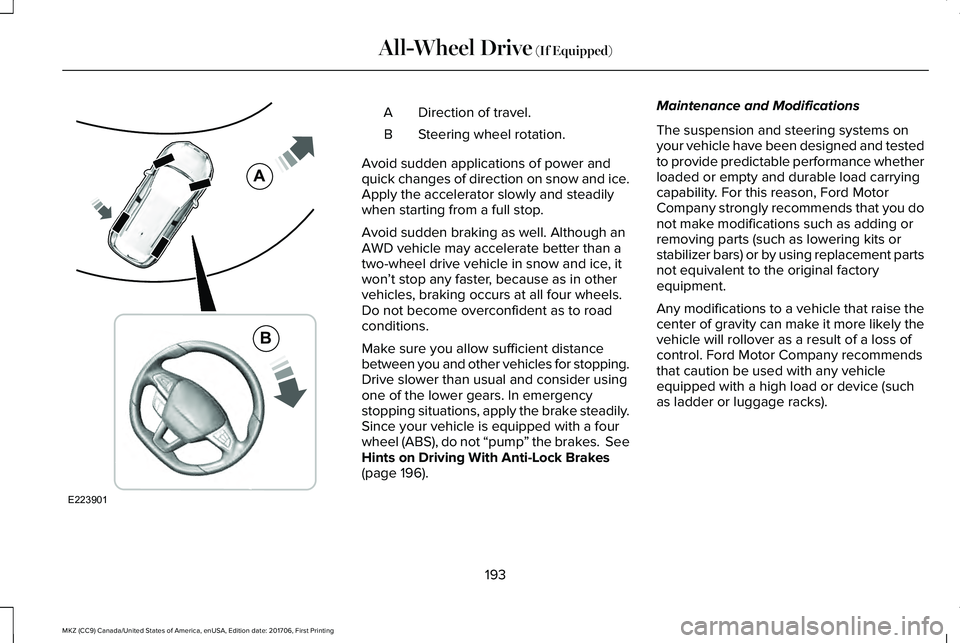
Direction of travel.A
Steering wheel rotation.B
Avoid sudden applications of power andquick changes of direction on snow and ice.Apply the accelerator slowly and steadilywhen starting from a full stop.
Avoid sudden braking as well. Although anAWD vehicle may accelerate better than atwo-wheel drive vehicle in snow and ice, itwon’t stop any faster, because as in othervehicles, braking occurs at all four wheels.Do not become overconfident as to roadconditions.
Make sure you allow sufficient distancebetween you and other vehicles for stopping.Drive slower than usual and consider usingone of the lower gears. In emergencystopping situations, apply the brake steadily.Since your vehicle is equipped with a fourwheel (ABS), do not “pump” the brakes. SeeHints on Driving With Anti-Lock Brakes(page 196).
Maintenance and Modifications
The suspension and steering systems onyour vehicle have been designed and testedto provide predictable performance whetherloaded or empty and durable load carryingcapability. For this reason, Ford MotorCompany strongly recommends that you donot make modifications such as adding orremoving parts (such as lowering kits orstabilizer bars) or by using replacement partsnot equivalent to the original factoryequipment.
Any modifications to a vehicle that raise thecenter of gravity can make it more likely thevehicle will rollover as a result of a loss ofcontrol. Ford Motor Company recommendsthat caution be used with any vehicleequipped with a high load or device (suchas ladder or luggage racks).
193
MKZ (CC9) Canada/United States of America, enUSA, Edition date: 201706, First Printing
All-Wheel Drive (If Equipped)E223901
A
B
Page 198 of 595
GENERAL INFORMATION
Note: Occasional brake noise is normal. Ifa metal-to-metal, continuous grinding orcontinuous squeal sound is present, thebrake linings may be worn-out. Have thesystem checked by an authorized dealer. Ifyour vehicle has continuous vibration orshudder in the steering wheel while braking,have it checked by an authorized dealer.
Note:Brake dust may accumulate on thewheels, even under normal drivingconditions. Some dust is inevitable as thebrakes wear and does not contribute tobrake noise. See Cleaning the Wheels(page 333).
Note:Depending on applicable laws andregulations in the country for which yourvehicle was originally built, your brake lampsmay flash during heavy braking. Followingthis, your hazard lights may also flash whenyour vehicle comes to a stop.
See Warning Lamps andIndicators (page 106).
Wet brakes result in reduced brakingefficiency. Gently press the brake pedal afew times when driving from a car wash orstanding water to dry the brakes.
Brake Over Accelerator
In the event the accelerator pedal becomesstuck or entrapped, apply steady and firmpressure to the brake pedal to slow thevehicle and reduce engine power. If youexperience this condition, apply the brakesand bring your vehicle to a safe stop. Movethe transmission to park (P), switch theengine off and apply the parking brake. Inspect the accelerator pedal for anyinterference. If none are found and thecondition persists, have your vehicle towedto the nearest authorized dealer.
Brake Assist
Brake assist detects when you brake rapidlyby measuring the rate at which you press thebrake pedal. It provides maximum brakingefficiency as long as you press the pedal,and can reduce stopping distances in criticalsituations.
Anti-lock Brake System
This system helps you maintain steeringcontrol during emergency stops by keepingthe brakes from locking.
This lamp momentarily illuminateswhen you turn the ignition on. Ifthe light does not illuminate duringstart up, remains on or flashes, the systemmay be disabled. Have the system checkedby an authorized dealer. If the anti-lock brakesystem is disabled, normal braking is stilleffective.
If the brake warning lampilluminates when you release theparking brake, have the systemchecked by an authorized dealer.
195
MKZ (CC9) Canada/United States of America, enUSA, Edition date: 201706, First Printing
BrakesE138644 E138644
Page 199 of 595
HINTS ON DRIVING WITH ANTI-
LOCK BRAKES
The anti-lock braking system does noteliminate the risks when:
•You drive too closely to the vehicle infront of you.
•Your vehicle is hydroplaning.
•You take corners too fast.
•The road surface is poor.
Note: If the system activates, the brakepedal may pulse and may travel further. Maintain pressure on the brake pedal. Youmay also hear a noise from the system. Thisis normal.
ELECTRIC PARKING BRAKE
WARNING
Always set the parking brake and leaveyour vehicle with the transmission inpark (P).
Note:When you apply the electric parkingbrake in certain conditions, for example ona steep hill, the electric parking brake mayreapply the brakes within three to tenminutes. As a result, you may notice variousnoises when you apply and release theelectric parking brake. This is normal and nocause for concern.
The electric parking brake replaces theconventional handbrake. The operatingswitch is on the instrument panel to the leftof the steering wheel.
Applying the electric parking brake
WARNING
The brake system warning lamp willflash when applying the electricparking brake. If the brake system warninglamp continues to flash there could be aproblem with your electric parking brake.Have your vehicle checked as soon aspossible.
Note:The brake system warning lampilluminates for 10 seconds if you switch theignition off after you apply the electricparking brake, or you apply the electricparking brake after you switch the ignitionoff.
Note:The electric parking brake will notautomatically apply. You must apply theelectric parking brake using the electricparking brake switch.
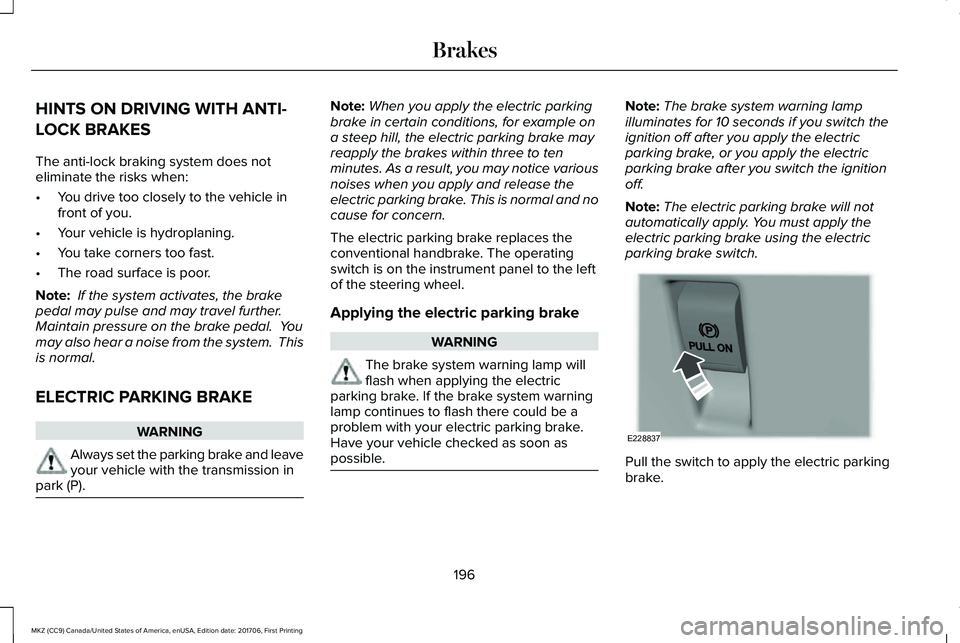
Pull the switch to apply the electric parkingbrake.
196
MKZ (CC9) Canada/United States of America, enUSA, Edition date: 201706, First Printing
BrakesE228837
Page 200 of 595
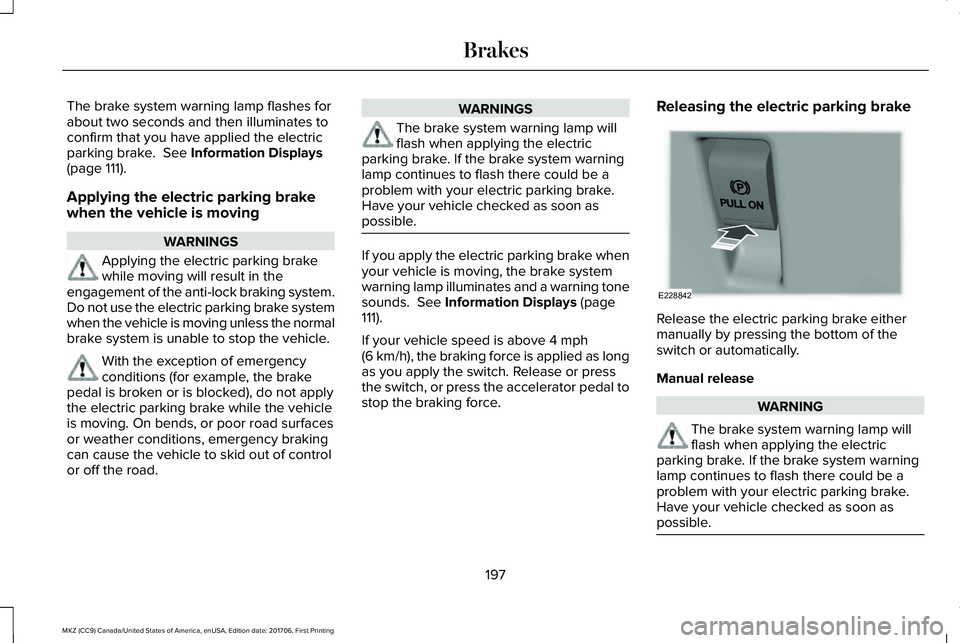
The brake system warning lamp flashes forabout two seconds and then illuminates toconfirm that you have applied the electricparking brake. See Information Displays(page 111).
Applying the electric parking brake
when the vehicle is moving
WARNINGS
Applying the electric parking brakewhile moving will result in theengagement of the anti-lock braking system.Do not use the electric parking brake systemwhen the vehicle is moving unless the normalbrake system is unable to stop the vehicle.
With the exception of emergencyconditions (for example, the brakepedal is broken or is blocked), do not applythe electric parking brake while the vehicleis moving. On bends, or poor road surfacesor weather conditions, emergency brakingcan cause the vehicle to skid out of controlor off the road.
WARNINGS
The brake system warning lamp willflash when applying the electricparking brake. If the brake system warninglamp continues to flash there could be aproblem with your electric parking brake.Have your vehicle checked as soon aspossible.
If you apply the electric parking brake whenyour vehicle is moving, the brake systemwarning lamp illuminates and a warning tonesounds. See Information Displays (page111).
If your vehicle speed is above 4 mph(6 km/h), the braking force is applied as longas you apply the switch. Release or pressthe switch, or press the accelerator pedal tostop the braking force.
Releasing the electric parking brake
Release the electric parking brake eithermanually by pressing the bottom of theswitch or automatically.
Manual release
WARNING
The brake system warning lamp willflash when applying the electricparking brake. If the brake system warninglamp continues to flash there could be aproblem with your electric parking brake.Have your vehicle checked as soon aspossible.
197
MKZ (CC9) Canada/United States of America, enUSA, Edition date: 201706, First Printing
BrakesE228842
Page 209 of 595
PRINCIPLE OF OPERATION
WARNINGS
To help avoid personal injury, alwaysuse caution when in reverse (R) andwhen using the sensing system.
The system may not detect objectswith surfaces that absorb reflection.Always drive with due care and attention.Failure to take care may result in a crash.
Traffic control systems, inclementweather, air brakes, external motorsand fans may affect the correct operation ofthe sensing system.This may cause reducedperformance or false alerts.
The system may not detect small ormoving objects, particularly those closeto the ground.
Note:If your vehicle is equipped withMyKey™, the sensing system cannot beturned off when a MyKey™ is present. SeePrinciple of Operation (page 62).
Note:Keep the sensors, located on thebumper or fascia, free from snow, ice andlarge accumulations of dirt. If the sensorsare covered, the system’s accuracy can beaffected. Do not clean the sensors with sharpobjects.
Note:If your vehicle sustains damage to thebumper or fascia, leaving it misaligned orbent, the sensing zone may be alteredcausing inaccurate measurement ofobstacles or false alerts.
Note:Certain add-on devices installedaround the bumper or fascia may createfalse alerts. For example, large trailerhitches, bike or surfboard racks, license platebrackets, bumper covers or any other devicethat may block the normal detection zoneof the system. Remove the add-on device toprevent false alerts.
Note:When a trailer is connected to yourvehicle, the rear parking aid may detect thetrailer and therefore provide an alert. Disablethe rear parking aid when a trailer isconnected to prevent the alert.
The sensing system warns the driver ofobstacles within a certain range of yourvehicle. The system turns on automaticallywhenever you switch the ignition on.
The system can be switched off through theinformation display menu or from the pop-upmessage that appears once you shift thetransmission into reverse (R). See GeneralInformation (page 111).
If a fault is present in the system, a warningmessage appears in the information display.See Information Messages (page 117).
REAR PARKING AID
The rear sensors are only active when thetransmission is in reverse (R). As your vehiclemoves closer to the obstacle, the rate of theaudible warning increases. When theobstacle is less than 12 in (30 cm) away, thewarning sounds continuously. If the systemdetects a stationary or receding objectfarther than 12 in (30 cm) from the corners ofthe bumper, the tone sounds for only threeseconds. Once the system detects an objectapproaching, the warning sounds again.
206
MKZ (CC9) Canada/United States of America, enUSA, Edition date: 201706, First Printing
Parking Aids
Page 210 of 595
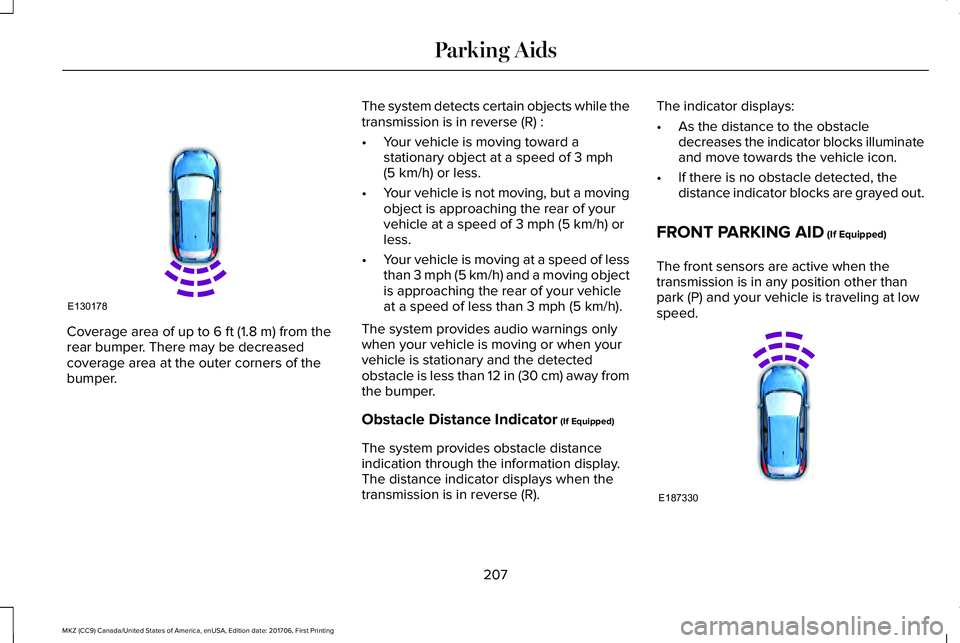
Coverage area of up to 6 ft (1.8 m) from therear bumper. There may be decreasedcoverage area at the outer corners of thebumper.
The system detects certain objects while thetransmission is in reverse (R) :
•Your vehicle is moving toward astationary object at a speed of 3 mph(5 km/h) or less.
•Your vehicle is not moving, but a movingobject is approaching the rear of yourvehicle at a speed of 3 mph (5 km/h) orless.
•Your vehicle is moving at a speed of lessthan 3 mph (5 km/h) and a moving objectis approaching the rear of your vehicleat a speed of less than 3 mph (5 km/h).
The system provides audio warnings onlywhen your vehicle is moving or when yourvehicle is stationary and the detectedobstacle is less than 12 in (30 cm) away fromthe bumper.
Obstacle Distance Indicator (If Equipped)
The system provides obstacle distanceindication through the information display.The distance indicator displays when thetransmission is in reverse (R).
The indicator displays:
•As the distance to the obstacledecreases the indicator blocks illuminateand move towards the vehicle icon.
•If there is no obstacle detected, thedistance indicator blocks are grayed out.
FRONT PARKING AID (If Equipped)
The front sensors are active when thetransmission is in any position other thanpark (P) and your vehicle is traveling at lowspeed.
207
MKZ (CC9) Canada/United States of America, enUSA, Edition date: 201706, First Printing
Parking AidsE130178 E187330
Page 211 of 595
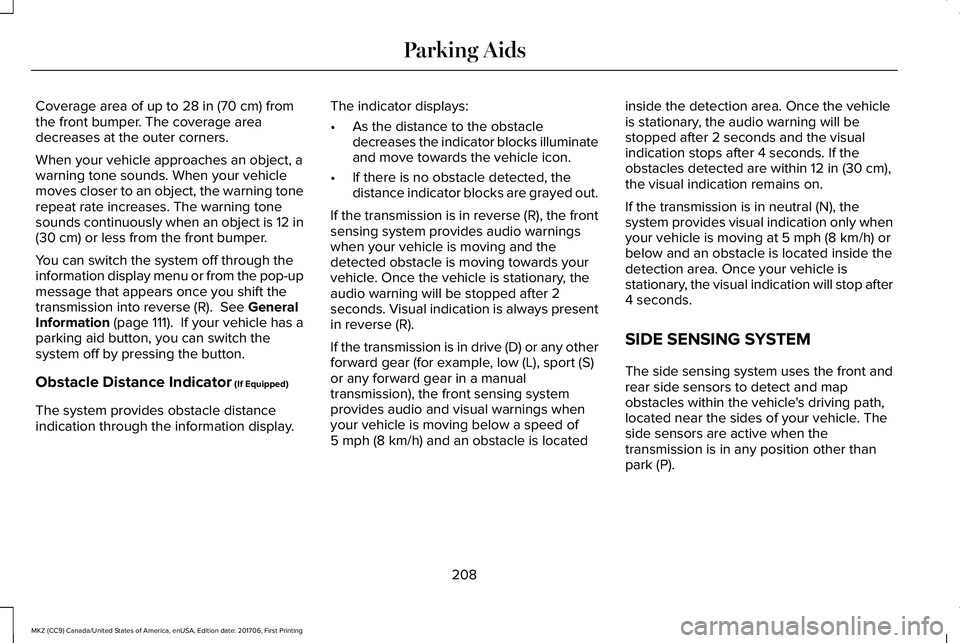
Coverage area of up to 28 in (70 cm) fromthe front bumper. The coverage areadecreases at the outer corners.
When your vehicle approaches an object, awarning tone sounds. When your vehiclemoves closer to an object, the warning tonerepeat rate increases. The warning tonesounds continuously when an object is 12 in(30 cm) or less from the front bumper.
You can switch the system off through theinformation display menu or from the pop-upmessage that appears once you shift thetransmission into reverse (R). See GeneralInformation (page 111). If your vehicle has aparking aid button, you can switch thesystem off by pressing the button.
Obstacle Distance Indicator (If Equipped)
The system provides obstacle distanceindication through the information display.
The indicator displays:
•As the distance to the obstacledecreases the indicator blocks illuminateand move towards the vehicle icon.
•If there is no obstacle detected, thedistance indicator blocks are grayed out.
If the transmission is in reverse (R), the frontsensing system provides audio warningswhen your vehicle is moving and thedetected obstacle is moving towards yourvehicle. Once the vehicle is stationary, theaudio warning will be stopped after 2seconds. Visual indication is always presentin reverse (R).
If the transmission is in drive (D) or any otherforward gear (for example, low (L), sport (S)or any forward gear in a manualtransmission), the front sensing systemprovides audio and visual warnings whenyour vehicle is moving below a speed of5 mph (8 km/h) and an obstacle is located
inside the detection area. Once the vehicleis stationary, the audio warning will bestopped after 2 seconds and the visualindication stops after 4 seconds. If theobstacles detected are within 12 in (30 cm),the visual indication remains on.
If the transmission is in neutral (N), thesystem provides visual indication only whenyour vehicle is moving at 5 mph (8 km/h) orbelow and an obstacle is located inside thedetection area. Once your vehicle isstationary, the visual indication will stop after4 seconds.
SIDE SENSING SYSTEM
The side sensing system uses the front andrear side sensors to detect and mapobstacles within the vehicle's driving path,located near the sides of your vehicle. Theside sensors are active when thetransmission is in any position other thanpark (P).
208
MKZ (CC9) Canada/United States of America, enUSA, Edition date: 201706, First Printing
Parking Aids
Page 212 of 595
Note:Obstacles that enter the side detectionarea without being detected and mappedby the front or rear side sensors will not bedetected.
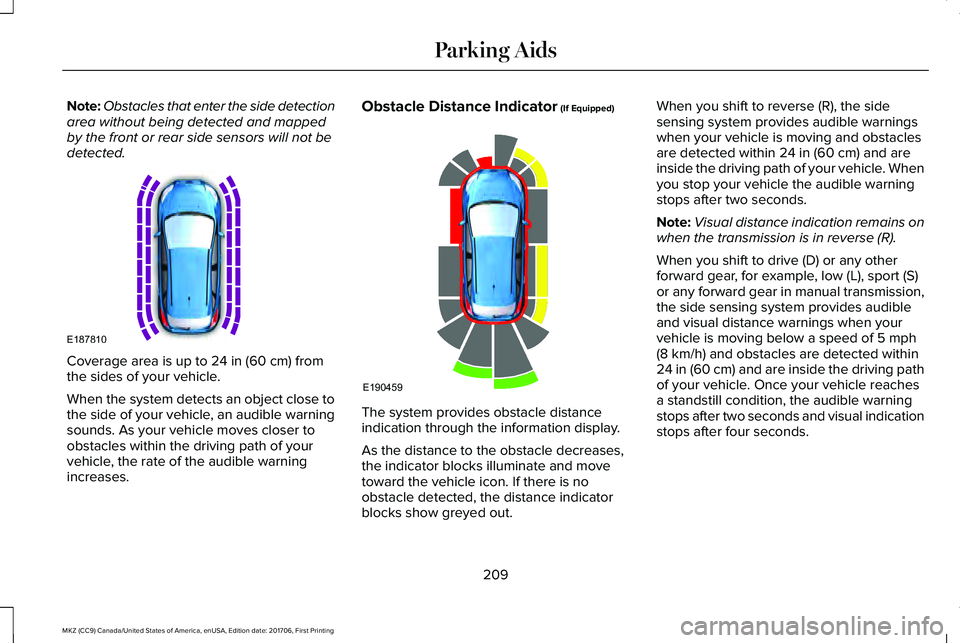
Coverage area is up to 24 in (60 cm) fromthe sides of your vehicle.
When the system detects an object close tothe side of your vehicle, an audible warningsounds. As your vehicle moves closer toobstacles within the driving path of yourvehicle, the rate of the audible warningincreases.
Obstacle Distance Indicator (If Equipped)
The system provides obstacle distanceindication through the information display.
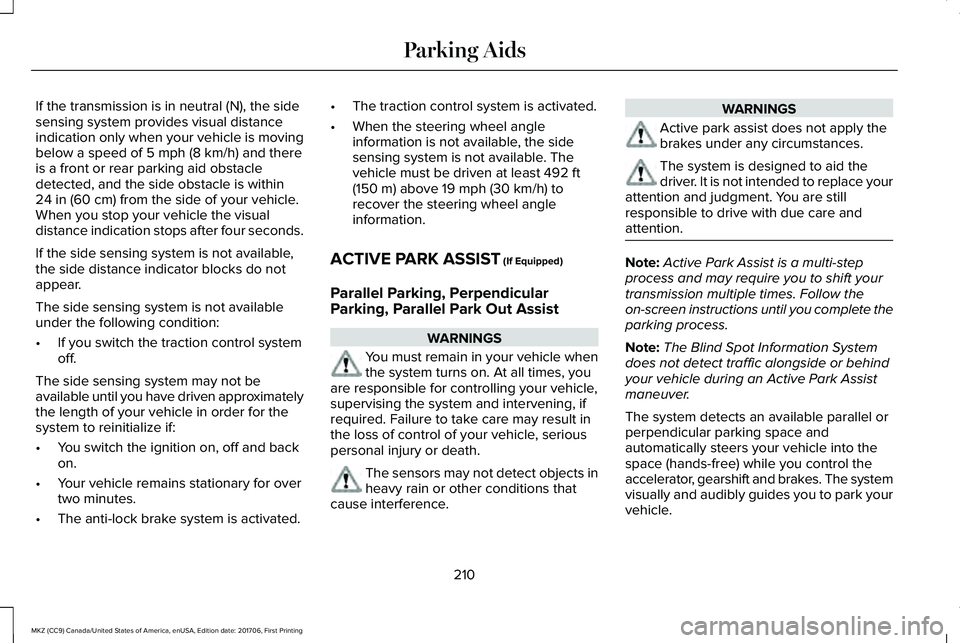
As the distance to the obstacle decreases,the indicator blocks illuminate and movetoward the vehicle icon. If there is noobstacle detected, the distance indicatorblocks show greyed out.
When you shift to reverse (R), the sidesensing system provides audible warningswhen your vehicle is moving and obstaclesare detected within 24 in (60 cm) and areinside the driving path of your vehicle. Whenyou stop your vehicle the audible warningstops after two seconds.
Note:Visual distance indication remains onwhen the transmission is in reverse (R).
When you shift to drive (D) or any otherforward gear, for example, low (L), sport (S)or any forward gear in manual transmission,the side sensing system provides audibleand visual distance warnings when yourvehicle is moving below a speed of 5 mph(8 km/h) and obstacles are detected within24 in (60 cm) and are inside the driving pathof your vehicle. Once your vehicle reachesa standstill condition, the audible warningstops after two seconds and visual indicationstops after four seconds.
209
MKZ (CC9) Canada/United States of America, enUSA, Edition date: 201706, First Printing
Parking AidsE187810 E190459
Page 213 of 595
If the transmission is in neutral (N), the sidesensing system provides visual distanceindication only when your vehicle is movingbelow a speed of 5 mph (8 km/h) and thereis a front or rear parking aid obstacledetected, and the side obstacle is within24 in (60 cm) from the side of your vehicle.When you stop your vehicle the visualdistance indication stops after four seconds.
If the side sensing system is not available,the side distance indicator blocks do notappear.
The side sensing system is not availableunder the following condition:
•If you switch the traction control systemoff.
The side sensing system may not beavailable until you have driven approximatelythe length of your vehicle in order for thesystem to reinitialize if:
•You switch the ignition on, off and backon.
•Your vehicle remains stationary for overtwo minutes.
•The anti-lock brake system is activated.
•The traction control system is activated.
•When the steering wheel angleinformation is not available, the sidesensing system is not available. Thevehicle must be driven at least 492 ft(150 m) above 19 mph (30 km/h) torecover the steering wheel angleinformation.
ACTIVE PARK ASSIST (If Equipped)
Parallel Parking, PerpendicularParking, Parallel Park Out Assist
WARNINGS
You must remain in your vehicle whenthe system turns on. At all times, youare responsible for controlling your vehicle,supervising the system and intervening, ifrequired. Failure to take care may result inthe loss of control of your vehicle, seriouspersonal injury or death.
The sensors may not detect objects inheavy rain or other conditions thatcause interference.
WARNINGS
Active park assist does not apply thebrakes under any circumstances.
The system is designed to aid thedriver. It is not intended to replace yourattention and judgment. You are stillresponsible to drive with due care andattention.
Note:Active Park Assist is a multi-stepprocess and may require you to shift yourtransmission multiple times. Follow theon-screen instructions until you complete theparking process.
Note:The Blind Spot Information Systemdoes not detect traffic alongside or behindyour vehicle during an Active Park Assistmaneuver.
The system detects an available parallel orperpendicular parking space andautomatically steers your vehicle into thespace (hands-free) while you control theaccelerator, gearshift and brakes. The systemvisually and audibly guides you to park yourvehicle.
210
MKZ (CC9) Canada/United States of America, enUSA, Edition date: 201706, First Printing
Parking Aids