instrument panel LINCOLN MKZ 2018 User Guide
[x] Cancel search | Manufacturer: LINCOLN, Model Year: 2018, Model line: MKZ, Model: LINCOLN MKZ 2018Pages: 595, PDF Size: 5.06 MB
Page 141 of 595
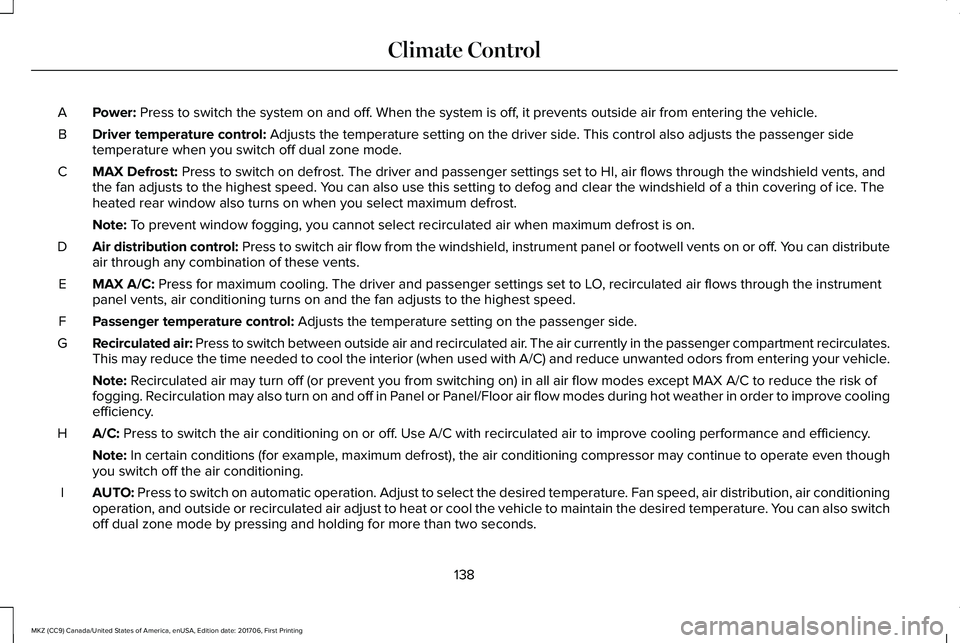
Power: Press to switch the system on and off. When the system is off, it prevents outside air from entering the vehicle.A
Driver temperature control: Adjusts the temperature setting on the driver side. This control also adjusts the passenger sidetemperature when you switch off dual zone mode.B
MAX Defrost: Press to switch on defrost. The driver and passenger settings set to HI, air flows through the windshield vents, andthe fan adjusts to the highest speed. You can also use this setting to defog and clear the windshield of a thin covering of ice. Theheated rear window also turns on when you select maximum defrost.
C
Note: To prevent window fogging, you cannot select recirculated air when maximum defrost is on.
Air distribution control: Press to switch air flow from the windshield, instrument panel or footwell vents on or off. You can distributeair through any combination of these vents.D
MAX A/C: Press for maximum cooling. The driver and passenger settings set to LO, recirculated air flows through the instrumentpanel vents, air conditioning turns on and the fan adjusts to the highest speed.E
Passenger temperature control: Adjusts the temperature setting on the passenger side.F
Recirculated air: Press to switch between outside air and recirculated air. The air currently in the passenger compartment recirculates.This may reduce the time needed to cool the interior (when used with A/C) and reduce unwanted odors from entering your vehicle.G
Note: Recirculated air may turn off (or prevent you from switching on) in all air flow modes except MAX A/C to reduce the risk offogging. Recirculation may also turn on and off in Panel or Panel/Floor air flow modes during hot weather in order to improve coolingefficiency.
A/C: Press to switch the air conditioning on or off. Use A/C with recirculated air to improve cooling performance and efficiency.H
Note: In certain conditions (for example, maximum defrost), the air conditioning compressor may continue to operate even thoughyou switch off the air conditioning.
AUTO: Press to switch on automatic operation. Adjust to select the desired temperature. Fan speed, air distribution, air conditioningoperation, and outside or recirculated air adjust to heat or cool the vehicle to maintain the desired temperature. You can also switchoff dual zone mode by pressing and holding for more than two seconds.
I
138
MKZ (CC9) Canada/United States of America, enUSA, Edition date: 201706, First Printing
Climate Control
Page 143 of 595
Note:The system adjusts to heat or cool theinterior to the temperature you select asquickly as possible.
Note:For the system to function efficiently,the instrument panel and side air ventsshould be fully open.
Note:If you select AUTO during cold outsidetemperatures, the system directs air flow tothe windshield and side window vents. Inaddition, the fan may run at a slower speeduntil the engine warms up.
Note:If you select AUTO during hottemperatures and the inside of the vehicleis hot, the system uses recirculated air tomaximize interior cooling. Fan speed mayalso reduce until the air cools.
Quickly Heating the Interior
1. Press AUTO.
2. Adjust the temperature function to thedesired setting.
Recommended Settings for Heating
1. Press AUTO.
2. Adjust the temperature function to thedesired setting. Use 72°F (22°C) as astarting point, then adjust the setting asnecessary.
Quickly Cooling the Interior
1. Press MAX A/C.
Recommended Settings for Cooling
1. Press AUTO.
2. Adjust the temperature function to thedesired setting. Use 72°F (22°C) as astarting point, then adjust the setting asnecessary.
Defogging the Side Windows in ColdWeather
1. Press defrost.
2. Adjust the temperature control to thedesired setting. Use 72°F (22°C) as astarting point, then adjust the setting asnecessary.
HEATED WINDOWS AND MIRRORS
Note:Make sure the engine is runningbefore operating the heated windows.
Note:Depending on your remote startsettings, the heated windows, mirrors andwipers may remain on after remote startingthe vehicle.
Heated Rear Window
Press the button to clear theheated rear window of thin ice andfog. The heated rear window turnsoff after a short period of time. Press thebutton again to switch it off.
Note: Do not use razor blades or othersharp objects to clean or remove decals fromthe inside of the heated rear window. Thevehicle warranty does not cover damagecaused to the heated rear window grid lines.
Heated Exterior Mirrors (If Equipped)
When you switch the heated rear windowon, the heated exterior mirrors turn on.
140
MKZ (CC9) Canada/United States of America, enUSA, Edition date: 201706, First Printing
Climate ControlE184884
Page 183 of 595
AUTOMATIC TRANSMISSION
WARNINGS
Always fully apply the parking brakeand make sure you shift into park (P).Failure to follow this instruction could resultin personal injury or death.
Do not apply the brake pedal andaccelerator pedal simultaneously.Applying both pedals simultaneously formore than a few seconds will limit engineperformance, which may result in difficultymaintaining speed in traffic and could leadto serious injury.
Note:You may not be able to shift out ofpark (P) unless the intelligent access key isinside your vehicle.
Push Button Shift Transmission
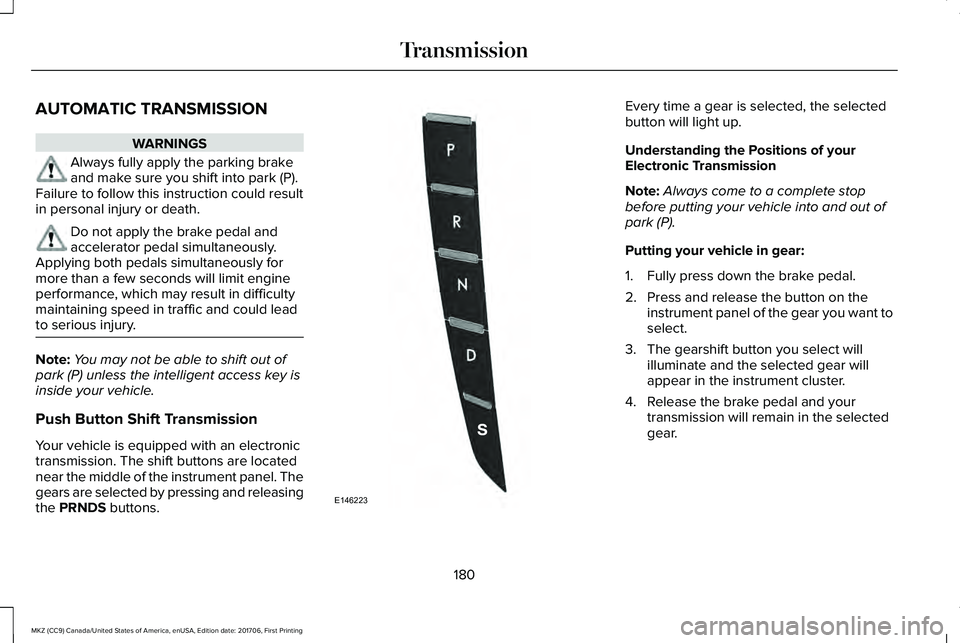
Your vehicle is equipped with an electronictransmission. The shift buttons are locatednear the middle of the instrument panel. Thegears are selected by pressing and releasingthe PRNDS buttons.
Every time a gear is selected, the selectedbutton will light up.
Understanding the Positions of yourElectronic Transmission
Note:Always come to a complete stopbefore putting your vehicle into and out ofpark (P).
Putting your vehicle in gear:
1. Fully press down the brake pedal.
2. Press and release the button on theinstrument panel of the gear you want toselect.
3. The gearshift button you select willilluminate and the selected gear willappear in the instrument cluster.
4. Release the brake pedal and yourtransmission will remain in the selectedgear.
180
MKZ (CC9) Canada/United States of America, enUSA, Edition date: 201706, First Printing
TransmissionE146223
Page 187 of 595
Note:This feature will only function if your12-volt battery has power. If vehicle batteryvoltage is not sufficient, an external 12-voltpower source (for example, jumper cables,battery charger or jump pack) may berequired to function the interlock overrideswitch.
Use the brake-shift interlock override tomove your transmission from the parkposition in the event of an electricalmalfunction. If your vehicle has a deadbattery, an external power source will berequired.
1. Apply the parking brake and turn yourignition off before performing thisprocedure.
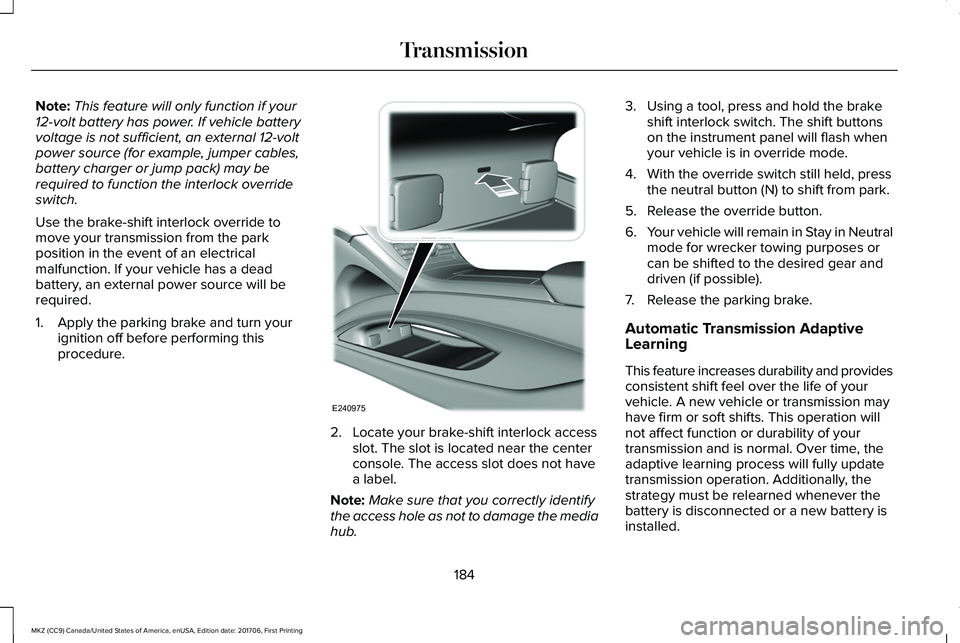
2. Locate your brake-shift interlock accessslot. The slot is located near the centerconsole. The access slot does not havea label.
Note:Make sure that you correctly identifythe access hole as not to damage the mediahub.
3. Using a tool, press and hold the brakeshift interlock switch. The shift buttonson the instrument panel will flash whenyour vehicle is in override mode.
4. With the override switch still held, pressthe neutral button (N) to shift from park.
5. Release the override button.
6.Your vehicle will remain in Stay in Neutralmode for wrecker towing purposes orcan be shifted to the desired gear anddriven (if possible).
7. Release the parking brake.
Automatic Transmission AdaptiveLearning
This feature increases durability and providesconsistent shift feel over the life of yourvehicle. A new vehicle or transmission mayhave firm or soft shifts. This operation willnot affect function or durability of yourtransmission and is normal. Over time, theadaptive learning process will fully updatetransmission operation. Additionally, thestrategy must be relearned whenever thebattery is disconnected or a new battery isinstalled.
184
MKZ (CC9) Canada/United States of America, enUSA, Edition date: 201706, First Printing
TransmissionE240975
Page 199 of 595
HINTS ON DRIVING WITH ANTI-
LOCK BRAKES
The anti-lock braking system does noteliminate the risks when:
•You drive too closely to the vehicle infront of you.
•Your vehicle is hydroplaning.
•You take corners too fast.
•The road surface is poor.
Note: If the system activates, the brakepedal may pulse and may travel further. Maintain pressure on the brake pedal. Youmay also hear a noise from the system. Thisis normal.
ELECTRIC PARKING BRAKE
WARNING
Always set the parking brake and leaveyour vehicle with the transmission inpark (P).
Note:When you apply the electric parkingbrake in certain conditions, for example ona steep hill, the electric parking brake mayreapply the brakes within three to tenminutes. As a result, you may notice variousnoises when you apply and release theelectric parking brake. This is normal and nocause for concern.
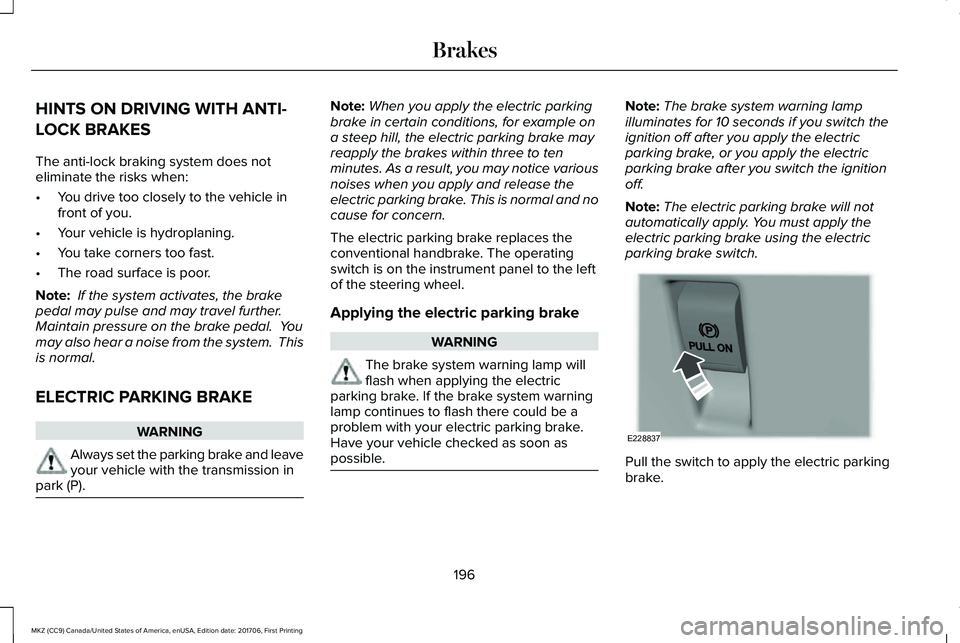
The electric parking brake replaces theconventional handbrake. The operatingswitch is on the instrument panel to the leftof the steering wheel.
Applying the electric parking brake
WARNING
The brake system warning lamp willflash when applying the electricparking brake. If the brake system warninglamp continues to flash there could be aproblem with your electric parking brake.Have your vehicle checked as soon aspossible.
Note:The brake system warning lampilluminates for 10 seconds if you switch theignition off after you apply the electricparking brake, or you apply the electricparking brake after you switch the ignitionoff.
Note:The electric parking brake will notautomatically apply. You must apply theelectric parking brake using the electricparking brake switch.
Pull the switch to apply the electric parkingbrake.
196
MKZ (CC9) Canada/United States of America, enUSA, Edition date: 201706, First Printing
BrakesE228837
Page 204 of 595
PRINCIPLE OF OPERATION
The traction control system helps avoid drivewheel spin and loss of traction.
If your vehicle begins to slide, the systemapplies the brakes to individual wheels and,when needed, reduces engine power at thesame time. If the wheels spin whenaccelerating on slippery or loose surfaces,the system reduces engine power in orderto increase traction.
USING TRACTION CONTROL
WARNING
The stability and traction control lightilluminates steadily if the systemdetects a failure. Make sure you did notmanually disable the traction control systemusing the information display controls or theswitch. If the stability control and tractioncontrol light is still illuminating steadily, havethe system serviced by an authorized dealerimmediately. Operating your vehicle with thetraction control disabled could lead to anincreased risk of loss of vehicle control,vehicle rollover, personal injury and death.
The system automatically turns on each timeyou switch the ignition on.
If your vehicle is stuck in mud or snow,switching traction control off may bebeneficial as this allows the wheels to spin.
Note:When you switch traction control off,stability control remains fully active.
Switching the System Off
When you switch the system off or on, amessage appears in the information displayshowing system status.
You can switch the system off by either usingthe information display controls or the switch.
Using the Information Display Controls
You can switch this feature off or on in theinformation display. See General Information(page 111).
Using a Switch (If Equipped)
Use the traction control switch on theinstrument panel to switch the system off oron.
System Indicator Lights and Messages
The stability and traction controllight:
201
MKZ (CC9) Canada/United States of America, enUSA, Edition date: 201706, First Printing
Traction ControlE138639
Page 222 of 595
REAR VIEW CAMERA
WARNINGS
The rear view camera system is areverse aid supplement device that stillrequires the driver to use it in conjunctionwith the interior and exterior mirrors formaximum coverage.
Objects that are close to either cornerof the bumper or under the bumper,might not be seen on the screen due to thelimited coverage of the camera system.
Back up as slow as possible sincehigher speeds might limit your reactiontime to stop your vehicle.
Use caution when using the rear videocamera and the trunk is ajar. If the trunkis ajar, the camera will be out of position andthe video image may be incorrect. Allguidelines (if enabled) have been removedwhen the trunk is ajar.
Use caution when turning camerafeatures on or off while in reverse (R).Make sure your vehicle is not moving.
The rear view camera system provides avideo image of the area behind your vehicle.The image will display in either the rear viewmirror or the display in the center of theinstrument panel.
During operation, lines will appear in thedisplay that represent your vehicle’s pathand proximity to objects behind your vehicle.
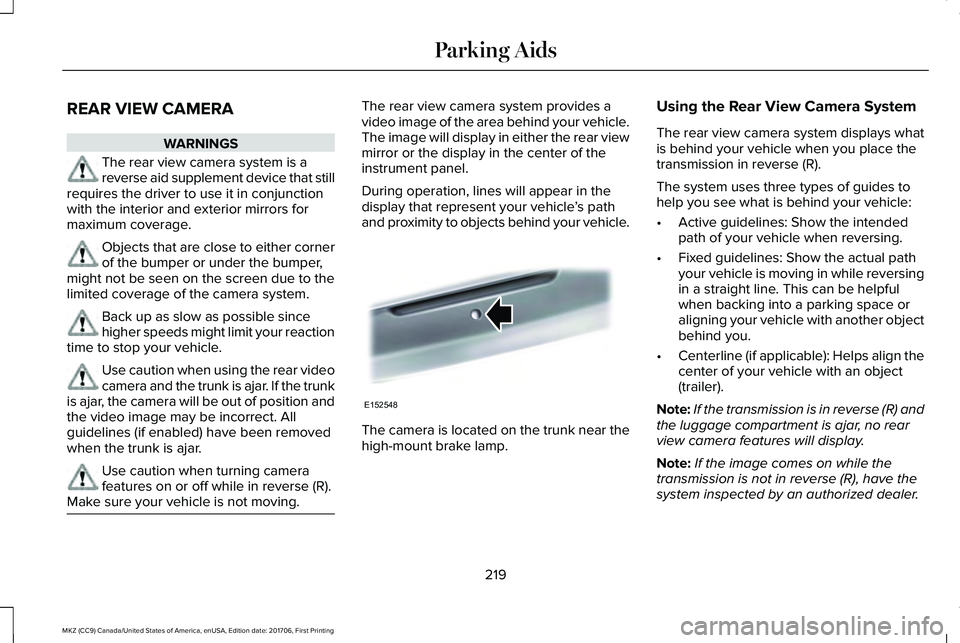
The camera is located on the trunk near thehigh-mount brake lamp.
Using the Rear View Camera System
The rear view camera system displays whatis behind your vehicle when you place thetransmission in reverse (R).
The system uses three types of guides tohelp you see what is behind your vehicle:
•Active guidelines: Show the intendedpath of your vehicle when reversing.
•Fixed guidelines: Show the actual pathyour vehicle is moving in while reversingin a straight line. This can be helpfulwhen backing into a parking space oraligning your vehicle with another objectbehind you.
•Centerline (if applicable): Helps align thecenter of your vehicle with an object(trailer).
Note:If the transmission is in reverse (R) andthe luggage compartment is ajar, no rearview camera features will display.
Note:If the image comes on while thetransmission is not in reverse (R), have thesystem inspected by an authorized dealer.
219
MKZ (CC9) Canada/United States of America, enUSA, Edition date: 201706, First Printing
Parking AidsE152548
Page 270 of 595
If you need to arrange roadside assistancefor yourself, Lincoln Motor Companyreimburses a reasonable amount for towingto the nearest Lincoln dealership within100 mi (160 km). To obtain reimbursementinformation, United States clients, call1-800-521-4140. Clients need to submit theiroriginal receipts.
Vehicles Sold in Canada: GettingRoadside Assistance
To fully assist you should you have a vehicleconcern, Lincoln Motor Company offers acomplimentary roadside assistance program. This program is eligible within Canada or thecontinental United States.
This program is separate from the NewVehicle Limited Warranty, beginning fromthe original warranty start date and lasts thelife of the vehicle for the original owner.Subsequent owners receive coverage thatis concurrent with the 6 years or 70,000 mi(110,000 km) (whichever occurs first)powertrain warranty coverage period.
If you purchased your vehicle in Canada andrequire roadside assistance, please call1-800-387-9333.
Vehicles Sold in Canada: UsingRoadside Assistance
Complete the roadside assistanceidentification card and place it in your walletfor quick reference.
In Canada, this card is found in the WarrantyGuide in the glove compartment of yourvehicle.
Vehicles Sold in Canada: RoadsideAssistance Program Coverage
The service is available 24 hours a day,seven days a week.
Canadian roadside coverage and benefitsmay differ from the U.S. coverage.
For complete program coverage detailsreview your warranty guide, contact yourdealer, call us in Canada at 1-800-387-9333,or visit our website atwww.lincolncanada.com.
HAZARD FLASHERS
Note:The hazard flashers operate when theignition is in any position, or if the key is notin the ignition. If used when the vehicle is notrunning, the battery loses charge. As a result,there may be insufficient power to restartyour vehicle.
The flasher control is on theinstrument panel. Use your hazardflashers when your vehicle iscreating a safety hazard for other motorists.
•Press the flasher control and all front andrear direction indicators flash.
•Press the button again to switch them off.
FUEL SHUTOFF
WARNING
If your vehicle has been involved in acrash, have the fuel system checked.Failure to follow this instruction could resultin fire, personal injury or death.
267
MKZ (CC9) Canada/United States of America, enUSA, Edition date: 201706, First Printing
Roadside Emergencies
Page 297 of 595
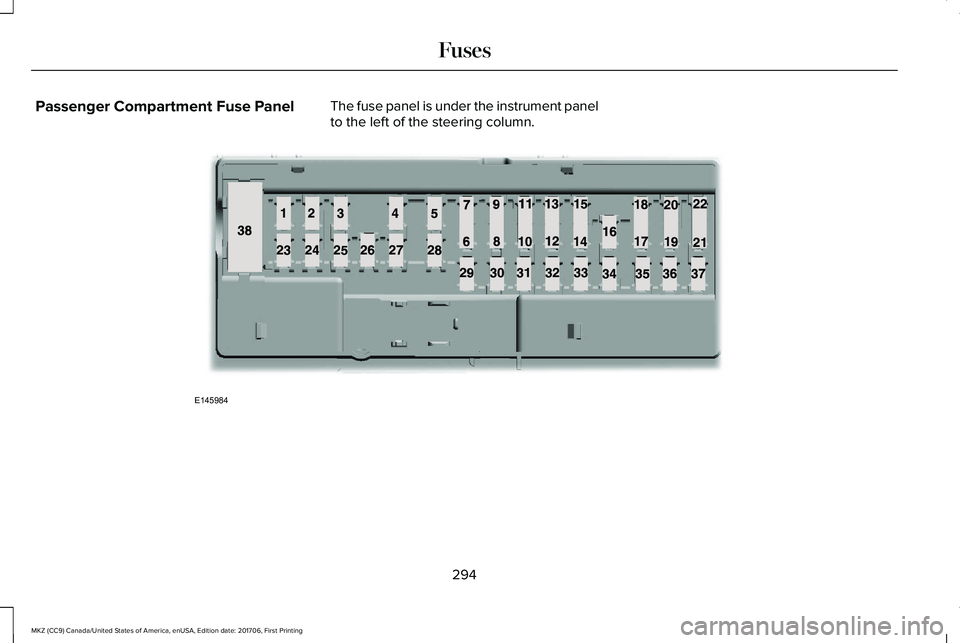
Passenger Compartment Fuse PanelThe fuse panel is under the instrument panelto the left of the steering column.
294
MKZ (CC9) Canada/United States of America, enUSA, Edition date: 201706, First Printing
FusesE145984
Page 305 of 595
GENERAL INFORMATION
Have your vehicle serviced regularly to helpmaintain its roadworthiness and resale value.There is a large network of authorizeddealers that are there to help you with theirprofessional servicing expertise. We believethat their specially trained technicians arebest qualified to service your vehicle properlyand expertly. They are supported by a widerange of highly specialized tools developedspecifically for servicing your vehicle.
If your vehicle requires professional service,an authorized dealer can provide thenecessary parts and service. Check yourwarranty information to find out which partsand services are covered.
Use only recommended fuels, lubricants,fluids and service parts conforming tospecifications. Motorcraft® parts aredesigned and built to provide the bestperformance in your vehicle.
Precautions
•Do not work on a hot engine.
•Make sure that nothing gets caught inmoving parts.
•Do not work on a vehicle with the enginerunning in an enclosed space, unless youare sure you have enough ventilation.
•Keep all open flames and other burningmaterial (such as cigarettes) away fromthe battery and all fuel related parts.
Working with the Engine Off
1. Set the parking brake and shift to park(P).
2. Switch off the engine.
3. Block the wheels.
Working with the Engine On
WARNING
To reduce the risk of vehicle damageand/or personal burn injuries, do notstart your engine with the air cleanerremoved and do not remove it while theengine is running.
1. Set the parking brake and shift to park(P).
2. Block the wheels.
OPENING AND CLOSING THE
HOOD
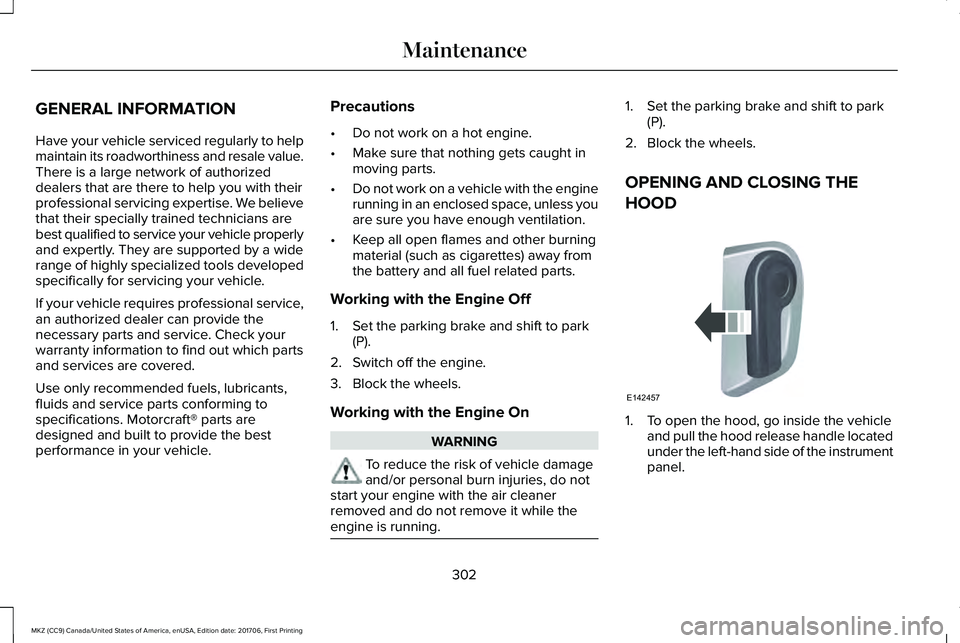
1. To open the hood, go inside the vehicleand pull the hood release handle locatedunder the left-hand side of the instrumentpanel.
302
MKZ (CC9) Canada/United States of America, enUSA, Edition date: 201706, First Printing
MaintenanceE142457