instrument panel LINCOLN MKZ 2018 Owner's Manual
[x] Cancel search | Manufacturer: LINCOLN, Model Year: 2018, Model line: MKZ, Model: LINCOLN MKZ 2018Pages: 595, PDF Size: 5.06 MB
Page 332 of 595
When washing:
•Take care when using a power washerto clean the engine. The high-pressurefluid could penetrate the sealed partsand cause damage.
•Do not spray a hot engine with cold waterto avoid cracking the engine block orother engine components.
•Spray Motorcraft Engine Shampoo andDegreaser on all parts that requirecleaning and pressure rinse clean. InCanada, use Motorcraft Engine Shampoo.
•Never wash or rinse the engine while itis hot or running; water in the runningengine may cause internal damage.
•Never wash or rinse any ignition coil,spark plug wire or spark plug well, or thearea in and around these locations.
•Cover the battery, power distribution box,and air filter assembly to prevent waterdamage when cleaning the engine.
CLEANING THE WINDOWS AND
WIPER BLADES
Car wash chemicals and environmentalfallout can result in windshield and wiperblade contamination. Dirty windshield andwipers will result in poor windshield wiperoperation. Keep the windshield and wiperblades clean to maintain windshield wiperperformance.
To clean the windshield and wiper blades:
•Clean the windshield with a non-abrasiveglass cleaner. When cleaning the interiorof the windshield, avoid getting any glasscleaner on the instrument panel or doorpanels. Wipe any glass cleaner off thesesurfaces immediately.
•For windshields contaminated with treesap, chemicals, wax or bugs, clean theentire windshield using steel wool (nogreater than 0000 grade) in a circularmotion and rinse with water.
•Clean the wiper blades with isopropylrubbing alcohol or windshield washerconcentrate.
Note: Do not use razor blades or othersharp objects to clean or remove decals fromthe inside of the heated rear window. Thevehicle warranty does not cover damagecaused to the heated rear window grid lines.
CLEANING THE INTERIOR
WARNINGS
Do not use cleaning solvents, bleachor dye on the vehicle’s safety belts, asthese actions may weaken the belt webbing.
On vehicles equipped withseat-mounted airbags, do not usechemical solvents or strong detergents. Suchproducts could contaminate the side airbagsystem and affect performance of the sideairbag in a collision.
Note:Follow the same procedure forcleaning leather seats when cleaning leatherinterior. See Cleaning Leather Seats (page332).
329
MKZ (CC9) Canada/United States of America, enUSA, Edition date: 201706, First Printing
Vehicle Care
Page 334 of 595
Cleaning ProcedureType of Stain
Use lukewarm water and rinse by dabbing with clean water.Indelible pencil, cocoa, chocolate, pastry with cream or chocolate, icecream or mustard.
Use lemon juice, wipe with lukewarm water and rinse by dabbing withclean water.Vinegar, hair gel, tomato sauce or coffee with sugar.
Use ethyl alcohol, then dab with water.Dye transfer and all other stains.
CLEANING THE INSTRUMENT
PANEL AND INSTRUMENT
CLUSTER LENS
WARNING
Do not use chemical solvents or strongdetergents when cleaning the steeringwheel or instrument panel to avoidcontamination of the airbag system.
Note:Follow the same procedure ascleaning leather seats for cleaning leatherinstrument panels and leather interior trimsurfaces. See Cleaning Leather Seats (page332).
Clean the instrument panel and cluster lenswith a clean, damp and soft cloth, then usea clean, dry and soft cloth to dry these areas.
•Avoid cleaners or polishes that increasethe gloss of the upper portion of theinstrument panel. The dull finish in thisarea helps protect you from undesirablewindshield reflection.
•Do not use any household cleaningproducts or glass cleaners as these maydamage the finish of the instrumentpanel, interior trim and cluster lens.
•Wash or wipe your hands clean if youhave been in contact with certainproducts such as insect repellent andsuntan lotion to avoid possible damageto the interior painted surfaces.
•Do not allow air fresheners and handsanitizers to spill onto interior surfaces.If a spill occurs, wipe off immediately.Your warranty may not cover thesedamages.
If a staining liquid like coffee or juice hasbeen spilled on the instrument panel or oninterior trim surfaces:
1.Wipe up spilled liquid using a clean, softcloth as quickly as possible.
331
MKZ (CC9) Canada/United States of America, enUSA, Edition date: 201706, First Printing
Vehicle Care
Page 335 of 595
2. Use Motorcraft Premium Leather andVinyl Cleaner or a commercially availableleather cleaning product for automotiveinteriors. Test any cleaner or stainremover on an inconspicuous area.
3. Alternatively, wipe the surface with aclean, soft cloth and a mild soap andwater solution. Dry the area with a clean,soft cloth.
4.If necessary, apply more soap and watersolution or cleaning product to a clean,soft cloth and press it onto the soiledarea. Allow this to set at roomtemperature for 30 minutes.
5. Remove the soaked cloth, then with aclean, damp cloth, use a rubbing motionfor 60 seconds on the soiled area.
6. Dry the area with a clean, soft cloth.
CLEANING LEATHER SEATS (If
Equipped)
Note:Follow the same procedure ascleaning leather seats for cleaning leatherinstrument panels and leather interior trimsurfaces.
For routine cleaning, wipe the surface witha soft, damp cloth and a mild soap and watersolution. Dry the area with a clean, soft cloth.
For cleaning and removing stains such asdye transfer, use Motorcraft Premium Leatherand Vinyl Cleaner or a commercially availableleather cleaning product for automotiveinteriors.
Note:Test any cleaner or stain remover onan inconspicuous area.
You should:
•Remove dust and loose dirt with avacuum cleaner.
•Clean and treat spills and stains as soonas possible.
Do not use the following products as thesemay damage the leather:
•Oil and petroleum or silicone-basedleather conditioners.
•Household cleaners.
•Alcohol solutions.
•Solvents or cleaners intended specificallyfor rubber, vinyl and plastics.
REPAIRING MINOR PAINT
DAMAGE
Authorized dealers have touch-up paint tomatch your vehicle’s color. Your vehicle colorcode is printed on a sticker on the front,left-hand side door jamb. Take your colorcode to your authorized dealer to make sureyou get the correct color.
Before repairing minor paint damage, use acleaner such as Motorcraft Bug and TarRemover to remove particles such as birddroppings, tree sap, insect deposits, tarspots, road salt and industrial fallout.
Always read the instructions before usingcleaning products.
332
MKZ (CC9) Canada/United States of America, enUSA, Edition date: 201706, First Printing
Vehicle Care
Page 342 of 595
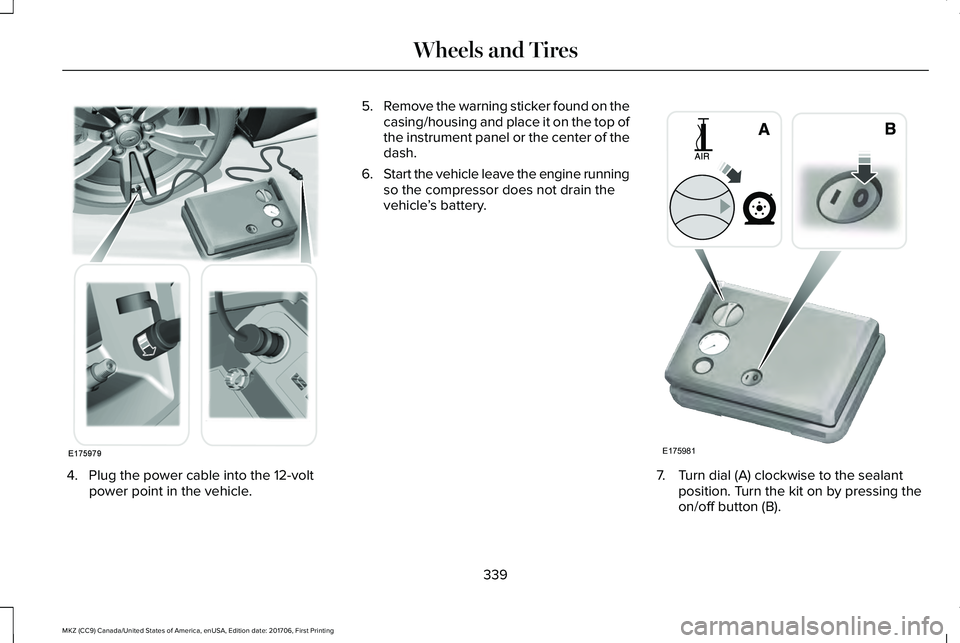
4. Plug the power cable into the 12-voltpower point in the vehicle.
5.Remove the warning sticker found on thecasing/housing and place it on the top ofthe instrument panel or the center of thedash.
6.Start the vehicle leave the engine runningso the compressor does not drain thevehicle’s battery.
7. Turn dial (A) clockwise to the sealantposition. Turn the kit on by pressing theon/off button (B).
339
MKZ (CC9) Canada/United States of America, enUSA, Edition date: 201706, First Printing
Wheels and TiresE175979 E175981
Page 381 of 595
VEHICLE IDENTIFICATION
NUMBER
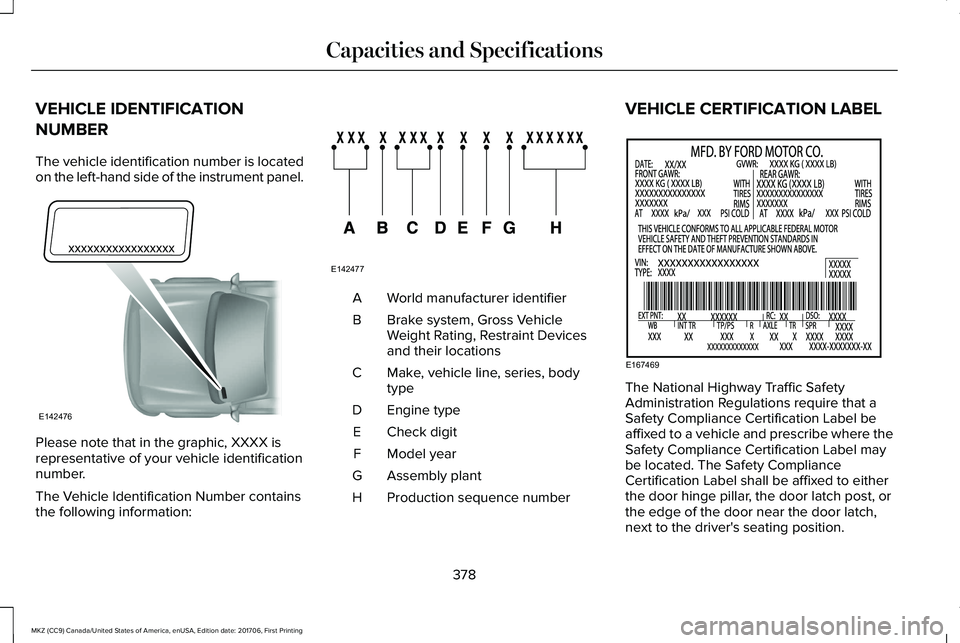
The vehicle identification number is locatedon the left-hand side of the instrument panel.
Please note that in the graphic, XXXX isrepresentative of your vehicle identificationnumber.
The Vehicle Identification Number containsthe following information:
World manufacturer identifierA
Brake system, Gross VehicleWeight Rating, Restraint Devicesand their locations
B
Make, vehicle line, series, bodytypeC
Engine typeD
Check digitE
Model yearF
Assembly plantG
Production sequence numberH
VEHICLE CERTIFICATION LABEL
The National Highway Traffic SafetyAdministration Regulations require that aSafety Compliance Certification Label beaffixed to a vehicle and prescribe where theSafety Compliance Certification Label maybe located. The Safety ComplianceCertification Label shall be affixed to eitherthe door hinge pillar, the door latch post, orthe edge of the door near the door latch,next to the driver's seating position.
378
MKZ (CC9) Canada/United States of America, enUSA, Edition date: 201706, First Printing
Capacities and SpecificationsE142476 E142477 E167469
Page 410 of 595
Note:If your vehicle is not equipped withnavigation, compass appears in the displayinstead of navigation. If you press the rightarrow to go into the compass menu, you cansee the compass graphic. The compassdisplays the direction in which the vehicle istraveling, not true direction (for example, ifthe vehicle is traveling west, the middle ofthe compass graphic displays west; northdisplays to the left of west though its truedirection is to the right of west).
Using the Steering Wheel Controls
Depending on your vehicle and optionpackage, you can use different controls onyour steering wheel to interact with thetouchscreen system in different ways.
VOL: Control the volume of audio output.
Mute: Mute the audio output.
Voice: Press to start a voice session. Pressagain to stop the voice prompt andimmediately begin speaking. Press and holdto end a voice session.
SEEK NEXT:
•While in radio mode, press to seekbetween memory presets.
•While in USB, Bluetooth Audio or CDmode, press to seek between songs orpress and hold to fast seek.
SEEK PREVIOUS:
•While in radio mode, press to seekbetween memory presets.
•While in USB, Bluetooth Audio or CDmode, press to seek between songs orpress and hold to fast seek.
PHONE ACCEPT: Press to answer a call orswitch between calls.
PHONE REJECT: Press to end a call or rejectan incoming call.
Note:On some models, SEEK NEXT may becombined with PHONE REJECT and SEEKPREVIOUS may be combined with PHONEACCEPT.
M: Touch the control repeatedly to switchbetween media sources (modes).
See Steering Wheel (page 81).
Using Your Bezel Controls
Depending on your vehicle and optionpackage, you may also have these controlson your instrument panel:
•Power: Switch the audio system on andoff.
•VOL: Control the volume of playingaudio.
•Seek and Tune: Use as you normallywould in audio modes.
•Eject: Eject a CD from the audio system.
•SOURCE or MEDIA: Press repeatedly toadvance through available media modes.
•SOUND: Press to access the Soundmenu where you can adjust sound andother audio settings.
•1-6: Press and hold to store or press toselect an AM, FM or SIRIUS memorypreset. See Audio System (page 394).
407
MKZ (CC9) Canada/United States of America, enUSA, Edition date: 201706, First Printing
SYNC™ 3
Page 443 of 595
USB Ports
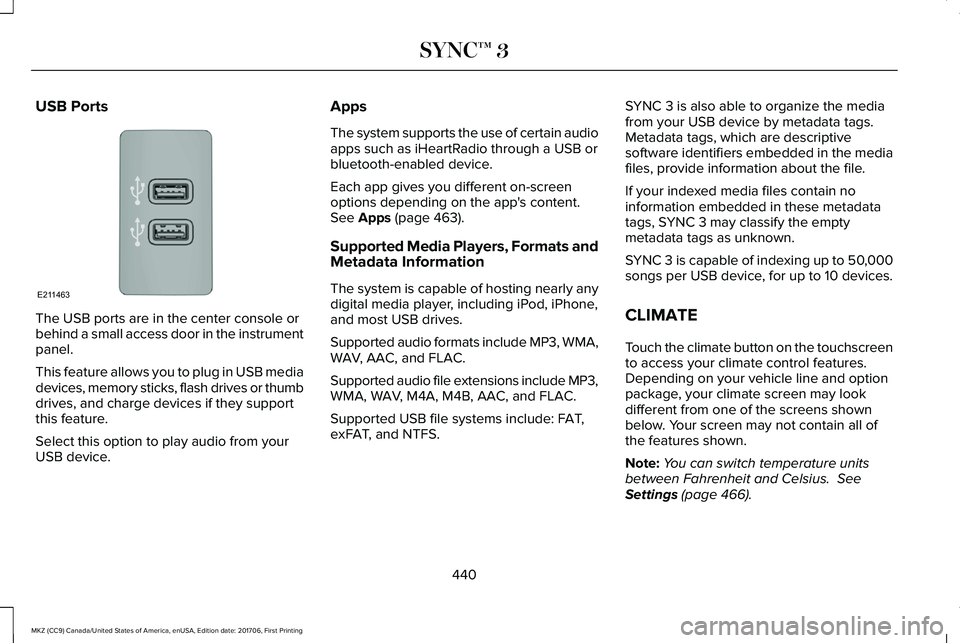
The USB ports are in the center console orbehind a small access door in the instrumentpanel.
This feature allows you to plug in USB mediadevices, memory sticks, flash drives or thumbdrives, and charge devices if they supportthis feature.
Select this option to play audio from yourUSB device.
Apps
The system supports the use of certain audioapps such as iHeartRadio through a USB orbluetooth-enabled device.
Each app gives you different on-screenoptions depending on the app's content.See Apps (page 463).
Supported Media Players, Formats andMetadata Information
The system is capable of hosting nearly anydigital media player, including iPod, iPhone,and most USB drives.
Supported audio formats include MP3, WMA,WAV, AAC, and FLAC.
Supported audio file extensions include MP3,WMA, WAV, M4A, M4B, AAC, and FLAC.
Supported USB file systems include: FAT,exFAT, and NTFS.
SYNC 3 is also able to organize the mediafrom your USB device by metadata tags.Metadata tags, which are descriptivesoftware identifiers embedded in the mediafiles, provide information about the file.
If your indexed media files contain noinformation embedded in these metadatatags, SYNC 3 may classify the emptymetadata tags as unknown.
SYNC 3 is capable of indexing up to 50,000songs per USB device, for up to 10 devices.
CLIMATE
Touch the climate button on the touchscreento access your climate control features.Depending on your vehicle line and optionpackage, your climate screen may lookdifferent from one of the screens shownbelow. Your screen may not contain all ofthe features shown.
Note:You can switch temperature unitsbetween Fahrenheit and Celsius. SeeSettings (page 466).
440
MKZ (CC9) Canada/United States of America, enUSA, Edition date: 201706, First Printing
SYNC™ 3E211463
Page 446 of 595
Fan speed: Touch up or down to increase or decrease the volume of air that circulates in your vehicle.H
Note: You cannot adjust the fan speed when the system is set to AUTO, MAX A/C or MAX Defrost.
A/C: A pop-up appears on the screen to display the air conditioning options.I
MAX A/C: Touch the button to activate and maximize cooling. The driver and passenger temperatures are set to LO, recirculatedair flows through the instrument panel vents, air conditioning automatically turns on and the fan automatically adjusts to the highestspeed.
A/C: Touch to switch the air conditioning on or off. Use A/C with recirculated air to improve cooling performance and efficiency.
Note: In certain conditions (for example, Max Defrost), the air conditioning compressor may continue to operate even when youswitch the air conditioning A/C button off.
Recirculated air: Touch to switch the recirculated air on or off. When recirculated air is on, it may reduce the amount of time neededto cool down the interior (when used with A/C) and help reduce odors from reaching the interior.
Note: Recirculated air may turn off automatically (or the system may prevent it from turning on) in all airflow modes except MAXA/C to reduce risk of fogging. It may also turn on and off automatically in Panel or Panel/Floor airflow modes during hot weather inorder to improve cooling efficiency.
Manual airflow distribution controls: Select these controls individually, together, or with Defrost to direct the air flow to the areayou desire.J
Panel: Distributes air through the instrument panel vents.
Floor: Distributes air through the demister vents, floor vents and rear seat floor vents.
443
MKZ (CC9) Canada/United States of America, enUSA, Edition date: 201706, First Printing
SYNC™ 3
Page 586 of 595
Cleaning Products........................................326Materials...............................................................326
Cleaning the Engine....................................328Cleaning the Exterior...................................327Cleaning the Headlamps..................................327Exterior Chrome Parts.......................................327Exterior Plastic Parts..........................................328Stripes or Graphics............................................328Underbody...........................................................328Under Hood.........................................................328
Cleaning the Instrument Panel andInstrument Cluster Lens............................331Cleaning the Interior....................................329Cleaning Alcantara Microfiber ClothFabric................................................................330
Cleaning the Wheels...................................333Cleaning the Windows and WiperBlades...........................................................329Clearing All MyKeys.......................................65Climate............................................................440Climate Control..............................................137Climate Controlled Seats............................152Cooled Seats........................................................153
Coolant CheckSee: Engine Coolant Check.............................310
Crash Sensors and Airbag Indicator..........55
Creating a MyKey...........................................63Programming/Changing ConfigurableSettings...............................................................64
Cross Traffic Alert.........................................240Blocked Sensors.................................................243Switching the System Off and On..................243System Errors......................................................243System Lights, Messages and AudibleAlerts.................................................................243System Limitations.............................................243Using the Cross Traffic Alert System............240
Cruise Control..................................................83Principle of Operation.......................................222Type One................................................................83Type Two.................................................................84
Cruise controlSee: Using Cruise Control...............................222
Customer Assistance...................................274
D
Data Recording..................................................9Event Data Recording...........................................10Service Data Recording.........................................9
Daytime Running Lamps...............................90Type One - Conventional(Non-Configurable)...........................................91Type Two - Configurable......................................91
Direction Indicators........................................93Lane Change..........................................................93
Doors and Locks.............................................68Drive Control.................................................249LINCOLN DRIVE CONTROL............................249
Driver Alert......................................................231PRINCIPLE OF OPERATION.............................231USING DRIVER ALERT.......................................231
Driver and Passenger Airbags....................48Children and Airbags...........................................49Proper Driver and Front Passenger SeatingAdjustment.........................................................49
Driver and Passenger Knee Airbags.........53Driving Aids.....................................................231Driving Hints..................................................263Driving Through Water...............................263DRLSee: Daytime Running Lamps...........................90
E
Economical Driving......................................263Electric Parking Brake..................................196Applying the electric parking brake...............196Applying the electric parking brake when thevehicle is moving............................................197Battery With No Charge....................................198Releasing the electric parking brake.............197
583
MKZ (CC9) Canada/United States of America, enUSA, Edition date: 201706, First Printing
Index
Page 589 of 595
Adaptive Headlamps...........................................119AdvanceTrac™........................................................119Airbag......................................................................119Alarm......................................................................120Automatic Engine Shutdown...........................120AWD.........................................................................121Battery and Charging System..........................122Blind Spot Information and Cross Traffic AlertSystem...............................................................123Doors and Locks..................................................123Driver Alert............................................................124Fuel.........................................................................124Hill Start Assist.....................................................125Keys and Intelligent Access.............................125Lane Keeping System........................................126Maintenance.........................................................127MyKey.....................................................................128Park Aid..................................................................129Park Brake.............................................................129Power Steering....................................................130Pre-Collision Assist..............................................131Remote Start..........................................................131Seats.......................................................................132Starting System ...................................................132Tire Pressure Monitoring System....................133Traction Control...................................................133Transmission.........................................................134
Installing Child Restraints..............................21Child Seats..............................................................21Using Lap and Shoulder Belts............................21Using Lower Anchors and Tethers forCHildren (LATCH).............................................27Using Tether Straps..............................................29
Instrument Cluster.........................................104Instrument Lighting Dimmer........................90Instrument Panel Overview...........................17Interior Lamps..................................................94Front Interior Lamp...............................................94Rear Interior Lamp................................................95
Interior Luggage CompartmentRelease...........................................................76Interior Mirror.................................................100Auto-Dimming Mirror..........................................100
Introduction.........................................................7
J
Jump Starting the Vehicle..........................268Connecting the Jumper Cables.....................269Jump Starting......................................................270Preparing Your Vehicle.....................................268Removing the Jumper Cables.........................270
K
Keyless Entry....................................................74SECURICODE™ KEYLESS ENTRYKEYPAD...............................................................74
Keyless Starting.............................................163Ignition Modes.....................................................163
Keys and Remote Controls...........................57
L
Lane Keeping System.................................233Switching the System On and Off..................234
Lighting Control...............................................88Headlamp Flasher................................................89Headlamp High Beam.........................................89
Lighting..............................................................88General Information.............................................88
Lincoln Automotive Financial Services......12Lincoln Protect..............................................506Lincoln Protect (CANADA ONLY)....................507Lincoln Protect Extended Service Plans (U.S.Only)..................................................................506
Load Carrying.................................................251Load Limit........................................................251Special Loading Instructions for Owners ofPick-up Trucks and Utility-typeVehicles............................................................255
586
MKZ (CC9) Canada/United States of America, enUSA, Edition date: 201706, First Printing
Index