reset LINCOLN MKZ 2018 User Guide
[x] Cancel search | Manufacturer: LINCOLN, Model Year: 2018, Model line: MKZ, Model: LINCOLN MKZ 2018Pages: 595, PDF Size: 5.06 MB
Page 118 of 595
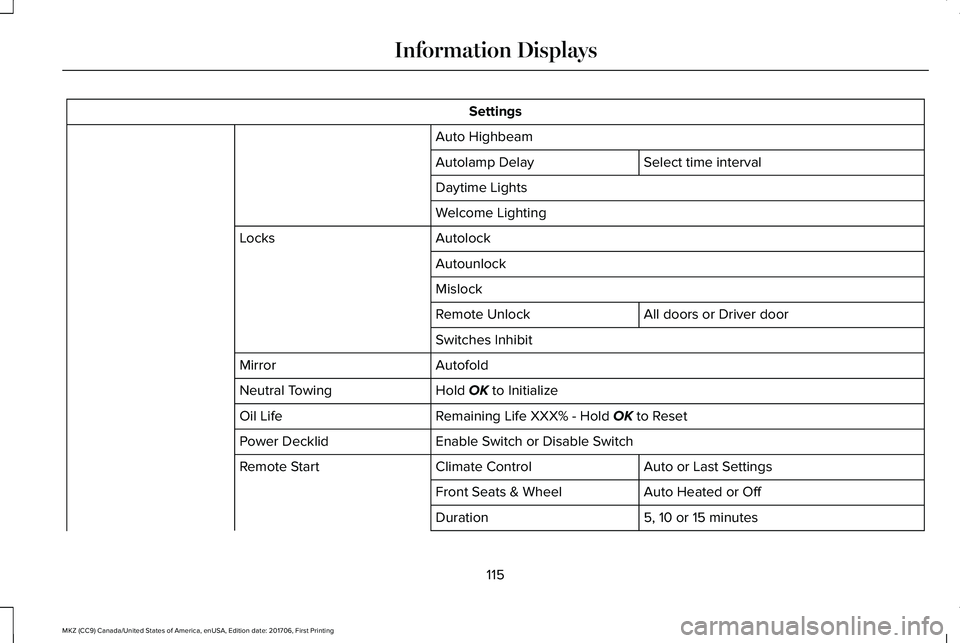
Settings
Auto Highbeam
Select time intervalAutolamp Delay
Daytime Lights
Welcome Lighting
AutolockLocks
Autounlock
Mislock
All doors or Driver doorRemote Unlock
Switches Inhibit
AutofoldMirror
Hold OK to InitializeNeutral Towing
Remaining Life XXX% - Hold OK to ResetOil Life
Enable Switch or Disable SwitchPower Decklid
Auto or Last SettingsClimate ControlRemote Start
Auto Heated or OffFront Seats & Wheel
5, 10 or 15 minutesDuration
115
MKZ (CC9) Canada/United States of America, enUSA, Edition date: 201706, First Printing
Information Displays
Page 127 of 595
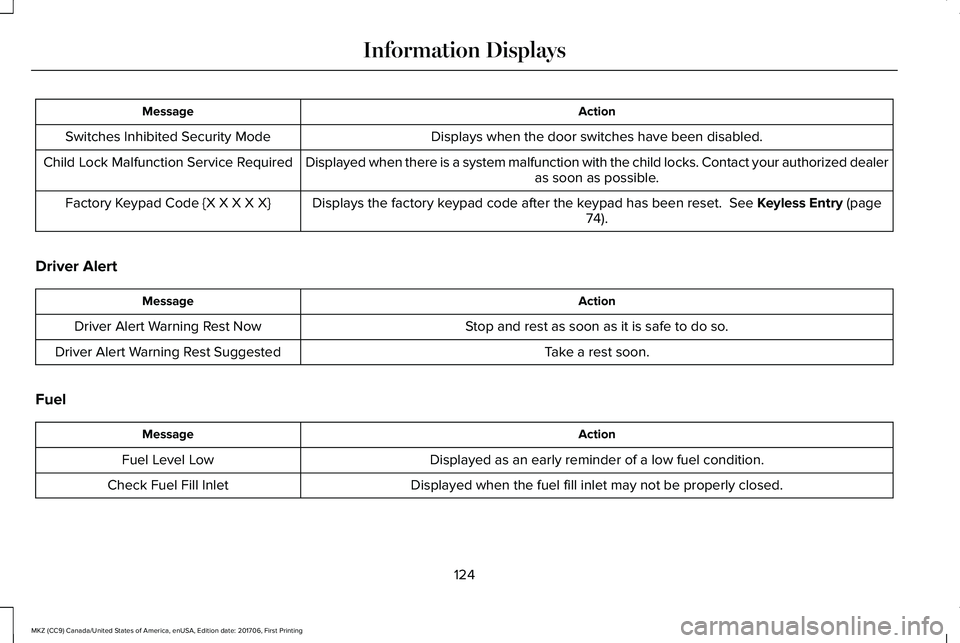
ActionMessage
Displays when the door switches have been disabled.Switches Inhibited Security Mode
Displayed when there is a system malfunction with the child locks. Contact your authorized dealeras soon as possible.Child Lock Malfunction Service Required
Displays the factory keypad code after the keypad has been reset. See Keyless Entry (page74).Factory Keypad Code {X X X X X}
Driver Alert
ActionMessage
Stop and rest as soon as it is safe to do so.Driver Alert Warning Rest Now
Take a rest soon.Driver Alert Warning Rest Suggested
Fuel
ActionMessage
Displayed as an early reminder of a low fuel condition.Fuel Level Low
Displayed when the fuel fill inlet may not be properly closed.Check Fuel Fill Inlet
124
MKZ (CC9) Canada/United States of America, enUSA, Edition date: 201706, First Printing
Information Displays
Page 142 of 595
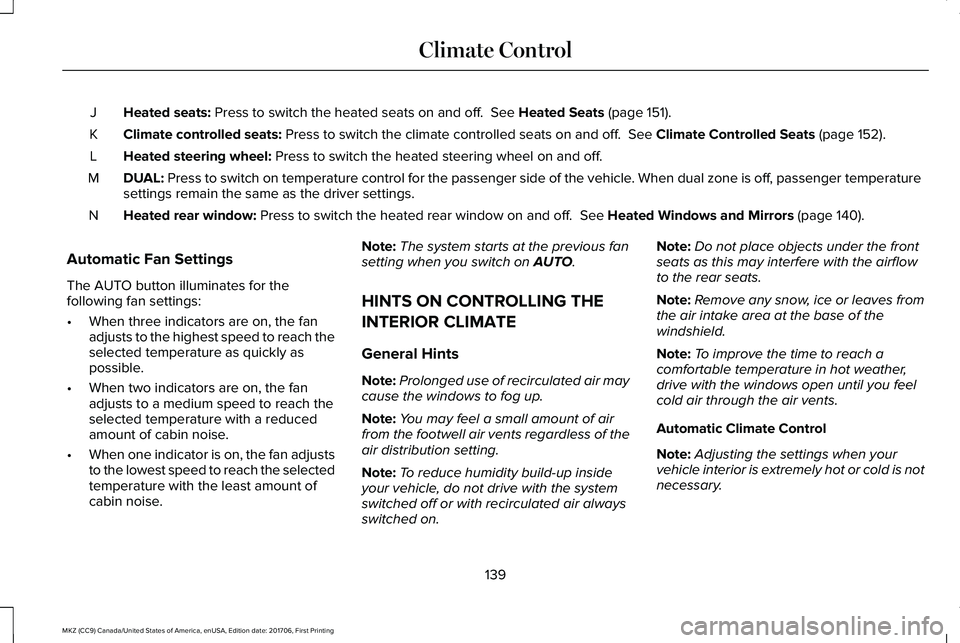
Heated seats: Press to switch the heated seats on and off. See Heated Seats (page 151).J
Climate controlled seats: Press to switch the climate controlled seats on and off. See Climate Controlled Seats (page 152).K
Heated steering wheel: Press to switch the heated steering wheel on and off.L
DUAL: Press to switch on temperature control for the passenger side of the vehicle. When dual zone is off, passenger temperaturesettings remain the same as the driver settings.M
Heated rear window: Press to switch the heated rear window on and off. See Heated Windows and Mirrors (page 140).N
Automatic Fan Settings
The AUTO button illuminates for thefollowing fan settings:
•When three indicators are on, the fanadjusts to the highest speed to reach theselected temperature as quickly aspossible.
•When two indicators are on, the fanadjusts to a medium speed to reach theselected temperature with a reducedamount of cabin noise.
•When one indicator is on, the fan adjuststo the lowest speed to reach the selectedtemperature with the least amount ofcabin noise.
Note:The system starts at the previous fansetting when you switch on AUTO.
HINTS ON CONTROLLING THE
INTERIOR CLIMATE
General Hints
Note:Prolonged use of recirculated air maycause the windows to fog up.
Note:You may feel a small amount of airfrom the footwell air vents regardless of theair distribution setting.
Note:To reduce humidity build-up insideyour vehicle, do not drive with the systemswitched off or with recirculated air alwaysswitched on.
Note:Do not place objects under the frontseats as this may interfere with the airflowto the rear seats.
Note:Remove any snow, ice or leaves fromthe air intake area at the base of thewindshield.
Note:To improve the time to reach acomfortable temperature in hot weather,drive with the windows open until you feelcold air through the air vents.
Automatic Climate Control
Note:Adjusting the settings when yourvehicle interior is extremely hot or cold is notnecessary.
139
MKZ (CC9) Canada/United States of America, enUSA, Edition date: 201706, First Printing
Climate Control
Page 152 of 595
MEMORY FUNCTION
WARNINGS
Before activating the memory seat,make sure that the area immediatelysurrounding the seat is clear of obstructionsand that all occupants are clear of movingparts.
Do not use the memory function whenyour vehicle is moving.
This feature automatically recalls the positionof the following features:
•Driver seat.
•Power mirrors.
•Power steering column.
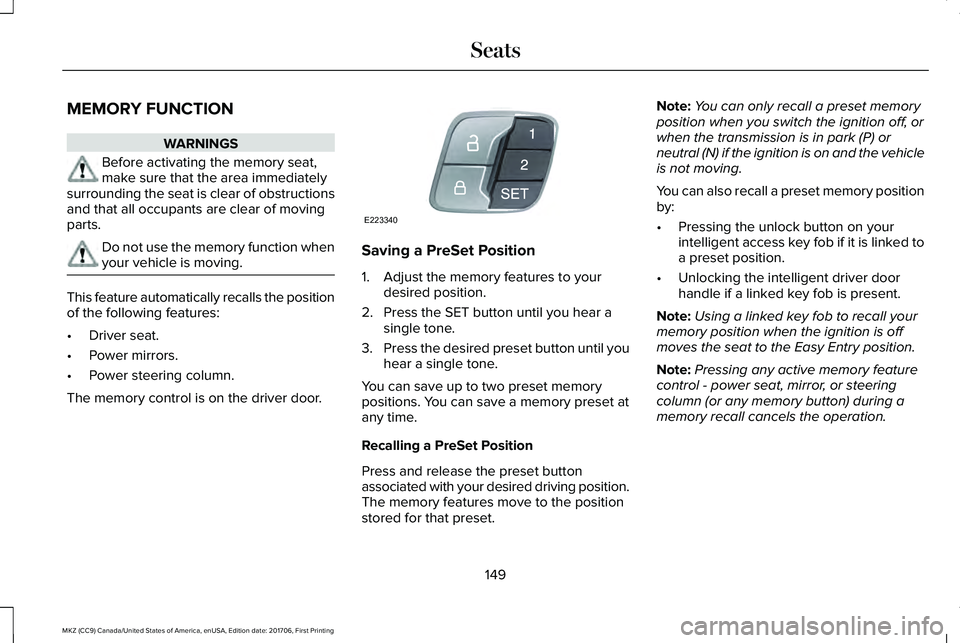
The memory control is on the driver door.
Saving a PreSet Position
1. Adjust the memory features to yourdesired position.
2. Press the SET button until you hear asingle tone.
3.Press the desired preset button until youhear a single tone.
You can save up to two preset memorypositions. You can save a memory preset atany time.
Recalling a PreSet Position
Press and release the preset buttonassociated with your desired driving position.The memory features move to the positionstored for that preset.
Note:You can only recall a preset memoryposition when you switch the ignition off, orwhen the transmission is in park (P) orneutral (N) if the ignition is on and the vehicleis not moving.
You can also recall a preset memory positionby:
•Pressing the unlock button on yourintelligent access key fob if it is linked toa preset position.
•Unlocking the intelligent driver doorhandle if a linked key fob is present.
Note:Using a linked key fob to recall yourmemory position when the ignition is offmoves the seat to the Easy Entry position.
Note:Pressing any active memory featurecontrol - power seat, mirror, or steeringcolumn (or any memory button) during amemory recall cancels the operation.
149
MKZ (CC9) Canada/United States of America, enUSA, Edition date: 201706, First Printing
SeatsE223340
Page 153 of 595
Linking a PreSet Position to yourRemote Control or Intelligent AccessKey Fob
Your vehicle can save the preset memorypositions for up to two remote controls orintelligent access (IA) keys.
After you have saved your desired memorypreset positions:
1.Press and hold the desired preset buttonfor about three seconds until you hear asingle tone.
2. Within three seconds, press the lockbutton on the remote control you arelinking.
To unlink a remote control, follow the sameprocedure – except in step 2, press theunlock button on the remote control.
Note:If more than one linked remote controlor intelligent access key is in range, thememory function moves to the settings ofthe first key to initiate a memory recall.
Easy Entry and Exit Feature
If you enable the easy entry and exit feature,it automatically moves the driver seatposition rearward up to 2 in (5 cm) when youswitch the ignition off.
The driver seat returns to the previousposition when you switch the ignition on.
You can enable or disable this feature in theinformation display. See GeneralInformation (page 111).
REAR SEATS
Note:Your vehicle may have split seatbacksthat you must fold individually.
Note:Make sure the center safety belt isunbuckled before folding the seatback.
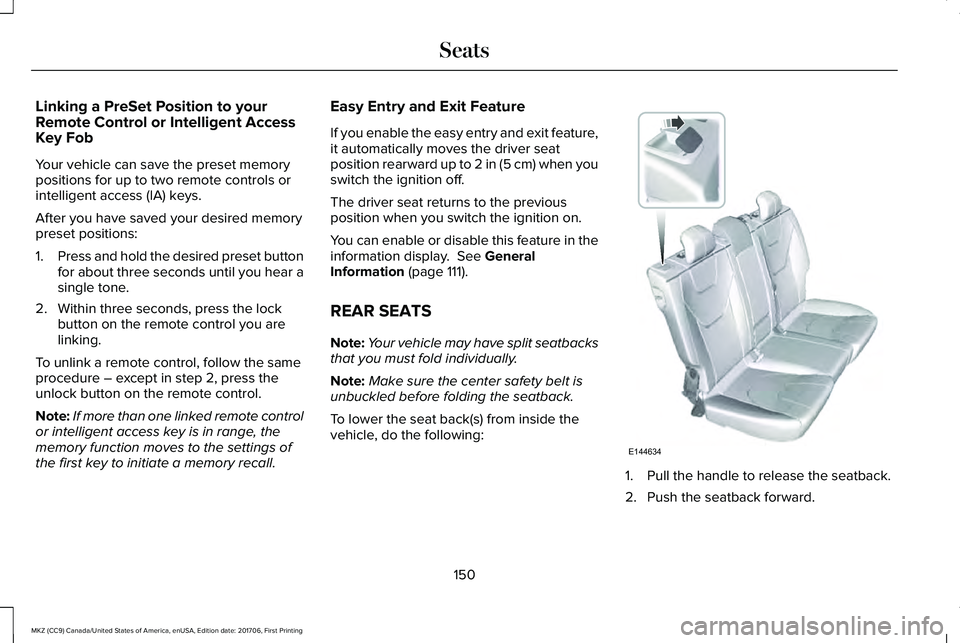
To lower the seat back(s) from inside thevehicle, do the following:
1. Pull the handle to release the seatback.
2. Push the seatback forward.
150
MKZ (CC9) Canada/United States of America, enUSA, Edition date: 201706, First Printing
SeatsE144634
Page 155 of 595
Rear Seats
WARNING
Persons who are unable to feel pain tothe skin because of advanced age,chronic illness, diabetes, spinal cord injury,medication, alcohol use, exhaustion, or otherphysical conditions, must exercise care whenusing the seat heater. The seat heater maycause burns even at low temperatures,especially if used for long periods of time.Do not place anything on the seat thatinsulates against heat, such as a blanket orcushion, because this may cause the seatheater to overheat. Do not puncture the seatwith pins, needles, or other pointed objectsbecause this may damage the heatingelement which may cause the seat heater tooverheat. An overheated seat may causeserious personal injury.
Do not do the following:
•Place heavy objects on the seat.
•Operate the seat heater if water or anyother liquid is spilled on the seat. Allowthe seat to dry thoroughly.
•Operate the heated seats unless theengine is running. Doing so can causethe battery to lose charge.
The rear seat heat controls are located onthe rear of the center console.
Press the heated seat symbol to cyclethrough the various heat settings and off.More indicator lights indicate warmersettings.
The heated seat module resets at everyignition run cycle. While the ignition is on,press the high or low heated seat switch toenable heating mode. When activated, theywill turn off automatically when you turn theengine off.
CLIMATE CONTROLLED SEATS (If
Equipped)
Heated Seats
152
MKZ (CC9) Canada/United States of America, enUSA, Edition date: 201706, First Printing
SeatsE146322
Page 164 of 595
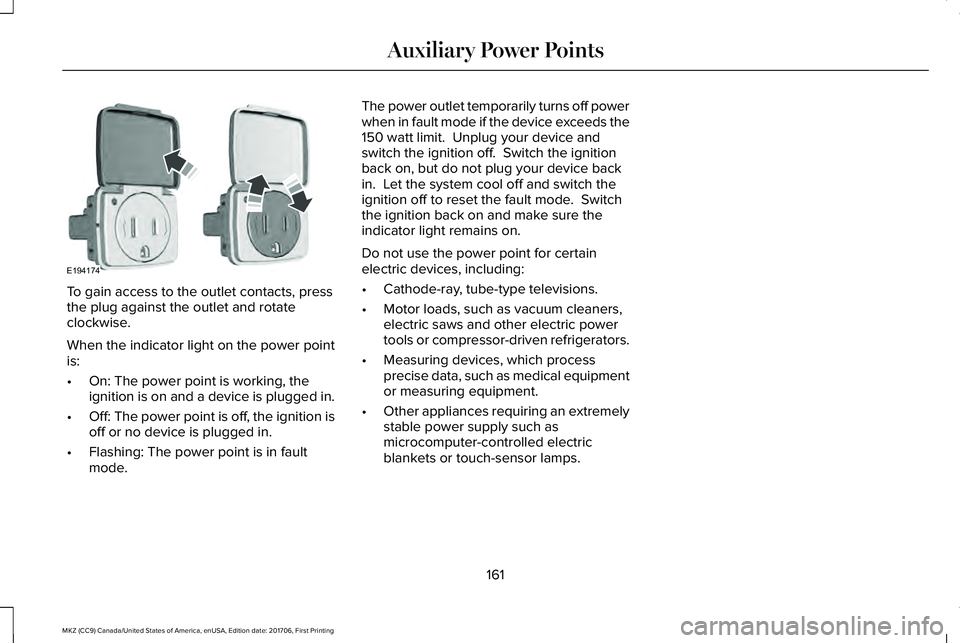
To gain access to the outlet contacts, pressthe plug against the outlet and rotateclockwise.
When the indicator light on the power pointis:
•On: The power point is working, theignition is on and a device is plugged in.
•Off: The power point is off, the ignition isoff or no device is plugged in.
•Flashing: The power point is in faultmode.
The power outlet temporarily turns off powerwhen in fault mode if the device exceeds the150 watt limit. Unplug your device andswitch the ignition off. Switch the ignitionback on, but do not plug your device backin. Let the system cool off and switch theignition off to reset the fault mode. Switchthe ignition back on and make sure theindicator light remains on.
Do not use the power point for certainelectric devices, including:
•Cathode-ray, tube-type televisions.
•Motor loads, such as vacuum cleaners,electric saws and other electric powertools or compressor-driven refrigerators.
•Measuring devices, which processprecise data, such as medical equipmentor measuring equipment.
•Other appliances requiring an extremelystable power supply such asmicrocomputer-controlled electricblankets or touch-sensor lamps.
161
MKZ (CC9) Canada/United States of America, enUSA, Edition date: 201706, First Printing
Auxiliary Power PointsE194174
Page 168 of 595
Within 20 seconds of switching the engineoff, press the brake pedal and press thebutton. After 20 seconds have expired, youcan no longer restart the engine without thekey present inside your vehicle.
Once the engine has started, it remainsrunning until you press the button, even ifthe system does not detect a valid key. If youopen and close a door while the engine isrunning, the system searches for a valid key.You cannot restart the engine if the systemdoes not detect a valid key within 20seconds.
Failure to Start
If you cannot start the engine after threeattempts, wait 10 seconds and follow thisprocedure:
1. Fully press the brake pedal.
2. Fully press the accelerator pedal andhold it there.
3. Start the engine.
Note: You can crank the engine for a totalof 60 seconds without the engine startingbefore the starting system temporarilydisables. The 60 seconds does not have tobe all at once. For example, if you crank theengine three times for 20 seconds each time,without the engine starting, you reached the60-second time limit. A message appearsin the information display alerting you thatyou exceeded the cranking time. Youcannot attempt to start the engine for atleast 15 minutes.
Note: After 15 minutes, you are limited to a15-second engine cranking time. You needto wait 60 minutes before you can crank theengine for 60 seconds again.
Automatic Engine Shutdown
If your vehicle is equipped with a keylessignition, it has a feature that automaticallyshuts down the engine if it has been idlingfor an extended period. The ignition alsoturns off in order to save battery power.Before the engine shuts down, a messageappears in the information display showinga timer counting down from 30 seconds. If
you do not intervene within 30 seconds, theengine shuts down. Another messageappears in the information display to informyou that the engine has shut down in orderto save fuel. Start your vehicle as younormally do.
Automatic Engine Shutdown Override
Note:You cannot permanently switch off theautomatic engine shutdown feature. Whenyou switch it off temporarily, it turns on atthe next ignition cycle.
You can stop the engine shutdown, or resetthe timer, at any point before the 30-secondcountdown has expired by doing any of thefollowing:
165
MKZ (CC9) Canada/United States of America, enUSA, Edition date: 201706, First Printing
Starting and Stopping the Engine
Page 169 of 595
•You can reset the timer by interactingwith your vehicle (such as pressing thebrake pedal or accelerator pedal).
•You can temporarily switch off theshutdown feature any time the ignition ison (for the current ignition cycle only).Use the information display to do so. SeeInformation Displays (page 111).
•During the countdown before engineshutdown, you are prompted to press OKor RESET (depending on your type ofinformation display) to temporarily switchthe feature off (for the current ignitioncycle only).
Stopping the Engine When YourVehicle is Stationary
1. Put the transmission in position P.
2. Press the button once.
3. Apply the parking brake.
Note:This switches off the ignition, allelectrical circuits, warning lamps andindicators.
Note:If the engine is idling for 30 minutes,the ignition and engine automatically shutdown.
Stopping the Engine When YourVehicle is Moving
WARNING
Switching off the engine when thevehicle is still moving will result in aloss of brake and steering assistance. Thesteering will not lock, but higher effort willbe required. When the ignition is switchedoff, some electrical circuits, including airbags, warning lamps and indicators may alsobe off. If the ignition was turned offaccidentally, you can shift into neutral (N) andre-start the engine.
1. Put the transmission in position N anduse the brakes to bring your vehicle to asafe stop.
2. When your vehicle has stopped, put thetransmission in position P.
3. Press and hold the button for onesecond, or press it three times within twoseconds.
4. Apply the parking brake.
Guarding Against Exhaust Fumes
WARNING
Exhaust leaks may result in entry ofharmful and potentially lethal fumesinto the passenger compartment. If you smellexhaust fumes inside your vehicle, have yourvehicle inspected immediately. Do not driveif you smell exhaust fumes.
Important Ventilating Information
If you stop your vehicle and then leave theengine idling for long periods, werecommend that you do one of the following:
•Open the windows at least 1 in (2.5 cm).
•Set your climate control to outside air.
ENGINE BLOCK HEATER (If Equipped)
WARNINGS
Failure to follow engine block heaterinstructions could result in propertydamage or serious personal injury.
166
MKZ (CC9) Canada/United States of America, enUSA, Edition date: 201706, First Printing
Starting and Stopping the Engine
Page 176 of 595
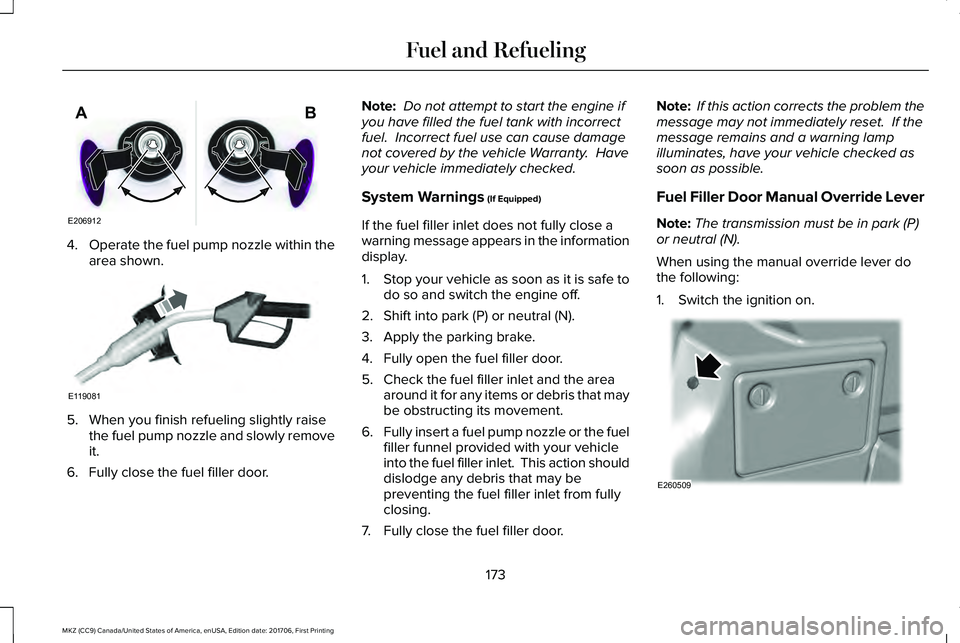
4.Operate the fuel pump nozzle within thearea shown.
5. When you finish refueling slightly raisethe fuel pump nozzle and slowly removeit.
6. Fully close the fuel filler door.
Note: Do not attempt to start the engine ifyou have filled the fuel tank with incorrectfuel. Incorrect fuel use can cause damagenot covered by the vehicle Warranty. Haveyour vehicle immediately checked.
System Warnings (If Equipped)
If the fuel filler inlet does not fully close awarning message appears in the informationdisplay.
1.Stop your vehicle as soon as it is safe todo so and switch the engine off.
2. Shift into park (P) or neutral (N).
3. Apply the parking brake.
4. Fully open the fuel filler door.
5. Check the fuel filler inlet and the areaaround it for any items or debris that maybe obstructing its movement.
6.Fully insert a fuel pump nozzle or the fuelfiller funnel provided with your vehicleinto the fuel filler inlet. This action shoulddislodge any debris that may bepreventing the fuel filler inlet from fullyclosing.
7. Fully close the fuel filler door.
Note: If this action corrects the problem themessage may not immediately reset. If themessage remains and a warning lampilluminates, have your vehicle checked assoon as possible.
Fuel Filler Door Manual Override Lever
Note:The transmission must be in park (P)or neutral (N).
When using the manual override lever dothe following:
1. Switch the ignition on.
173
MKZ (CC9) Canada/United States of America, enUSA, Edition date: 201706, First Printing
Fuel and RefuelingE206912
AB E119081 E260509