transmission LINCOLN MKZ 2018 User Guide
[x] Cancel search | Manufacturer: LINCOLN, Model Year: 2018, Model line: MKZ, Model: LINCOLN MKZ 2018Pages: 595, PDF Size: 5.06 MB
Page 101 of 595
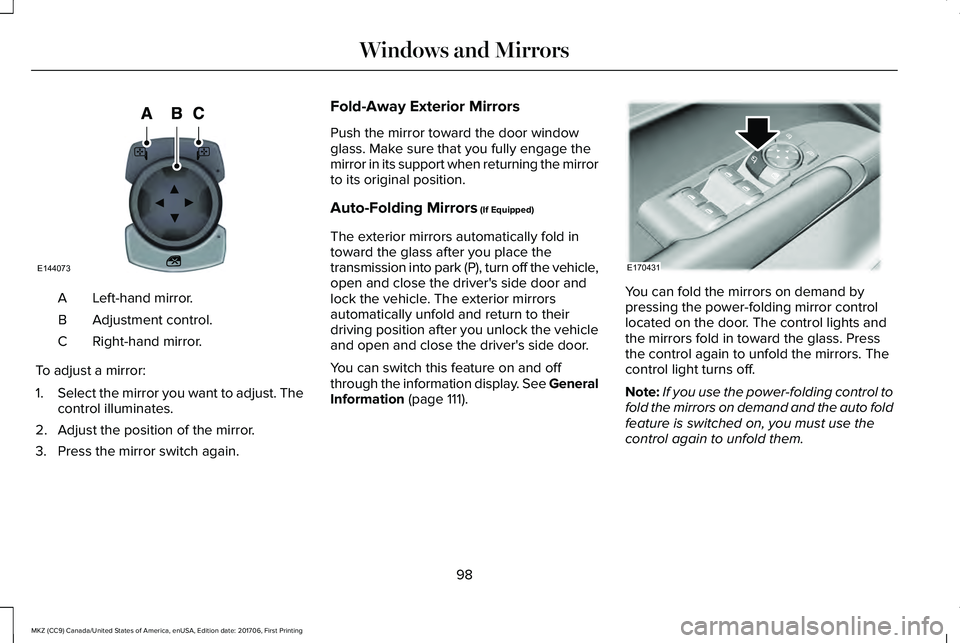
Left-hand mirror.A
Adjustment control.B
Right-hand mirror.C
To adjust a mirror:
1.Select the mirror you want to adjust. Thecontrol illuminates.
2. Adjust the position of the mirror.
3. Press the mirror switch again.
Fold-Away Exterior Mirrors
Push the mirror toward the door windowglass. Make sure that you fully engage themirror in its support when returning the mirrorto its original position.
Auto-Folding Mirrors (If Equipped)
The exterior mirrors automatically fold intoward the glass after you place thetransmission into park (P), turn off the vehicle,open and close the driver's side door andlock the vehicle. The exterior mirrorsautomatically unfold and return to theirdriving position after you unlock the vehicleand open and close the driver's side door.
You can switch this feature on and offthrough the information display. See GeneralInformation (page 111).
You can fold the mirrors on demand bypressing the power-folding mirror controllocated on the door. The control lights andthe mirrors fold in toward the glass. Pressthe control again to unfold the mirrors. Thecontrol light turns off.
Note:If you use the power-folding control tofold the mirrors on demand and the auto foldfeature is switched on, you must use thecontrol again to unfold them.
98
MKZ (CC9) Canada/United States of America, enUSA, Edition date: 201706, First Printing
Windows and MirrorsE144073 E170431
Page 104 of 595
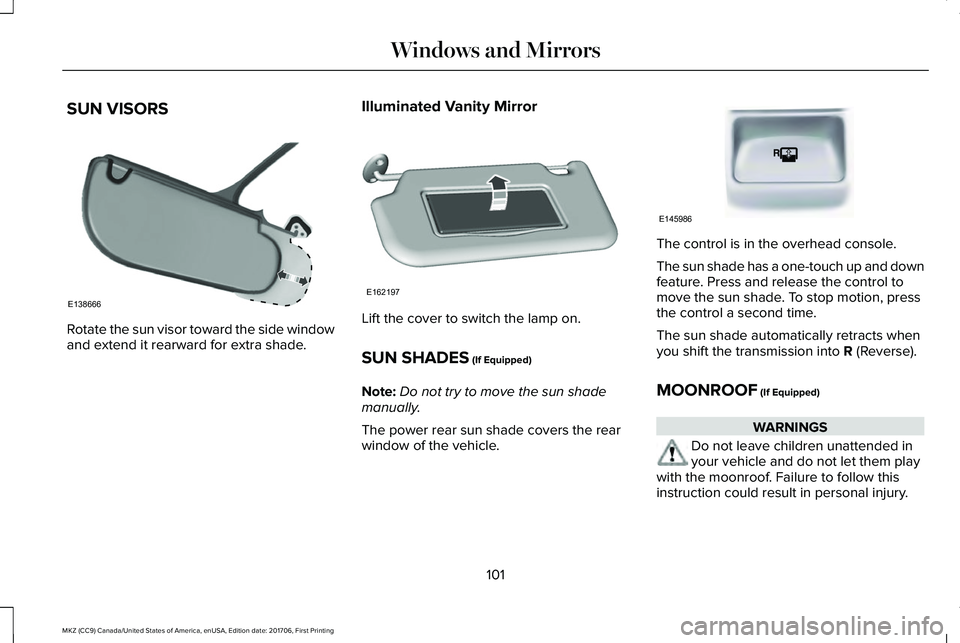
SUN VISORS
Rotate the sun visor toward the side windowand extend it rearward for extra shade.
Illuminated Vanity Mirror
Lift the cover to switch the lamp on.
SUN SHADES (If Equipped)
Note:Do not try to move the sun shademanually.
The power rear sun shade covers the rearwindow of the vehicle.
The control is in the overhead console.
The sun shade has a one-touch up and downfeature. Press and release the control tomove the sun shade. To stop motion, pressthe control a second time.
The sun shade automatically retracts whenyou shift the transmission into R (Reverse).
MOONROOF (If Equipped)
WARNINGS
Do not leave children unattended inyour vehicle and do not let them playwith the moonroof. Failure to follow thisinstruction could result in personal injury.
101
MKZ (CC9) Canada/United States of America, enUSA, Edition date: 201706, First Printing
Windows and MirrorsE138666 E162197 E145986
Page 121 of 595
Adaptive Cruise Control
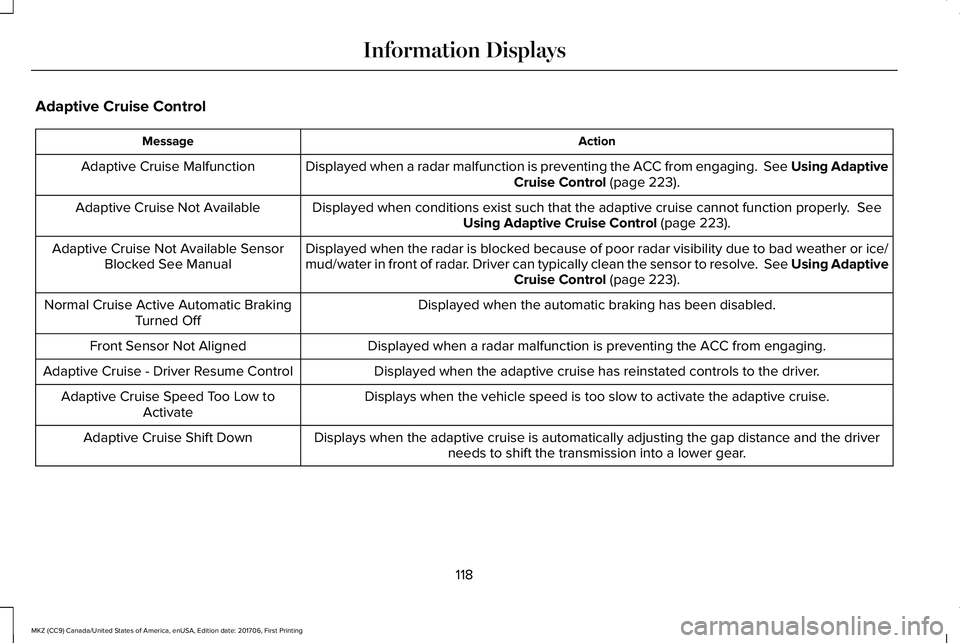
ActionMessage
Displayed when a radar malfunction is preventing the ACC from engaging. See Using AdaptiveCruise Control (page 223).Adaptive Cruise Malfunction
Displayed when conditions exist such that the adaptive cruise cannot function properly. SeeUsing Adaptive Cruise Control (page 223).Adaptive Cruise Not Available
Displayed when the radar is blocked because of poor radar visibility due to bad weather or ice/mud/water in front of radar. Driver can typically clean the sensor to resolve. See Using AdaptiveCruise Control (page 223).
Adaptive Cruise Not Available SensorBlocked See Manual
Displayed when the automatic braking has been disabled.Normal Cruise Active Automatic BrakingTurned Off
Displayed when a radar malfunction is preventing the ACC from engaging.Front Sensor Not Aligned
Displayed when the adaptive cruise has reinstated controls to the driver.Adaptive Cruise - Driver Resume Control
Displays when the vehicle speed is too slow to activate the adaptive cruise.Adaptive Cruise Speed Too Low toActivate
Displays when the adaptive cruise is automatically adjusting the gap distance and the driverneeds to shift the transmission into a lower gear.Adaptive Cruise Shift Down
118
MKZ (CC9) Canada/United States of America, enUSA, Edition date: 201706, First Printing
Information Displays
Page 124 of 595
AWD
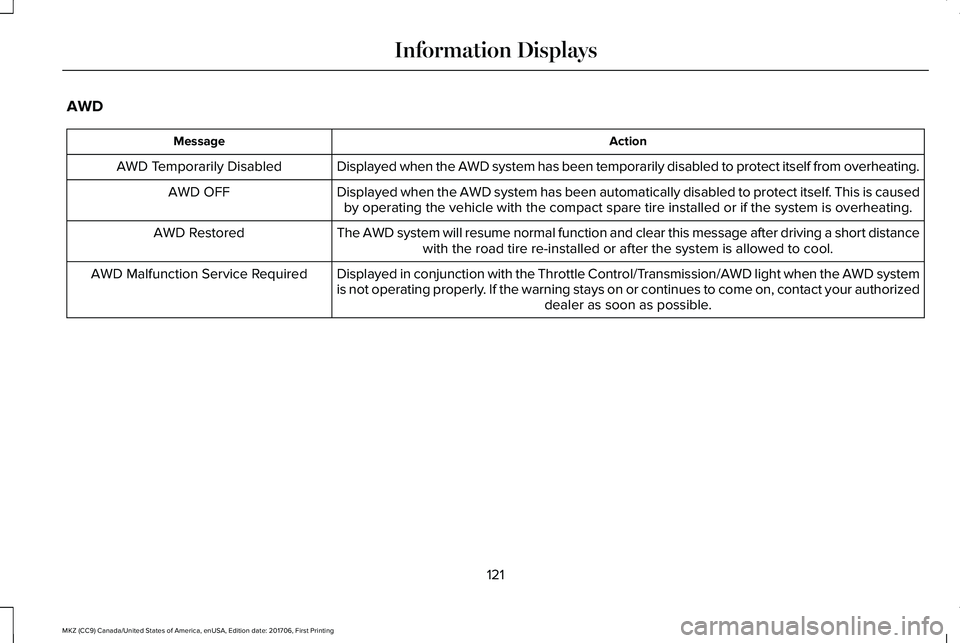
ActionMessage
Displayed when the AWD system has been temporarily disabled to protect itself from overheating.AWD Temporarily Disabled
Displayed when the AWD system has been automatically disabled to protect itself. This is causedby operating the vehicle with the compact spare tire installed or if the system is overheating.AWD OFF
The AWD system will resume normal function and clear this message after driving a short distancewith the road tire re-installed or after the system is allowed to cool.AWD Restored
Displayed in conjunction with the Throttle Control/Transmission/AWD light when the AWD systemis not operating properly. If the warning stays on or continues to come on, contact your authorizeddealer as soon as possible.
AWD Malfunction Service Required
121
MKZ (CC9) Canada/United States of America, enUSA, Edition date: 201706, First Printing
Information Displays
Page 137 of 595
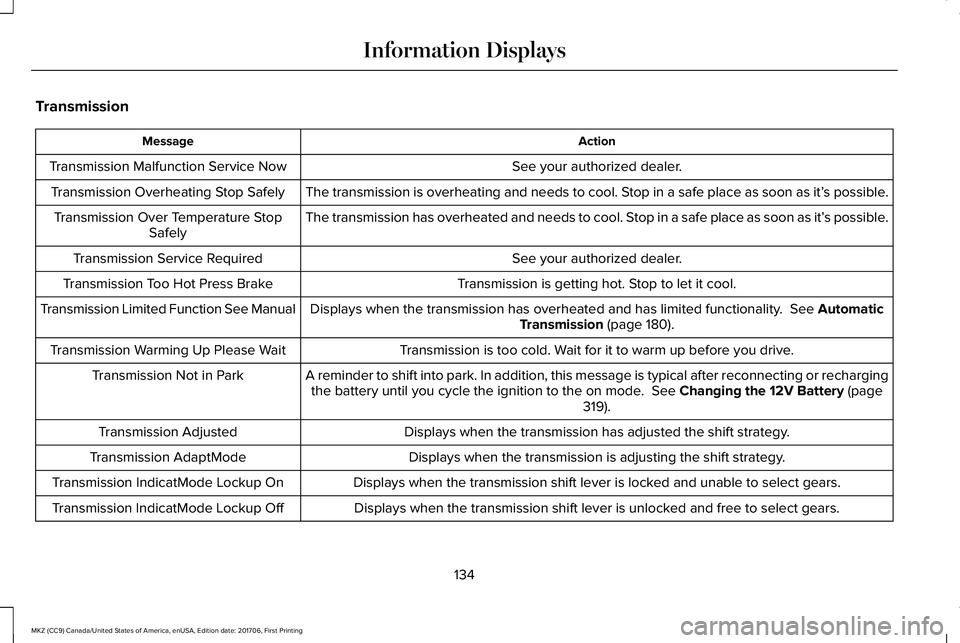
Transmission
ActionMessage
See your authorized dealer.Transmission Malfunction Service Now
The transmission is overheating and needs to cool. Stop in a safe place as soon as it’s possible.Transmission Overheating Stop Safely
The transmission has overheated and needs to cool. Stop in a safe place as soon as it’s possible.Transmission Over Temperature StopSafely
See your authorized dealer.Transmission Service Required
Transmission is getting hot. Stop to let it cool.Transmission Too Hot Press Brake
Displays when the transmission has overheated and has limited functionality. See AutomaticTransmission (page 180).Transmission Limited Function See Manual
Transmission is too cold. Wait for it to warm up before you drive.Transmission Warming Up Please Wait
A reminder to shift into park. In addition, this message is typical after reconnecting or rechargingthe battery until you cycle the ignition to the on mode. See Changing the 12V Battery (page319).
Transmission Not in Park
Displays when the transmission has adjusted the shift strategy.Transmission Adjusted
Displays when the transmission is adjusting the shift strategy.Transmission AdaptMode
Displays when the transmission shift lever is locked and unable to select gears.Transmission IndicatMode Lockup On
Displays when the transmission shift lever is unlocked and free to select gears.Transmission IndicatMode Lockup Off
134
MKZ (CC9) Canada/United States of America, enUSA, Edition date: 201706, First Printing
Information Displays
Page 138 of 595
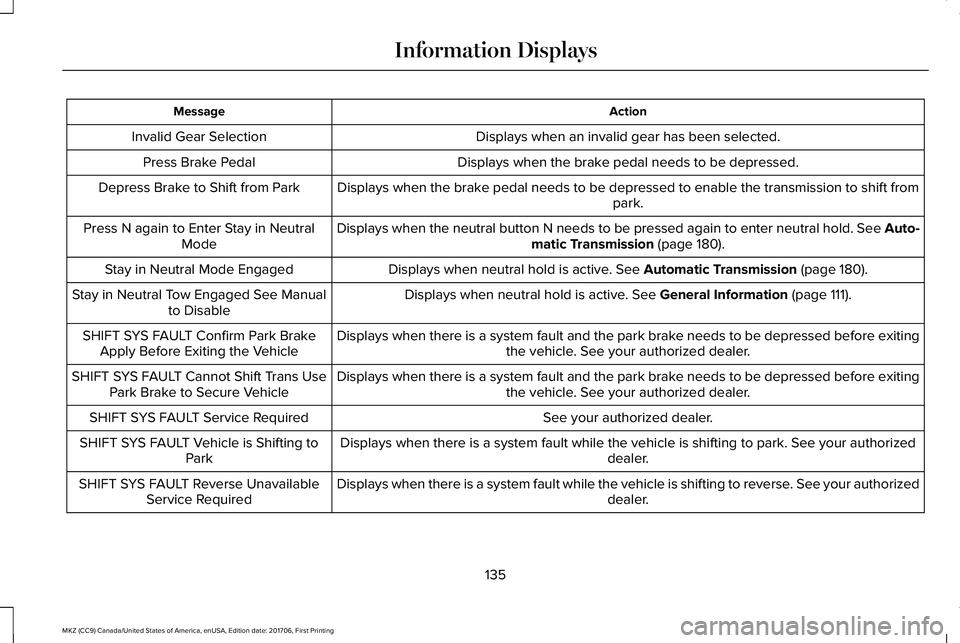
ActionMessage
Displays when an invalid gear has been selected.Invalid Gear Selection
Displays when the brake pedal needs to be depressed.Press Brake Pedal
Displays when the brake pedal needs to be depressed to enable the transmission to shift frompark.Depress Brake to Shift from Park
Displays when the neutral button N needs to be pressed again to enter neutral hold. See Auto-matic Transmission (page 180).Press N again to Enter Stay in NeutralMode
Displays when neutral hold is active. See Automatic Transmission (page 180).Stay in Neutral Mode Engaged
Displays when neutral hold is active. See General Information (page 111).Stay in Neutral Tow Engaged See Manualto Disable
Displays when there is a system fault and the park brake needs to be depressed before exitingthe vehicle. See your authorized dealer.SHIFT SYS FAULT Confirm Park BrakeApply Before Exiting the Vehicle
Displays when there is a system fault and the park brake needs to be depressed before exitingthe vehicle. See your authorized dealer.SHIFT SYS FAULT Cannot Shift Trans UsePark Brake to Secure Vehicle
See your authorized dealer.SHIFT SYS FAULT Service Required
Displays when there is a system fault while the vehicle is shifting to park. See your authorizeddealer.SHIFT SYS FAULT Vehicle is Shifting toPark
Displays when there is a system fault while the vehicle is shifting to reverse. See your authorizeddealer.SHIFT SYS FAULT Reverse UnavailableService Required
135
MKZ (CC9) Canada/United States of America, enUSA, Edition date: 201706, First Printing
Information Displays
Page 152 of 595
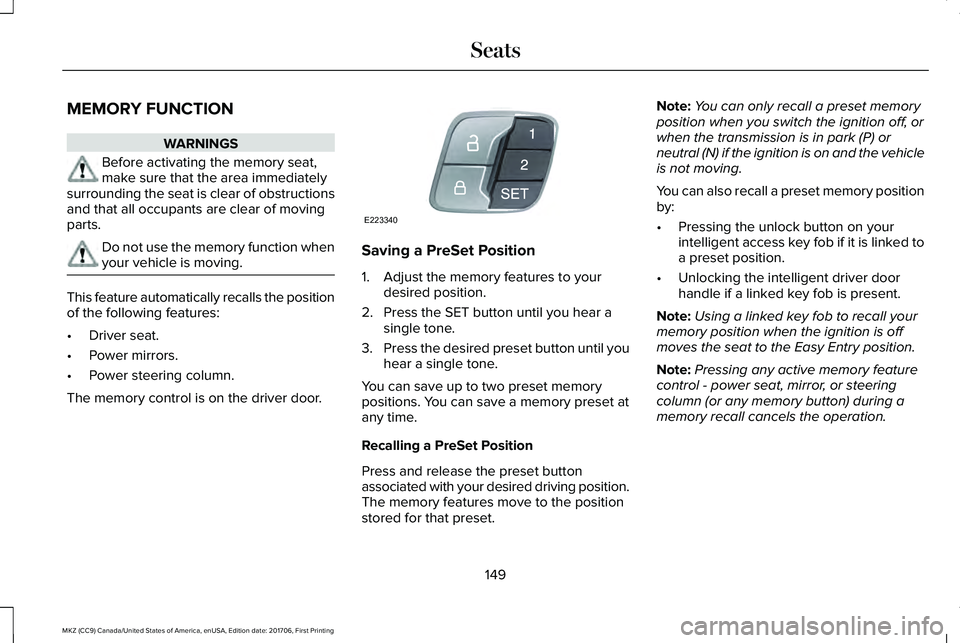
MEMORY FUNCTION
WARNINGS
Before activating the memory seat,make sure that the area immediatelysurrounding the seat is clear of obstructionsand that all occupants are clear of movingparts.
Do not use the memory function whenyour vehicle is moving.
This feature automatically recalls the positionof the following features:
•Driver seat.
•Power mirrors.
•Power steering column.
The memory control is on the driver door.
Saving a PreSet Position
1. Adjust the memory features to yourdesired position.
2. Press the SET button until you hear asingle tone.
3.Press the desired preset button until youhear a single tone.
You can save up to two preset memorypositions. You can save a memory preset atany time.
Recalling a PreSet Position
Press and release the preset buttonassociated with your desired driving position.The memory features move to the positionstored for that preset.
Note:You can only recall a preset memoryposition when you switch the ignition off, orwhen the transmission is in park (P) orneutral (N) if the ignition is on and the vehicleis not moving.
You can also recall a preset memory positionby:
•Pressing the unlock button on yourintelligent access key fob if it is linked toa preset position.
•Unlocking the intelligent driver doorhandle if a linked key fob is present.
Note:Using a linked key fob to recall yourmemory position when the ignition is offmoves the seat to the Easy Entry position.
Note:Pressing any active memory featurecontrol - power seat, mirror, or steeringcolumn (or any memory button) during amemory recall cancels the operation.
149
MKZ (CC9) Canada/United States of America, enUSA, Edition date: 201706, First Printing
SeatsE223340
Page 158 of 595
HomeLink Wireless Control System
WARNINGS
Make sure that the garage door andsecurity device are free fromobstruction when you are programming. Donot program the system with the vehicle inthe garage.
Do not use the system with any garagedoor opener that does not have thesafety stop and reverse feature as requiredby U.S. Federal Safety Standards (thisincludes any garage door openermanufactured before April 1, 1982). A garagedoor opener which cannot detect an object,signaling the door to stop and reverse, doesnot meet current federal safety standards.Using a garage door opener without thesefeatures increases the risk of serious injuryor death.
Note:Make sure you keep the originalremote control transmitter for use in othervehicles as well as for future systemprogramming.
Note:We recommend that upon the sale orlease termination of your vehicle, you erasethe programmed function buttons for securityreasons. See Erasing the Function ButtonCodes.
Note:You can program a maximum of threedevices. To change or replace any of thethree devices after it has been initiallyprogrammed, you must first erase the currentsettings. See Erasing the Function ButtonCodes.
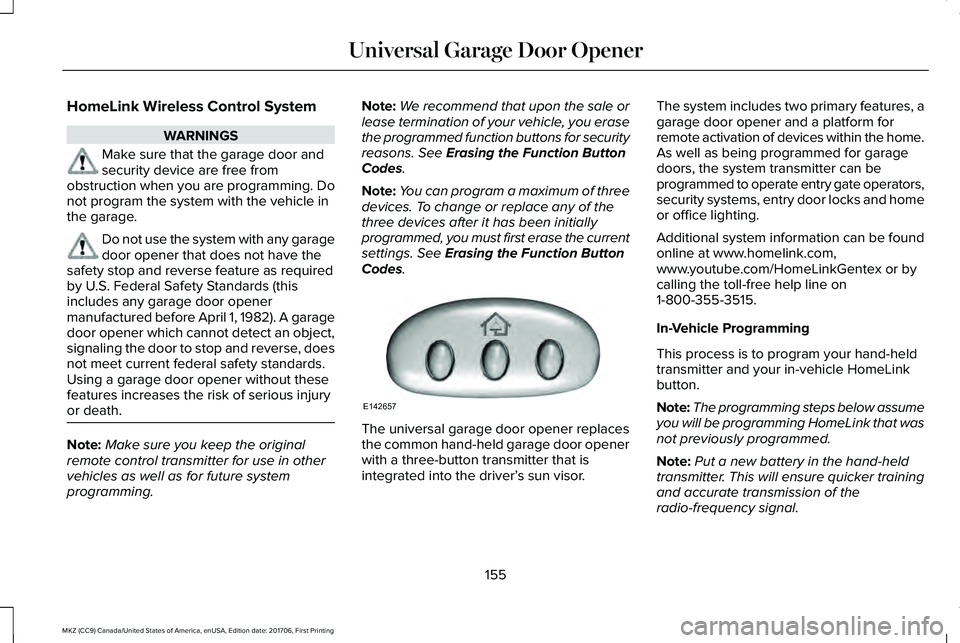
The universal garage door opener replacesthe common hand-held garage door openerwith a three-button transmitter that isintegrated into the driver’s sun visor.
The system includes two primary features, agarage door opener and a platform forremote activation of devices within the home.As well as being programmed for garagedoors, the system transmitter can beprogrammed to operate entry gate operators,security systems, entry door locks and homeor office lighting.
Additional system information can be foundonline at www.homelink.com,www.youtube.com/HomeLinkGentex or bycalling the toll-free help line on1-800-355-3515.
In-Vehicle Programming
This process is to program your hand-heldtransmitter and your in-vehicle HomeLinkbutton.
Note:The programming steps below assumeyou will be programming HomeLink that wasnot previously programmed.
Note:Put a new battery in the hand-heldtransmitter. This will ensure quicker trainingand accurate transmission of theradio-frequency signal.
155
MKZ (CC9) Canada/United States of America, enUSA, Edition date: 201706, First Printing
Universal Garage Door OpenerE142657
Page 160 of 595
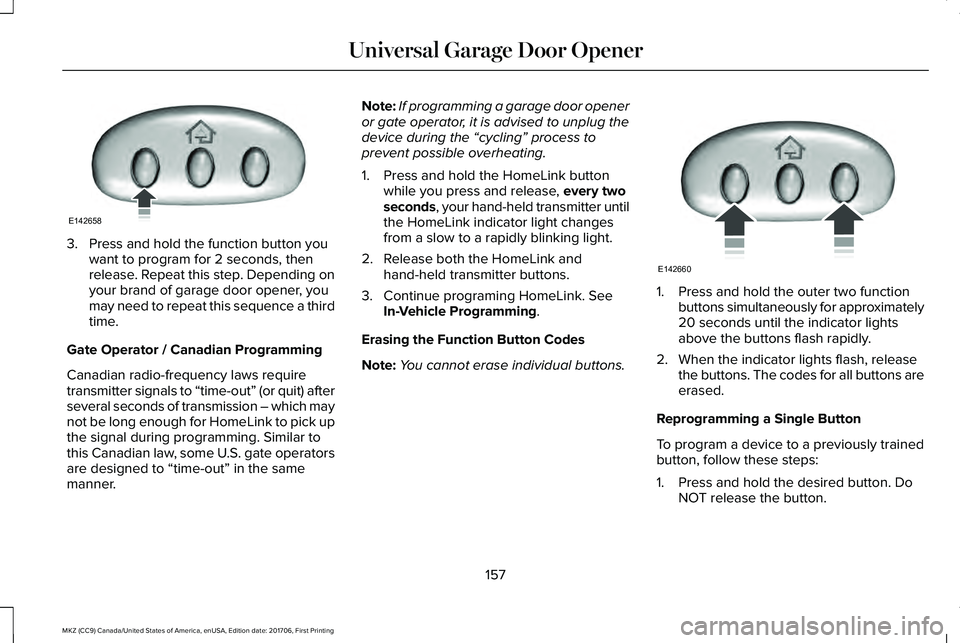
3. Press and hold the function button youwant to program for 2 seconds, thenrelease. Repeat this step. Depending onyour brand of garage door opener, youmay need to repeat this sequence a thirdtime.
Gate Operator / Canadian Programming
Canadian radio-frequency laws requiretransmitter signals to “time-out” (or quit) afterseveral seconds of transmission – which maynot be long enough for HomeLink to pick upthe signal during programming. Similar tothis Canadian law, some U.S. gate operatorsare designed to “time-out” in the samemanner.
Note:If programming a garage door openeror gate operator, it is advised to unplug thedevice during the “cycling” process toprevent possible overheating.
1. Press and hold the HomeLink buttonwhile you press and release, every twoseconds, your hand-held transmitter untilthe HomeLink indicator light changesfrom a slow to a rapidly blinking light.
2. Release both the HomeLink andhand-held transmitter buttons.
3. Continue programing HomeLink. SeeIn-Vehicle Programming.
Erasing the Function Button Codes
Note:You cannot erase individual buttons.
1. Press and hold the outer two functionbuttons simultaneously for approximately20 seconds until the indicator lightsabove the buttons flash rapidly.
2. When the indicator lights flash, releasethe buttons. The codes for all buttons areerased.
Reprogramming a Single Button
To program a device to a previously trainedbutton, follow these steps:
1. Press and hold the desired button. DoNOT release the button.
157
MKZ (CC9) Canada/United States of America, enUSA, Edition date: 201706, First Printing
Universal Garage Door OpenerE142658 E142660
Page 167 of 595
The keyless starting system has threemodes:
•Off: Turns the ignition off.
•Without applying the brake pedal,press and release the button oncewhen the ignition is in the on mode,or when the vehicle is running but isnot moving.
•On: All electrical circuits are operationaland the warning lamps and indicatorsilluminate.
•Without applying the brake pedal,press and release the button once.
•Start: Starts the vehicle. The engine maynot start when the vehicle starts.
•Press the brake pedal, and then pressthe button until the vehicle starts. Anindicator light on the buttonilluminates when the ignition is onand when the vehicle starts.
STARTING A GASOLINE ENGINE
When you start the engine, the idle speedincreases, this helps to warm up the engine.If the engine idle speed does not slow downautomatically, have your vehicle checked byan authorized dealer.
Before starting the engine, check thefollowing:
•Make sure all occupants have fastenedtheir safety belts.
•Make sure the headlamps and electricalaccessories are off.
•Make sure the parking brake is on.
•Put the transmission in P.
Note:Do not touch the accelerator pedal.
1. Fully press the brake pedal.
2. Press the button.
The system does not function if:
•The key frequencies are jammed.
•The key battery has no charge.
If you are unable to start the engine, do thefollowing:
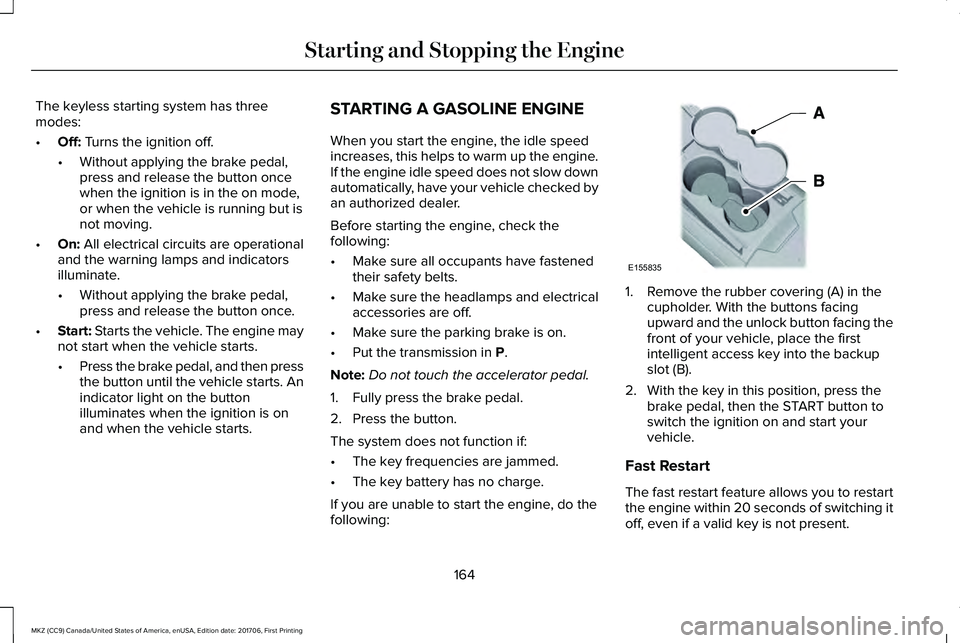
1. Remove the rubber covering (A) in thecupholder. With the buttons facingupward and the unlock button facing thefront of your vehicle, place the firstintelligent access key into the backupslot (B).
2. With the key in this position, press thebrake pedal, then the START button toswitch the ignition on and start yourvehicle.
Fast Restart
The fast restart feature allows you to restartthe engine within 20 seconds of switching itoff, even if a valid key is not present.
164
MKZ (CC9) Canada/United States of America, enUSA, Edition date: 201706, First Printing
Starting and Stopping the EngineE155835