ECU LINCOLN MKZ 2018 Owner's Manual
[x] Cancel search | Manufacturer: LINCOLN, Model Year: 2018, Model line: MKZ, Model: LINCOLN MKZ 2018Pages: 595, PDF Size: 5.06 MB
Page 127 of 595
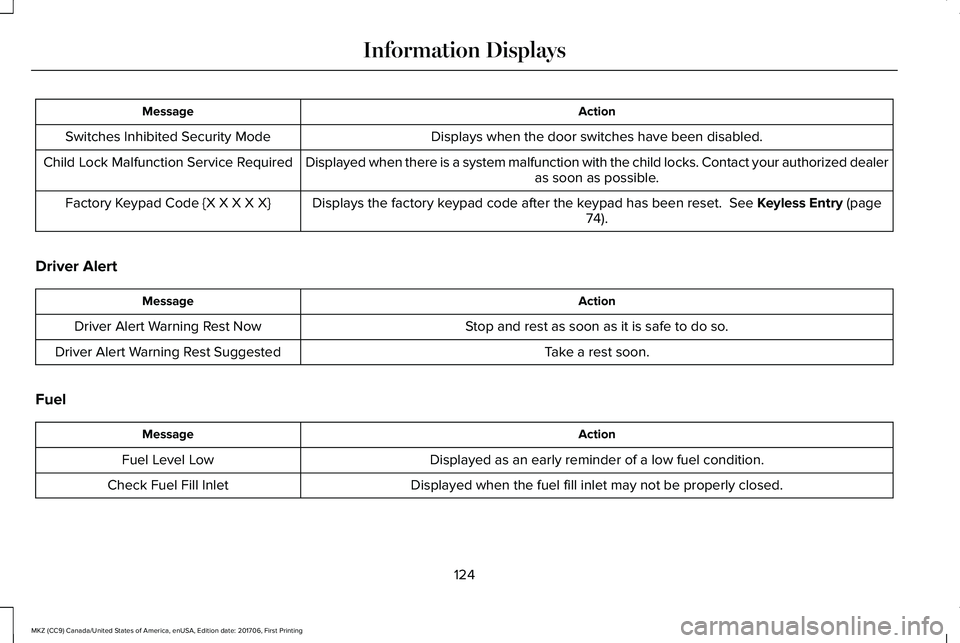
ActionMessage
Displays when the door switches have been disabled.Switches Inhibited Security Mode
Displayed when there is a system malfunction with the child locks. Contact your authorized dealeras soon as possible.Child Lock Malfunction Service Required
Displays the factory keypad code after the keypad has been reset. See Keyless Entry (page74).Factory Keypad Code {X X X X X}
Driver Alert
ActionMessage
Stop and rest as soon as it is safe to do so.Driver Alert Warning Rest Now
Take a rest soon.Driver Alert Warning Rest Suggested
Fuel
ActionMessage
Displayed as an early reminder of a low fuel condition.Fuel Level Low
Displayed when the fuel fill inlet may not be properly closed.Check Fuel Fill Inlet
124
MKZ (CC9) Canada/United States of America, enUSA, Edition date: 201706, First Printing
Information Displays
Page 138 of 595
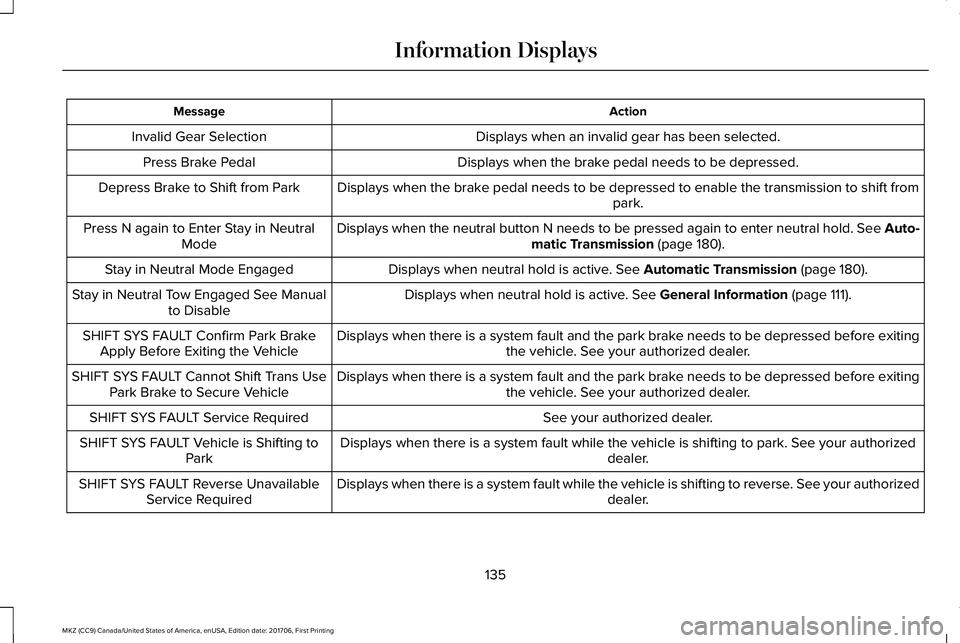
ActionMessage
Displays when an invalid gear has been selected.Invalid Gear Selection
Displays when the brake pedal needs to be depressed.Press Brake Pedal
Displays when the brake pedal needs to be depressed to enable the transmission to shift frompark.Depress Brake to Shift from Park
Displays when the neutral button N needs to be pressed again to enter neutral hold. See Auto-matic Transmission (page 180).Press N again to Enter Stay in NeutralMode
Displays when neutral hold is active. See Automatic Transmission (page 180).Stay in Neutral Mode Engaged
Displays when neutral hold is active. See General Information (page 111).Stay in Neutral Tow Engaged See Manualto Disable
Displays when there is a system fault and the park brake needs to be depressed before exitingthe vehicle. See your authorized dealer.SHIFT SYS FAULT Confirm Park BrakeApply Before Exiting the Vehicle
Displays when there is a system fault and the park brake needs to be depressed before exitingthe vehicle. See your authorized dealer.SHIFT SYS FAULT Cannot Shift Trans UsePark Brake to Secure Vehicle
See your authorized dealer.SHIFT SYS FAULT Service Required
Displays when there is a system fault while the vehicle is shifting to park. See your authorizeddealer.SHIFT SYS FAULT Vehicle is Shifting toPark
Displays when there is a system fault while the vehicle is shifting to reverse. See your authorizeddealer.SHIFT SYS FAULT Reverse UnavailableService Required
135
MKZ (CC9) Canada/United States of America, enUSA, Edition date: 201706, First Printing
Information Displays
Page 157 of 595
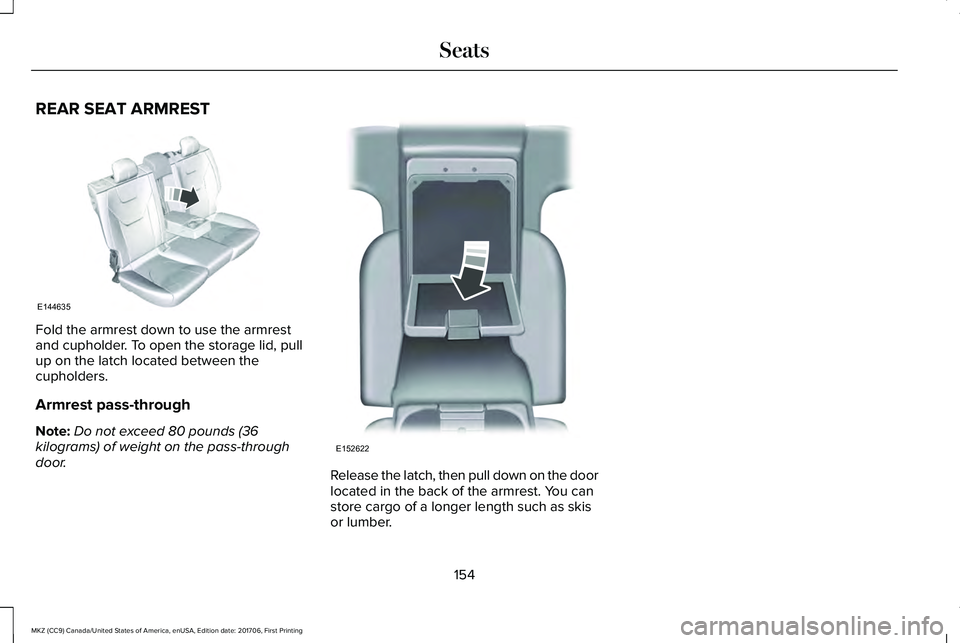
REAR SEAT ARMREST
Fold the armrest down to use the armrestand cupholder. To open the storage lid, pullup on the latch located between thecupholders.
Armrest pass-through
Note:Do not exceed 80 pounds (36kilograms) of weight on the pass-throughdoor.Release the latch, then pull down on the doorlocated in the back of the armrest. You canstore cargo of a longer length such as skisor lumber.
154
MKZ (CC9) Canada/United States of America, enUSA, Edition date: 201706, First Printing
SeatsE144635 E152622
Page 158 of 595
HomeLink Wireless Control System
WARNINGS
Make sure that the garage door andsecurity device are free fromobstruction when you are programming. Donot program the system with the vehicle inthe garage.
Do not use the system with any garagedoor opener that does not have thesafety stop and reverse feature as requiredby U.S. Federal Safety Standards (thisincludes any garage door openermanufactured before April 1, 1982). A garagedoor opener which cannot detect an object,signaling the door to stop and reverse, doesnot meet current federal safety standards.Using a garage door opener without thesefeatures increases the risk of serious injuryor death.
Note:Make sure you keep the originalremote control transmitter for use in othervehicles as well as for future systemprogramming.
Note:We recommend that upon the sale orlease termination of your vehicle, you erasethe programmed function buttons for securityreasons. See Erasing the Function ButtonCodes.
Note:You can program a maximum of threedevices. To change or replace any of thethree devices after it has been initiallyprogrammed, you must first erase the currentsettings. See Erasing the Function ButtonCodes.
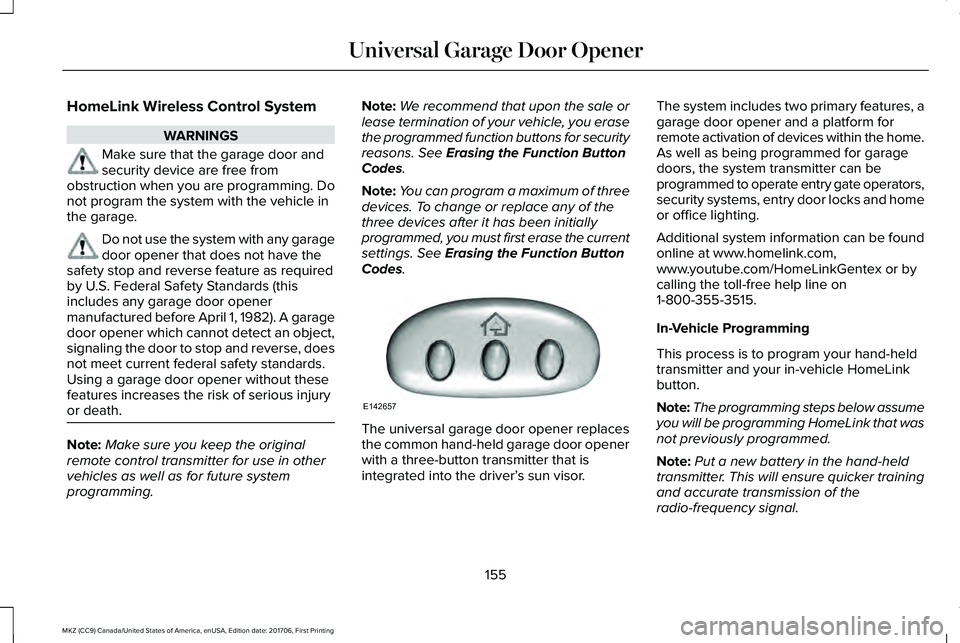
The universal garage door opener replacesthe common hand-held garage door openerwith a three-button transmitter that isintegrated into the driver’s sun visor.
The system includes two primary features, agarage door opener and a platform forremote activation of devices within the home.As well as being programmed for garagedoors, the system transmitter can beprogrammed to operate entry gate operators,security systems, entry door locks and homeor office lighting.
Additional system information can be foundonline at www.homelink.com,www.youtube.com/HomeLinkGentex or bycalling the toll-free help line on1-800-355-3515.
In-Vehicle Programming
This process is to program your hand-heldtransmitter and your in-vehicle HomeLinkbutton.
Note:The programming steps below assumeyou will be programming HomeLink that wasnot previously programmed.
Note:Put a new battery in the hand-heldtransmitter. This will ensure quicker trainingand accurate transmission of theradio-frequency signal.
155
MKZ (CC9) Canada/United States of America, enUSA, Edition date: 201706, First Printing
Universal Garage Door OpenerE142657
Page 167 of 595
The keyless starting system has threemodes:
•Off: Turns the ignition off.
•Without applying the brake pedal,press and release the button oncewhen the ignition is in the on mode,or when the vehicle is running but isnot moving.
•On: All electrical circuits are operationaland the warning lamps and indicatorsilluminate.
•Without applying the brake pedal,press and release the button once.
•Start: Starts the vehicle. The engine maynot start when the vehicle starts.
•Press the brake pedal, and then pressthe button until the vehicle starts. Anindicator light on the buttonilluminates when the ignition is onand when the vehicle starts.
STARTING A GASOLINE ENGINE
When you start the engine, the idle speedincreases, this helps to warm up the engine.If the engine idle speed does not slow downautomatically, have your vehicle checked byan authorized dealer.
Before starting the engine, check thefollowing:
•Make sure all occupants have fastenedtheir safety belts.
•Make sure the headlamps and electricalaccessories are off.
•Make sure the parking brake is on.
•Put the transmission in P.
Note:Do not touch the accelerator pedal.
1. Fully press the brake pedal.
2. Press the button.
The system does not function if:
•The key frequencies are jammed.
•The key battery has no charge.
If you are unable to start the engine, do thefollowing:
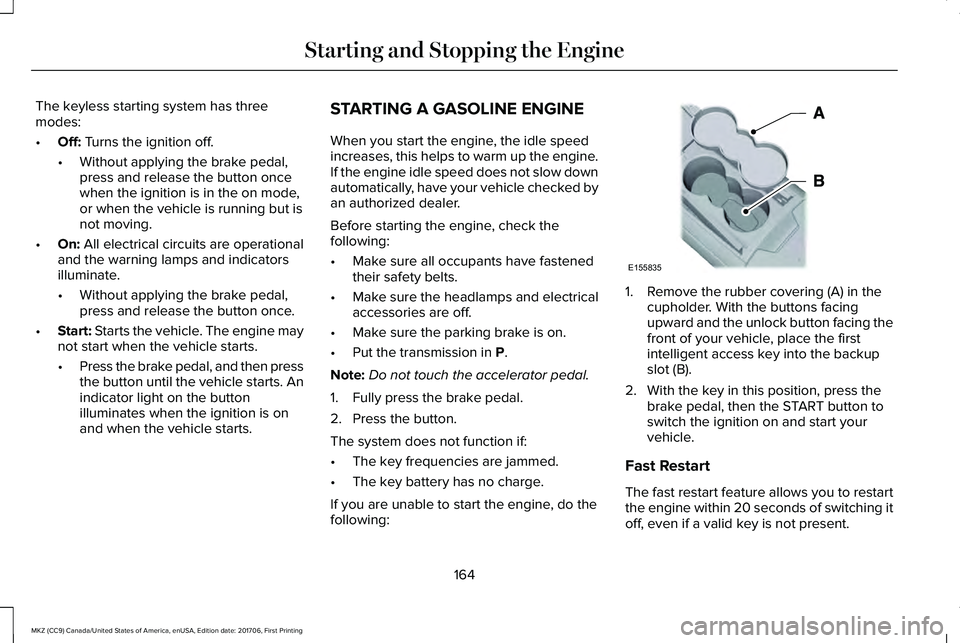
1. Remove the rubber covering (A) in thecupholder. With the buttons facingupward and the unlock button facing thefront of your vehicle, place the firstintelligent access key into the backupslot (B).
2. With the key in this position, press thebrake pedal, then the START button toswitch the ignition on and start yourvehicle.
Fast Restart
The fast restart feature allows you to restartthe engine within 20 seconds of switching itoff, even if a valid key is not present.
164
MKZ (CC9) Canada/United States of America, enUSA, Edition date: 201706, First Printing
Starting and Stopping the EngineE155835
Page 219 of 595
The system determines the clearance to thefront and rear of your vehicle andautomatically steers your vehicle out of aparallel parking space (hands-free) while youcontrol the accelerator, gearshift and brakes.The system visually and audibly guides youto enter traffic.
After the system directs your vehicle pastthe adjacent vehicle or object, it guides youto take control of the steering to completethe exit out of the parking space.
Note:If the clearance in front of your vehicleallows easy departure, the Parallel Park OutAssist feature may not be available.
Note:You are responsible for controllingyour vehicle and making sure the path isclear prior to pulling into traffic.
Note:Do not use this system to assist inexiting perpendicular parking spaces.Damages to your vehicle may occur.
Note:If your vehicle speed exceedsapproximately 3 mph (5 km/h) or youinterrupt the maneuver, the system switchesoff and you need to take full control of yourvehicle.
Deactivating the Active Park AssistFeature
You can manually deactivate the system by:
•Pressing the Active Park Assist buttonduring an active maneuver.
•Grabbing the steering wheel during anactive maneuver.
•Driving above approximately 22 mph(35 km/h) for 30 seconds while searchingfor a parking space.
•Driving above approximately 6 mph(10 km/h) during an active maneuver.
•Switching the traction control system off.
Certain vehicle conditions may alsodeactivate the system, for example:
•The traction control system activates.
•There is an anti-lock brake systemactivation or failure.
If a problem occurs with the system, awarning message displays accompanied bya tone. Occasional system messages mayoccur in normal operation. For recurring orfrequent system faults, contact an authorizeddealer.
216
MKZ (CC9) Canada/United States of America, enUSA, Edition date: 201706, First Printing
Parking Aids
Page 267 of 595
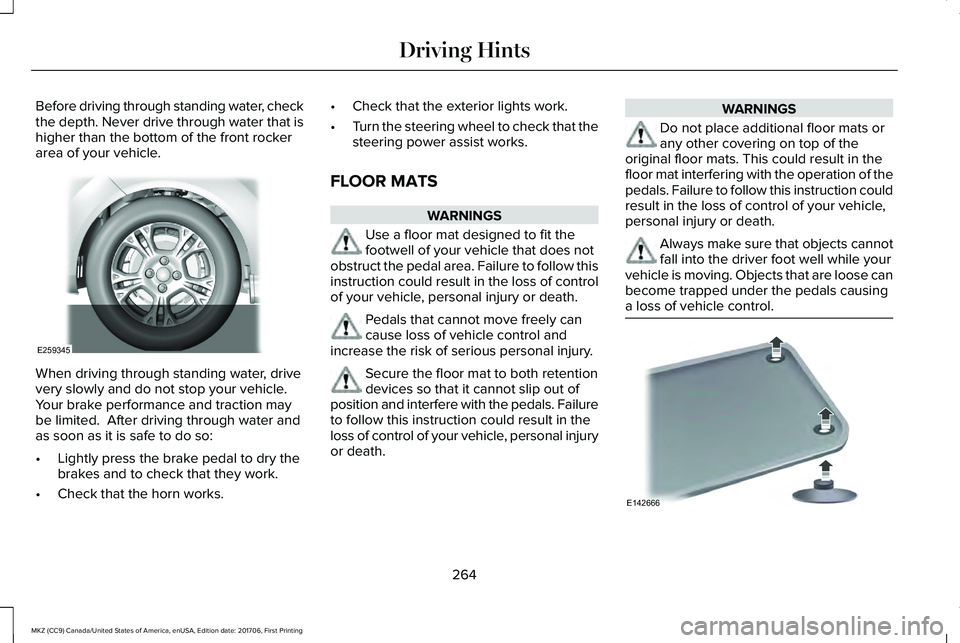
Before driving through standing water, checkthe depth. Never drive through water that ishigher than the bottom of the front rockerarea of your vehicle.
When driving through standing water, drivevery slowly and do not stop your vehicle. Your brake performance and traction maybe limited. After driving through water andas soon as it is safe to do so:
•Lightly press the brake pedal to dry thebrakes and to check that they work.
•Check that the horn works.
•Check that the exterior lights work.
•Turn the steering wheel to check that thesteering power assist works.
FLOOR MATS
WARNINGS
Use a floor mat designed to fit thefootwell of your vehicle that does notobstruct the pedal area. Failure to follow thisinstruction could result in the loss of controlof your vehicle, personal injury or death.
Pedals that cannot move freely cancause loss of vehicle control andincrease the risk of serious personal injury.
Secure the floor mat to both retentiondevices so that it cannot slip out ofposition and interfere with the pedals. Failureto follow this instruction could result in theloss of control of your vehicle, personal injuryor death.
WARNINGS
Do not place additional floor mats orany other covering on top of theoriginal floor mats. This could result in thefloor mat interfering with the operation of thepedals. Failure to follow this instruction couldresult in the loss of control of your vehicle,personal injury or death.
Always make sure that objects cannotfall into the driver foot well while yourvehicle is moving. Objects that are loose canbecome trapped under the pedals causinga loss of vehicle control.
264
MKZ (CC9) Canada/United States of America, enUSA, Edition date: 201706, First Printing
Driving HintsE259345 E142666
Page 268 of 595
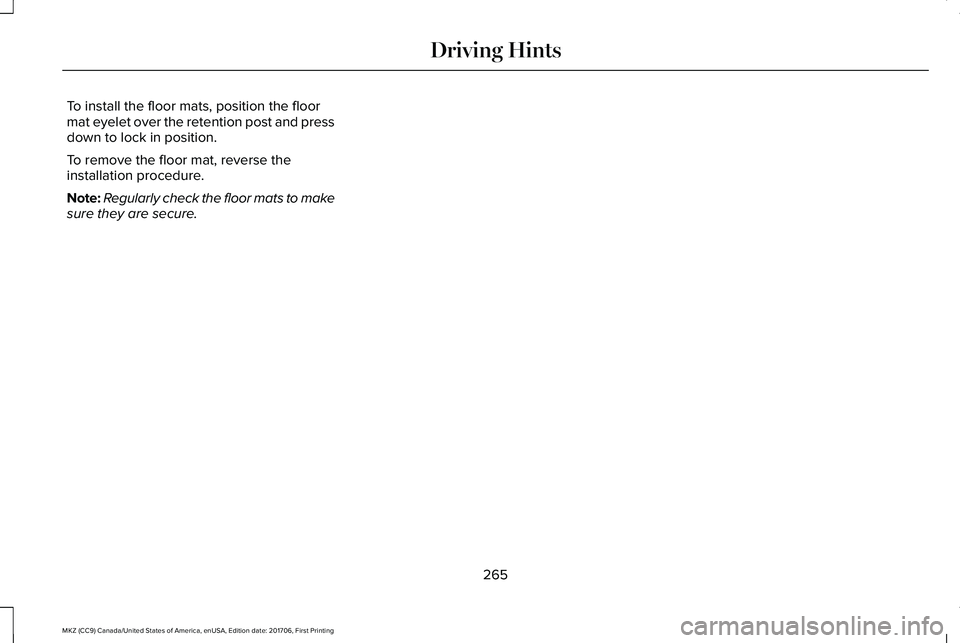
To install the floor mats, position the floormat eyelet over the retention post and pressdown to lock in position.
To remove the floor mat, reverse theinstallation procedure.
Note:Regularly check the floor mats to makesure they are secure.
265
MKZ (CC9) Canada/United States of America, enUSA, Edition date: 201706, First Printing
Driving Hints
Page 279 of 595
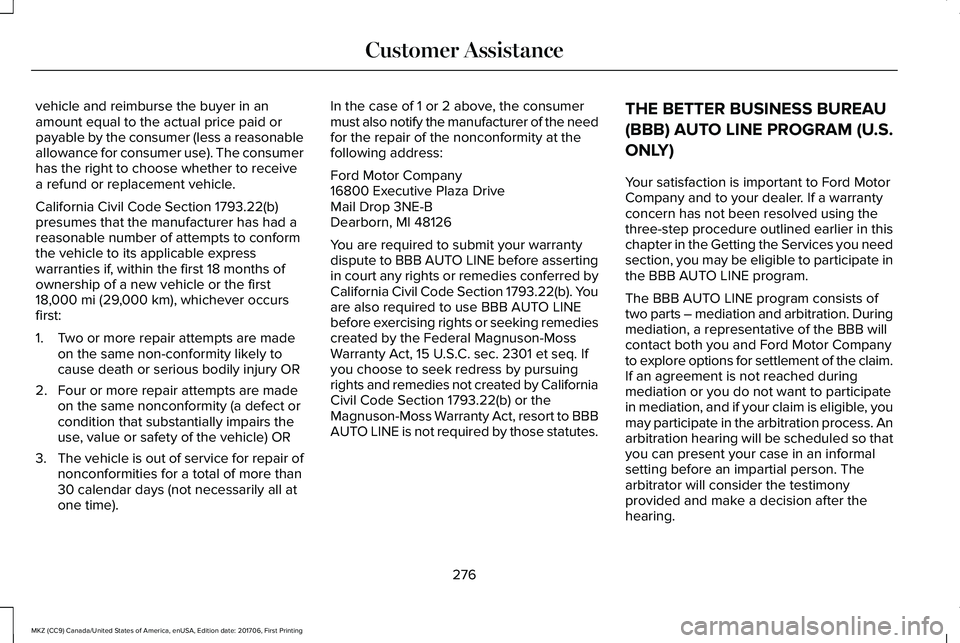
vehicle and reimburse the buyer in anamount equal to the actual price paid orpayable by the consumer (less a reasonableallowance for consumer use). The consumerhas the right to choose whether to receivea refund or replacement vehicle.
California Civil Code Section 1793.22(b)presumes that the manufacturer has had areasonable number of attempts to conformthe vehicle to its applicable expresswarranties if, within the first 18 months ofownership of a new vehicle or the first18,000 mi (29,000 km), whichever occursfirst:
1. Two or more repair attempts are madeon the same non-conformity likely tocause death or serious bodily injury OR
2. Four or more repair attempts are madeon the same nonconformity (a defect orcondition that substantially impairs theuse, value or safety of the vehicle) OR
3.The vehicle is out of service for repair ofnonconformities for a total of more than30 calendar days (not necessarily all atone time).
In the case of 1 or 2 above, the consumermust also notify the manufacturer of the needfor the repair of the nonconformity at thefollowing address:
Ford Motor Company16800 Executive Plaza DriveMail Drop 3NE-BDearborn, MI 48126
You are required to submit your warrantydispute to BBB AUTO LINE before assertingin court any rights or remedies conferred byCalifornia Civil Code Section 1793.22(b). Youare also required to use BBB AUTO LINEbefore exercising rights or seeking remediescreated by the Federal Magnuson-MossWarranty Act, 15 U.S.C. sec. 2301 et seq. Ifyou choose to seek redress by pursuingrights and remedies not created by CaliforniaCivil Code Section 1793.22(b) or theMagnuson-Moss Warranty Act, resort to BBBAUTO LINE is not required by those statutes.
THE BETTER BUSINESS BUREAU
(BBB) AUTO LINE PROGRAM (U.S.
ONLY)
Your satisfaction is important to Ford MotorCompany and to your dealer. If a warrantyconcern has not been resolved using thethree-step procedure outlined earlier in thischapter in the Getting the Services you needsection, you may be eligible to participate inthe BBB AUTO LINE program.
The BBB AUTO LINE program consists oftwo parts – mediation and arbitration. Duringmediation, a representative of the BBB willcontact both you and Ford Motor Companyto explore options for settlement of the claim.If an agreement is not reached duringmediation or you do not want to participatein mediation, and if your claim is eligible, youmay participate in the arbitration process. Anarbitration hearing will be scheduled so thatyou can present your case in an informalsetting before an impartial person. Thearbitrator will consider the testimonyprovided and make a decision after thehearing.
276
MKZ (CC9) Canada/United States of America, enUSA, Edition date: 201706, First Printing
Customer Assistance
Page 282 of 595
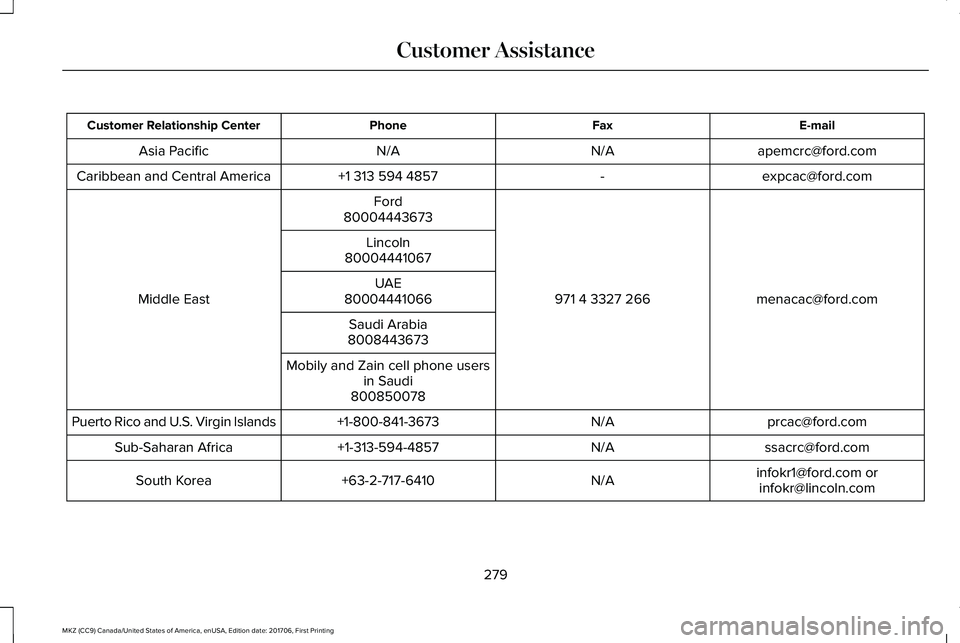
E-mailFaxPhoneCustomer Relationship Center
[email protected]/AN/AAsia Pacific
[email protected]+1 313 594 4857Caribbean and Central America
[email protected] 4 3327 266
Ford
Middle East
80004443673
Lincoln80004441067
UAE80004441066
Saudi Arabia8008443673
Mobily and Zain cell phone usersin Saudi800850078
[email protected]/A+1-800-841-3673Puerto Rico and U.S. Virgin Islands
[email protected]/A+1-313-594-4857Sub-Saharan Africa
[email protected] [email protected]/A+63-2-717-6410South Korea
279
MKZ (CC9) Canada/United States of America, enUSA, Edition date: 201706, First Printing
Customer Assistance