change wheel LINCOLN MKZ 2018 Owner's Manual
[x] Cancel search | Manufacturer: LINCOLN, Model Year: 2018, Model line: MKZ, Model: LINCOLN MKZ 2018Pages: 595, PDF Size: 5.06 MB
Page 355 of 595
that meets the door-latch post, next tothe driver's seating position), or TireLabel which is located on the B-Pillar orthe edge of the driver’s door. The coldinflation pressure should never be setlower than the recommended pressureon the Safety Compliance CertificationLabel or Tire Label.
When weather temperature changesoccur, tire inflation pressures alsochange. A 10°F (6°C) temperature dropcan cause a corresponding drop of 1 psi(0.07 bar) in inflation pressure. Checkyour tire pressures frequently and adjustthem to the proper pressure which canbe found on the Safety ComplianceCertification Label or Tire Label.
To check the pressure in your tire(s):
1. Make sure the tires are cool,meaning they are not hot fromdriving even a mile.
Note:If you are checking tire pressurewhen the tire is hot, (for example drivenmore than 1.0 mi (1.6 km), never bleedor reduce air pressure. The tires are hotfrom driving and it is normal forpressures to increase aboverecommended cold pressures. A hot tireat or below recommended cold inflationpressure could be significantlyunder-inflated.
Note:If you have to drive a distance toget air for your tire(s), check and recordthe tire pressure first and add theappropriate air pressure when you getto the pump. It is normal for tires to heatup and the air pressure inside to go upas you drive.
2.Remove the cap from the valve on
one tire, then firmly press the tiregauge onto the valve and measurethe pressure.
3. Add enough air to reach therecommended air pressure.
Note:If you overfill the tire, release airby pressing on the metal stem in thecenter of the valve. Then recheck thepressure with your tire gauge.
4. Replace the valve cap.
5.Repeat this procedure for each tire,including the spare.
Note:Some spare tires operate at ahigher inflation pressure than the othertires. For T type mini-spare tires, see theDissimilar spare wheel and tireassembly information for a description.Store and maintain at 60 psi (4.15 bar).For full-size and dissimilar spare tires,see the Dissimilar spare wheel and tireassembly information for a description.Store and maintain at the higher of thefront and rear inflation pressure as
shown on the Tire Label.
6.Visually inspect the tires to makesure there are no nails or otherobjects embedded that could pokea hole in the tire and cause an airleak.
352
MKZ (CC9) Canada/United States of America, enUSA, Edition date: 201706, First Printing
Wheels and Tires
Page 363 of 595
functioning properly. Always check the TPMSmalfunction telltale after replacing one ormore tires or wheels on your vehicle toensure that the replacement or alternate tiresand wheels allow the TPMS to continue tofunction properly.
This device complies with Part 15 of the FCCRules and with License exempt RSSStandards of Industry Canada. Operation issubject to the following two conditions:
1. This device may not cause harmfulinterference, and
2.This device must accept any interferencereceived, including interference that maycause undesired operation.
Note:Changes or modifications notexpressively approved by the partyresponsible for compliance could void theuser's authority to operate the equipment.The term "IC:" before the radio certificationnumber only signifies that Industry Canadatechnical specifications were met.
Changing Tires With a Tire PressureMonitoring System
Note:Each road tire is equipped with a tirepressure sensor located inside the wheeland tire assembly cavity. The pressuresensor is attached to the valve stem. Thepressure sensor is covered by the tire andis not visible unless the tire is removed. Takecare when changing the tire to avoiddamaging the sensor.
You should always have your tires servicedby an authorized dealer.
Check the tire pressure periodically (at leastmonthly) using an accurate tire gauge. SeeWhen Inflating Your Tires in this chapter.
Understanding Your Tire PressureMonitoring System
The tire pressure monitoring systemmeasures pressure in your road tires andsends the tire pressure readings to yourvehicle. You can view the tire pressurereadings through the information display.See General Information (page 111). The lowtire pressure warning light will turn on if thetire pressure is significantly low. Once the
360
MKZ (CC9) Canada/United States of America, enUSA, Edition date: 201706, First Printing
Wheels and TiresE142549 E250820
Page 368 of 595
•Use commercial car washing equipment.
•Use snow chains on the end of thevehicle with the dissimilar spare wheeland tire assembly.
Use of the above dissimilar spare wheel atany one wheel location can lead toimpairment of the following:
•Handling, stability and brakingperformance.
•Comfort and noise.
•Ground clearance and parking at curbs.
•Winter weather driving capability.
•Wet weather driving capability.
•All-wheel driving capability.
Give additional caution to the following whendriving with the full-size dissimilar sparewheel and tire assembly:
•Towing a trailer.
•Driving vehicles equipped with a camperbody.
•Driving vehicles with a load on the cargorack.
Drive cautiously when using a full-sizedissimilar spare wheel and tire assembly andseek service as soon as possible.
Changing a Road Wheel Procedure
WARNINGS
When one of the front wheels is off theground, the transmission alone will notprevent the vehicle from moving or slippingoff the jack, even if the transmission is in park(P).
To help prevent your vehicle frommoving when changing a wheel, shiftthe transmission into park (P), set the parkingbrake and use an appropriate block or wheelchock to secure the wheel diagonallyopposite to the wheel being changed. Forexample, when changing the front left wheel,place an appropriate block or wheel chockon the right rear wheel.
Do not work on your vehicle when thejack is the only support. If the vehicleslips off the jack, you or someone else couldbe seriously injured.
WARNINGS
Do not attempt to change a tire on theside of the vehicle close to movingtraffic. Pull far enough off the road to avoidthe danger of being hit when operating thejack or changing the wheel.
Always use the jack provided asoriginal equipment with your vehicle.If using a jack other than the one provided,make sure the jack capacity is adequate forthe vehicle weight, including any vehiclecargo or modifications. If you are unsure ifthe jack capacity is adequate, contact theauthorized dealer.
Note:Passengers should not remain in yourvehicle when the vehicle is being jacked.
1. Park on a level surface, set the parkingbrake and activate the hazard flashers.
2. Place the transmission in park (P) andturn the engine off. For vehicles with amanual transmission, place thetransmission in reverse (R) after theengine is turned off.
365
MKZ (CC9) Canada/United States of America, enUSA, Edition date: 201706, First Printing
Wheels and Tires
Page 518 of 595
Maintenance Intervals
At Every Oil Change Interval as Indicated by the Information Display1
Change engine oil and filter.2
Rotate the tires.
Perform a multi-point inspection (recommended).
Inspect the automatic transmission fluid level. Consult your dealer for requirements.
Inspect the brake pads, rotors, hoses and parking brake.
Inspect the engine cooling system strength and hoses.
Inspect the exhaust system and heat shields.
Inspect the rear axle and U-joints (All-Wheel Drive only).
Inspect the half-shaft boots.
Inspect the steering linkage, ball joints, suspension, tie-rod ends, driveshaft and U-joints.
Inspect the tires, tire wear and measure the tread depth.
Inspect the wheels and related components for abnormal noise, wear, looseness or drag.
1 Do not exceed one year or 10,000 mi (16,000 km) between service intervals.2 Reset the Intelligent Oil-Life Monitor after engine oil and filter changes. See Oil Change Indicator Reset (page 309).
515
MKZ (CC9) Canada/United States of America, enUSA, Edition date: 201706, First Printing
Scheduled Maintenance
Page 519 of 595
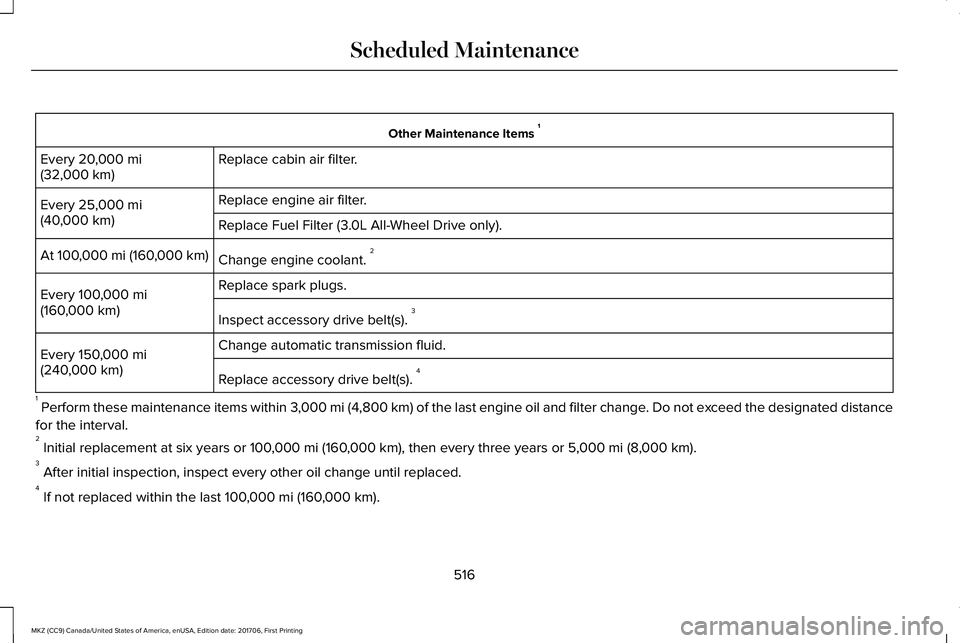
Other Maintenance Items 1
Replace cabin air filter.Every 20,000 mi(32,000 km)
Replace engine air filter.Every 25,000 mi(40,000 km)Replace Fuel Filter (3.0L All-Wheel Drive only).
Change engine coolant. 2At 100,000 mi (160,000 km)
Replace spark plugs.Every 100,000 mi(160,000 km)Inspect accessory drive belt(s). 3
Change automatic transmission fluid.Every 150,000 mi(240,000 km)Replace accessory drive belt(s). 4
1 Perform these maintenance items within 3,000 mi (4,800 km) of the last engine oil and filter change. Do not exceed the designated distance
for the interval.2 Initial replacement at six years or 100,000 mi (160,000 km), then every three years or 5,000 mi (8,000 km).3 After initial inspection, inspect every other oil change until replaced.4 If not replaced within the last 100,000 mi (160,000 km).
516
MKZ (CC9) Canada/United States of America, enUSA, Edition date: 201706, First Printing
Scheduled Maintenance
Page 522 of 595
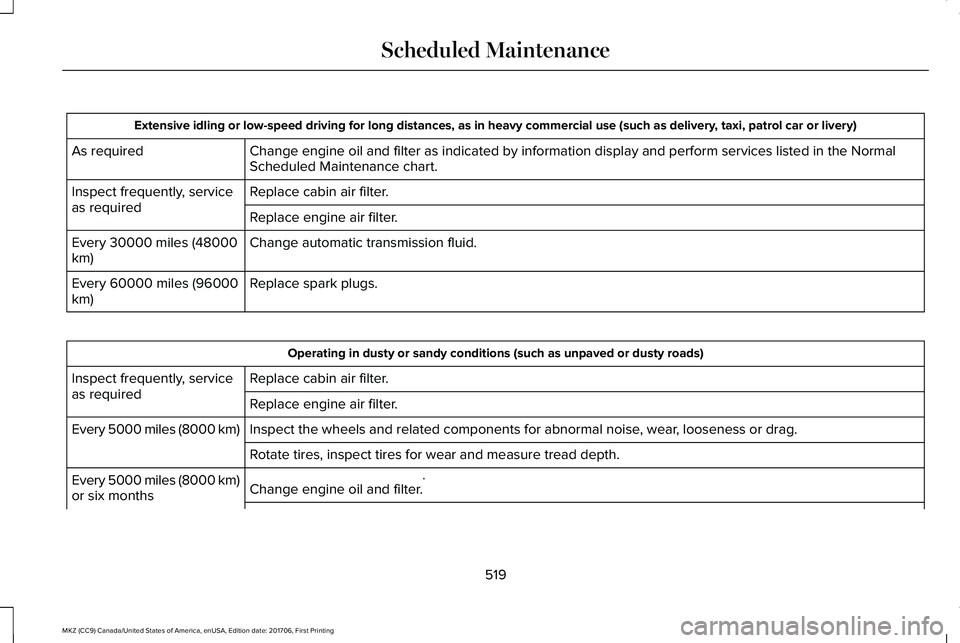
Extensive idling or low-speed driving for long distances, as in heavy commercial use (such as delivery, taxi, patrol car or livery)
Change engine oil and filter as indicated by information display and perform services listed in the NormalScheduled Maintenance chart.As required
Replace cabin air filter.Inspect frequently, serviceas requiredReplace engine air filter.
Change automatic transmission fluid.Every 30000 miles (48000km)
Replace spark plugs.Every 60000 miles (96000km)
Operating in dusty or sandy conditions (such as unpaved or dusty roads)
Replace cabin air filter.Inspect frequently, serviceas requiredReplace engine air filter.
Inspect the wheels and related components for abnormal noise, wear, looseness or drag.Every 5000 miles (8000 km)
Rotate tires, inspect tires for wear and measure tread depth.
Change engine oil and filter.*Every 5000 miles (8000 km)or six months
519
MKZ (CC9) Canada/United States of America, enUSA, Edition date: 201706, First Printing
Scheduled Maintenance
Page 586 of 595
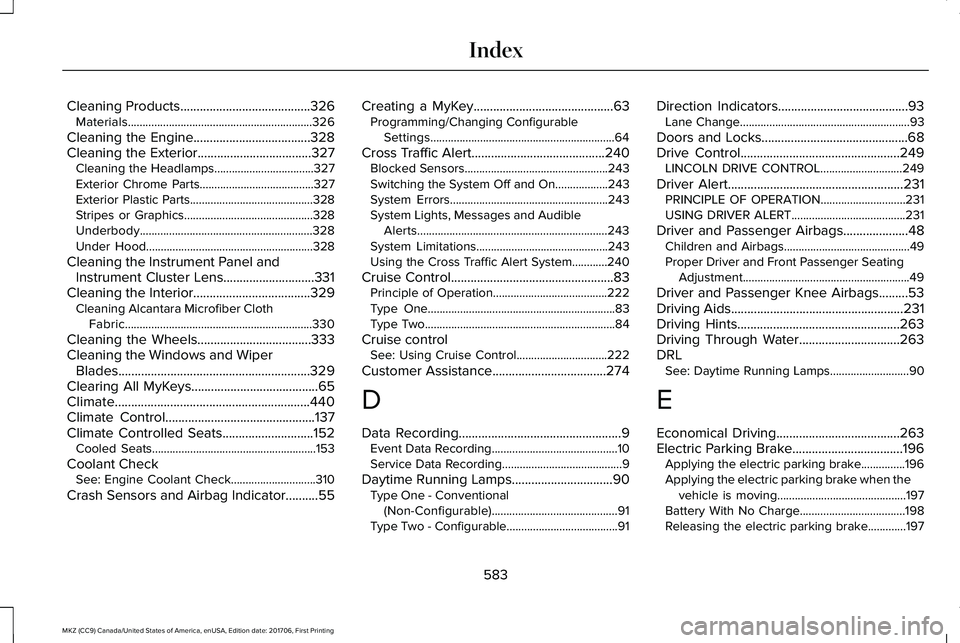
Cleaning Products........................................326Materials...............................................................326
Cleaning the Engine....................................328Cleaning the Exterior...................................327Cleaning the Headlamps..................................327Exterior Chrome Parts.......................................327Exterior Plastic Parts..........................................328Stripes or Graphics............................................328Underbody...........................................................328Under Hood.........................................................328
Cleaning the Instrument Panel andInstrument Cluster Lens............................331Cleaning the Interior....................................329Cleaning Alcantara Microfiber ClothFabric................................................................330
Cleaning the Wheels...................................333Cleaning the Windows and WiperBlades...........................................................329Clearing All MyKeys.......................................65Climate............................................................440Climate Control..............................................137Climate Controlled Seats............................152Cooled Seats........................................................153
Coolant CheckSee: Engine Coolant Check.............................310
Crash Sensors and Airbag Indicator..........55
Creating a MyKey...........................................63Programming/Changing ConfigurableSettings...............................................................64
Cross Traffic Alert.........................................240Blocked Sensors.................................................243Switching the System Off and On..................243System Errors......................................................243System Lights, Messages and AudibleAlerts.................................................................243System Limitations.............................................243Using the Cross Traffic Alert System............240
Cruise Control..................................................83Principle of Operation.......................................222Type One................................................................83Type Two.................................................................84
Cruise controlSee: Using Cruise Control...............................222
Customer Assistance...................................274
D
Data Recording..................................................9Event Data Recording...........................................10Service Data Recording.........................................9
Daytime Running Lamps...............................90Type One - Conventional(Non-Configurable)...........................................91Type Two - Configurable......................................91
Direction Indicators........................................93Lane Change..........................................................93
Doors and Locks.............................................68Drive Control.................................................249LINCOLN DRIVE CONTROL............................249
Driver Alert......................................................231PRINCIPLE OF OPERATION.............................231USING DRIVER ALERT.......................................231
Driver and Passenger Airbags....................48Children and Airbags...........................................49Proper Driver and Front Passenger SeatingAdjustment.........................................................49
Driver and Passenger Knee Airbags.........53Driving Aids.....................................................231Driving Hints..................................................263Driving Through Water...............................263DRLSee: Daytime Running Lamps...........................90
E
Economical Driving......................................263Electric Parking Brake..................................196Applying the electric parking brake...............196Applying the electric parking brake when thevehicle is moving............................................197Battery With No Charge....................................198Releasing the electric parking brake.............197
583
MKZ (CC9) Canada/United States of America, enUSA, Edition date: 201706, First Printing
Index
Page 590 of 595
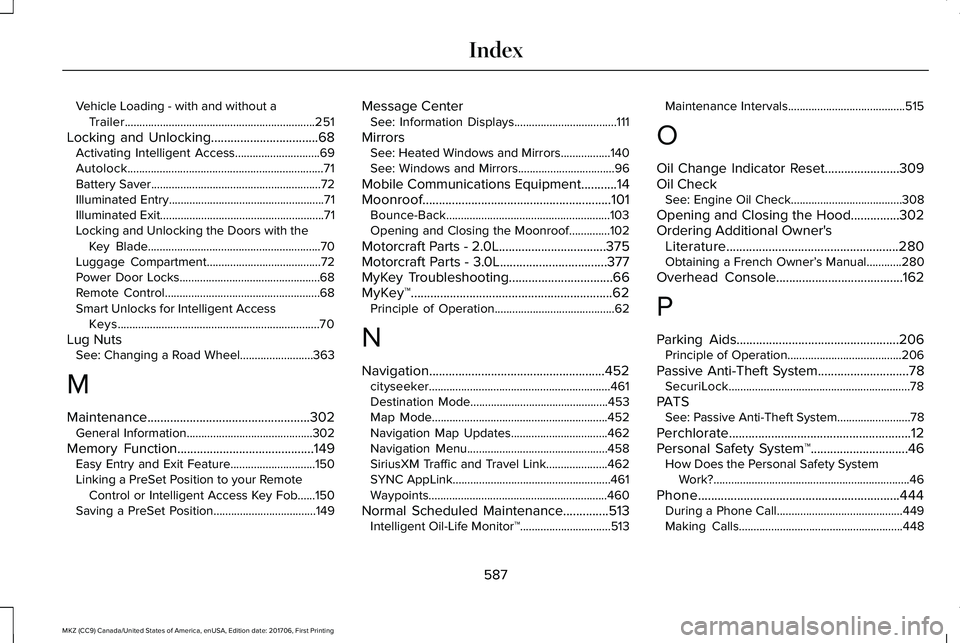
Vehicle Loading - with and without aTrailer.................................................................251
Locking and Unlocking.................................68Activating Intelligent Access.............................69Autolock...................................................................71Battery Saver..........................................................72Illuminated Entry.....................................................71Illuminated Exit........................................................71Locking and Unlocking the Doors with theKey Blade...........................................................70Luggage Compartment.......................................72Power Door Locks................................................68Remote Control.....................................................68Smart Unlocks for Intelligent AccessKeys.....................................................................70
Lug NutsSee: Changing a Road Wheel.........................363
M
Maintenance..................................................302General Information...........................................302
Memory Function..........................................149Easy Entry and Exit Feature.............................150Linking a PreSet Position to your RemoteControl or Intelligent Access Key Fob......150Saving a PreSet Position...................................149
Message CenterSee: Information Displays...................................111
MirrorsSee: Heated Windows and Mirrors.................140See: Windows and Mirrors.................................96
Mobile Communications Equipment...........14Moonroof..........................................................101Bounce-Back........................................................103Opening and Closing the Moonroof..............102
Motorcraft Parts - 2.0L.................................375Motorcraft Parts - 3.0L.................................377MyKey Troubleshooting................................66MyKey™..............................................................62Principle of Operation.........................................62
N
Navigation......................................................452cityseeker..............................................................461Destination Mode...............................................453Map Mode............................................................452Navigation Map Updates.................................462Navigation Menu................................................458SiriusXM Traffic and Travel Link.....................462SYNC AppLink......................................................461Waypoints.............................................................460
Normal Scheduled Maintenance..............513Intelligent Oil-Life Monitor™...............................513
Maintenance Intervals........................................515
O
Oil Change Indicator Reset.......................309Oil CheckSee: Engine Oil Check......................................308
Opening and Closing the Hood...............302Ordering Additional Owner'sLiterature.....................................................280Obtaining a French Owner’s Manual............280
Overhead Console.......................................162
P
Parking Aids..................................................206Principle of Operation.......................................206
Passive Anti-Theft System............................78SecuriLock..............................................................78
PATSSee: Passive Anti-Theft System.........................78
Perchlorate........................................................12Personal Safety System™..............................46How Does the Personal Safety SystemWork?...................................................................46
Phone..............................................................444During a Phone Call...........................................449Making Calls........................................................448
587
MKZ (CC9) Canada/United States of America, enUSA, Edition date: 201706, First Printing
Index