steering LINCOLN MKZ 2018 Manual PDF
[x] Cancel search | Manufacturer: LINCOLN, Model Year: 2018, Model line: MKZ, Model: LINCOLN MKZ 2018Pages: 595, PDF Size: 5.06 MB
Page 450 of 595
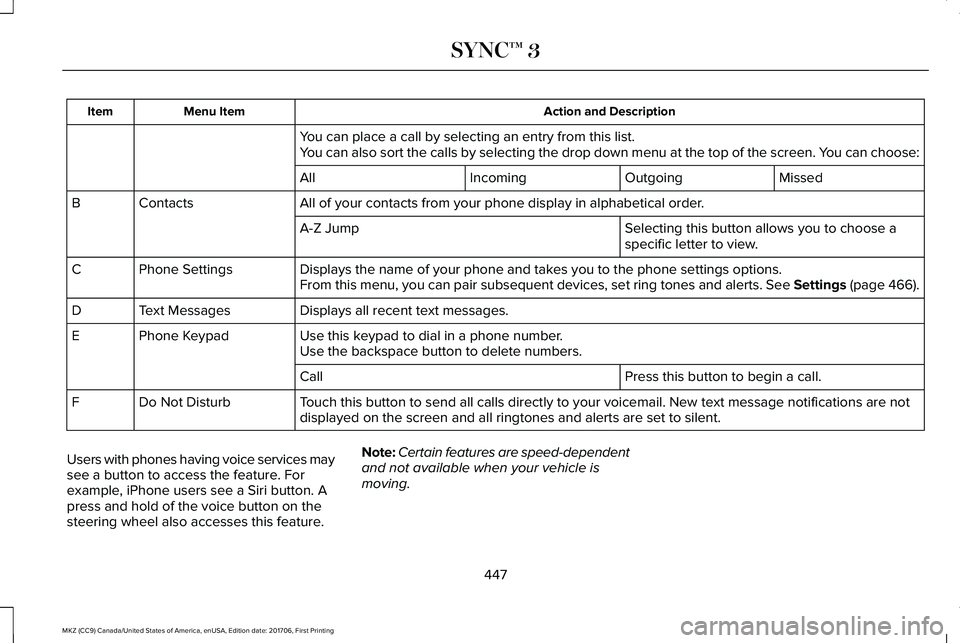
Action and DescriptionMenu ItemItem
You can place a call by selecting an entry from this list.You can also sort the calls by selecting the drop down menu at the top of the screen. You can choose:
MissedOutgoingIncomingAll
All of your contacts from your phone display in alphabetical order.ContactsB
Selecting this button allows you to choose aspecific letter to view.A-Z Jump
Displays the name of your phone and takes you to the phone settings options.Phone SettingsCFrom this menu, you can pair subsequent devices, set ring tones and alerts. See Settings (page 466).
Displays all recent text messages.Text MessagesD
Use this keypad to dial in a phone number.Phone KeypadEUse the backspace button to delete numbers.
Press this button to begin a call.Call
Touch this button to send all calls directly to your voicemail. New text message notifications are notdisplayed on the screen and all ringtones and alerts are set to silent.Do Not DisturbF
Users with phones having voice services maysee a button to access the feature. Forexample, iPhone users see a Siri button. Apress and hold of the voice button on thesteering wheel also accesses this feature.
Note:Certain features are speed-dependentand not available when your vehicle ismoving.
447
MKZ (CC9) Canada/United States of America, enUSA, Edition date: 201706, First Printing
SYNC™ 3
Page 452 of 595
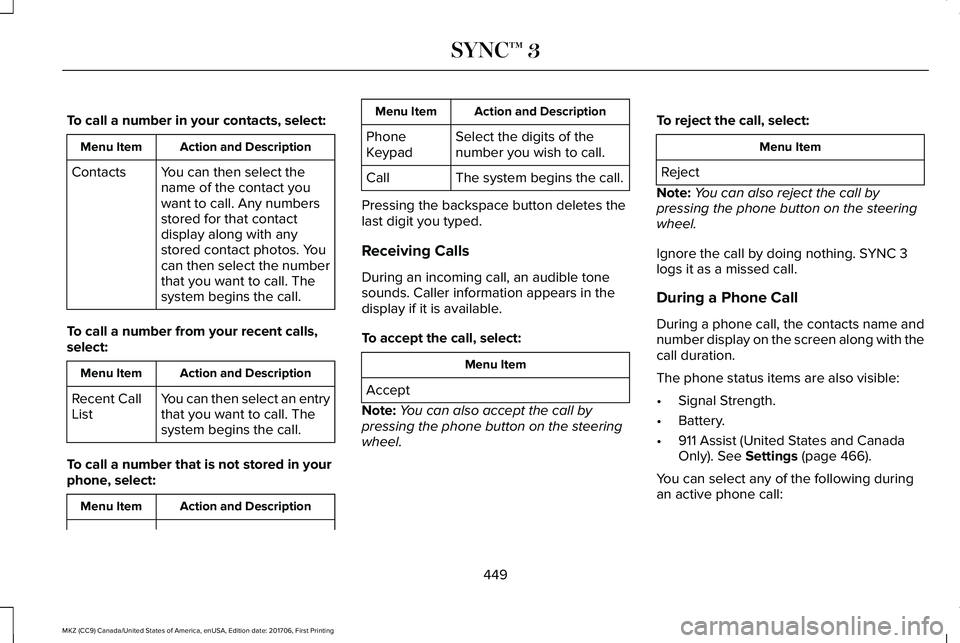
To call a number in your contacts, select:
Action and DescriptionMenu Item
You can then select thename of the contact youwant to call. Any numbersstored for that contactdisplay along with anystored contact photos. Youcan then select the numberthat you want to call. Thesystem begins the call.
Contacts
To call a number from your recent calls,select:
Action and DescriptionMenu Item
You can then select an entrythat you want to call. Thesystem begins the call.
Recent CallList
To call a number that is not stored in yourphone, select:
Action and DescriptionMenu Item
Action and DescriptionMenu Item
Select the digits of thenumber you wish to call.PhoneKeypad
The system begins the call.Call
Pressing the backspace button deletes thelast digit you typed.
Receiving Calls
During an incoming call, an audible tonesounds. Caller information appears in thedisplay if it is available.
To accept the call, select:
Menu Item
Accept
Note:You can also accept the call bypressing the phone button on the steeringwheel.
To reject the call, select:
Menu Item
Reject
Note:You can also reject the call bypressing the phone button on the steeringwheel.
Ignore the call by doing nothing. SYNC 3logs it as a missed call.
During a Phone Call
During a phone call, the contacts name andnumber display on the screen along with thecall duration.
The phone status items are also visible:
•Signal Strength.
•Battery.
•911 Assist (United States and CanadaOnly). See Settings (page 466).
You can select any of the following duringan active phone call:
449
MKZ (CC9) Canada/United States of America, enUSA, Edition date: 201706, First Printing
SYNC™ 3
Page 453 of 595
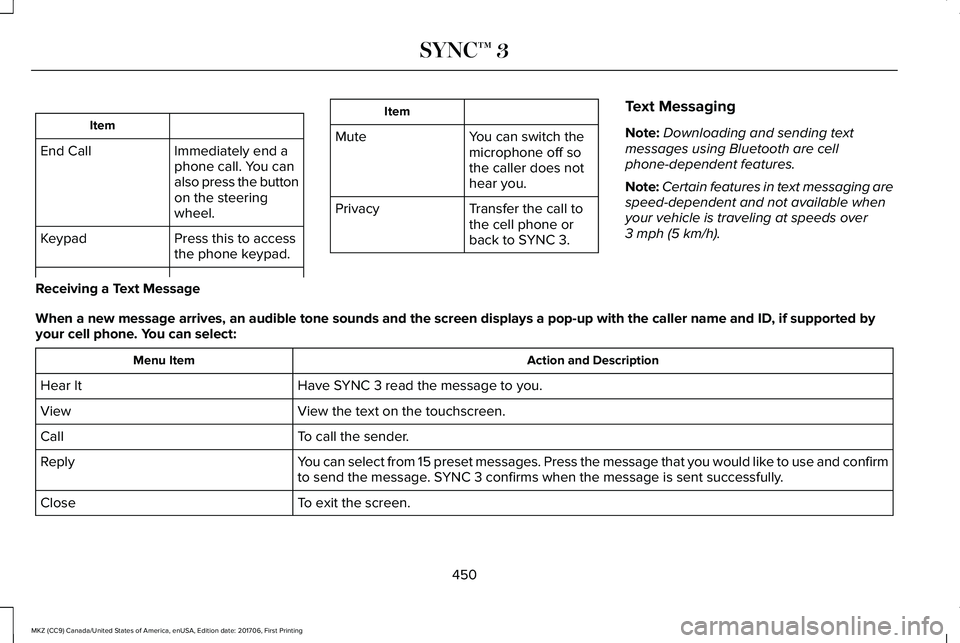
Item
Immediately end aphone call. You canalso press the buttonon the steeringwheel.
End Call
Press this to accessthe phone keypad.Keypad
Item
MuteYou can switch themicrophone off sothe caller does nothear you.
Transfer the call tothe cell phone orback to SYNC 3.
Privacy
Text Messaging
Note:Downloading and sending textmessages using Bluetooth are cellphone-dependent features.
Note:Certain features in text messaging arespeed-dependent and not available whenyour vehicle is traveling at speeds over3 mph (5 km/h).
Receiving a Text Message
When a new message arrives, an audible tone sounds and the screen displays a pop-up with the caller name and ID, if supported byyour cell phone. You can select:
Action and DescriptionMenu Item
Have SYNC 3 read the message to you.Hear It
View the text on the touchscreen.View
To call the sender.Call
You can select from 15 preset messages. Press the message that you would like to use and confirmto send the message. SYNC 3 confirms when the message is sent successfully.Reply
To exit the screen.Close
450
MKZ (CC9) Canada/United States of America, enUSA, Edition date: 201706, First Printing
SYNC™ 3
Page 466 of 595
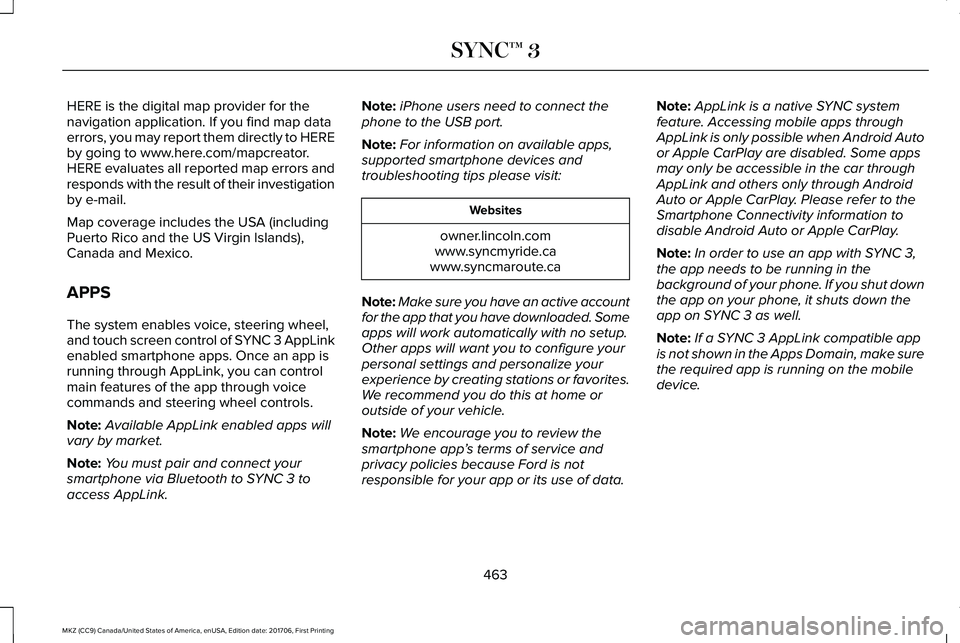
HERE is the digital map provider for thenavigation application. If you find map dataerrors, you may report them directly to HEREby going to www.here.com/mapcreator.HERE evaluates all reported map errors andresponds with the result of their investigationby e-mail.
Map coverage includes the USA (includingPuerto Rico and the US Virgin Islands),Canada and Mexico.
APPS
The system enables voice, steering wheel,and touch screen control of SYNC 3 AppLinkenabled smartphone apps. Once an app isrunning through AppLink, you can controlmain features of the app through voicecommands and steering wheel controls.
Note:Available AppLink enabled apps willvary by market.
Note:You must pair and connect yoursmartphone via Bluetooth to SYNC 3 toaccess AppLink.
Note:iPhone users need to connect thephone to the USB port.
Note:For information on available apps,supported smartphone devices andtroubleshooting tips please visit:
Websites
owner.lincoln.comwww.syncmyride.cawww.syncmaroute.ca
Note:Make sure you have an active accountfor the app that you have downloaded. Someapps will work automatically with no setup.Other apps will want you to configure yourpersonal settings and personalize yourexperience by creating stations or favorites.We recommend you do this at home oroutside of your vehicle.
Note:We encourage you to review thesmartphone app’s terms of service andprivacy policies because Ford is notresponsible for your app or its use of data.
Note:AppLink is a native SYNC systemfeature. Accessing mobile apps throughAppLink is only possible when Android Autoor Apple CarPlay are disabled. Some appsmay only be accessible in the car throughAppLink and others only through AndroidAuto or Apple CarPlay. Please refer to theSmartphone Connectivity information todisable Android Auto or Apple CarPlay.
Note:In order to use an app with SYNC 3,the app needs to be running in thebackground of your phone. If you shut downthe app on your phone, it shuts down theapp on SYNC 3 as well.
Note:If a SYNC 3 AppLink compatible appis not shown in the Apps Domain, make surethe required app is running on the mobiledevice.
463
MKZ (CC9) Canada/United States of America, enUSA, Edition date: 201706, First Printing
SYNC™ 3
Page 516 of 595
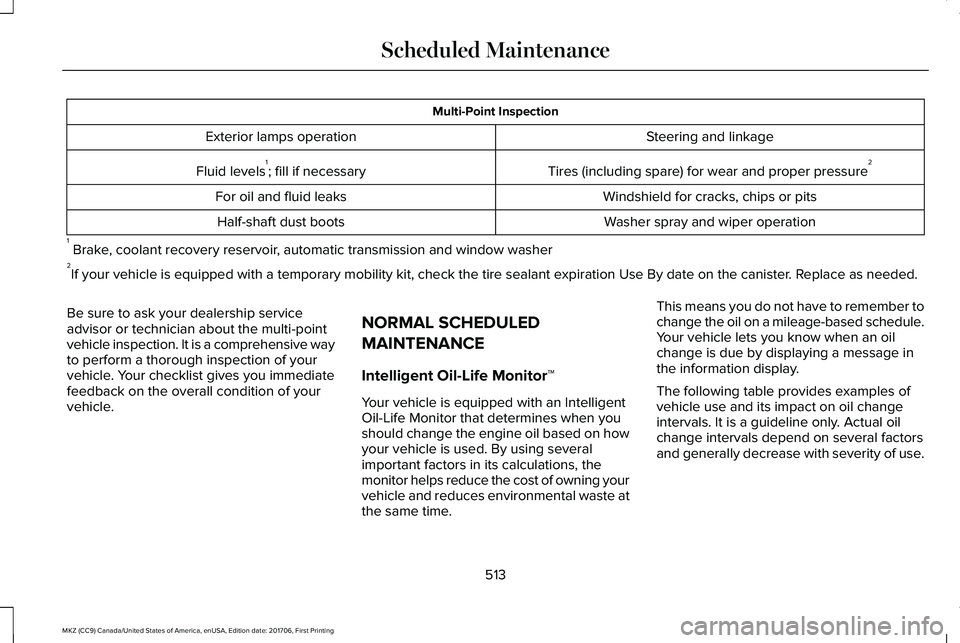
Multi-Point Inspection
Steering and linkageExterior lamps operation
Tires (including spare) for wear and proper pressure2Fluid levels1; fill if necessary
Windshield for cracks, chips or pitsFor oil and fluid leaks
Washer spray and wiper operationHalf-shaft dust boots
1 Brake, coolant recovery reservoir, automatic transmission and window washer2If your vehicle is equipped with a temporary mobility kit, check the tire sealant expiration Use By date on the canister. Replace as needed.
Be sure to ask your dealership serviceadvisor or technician about the multi-pointvehicle inspection. It is a comprehensive wayto perform a thorough inspection of yourvehicle. Your checklist gives you immediatefeedback on the overall condition of yourvehicle.
NORMAL SCHEDULED
MAINTENANCE
Intelligent Oil-Life Monitor™
Your vehicle is equipped with an IntelligentOil-Life Monitor that determines when youshould change the engine oil based on howyour vehicle is used. By using severalimportant factors in its calculations, themonitor helps reduce the cost of owning yourvehicle and reduces environmental waste atthe same time.
This means you do not have to remember tochange the oil on a mileage-based schedule.Your vehicle lets you know when an oilchange is due by displaying a message inthe information display.
The following table provides examples ofvehicle use and its impact on oil changeintervals. It is a guideline only. Actual oilchange intervals depend on several factorsand generally decrease with severity of use.
513
MKZ (CC9) Canada/United States of America, enUSA, Edition date: 201706, First Printing
Scheduled Maintenance
Page 518 of 595
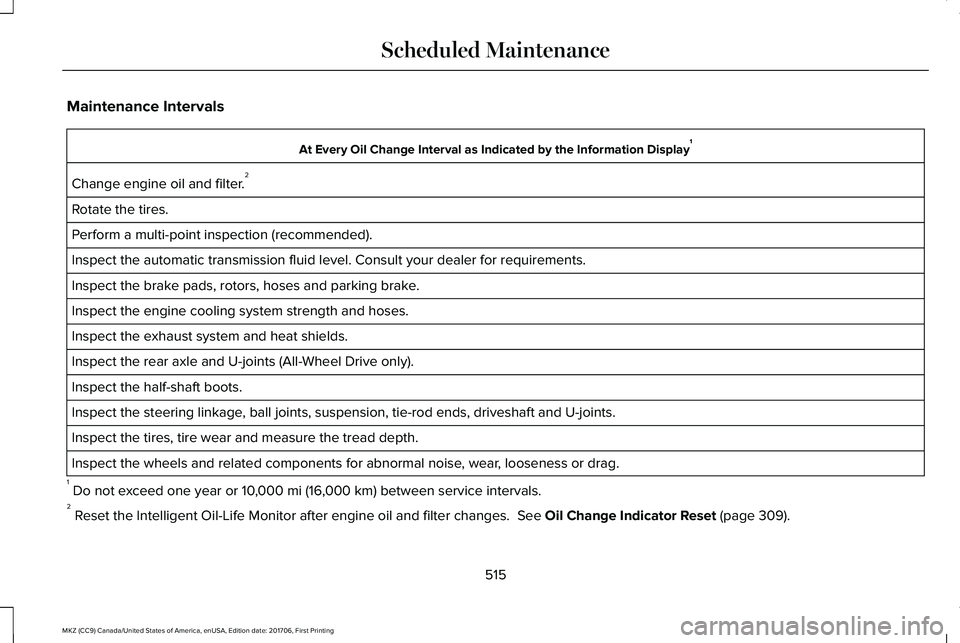
Maintenance Intervals
At Every Oil Change Interval as Indicated by the Information Display1
Change engine oil and filter.2
Rotate the tires.
Perform a multi-point inspection (recommended).
Inspect the automatic transmission fluid level. Consult your dealer for requirements.
Inspect the brake pads, rotors, hoses and parking brake.
Inspect the engine cooling system strength and hoses.
Inspect the exhaust system and heat shields.
Inspect the rear axle and U-joints (All-Wheel Drive only).
Inspect the half-shaft boots.
Inspect the steering linkage, ball joints, suspension, tie-rod ends, driveshaft and U-joints.
Inspect the tires, tire wear and measure the tread depth.
Inspect the wheels and related components for abnormal noise, wear, looseness or drag.
1 Do not exceed one year or 10,000 mi (16,000 km) between service intervals.2 Reset the Intelligent Oil-Life Monitor after engine oil and filter changes. See Oil Change Indicator Reset (page 309).
515
MKZ (CC9) Canada/United States of America, enUSA, Edition date: 201706, First Printing
Scheduled Maintenance
Page 584 of 595
A
A/CSee: Climate Control...........................................137
About This Manual............................................7ABSSee: Brakes...........................................................195
ABS driving hintsSee: Hints on Driving With Anti-LockBrakes................................................................196
Accessories...................................................504Exterior Style.......................................................504Interior Style........................................................504Lifestyle.................................................................504Peace of Mind.....................................................504
AccessoriesSee: Replacement Parts Recommendation.....13
ACCSee: Using Adaptive Cruise Control.............223
Active Park Assist..........................................210Deactivating the Active Park AssistFeature..............................................................216Parallel Parking, Perpendicular Parking,Parallel Park Out Assist.................................210Troubleshooting the System.............................217
Adaptive Headlamps.....................................92Adjusting the Headlamps..........................322Horizontal Aim Adjustment..............................323
Vertical Aim Adjustment...................................322
Adjusting the Steering Wheel - VehiclesWith: Manual Adjustable SteeringColumn............................................................81Adjusting the Steering Wheel - VehiclesWith: Power Adjustable SteeringColumn............................................................81End of Travel Position..........................................82
AFSSee: Adaptive Headlamps..................................92
Airbag Disposal...............................................56Air ConditioningSee: Climate Control...........................................137
Air FilterSee: Changing the Engine Air Filter..............325
AlarmSee: Anti-Theft Alarm...........................................79
All-Wheel Drive..............................................186Ambient Lighting............................................95Anti-Theft Alarm..............................................79Arming the Alarm..................................................80Disarming the Alarm............................................80
Appendices.....................................................541Apps.................................................................463.................................................................................463SiriusXM Traffic and Travel Link.....................465
At a Glance........................................................17
Audible Warnings and Indicators...............110Headlamps On Warning Chime........................110Key in Ignition Warning Chime..........................110Keyless Warning Alert.........................................110Parking Brake On Warning Chime...................110
Audio Control..................................................82Seek, Next or Previous........................................83
Audio System................................................394General Information...........................................394
Audio Unit......................................................395Auto Hold........................................................198Using Auto Hold.................................................200
Autolamps.........................................................89Windshield Wiper Activated Headlamps........90
Automatic Climate Control..........................137Automatic Fan Settings......................................139
Automatic High Beam Control.....................91Automatic High Beam Indicator........................92Switching the System On and Off....................92
Automatic Transmission..............................180Automatic Transmission AdaptiveLearning............................................................184Brake-Shift Interlock Override.........................183If Your Vehicle Gets Stuck In Mud orSnow..................................................................185Push Button Shift Transmission.......................180SelectShift Automatic™ Transmission.............182
581
MKZ (CC9) Canada/United States of America, enUSA, Edition date: 201706, First Printing
Index
Page 589 of 595
Adaptive Headlamps...........................................119AdvanceTrac™........................................................119Airbag......................................................................119Alarm......................................................................120Automatic Engine Shutdown...........................120AWD.........................................................................121Battery and Charging System..........................122Blind Spot Information and Cross Traffic AlertSystem...............................................................123Doors and Locks..................................................123Driver Alert............................................................124Fuel.........................................................................124Hill Start Assist.....................................................125Keys and Intelligent Access.............................125Lane Keeping System........................................126Maintenance.........................................................127MyKey.....................................................................128Park Aid..................................................................129Park Brake.............................................................129Power Steering....................................................130Pre-Collision Assist..............................................131Remote Start..........................................................131Seats.......................................................................132Starting System ...................................................132Tire Pressure Monitoring System....................133Traction Control...................................................133Transmission.........................................................134
Installing Child Restraints..............................21Child Seats..............................................................21Using Lap and Shoulder Belts............................21Using Lower Anchors and Tethers forCHildren (LATCH).............................................27Using Tether Straps..............................................29
Instrument Cluster.........................................104Instrument Lighting Dimmer........................90Instrument Panel Overview...........................17Interior Lamps..................................................94Front Interior Lamp...............................................94Rear Interior Lamp................................................95
Interior Luggage CompartmentRelease...........................................................76Interior Mirror.................................................100Auto-Dimming Mirror..........................................100
Introduction.........................................................7
J
Jump Starting the Vehicle..........................268Connecting the Jumper Cables.....................269Jump Starting......................................................270Preparing Your Vehicle.....................................268Removing the Jumper Cables.........................270
K
Keyless Entry....................................................74SECURICODE™ KEYLESS ENTRYKEYPAD...............................................................74
Keyless Starting.............................................163Ignition Modes.....................................................163
Keys and Remote Controls...........................57
L
Lane Keeping System.................................233Switching the System On and Off..................234
Lighting Control...............................................88Headlamp Flasher................................................89Headlamp High Beam.........................................89
Lighting..............................................................88General Information.............................................88
Lincoln Automotive Financial Services......12Lincoln Protect..............................................506Lincoln Protect (CANADA ONLY)....................507Lincoln Protect Extended Service Plans (U.S.Only)..................................................................506
Load Carrying.................................................251Load Limit........................................................251Special Loading Instructions for Owners ofPick-up Trucks and Utility-typeVehicles............................................................255
586
MKZ (CC9) Canada/United States of America, enUSA, Edition date: 201706, First Printing
Index
Page 592 of 595
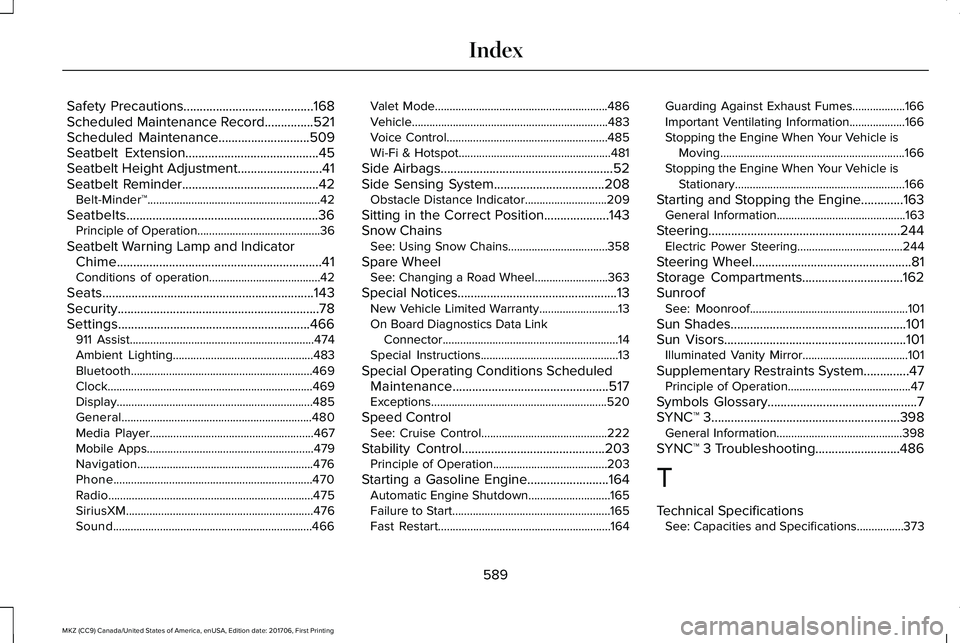
Safety Precautions........................................168Scheduled Maintenance Record...............521Scheduled Maintenance............................509Seatbelt Extension.........................................45Seatbelt Height Adjustment..........................41Seatbelt Reminder..........................................42Belt-Minder™...........................................................42
Seatbelts...........................................................36Principle of Operation..........................................36
Seatbelt Warning Lamp and IndicatorChime...............................................................41Conditions of operation......................................42
Seats.................................................................143Security..............................................................78Settings...........................................................466911 Assist...............................................................474Ambient Lighting................................................483Bluetooth..............................................................469Clock......................................................................469Display...................................................................485General.................................................................480Media Player........................................................467Mobile Apps.........................................................479Navigation............................................................476Phone....................................................................470Radio......................................................................475SiriusXM................................................................476Sound....................................................................466
Valet Mode...........................................................486Vehicle...................................................................483Voice Control.......................................................485Wi-Fi & Hotspot....................................................481
Side Airbags.....................................................52Side Sensing System..................................208Obstacle Distance Indicator............................209
Sitting in the Correct Position....................143Snow ChainsSee: Using Snow Chains..................................358
Spare WheelSee: Changing a Road Wheel.........................363
Special Notices.................................................13New Vehicle Limited Warranty...........................13On Board Diagnostics Data LinkConnector............................................................14Special Instructions...............................................13
Special Operating Conditions ScheduledMaintenance................................................517Exceptions............................................................520
Speed ControlSee: Cruise Control...........................................222
Stability Control............................................203Principle of Operation.......................................203
Starting a Gasoline Engine.........................164Automatic Engine Shutdown............................165Failure to Start......................................................165Fast Restart...........................................................164
Guarding Against Exhaust Fumes..................166Important Ventilating Information...................166Stopping the Engine When Your Vehicle isMoving...............................................................166Stopping the Engine When Your Vehicle isStationary..........................................................166
Starting and Stopping the Engine.............163General Information............................................163
Steering...........................................................244Electric Power Steering....................................244
Steering Wheel.................................................81Storage Compartments...............................162SunroofSee: Moonroof......................................................101
Sun Shades......................................................101Sun Visors........................................................101Illuminated Vanity Mirror....................................101
Supplementary Restraints System..............47Principle of Operation..........................................47
Symbols Glossary..............................................7SYNC™ 3..........................................................398General Information...........................................398
SYNC™ 3 Troubleshooting..........................486
T
Technical SpecificationsSee: Capacities and Specifications................373
589
MKZ (CC9) Canada/United States of America, enUSA, Edition date: 201706, First Printing
Index