traction control LINCOLN MKZ 2018 Owners Manual
[x] Cancel search | Manufacturer: LINCOLN, Model Year: 2018, Model line: MKZ, Model: LINCOLN MKZ 2018Pages: 595, PDF Size: 5.06 MB
Page 6 of 595
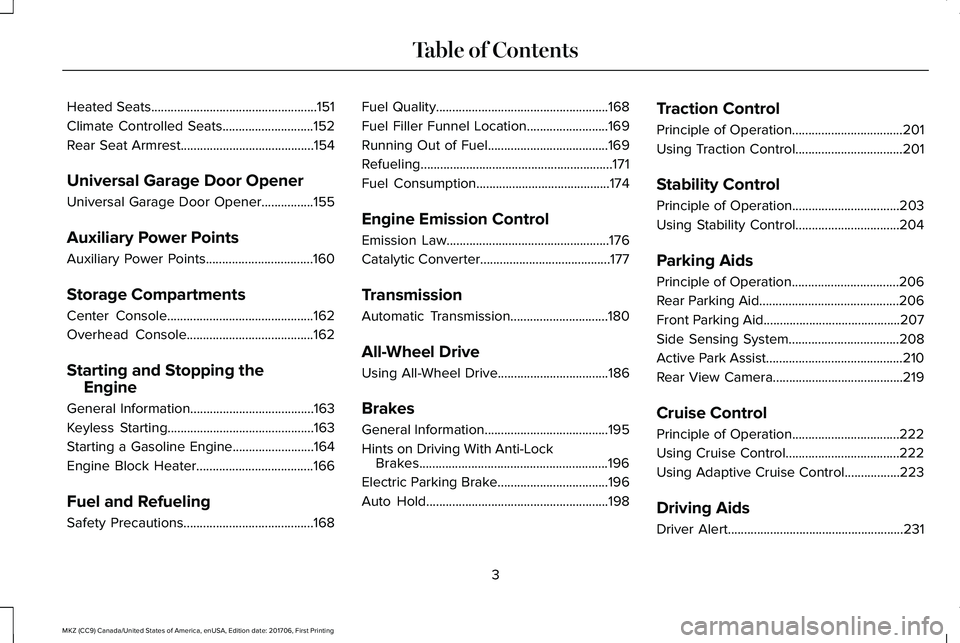
Heated Seats...................................................151
Climate Controlled Seats............................152
Rear Seat Armrest.........................................154
Universal Garage Door Opener
Universal Garage Door Opener................155
Auxiliary Power Points
Auxiliary Power Points.................................160
Storage Compartments
Center Console.............................................162
Overhead Console.......................................162
Starting and Stopping the
Engine
General Information......................................163
Keyless Starting.............................................163
Starting a Gasoline Engine.........................164
Engine Block Heater....................................166
Fuel and Refueling
Safety Precautions........................................168
Fuel Quality.....................................................168
Fuel Filler Funnel Location.........................169
Running Out of Fuel.....................................169
Refueling...........................................................171
Fuel Consumption.........................................174
Engine Emission Control
Emission Law..................................................176
Catalytic Converter........................................177
Transmission
Automatic Transmission..............................180
All-Wheel Drive
Using All-Wheel Drive..................................186
Brakes
General Information......................................195
Hints on Driving With Anti-LockBrakes..........................................................196
Electric Parking Brake..................................196
Auto Hold........................................................198
Traction Control
Principle of Operation..................................201
Using Traction Control.................................201
Stability Control
Principle of Operation.................................203
Using Stability Control................................204
Parking Aids
Principle of Operation.................................206
Rear Parking Aid...........................................206
Front Parking Aid..........................................207
Side Sensing System..................................208
Active Park Assist..........................................210
Rear View Camera........................................219
Cruise Control
Principle of Operation.................................222
Using Cruise Control...................................222
Using Adaptive Cruise Control.................223
Driving Aids
Driver Alert......................................................231
3
MKZ (CC9) Canada/United States of America, enUSA, Edition date: 201706, First Printing
Table of Contents
Page 66 of 595

Note:Not every feature applies to everyvehicle in every market. When they areavailable for your vehicle, then they appearin your information display, providing choicesto switch them on or off, or to select a morespecific setting.
•Various vehicle speed limits so theMyKey driver cannot exceed certainspeeds. The information display showswarnings followed by an audible tonewhen the MyKey driver reaches the setspeed. You cannot override the setspeed by fully depressing the acceleratorpedal.
WARNING
Do not set MyKey maximum speed limitto a limit that will prevent the driverfrom maintaining a safe speed consideringposted speed limits and prevailing roadconditions. The driver is always responsibleto drive in accordance with local laws andprevailing conditions. Failure to do so couldresult in accident or injury.
•Various vehicle speed reminders soMyKey drivers know when their vehiclespeed approaches the limits. Warningsappear in your information display and atone sounds when the MyKey driversexceed the set vehicle speed.
•The audio system's maximum volumelimits to 45% so MyKey drivers canconcentrate on the road. A messageappears in the information display whenMyKey drivers attempt to exceed thelimited volume. MyKey also disables theautomatic volume control. Note: If yourvehicle includes an AM/FM radio or avery basic audio system, then the radiomay not limit.
•Always on setting. This setting forcescertain features to remain on and activefor MyKey drivers. For example, E911 oremergency assistance and the do notdisturb features stay on even if a MyKeydriver uses the feature's control to switchit off. When you select, you will not beable to turn off Advance Trac or tractioncontrol (if your vehicle has this feature).
CREATING A MYKEY
Use the information display to create aMyKey:
1. Insert the key you want to program intothe ignition. See Starting a GasolineEngine (page 164). If your vehicle isequipped with a push-button start, placethe remote control into the backupposition. See Passive Anti-Theft System(page 78).
2. Switch the ignition on.
3.Access the main menu on the informationdisplay controls. Use the arrow keys toget to the following menu selections:
63
MKZ (CC9) Canada/United States of America, enUSA, Edition date: 201706, First Printing
MyKey™
Page 116 of 595
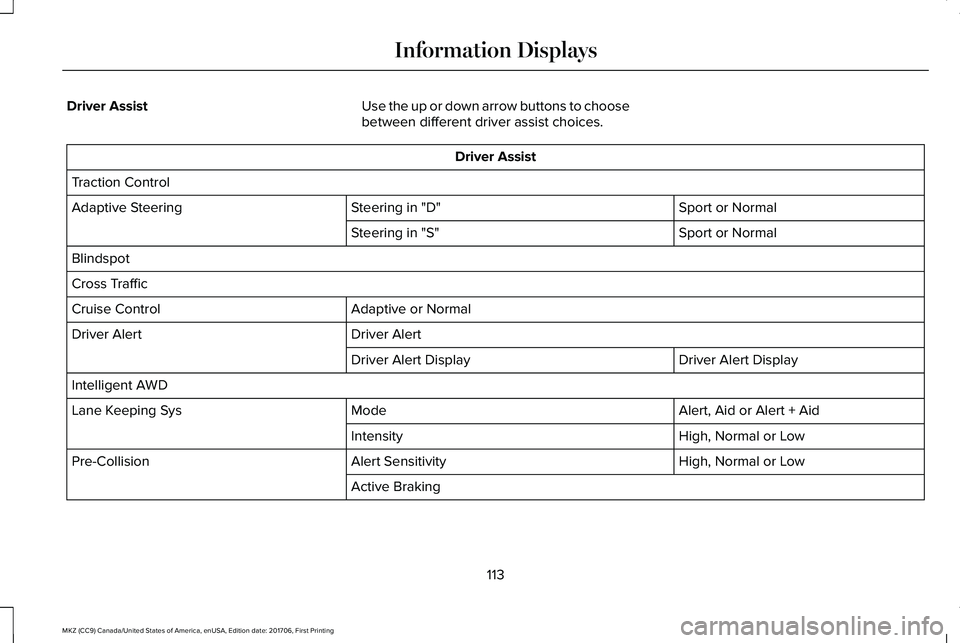
Driver AssistUse the up or down arrow buttons to choosebetween different driver assist choices.
Driver Assist
Traction Control
Sport or NormalSteering in "D"Adaptive Steering
Sport or NormalSteering in "S"
Blindspot
Cross Traffic
Adaptive or NormalCruise Control
Driver AlertDriver Alert
Driver Alert DisplayDriver Alert Display
Intelligent AWD
Alert, Aid or Alert + AidModeLane Keeping Sys
High, Normal or LowIntensity
High, Normal or LowAlert SensitivityPre-Collision
Active Braking
113
MKZ (CC9) Canada/United States of America, enUSA, Edition date: 201706, First Printing
Information Displays
Page 119 of 595
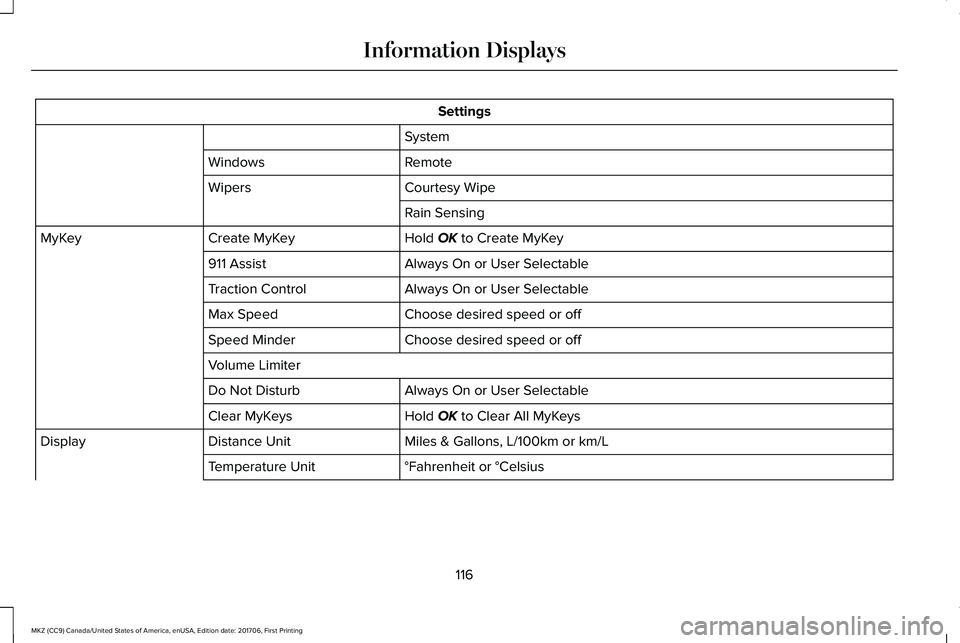
Settings
System
RemoteWindows
Courtesy WipeWipers
Rain Sensing
Hold OK to Create MyKeyCreate MyKeyMyKey
Always On or User Selectable911 Assist
Always On or User SelectableTraction Control
Choose desired speed or offMax Speed
Choose desired speed or offSpeed Minder
Volume Limiter
Always On or User SelectableDo Not Disturb
Hold OK to Clear All MyKeysClear MyKeys
Miles & Gallons, L/100km or km/LDistance UnitDisplay
°Fahrenheit or °CelsiusTemperature Unit
116
MKZ (CC9) Canada/United States of America, enUSA, Edition date: 201706, First Printing
Information Displays
Page 122 of 595
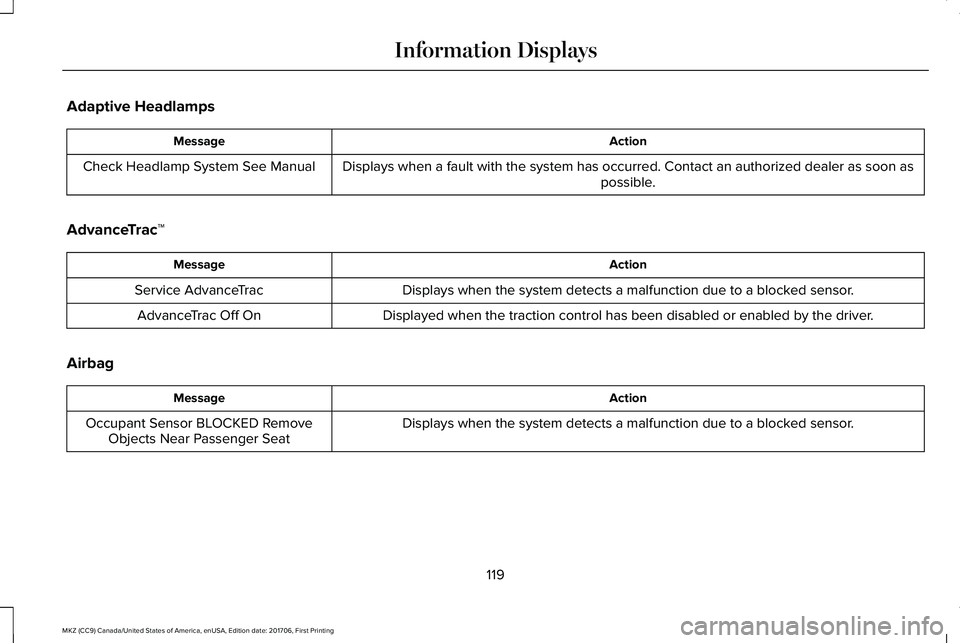
Adaptive Headlamps
ActionMessage
Displays when a fault with the system has occurred. Contact an authorized dealer as soon aspossible.Check Headlamp System See Manual
AdvanceTrac™
ActionMessage
Displays when the system detects a malfunction due to a blocked sensor.Service AdvanceTrac
Displayed when the traction control has been disabled or enabled by the driver.AdvanceTrac Off On
Airbag
ActionMessage
Displays when the system detects a malfunction due to a blocked sensor.Occupant Sensor BLOCKED RemoveObjects Near Passenger Seat
119
MKZ (CC9) Canada/United States of America, enUSA, Edition date: 201706, First Printing
Information Displays
Page 131 of 595
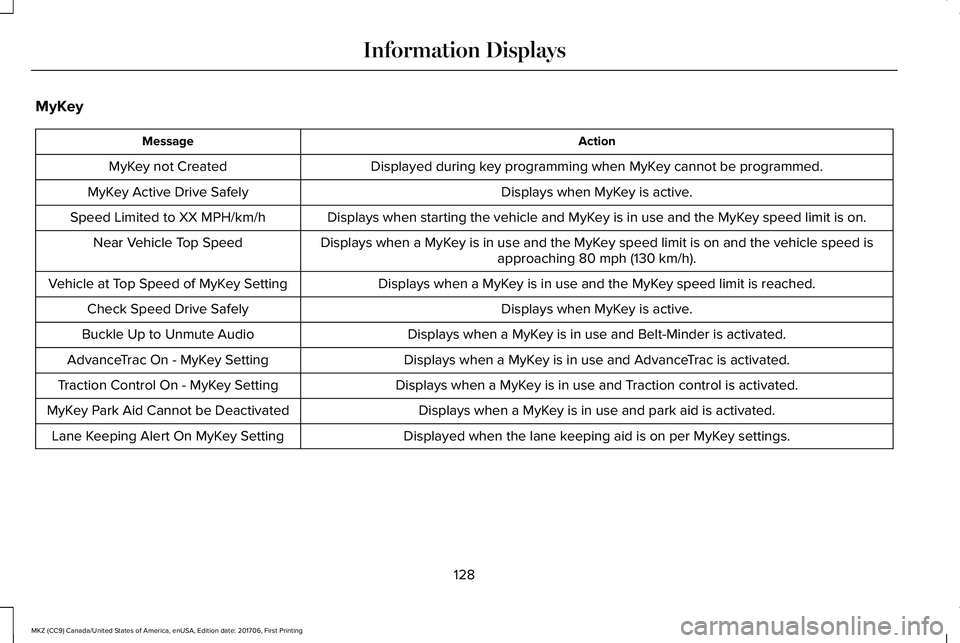
MyKey
ActionMessage
Displayed during key programming when MyKey cannot be programmed.MyKey not Created
Displays when MyKey is active.MyKey Active Drive Safely
Displays when starting the vehicle and MyKey is in use and the MyKey speed limit is on.Speed Limited to XX MPH/km/h
Displays when a MyKey is in use and the MyKey speed limit is on and the vehicle speed isapproaching 80 mph (130 km/h).Near Vehicle Top Speed
Displays when a MyKey is in use and the MyKey speed limit is reached.Vehicle at Top Speed of MyKey Setting
Displays when MyKey is active.Check Speed Drive Safely
Displays when a MyKey is in use and Belt-Minder is activated.Buckle Up to Unmute Audio
Displays when a MyKey is in use and AdvanceTrac is activated.AdvanceTrac On - MyKey Setting
Displays when a MyKey is in use and Traction control is activated.Traction Control On - MyKey Setting
Displays when a MyKey is in use and park aid is activated.MyKey Park Aid Cannot be Deactivated
Displayed when the lane keeping aid is on per MyKey settings.Lane Keeping Alert On MyKey Setting
128
MKZ (CC9) Canada/United States of America, enUSA, Edition date: 201706, First Printing
Information Displays
Page 136 of 595
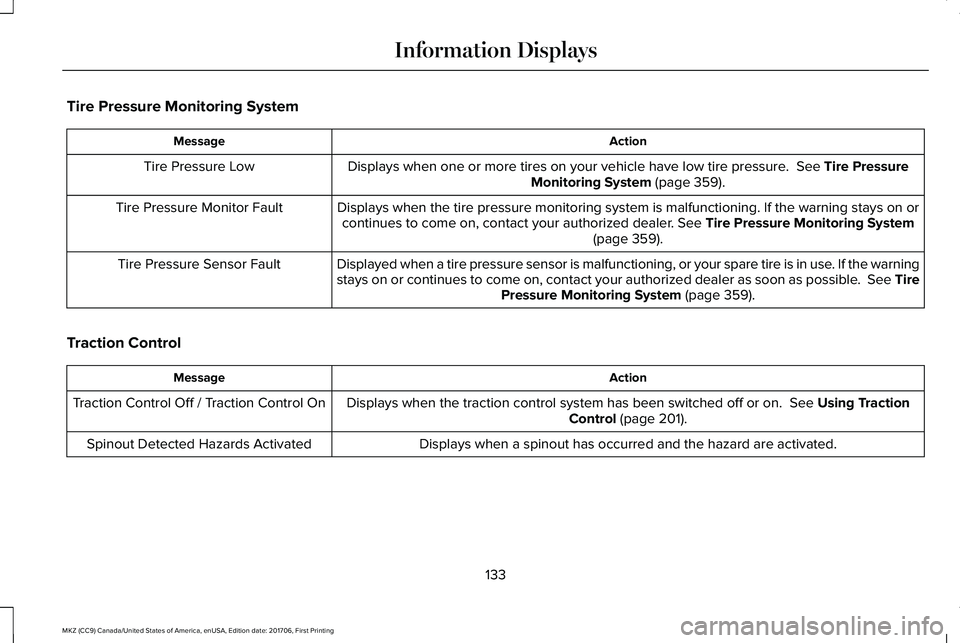
Tire Pressure Monitoring System
ActionMessage
Displays when one or more tires on your vehicle have low tire pressure. See Tire PressureMonitoring System (page 359).Tire Pressure Low
Displays when the tire pressure monitoring system is malfunctioning. If the warning stays on orcontinues to come on, contact your authorized dealer. See Tire Pressure Monitoring System(page 359).
Tire Pressure Monitor Fault
Displayed when a tire pressure sensor is malfunctioning, or your spare tire is in use. If the warningstays on or continues to come on, contact your authorized dealer as soon as possible. See TirePressure Monitoring System (page 359).
Tire Pressure Sensor Fault
Traction Control
ActionMessage
Displays when the traction control system has been switched off or on. See Using TractionControl (page 201).Traction Control Off / Traction Control On
Displays when a spinout has occurred and the hazard are activated.Spinout Detected Hazards Activated
133
MKZ (CC9) Canada/United States of America, enUSA, Edition date: 201706, First Printing
Information Displays
Page 189 of 595
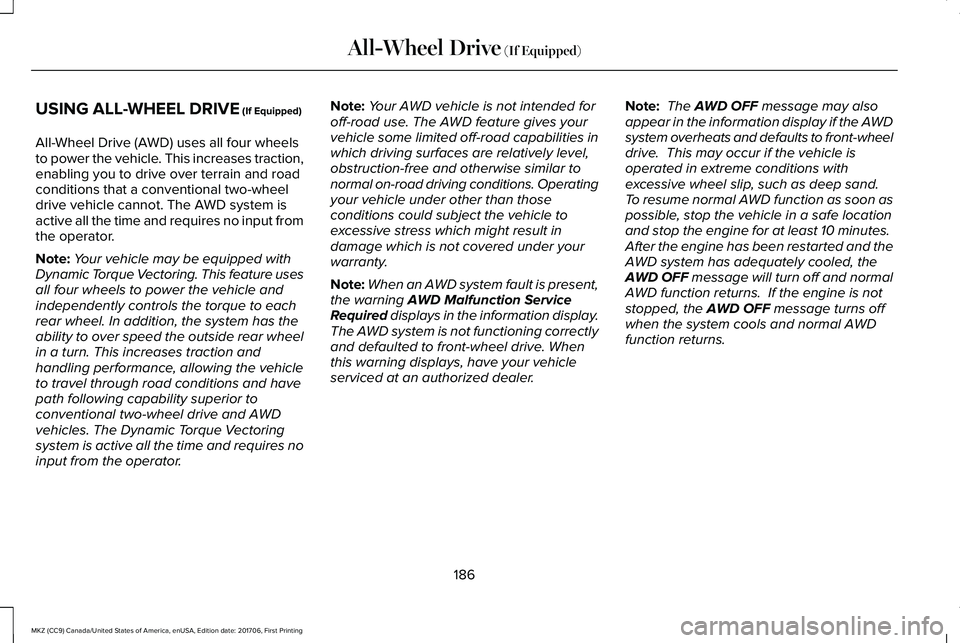
USING ALL-WHEEL DRIVE (If Equipped)
All-Wheel Drive (AWD) uses all four wheelsto power the vehicle. This increases traction,enabling you to drive over terrain and roadconditions that a conventional two-wheeldrive vehicle cannot. The AWD system isactive all the time and requires no input fromthe operator.
Note:Your vehicle may be equipped withDynamic Torque Vectoring. This feature usesall four wheels to power the vehicle andindependently controls the torque to eachrear wheel. In addition, the system has theability to over speed the outside rear wheelin a turn. This increases traction andhandling performance, allowing the vehicleto travel through road conditions and havepath following capability superior toconventional two-wheel drive and AWDvehicles. The Dynamic Torque Vectoringsystem is active all the time and requires noinput from the operator.
Note:Your AWD vehicle is not intended foroff-road use. The AWD feature gives yourvehicle some limited off-road capabilities inwhich driving surfaces are relatively level,obstruction-free and otherwise similar tonormal on-road driving conditions. Operatingyour vehicle under other than thoseconditions could subject the vehicle toexcessive stress which might result indamage which is not covered under yourwarranty.
Note:When an AWD system fault is present,the warning AWD Malfunction ServiceRequired displays in the information display.The AWD system is not functioning correctlyand defaulted to front-wheel drive. Whenthis warning displays, have your vehicleserviced at an authorized dealer.
Note: The AWD OFF message may alsoappear in the information display if the AWDsystem overheats and defaults to front-wheeldrive. This may occur if the vehicle isoperated in extreme conditions withexcessive wheel slip, such as deep sand. To resume normal AWD function as soon aspossible, stop the vehicle in a safe locationand stop the engine for at least 10 minutes. After the engine has been restarted and theAWD system has adequately cooled, theAWD OFF message will turn off and normalAWD function returns. If the engine is notstopped, the AWD OFF message turns offwhen the system cools and normal AWDfunction returns.
186
MKZ (CC9) Canada/United States of America, enUSA, Edition date: 201706, First Printing
All-Wheel Drive (If Equipped)
Page 193 of 595
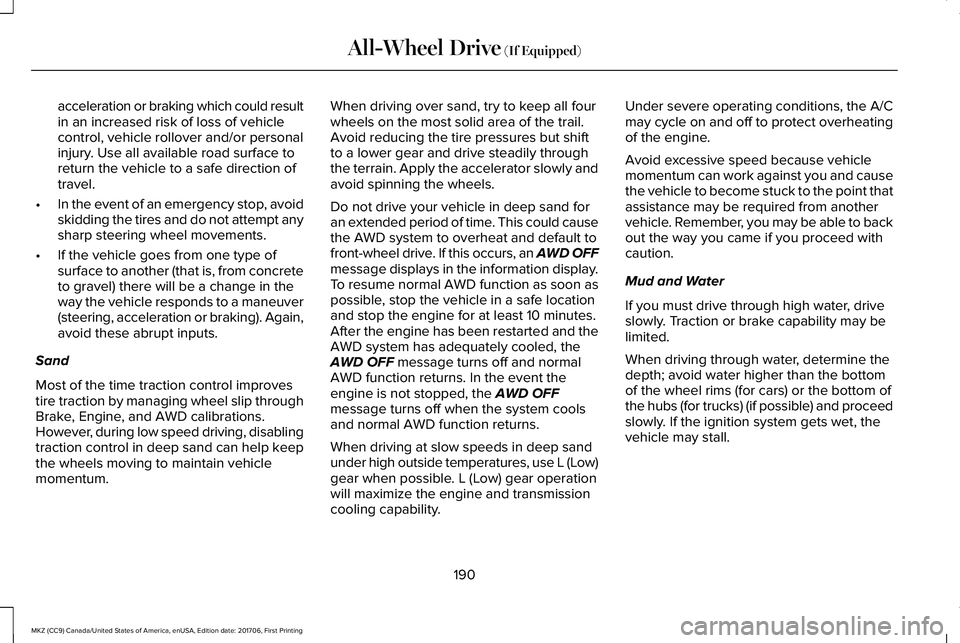
acceleration or braking which could resultin an increased risk of loss of vehiclecontrol, vehicle rollover and/or personalinjury. Use all available road surface toreturn the vehicle to a safe direction oftravel.
•In the event of an emergency stop, avoidskidding the tires and do not attempt anysharp steering wheel movements.
•If the vehicle goes from one type ofsurface to another (that is, from concreteto gravel) there will be a change in theway the vehicle responds to a maneuver(steering, acceleration or braking). Again,avoid these abrupt inputs.
Sand
Most of the time traction control improvestire traction by managing wheel slip throughBrake, Engine, and AWD calibrations.However, during low speed driving, disablingtraction control in deep sand can help keepthe wheels moving to maintain vehiclemomentum.
When driving over sand, try to keep all fourwheels on the most solid area of the trail.Avoid reducing the tire pressures but shiftto a lower gear and drive steadily throughthe terrain. Apply the accelerator slowly andavoid spinning the wheels.
Do not drive your vehicle in deep sand foran extended period of time. This could causethe AWD system to overheat and default tofront-wheel drive. If this occurs, an AWD OFFmessage displays in the information display.To resume normal AWD function as soon aspossible, stop the vehicle in a safe locationand stop the engine for at least 10 minutes.After the engine has been restarted and theAWD system has adequately cooled, theAWD OFF message turns off and normalAWD function returns. In the event theengine is not stopped, the AWD OFFmessage turns off when the system coolsand normal AWD function returns.
When driving at slow speeds in deep sandunder high outside temperatures, use L (Low)gear when possible. L (Low) gear operationwill maximize the engine and transmissioncooling capability.
Under severe operating conditions, the A/Cmay cycle on and off to protect overheatingof the engine.
Avoid excessive speed because vehiclemomentum can work against you and causethe vehicle to become stuck to the point thatassistance may be required from anothervehicle. Remember, you may be able to backout the way you came if you proceed withcaution.
Mud and Water
If you must drive through high water, driveslowly. Traction or brake capability may belimited.
When driving through water, determine thedepth; avoid water higher than the bottomof the wheel rims (for cars) or the bottom ofthe hubs (for trucks) (if possible) and proceedslowly. If the ignition system gets wet, thevehicle may stall.
190
MKZ (CC9) Canada/United States of America, enUSA, Edition date: 201706, First Printing
All-Wheel Drive (If Equipped)
Page 194 of 595
Once through water, always try the brakes.Wet brakes do not stop the vehicle aseffectively as dry brakes. Drying can beimproved by moving your vehicle slowlywhile applying light pressure on the brakepedal.
Be cautious of sudden changes in vehiclespeed or direction when you are driving inmud. Even AWD vehicles can lose tractionin slick mud. As when you are driving oversand, apply the accelerator slowly and avoidspinning your wheels. If the vehicle doesslide, steer in the direction of the slide untilyou regain control of the vehicle.
After driving through mud, clean off residuestuck to rotating driveshafts and tires. Excessmud stuck on tires and rotating driveshaftscauses an imbalance that could damagedrive components.
Note:Driving through deep water maydamage the transmission.
If the front or rear axle is submerged in water,have the power transfer unit (PTU) or rearaxle serviced by an authorized dealer.
Driving on Hilly or Sloping Terrain
Note:Avoid driving crosswise or turning onsteep slopes or hills. A danger lies in losingtraction, slipping sideways and possiblyrolling over. Whenever driving on a hill,determine beforehand the route you will use.Do not drive over the crest of a hill withoutseeing what conditions are on the other side.Do not drive in reverse over a hill withoutthe aid of an observer.
Although natural obstacles may make itnecessary to travel diagonally up or down ahill or steep incline, you should always try todrive straight up or straight down.
When climbing a steep slope or hill, start ina lower gear rather than downshifting to alower gear from a higher gear once theascent has started. This reduces strain onthe engine and the possibility of stalling.
If you do stall out, do not try to turnaroundbecause you might roll over. It is better toback down to a safe location.
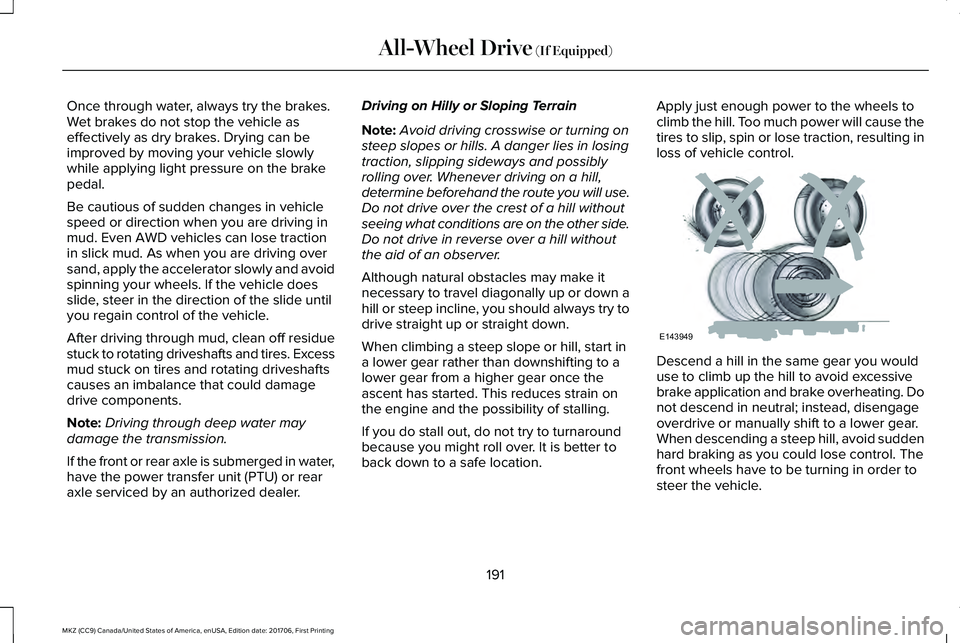
Apply just enough power to the wheels toclimb the hill. Too much power will cause thetires to slip, spin or lose traction, resulting inloss of vehicle control.
Descend a hill in the same gear you woulduse to climb up the hill to avoid excessivebrake application and brake overheating. Donot descend in neutral; instead, disengageoverdrive or manually shift to a lower gear.When descending a steep hill, avoid suddenhard braking as you could lose control. Thefront wheels have to be turning in order tosteer the vehicle.
191
MKZ (CC9) Canada/United States of America, enUSA, Edition date: 201706, First Printing
All-Wheel Drive (If Equipped)E143949