warning LINCOLN MKZ 2019 Owners Manual
[x] Cancel search | Manufacturer: LINCOLN, Model Year: 2019, Model line: MKZ, Model: LINCOLN MKZ 2019Pages: 595, PDF Size: 4.95 MB
Page 203 of 595
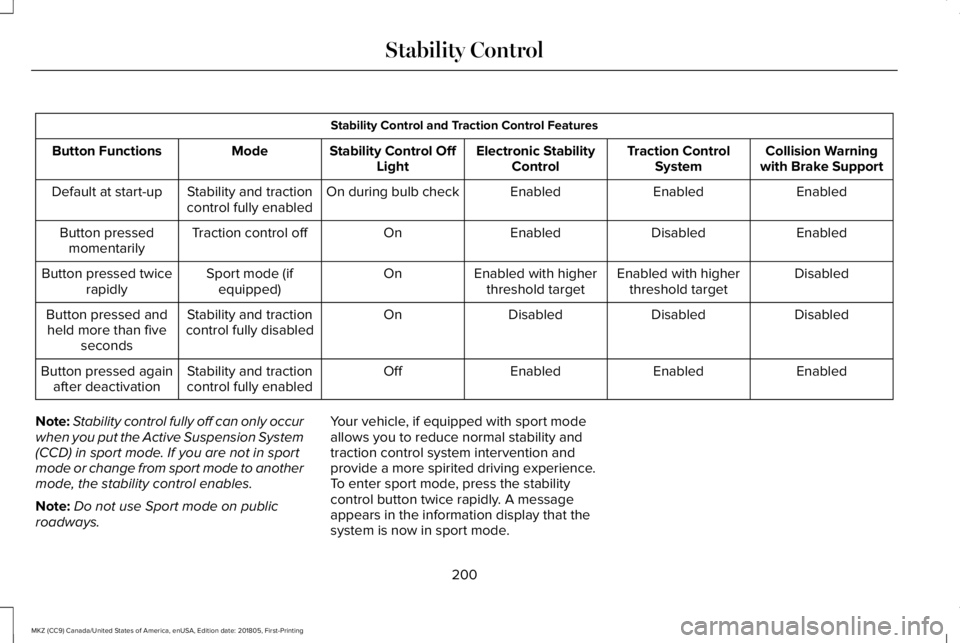
Stability Control and Traction Control Features
Collision Warningwith Brake SupportTraction ControlSystemElectronic StabilityControlStability Control OffLightModeButton Functions
EnabledEnabledEnabledOn during bulb checkStability and tractioncontrol fully enabledDefault at start-up
EnabledDisabledEnabledOnTraction control offButton pressedmomentarily
DisabledEnabled with higherthreshold targetEnabled with higherthreshold targetOnSport mode (ifequipped)Button pressed twicerapidly
DisabledDisabledDisabledOnStability and tractioncontrol fully disabledButton pressed andheld more than fiveseconds
EnabledEnabledEnabledOffStability and tractioncontrol fully enabledButton pressed againafter deactivation
Note:Stability control fully off can only occurwhen you put the Active Suspension System(CCD) in sport mode. If you are not in sportmode or change from sport mode to anothermode, the stability control enables.
Note:Do not use Sport mode on publicroadways.
Your vehicle, if equipped with sport modeallows you to reduce normal stability andtraction control system intervention andprovide a more spirited driving experience.To enter sport mode, press the stabilitycontrol button twice rapidly. A messageappears in the information display that thesystem is now in sport mode.
200
MKZ (CC9) Canada/United States of America, enUSA, Edition date: 201805, First-Printing
Stability Control
Page 204 of 595
PRINCIPLE OF OPERATION
WARNING: To help avoid personalinjury, always use caution when in reverse(R) and when using the sensing system.
WARNING: The system may not detectobjects with surfaces that absorb reflection.Always drive with due care and attention.Failure to take care may result in a crash.
WARNING: Traffic control systems,inclement weather, air brakes, externalmotors and fans may affect the correctoperation of the sensing system.This maycause reduced performance or false alerts.
WARNING: The system may not detectsmall or moving objects, particularly thoseclose to the ground.
Note:If your vehicle is equipped withMyKey™, the sensing system cannot beturned off when a MyKey™ is present. SeePrinciple of Operation (page 62).
Note:Keep the sensors, located on thebumper or fascia, free from snow, ice andlarge accumulations of dirt. If the sensorsare covered, the system’s accuracy can beaffected. Do not clean the sensors with sharpobjects.
Note:If your vehicle sustains damage to thebumper or fascia, leaving it misaligned orbent, the sensing zone may be alteredcausing inaccurate measurement ofobstacles or false alerts.
Note:Certain add-on devices installedaround the bumper or fascia may createfalse alerts. For example, large trailerhitches, bike or surfboard racks, license platebrackets, bumper covers or any other devicethat may block the normal detection zoneof the system. Remove the add-on device toprevent false alerts.
Note:When a trailer is connected to yourvehicle, the rear parking aid may detect thetrailer and therefore provide an alert. Disablethe rear parking aid when a trailer isconnected to prevent the alert.
The sensing system warns the driver ofobstacles within a certain range of yourvehicle. The system turns on automaticallywhenever you switch the ignition on.
The system can be switched off through theinformation display menu or from the pop-upmessage that appears once you shift thetransmission into reverse (R). See GeneralInformation (page 110).
If a fault is present in the system, a warningmessage appears in the information display.See Information Messages (page 116).
REAR PARKING AID
The rear sensors are only active when thetransmission is in reverse (R). As your vehiclemoves closer to the obstacle, the rate of theaudible warning increases. When theobstacle is less than 12 in (30 cm) away, thewarning sounds continuously. If the systemdetects a stationary or receding objectfarther than 12 in (30 cm) from the corners ofthe bumper, the tone sounds for only threeseconds. Once the system detects an objectapproaching, the warning sounds again.
201
MKZ (CC9) Canada/United States of America, enUSA, Edition date: 201805, First-Printing
Parking Aids
Page 205 of 595
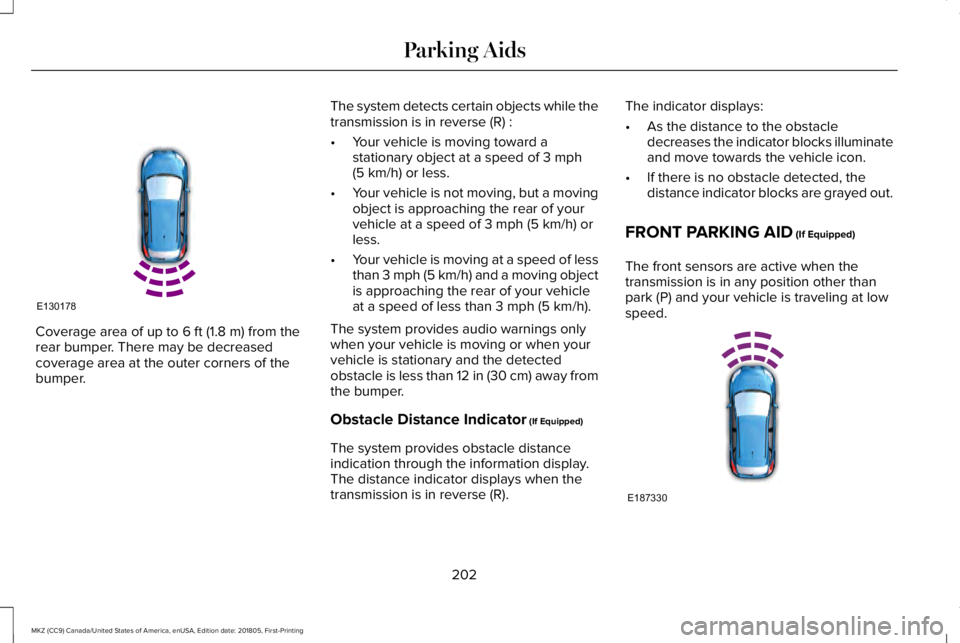
Coverage area of up to 6 ft (1.8 m) from therear bumper. There may be decreasedcoverage area at the outer corners of thebumper.
The system detects certain objects while thetransmission is in reverse (R) :
•Your vehicle is moving toward astationary object at a speed of 3 mph(5 km/h) or less.
•Your vehicle is not moving, but a movingobject is approaching the rear of yourvehicle at a speed of 3 mph (5 km/h) orless.
•Your vehicle is moving at a speed of lessthan 3 mph (5 km/h) and a moving objectis approaching the rear of your vehicleat a speed of less than 3 mph (5 km/h).
The system provides audio warnings onlywhen your vehicle is moving or when yourvehicle is stationary and the detectedobstacle is less than 12 in (30 cm) away fromthe bumper.
Obstacle Distance Indicator (If Equipped)
The system provides obstacle distanceindication through the information display.The distance indicator displays when thetransmission is in reverse (R).
The indicator displays:
•As the distance to the obstacledecreases the indicator blocks illuminateand move towards the vehicle icon.
•If there is no obstacle detected, thedistance indicator blocks are grayed out.
FRONT PARKING AID (If Equipped)
The front sensors are active when thetransmission is in any position other thanpark (P) and your vehicle is traveling at lowspeed.
202
MKZ (CC9) Canada/United States of America, enUSA, Edition date: 201805, First-Printing
Parking AidsE130178 E187330
Page 206 of 595
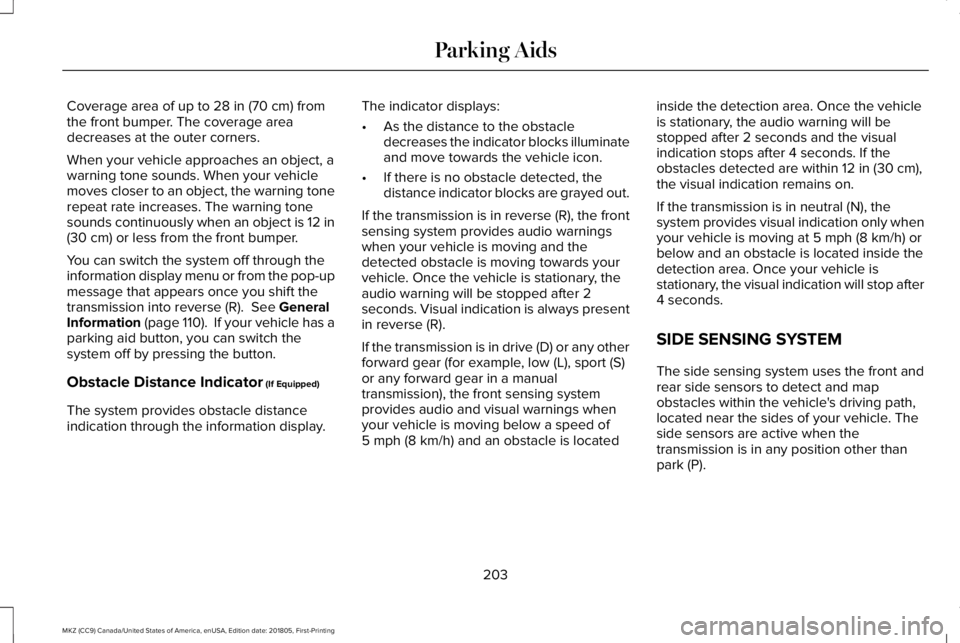
Coverage area of up to 28 in (70 cm) fromthe front bumper. The coverage areadecreases at the outer corners.
When your vehicle approaches an object, awarning tone sounds. When your vehiclemoves closer to an object, the warning tonerepeat rate increases. The warning tonesounds continuously when an object is 12 in(30 cm) or less from the front bumper.
You can switch the system off through theinformation display menu or from the pop-upmessage that appears once you shift thetransmission into reverse (R). See GeneralInformation (page 110). If your vehicle has aparking aid button, you can switch thesystem off by pressing the button.
Obstacle Distance Indicator (If Equipped)
The system provides obstacle distanceindication through the information display.
The indicator displays:
•As the distance to the obstacledecreases the indicator blocks illuminateand move towards the vehicle icon.
•If there is no obstacle detected, thedistance indicator blocks are grayed out.
If the transmission is in reverse (R), the frontsensing system provides audio warningswhen your vehicle is moving and thedetected obstacle is moving towards yourvehicle. Once the vehicle is stationary, theaudio warning will be stopped after 2seconds. Visual indication is always presentin reverse (R).
If the transmission is in drive (D) or any otherforward gear (for example, low (L), sport (S)or any forward gear in a manualtransmission), the front sensing systemprovides audio and visual warnings whenyour vehicle is moving below a speed of5 mph (8 km/h) and an obstacle is located
inside the detection area. Once the vehicleis stationary, the audio warning will bestopped after 2 seconds and the visualindication stops after 4 seconds. If theobstacles detected are within 12 in (30 cm),the visual indication remains on.
If the transmission is in neutral (N), thesystem provides visual indication only whenyour vehicle is moving at 5 mph (8 km/h) orbelow and an obstacle is located inside thedetection area. Once your vehicle isstationary, the visual indication will stop after4 seconds.
SIDE SENSING SYSTEM
The side sensing system uses the front andrear side sensors to detect and mapobstacles within the vehicle's driving path,located near the sides of your vehicle. Theside sensors are active when thetransmission is in any position other thanpark (P).
203
MKZ (CC9) Canada/United States of America, enUSA, Edition date: 201805, First-Printing
Parking Aids
Page 207 of 595
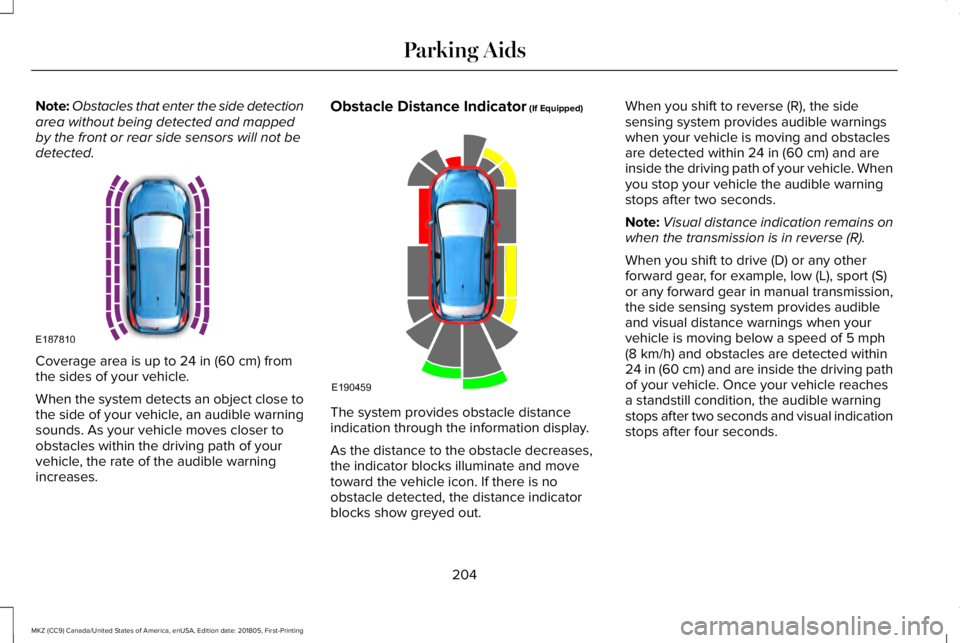
Note:Obstacles that enter the side detectionarea without being detected and mappedby the front or rear side sensors will not bedetected.
Coverage area is up to 24 in (60 cm) fromthe sides of your vehicle.
When the system detects an object close tothe side of your vehicle, an audible warningsounds. As your vehicle moves closer toobstacles within the driving path of yourvehicle, the rate of the audible warningincreases.
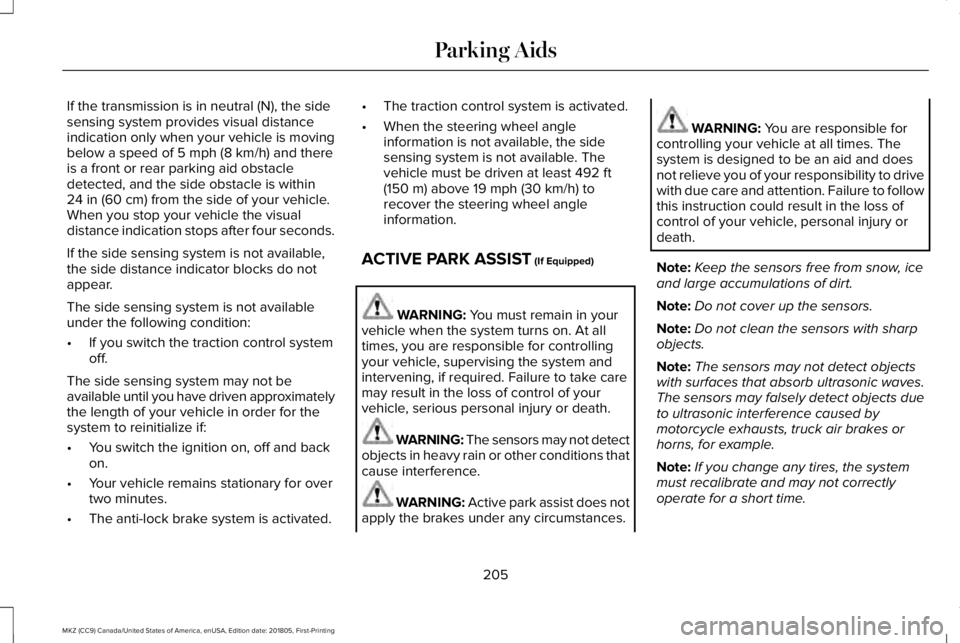
Obstacle Distance Indicator (If Equipped)
The system provides obstacle distanceindication through the information display.
As the distance to the obstacle decreases,the indicator blocks illuminate and movetoward the vehicle icon. If there is noobstacle detected, the distance indicatorblocks show greyed out.
When you shift to reverse (R), the sidesensing system provides audible warningswhen your vehicle is moving and obstaclesare detected within 24 in (60 cm) and areinside the driving path of your vehicle. Whenyou stop your vehicle the audible warningstops after two seconds.
Note:Visual distance indication remains onwhen the transmission is in reverse (R).
When you shift to drive (D) or any otherforward gear, for example, low (L), sport (S)or any forward gear in manual transmission,the side sensing system provides audibleand visual distance warnings when yourvehicle is moving below a speed of 5 mph(8 km/h) and obstacles are detected within24 in (60 cm) and are inside the driving pathof your vehicle. Once your vehicle reachesa standstill condition, the audible warningstops after two seconds and visual indicationstops after four seconds.
204
MKZ (CC9) Canada/United States of America, enUSA, Edition date: 201805, First-Printing
Parking AidsE187810 E190459
Page 208 of 595
If the transmission is in neutral (N), the sidesensing system provides visual distanceindication only when your vehicle is movingbelow a speed of 5 mph (8 km/h) and thereis a front or rear parking aid obstacledetected, and the side obstacle is within24 in (60 cm) from the side of your vehicle.When you stop your vehicle the visualdistance indication stops after four seconds.
If the side sensing system is not available,the side distance indicator blocks do notappear.
The side sensing system is not availableunder the following condition:
•If you switch the traction control systemoff.
The side sensing system may not beavailable until you have driven approximatelythe length of your vehicle in order for thesystem to reinitialize if:
•You switch the ignition on, off and backon.
•Your vehicle remains stationary for overtwo minutes.
•The anti-lock brake system is activated.
•The traction control system is activated.
•When the steering wheel angleinformation is not available, the sidesensing system is not available. Thevehicle must be driven at least 492 ft(150 m) above 19 mph (30 km/h) torecover the steering wheel angleinformation.
ACTIVE PARK ASSIST (If Equipped)
WARNING: You must remain in yourvehicle when the system turns on. At alltimes, you are responsible for controllingyour vehicle, supervising the system andintervening, if required. Failure to take caremay result in the loss of control of yourvehicle, serious personal injury or death.
WARNING: The sensors may not detectobjects in heavy rain or other conditions thatcause interference.
WARNING: Active park assist does notapply the brakes under any circumstances.
WARNING: You are responsible forcontrolling your vehicle at all times. Thesystem is designed to be an aid and doesnot relieve you of your responsibility to drivewith due care and attention. Failure to followthis instruction could result in the loss ofcontrol of your vehicle, personal injury ordeath.
Note:Keep the sensors free from snow, iceand large accumulations of dirt.
Note:Do not cover up the sensors.
Note:Do not clean the sensors with sharpobjects.
Note:The sensors may not detect objectswith surfaces that absorb ultrasonic waves.The sensors may falsely detect objects dueto ultrasonic interference caused bymotorcycle exhausts, truck air brakes orhorns, for example.
Note:If you change any tires, the systemmust recalibrate and may not correctlyoperate for a short time.
205
MKZ (CC9) Canada/United States of America, enUSA, Edition date: 201805, First-Printing
Parking Aids
Page 216 of 595
Possible CauseSymptom
A parked vehicle has a high attachment. For example, a salt sprayer, snowplow or movingtruck bed.
The parking space length or position of parked objects changes after your vehicle passesthe space.
The temperature around your vehicle quickly changes. For example, driving from aheated garage into the cold, or after leaving a car wash.
REAR VIEW CAMERA
WARNING: The rear view camerasystem is a reverse aid supplement devicethat still requires the driver to use it inconjunction with the interior and exteriormirrors for maximum coverage.
WARNING: Objects that are close toeither corner of the bumper or under thebumper, might not be seen on the screendue to the limited coverage of the camerasystem.
WARNING: Back up as slow aspossible since higher speeds might limit yourreaction time to stop your vehicle.
WARNING: Use caution when usingthe rear video camera and the trunk is ajar.If the trunk is ajar, the camera will be out ofposition and the video image may beincorrect. All guidelines (if enabled) havebeen removed when the trunk is ajar.
WARNING: Use caution when turningcamera features on or off while in reverse(R). Make sure your vehicle is not moving.
The rear view camera system provides avideo image of the area behind your vehicle.The image will display in either the rear viewmirror or the display in the center of theinstrument panel.
During operation, lines will appear in thedisplay that represent your vehicle’s pathand proximity to objects behind your vehicle.
213
MKZ (CC9) Canada/United States of America, enUSA, Edition date: 201805, First-Printing
Parking Aids
Page 218 of 595
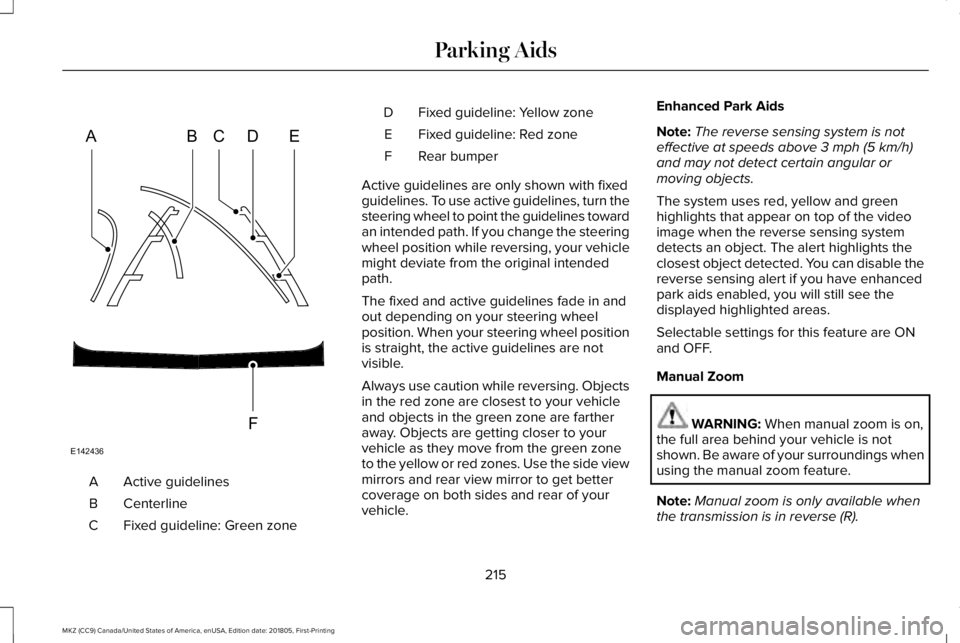
Active guidelinesA
CenterlineB
Fixed guideline: Green zoneC
Fixed guideline: Yellow zoneD
Fixed guideline: Red zoneE
Rear bumperF
Active guidelines are only shown with fixedguidelines. To use active guidelines, turn thesteering wheel to point the guidelines towardan intended path. If you change the steeringwheel position while reversing, your vehiclemight deviate from the original intendedpath.
The fixed and active guidelines fade in andout depending on your steering wheelposition. When your steering wheel positionis straight, the active guidelines are notvisible.
Always use caution while reversing. Objectsin the red zone are closest to your vehicleand objects in the green zone are fartheraway. Objects are getting closer to yourvehicle as they move from the green zoneto the yellow or red zones. Use the side viewmirrors and rear view mirror to get bettercoverage on both sides and rear of yourvehicle.
Enhanced Park Aids
Note:The reverse sensing system is noteffective at speeds above 3 mph (5 km/h)and may not detect certain angular ormoving objects.
The system uses red, yellow and greenhighlights that appear on top of the videoimage when the reverse sensing systemdetects an object. The alert highlights theclosest object detected. You can disable thereverse sensing alert if you have enhancedpark aids enabled, you will still see thedisplayed highlighted areas.
Selectable settings for this feature are ONand OFF.
Manual Zoom
WARNING: When manual zoom is on,the full area behind your vehicle is notshown. Be aware of your surroundings whenusing the manual zoom feature.
Note:Manual zoom is only available whenthe transmission is in reverse (R).
215
MKZ (CC9) Canada/United States of America, enUSA, Edition date: 201805, First-Printing
Parking AidsABCD
F
E
E142436
Page 220 of 595
PRINCIPLE OF OPERATION
Cruise control lets you maintain a set speedwithout keeping your foot on the acceleratorpedal. You can use cruise control when yourvehicle speed is greater than 20 mph(30 km/h).
USING CRUISE CONTROL (If Equipped)
WARNING: Do not use cruise controlon winding roads, in heavy traffic or whenthe road surface is slippery. This could resultin loss of vehicle control, serious injury ordeath.
WARNING: When you are goingdownhill, your vehicle speed could increaseabove the set speed. The system does notapply the brakes.
To help the system to maintain the set speedwhen going downhill, downshift to a lowergear.
Your vehicle speed could decrease belowthe set speed when driving uphill.
Note:The system cancels if your vehiclespeed drops below 10 mph (16 km/h) underthe set speed when driving uphill.
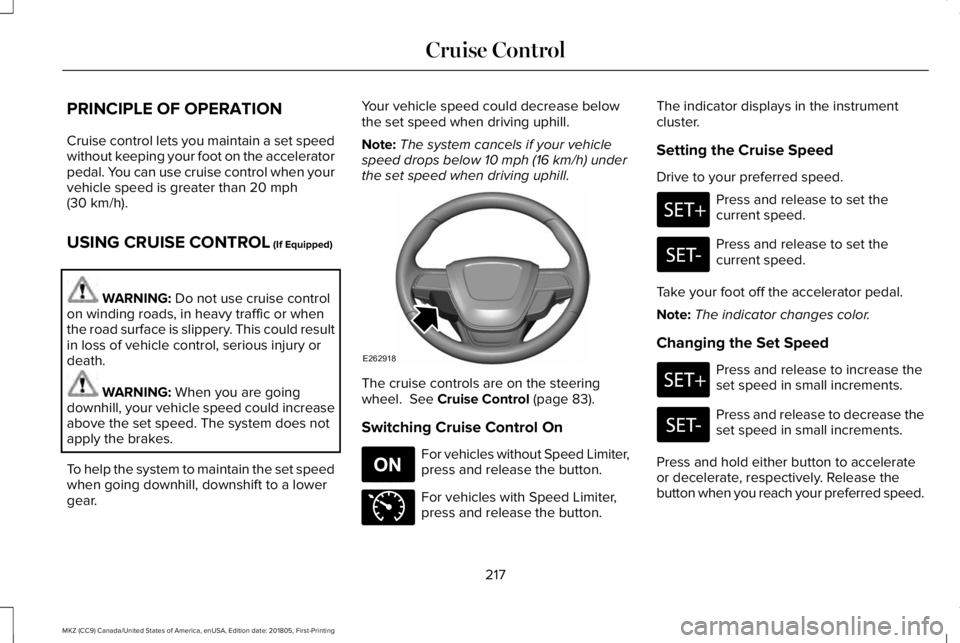
The cruise controls are on the steeringwheel. See Cruise Control (page 83).
Switching Cruise Control On
For vehicles without Speed Limiter,press and release the button.
For vehicles with Speed Limiter,press and release the button.
The indicator displays in the instrumentcluster.
Setting the Cruise Speed
Drive to your preferred speed.
Press and release to set thecurrent speed.
Press and release to set thecurrent speed.
Take your foot off the accelerator pedal.
Note:The indicator changes color.
Changing the Set Speed
Press and release to increase theset speed in small increments.
Press and release to decrease theset speed in small increments.
Press and hold either button to accelerateor decelerate, respectively. Release thebutton when you reach your preferred speed.
217
MKZ (CC9) Canada/United States of America, enUSA, Edition date: 201805, First-Printing
Cruise ControlE262918 E265296 E71340
Page 221 of 595
Press the accelerator or brake pedal untilyou reach your preferred speed. Press eitherbutton.
Note: If you accelerate by pressing only theaccelerator pedal, the set speed does notchange. When you release the acceleratorpedal, your vehicle returns to the speed youpreviously set.
Canceling the Set Speed
Press and release the button, ortap the brake pedal to cancel theset speed.
Note:The system remembers the set speed.
Resuming the Set Speed
Press and release to resume theset speed.
Switching Cruise Control Off
For vehicles without Speed Limiter,press and release the button whenthe system is in standby mode orswitch the ignition off.
For vehicles with Speed Limiter,press and release the button whenthe system is in standby mode orswitch the ignition off.
Note:You erase the set speed when youswitch the system off.
USING ADAPTIVE CRUISE
CONTROL (If Equipped)
WARNING: Always pay close attentionto changing road conditions when usingadaptive cruise control. The system does notreplace attentive driving. Failing to payattention to the road may result in a crash,serious injury or death.
WARNING: Do not use the adaptivecruise control when entering or leaving ahighway, on roads with intersections orroundabouts or non-vehicular traffic or roadsthat are winding, slippery, unpaved, or steepslopes.
WARNING: Do not use the system inpoor visibility, for example fog, heavy rain,spray or snow.
WARNING: Do not use the systemwhen towing a trailer that has aftermarketelectronic trailer brake controls. Failure tofollow this instruction could result in the lossof control of your vehicle, personal injury ordeath.
WARNING: Do not use tire sizes otherthan those recommended because this canaffect the normal operation of the system.Failure to do so may result in a loss of vehiclecontrol, which could result in serious injury.
WARNING: Adaptive cruise controlmay not detect stationary or slow movingvehicles below 6 mph (10 km/h).
WARNING: Adaptive cruise controldoes not detect pedestrians or objects in theroad.
218
MKZ (CC9) Canada/United States of America, enUSA, Edition date: 201805, First-Printing
Cruise ControlE265298 E265297 E71340