warning LINCOLN MKZ 2019 Repair Manual
[x] Cancel search | Manufacturer: LINCOLN, Model Year: 2019, Model line: MKZ, Model: LINCOLN MKZ 2019Pages: 595, PDF Size: 4.95 MB
Page 123 of 595
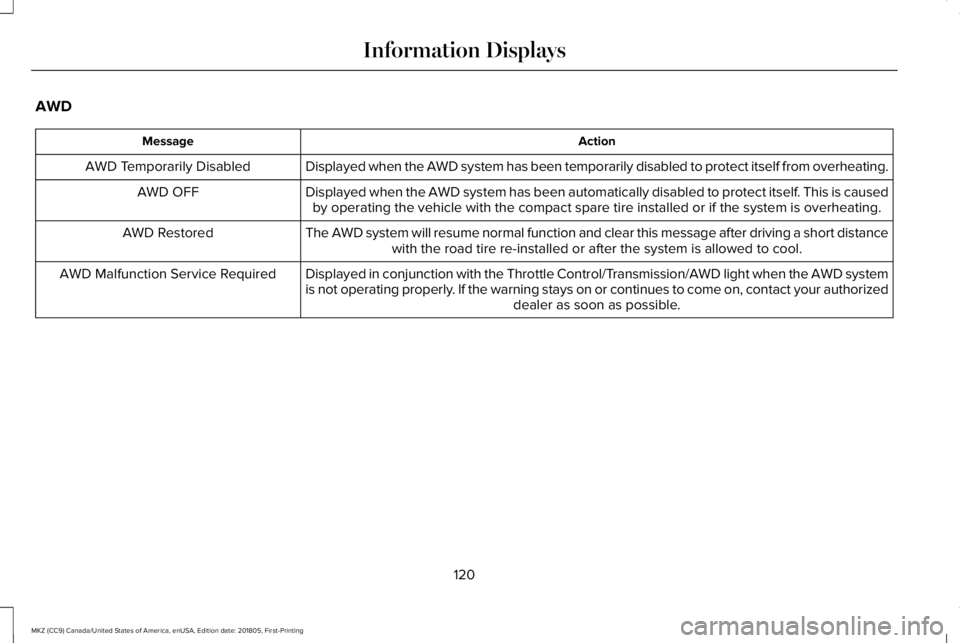
AWD
ActionMessage
Displayed when the AWD system has been temporarily disabled to protect itself from overheating.AWD Temporarily Disabled
Displayed when the AWD system has been automatically disabled to protect itself. This is causedby operating the vehicle with the compact spare tire installed or if the system is overheating.AWD OFF
The AWD system will resume normal function and clear this message after driving a short distancewith the road tire re-installed or after the system is allowed to cool.AWD Restored
Displayed in conjunction with the Throttle Control/Transmission/AWD light when the AWD systemis not operating properly. If the warning stays on or continues to come on, contact your authorizeddealer as soon as possible.
AWD Malfunction Service Required
120
MKZ (CC9) Canada/United States of America, enUSA, Edition date: 201805, First-Printing
Information Displays
Page 124 of 595
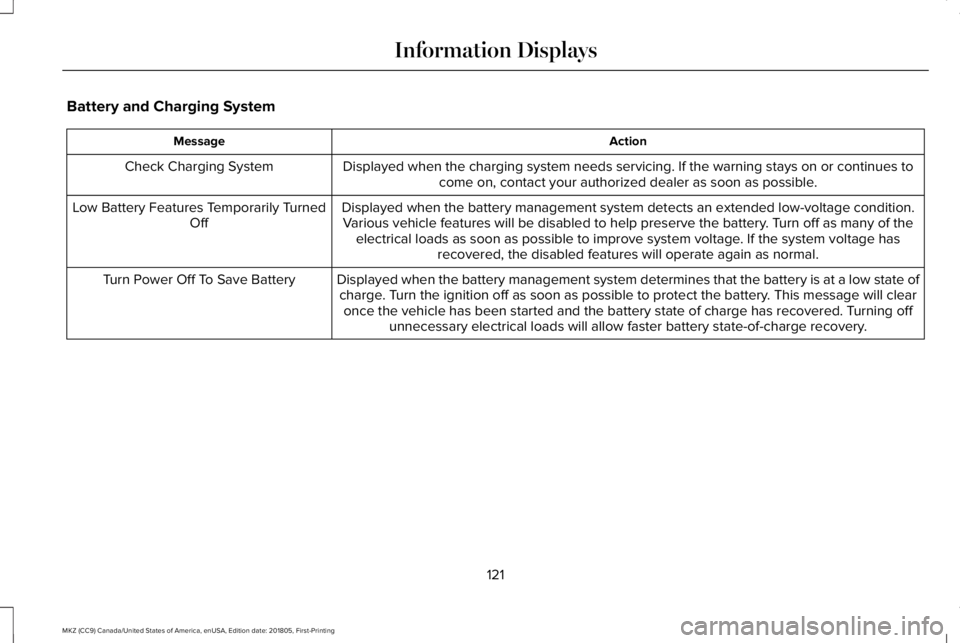
Battery and Charging System
ActionMessage
Displayed when the charging system needs servicing. If the warning stays on or continues tocome on, contact your authorized dealer as soon as possible.Check Charging System
Displayed when the battery management system detects an extended low-voltage condition.Various vehicle features will be disabled to help preserve the battery. Turn off as many of theelectrical loads as soon as possible to improve system voltage. If the system voltage hasrecovered, the disabled features will operate again as normal.
Low Battery Features Temporarily TurnedOff
Displayed when the battery management system determines that the battery is at a low state ofcharge. Turn the ignition off as soon as possible to protect the battery. This message will clearonce the vehicle has been started and the battery state of charge has recovered. Turning offunnecessary electrical loads will allow faster battery state-of-charge recovery.
Turn Power Off To Save Battery
121
MKZ (CC9) Canada/United States of America, enUSA, Edition date: 201805, First-Printing
Information Displays
Page 126 of 595
ActionMessage
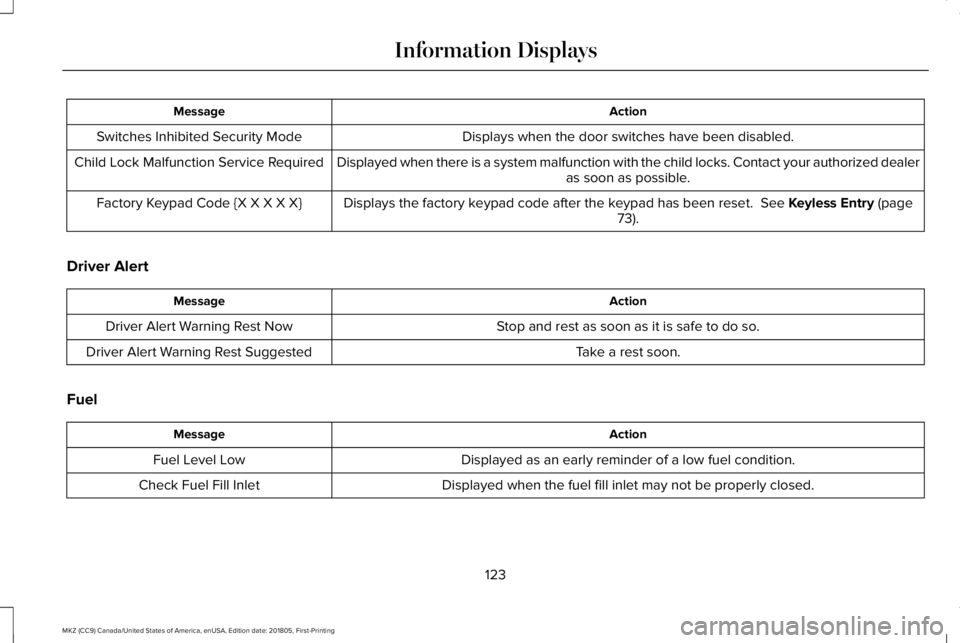
Displays when the door switches have been disabled.Switches Inhibited Security Mode
Displayed when there is a system malfunction with the child locks. Contact your authorized dealeras soon as possible.Child Lock Malfunction Service Required
Displays the factory keypad code after the keypad has been reset. See Keyless Entry (page73).Factory Keypad Code {X X X X X}
Driver Alert
ActionMessage
Stop and rest as soon as it is safe to do so.Driver Alert Warning Rest Now
Take a rest soon.Driver Alert Warning Rest Suggested
Fuel
ActionMessage
Displayed as an early reminder of a low fuel condition.Fuel Level Low
Displayed when the fuel fill inlet may not be properly closed.Check Fuel Fill Inlet
123
MKZ (CC9) Canada/United States of America, enUSA, Edition date: 201805, First-Printing
Information Displays
Page 129 of 595
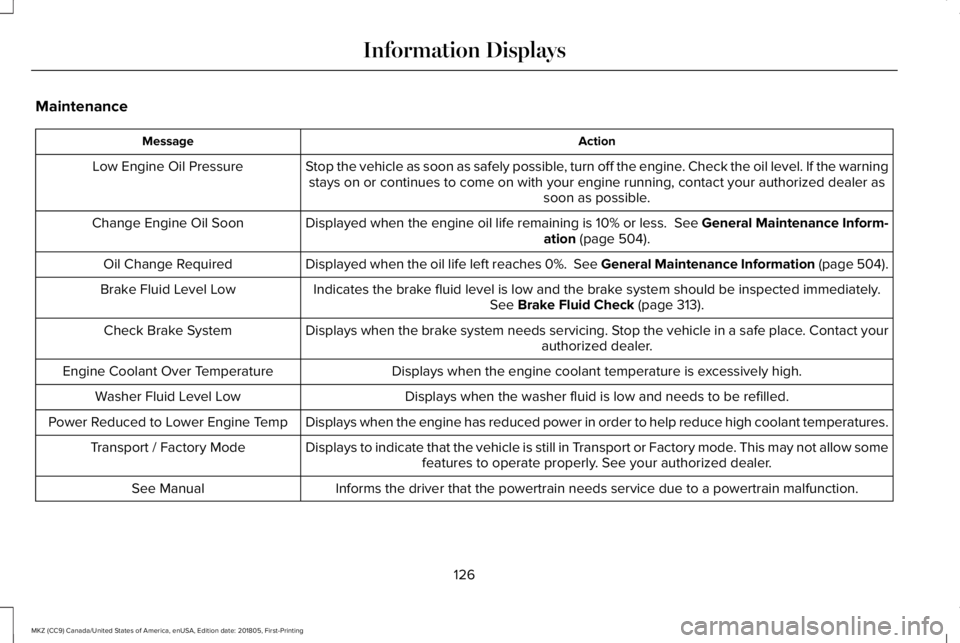
Maintenance
ActionMessage
Stop the vehicle as soon as safely possible, turn off the engine. Check the oil level. If the warningstays on or continues to come on with your engine running, contact your authorized dealer assoon as possible.
Low Engine Oil Pressure
Displayed when the engine oil life remaining is 10% or less. See General Maintenance Inform-ation (page 504).Change Engine Oil Soon
Displayed when the oil life left reaches 0%. See General Maintenance Information (page 504).Oil Change Required
Indicates the brake fluid level is low and the brake system should be inspected immediately.See Brake Fluid Check (page 313).Brake Fluid Level Low
Displays when the brake system needs servicing. Stop the vehicle in a safe place. Contact yourauthorized dealer.Check Brake System
Displays when the engine coolant temperature is excessively high.Engine Coolant Over Temperature
Displays when the washer fluid is low and needs to be refilled.Washer Fluid Level Low
Displays when the engine has reduced power in order to help reduce high coolant temperatures.Power Reduced to Lower Engine Temp
Displays to indicate that the vehicle is still in Transport or Factory mode. This may not allow somefeatures to operate properly. See your authorized dealer.Transport / Factory Mode
Informs the driver that the powertrain needs service due to a powertrain malfunction.See Manual
126
MKZ (CC9) Canada/United States of America, enUSA, Edition date: 201805, First-Printing
Information Displays
Page 133 of 595
Pre-Collision Assist
ActionMessage
Displayed when there is a system malfunction with the collision warning system. The system willbe disabled. Contact an authorized dealer as soon as possible.Pre-Collision Assist Malfunction
Displayed when the collision warning system radar is blocked because of poor radar visibilitydue to bad weather, ice, mud or water in front of the radar. Driver can typically clean the sensorto resolve. Contact an authorized dealer as soon as possible.
Pre-Collision Assist Not Available SensorBlocked
Displayed when there is a system malfunction with the collision warning system. The system willbe disabled. Contact an authorized dealer as soon as possible.Pre-Collision Assist Not Available
Remote Start
ActionMessage
Displays as a reminder to apply the brake and push the gear shift button to drive the vehicleafter a remote start.To Drive: Press Brake and Gear ShiftButton
130
MKZ (CC9) Canada/United States of America, enUSA, Edition date: 201805, First-Printing
Information Displays
Page 135 of 595
Tire Pressure Monitoring System
ActionMessage
Displays when one or more tires on your vehicle have low tire pressure. See Tire PressureMonitoring System (page 352).Tire Pressure Low
Displays when the tire pressure monitoring system is malfunctioning. If the warning stays on orcontinues to come on, contact your authorized dealer. See Tire Pressure Monitoring System(page 352).
Tire Pressure Monitor Fault
Displayed when a tire pressure sensor is malfunctioning, or your spare tire is in use. If the warningstays on or continues to come on, contact your authorized dealer as soon as possible. See TirePressure Monitoring System (page 352).
Tire Pressure Sensor Fault
Traction Control
ActionMessage
Displays when the traction control system has been switched off or on. See Using TractionControl (page 197).Traction Control Off / Traction Control On
Displays when a spinout has occurred and the hazard are activated.Spinout Detected Hazards Activated
132
MKZ (CC9) Canada/United States of America, enUSA, Edition date: 201805, First-Printing
Information Displays
Page 144 of 595
SITTING IN THE CORRECT
POSITION
WARNING: Sitting improperly, out ofposition or with the seatback reclined too farcan take weight off the seat cushion andaffect the decision of the passenger sensingsystem, resulting in serious injury or deathin the event of a crash. Always sit uprightagainst your seat back, with your feet on thefloor.
WARNING: Do not recline the seatbackas this can cause the occupant to slide underthe safety belt, resulting in serious injury inthe event of a crash.
WARNING: Do not place objects higherthan the seatback to reduce the risk ofserious injury in the event of a crash orduring heavy braking.
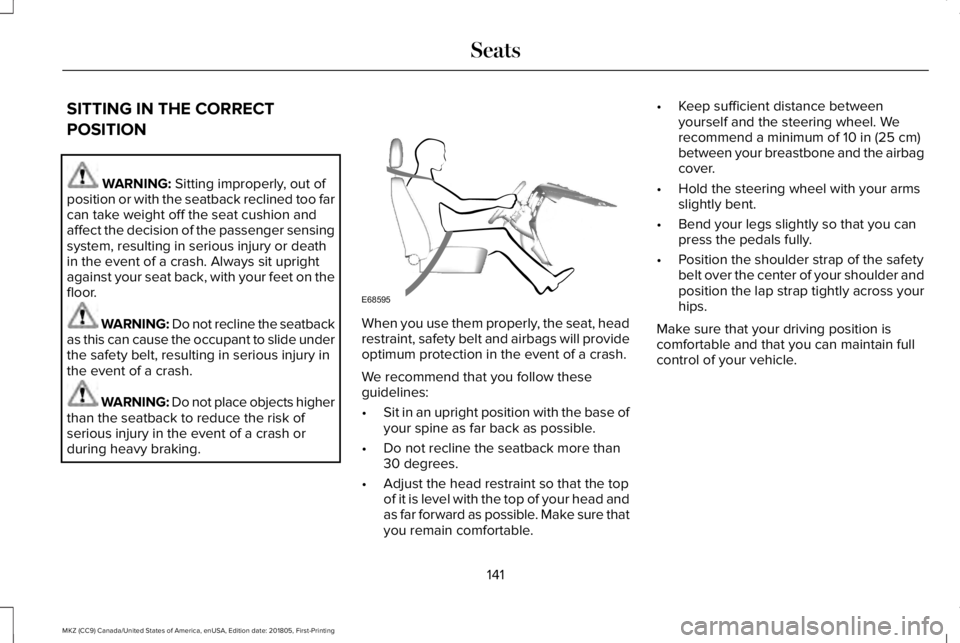
When you use them properly, the seat, headrestraint, safety belt and airbags will provideoptimum protection in the event of a crash.
We recommend that you follow theseguidelines:
•Sit in an upright position with the base ofyour spine as far back as possible.
•Do not recline the seatback more than30 degrees.
•Adjust the head restraint so that the topof it is level with the top of your head andas far forward as possible. Make sure thatyou remain comfortable.
•Keep sufficient distance betweenyourself and the steering wheel. Werecommend a minimum of 10 in (25 cm)between your breastbone and the airbagcover.
•Hold the steering wheel with your armsslightly bent.
•Bend your legs slightly so that you canpress the pedals fully.
•Position the shoulder strap of the safetybelt over the center of your shoulder andposition the lap strap tightly across yourhips.
Make sure that your driving position iscomfortable and that you can maintain fullcontrol of your vehicle.
141
MKZ (CC9) Canada/United States of America, enUSA, Edition date: 201805, First-Printing
SeatsE68595
Page 145 of 595
HEAD RESTRAINTS
WARNING: Fully adjust the headrestraint before you sit in or operate yourvehicle. This will help minimize the risk ofneck injury in the event of a crash. Do notadjust the head restraint when your vehicleis moving.
WARNING: The adjustable headrestraint is a safety device. Wheneverpossible, it should be installed and properlyadjusted when the seat is occupied. Failureto adjust the head restraint properly couldreduce its effectiveness during certainimpacts.
WARNING: Install the head restraintproperly to help minimize the risk of neckinjury in the event of a crash.
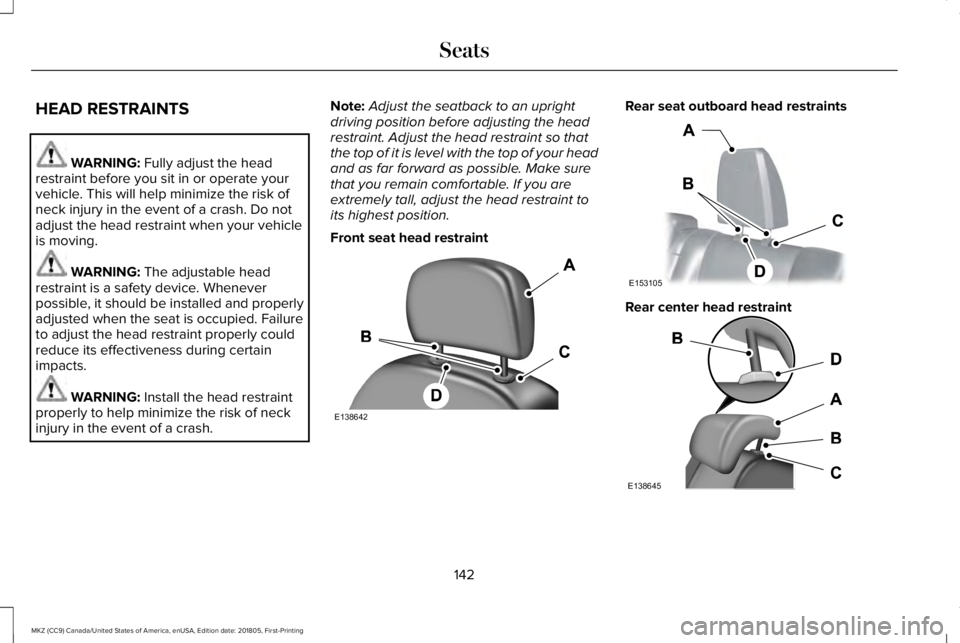
Note:Adjust the seatback to an uprightdriving position before adjusting the headrestraint. Adjust the head restraint so thatthe top of it is level with the top of your headand as far forward as possible. Make surethat you remain comfortable. If you areextremely tall, adjust the head restraint toits highest position.
Front seat head restraint
Rear seat outboard head restraints
Rear center head restraint
142
MKZ (CC9) Canada/United States of America, enUSA, Edition date: 201805, First-Printing
SeatsE138642 E153105 E138645
Page 146 of 595
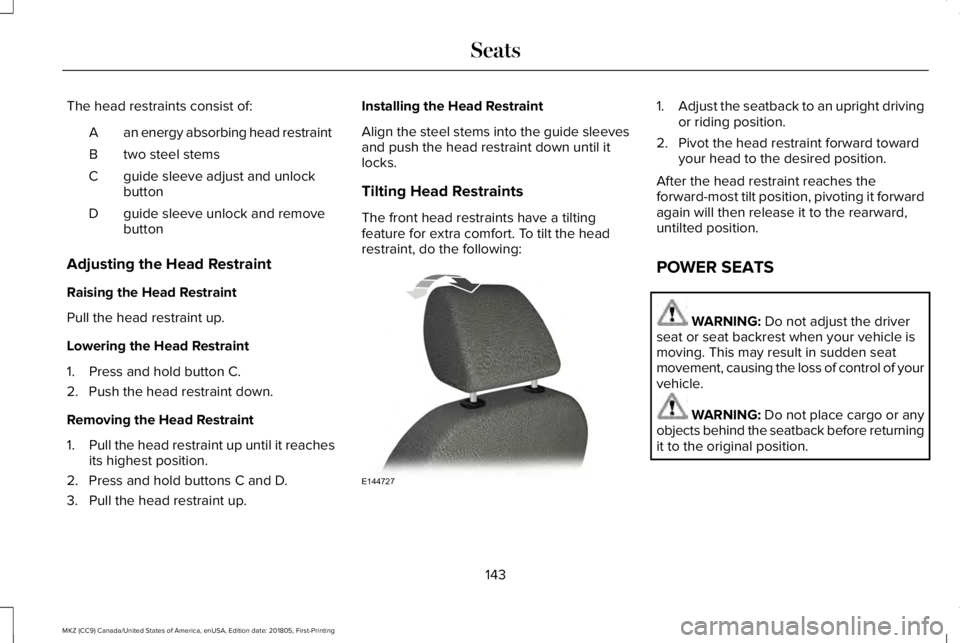
The head restraints consist of:
an energy absorbing head restraintA
two steel stemsB
guide sleeve adjust and unlockbuttonC
guide sleeve unlock and removebuttonD
Adjusting the Head Restraint
Raising the Head Restraint
Pull the head restraint up.
Lowering the Head Restraint
1. Press and hold button C.
2. Push the head restraint down.
Removing the Head Restraint
1.Pull the head restraint up until it reachesits highest position.
2. Press and hold buttons C and D.
3. Pull the head restraint up.
Installing the Head Restraint
Align the steel stems into the guide sleevesand push the head restraint down until itlocks.
Tilting Head Restraints
The front head restraints have a tiltingfeature for extra comfort. To tilt the headrestraint, do the following:
1.Adjust the seatback to an upright drivingor riding position.
2. Pivot the head restraint forward towardyour head to the desired position.
After the head restraint reaches theforward-most tilt position, pivoting it forwardagain will then release it to the rearward,untilted position.
POWER SEATS
WARNING: Do not adjust the driverseat or seat backrest when your vehicle ismoving. This may result in sudden seatmovement, causing the loss of control of yourvehicle.
WARNING: Do not place cargo or anyobjects behind the seatback before returningit to the original position.
143
MKZ (CC9) Canada/United States of America, enUSA, Edition date: 201805, First-Printing
SeatsE144727
Page 150 of 595
MEMORY FUNCTION
WARNING: Before activating thememory seat, make sure that the areaimmediately surrounding the seat is clear ofobstructions and that all occupants are clearof moving parts.
WARNING: Do not use the memoryfunction when your vehicle is moving.
This feature automatically recalls the positionof the following features:
•Driver seat.
•Power mirrors.
•Power steering column.
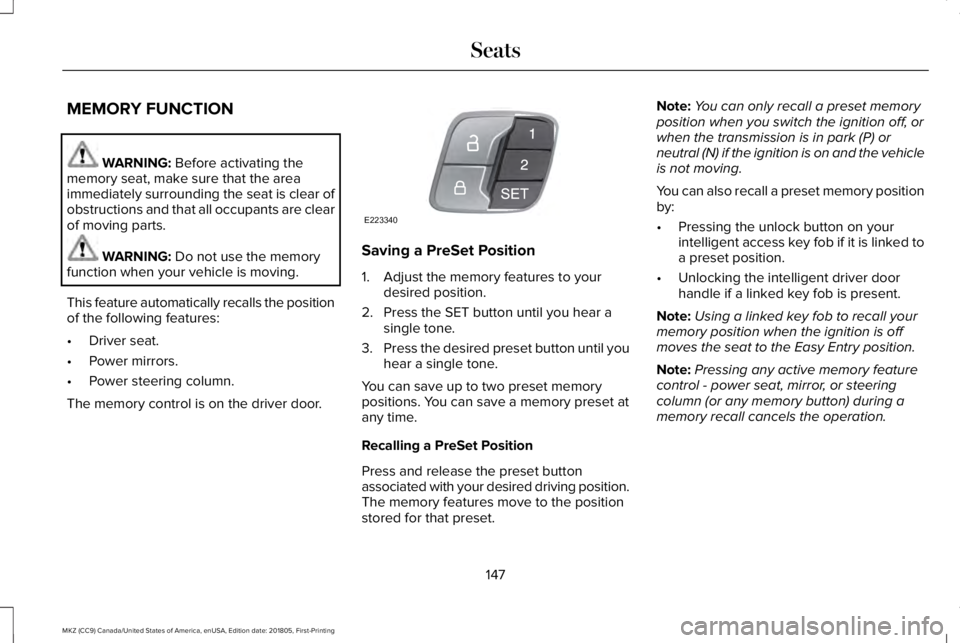
The memory control is on the driver door.
Saving a PreSet Position
1. Adjust the memory features to yourdesired position.
2. Press the SET button until you hear asingle tone.
3.Press the desired preset button until youhear a single tone.
You can save up to two preset memorypositions. You can save a memory preset atany time.
Recalling a PreSet Position
Press and release the preset buttonassociated with your desired driving position.The memory features move to the positionstored for that preset.
Note:You can only recall a preset memoryposition when you switch the ignition off, orwhen the transmission is in park (P) orneutral (N) if the ignition is on and the vehicleis not moving.
You can also recall a preset memory positionby:
•Pressing the unlock button on yourintelligent access key fob if it is linked toa preset position.
•Unlocking the intelligent driver doorhandle if a linked key fob is present.
Note:Using a linked key fob to recall yourmemory position when the ignition is offmoves the seat to the Easy Entry position.
Note:Pressing any active memory featurecontrol - power seat, mirror, or steeringcolumn (or any memory button) during amemory recall cancels the operation.
147
MKZ (CC9) Canada/United States of America, enUSA, Edition date: 201805, First-Printing
SeatsE223340