lock LINCOLN MKZ 2019 Owners Manual
[x] Cancel search | Manufacturer: LINCOLN, Model Year: 2019, Model line: MKZ, Model: LINCOLN MKZ 2019Pages: 595, PDF Size: 4.95 MB
Page 489 of 595
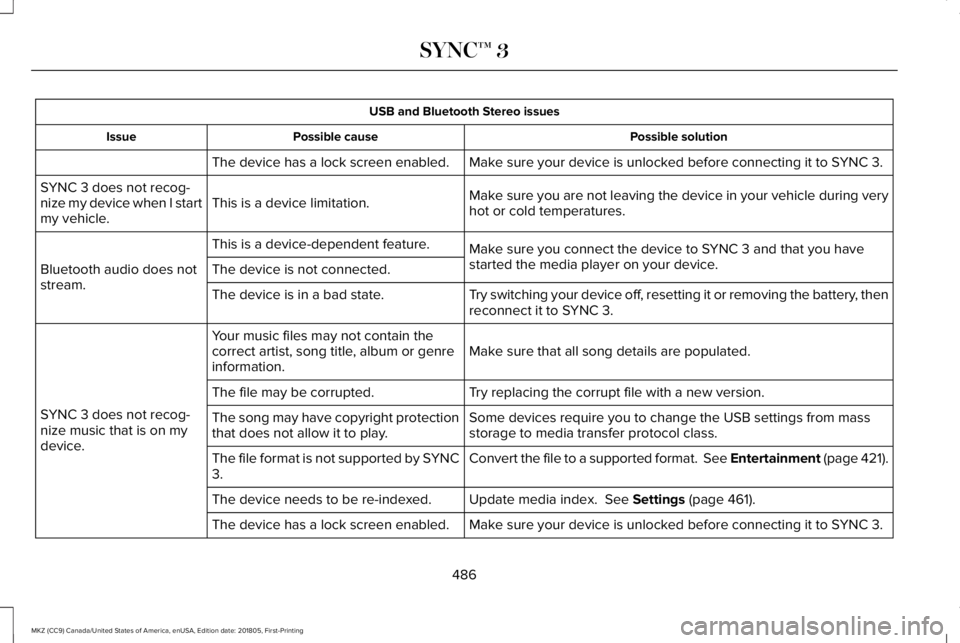
USB and Bluetooth Stereo issues
Possible solutionPossible causeIssue
Make sure your device is unlocked before connecting it to SYNC 3.The device has a lock screen enabled.
Make sure you are not leaving the device in your vehicle during veryhot or cold temperatures.This is a device limitation.SYNC 3 does not recog-nize my device when I startmy vehicle.
Make sure you connect the device to SYNC 3 and that you havestarted the media player on your device.
This is a device-dependent feature.
Bluetooth audio does notstream.The device is not connected.
Try switching your device off, resetting it or removing the battery, thenreconnect it to SYNC 3.The device is in a bad state.
Make sure that all song details are populated.Your music files may not contain thecorrect artist, song title, album or genreinformation.
SYNC 3 does not recog-nize music that is on mydevice.
Try replacing the corrupt file with a new version.The file may be corrupted.
Some devices require you to change the USB settings from massstorage to media transfer protocol class.The song may have copyright protectionthat does not allow it to play.
Convert the file to a supported format. See Entertainment (page 421).The file format is not supported by SYNC3.
Update media index. See Settings (page 461).The device needs to be re-indexed.
Make sure your device is unlocked before connecting it to SYNC 3.The device has a lock screen enabled.
486
MKZ (CC9) Canada/United States of America, enUSA, Edition date: 201805, First-Printing
SYNC™ 3
Page 498 of 595
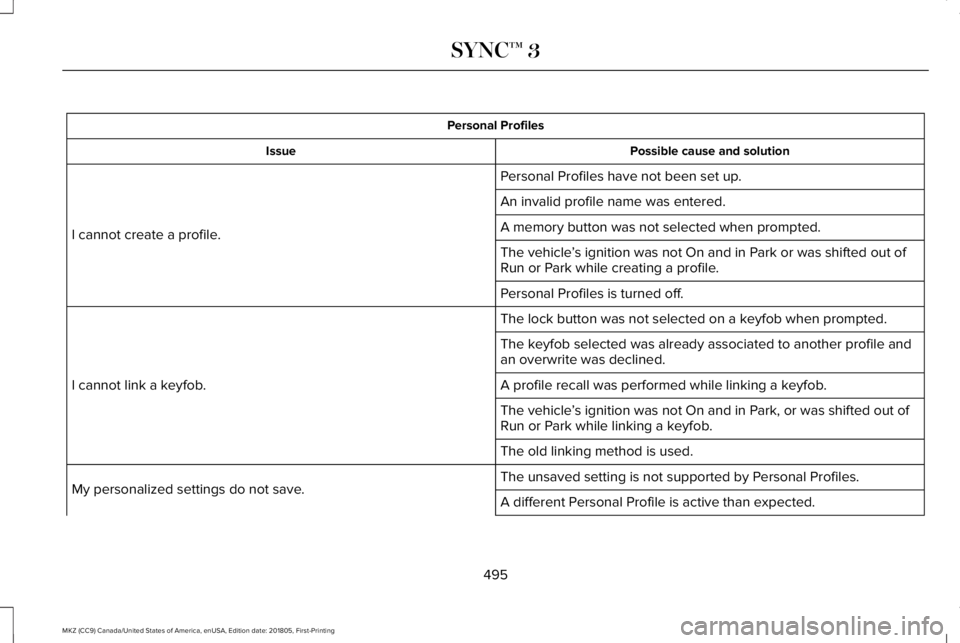
Personal Profiles
Possible cause and solutionIssue
Personal Profiles have not been set up.
I cannot create a profile.
An invalid profile name was entered.
A memory button was not selected when prompted.
The vehicle’s ignition was not On and in Park or was shifted out ofRun or Park while creating a profile.
Personal Profiles is turned off.
The lock button was not selected on a keyfob when prompted.
I cannot link a keyfob.
The keyfob selected was already associated to another profile andan overwrite was declined.
A profile recall was performed while linking a keyfob.
The vehicle’s ignition was not On and in Park, or was shifted out ofRun or Park while linking a keyfob.
The old linking method is used.
The unsaved setting is not supported by Personal Profiles.My personalized settings do not save.A different Personal Profile is active than expected.
495
MKZ (CC9) Canada/United States of America, enUSA, Edition date: 201805, First-Printing
SYNC™ 3
Page 499 of 595
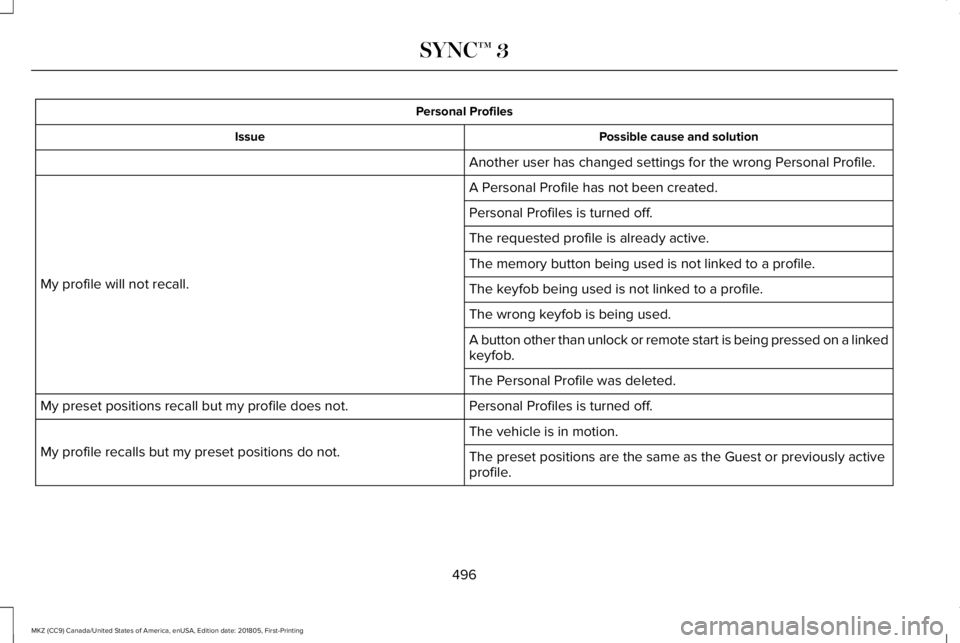
Personal Profiles
Possible cause and solutionIssue
Another user has changed settings for the wrong Personal Profile.
A Personal Profile has not been created.
My profile will not recall.
Personal Profiles is turned off.
The requested profile is already active.
The memory button being used is not linked to a profile.
The keyfob being used is not linked to a profile.
The wrong keyfob is being used.
A button other than unlock or remote start is being pressed on a linkedkeyfob.
The Personal Profile was deleted.
Personal Profiles is turned off.My preset positions recall but my profile does not.
The vehicle is in motion.
My profile recalls but my preset positions do not.The preset positions are the same as the Guest or previously activeprofile.
496
MKZ (CC9) Canada/United States of America, enUSA, Edition date: 201805, First-Printing
SYNC™ 3
Page 502 of 595
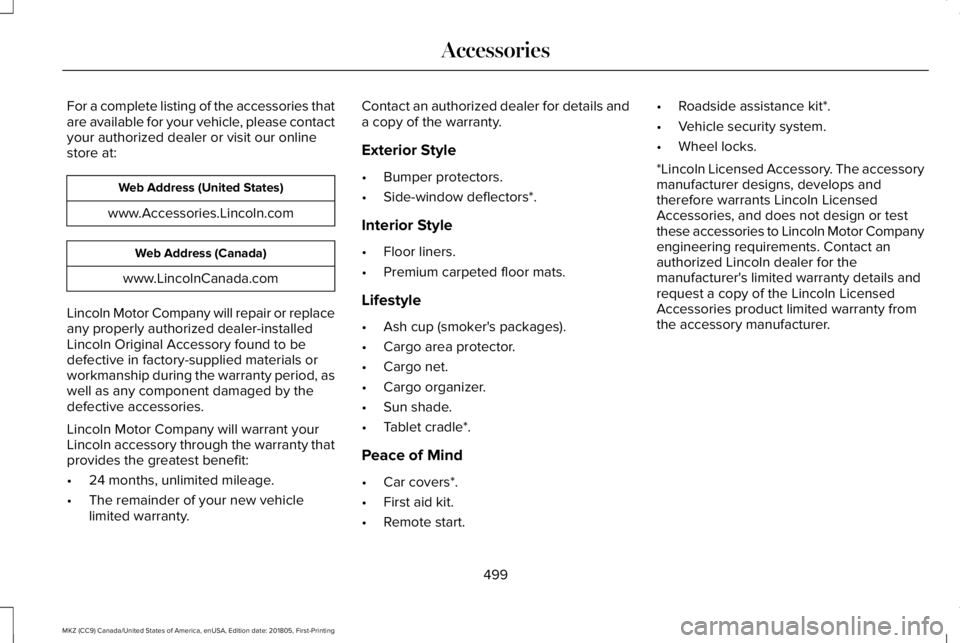
For a complete listing of the accessories thatare available for your vehicle, please contactyour authorized dealer or visit our onlinestore at:
Web Address (United States)
www.Accessories.Lincoln.com
Web Address (Canada)
www.LincolnCanada.com
Lincoln Motor Company will repair or replaceany properly authorized dealer-installedLincoln Original Accessory found to bedefective in factory-supplied materials orworkmanship during the warranty period, aswell as any component damaged by thedefective accessories.
Lincoln Motor Company will warrant yourLincoln accessory through the warranty thatprovides the greatest benefit:
•24 months, unlimited mileage.
•The remainder of your new vehiclelimited warranty.
Contact an authorized dealer for details anda copy of the warranty.
Exterior Style
•Bumper protectors.
•Side-window deflectors*.
Interior Style
•Floor liners.
•Premium carpeted floor mats.
Lifestyle
•Ash cup (smoker's packages).
•Cargo area protector.
•Cargo net.
•Cargo organizer.
•Sun shade.
•Tablet cradle*.
Peace of Mind
•Car covers*.
•First aid kit.
•Remote start.
•Roadside assistance kit*.
•Vehicle security system.
•Wheel locks.
*Lincoln Licensed Accessory. The accessorymanufacturer designs, develops andtherefore warrants Lincoln LicensedAccessories, and does not design or testthese accessories to Lincoln Motor Companyengineering requirements. Contact anauthorized Lincoln dealer for themanufacturer's limited warranty details andrequest a copy of the Lincoln LicensedAccessories product limited warranty fromthe accessory manufacturer.
499
MKZ (CC9) Canada/United States of America, enUSA, Edition date: 201805, First-Printing
Accessories
Page 504 of 595
PROTECT YOURSELF FROM THE RISINGCOST OF VEHICLE REPAIRS WITHLINCOLN PROTECT EXTENDED SERVICEPLAN.
Lincoln Protect Extended Service Plans(U.S. Only)
Lincoln Protect means peace of mind. It’s theextended service plan backed by the LincolnMotor Company, and provides moreprotection beyond the New Vehicle LimitedWarranty coverage. When you visit yourLincoln Dealer, insist on genuine LincolnProtect extended service plans!
Lincoln Protect Extended Service Plan CanQuickly Pay for Itself
One trip to the Service Center could easilyexceed the price of your Lincoln Protectextended service plan. With Lincoln Protectyou minimize your risk for unexpected repairbills and rising repair costs.
Up to 1000+ Covered Vehicle Components
There are four mechanical Lincoln Protectextended service plans with different levelsof coverage. Ask your authorized dealer fordetails.
1.PremiumCARE - Our most comprehensivecoverage. With over 1,000 coveredcomponents, this plan is so complete it’sprobably easier to list what’s not covered.
2.ExtraCARE - Covers 113 components, andincludes many high-tech items.
3. BaseCARE - Covers 84 components.
4. PowertrainCARE - Covers 29 criticalcomponents.
Lincoln Protect extended service plans arehonored by all authorized Lincoln dealers inthe U.S., Canada and Mexico.
That means you get:
•Reliable, quality service at any Lincoln orFord dealership.
•Repairs performed by factory trainedtechnicians, using genuine parts.
Rental Car Reimbursement
1st day Rental Benefit
If you bring your car into your dealer forservice, we’ll give you a loaner to use for theday.
Extended Rental Benefits
If your vehicle is kept overnight for coveredrepairs, you are eligible for rental carcoverage, including bumper to bumperwarranty repairs, and Field Service Actions.
Roadside Assistance
Exclusive 24/7 roadside assistance, including:
•Towing, flat-tire change and battery jumpstarts.
•Out of fuel and lock-out assistance.
•Travel expense reimbursement forlodging, meals and rental car.
•Assistance for taxi, shuttle, rental carcoverage and other transportation.
501
MKZ (CC9) Canada/United States of America, enUSA, Edition date: 201805, First-Printing
Lincoln Protect
Page 509 of 595
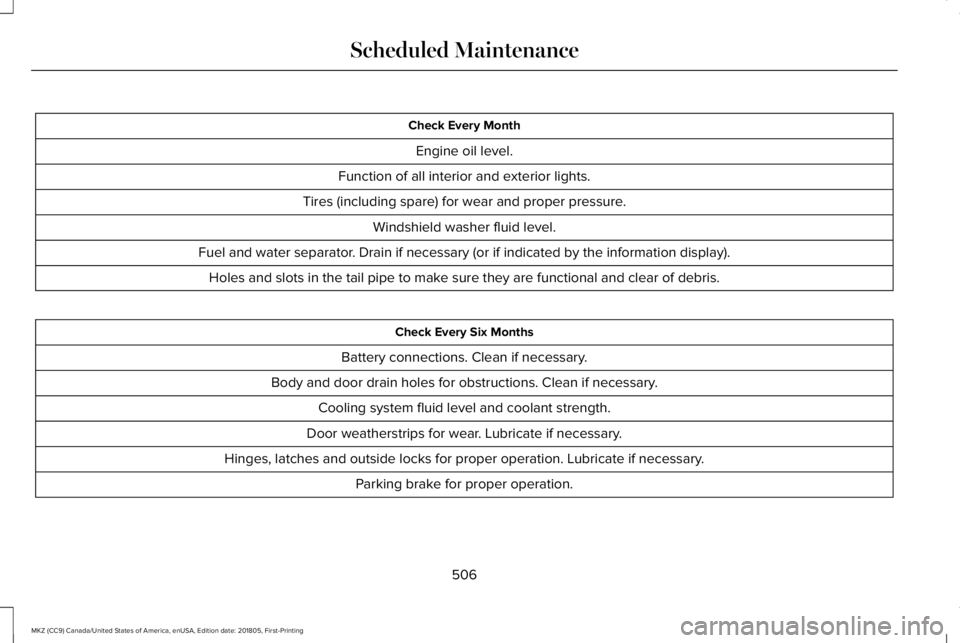
Check Every Month
Engine oil level.
Function of all interior and exterior lights.
Tires (including spare) for wear and proper pressure.
Windshield washer fluid level.
Fuel and water separator. Drain if necessary (or if indicated by the information display).
Holes and slots in the tail pipe to make sure they are functional and clear of debris.
Check Every Six Months
Battery connections. Clean if necessary.
Body and door drain holes for obstructions. Clean if necessary.
Cooling system fluid level and coolant strength.
Door weatherstrips for wear. Lubricate if necessary.
Hinges, latches and outside locks for proper operation. Lubricate if necessary.
Parking brake for proper operation.
506
MKZ (CC9) Canada/United States of America, enUSA, Edition date: 201805, First-Printing
Scheduled Maintenance
Page 584 of 595
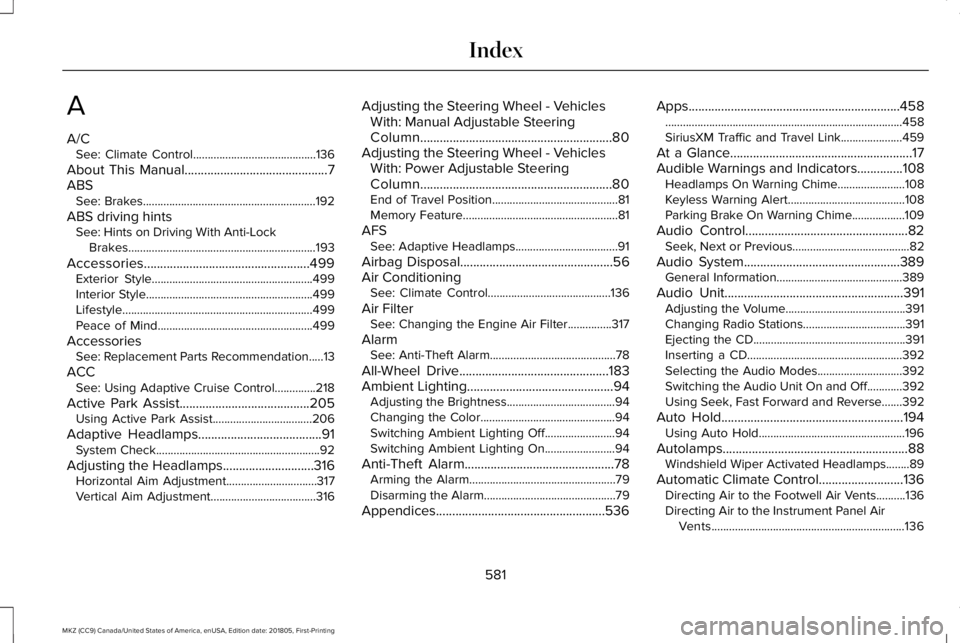
A
A/CSee: Climate Control..........................................136
About This Manual............................................7ABSSee: Brakes...........................................................192
ABS driving hintsSee: Hints on Driving With Anti-LockBrakes................................................................193
Accessories...................................................499Exterior Style.......................................................499Interior Style.........................................................499Lifestyle.................................................................499Peace of Mind.....................................................499
AccessoriesSee: Replacement Parts Recommendation.....13
ACCSee: Using Adaptive Cruise Control..............218
Active Park Assist........................................205Using Active Park Assist..................................206
Adaptive Headlamps......................................91System Check........................................................92
Adjusting the Headlamps............................316Horizontal Aim Adjustment...............................317Vertical Aim Adjustment....................................316
Adjusting the Steering Wheel - VehiclesWith: Manual Adjustable SteeringColumn...........................................................80Adjusting the Steering Wheel - VehiclesWith: Power Adjustable SteeringColumn...........................................................80End of Travel Position...........................................81Memory Feature.....................................................81
AFSSee: Adaptive Headlamps...................................91
Airbag Disposal...............................................56Air ConditioningSee: Climate Control..........................................136
Air FilterSee: Changing the Engine Air Filter...............317
AlarmSee: Anti-Theft Alarm...........................................78
All-Wheel Drive..............................................183Ambient Lighting.............................................94Adjusting the Brightness.....................................94Changing the Color..............................................94Switching Ambient Lighting Off........................94Switching Ambient Lighting On........................94
Anti-Theft Alarm..............................................78Arming the Alarm..................................................79Disarming the Alarm.............................................79
Appendices....................................................536
Apps.................................................................458.................................................................................458SiriusXM Traffic and Travel Link.....................459
At a Glance........................................................17Audible Warnings and Indicators..............108Headlamps On Warning Chime.......................108Keyless Warning Alert........................................108Parking Brake On Warning Chime..................109
Audio Control..................................................82Seek, Next or Previous........................................82
Audio System................................................389General Information...........................................389
Audio Unit.......................................................391Adjusting the Volume.........................................391Changing Radio Stations...................................391Ejecting the CD....................................................391Inserting a CD.....................................................392Selecting the Audio Modes.............................392Switching the Audio Unit On and Off............392Using Seek, Fast Forward and Reverse.......392
Auto Hold........................................................194Using Auto Hold..................................................196
Autolamps.........................................................88Windshield Wiper Activated Headlamps........89
Automatic Climate Control..........................136Directing Air to the Footwell Air Vents..........136Directing Air to the Instrument Panel AirVents..................................................................136
581
MKZ (CC9) Canada/United States of America, enUSA, Edition date: 201805, First-Printing
Index
Page 585 of 595
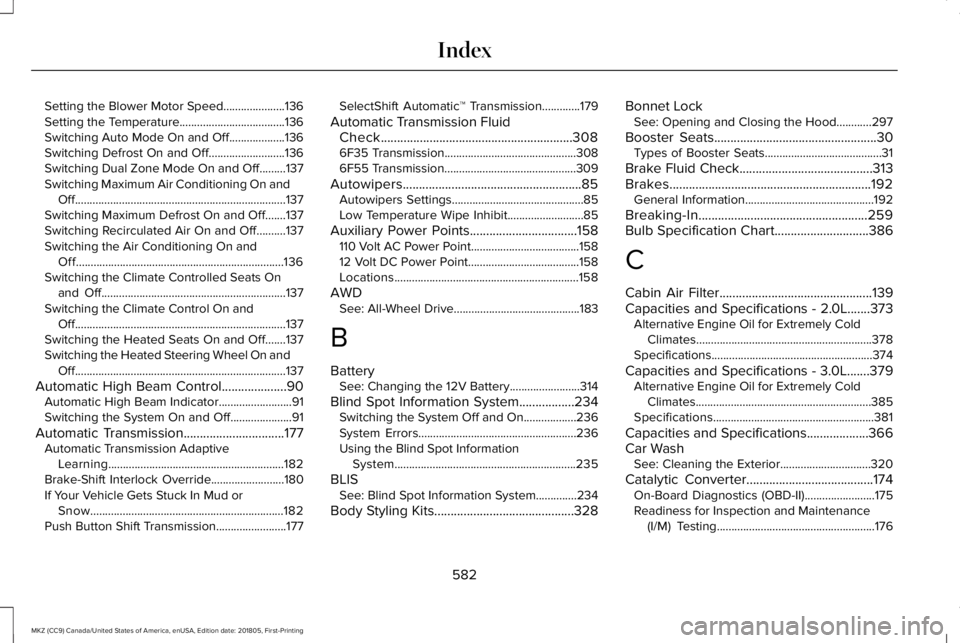
Setting the Blower Motor Speed.....................136Setting the Temperature....................................136Switching Auto Mode On and Off...................136Switching Defrost On and Off..........................136Switching Dual Zone Mode On and Off.........137Switching Maximum Air Conditioning On andOff........................................................................137Switching Maximum Defrost On and Off.......137Switching Recirculated Air On and Off..........137Switching the Air Conditioning On andOff.......................................................................136Switching the Climate Controlled Seats Onand Off...............................................................137Switching the Climate Control On andOff........................................................................137Switching the Heated Seats On and Off.......137Switching the Heated Steering Wheel On andOff........................................................................137
Automatic High Beam Control....................90Automatic High Beam Indicator.........................91Switching the System On and Off.....................91
Automatic Transmission...............................177Automatic Transmission AdaptiveLearning............................................................182Brake-Shift Interlock Override.........................180If Your Vehicle Gets Stuck In Mud orSnow..................................................................182Push Button Shift Transmission........................177
SelectShift Automatic™ Transmission.............179
Automatic Transmission FluidCheck...........................................................3086F35 Transmission.............................................3086F55 Transmission.............................................309
Autowipers.......................................................85Autowipers Settings.............................................85Low Temperature Wipe Inhibit..........................85
Auxiliary Power Points.................................158110 Volt AC Power Point.....................................15812 Volt DC Power Point......................................158Locations...............................................................158
AWDSee: All-Wheel Drive...........................................183
B
BatterySee: Changing the 12V Battery........................314
Blind Spot Information System.................234Switching the System Off and On..................236System Errors......................................................236Using the Blind Spot InformationSystem..............................................................235
BLISSee: Blind Spot Information System..............234
Body Styling Kits...........................................328
Bonnet LockSee: Opening and Closing the Hood............297
Booster Seats..................................................30Types of Booster Seats........................................31
Brake Fluid Check.........................................313Brakes..............................................................192General Information............................................192
Breaking-In....................................................259Bulb Specification Chart.............................386
C
Cabin Air Filter...............................................139Capacities and Specifications - 2.0L.......373Alternative Engine Oil for Extremely ColdClimates............................................................378Specifications.......................................................374
Capacities and Specifications - 3.0L.......379Alternative Engine Oil for Extremely ColdClimates............................................................385Specifications.......................................................381
Capacities and Specifications...................366Car WashSee: Cleaning the Exterior...............................320
Catalytic Converter.......................................174On-Board Diagnostics (OBD-II)........................175Readiness for Inspection and Maintenance(I/M) Testing......................................................176
582
MKZ (CC9) Canada/United States of America, enUSA, Edition date: 201805, First-Printing
Index
Page 586 of 595
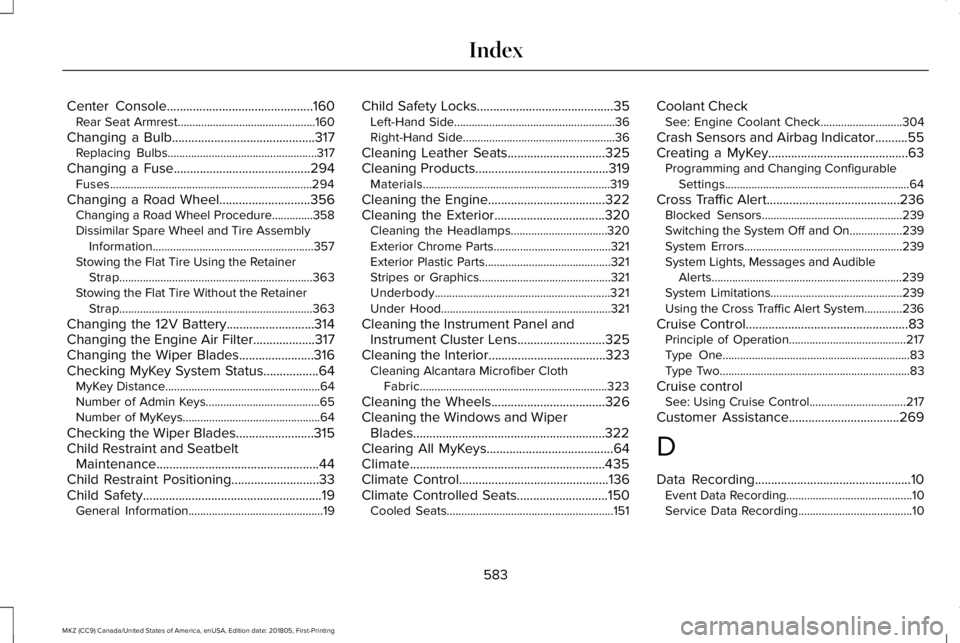
Center Console.............................................160Rear Seat Armrest...............................................160
Changing a Bulb............................................317Replacing Bulbs...................................................317
Changing a Fuse..........................................294Fuses.....................................................................294
Changing a Road Wheel............................356Changing a Road Wheel Procedure..............358Dissimilar Spare Wheel and Tire AssemblyInformation.......................................................357Stowing the Flat Tire Using the RetainerStrap..................................................................363Stowing the Flat Tire Without the RetainerStrap..................................................................363
Changing the 12V Battery...........................314Changing the Engine Air Filter...................317Changing the Wiper Blades.......................316Checking MyKey System Status.................64MyKey Distance.....................................................64Number of Admin Keys.......................................65Number of MyKeys...............................................64
Checking the Wiper Blades........................315Child Restraint and SeatbeltMaintenance..................................................44Child Restraint Positioning...........................33Child Safety.......................................................19General Information..............................................19
Child Safety Locks..........................................35Left-Hand Side.......................................................36Right-Hand Side....................................................36
Cleaning Leather Seats..............................325Cleaning Products.........................................319Materials................................................................319
Cleaning the Engine....................................322Cleaning the Exterior..................................320Cleaning the Headlamps.................................320Exterior Chrome Parts........................................321Exterior Plastic Parts...........................................321Stripes or Graphics.............................................321Underbody............................................................321Under Hood..........................................................321
Cleaning the Instrument Panel andInstrument Cluster Lens...........................325Cleaning the Interior....................................323Cleaning Alcantara Microfiber ClothFabric................................................................323
Cleaning the Wheels...................................326Cleaning the Windows and WiperBlades...........................................................322Clearing All MyKeys.......................................64Climate............................................................435Climate Control..............................................136Climate Controlled Seats............................150Cooled Seats.........................................................151
Coolant CheckSee: Engine Coolant Check............................304
Crash Sensors and Airbag Indicator..........55Creating a MyKey...........................................63Programming and Changing ConfigurableSettings...............................................................64
Cross Traffic Alert.........................................236Blocked Sensors................................................239Switching the System Off and On..................239System Errors......................................................239System Lights, Messages and AudibleAlerts.................................................................239System Limitations.............................................239Using the Cross Traffic Alert System.............236
Cruise Control..................................................83Principle of Operation........................................217Type One................................................................83Type Two.................................................................83
Cruise controlSee: Using Cruise Control.................................217
Customer Assistance..................................269
D
Data Recording................................................10Event Data Recording...........................................10Service Data Recording.......................................10
583
MKZ (CC9) Canada/United States of America, enUSA, Edition date: 201805, First-Printing
Index
Page 587 of 595
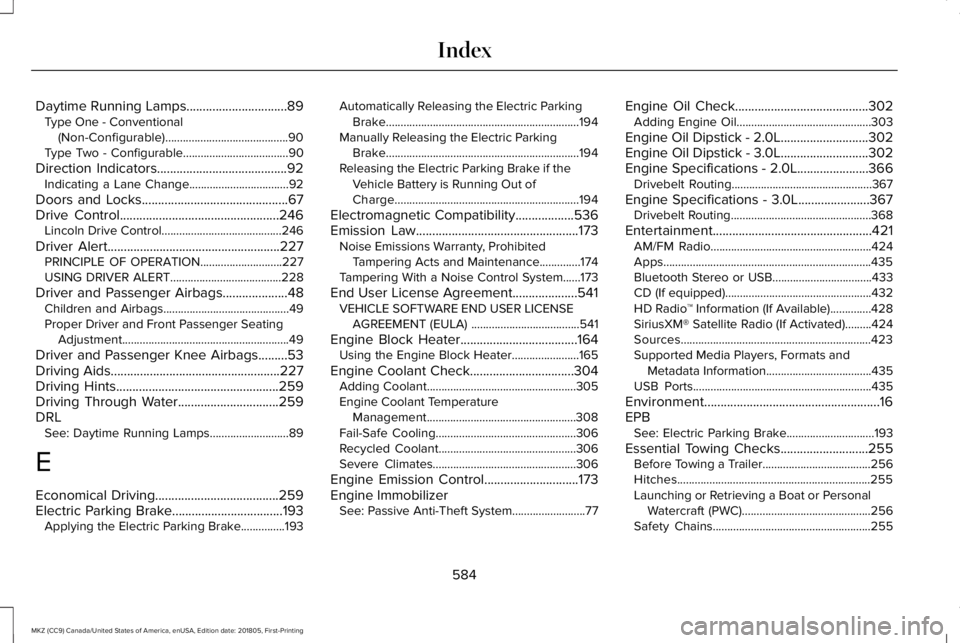
Daytime Running Lamps...............................89Type One - Conventional(Non-Configurable)..........................................90Type Two - Configurable....................................90
Direction Indicators........................................92Indicating a Lane Change..................................92
Doors and Locks.............................................67Drive Control.................................................246Lincoln Drive Control.........................................246
Driver Alert.....................................................227PRINCIPLE OF OPERATION............................227USING DRIVER ALERT......................................228
Driver and Passenger Airbags....................48Children and Airbags...........................................49Proper Driver and Front Passenger SeatingAdjustment.........................................................49
Driver and Passenger Knee Airbags.........53Driving Aids....................................................227Driving Hints..................................................259Driving Through Water...............................259DRLSee: Daytime Running Lamps...........................89
E
Economical Driving......................................259Electric Parking Brake..................................193Applying the Electric Parking Brake...............193
Automatically Releasing the Electric ParkingBrake..................................................................194Manually Releasing the Electric ParkingBrake..................................................................194Releasing the Electric Parking Brake if theVehicle Battery is Running Out ofCharge...............................................................194
Electromagnetic Compatibility..................536Emission Law..................................................173Noise Emissions Warranty, ProhibitedTampering Acts and Maintenance..............174Tampering With a Noise Control System......173
End User License Agreement....................541VEHICLE SOFTWARE END USER LICENSEAGREEMENT (EULA) .....................................541
Engine Block Heater....................................164Using the Engine Block Heater.......................165
Engine Coolant Check................................304Adding Coolant...................................................305Engine Coolant TemperatureManagement...................................................308Fail-Safe Cooling................................................306Recycled Coolant...............................................306Severe Climates.................................................306
Engine Emission Control.............................173Engine ImmobilizerSee: Passive Anti-Theft System.........................77
Engine Oil Check.........................................302Adding Engine Oil..............................................303
Engine Oil Dipstick - 2.0L...........................302Engine Oil Dipstick - 3.0L...........................302Engine Specifications - 2.0L......................366Drivebelt Routing................................................367
Engine Specifications - 3.0L......................367Drivebelt Routing................................................368
Entertainment.................................................421AM/FM Radio.......................................................424Apps.......................................................................435Bluetooth Stereo or USB..................................433CD (If equipped)..................................................432HD Radio™ Information (If Available)..............428SiriusXM® Satellite Radio (If Activated).........424Sources.................................................................423Supported Media Players, Formats andMetadata Information....................................435USB Ports.............................................................435
Environment......................................................16EPBSee: Electric Parking Brake..............................193
Essential Towing Checks...........................255Before Towing a Trailer.....................................256Hitches..................................................................255Launching or Retrieving a Boat or PersonalWatercraft (PWC)............................................256Safety Chains......................................................255
584
MKZ (CC9) Canada/United States of America, enUSA, Edition date: 201805, First-Printing
Index