ECO mode LINCOLN MKZ 2019 User Guide
[x] Cancel search | Manufacturer: LINCOLN, Model Year: 2019, Model line: MKZ, Model: LINCOLN MKZ 2019Pages: 595, PDF Size: 4.95 MB
Page 77 of 595
You can operate the keypad with thefactory-set 5-digit entry code. The code islocated on the owner’s wallet card in theglove box and is available from an authorizeddealer. You can also create up to five of yourown 5-digit personal entry codes.
Programming a Personal Entry Code
To create your own personal entry code:
1. Enter the factory-set code.
2. Press 1·2 on the keypad within fiveseconds.
3. Enter your personal 5-digit code. Youmust enter each number within fiveseconds of each other.
4.Press 1·2 on the keypad to save personalcode 1.
The doors lock then unlock to confirm thatprogramming was successful.
To program additional personal entry codes,repeat Steps 1-3, then for Step 4:
•Press 3·4 to save personal code 2
•Press 5·6 to save personal code 3
•Press 7·8 to save personal code 4
•Press 9·0 to save personal code 5.
You may also program a personal entry codeusing the touchscreen. See Settings (page461).
Tips:
•Do not set a code that uses five of thesame number.
•Do not use five numbers in sequentialorder.
•The factory-set code works even if youhave set your own personal code.
Erasing a Personal Code
1. Enter the factory-set 5-digit code.
2. Press and release 1·2 on the keypadwithin five seconds.
3. Press and hold 1·2 for two seconds. Youmust do this within five seconds ofcompleting Step 2.
If you complete this successfully, you haveerased all personal codes and only thefactory-set 5-digit code works.
Anti-Scan Feature
The keypad goes into an anti-scan mode ifyou enter the wrong code seven times (35consecutive button presses). This modedisables the keypad for one minute and thekeypad lamp flashes.
The anti-scan feature turns off after:
•One minute of keypad inactivity.
•Pressing the unlock button on the remotecontrol.
•Switching the ignition on.
•Unlocking your vehicle using intelligentaccess.
Unlocking and Locking the Doors
To Unlock the Driver Door
Enter the factory-set 5-digit code or yourpersonal code. You must press each numberwithin five seconds of each other. Theinterior lamps illuminate.
Note:All doors unlock if you enable the alldoor unlocking mode. See Locking andUnlocking (page 67).
74
MKZ (CC9) Canada/United States of America, enUSA, Edition date: 201805, First-Printing
Doors and Locks
Page 84 of 595
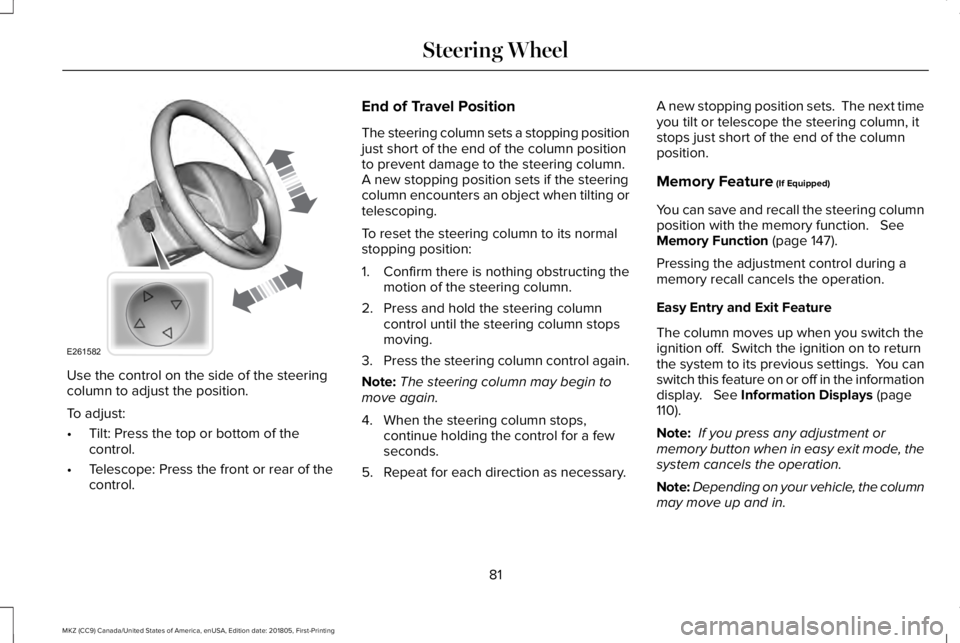
Use the control on the side of the steeringcolumn to adjust the position.
To adjust:
•Tilt: Press the top or bottom of thecontrol.
•Telescope: Press the front or rear of thecontrol.
End of Travel Position
The steering column sets a stopping positionjust short of the end of the column positionto prevent damage to the steering column. A new stopping position sets if the steeringcolumn encounters an object when tilting ortelescoping.
To reset the steering column to its normalstopping position:
1. Confirm there is nothing obstructing themotion of the steering column.
2. Press and hold the steering columncontrol until the steering column stopsmoving.
3.Press the steering column control again.
Note:The steering column may begin tomove again.
4. When the steering column stops,continue holding the control for a fewseconds.
5. Repeat for each direction as necessary.
A new stopping position sets. The next timeyou tilt or telescope the steering column, itstops just short of the end of the columnposition.
Memory Feature (If Equipped)
You can save and recall the steering columnposition with the memory function. SeeMemory Function (page 147).
Pressing the adjustment control during amemory recall cancels the operation.
Easy Entry and Exit Feature
The column moves up when you switch theignition off. Switch the ignition on to returnthe system to its previous settings. You canswitch this feature on or off in the informationdisplay. See Information Displays (page110).
Note: If you press any adjustment ormemory button when in easy exit mode, thesystem cancels the operation.
Note:Depending on your vehicle, the columnmay move up and in.
81
MKZ (CC9) Canada/United States of America, enUSA, Edition date: 201805, First-Printing
Steering WheelE261582
Page 92 of 595
Windshield Wiper Activated Headlamps
When you switch the autolamps on, theheadlamps turn on within 10 seconds ofswitching the wipers on. They turn offapproximately 60 seconds after you switchthe windshield wipers off.
The headlamps do not turn on with thewipers:
•During a single wipe.
•When using the windshield washers.
•If the wipers are in intermittent mode.
Note:If you switch the autolamps and theautowipers on, the headlamps turn on whenthe windshield wipers continuously operate.
INSTRUMENT LIGHTING DIMMER
Note:If you disconnect and connect thebattery, or fully discharge and charge thebattery, the illuminated components switchto the maximum setting.
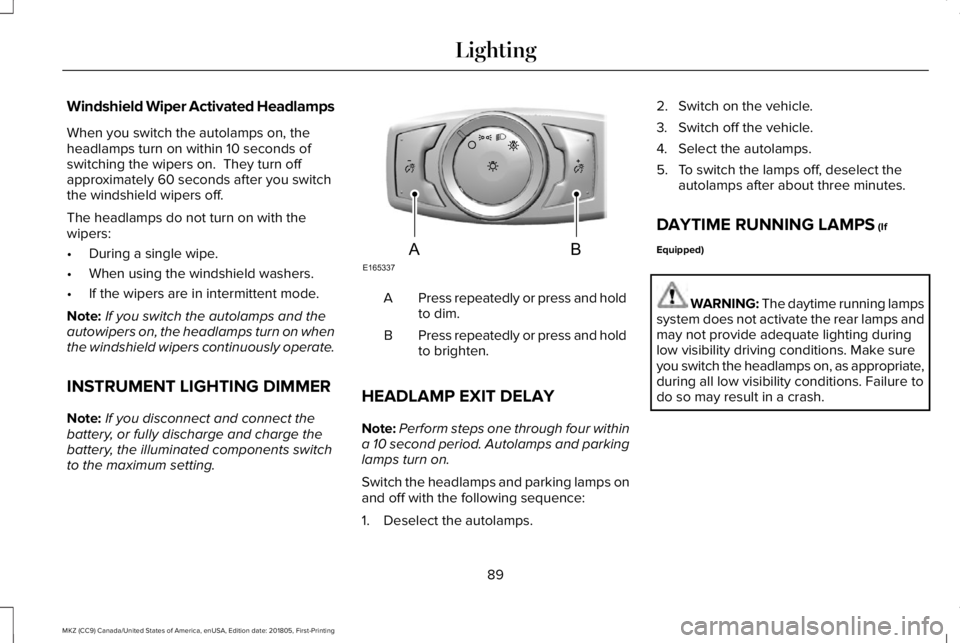
Press repeatedly or press and holdto dim.A
Press repeatedly or press and holdto brighten.B
HEADLAMP EXIT DELAY
Note:Perform steps one through four withina 10 second period. Autolamps and parkinglamps turn on.
Switch the headlamps and parking lamps onand off with the following sequence:
1. Deselect the autolamps.
2. Switch on the vehicle.
3. Switch off the vehicle.
4. Select the autolamps.
5. To switch the lamps off, deselect theautolamps after about three minutes.
DAYTIME RUNNING LAMPS (If
Equipped)
WARNING: The daytime running lampssystem does not activate the rear lamps andmay not provide adequate lighting duringlow visibility driving conditions. Make sureyou switch the headlamps on, as appropriate,during all low visibility conditions. Failure todo so may result in a crash.
89
MKZ (CC9) Canada/United States of America, enUSA, Edition date: 201805, First-Printing
LightingE165337AB
Page 108 of 595
WARNING LAMPS AND
INDICATORS
The following warning lamps and indicatorsalert you to a vehicle condition that maybecome serious. Some lamps illuminatewhen you start your vehicle to make surethey work. If any lamps remain on afterstarting your vehicle, refer to the respectivesystem warning lamp for further information.
Note:Some warning indicators appear inthe information display and operate thesame as a warning lamp but do notilluminate when you start your vehicle.
Adaptive Cruise Control Indicator (If
Equipped)
The speed control system indicatorlight changes color to indicatewhat mode the system is in: SeeUsing Adaptive Cruise Control (page 218).
On (white light): Illuminates when theadaptive cruise control system is turned on.Turns off when the speed control system isturned off.
Engaged (green light): Illuminates when theadaptive cruise control system is engaged.Turns off when the speed control system isdisengaged.
Anti-Lock Brake System Warning Lamp
If it illuminates when you aredriving, this indicates amalfunction. You will continue tohave the normal braking system (withoutABS) unless the brake system warning lampis also illuminated. Have the system checkedby your authorized dealer.
Auto Hold Active
It illuminates when the systemholds your vehicle stationary.
Auto Hold Unavailable
It illuminates when the system ison, but unavailable to hold yourvehicle stationary.
Automatic Headlamp High BeamIndicator (If Equipped)
It illuminates when the systemautomatically turns the headlamphigh beam on.
See Automatic High Beam Control (page90).
Battery
If it illuminates while driving, itindicates a malfunction. Switch offall unnecessary electricalequipment and have the system checked byyour authorized dealer immediately.
Blind Spot Monitor (If Equipped)
It illuminates when you switch thisfeature off or in conjunction with amessage. See Blind SpotInformation System (page 234). SeeInformation Messages (page 116).
105
MKZ (CC9) Canada/United States of America, enUSA, Edition date: 201805, First-Printing
Instrument ClusterE144524 E197933 E197934 E151262
Page 111 of 595
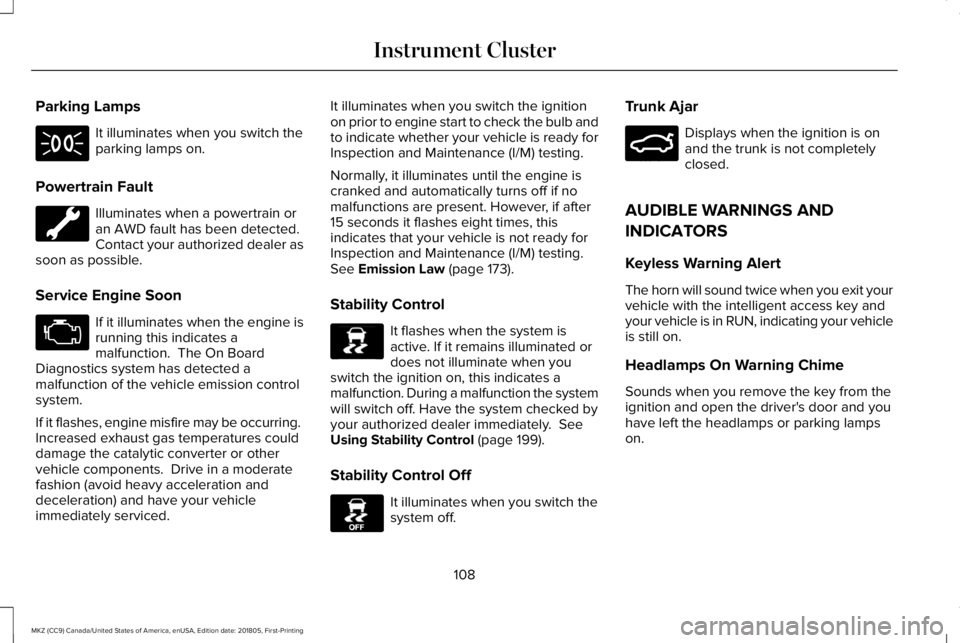
Parking Lamps
It illuminates when you switch theparking lamps on.
Powertrain Fault
Illuminates when a powertrain oran AWD fault has been detected.Contact your authorized dealer assoon as possible.
Service Engine Soon
If it illuminates when the engine isrunning this indicates amalfunction. The On BoardDiagnostics system has detected amalfunction of the vehicle emission controlsystem.
If it flashes, engine misfire may be occurring. Increased exhaust gas temperatures coulddamage the catalytic converter or othervehicle components. Drive in a moderatefashion (avoid heavy acceleration anddeceleration) and have your vehicleimmediately serviced.
It illuminates when you switch the ignitionon prior to engine start to check the bulb andto indicate whether your vehicle is ready forInspection and Maintenance (I/M) testing.
Normally, it illuminates until the engine iscranked and automatically turns off if nomalfunctions are present. However, if after15 seconds it flashes eight times, thisindicates that your vehicle is not ready forInspection and Maintenance (I/M) testing.See Emission Law (page 173).
Stability Control
It flashes when the system isactive. If it remains illuminated ordoes not illuminate when youswitch the ignition on, this indicates amalfunction. During a malfunction the systemwill switch off. Have the system checked byyour authorized dealer immediately. SeeUsing Stability Control (page 199).
Stability Control Off
It illuminates when you switch thesystem off.
Trunk Ajar
Displays when the ignition is onand the trunk is not completelyclosed.
AUDIBLE WARNINGS AND
INDICATORS
Keyless Warning Alert
The horn will sound twice when you exit yourvehicle with the intelligent access key andyour vehicle is in RUN, indicating your vehicleis still on.
Headlamps On Warning Chime
Sounds when you remove the key from theignition and open the driver's door and youhave left the headlamps or parking lampson.
108
MKZ (CC9) Canada/United States of America, enUSA, Edition date: 201805, First-Printing
Instrument Cluster E138639 E130458 E159323
Page 136 of 595
Transmission
ActionMessage
See your authorized dealer.Transmission Malfunction Service Now
The transmission is overheating and needs to cool. Stop in a safe place as soon as it’s possible.Transmission Overheating Stop Safely
The transmission has overheated and needs to cool. Stop in a safe place as soon as it’s possible.Transmission Over Temperature StopSafely
See your authorized dealer.Transmission Service Required
Transmission is getting hot. Stop to let it cool.Transmission Too Hot Press Brake
Displays when the transmission has overheated and has limited functionality.Transmission Limited Function See Manual
Transmission is too cold. Wait for it to warm up before you drive.Transmission Warming Up Please Wait
A reminder to shift into park. In addition, this message is typical after reconnecting or rechargingthe battery until you cycle the ignition to the on mode. See Changing the 12V Battery (page314).
Transmission Not in Park
Displays when the transmission has adjusted the shift strategy.Transmission Adjusted
Displays when the transmission is adjusting the shift strategy.Transmission AdaptMode
Displays when the transmission shift lever is locked and unable to select gears.Transmission IndicatMode Lockup On
Displays when the transmission shift lever is unlocked and free to select gears.Transmission IndicatMode Lockup Off
Displays when an invalid gear has been selected.Invalid Gear Selection
133
MKZ (CC9) Canada/United States of America, enUSA, Edition date: 201805, First-Printing
Information Displays
Page 139 of 595
AUTOMATIC CLIMATE CONTROL
Note: You can switch temperature unitsbetween Fahrenheit and Celsius. See yourSYNC information.
Directing Air to the Instrument PanelAir Vents
Press and release the button todirect airflow to instrument panelair vents.
Directing Air to the Footwell Air Vents
Press and release the button todirect airflow to footwell air vents.
Setting the Blower Motor Speed
Turn the control to adjust thevolume of air circulated in thevehicle.
Setting the Temperature
Press the toggle button on the left-hand sideof the climate control upward or downwardto set the left-hand temperature.
Note:This control also adjusts the right-handside temperature when you switch off dualzone mode.
Press the toggle button on the right-handside of the climate control upward ordownward to set the right-hand temperature.
Switching Auto Mode On and Off
Press and release the button tocycle through the automaticsettings and off, then set thetemperature.
When three indicators are on, the blowermotor adjusts to the highest speed to reachthe selected temperature as quickly aspossible.
When two indicators are on, the blowermotor adjusts to a medium speed to reachthe selected temperature with a reducedamount of cabin noise.
When one indicator is on, the blower motoradjusts to the lowest speed to reach theselected temperature with the least amountof cabin noise.
Note:The system starts at the previous fansetting when you switch on AUTO.
Note:You can also switch off dual zonemode by pressing and holding the button formore than two seconds.
Switching Defrost On and Off
Press and release the button todistribute air through thewindshield air vents and de-mister.
Air directed to the instrument panel andfootwell air vents turns off. You can also usethis setting to defog and clear the windshieldof a thin covering of ice.
Switching the Air Conditioning On andOff
Press and release the button.
136
MKZ (CC9) Canada/United States of America, enUSA, Edition date: 201805, First-Printing
Climate Control
Page 140 of 595
Use air conditioning with recirculated air toimprove cooling performance and efficiency.
Note:In certain conditions (for example,maximum defrost) the air conditioningcompressor may continue to operate eventhough you switch off the air conditioning.
Switching the Climate Control On andOff
Press and release the button.
Switching the Climate Controlled SeatsOn and Off
Press and release the button tocycle through the various climatecontrolled seat settings and off.
See Climate Controlled Seats (page 150).
Switching Dual Zone Mode On and Off
Press and release the button toswitch on temperature control forthe right-hand side of the vehicle.
Switching the Heated Seats On and Off
Press and release the button tocycle through the various heatsettings and off.
See Heated Seats (page 149).
Switching the Heated Steering WheelOn and Off
Press and release the button.
Switching Maximum Air ConditioningOn and Off
Press and release the button formaximum cooling.
The left-hand and right-hand settings set toLO, recirculated air flows through theinstrument panel air vents, air conditioningturns on and the blower motor adjusts to thehighest speed.
Switching Maximum Defrost On andOff
Press and release the button formaximum defrosting.
The left-hand and right-hand settings set toHI, air flows through the windshield air vents,and the blower motor adjusts to the highestspeed.
You can also use this setting to defog andclear the windshield of a thin covering of ice.
Note:To prevent window fogging, youcannot select recirculated air whenmaximum defrost is on.
Note:The heated rear window also turns onwhen you select maximum defrost.
Switching Recirculated Air On and Off
Press and release the button toswitch between outside air andrecirculated air.
137
MKZ (CC9) Canada/United States of America, enUSA, Edition date: 201805, First-Printing
Climate Control E265282 E265280
Page 141 of 595
The air currently in the passengercompartment recirculates. This may reducethe time needed to cool the interior (whenused with A/C) and reduce unwanted odorsfrom entering your vehicle.
Note:Recirculated air may turn off (orprevent you from switching on) in all air flowmodes except MAX A/C to reduce the riskof fogging. Recirculation may also turn onand off in various air distribution controlcombinations during hot weather in order toimprove cooling efficiency.
HINTS ON CONTROLLING THE
INTERIOR CLIMATE
General Hints
Note:Prolonged use of recirculated air maycause the windows to fog up.
Note:You may feel a small amount of airfrom the footwell air vents regardless of theair distribution setting.
Note:To reduce humidity build-up insideyour vehicle, do not drive with the systemswitched off or with recirculated air alwaysswitched on.
Note:Do not place objects under the frontseats as this may interfere with the airflowto the rear seats.
Note:Remove any snow, ice or leaves fromthe air intake area at the base of thewindshield.
Note:To improve the time to reach acomfortable temperature in hot weather,drive with the windows open until you feelcold air through the air vents.
Automatic Climate Control
Note:Adjusting the settings when yourvehicle interior is extremely hot or cold is notnecessary.
Note:The system adjusts to heat or cool theinterior to the temperature you select asquickly as possible.
Note:For the system to function efficiently,the instrument panel and side air ventsshould be fully open.
Note:If you select AUTO during cold outsidetemperatures, the system directs air flow tothe windshield and side window air vents. Inaddition, the blower motor may run at aslower speed until the engine warms up.
Note:If you select AUTO during hottemperatures and the inside of the vehicleis hot, the system uses recirculated air tomaximize interior cooling. Blower motorspeed may also reduce until the air cools.
Quickly Heating the Interior
1. Press and release AUTO.
2. Adjust the temperature function to thesetting you prefer.
Recommended Settings for Heating
1. Press and release AUTO.
2. Adjust the temperature function to thesetting you prefer. Use 72°F (22°C) as astarting point, then adjust the setting asnecessary.
Quickly Cooling the Interior
1. Press and release MAX A/C.
138
MKZ (CC9) Canada/United States of America, enUSA, Edition date: 201805, First-Printing
Climate Control
Page 148 of 595
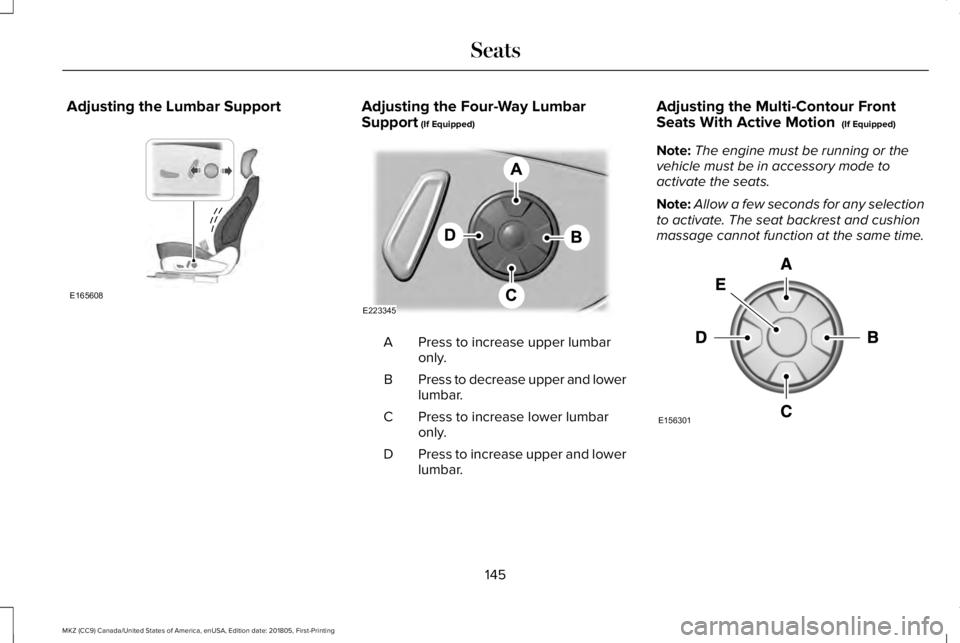
Adjusting the Lumbar SupportAdjusting the Four-Way LumbarSupport (If Equipped)
Press to increase upper lumbaronly.A
Press to decrease upper and lowerlumbar.B
Press to increase lower lumbaronly.C
Press to increase upper and lowerlumbar.D
Adjusting the Multi-Contour FrontSeats With Active Motion (If Equipped)
Note:The engine must be running or thevehicle must be in accessory mode toactivate the seats.
Note:Allow a few seconds for any selectionto activate. The seat backrest and cushionmassage cannot function at the same time.
145
MKZ (CC9) Canada/United States of America, enUSA, Edition date: 201805, First-Printing
SeatsE165608 E223345 E156301