ECO mode LINCOLN MKZ 2019 Workshop Manual
[x] Cancel search | Manufacturer: LINCOLN, Model Year: 2019, Model line: MKZ, Model: LINCOLN MKZ 2019Pages: 595, PDF Size: 4.95 MB
Page 455 of 595
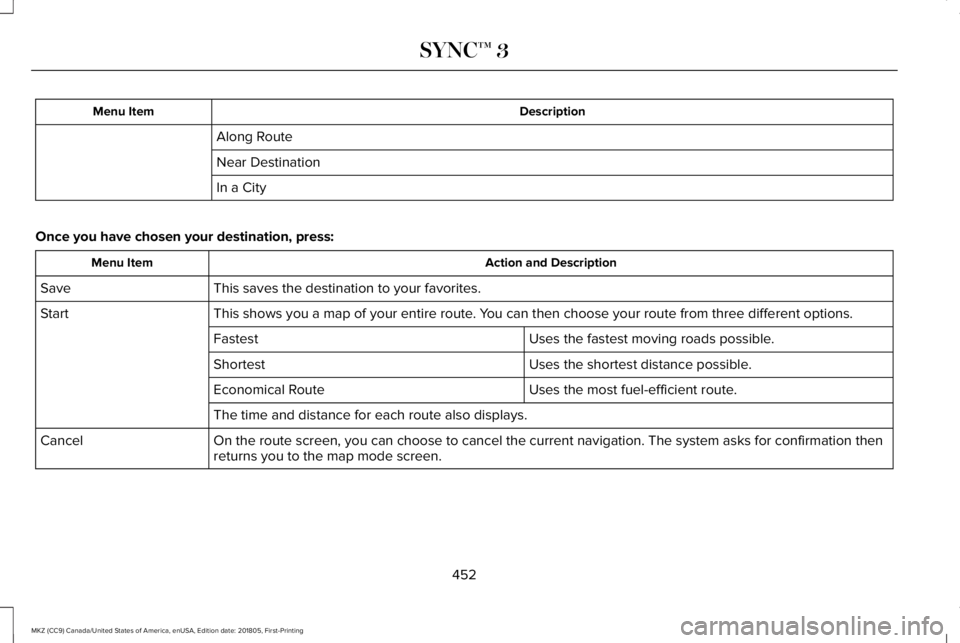
DescriptionMenu Item
Along Route
Near Destination
In a City
Once you have chosen your destination, press:
Action and DescriptionMenu Item
This saves the destination to your favorites.Save
This shows you a map of your entire route. You can then choose your route from three different options.Start
Uses the fastest moving roads possible.Fastest
Uses the shortest distance possible.Shortest
Uses the most fuel-efficient route.Economical Route
The time and distance for each route also displays.
On the route screen, you can choose to cancel the current navigation. The system asks for confirmation thenreturns you to the map mode screen.Cancel
452
MKZ (CC9) Canada/United States of America, enUSA, Edition date: 201805, First-Printing
SYNC™ 3
Page 484 of 595
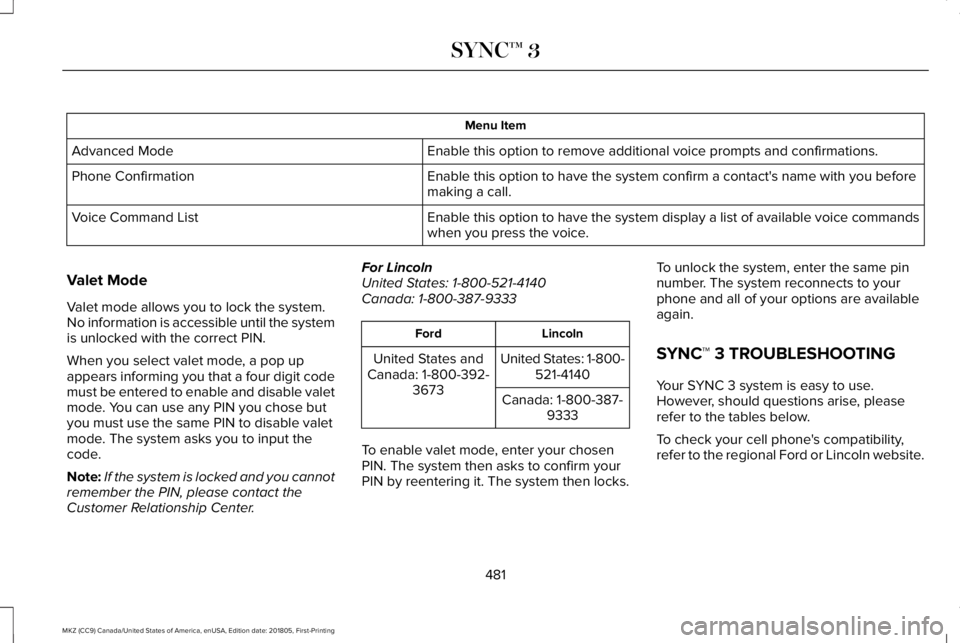
Menu Item
Enable this option to remove additional voice prompts and confirmations.Advanced Mode
Enable this option to have the system confirm a contact's name with you beforemaking a call.Phone Confirmation
Enable this option to have the system display a list of available voice commandswhen you press the voice.Voice Command List
Valet Mode
Valet mode allows you to lock the system.No information is accessible until the systemis unlocked with the correct PIN.
When you select valet mode, a pop upappears informing you that a four digit codemust be entered to enable and disable valetmode. You can use any PIN you chose butyou must use the same PIN to disable valetmode. The system asks you to input thecode.
Note:If the system is locked and you cannotremember the PIN, please contact theCustomer Relationship Center.
For LincolnUnited States: 1-800-521-4140Canada: 1-800-387-9333
LincolnFord
United States: 1-800-521-4140United States andCanada: 1-800-392-3673Canada: 1-800-387-9333
To enable valet mode, enter your chosenPIN. The system then asks to confirm yourPIN by reentering it. The system then locks.
To unlock the system, enter the same pinnumber. The system reconnects to yourphone and all of your options are availableagain.
SYNC™ 3 TROUBLESHOOTING
Your SYNC 3 system is easy to use.However, should questions arise, pleaserefer to the tables below.
To check your cell phone's compatibility,refer to the regional Ford or Lincoln website.
481
MKZ (CC9) Canada/United States of America, enUSA, Edition date: 201805, First-Printing
SYNC™ 3
Page 487 of 595
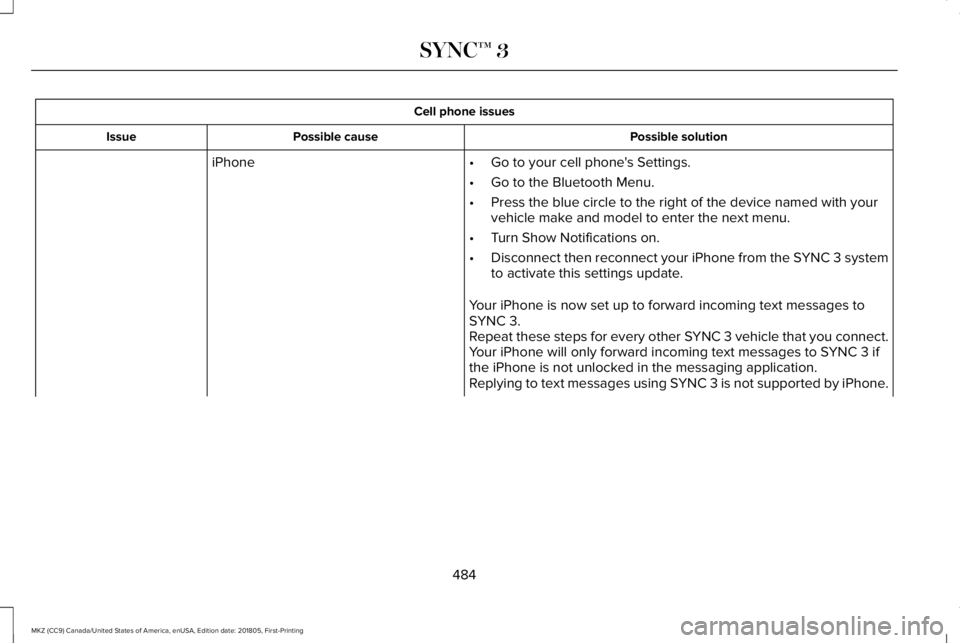
Cell phone issues
Possible solutionPossible causeIssue
iPhone•Go to your cell phone's Settings.
•Go to the Bluetooth Menu.
•Press the blue circle to the right of the device named with yourvehicle make and model to enter the next menu.
•Turn Show Notifications on.
•Disconnect then reconnect your iPhone from the SYNC 3 systemto activate this settings update.
Your iPhone is now set up to forward incoming text messages toSYNC 3.Repeat these steps for every other SYNC 3 vehicle that you connect.Your iPhone will only forward incoming text messages to SYNC 3 ifthe iPhone is not unlocked in the messaging application.Replying to text messages using SYNC 3 is not supported by iPhone.
484
MKZ (CC9) Canada/United States of America, enUSA, Edition date: 201805, First-Printing
SYNC™ 3
Page 488 of 595
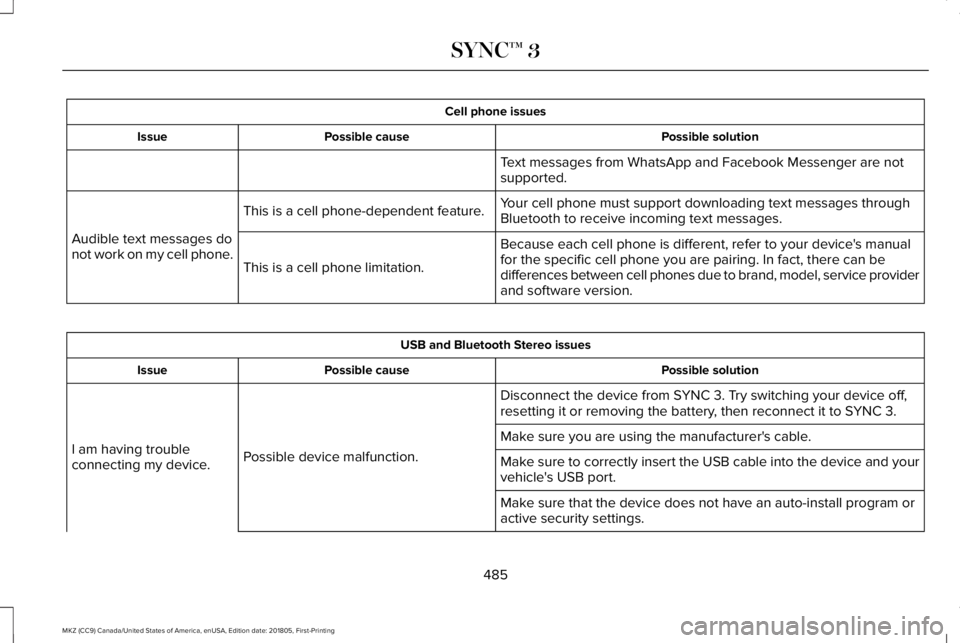
Cell phone issues
Possible solutionPossible causeIssue
Text messages from WhatsApp and Facebook Messenger are notsupported.
Your cell phone must support downloading text messages throughBluetooth to receive incoming text messages.This is a cell phone-dependent feature.
Audible text messages donot work on my cell phone.Because each cell phone is different, refer to your device's manualfor the specific cell phone you are pairing. In fact, there can bedifferences between cell phones due to brand, model, service providerand software version.
This is a cell phone limitation.
USB and Bluetooth Stereo issues
Possible solutionPossible causeIssue
Disconnect the device from SYNC 3. Try switching your device off,resetting it or removing the battery, then reconnect it to SYNC 3.
Possible device malfunction.I am having troubleconnecting my device.
Make sure you are using the manufacturer's cable.
Make sure to correctly insert the USB cable into the device and yourvehicle's USB port.
Make sure that the device does not have an auto-install program oractive security settings.
485
MKZ (CC9) Canada/United States of America, enUSA, Edition date: 201805, First-Printing
SYNC™ 3
Page 573 of 595
Taiwan Territory
Note: In accordance with the managementapproach of low-power radio wave radiationmotors:
Article 12: For approved and certifiedlow-power radiation motor models,companies, firms or users must not alter thefrequency, increase the power or change thecharacteristics and functions of the originaldesign without authorization.
Article 14: The usage of low-powerradio-frequency motors must not affectaviation safety and interfere with legaltelecommunications. Should interference bedetected, immediately stop using the deviceand only resume usage after ensuring thatthere is no longer any interference. For thelegal telecommunication and wirelesstelecommunication of the telco, thelow-power radio frequency motor must beable to tolerate legal limits of interferencefrom telecommunication, industrial, scientificand radio wave equipment.
SUNA TRAFFIC CHANNEL – TERMS ANDCONDITIONS
By activating, using and/or accessing theSUNA Traffic Channel, SUNA Predictive orother content or material provided byIntelematics (together, SUNA Productsand/or Services), you must accept certainterms and conditions. The following is a briefsummary of the terms and conditions thatapply to you. To view the full terms andconditions relevant to your use of the SUNAProducts and/or Services, please consult:
Website
www.sunatraffic.com.au/termsandcondi-tions/
1. Acceptance
By using SUNA Products and/or Services,you will be deemed to have accepted andagreed to be bound by the terms andconditions fully detailed at:
Website
www.sunatraffic.com.au/termsandcondi-tions/
2. Intellectual Property
SUNA Products and/or Services are for yourpersonal use. You may not record, orretransmit the content, nor use the contentin association with any other trafficinformation or route guidance service ordevice not approved by Intelematics. Youobtain no right of ownership in anyIntellectual Property Rights (includingcopyright) in the data that is used to provideSUNA Products and/or Services.
3. Appropriate Use
570
MKZ (CC9) Canada/United States of America, enUSA, Edition date: 201805, First-Printing
Appendices
Page 584 of 595
A
A/CSee: Climate Control..........................................136
About This Manual............................................7ABSSee: Brakes...........................................................192
ABS driving hintsSee: Hints on Driving With Anti-LockBrakes................................................................193
Accessories...................................................499Exterior Style.......................................................499Interior Style.........................................................499Lifestyle.................................................................499Peace of Mind.....................................................499
AccessoriesSee: Replacement Parts Recommendation.....13
ACCSee: Using Adaptive Cruise Control..............218
Active Park Assist........................................205Using Active Park Assist..................................206
Adaptive Headlamps......................................91System Check........................................................92
Adjusting the Headlamps............................316Horizontal Aim Adjustment...............................317Vertical Aim Adjustment....................................316
Adjusting the Steering Wheel - VehiclesWith: Manual Adjustable SteeringColumn...........................................................80Adjusting the Steering Wheel - VehiclesWith: Power Adjustable SteeringColumn...........................................................80End of Travel Position...........................................81Memory Feature.....................................................81
AFSSee: Adaptive Headlamps...................................91
Airbag Disposal...............................................56Air ConditioningSee: Climate Control..........................................136
Air FilterSee: Changing the Engine Air Filter...............317
AlarmSee: Anti-Theft Alarm...........................................78
All-Wheel Drive..............................................183Ambient Lighting.............................................94Adjusting the Brightness.....................................94Changing the Color..............................................94Switching Ambient Lighting Off........................94Switching Ambient Lighting On........................94
Anti-Theft Alarm..............................................78Arming the Alarm..................................................79Disarming the Alarm.............................................79
Appendices....................................................536
Apps.................................................................458.................................................................................458SiriusXM Traffic and Travel Link.....................459
At a Glance........................................................17Audible Warnings and Indicators..............108Headlamps On Warning Chime.......................108Keyless Warning Alert........................................108Parking Brake On Warning Chime..................109
Audio Control..................................................82Seek, Next or Previous........................................82
Audio System................................................389General Information...........................................389
Audio Unit.......................................................391Adjusting the Volume.........................................391Changing Radio Stations...................................391Ejecting the CD....................................................391Inserting a CD.....................................................392Selecting the Audio Modes.............................392Switching the Audio Unit On and Off............392Using Seek, Fast Forward and Reverse.......392
Auto Hold........................................................194Using Auto Hold..................................................196
Autolamps.........................................................88Windshield Wiper Activated Headlamps........89
Automatic Climate Control..........................136Directing Air to the Footwell Air Vents..........136Directing Air to the Instrument Panel AirVents..................................................................136
581
MKZ (CC9) Canada/United States of America, enUSA, Edition date: 201805, First-Printing
Index
Page 588 of 595
Trailer Brakes......................................................255Trailer Lamps.......................................................255When Towing a Trailer......................................256
Event Data RecordingSee: Data Recording.............................................10
Export Unique Options...................................14Exterior Mirrors................................................96Auto-Dimming Feature........................................98Auto-Folding Mirrors............................................97Blind Spot Monitor................................................99Fold-Away Exterior Mirrors.................................97Heated Exterior Mirrors.......................................98Integrated Blind Spot Mirrors............................98Lincoln Welcome Mat..........................................98Memory Mirrors.....................................................98Power Exterior Mirrors.........................................96Signal Indicator Mirrors.......................................98
F
Fastening the Seatbelts................................38Rear Inflatable Seatbelt.......................................40Seatbelt Locking Modes.....................................39Using Seatbelts During Pregnancy..................38
Flat TireSee: Changing a Road Wheel.........................356
Flat Tire InflationSee: Tire Sealant and Inflator Kit....................329
Floor Mats......................................................260Front Parking Aid.........................................202Obstacle Distance Indicator............................203
Front Passenger Sensing System..............50Fuel and Refueling........................................166Fuel Consumption.........................................172Advertised Capacity...........................................172Fuel Economy.......................................................172
Fuel Filler Funnel Location..........................167Fuel Filter.........................................................3132.0L Engines and 3.0L Engines withFWD....................................................................3133.0L Engines with AWD.....................................314
Fuel Quality.....................................................166Choosing the Right Fuel....................................166
Fuel Shutoff...................................................263Fuses................................................................277Fuse Specification Chart.............................277Passenger Compartment Fuse Panel...........289Power Distribution Box......................................277
G
Garage Door OpenerSee: Universal Garage Door Opener.............153
Gauges.............................................................103Engine Coolant Temperature Gauge.............104Fuel Gauge...........................................................104
Information Display.............................................104
GearboxSee: Transmission................................................177
General Information on RadioFrequencies...................................................57Intelligent Access..................................................57
General Maintenance Information...........504Multi-Point Inspection........................................507Owner Checks and Services...........................505Protecting Your Investment.............................504Why Maintain Your Vehicle?............................504Why Maintain Your Vehicle at YourDealership?.....................................................504
Getting Assistance Outside the U.S. andCanada.........................................................273Getting the Services You Need................269Away From Home..............................................269
Global Opening and Closing.......................96Closing the Windows...........................................96Opening the Windows.........................................96
H
Hazard Flashers............................................263Headlamp AdjustingSee: Adjusting the Headlamps........................316
Headlamp Exit Delay.....................................89
585
MKZ (CC9) Canada/United States of America, enUSA, Edition date: 201805, First-Printing
Index
Page 590 of 595
J
Jump Starting the Vehicle..........................264Connecting the Jumper Cables.....................264Jump Starting......................................................265Preparing Your Vehicle.....................................264Removing the Jumper Cables........................266
K
Keyless Entry....................................................73SECURICODE™ KEYLESS ENTRYKEYPAD...............................................................73
Keyless Starting..............................................161Ignition Modes......................................................161
Keys and Remote Controls...........................57
L
Lane Keeping System.................................229Switching the System On and Off..................230
Lighting Control...............................................87Flashing the Headlamp High Beam.................88Headlamp High Beam.........................................88
Lighting..............................................................87General Information..............................................87
Lincoln Automotive Financial Services......12
Lincoln Protect...............................................501Lincoln Protect (CANADA ONLY)...................502Lincoln Protect Extended Service Plans (U.S.Only)...................................................................501
Load Carrying................................................248Load Limit.......................................................248Special Loading Instructions for Owners ofPick-up Trucks and Utility-typeVehicles............................................................252Vehicle Loading - with and without aTrailer................................................................248
Locking and Unlocking..................................67Activating Intelligent Access.............................68Autolock..................................................................70Battery Saver...........................................................71Illuminated Entry...................................................70Illuminated Exit......................................................70Locking and Unlocking the Doors with theKey Blade...........................................................69Luggage Compartment........................................71Power Door Locks................................................67Remote Control.....................................................67Smart Unlocks for Intelligent AccessKeys.....................................................................69
Lug NutsSee: Changing a Road Wheel.........................356
M
Maintenance..................................................297General Information...........................................297
Media Hub......................................................392Memory Function...........................................147Easy Entry and Exit Feature..............................148Linking a PreSet Position to your RemoteControl or Intelligent Access Key Fob.......148Saving a PreSet Position....................................147
Message CenterSee: Information Displays..................................110
MirrorsSee: Windows and Mirrors.................................95
Mobile Communications Equipment...........14Moonroof.........................................................100Opening and Closing.........................................102Type 1.......................................................................101Type 2.....................................................................101
Motorcraft Parts - 2.0L................................368Motorcraft Parts - 3.0L.................................370MyKey Troubleshooting................................65MyKey™..............................................................62Principle of Operation.........................................62
587
MKZ (CC9) Canada/United States of America, enUSA, Edition date: 201805, First-Printing
Index
Page 592 of 595
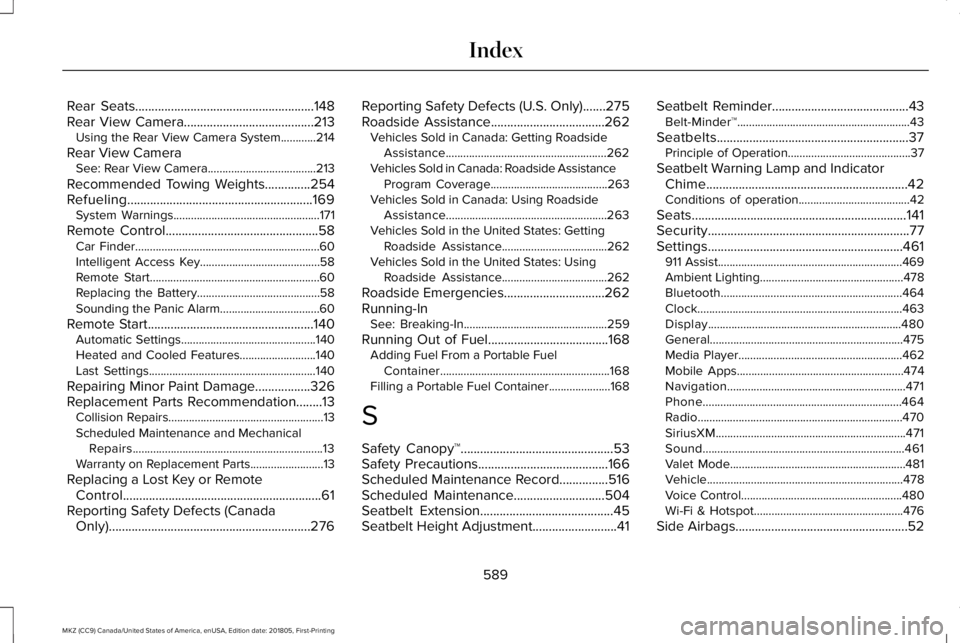
Rear Seats.......................................................148Rear View Camera........................................213Using the Rear View Camera System............214
Rear View CameraSee: Rear View Camera.....................................213
Recommended Towing Weights..............254Refueling.........................................................169System Warnings..................................................171
Remote Control...............................................58Car Finder...............................................................60Intelligent Access Key.........................................58Remote Start..........................................................60Replacing the Battery..........................................58Sounding the Panic Alarm..................................60
Remote Start...................................................140Automatic Settings..............................................140Heated and Cooled Features..........................140Last Settings.........................................................140
Repairing Minor Paint Damage.................326Replacement Parts Recommendation........13Collision Repairs.....................................................13Scheduled Maintenance and MechanicalRepairs.................................................................13Warranty on Replacement Parts.........................13
Replacing a Lost Key or RemoteControl.............................................................61Reporting Safety Defects (CanadaOnly)..............................................................276
Reporting Safety Defects (U.S. Only).......275Roadside Assistance...................................262Vehicles Sold in Canada: Getting RoadsideAssistance.......................................................262Vehicles Sold in Canada: Roadside AssistanceProgram Coverage........................................263Vehicles Sold in Canada: Using RoadsideAssistance.......................................................263Vehicles Sold in the United States: GettingRoadside Assistance....................................262Vehicles Sold in the United States: UsingRoadside Assistance....................................262
Roadside Emergencies...............................262Running-InSee: Breaking-In.................................................259
Running Out of Fuel.....................................168Adding Fuel From a Portable FuelContainer..........................................................168Filling a Portable Fuel Container.....................168
S
Safety Canopy™...............................................53Safety Precautions........................................166Scheduled Maintenance Record...............516Scheduled Maintenance............................504Seatbelt Extension.........................................45Seatbelt Height Adjustment..........................41
Seatbelt Reminder..........................................43Belt-Minder™...........................................................43
Seatbelts...........................................................37Principle of Operation..........................................37
Seatbelt Warning Lamp and IndicatorChime..............................................................42Conditions of operation......................................42
Seats..................................................................141Security..............................................................77Settings............................................................461911 Assist...............................................................469Ambient Lighting.................................................478Bluetooth..............................................................464Clock......................................................................463Display..................................................................480General..................................................................475Media Player........................................................462Mobile Apps.........................................................474Navigation.............................................................471Phone....................................................................464Radio......................................................................470SiriusXM.................................................................471Sound.....................................................................461Valet Mode............................................................481Vehicle...................................................................478Voice Control.......................................................480Wi-Fi & Hotspot...................................................476
Side Airbags.....................................................52
589
MKZ (CC9) Canada/United States of America, enUSA, Edition date: 201805, First-Printing
Index