brake LINCOLN MKZ 2019 User Guide
[x] Cancel search | Manufacturer: LINCOLN, Model Year: 2019, Model line: MKZ, Model: LINCOLN MKZ 2019Pages: 595, PDF Size: 4.95 MB
Page 93 of 595
Type One - Conventional (Non-Configurable)
The daytime running lamps turn on when:
1. Switching the ignition on.
2. The transmission is not in park (P) forvehicles with automatic transmissions, orreleasing the parking brake for vehicleswith manual transmissions.
3. The lighting control is in the off, parkinglamp or autolamps positions.
4. The headlamps are off.
Type Two - Configurable
Switch the daytime running lamps on or offusing the information display. SeeInformation Displays (page 110).
The daytime running lamps turn on when:
1. The lamps are on in the informationdisplay.
2. Switching the ignition on.
3. The transmission is not in park (P) forvehicles with automatic transmissions, orreleasing the parking brake for vehicleswith manual transmissions.
4. The lighting control is in the autolampsposition.
5. The headlamps are off.
The other lighting control switch positionsdo not turn on the daytime running lamps.
If the daytime running lamps are off in theinformation display, the lamps stay off in allswitch positions.
AUTOMATIC HIGH BEAM
CONTROL (If Equipped)
WARNING: The system does notrelieve you of your responsibility to drive withdue care and attention. You may need tooverride the system if it does not turn thehigh beams on or off.
The system turns on high beams if it is darkenough and no other traffic is present. If itdetects an approaching vehicle’s headlampsor tail lamps, or street lighting ahead, thesystem turns off high beams before they candistract other road users. Low beams remainon.
Note:The system may not operate properlyif the sensor is blocked. Keep the windshieldfree from obstruction or damage.
Note:The system may not operate properlyin cold or inclement conditions. You canswitch on the high beams by overriding thesystem.
Note:If the system detects a blockage, forexample bird droppings, bug splatter, snowor ice, the system goes into low beam modeuntil you clear the blockage. A message mayappear in the information display if thecamera is blocked.
Note:Using much larger tires or equippingvehicle accessories such as snowplows canmodify your vehicle's ride height anddegrade automatic high beam controlperformance.
90
MKZ (CC9) Canada/United States of America, enUSA, Edition date: 201805, First-Printing
Lighting
Page 108 of 595
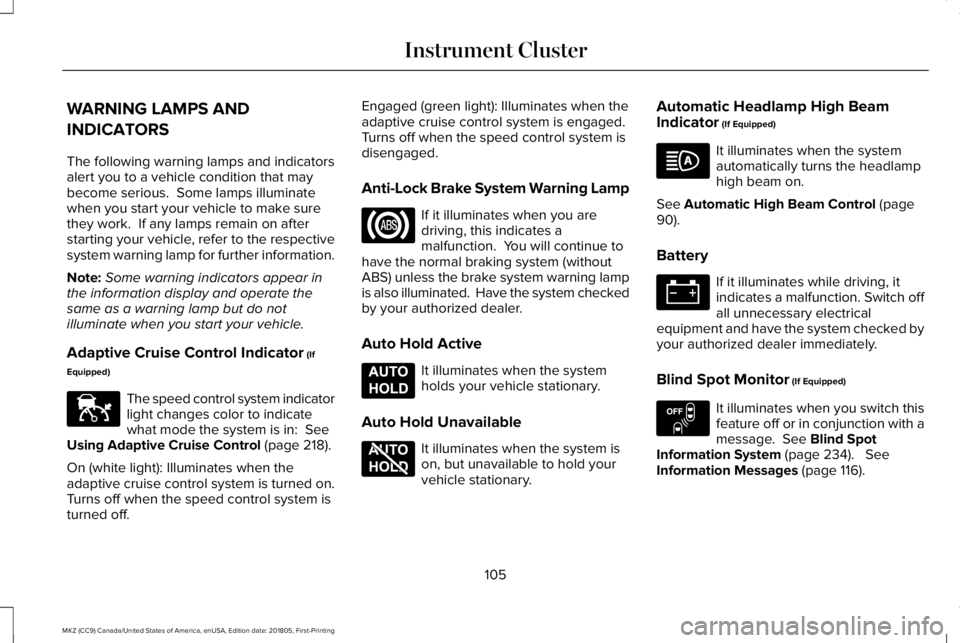
WARNING LAMPS AND
INDICATORS
The following warning lamps and indicatorsalert you to a vehicle condition that maybecome serious. Some lamps illuminatewhen you start your vehicle to make surethey work. If any lamps remain on afterstarting your vehicle, refer to the respectivesystem warning lamp for further information.
Note:Some warning indicators appear inthe information display and operate thesame as a warning lamp but do notilluminate when you start your vehicle.
Adaptive Cruise Control Indicator (If
Equipped)
The speed control system indicatorlight changes color to indicatewhat mode the system is in: SeeUsing Adaptive Cruise Control (page 218).
On (white light): Illuminates when theadaptive cruise control system is turned on.Turns off when the speed control system isturned off.
Engaged (green light): Illuminates when theadaptive cruise control system is engaged.Turns off when the speed control system isdisengaged.
Anti-Lock Brake System Warning Lamp
If it illuminates when you aredriving, this indicates amalfunction. You will continue tohave the normal braking system (withoutABS) unless the brake system warning lampis also illuminated. Have the system checkedby your authorized dealer.
Auto Hold Active
It illuminates when the systemholds your vehicle stationary.
Auto Hold Unavailable
It illuminates when the system ison, but unavailable to hold yourvehicle stationary.
Automatic Headlamp High BeamIndicator (If Equipped)
It illuminates when the systemautomatically turns the headlamphigh beam on.
See Automatic High Beam Control (page90).
Battery
If it illuminates while driving, itindicates a malfunction. Switch offall unnecessary electricalequipment and have the system checked byyour authorized dealer immediately.
Blind Spot Monitor (If Equipped)
It illuminates when you switch thisfeature off or in conjunction with amessage. See Blind SpotInformation System (page 234). SeeInformation Messages (page 116).
105
MKZ (CC9) Canada/United States of America, enUSA, Edition date: 201805, First-Printing
Instrument ClusterE144524 E197933 E197934 E151262
Page 109 of 595
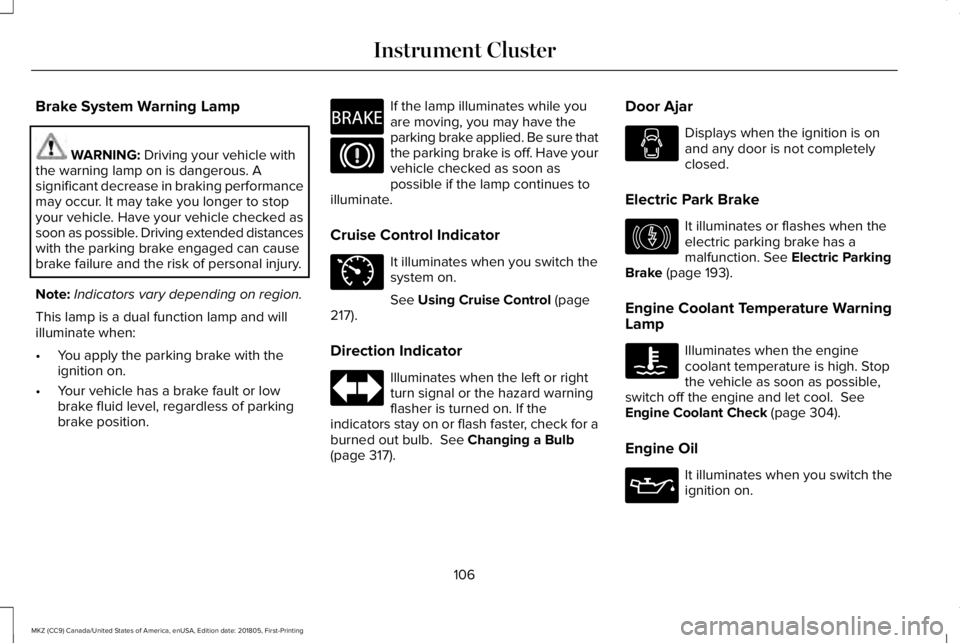
Brake System Warning Lamp
WARNING: Driving your vehicle withthe warning lamp on is dangerous. Asignificant decrease in braking performancemay occur. It may take you longer to stopyour vehicle. Have your vehicle checked assoon as possible. Driving extended distanceswith the parking brake engaged can causebrake failure and the risk of personal injury.
Note:Indicators vary depending on region.
This lamp is a dual function lamp and willilluminate when:
•You apply the parking brake with theignition on.
•Your vehicle has a brake fault or lowbrake fluid level, regardless of parkingbrake position.
If the lamp illuminates while youare moving, you may have theparking brake applied. Be sure thatthe parking brake is off. Have yourvehicle checked as soon aspossible if the lamp continues toilluminate.
Cruise Control Indicator
It illuminates when you switch thesystem on.
See Using Cruise Control (page217).
Direction Indicator
Illuminates when the left or rightturn signal or the hazard warningflasher is turned on. If theindicators stay on or flash faster, check for aburned out bulb. See Changing a Bulb(page 317).
Door Ajar
Displays when the ignition is onand any door is not completelyclosed.
Electric Park Brake
It illuminates or flashes when theelectric parking brake has amalfunction. See Electric ParkingBrake (page 193).
Engine Coolant Temperature WarningLamp
Illuminates when the enginecoolant temperature is high. Stopthe vehicle as soon as possible,switch off the engine and let cool. SeeEngine Coolant Check (page 304).
Engine Oil
It illuminates when you switch theignition on.
106
MKZ (CC9) Canada/United States of America, enUSA, Edition date: 201805, First-Printing
Instrument ClusterE270480 E71340 E146190
Page 112 of 595
Parking Brake On Warning Chime
Sounds when you have left the parking brakeon and drive your vehicle. If the warningchime remains on after you have releasedthe parking brake, have the system checkedby your authorized dealer immediately.
109
MKZ (CC9) Canada/United States of America, enUSA, Edition date: 201805, First-Printing
Instrument Cluster
Page 127 of 595
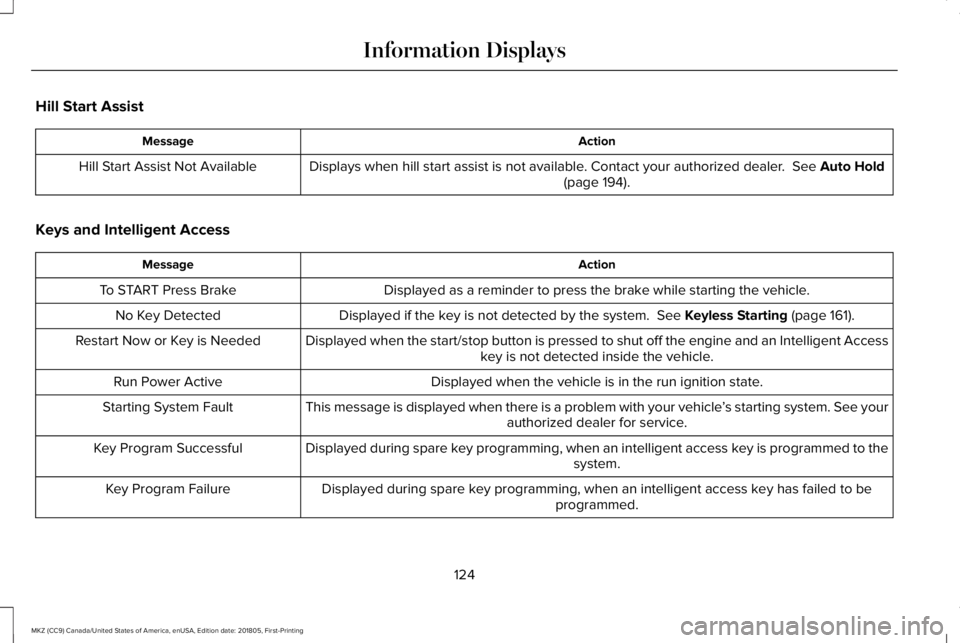
Hill Start Assist
ActionMessage
Displays when hill start assist is not available. Contact your authorized dealer. See Auto Hold(page 194).Hill Start Assist Not Available
Keys and Intelligent Access
ActionMessage
Displayed as a reminder to press the brake while starting the vehicle.To START Press Brake
Displayed if the key is not detected by the system. See Keyless Starting (page 161).No Key Detected
Displayed when the start/stop button is pressed to shut off the engine and an Intelligent Accesskey is not detected inside the vehicle.Restart Now or Key is Needed
Displayed when the vehicle is in the run ignition state.Run Power Active
This message is displayed when there is a problem with your vehicle’s starting system. See yourauthorized dealer for service.Starting System Fault
Displayed during spare key programming, when an intelligent access key is programmed to thesystem.Key Program Successful
Displayed during spare key programming, when an intelligent access key has failed to beprogrammed.Key Program Failure
124
MKZ (CC9) Canada/United States of America, enUSA, Edition date: 201805, First-Printing
Information Displays
Page 129 of 595
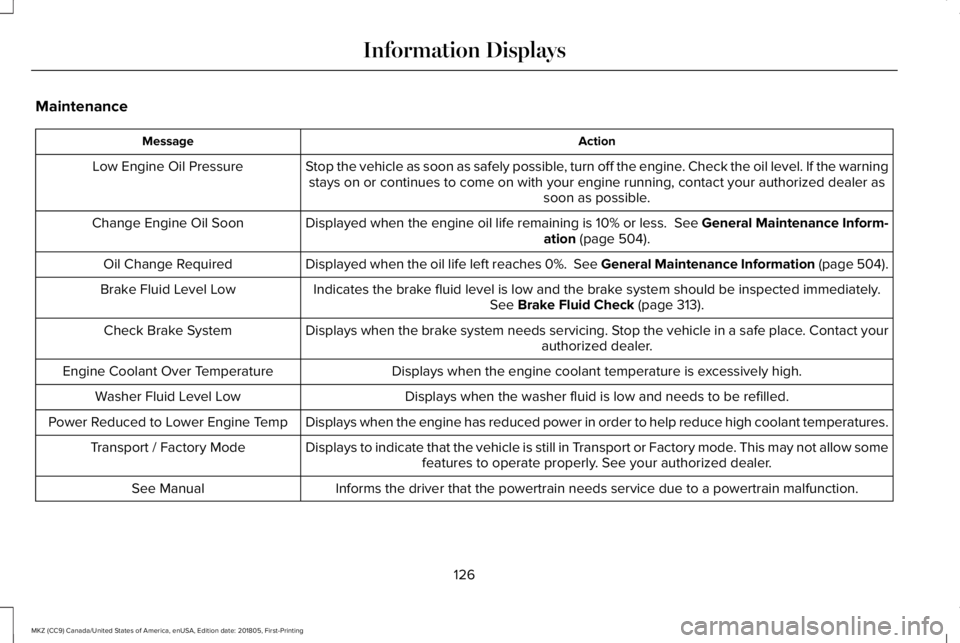
Maintenance
ActionMessage
Stop the vehicle as soon as safely possible, turn off the engine. Check the oil level. If the warningstays on or continues to come on with your engine running, contact your authorized dealer assoon as possible.
Low Engine Oil Pressure
Displayed when the engine oil life remaining is 10% or less. See General Maintenance Inform-ation (page 504).Change Engine Oil Soon
Displayed when the oil life left reaches 0%. See General Maintenance Information (page 504).Oil Change Required
Indicates the brake fluid level is low and the brake system should be inspected immediately.See Brake Fluid Check (page 313).Brake Fluid Level Low
Displays when the brake system needs servicing. Stop the vehicle in a safe place. Contact yourauthorized dealer.Check Brake System
Displays when the engine coolant temperature is excessively high.Engine Coolant Over Temperature
Displays when the washer fluid is low and needs to be refilled.Washer Fluid Level Low
Displays when the engine has reduced power in order to help reduce high coolant temperatures.Power Reduced to Lower Engine Temp
Displays to indicate that the vehicle is still in Transport or Factory mode. This may not allow somefeatures to operate properly. See your authorized dealer.Transport / Factory Mode
Informs the driver that the powertrain needs service due to a powertrain malfunction.See Manual
126
MKZ (CC9) Canada/United States of America, enUSA, Edition date: 201805, First-Printing
Information Displays
Page 131 of 595
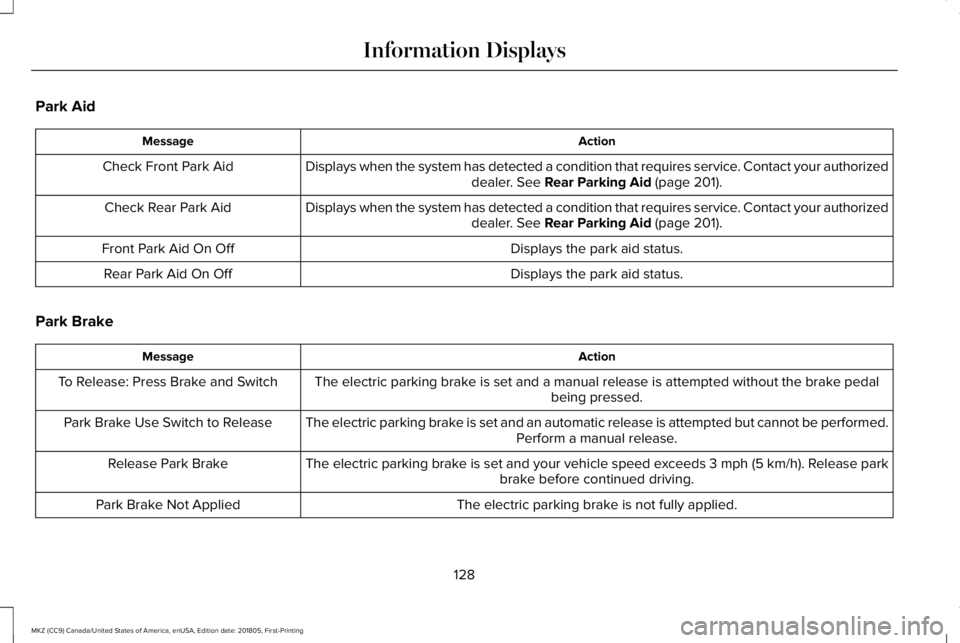
Park Aid
ActionMessage
Displays when the system has detected a condition that requires service. Contact your authorizeddealer. See Rear Parking Aid (page 201).Check Front Park Aid
Displays when the system has detected a condition that requires service. Contact your authorizeddealer. See Rear Parking Aid (page 201).Check Rear Park Aid
Displays the park aid status.Front Park Aid On Off
Displays the park aid status.Rear Park Aid On Off
Park Brake
ActionMessage
The electric parking brake is set and a manual release is attempted without the brake pedalbeing pressed.To Release: Press Brake and Switch
The electric parking brake is set and an automatic release is attempted but cannot be performed.Perform a manual release.Park Brake Use Switch to Release
The electric parking brake is set and your vehicle speed exceeds 3 mph (5 km/h). Release parkbrake before continued driving.Release Park Brake
The electric parking brake is not fully applied.Park Brake Not Applied
128
MKZ (CC9) Canada/United States of America, enUSA, Edition date: 201805, First-Printing
Information Displays
Page 132 of 595
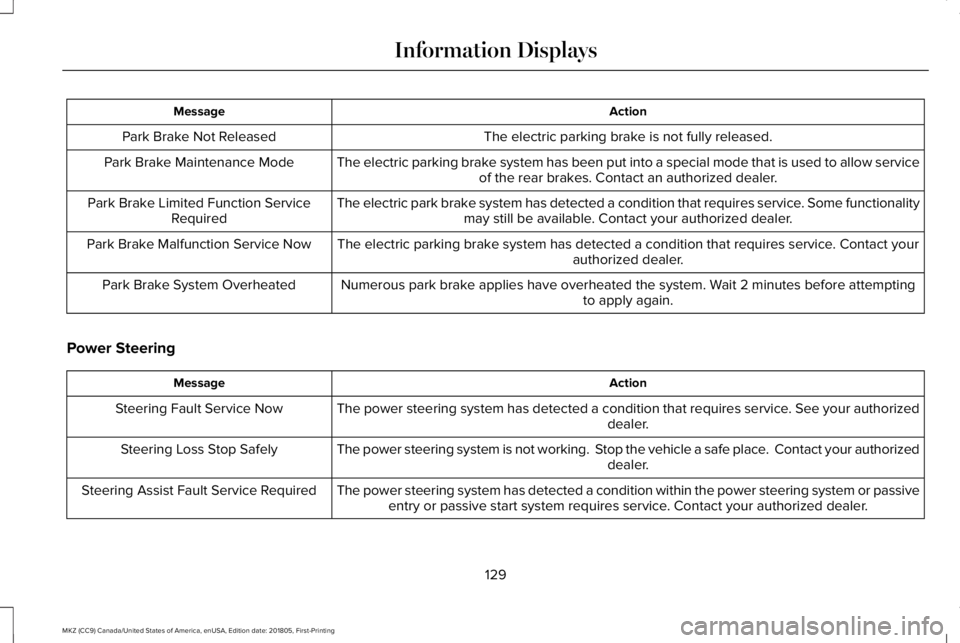
ActionMessage
The electric parking brake is not fully released.Park Brake Not Released
The electric parking brake system has been put into a special mode that is used to allow serviceof the rear brakes. Contact an authorized dealer.Park Brake Maintenance Mode
The electric park brake system has detected a condition that requires service. Some functionalitymay still be available. Contact your authorized dealer.Park Brake Limited Function ServiceRequired
The electric parking brake system has detected a condition that requires service. Contact yourauthorized dealer.Park Brake Malfunction Service Now
Numerous park brake applies have overheated the system. Wait 2 minutes before attemptingto apply again.Park Brake System Overheated
Power Steering
ActionMessage
The power steering system has detected a condition that requires service. See your authorizeddealer.Steering Fault Service Now
The power steering system is not working. Stop the vehicle a safe place. Contact your authorizeddealer.Steering Loss Stop Safely
The power steering system has detected a condition within the power steering system or passiveentry or passive start system requires service. Contact your authorized dealer.Steering Assist Fault Service Required
129
MKZ (CC9) Canada/United States of America, enUSA, Edition date: 201805, First-Printing
Information Displays
Page 133 of 595
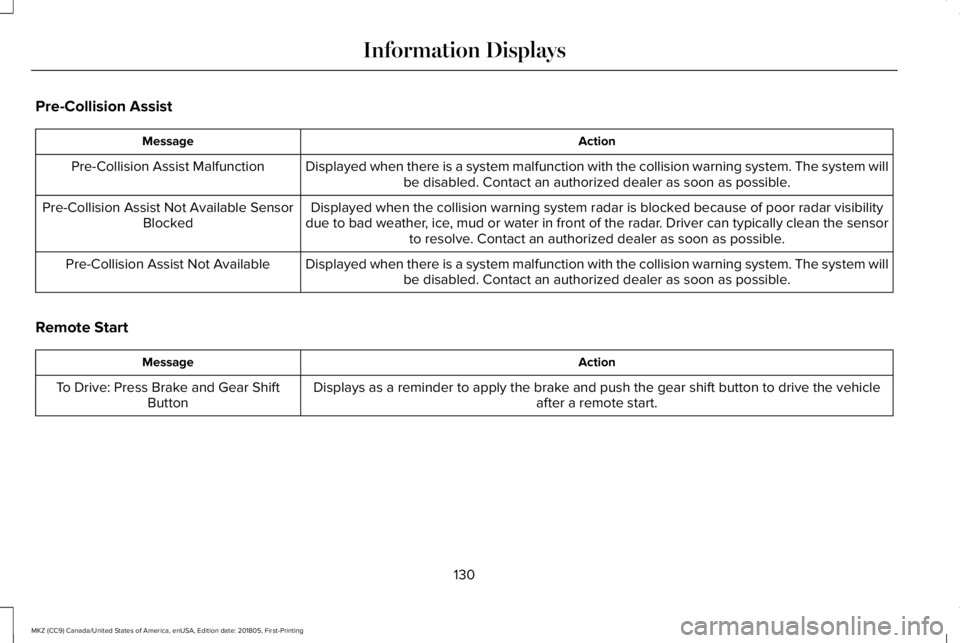
Pre-Collision Assist
ActionMessage
Displayed when there is a system malfunction with the collision warning system. The system willbe disabled. Contact an authorized dealer as soon as possible.Pre-Collision Assist Malfunction
Displayed when the collision warning system radar is blocked because of poor radar visibilitydue to bad weather, ice, mud or water in front of the radar. Driver can typically clean the sensorto resolve. Contact an authorized dealer as soon as possible.
Pre-Collision Assist Not Available SensorBlocked
Displayed when there is a system malfunction with the collision warning system. The system willbe disabled. Contact an authorized dealer as soon as possible.Pre-Collision Assist Not Available
Remote Start
ActionMessage
Displays as a reminder to apply the brake and push the gear shift button to drive the vehicleafter a remote start.To Drive: Press Brake and Gear ShiftButton
130
MKZ (CC9) Canada/United States of America, enUSA, Edition date: 201805, First-Printing
Information Displays
Page 134 of 595
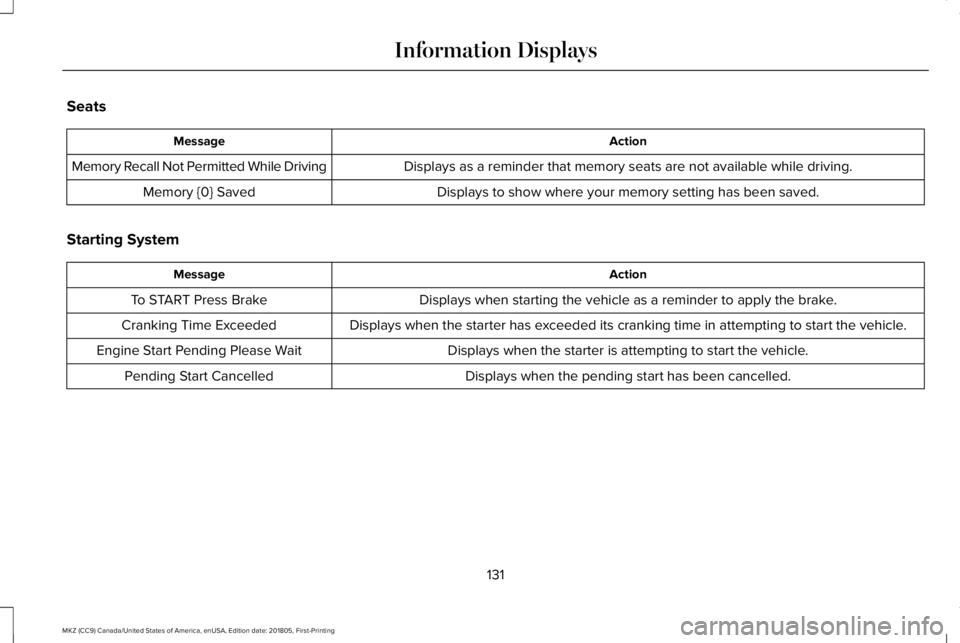
Seats
ActionMessage
Displays as a reminder that memory seats are not available while driving.Memory Recall Not Permitted While Driving
Displays to show where your memory setting has been saved.Memory {0} Saved
Starting System
ActionMessage
Displays when starting the vehicle as a reminder to apply the brake.To START Press Brake
Displays when the starter has exceeded its cranking time in attempting to start the vehicle.Cranking Time Exceeded
Displays when the starter is attempting to start the vehicle.Engine Start Pending Please Wait
Displays when the pending start has been cancelled.Pending Start Cancelled
131
MKZ (CC9) Canada/United States of America, enUSA, Edition date: 201805, First-Printing
Information Displays