tire type LINCOLN MKZ 2019 User Guide
[x] Cancel search | Manufacturer: LINCOLN, Model Year: 2019, Model line: MKZ, Model: LINCOLN MKZ 2019Pages: 595, PDF Size: 4.95 MB
Page 346 of 595
B. Load Range and Load InflationLimits: Indicates the tire's load-carryingcapabilities and its inflation limits.
C. Maximum Load Dual lb (kg) at psi(kPa) cold: Indicates the maximum loadand tire pressure when the tire is usedas a dual; defined as four tires on therear axle (a total of six or more tires onthe vehicle).
D. Maximum Load Single lb (kg) at psi(kPa) cold: Indicates the maximum loadand tire pressure when the tire is usedas a single; defined as two tires (total)on the rear axle.
Information on T Type Tires
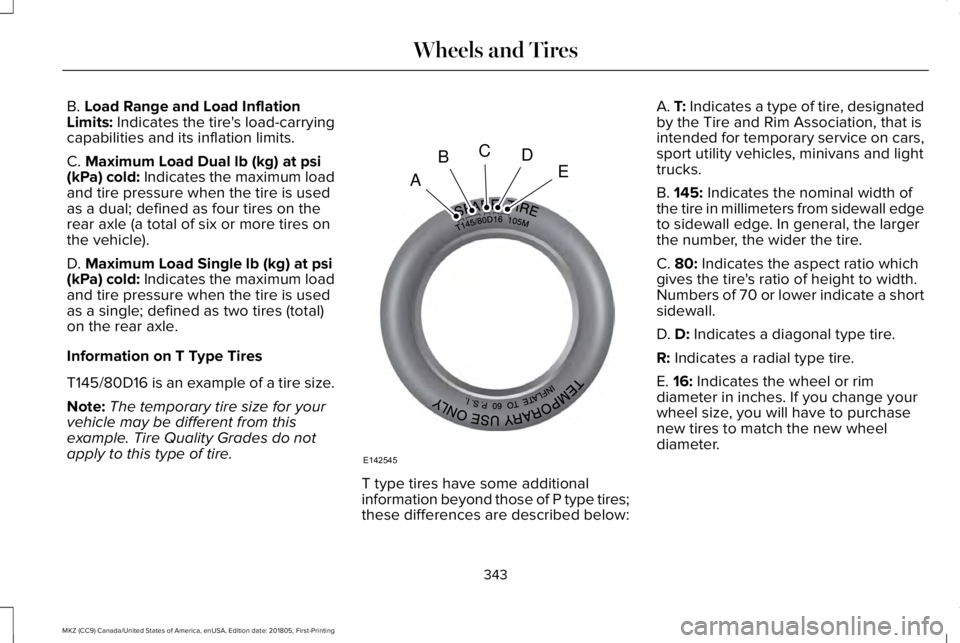
T145/80D16 is an example of a tire size.
Note:The temporary tire size for yourvehicle may be different from thisexample. Tire Quality Grades do notapply to this type of tire.
T type tires have some additionalinformation beyond those of P type tires;these differences are described below:
A. T: Indicates a type of tire, designatedby the Tire and Rim Association, that isintended for temporary service on cars,sport utility vehicles, minivans and lighttrucks.
B. 145: Indicates the nominal width ofthe tire in millimeters from sidewall edgeto sidewall edge. In general, the largerthe number, the wider the tire.
C. 80: Indicates the aspect ratio whichgives the tire's ratio of height to width.Numbers of 70 or lower indicate a shortsidewall.
D. D: Indicates a diagonal type tire.
R: Indicates a radial type tire.
E. 16: Indicates the wheel or rimdiameter in inches. If you change your
wheel size, you will have to purchasenew tires to match the new wheeldiameter.
343
MKZ (CC9) Canada/United States of America, enUSA, Edition date: 201805, First-Printing
Wheels and TiresA
BCDE
E142545
Page 347 of 595
Location of the Tire Label
You will find a Tire Label containing tireinflation pressure by tire size and otherimportant information located on theB-Pillar or the edge of the driver’s door.
Inflating Your Tires
Safe operation of your vehicle requiresthat your tires are properly inflated.Remember that a tire can lose up to halfof its air pressure without appearing flat.
Every day before you drive, check yourtires. If one looks lower than the others,use a tire gauge to check pressure of alltires and adjust if required.
At least once a month and before longtrips, inspect each tire and check the tire
pressure with a tire gauge (includingspare, if equipped). Inflate all tires to theinflation pressure recommended by FordMotor Company.
You are strongly urged to buy a reliabletire pressure gauge, as automaticservice station gauges may beinaccurate. Ford recommends the useof a digital or dial-type tire pressuregauge rather than a stick-type tirepressure gauge.
Use the recommended cold inflationpressure for optimum tire performanceand wear. Under-inflation orover-inflation may cause uneventreadwear patterns
WARNING: Under-inflation is themost common cause of tire failures andmay result in severe tire cracking, treadseparation or blowout, with unexpectedloss of vehicle control and increased riskof injury. Under-inflation increasessidewall flexing and rolling resistance,resulting in heat buildup and internaldamage to the tire. It also may result inunnecessary tire stress, irregular wear,loss of vehicle control and accidents. A
tire can lose up to half of its air pressureand not appear to be flat!
Always inflate your tires to the Fordrecommended inflation pressure evenif it is less than the maximum inflationpressure information found on the tire.The Ford recommended tire inflationpressure is found on the SafetyCompliance Certification Label (affixedto either the door hinge pillar, door-latchpost, or the door edge that meets thedoor-latch post, next to the driver'sseating position), or Tire Label which islocated on the B-Pillar or the edge of thedriver’s door. Failure to follow the tirepressure recommendations can causeuneven treadwear patterns andadversely affect the way your vehiclehandles
Maximum Inflation Pressure is the tiremanufacturer's maximum permissible
pressure and the pressure at which themaximum load can be carried by the tire.This pressure is normally higher than themanufacturer’s recommended coldinflation pressure which can be foundon the Safety Compliance CertificationLabel (affixed to either the door hingepillar, door-latch post, or the door edge
344
MKZ (CC9) Canada/United States of America, enUSA, Edition date: 201805, First-Printing
Wheels and Tires
Page 348 of 595
that meets the door-latch post, next tothe driver's seating position), or TireLabel which is located on the B-Pillar orthe edge of the driver’s door. The coldinflation pressure should never be setlower than the recommended pressureon the Safety Compliance CertificationLabel or Tire Label.
When weather temperature changesoccur, tire inflation pressures alsochange. A 10°F (6°C) temperature dropcan cause a corresponding drop of 1 psi(0.07 bar) in inflation pressure. Checkyour tire pressures frequently and adjustthem to the proper pressure which canbe found on the Safety ComplianceCertification Label or Tire Label.
To check the pressure in your tire(s):
1. Make sure the tires are cool,meaning they are not hot fromdriving even a mile.
Note:If you are checking tire pressurewhen the tire is hot, (for example drivenmore than 1.0 mi (1.6 km), never bleedor reduce air pressure. The tires are hotfrom driving and it is normal forpressures to increase aboverecommended cold pressures. A hot tireat or below recommended cold inflationpressure could be significantlyunder-inflated.
Note:If you have to drive a distance toget air for your tire(s), check and recordthe tire pressure first and add theappropriate air pressure when you getto the pump. It is normal for tires to heatup and the air pressure inside to go upas you drive.
2.Remove the cap from the valve on
one tire, then firmly press the tiregauge onto the valve and measurethe pressure.
3. Add enough air to reach therecommended air pressure.
Note:If you overfill the tire, release airby pressing on the metal stem in thecenter of the valve. Then recheck thepressure with your tire gauge.
4. Replace the valve cap.
5.Repeat this procedure for each tire,including the spare.
Note:Some spare tires operate at ahigher inflation pressure than the othertires. For T type mini-spare tires, see theDissimilar spare wheel and tireassembly information for a description.Store and maintain at 60 psi (4.15 bar).For full-size and dissimilar spare tires,see the Dissimilar spare wheel and tireassembly information for a description.Store and maintain at the higher of thefront and rear inflation pressure as
shown on the Tire Label.
6.Visually inspect the tires to makesure there are no nails or otherobjects embedded that could pokea hole in the tire and cause an airleak.
345
MKZ (CC9) Canada/United States of America, enUSA, Edition date: 201805, First-Printing
Wheels and Tires
Page 360 of 595
Dissimilar Spare Wheel and TireAssembly Information
WARNING: Failure to follow theseguidelines could result in an increased riskof loss of vehicle control, injury or death.
If you have a dissimilar spare wheel and tire,then it is intended for temporary use only.This means that if you need to use it, youshould replace it as soon as possible with aroad wheel and tire assembly that is thesame size and type as the road tires andwheels that were originally provided. If thedissimilar spare tire or wheel is damaged, itshould be replaced rather than repaired.
Important Use of Spare Wheel
A dissimilar spare wheel and tire assembly is defined as a spare wheel and tire assembly that is different in brand, size or appearancefrom the road tires and wheels and can be one of three types:
Types of Spare Wheels
T-type mini-spare.1
Full-size dissimilar spare with label on wheel.2
Full-size dissimilar spare without label on wheel.
1 This spare tire begins with the letter T for tire size and may have Temporary Use Only molded in the sidewall.2 This spare tire has a label on the wheel that states: THIS WHEEL AND TIRE ASSEMBLY FOR TEMPORARY USE ONLY.
357
MKZ (CC9) Canada/United States of America, enUSA, Edition date: 201805, First-Printing
Wheels and Tires
Page 361 of 595
Driving with a T-type Mini-spare or Full-sizeDissimilar Spare With Label on Wheel
Do not:
•Exceed 50 mph (80 km/h).
•Load the vehicle beyond maximumvehicle load rating listed on the SafetyCompliance Label.
•Tow a trailer.
•Use snow chains on the end of thevehicle with the dissimilar spare tire.
•Use more than one dissimilar spare tireat a time.
•Use commercial car washing equipment.
•Try to repair the dissimilar spare tire.
Use of the above dissimilar spare wheel atany one wheel location can lead toimpairment of the following:
•Handling, stability and brakingperformance.
•Comfort and noise.
•Ground clearance and parking at curbs.
•Winter weather driving capability.
•Wet weather driving capability.
•All-wheel driving capability, if applicable.
Driving With a Full-size Dissimilar SpareWheel and Tire Assembly
Do not:
•Exceed 70 mph (113 km/h).
•Use more than one dissimilar sparewheel and tire assembly at a time.
•Use commercial car washing equipment.
•Use snow chains on the end of thevehicle with the dissimilar spare wheeland tire assembly.
Use of the above dissimilar spare wheel atany one wheel location can lead toimpairment of the following:
•Handling, stability and brakingperformance.
•Comfort and noise.
•Ground clearance and parking at curbs.
•Winter weather driving capability.
•Wet weather driving capability.
•All-wheel driving capability.
Give additional caution to the following whendriving with the full-size dissimilar sparewheel and tire assembly:
•Towing a trailer.
•Driving vehicles equipped with a camperbody.
•Driving vehicles with a load on the cargorack.
Drive cautiously when using a full-sizedissimilar spare wheel and tire assembly andseek service as soon as possible.
Changing a Road Wheel Procedure
WARNING: When one of the frontwheels is off the ground, the transmissionalone will not prevent the vehicle frommoving or slipping off the jack, even if thetransmission is in park (P).
358
MKZ (CC9) Canada/United States of America, enUSA, Edition date: 201805, First-Printing
Wheels and Tires
Page 574 of 595
SUNA Products and/or Services are intendedas an aid to personal motoring and travelplanning, and do not provide comprehensiveor accurate information on all occasions. Onoccasions, you may experience additionaldelay as a result of using SUNA Productsand/or Services. You acknowledge that it isnot intended, or suitable, for use inapplications where time of arrival or drivingdirections may impact the safety of the publicor yourself.
4. Use of SUNA Products and Serviceswhile driving
You, and other authorised drivers of thevehicle in which SUNA Products and/orServices are available or installed and active,remain at all times responsible for observingall relevant laws and codes of safe driving.In particular, you agree to only activelyoperate SUNA Products and/or Serviceswhen the Vehicle is at a complete stop andit is safe to do so.
5. Service Continuity and Reception of theSUNA Traffic Channel
We will use reasonable endeavours toprovide the SUNA Traffic Channel 24 hoursa day, 365 days a year. The SUNA TrafficChannel may occasionally be unavailable fortechnical reasons or for plannedmaintenance. We will try to performmaintenance at times when congestion islight. We reserve the right to withdraw SUNAProducts and/or Services at any time.
Also, we cannot assure the uninterruptedreception of the SUNA Traffic ChannelRDS-TMC signal at any particular location.
6. Limitation of Liability
Neither Intelematics (nor its suppliers or themanufacturer of your device (the“Suppliers”)) shall be liable to you or to anythird party for any damages either direct,indirect, incidental, consequential orotherwise arising out of the use of or inabilityto use SUNA Products and/or Services evenif Intelematics or a Supplier has been advisedof the possibility of such damages. You alsoacknowledge that the neither Intelematicsnor any Supplier guarantees nor make anywarranties that relate to the availability,accuracy or completeness of SUNA Products
and/or Services, and to the extent which itis lawful to do so, both Intelematics and eachSupplier excludes any warranties whichmight otherwise be implied by any State orFederal legislation in relation to SUNAProducts and/or Services.
7. Please Note
Great care has been taken in preparing thismanual. Constant product development maymean that some information is not entirelyup-to-date. The information in this documentis subject to change without notice.
TYPE APPROVALS
Radio Frequency Certification Logosfor Tire Pressure Monitoring Sensor(s)
571
MKZ (CC9) Canada/United States of America, enUSA, Edition date: 201805, First-Printing
AppendicesE207816
Page 586 of 595
Center Console.............................................160Rear Seat Armrest...............................................160
Changing a Bulb............................................317Replacing Bulbs...................................................317
Changing a Fuse..........................................294Fuses.....................................................................294
Changing a Road Wheel............................356Changing a Road Wheel Procedure..............358Dissimilar Spare Wheel and Tire AssemblyInformation.......................................................357Stowing the Flat Tire Using the RetainerStrap..................................................................363Stowing the Flat Tire Without the RetainerStrap..................................................................363
Changing the 12V Battery...........................314Changing the Engine Air Filter...................317Changing the Wiper Blades.......................316Checking MyKey System Status.................64MyKey Distance.....................................................64Number of Admin Keys.......................................65Number of MyKeys...............................................64
Checking the Wiper Blades........................315Child Restraint and SeatbeltMaintenance..................................................44Child Restraint Positioning...........................33Child Safety.......................................................19General Information..............................................19
Child Safety Locks..........................................35Left-Hand Side.......................................................36Right-Hand Side....................................................36
Cleaning Leather Seats..............................325Cleaning Products.........................................319Materials................................................................319
Cleaning the Engine....................................322Cleaning the Exterior..................................320Cleaning the Headlamps.................................320Exterior Chrome Parts........................................321Exterior Plastic Parts...........................................321Stripes or Graphics.............................................321Underbody............................................................321Under Hood..........................................................321
Cleaning the Instrument Panel andInstrument Cluster Lens...........................325Cleaning the Interior....................................323Cleaning Alcantara Microfiber ClothFabric................................................................323
Cleaning the Wheels...................................326Cleaning the Windows and WiperBlades...........................................................322Clearing All MyKeys.......................................64Climate............................................................435Climate Control..............................................136Climate Controlled Seats............................150Cooled Seats.........................................................151
Coolant CheckSee: Engine Coolant Check............................304
Crash Sensors and Airbag Indicator..........55Creating a MyKey...........................................63Programming and Changing ConfigurableSettings...............................................................64
Cross Traffic Alert.........................................236Blocked Sensors................................................239Switching the System Off and On..................239System Errors......................................................239System Lights, Messages and AudibleAlerts.................................................................239System Limitations.............................................239Using the Cross Traffic Alert System.............236
Cruise Control..................................................83Principle of Operation........................................217Type One................................................................83Type Two.................................................................83
Cruise controlSee: Using Cruise Control.................................217
Customer Assistance..................................269
D
Data Recording................................................10Event Data Recording...........................................10Service Data Recording.......................................10
583
MKZ (CC9) Canada/United States of America, enUSA, Edition date: 201805, First-Printing
Index
Page 594 of 595
Towing a Trailer.............................................253Load Placement..................................................253
Towing Points................................................268Installing the Recovery Hook..........................268Recovery Hook Location..................................268
Towing the Vehicle on Four Wheels........257Emergency Towing.............................................257Recreational Towing..........................................257
Towing.............................................................253Traction Control.............................................197Principle of Operation........................................197
Transmission Code Designation...............372Transmission...................................................177Transporting the Vehicle............................267Type Approvals..............................................571Radio Frequency Certification Logos for BlindSpot Information System..............................579Radio Frequency Certification Logos for MidRange Radar....................................................574Radio Frequency Certification Logos forPassive Anti-Theft System...........................575Radio Frequency Certification Logos for RadioTransceiver Module.......................................577Radio Frequency Certification Logos for SYNC3.........................................................................580Radio Frequency Certification Logos for TirePressure Monitoring Sensor(s)....................571
Radio Frequency Certification Logos forWireless Charging.........................................580
U
Under Hood Overview - 2.0L....................298Under Hood Overview - 3.0L....................300Universal Garage Door Opener................153HomeLink Wireless Control System...............153
USB Port.........................................................392Using Adaptive Cruise Control..................218Automatic Cancellation....................................222Blocked Sensor...................................................224Canceling the Set Speed.................................222Changing the Set Speed...................................221Detection Issues.................................................223Following a Vehicle...........................................220Following a Vehicle to a CompleteStop...................................................................220Hilly Condition Usage.......................................222Overriding the Set Speed.................................221Park Brake Application.....................................222Resuming the Set Speed.................................222Setting the Adaptive Cruise Speed................219Setting the Adaptive Cruise Speed When YourVehicle is Stationary.....................................220Setting the Gap Distance..................................221Switching Adaptive Cruise Control Off........222
Switching Adaptive Cruise Control On..........219Switching to Normal Cruise Control..............226System Not Available........................................224
Using All-Wheel Drive..................................183Driving In Special Conditions With All-WheelDrive (AWD)......................................................185Operating AWD Vehicles With Spare orMismatched Tires...........................................185
Using Cruise Control....................................217Canceling the Set Speed..................................218Changing the Set Speed...................................217Resuming the Set Speed...................................218Setting the Cruise Speed..................................217Switching Cruise Control Off............................218Switching Cruise Control On............................217
Using MyKey With Remote StartSystems..........................................................65Using Snow Chains.......................................351Using Stability Control.................................199Using Summer Tires....................................350Using Traction Control.................................197Switching the System Off..................................197System Indicator Lights and Messages.........197Using a Switch......................................................197Using the Information Display Controls.........197
Using Voice Recognition..............................411Audio Voice Commands....................................413Climate Voice Commands.................................414
591
MKZ (CC9) Canada/United States of America, enUSA, Edition date: 201805, First-Printing
Index