key LINCOLN MKZ 2019 Owner's Manual
[x] Cancel search | Manufacturer: LINCOLN, Model Year: 2019, Model line: MKZ, Model: LINCOLN MKZ 2019Pages: 595, PDF Size: 4.95 MB
Page 78 of 595
To Unlock All Doors
Enter the factory-set code or your personalcode, then press 3·4 within five seconds.
To Lock All Doors
Press and hold 7·8 and 9·0 at the same timewith the driver door closed. You do not needto enter the keypad code first.
To Release the Trunk
Enter the factory-set code or your personalcode, then press 5·6 within five seconds.
Note:The keypad does not operate a powerdecklid.
Displaying the Factory Set Code
Note:You need to have two programmedintelligent access keys for this procedure.
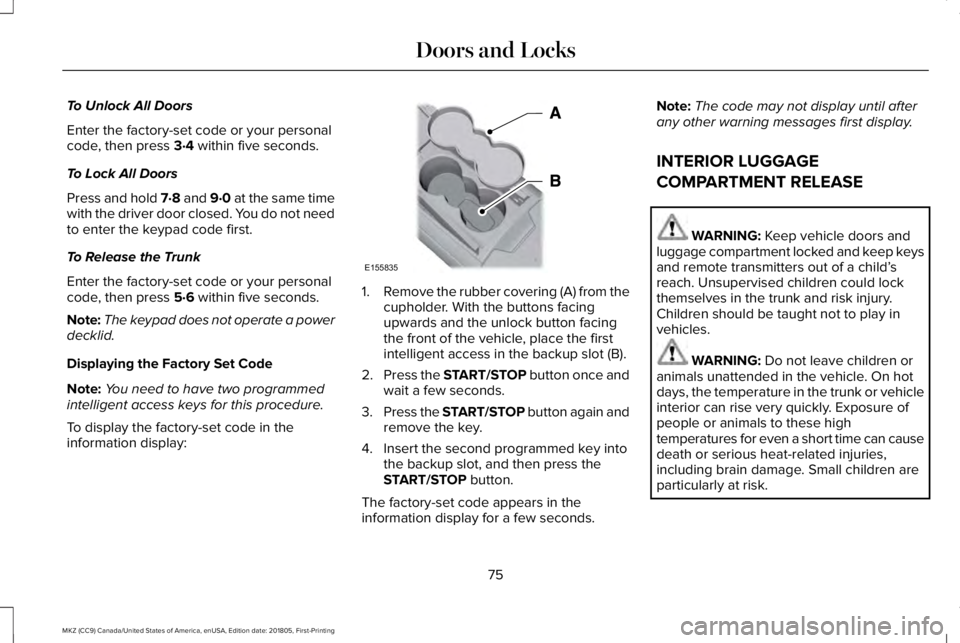
To display the factory-set code in theinformation display:
1.Remove the rubber covering (A) from thecupholder. With the buttons facingupwards and the unlock button facingthe front of the vehicle, place the firstintelligent access in the backup slot (B).
2.Press the START/STOP button once andwait a few seconds.
3.Press the START/STOP button again andremove the key.
4. Insert the second programmed key intothe backup slot, and then press theSTART/STOP button.
The factory-set code appears in theinformation display for a few seconds.
Note:The code may not display until afterany other warning messages first display.
INTERIOR LUGGAGE
COMPARTMENT RELEASE
WARNING: Keep vehicle doors andluggage compartment locked and keep keysand remote transmitters out of a child’sreach. Unsupervised children could lockthemselves in the trunk and risk injury.Children should be taught not to play invehicles.
WARNING: Do not leave children oranimals unattended in the vehicle. On hotdays, the temperature in the trunk or vehicleinterior can rise very quickly. Exposure ofpeople or animals to these hightemperatures for even a short time can causedeath or serious heat-related injuries,including brain damage. Small children areparticularly at risk.
75
MKZ (CC9) Canada/United States of America, enUSA, Edition date: 201805, First-Printing
Doors and LocksE155835
Page 80 of 595
PASSIVE ANTI-THEFT SYSTEM
Note: The system is not compatible withnon-Ford aftermarket remote start systems. Use of these systems may result in vehiclestarting problems and a loss of securityprotection.
Note: Metallic objects, electronic devicesor a second coded key on the same keychain may cause vehicle starting problemsif they are too close to the key when startingyour vehicle. Prevent these objects fromtouching the coded key while starting yourvehicle. Switch the ignition off, move allobjects on the key chain away from thecoded key and restart your vehicle if aproblem occurs.
Note: Do not leave a duplicate coded keyin your vehicle. Always take your keys andlock all doors when leaving your vehicle.
SecuriLock
The system helps prevent your vehicle fromstarting unless you use a coded keyprogrammed to your vehicle. Using thewrong key may prevent your vehicle fromstarting. A message may appear in theinformation display.
If you are unable to start your vehicle with acorrectly coded key, it is not operatingproperly. A message may appear in theinformation display.
Automatic Arming
Your vehicle arms immediately afterswitching the ignition off.
Automatic Disarming
Switching the ignition on with a coded keydisarms your vehicle.
Replacement Keys
Note:Your vehicle comes equipped with twointelligent access keys.
The intelligent access key functions as aprogrammed key that operates the driverdoor lock and activates the intelligent accesswith push button start system, as well as aremote control.
If your programmed transmitters are lost orstolen and you do not have an extra codedkey, have your vehicle towed to anauthorized dealer. You need to erase thekey codes from your vehicle and programnew coded keys.
Store an extra programmed key away fromyour vehicle in a safe place to help preventany inconveniences. See your authorizeddealer to purchase additional spare orreplacement keys.
Programming a Spare Intelligent AccessKey
Note: You can program a maximum of fourintelligent access keys to your vehicle.
77
MKZ (CC9) Canada/United States of America, enUSA, Edition date: 201805, First-Printing
Security
Page 81 of 595
You must have two previously programmedintelligent access keys inside your vehicleand the new unprogrammed intelligentaccess keys readily accessible. See anauthorized dealer to have the spare keyprogrammed if two previously programmedkeys are not available.
Make sure that your vehicle is off beforebeginning this procedure. Make sure thatyou close all the doors before beginning andthat they remain closed throughout theprocedure. Perform all steps within 30seconds of starting the sequence. Stop andwait for at least one minute before startingagain if you perform any steps out ofsequence.
Read and understand the entire procedurebefore you begin.
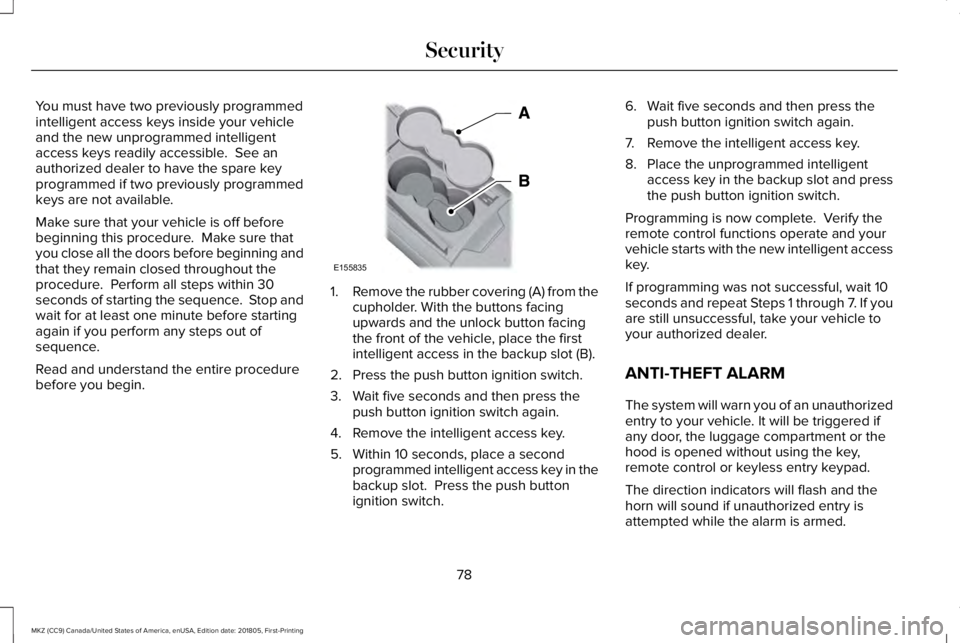
1.Remove the rubber covering (A) from thecupholder. With the buttons facingupwards and the unlock button facingthe front of the vehicle, place the firstintelligent access in the backup slot (B).
2. Press the push button ignition switch.
3. Wait five seconds and then press thepush button ignition switch again.
4. Remove the intelligent access key.
5. Within 10 seconds, place a secondprogrammed intelligent access key in thebackup slot. Press the push buttonignition switch.
6. Wait five seconds and then press thepush button ignition switch again.
7. Remove the intelligent access key.
8. Place the unprogrammed intelligentaccess key in the backup slot and pressthe push button ignition switch.
Programming is now complete. Verify theremote control functions operate and yourvehicle starts with the new intelligent accesskey.
If programming was not successful, wait 10seconds and repeat Steps 1 through 7. If youare still unsuccessful, take your vehicle toyour authorized dealer.
ANTI-THEFT ALARM
The system will warn you of an unauthorizedentry to your vehicle. It will be triggered ifany door, the luggage compartment or thehood is opened without using the key,remote control or keyless entry keypad.
The direction indicators will flash and thehorn will sound if unauthorized entry isattempted while the alarm is armed.
78
MKZ (CC9) Canada/United States of America, enUSA, Edition date: 201805, First-Printing
SecurityE155835
Page 82 of 595
Take all remote controls to an authorizeddealer if there is any potential alarm problemwith your vehicle.
Arming the Alarm
The alarm is ready to arm when there is nota key in your vehicle. Electronically lock yourvehicle to arm the alarm.
Disarming the Alarm
Disarm the alarm by any of the followingactions:
•Unlock the doors or luggagecompartment with the remote control orkeyless entry keypad.
•Switch your vehicle on or start yourvehicle.
•Use a key in the driver door to unlockyour vehicle, then switch your vehicle onwithin 12 seconds.
Note:Pressing the panic button on theremote control will stop the horn and signalindicators, but will not disarm the system.
79
MKZ (CC9) Canada/United States of America, enUSA, Edition date: 201805, First-Printing
Security
Page 104 of 595
WARNING: When closing themoonroof, verify that it is free of obstructionand make sure that children and pets are notin the proximity of the roof opening.
Type 1
The sliding shade can be manually openedor closed when the moonroof is closed. Pullthe shade toward the front of the vehicle toclose it.
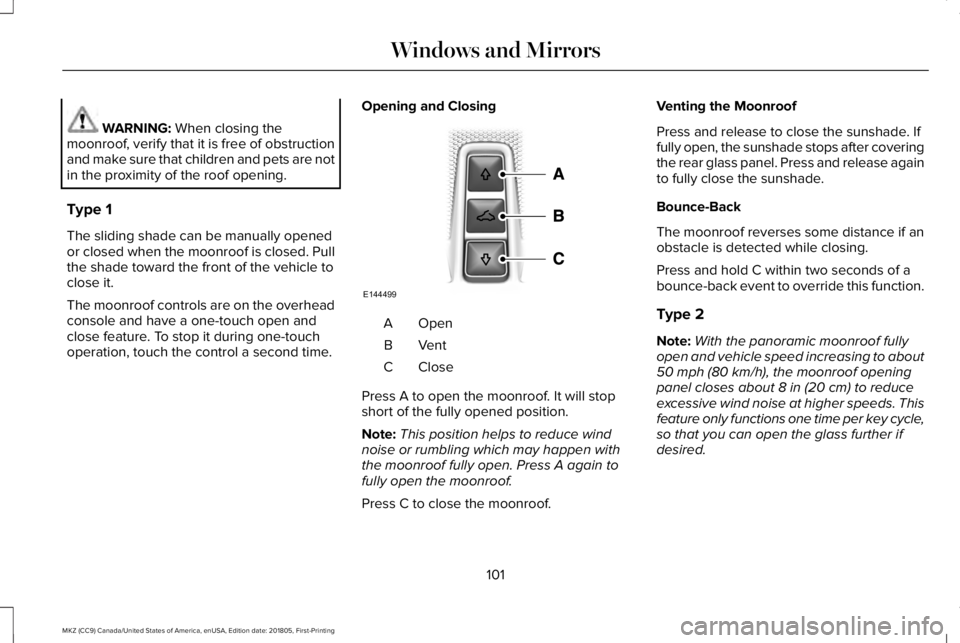
The moonroof controls are on the overheadconsole and have a one-touch open andclose feature. To stop it during one-touchoperation, touch the control a second time.
Opening and Closing
OpenA
VentB
CloseC
Press A to open the moonroof. It will stopshort of the fully opened position.
Note:This position helps to reduce windnoise or rumbling which may happen withthe moonroof fully open. Press A again tofully open the moonroof.
Press C to close the moonroof.
Venting the Moonroof
Press and release to close the sunshade. Iffully open, the sunshade stops after coveringthe rear glass panel. Press and release againto fully close the sunshade.
Bounce-Back
The moonroof reverses some distance if anobstacle is detected while closing.
Press and hold C within two seconds of abounce-back event to override this function.
Type 2
Note:With the panoramic moonroof fullyopen and vehicle speed increasing to about50 mph (80 km/h), the moonroof openingpanel closes about 8 in (20 cm) to reduceexcessive wind noise at higher speeds. Thisfeature only functions one time per key cycle,so that you can open the glass further ifdesired.
101
MKZ (CC9) Canada/United States of America, enUSA, Edition date: 201805, First-Printing
Windows and MirrorsE144499
Page 107 of 595
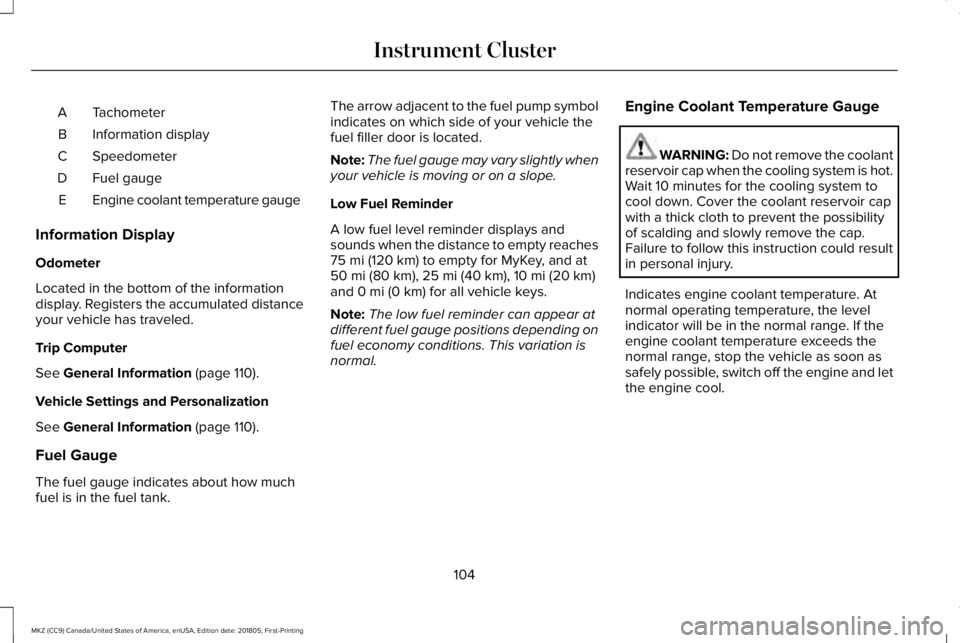
TachometerA
Information displayB
SpeedometerC
Fuel gaugeD
Engine coolant temperature gaugeE
Information Display
Odometer
Located in the bottom of the informationdisplay. Registers the accumulated distanceyour vehicle has traveled.
Trip Computer
See General Information (page 110).
Vehicle Settings and Personalization
See General Information (page 110).
Fuel Gauge
The fuel gauge indicates about how muchfuel is in the fuel tank.
The arrow adjacent to the fuel pump symbolindicates on which side of your vehicle thefuel filler door is located.
Note:The fuel gauge may vary slightly whenyour vehicle is moving or on a slope.
Low Fuel Reminder
A low fuel level reminder displays andsounds when the distance to empty reaches75 mi (120 km) to empty for MyKey, and at50 mi (80 km), 25 mi (40 km), 10 mi (20 km)and 0 mi (0 km) for all vehicle keys.
Note:The low fuel reminder can appear atdifferent fuel gauge positions depending onfuel economy conditions. This variation isnormal.
Engine Coolant Temperature Gauge
WARNING: Do not remove the coolantreservoir cap when the cooling system is hot.Wait 10 minutes for the cooling system tocool down. Cover the coolant reservoir capwith a thick cloth to prevent the possibilityof scalding and slowly remove the cap.Failure to follow this instruction could resultin personal injury.
Indicates engine coolant temperature. Atnormal operating temperature, the levelindicator will be in the normal range. If theengine coolant temperature exceeds thenormal range, stop the vehicle as soon assafely possible, switch off the engine and letthe engine cool.
104
MKZ (CC9) Canada/United States of America, enUSA, Edition date: 201805, First-Printing
Instrument Cluster
Page 111 of 595
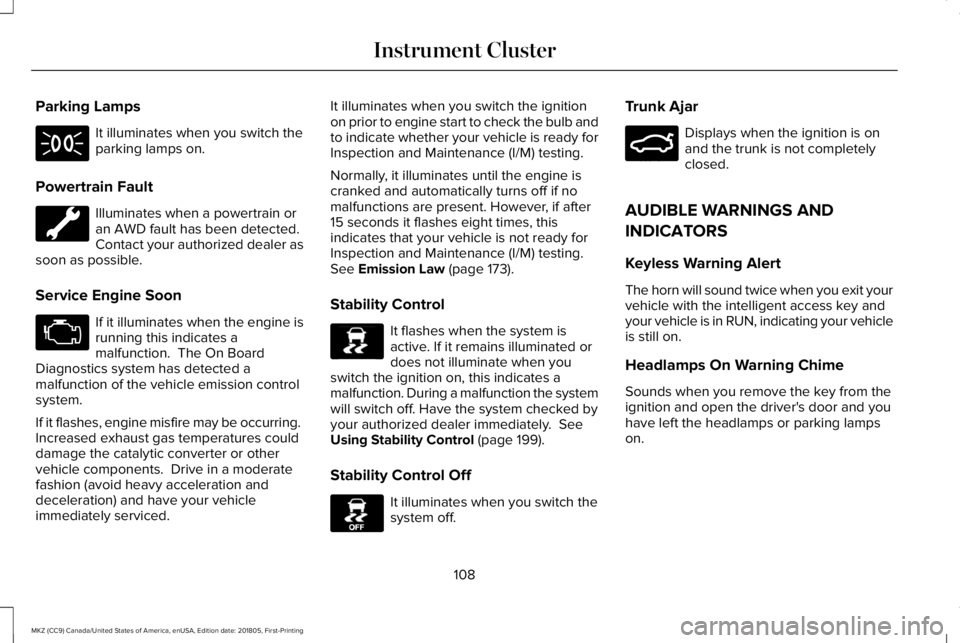
Parking Lamps
It illuminates when you switch theparking lamps on.
Powertrain Fault
Illuminates when a powertrain oran AWD fault has been detected.Contact your authorized dealer assoon as possible.
Service Engine Soon
If it illuminates when the engine isrunning this indicates amalfunction. The On BoardDiagnostics system has detected amalfunction of the vehicle emission controlsystem.
If it flashes, engine misfire may be occurring. Increased exhaust gas temperatures coulddamage the catalytic converter or othervehicle components. Drive in a moderatefashion (avoid heavy acceleration anddeceleration) and have your vehicleimmediately serviced.
It illuminates when you switch the ignitionon prior to engine start to check the bulb andto indicate whether your vehicle is ready forInspection and Maintenance (I/M) testing.
Normally, it illuminates until the engine iscranked and automatically turns off if nomalfunctions are present. However, if after15 seconds it flashes eight times, thisindicates that your vehicle is not ready forInspection and Maintenance (I/M) testing.See Emission Law (page 173).
Stability Control
It flashes when the system isactive. If it remains illuminated ordoes not illuminate when youswitch the ignition on, this indicates amalfunction. During a malfunction the systemwill switch off. Have the system checked byyour authorized dealer immediately. SeeUsing Stability Control (page 199).
Stability Control Off
It illuminates when you switch thesystem off.
Trunk Ajar
Displays when the ignition is onand the trunk is not completelyclosed.
AUDIBLE WARNINGS AND
INDICATORS
Keyless Warning Alert
The horn will sound twice when you exit yourvehicle with the intelligent access key andyour vehicle is in RUN, indicating your vehicleis still on.
Headlamps On Warning Chime
Sounds when you remove the key from theignition and open the driver's door and youhave left the headlamps or parking lampson.
108
MKZ (CC9) Canada/United States of America, enUSA, Edition date: 201805, First-Printing
Instrument Cluster E138639 E130458 E159323
Page 113 of 595
GENERAL INFORMATION
WARNING: Driving while distractedcan result in loss of vehicle control, crashand injury. We strongly recommend that youuse extreme caution when using any devicethat may take your focus off the road. Yourprimary responsibility is the safe operationof your vehicle. We recommend against theuse of any hand-held device while drivingand encourage the use of voice-operatedsystems when possible. Make sure you areaware of all applicable local laws that mayaffect the use of electronic devices whiledriving.
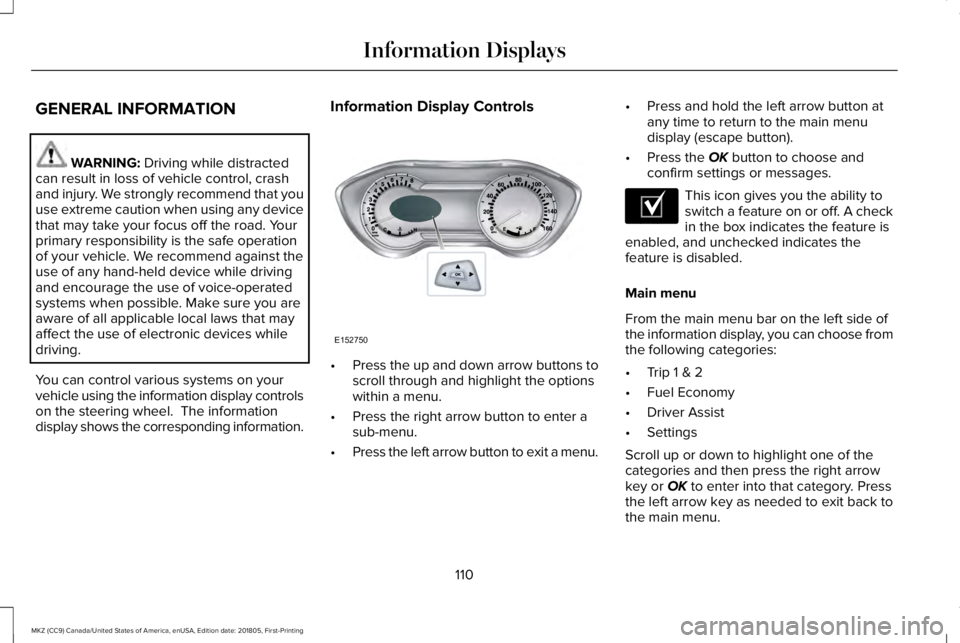
You can control various systems on yourvehicle using the information display controlson the steering wheel. The informationdisplay shows the corresponding information.
Information Display Controls
•Press the up and down arrow buttons toscroll through and highlight the optionswithin a menu.
•Press the right arrow button to enter asub-menu.
•Press the left arrow button to exit a menu.
•Press and hold the left arrow button atany time to return to the main menudisplay (escape button).
•Press the OK button to choose andconfirm settings or messages.
This icon gives you the ability toswitch a feature on or off. A checkin the box indicates the feature isenabled, and unchecked indicates thefeature is disabled.
Main menu
From the main menu bar on the left side ofthe information display, you can choose fromthe following categories:
•Trip 1 & 2
•Fuel Economy
•Driver Assist
•Settings
Scroll up or down to highlight one of thecategories and then press the right arrowkey or OK to enter into that category. Pressthe left arrow key as needed to exit back tothe main menu.
110
MKZ (CC9) Canada/United States of America, enUSA, Edition date: 201805, First-Printing
Information DisplaysE152750 E204495
Page 116 of 595
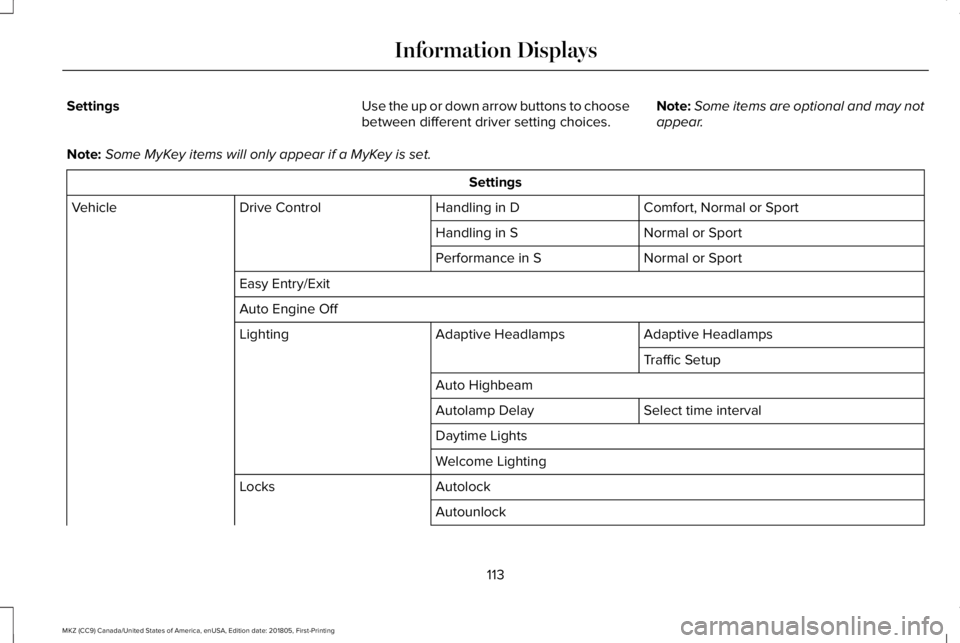
SettingsUse the up or down arrow buttons to choosebetween different driver setting choices.Note:Some items are optional and may notappear.
Note:Some MyKey items will only appear if a MyKey is set.
Settings
Comfort, Normal or SportHandling in DDrive ControlVehicle
Normal or SportHandling in S
Normal or SportPerformance in S
Easy Entry/Exit
Auto Engine Off
Adaptive HeadlampsAdaptive HeadlampsLighting
Traffic Setup
Auto Highbeam
Select time intervalAutolamp Delay
Daytime Lights
Welcome Lighting
AutolockLocks
Autounlock
113
MKZ (CC9) Canada/United States of America, enUSA, Edition date: 201805, First-Printing
Information Displays
Page 117 of 595
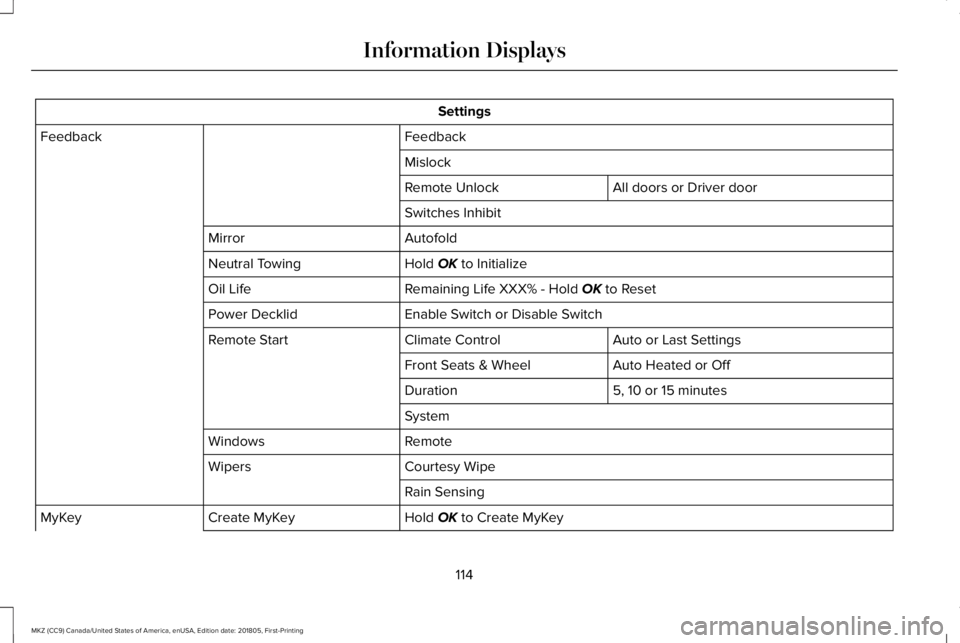
Settings
FeedbackFeedback
Mislock
All doors or Driver doorRemote Unlock
Switches Inhibit
AutofoldMirror
Hold OK to InitializeNeutral Towing
Remaining Life XXX% - Hold OK to ResetOil Life
Enable Switch or Disable SwitchPower Decklid
Auto or Last SettingsClimate ControlRemote Start
Auto Heated or OffFront Seats & Wheel
5, 10 or 15 minutesDuration
System
RemoteWindows
Courtesy WipeWipers
Rain Sensing
Hold OK to Create MyKeyCreate MyKeyMyKey
114
MKZ (CC9) Canada/United States of America, enUSA, Edition date: 201805, First-Printing
Information Displays