remote start LINCOLN MKZ 2019 Owner's Manual
[x] Cancel search | Manufacturer: LINCOLN, Model Year: 2019, Model line: MKZ, Model: LINCOLN MKZ 2019Pages: 595, PDF Size: 4.95 MB
Page 410 of 595
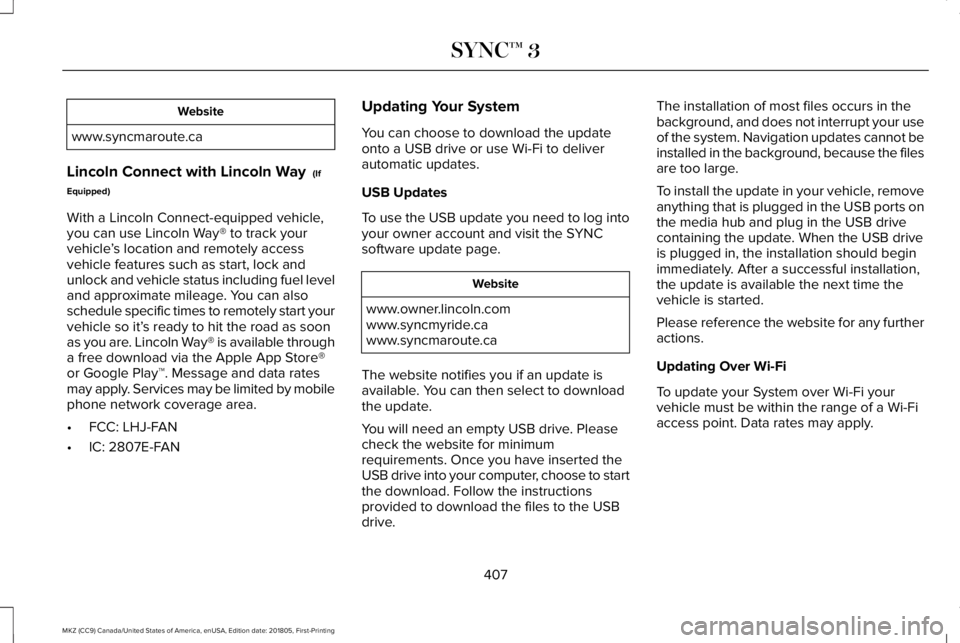
Website
www.syncmaroute.ca
Lincoln Connect with Lincoln Way (If
Equipped)
With a Lincoln Connect-equipped vehicle,you can use Lincoln Way® to track yourvehicle’s location and remotely accessvehicle features such as start, lock andunlock and vehicle status including fuel leveland approximate mileage. You can alsoschedule specific times to remotely start yourvehicle so it’s ready to hit the road as soonas you are. Lincoln Way® is available througha free download via the Apple App Store®or Google Play™. Message and data ratesmay apply. Services may be limited by mobilephone network coverage area.
•FCC: LHJ-FAN
•IC: 2807E-FAN
Updating Your System
You can choose to download the updateonto a USB drive or use Wi-Fi to deliverautomatic updates.
USB Updates
To use the USB update you need to log intoyour owner account and visit the SYNCsoftware update page.
Website
www.owner.lincoln.comwww.syncmyride.cawww.syncmaroute.ca
The website notifies you if an update isavailable. You can then select to downloadthe update.
You will need an empty USB drive. Pleasecheck the website for minimumrequirements. Once you have inserted theUSB drive into your computer, choose to startthe download. Follow the instructionsprovided to download the files to the USBdrive.
The installation of most files occurs in thebackground, and does not interrupt your useof the system. Navigation updates cannot beinstalled in the background, because the filesare too large.
To install the update in your vehicle, removeanything that is plugged in the USB ports onthe media hub and plug in the USB drivecontaining the update. When the USB driveis plugged in, the installation should beginimmediately. After a successful installation,the update is available the next time thevehicle is started.
Please reference the website for any furtheractions.
Updating Over Wi-Fi
To update your System over Wi-Fi yourvehicle must be within the range of a Wi-Fiaccess point. Data rates may apply.
407
MKZ (CC9) Canada/United States of America, enUSA, Edition date: 201805, First-Printing
SYNC™ 3
Page 499 of 595
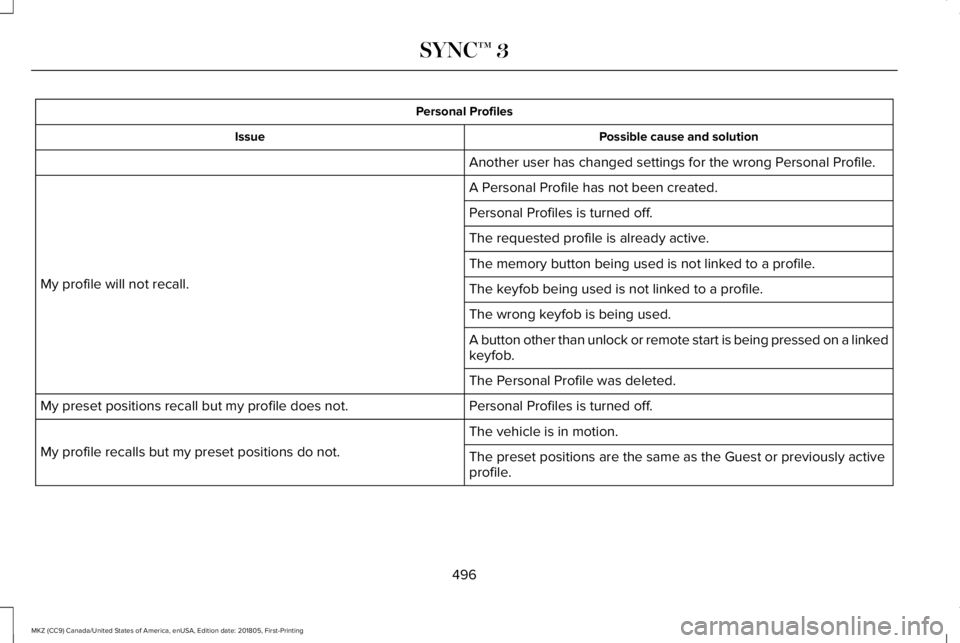
Personal Profiles
Possible cause and solutionIssue
Another user has changed settings for the wrong Personal Profile.
A Personal Profile has not been created.
My profile will not recall.
Personal Profiles is turned off.
The requested profile is already active.
The memory button being used is not linked to a profile.
The keyfob being used is not linked to a profile.
The wrong keyfob is being used.
A button other than unlock or remote start is being pressed on a linkedkeyfob.
The Personal Profile was deleted.
Personal Profiles is turned off.My preset positions recall but my profile does not.
The vehicle is in motion.
My profile recalls but my preset positions do not.The preset positions are the same as the Guest or previously activeprofile.
496
MKZ (CC9) Canada/United States of America, enUSA, Edition date: 201805, First-Printing
SYNC™ 3
Page 502 of 595
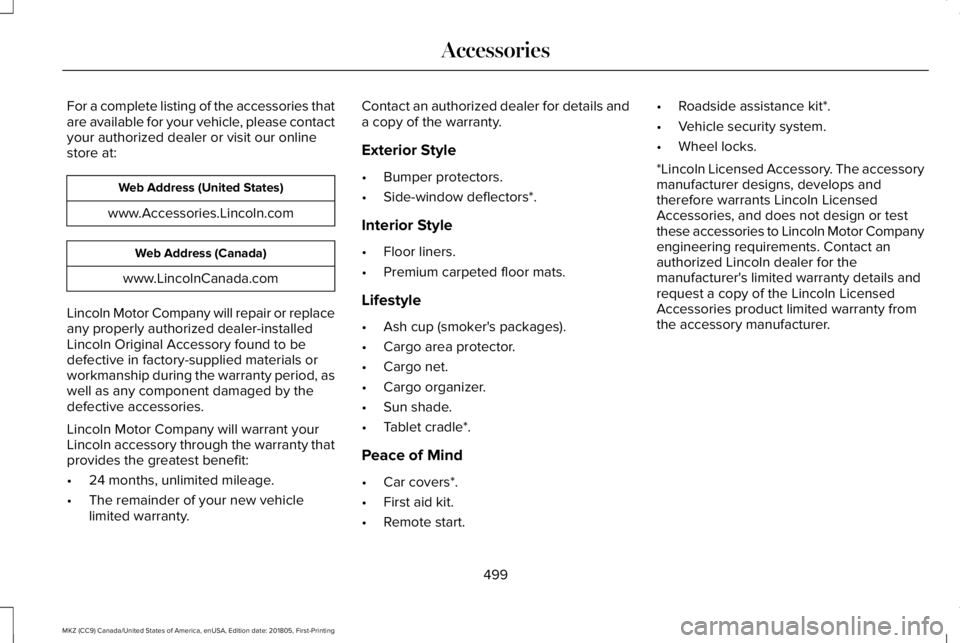
For a complete listing of the accessories thatare available for your vehicle, please contactyour authorized dealer or visit our onlinestore at:
Web Address (United States)
www.Accessories.Lincoln.com
Web Address (Canada)
www.LincolnCanada.com
Lincoln Motor Company will repair or replaceany properly authorized dealer-installedLincoln Original Accessory found to bedefective in factory-supplied materials orworkmanship during the warranty period, aswell as any component damaged by thedefective accessories.
Lincoln Motor Company will warrant yourLincoln accessory through the warranty thatprovides the greatest benefit:
•24 months, unlimited mileage.
•The remainder of your new vehiclelimited warranty.
Contact an authorized dealer for details anda copy of the warranty.
Exterior Style
•Bumper protectors.
•Side-window deflectors*.
Interior Style
•Floor liners.
•Premium carpeted floor mats.
Lifestyle
•Ash cup (smoker's packages).
•Cargo area protector.
•Cargo net.
•Cargo organizer.
•Sun shade.
•Tablet cradle*.
Peace of Mind
•Car covers*.
•First aid kit.
•Remote start.
•Roadside assistance kit*.
•Vehicle security system.
•Wheel locks.
*Lincoln Licensed Accessory. The accessorymanufacturer designs, develops andtherefore warrants Lincoln LicensedAccessories, and does not design or testthese accessories to Lincoln Motor Companyengineering requirements. Contact anauthorized Lincoln dealer for themanufacturer's limited warranty details andrequest a copy of the Lincoln LicensedAccessories product limited warranty fromthe accessory manufacturer.
499
MKZ (CC9) Canada/United States of America, enUSA, Edition date: 201805, First-Printing
Accessories
Page 589 of 595
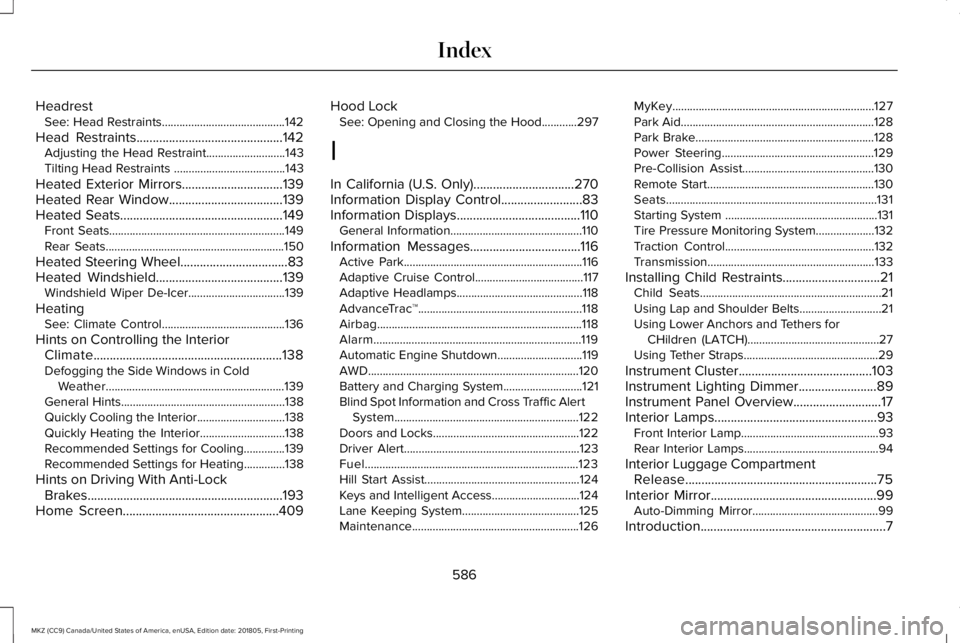
HeadrestSee: Head Restraints..........................................142
Head Restraints.............................................142Adjusting the Head Restraint...........................143Tilting Head Restraints ......................................143
Heated Exterior Mirrors...............................139Heated Rear Window...................................139Heated Seats..................................................149Front Seats............................................................149Rear Seats.............................................................150
Heated Steering Wheel.................................83Heated Windshield.......................................139Windshield Wiper De-Icer.................................139
HeatingSee: Climate Control..........................................136
Hints on Controlling the InteriorClimate..........................................................138Defogging the Side Windows in ColdWeather.............................................................139General Hints........................................................138Quickly Cooling the Interior..............................138Quickly Heating the Interior.............................138Recommended Settings for Cooling..............139Recommended Settings for Heating..............138
Hints on Driving With Anti-LockBrakes............................................................193Home Screen................................................409
Hood LockSee: Opening and Closing the Hood............297
I
In California (U.S. Only)...............................270Information Display Control.........................83Information Displays......................................110General Information.............................................110
Information Messages..................................116Active Park.............................................................116Adaptive Cruise Control.....................................117Adaptive Headlamps...........................................118AdvanceTrac™........................................................118Airbag......................................................................118Alarm.......................................................................119Automatic Engine Shutdown.............................119AWD........................................................................120Battery and Charging System...........................121Blind Spot Information and Cross Traffic AlertSystem...............................................................122Doors and Locks..................................................122Driver Alert............................................................123Fuel.........................................................................123Hill Start Assist.....................................................124Keys and Intelligent Access..............................124Lane Keeping System........................................125Maintenance.........................................................126
MyKey.....................................................................127Park Aid..................................................................128Park Brake.............................................................128Power Steering....................................................129Pre-Collision Assist.............................................130Remote Start.........................................................130Seats........................................................................131Starting System ....................................................131Tire Pressure Monitoring System....................132Traction Control...................................................132Transmission.........................................................133
Installing Child Restraints..............................21Child Seats..............................................................21Using Lap and Shoulder Belts............................21Using Lower Anchors and Tethers forCHildren (LATCH).............................................27Using Tether Straps..............................................29
Instrument Cluster.........................................103Instrument Lighting Dimmer........................89Instrument Panel Overview...........................17Interior Lamps..................................................93Front Interior Lamp...............................................93Rear Interior Lamps..............................................94
Interior Luggage CompartmentRelease...........................................................75Interior Mirror...................................................99Auto-Dimming Mirror...........................................99
Introduction.........................................................7
586
MKZ (CC9) Canada/United States of America, enUSA, Edition date: 201805, First-Printing
Index
Page 590 of 595
J
Jump Starting the Vehicle..........................264Connecting the Jumper Cables.....................264Jump Starting......................................................265Preparing Your Vehicle.....................................264Removing the Jumper Cables........................266
K
Keyless Entry....................................................73SECURICODE™ KEYLESS ENTRYKEYPAD...............................................................73
Keyless Starting..............................................161Ignition Modes......................................................161
Keys and Remote Controls...........................57
L
Lane Keeping System.................................229Switching the System On and Off..................230
Lighting Control...............................................87Flashing the Headlamp High Beam.................88Headlamp High Beam.........................................88
Lighting..............................................................87General Information..............................................87
Lincoln Automotive Financial Services......12
Lincoln Protect...............................................501Lincoln Protect (CANADA ONLY)...................502Lincoln Protect Extended Service Plans (U.S.Only)...................................................................501
Load Carrying................................................248Load Limit.......................................................248Special Loading Instructions for Owners ofPick-up Trucks and Utility-typeVehicles............................................................252Vehicle Loading - with and without aTrailer................................................................248
Locking and Unlocking..................................67Activating Intelligent Access.............................68Autolock..................................................................70Battery Saver...........................................................71Illuminated Entry...................................................70Illuminated Exit......................................................70Locking and Unlocking the Doors with theKey Blade...........................................................69Luggage Compartment........................................71Power Door Locks................................................67Remote Control.....................................................67Smart Unlocks for Intelligent AccessKeys.....................................................................69
Lug NutsSee: Changing a Road Wheel.........................356
M
Maintenance..................................................297General Information...........................................297
Media Hub......................................................392Memory Function...........................................147Easy Entry and Exit Feature..............................148Linking a PreSet Position to your RemoteControl or Intelligent Access Key Fob.......148Saving a PreSet Position....................................147
Message CenterSee: Information Displays..................................110
MirrorsSee: Windows and Mirrors.................................95
Mobile Communications Equipment...........14Moonroof.........................................................100Opening and Closing.........................................102Type 1.......................................................................101Type 2.....................................................................101
Motorcraft Parts - 2.0L................................368Motorcraft Parts - 3.0L.................................370MyKey Troubleshooting................................65MyKey™..............................................................62Principle of Operation.........................................62
587
MKZ (CC9) Canada/United States of America, enUSA, Edition date: 201805, First-Printing
Index
Page 592 of 595
Rear Seats.......................................................148Rear View Camera........................................213Using the Rear View Camera System............214
Rear View CameraSee: Rear View Camera.....................................213
Recommended Towing Weights..............254Refueling.........................................................169System Warnings..................................................171
Remote Control...............................................58Car Finder...............................................................60Intelligent Access Key.........................................58Remote Start..........................................................60Replacing the Battery..........................................58Sounding the Panic Alarm..................................60
Remote Start...................................................140Automatic Settings..............................................140Heated and Cooled Features..........................140Last Settings.........................................................140
Repairing Minor Paint Damage.................326Replacement Parts Recommendation........13Collision Repairs.....................................................13Scheduled Maintenance and MechanicalRepairs.................................................................13Warranty on Replacement Parts.........................13
Replacing a Lost Key or RemoteControl.............................................................61Reporting Safety Defects (CanadaOnly)..............................................................276
Reporting Safety Defects (U.S. Only).......275Roadside Assistance...................................262Vehicles Sold in Canada: Getting RoadsideAssistance.......................................................262Vehicles Sold in Canada: Roadside AssistanceProgram Coverage........................................263Vehicles Sold in Canada: Using RoadsideAssistance.......................................................263Vehicles Sold in the United States: GettingRoadside Assistance....................................262Vehicles Sold in the United States: UsingRoadside Assistance....................................262
Roadside Emergencies...............................262Running-InSee: Breaking-In.................................................259
Running Out of Fuel.....................................168Adding Fuel From a Portable FuelContainer..........................................................168Filling a Portable Fuel Container.....................168
S
Safety Canopy™...............................................53Safety Precautions........................................166Scheduled Maintenance Record...............516Scheduled Maintenance............................504Seatbelt Extension.........................................45Seatbelt Height Adjustment..........................41
Seatbelt Reminder..........................................43Belt-Minder™...........................................................43
Seatbelts...........................................................37Principle of Operation..........................................37
Seatbelt Warning Lamp and IndicatorChime..............................................................42Conditions of operation......................................42
Seats..................................................................141Security..............................................................77Settings............................................................461911 Assist...............................................................469Ambient Lighting.................................................478Bluetooth..............................................................464Clock......................................................................463Display..................................................................480General..................................................................475Media Player........................................................462Mobile Apps.........................................................474Navigation.............................................................471Phone....................................................................464Radio......................................................................470SiriusXM.................................................................471Sound.....................................................................461Valet Mode............................................................481Vehicle...................................................................478Voice Control.......................................................480Wi-Fi & Hotspot...................................................476
Side Airbags.....................................................52
589
MKZ (CC9) Canada/United States of America, enUSA, Edition date: 201805, First-Printing
Index
Page 594 of 595
Towing a Trailer.............................................253Load Placement..................................................253
Towing Points................................................268Installing the Recovery Hook..........................268Recovery Hook Location..................................268
Towing the Vehicle on Four Wheels........257Emergency Towing.............................................257Recreational Towing..........................................257
Towing.............................................................253Traction Control.............................................197Principle of Operation........................................197
Transmission Code Designation...............372Transmission...................................................177Transporting the Vehicle............................267Type Approvals..............................................571Radio Frequency Certification Logos for BlindSpot Information System..............................579Radio Frequency Certification Logos for MidRange Radar....................................................574Radio Frequency Certification Logos forPassive Anti-Theft System...........................575Radio Frequency Certification Logos for RadioTransceiver Module.......................................577Radio Frequency Certification Logos for SYNC3.........................................................................580Radio Frequency Certification Logos for TirePressure Monitoring Sensor(s)....................571
Radio Frequency Certification Logos forWireless Charging.........................................580
U
Under Hood Overview - 2.0L....................298Under Hood Overview - 3.0L....................300Universal Garage Door Opener................153HomeLink Wireless Control System...............153
USB Port.........................................................392Using Adaptive Cruise Control..................218Automatic Cancellation....................................222Blocked Sensor...................................................224Canceling the Set Speed.................................222Changing the Set Speed...................................221Detection Issues.................................................223Following a Vehicle...........................................220Following a Vehicle to a CompleteStop...................................................................220Hilly Condition Usage.......................................222Overriding the Set Speed.................................221Park Brake Application.....................................222Resuming the Set Speed.................................222Setting the Adaptive Cruise Speed................219Setting the Adaptive Cruise Speed When YourVehicle is Stationary.....................................220Setting the Gap Distance..................................221Switching Adaptive Cruise Control Off........222
Switching Adaptive Cruise Control On..........219Switching to Normal Cruise Control..............226System Not Available........................................224
Using All-Wheel Drive..................................183Driving In Special Conditions With All-WheelDrive (AWD)......................................................185Operating AWD Vehicles With Spare orMismatched Tires...........................................185
Using Cruise Control....................................217Canceling the Set Speed..................................218Changing the Set Speed...................................217Resuming the Set Speed...................................218Setting the Cruise Speed..................................217Switching Cruise Control Off............................218Switching Cruise Control On............................217
Using MyKey With Remote StartSystems..........................................................65Using Snow Chains.......................................351Using Stability Control.................................199Using Summer Tires....................................350Using Traction Control.................................197Switching the System Off..................................197System Indicator Lights and Messages.........197Using a Switch......................................................197Using the Information Display Controls.........197
Using Voice Recognition..............................411Audio Voice Commands....................................413Climate Voice Commands.................................414
591
MKZ (CC9) Canada/United States of America, enUSA, Edition date: 201805, First-Printing
Index