reset LINCOLN MKZ 2019 Workshop Manual
[x] Cancel search | Manufacturer: LINCOLN, Model Year: 2019, Model line: MKZ, Model: LINCOLN MKZ 2019Pages: 595, PDF Size: 4.95 MB
Page 500 of 595
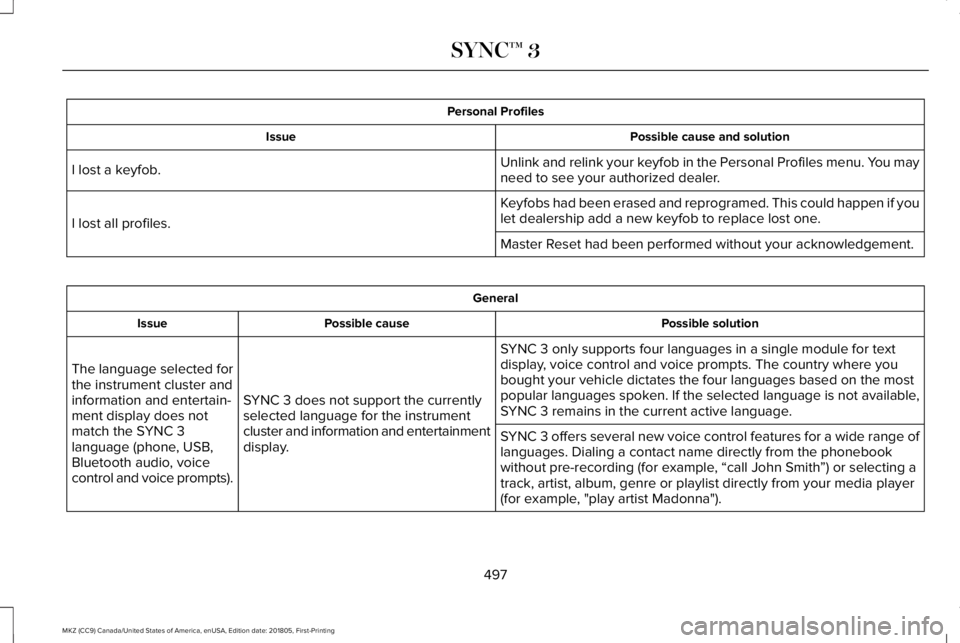
Personal Profiles
Possible cause and solutionIssue
Unlink and relink your keyfob in the Personal Profiles menu. You mayneed to see your authorized dealer.I lost a keyfob.
Keyfobs had been erased and reprogramed. This could happen if youlet dealership add a new keyfob to replace lost one.I lost all profiles.
Master Reset had been performed without your acknowledgement.
General
Possible solutionPossible causeIssue
SYNC 3 only supports four languages in a single module for textdisplay, voice control and voice prompts. The country where youbought your vehicle dictates the four languages based on the mostpopular languages spoken. If the selected language is not available,SYNC 3 remains in the current active language.SYNC 3 does not support the currentlyselected language for the instrumentcluster and information and entertainmentdisplay.
The language selected forthe instrument cluster andinformation and entertain-ment display does notmatch the SYNC 3language (phone, USB,Bluetooth audio, voicecontrol and voice prompts).
SYNC 3 offers several new voice control features for a wide range oflanguages. Dialing a contact name directly from the phonebookwithout pre-recording (for example, “call John Smith”) or selecting atrack, artist, album, genre or playlist directly from your media player(for example, "play artist Madonna").
497
MKZ (CC9) Canada/United States of America, enUSA, Edition date: 201805, First-Printing
SYNC™ 3
Page 501 of 595
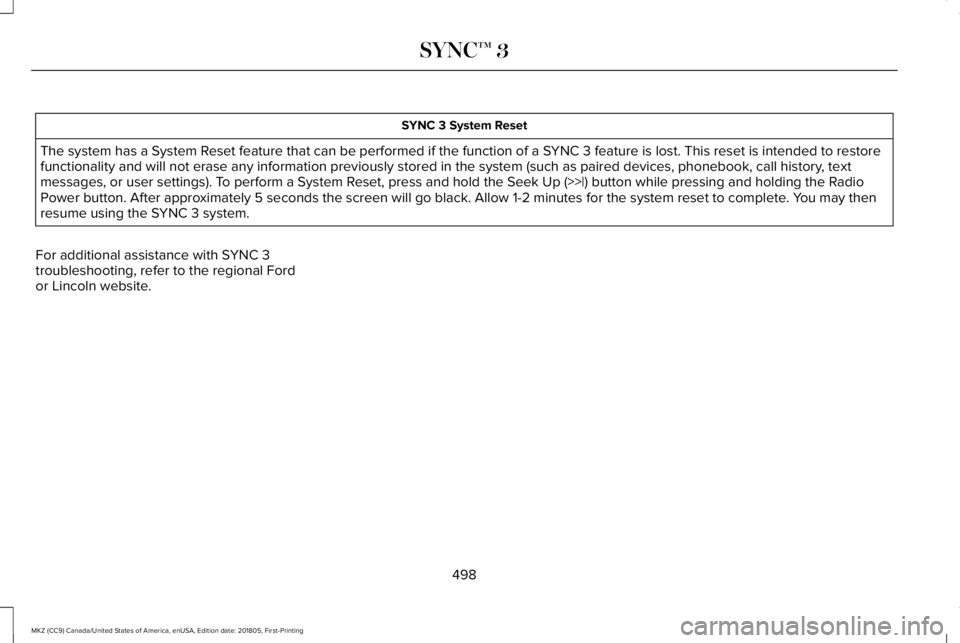
SYNC 3 System Reset
The system has a System Reset feature that can be performed if the function of a SYNC 3 feature is lost. This reset is intended to restorefunctionality and will not erase any information previously stored in the system (such as paired devices, phonebook, call history, textmessages, or user settings). To perform a System Reset, press and hold the Seek Up (>>|) button while pressing and holding the RadioPower button. After approximately 5 seconds the screen will go black. Allow 1-2 minutes for the system reset to complete. You may thenresume using the SYNC 3 system.
For additional assistance with SYNC 3troubleshooting, refer to the regional Fordor Lincoln website.
498
MKZ (CC9) Canada/United States of America, enUSA, Edition date: 201805, First-Printing
SYNC™ 3
Page 508 of 595
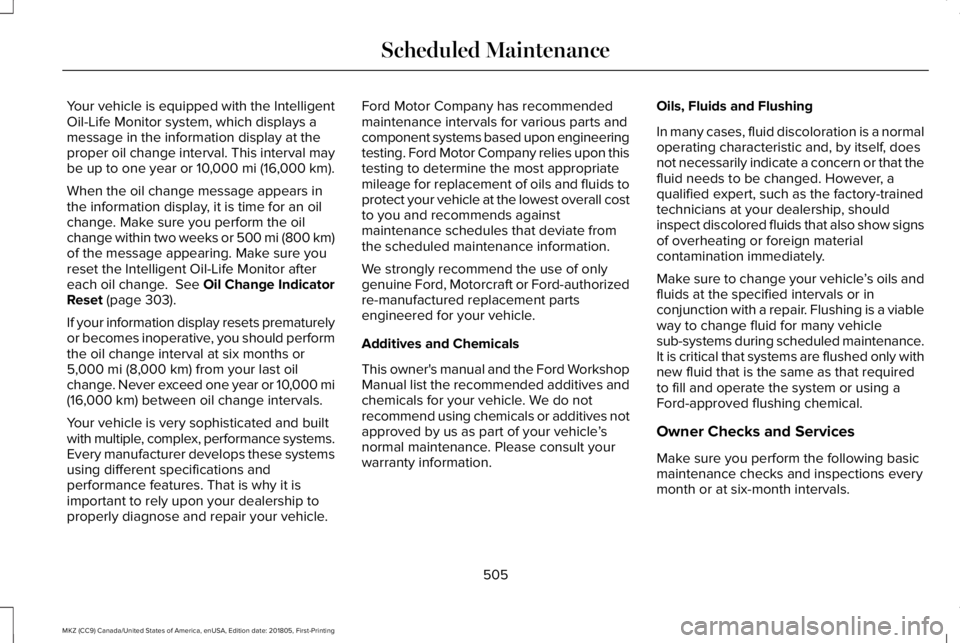
Your vehicle is equipped with the IntelligentOil-Life Monitor system, which displays amessage in the information display at theproper oil change interval. This interval maybe up to one year or 10,000 mi (16,000 km).
When the oil change message appears inthe information display, it is time for an oilchange. Make sure you perform the oilchange within two weeks or 500 mi (800 km)of the message appearing. Make sure youreset the Intelligent Oil-Life Monitor aftereach oil change. See Oil Change IndicatorReset (page 303).
If your information display resets prematurelyor becomes inoperative, you should performthe oil change interval at six months or5,000 mi (8,000 km) from your last oilchange. Never exceed one year or 10,000 mi(16,000 km) between oil change intervals.
Your vehicle is very sophisticated and builtwith multiple, complex, performance systems.Every manufacturer develops these systemsusing different specifications andperformance features. That is why it isimportant to rely upon your dealership toproperly diagnose and repair your vehicle.
Ford Motor Company has recommendedmaintenance intervals for various parts andcomponent systems based upon engineeringtesting. Ford Motor Company relies upon thistesting to determine the most appropriatemileage for replacement of oils and fluids toprotect your vehicle at the lowest overall costto you and recommends againstmaintenance schedules that deviate fromthe scheduled maintenance information.
We strongly recommend the use of onlygenuine Ford, Motorcraft or Ford-authorizedre-manufactured replacement partsengineered for your vehicle.
Additives and Chemicals
This owner's manual and the Ford WorkshopManual list the recommended additives andchemicals for your vehicle. We do notrecommend using chemicals or additives notapproved by us as part of your vehicle’snormal maintenance. Please consult yourwarranty information.
Oils, Fluids and Flushing
In many cases, fluid discoloration is a normaloperating characteristic and, by itself, doesnot necessarily indicate a concern or that thefluid needs to be changed. However, aqualified expert, such as the factory-trainedtechnicians at your dealership, shouldinspect discolored fluids that also show signsof overheating or foreign materialcontamination immediately.
Make sure to change your vehicle’s oils andfluids at the specified intervals or inconjunction with a repair. Flushing is a viableway to change fluid for many vehiclesub-systems during scheduled maintenance.It is critical that systems are flushed only withnew fluid that is the same as that requiredto fill and operate the system or using aFord-approved flushing chemical.
Owner Checks and Services
Make sure you perform the following basicmaintenance checks and inspections everymonth or at six-month intervals.
505
MKZ (CC9) Canada/United States of America, enUSA, Edition date: 201805, First-Printing
Scheduled Maintenance
Page 513 of 595
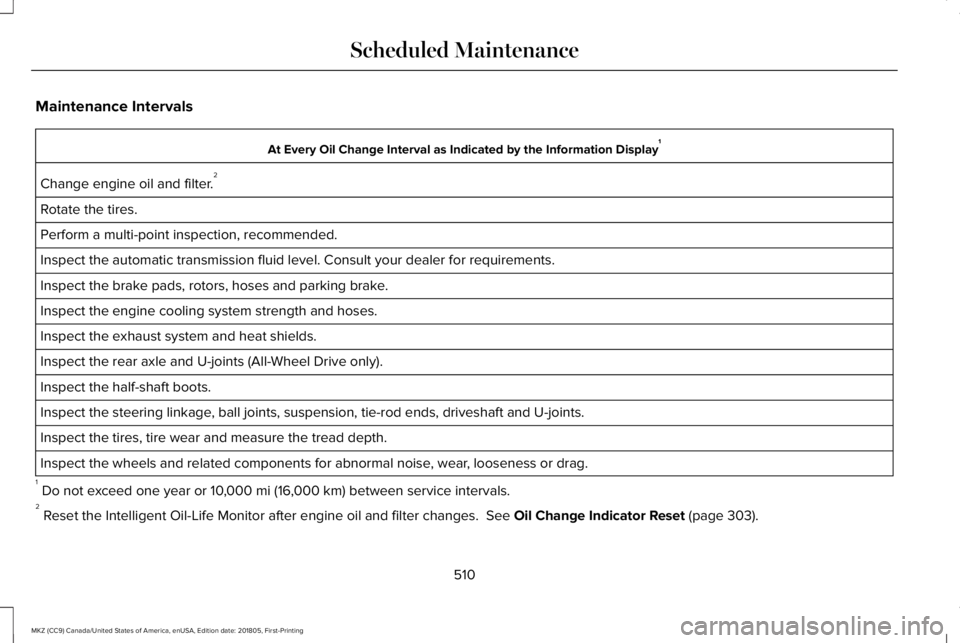
Maintenance Intervals
At Every Oil Change Interval as Indicated by the Information Display1
Change engine oil and filter.2
Rotate the tires.
Perform a multi-point inspection, recommended.
Inspect the automatic transmission fluid level. Consult your dealer for requirements.
Inspect the brake pads, rotors, hoses and parking brake.
Inspect the engine cooling system strength and hoses.
Inspect the exhaust system and heat shields.
Inspect the rear axle and U-joints (All-Wheel Drive only).
Inspect the half-shaft boots.
Inspect the steering linkage, ball joints, suspension, tie-rod ends, driveshaft and U-joints.
Inspect the tires, tire wear and measure the tread depth.
Inspect the wheels and related components for abnormal noise, wear, looseness or drag.
1 Do not exceed one year or 10,000 mi (16,000 km) between service intervals.2 Reset the Intelligent Oil-Life Monitor after engine oil and filter changes. See Oil Change Indicator Reset (page 303).
510
MKZ (CC9) Canada/United States of America, enUSA, Edition date: 201805, First-Printing
Scheduled Maintenance
Page 515 of 595
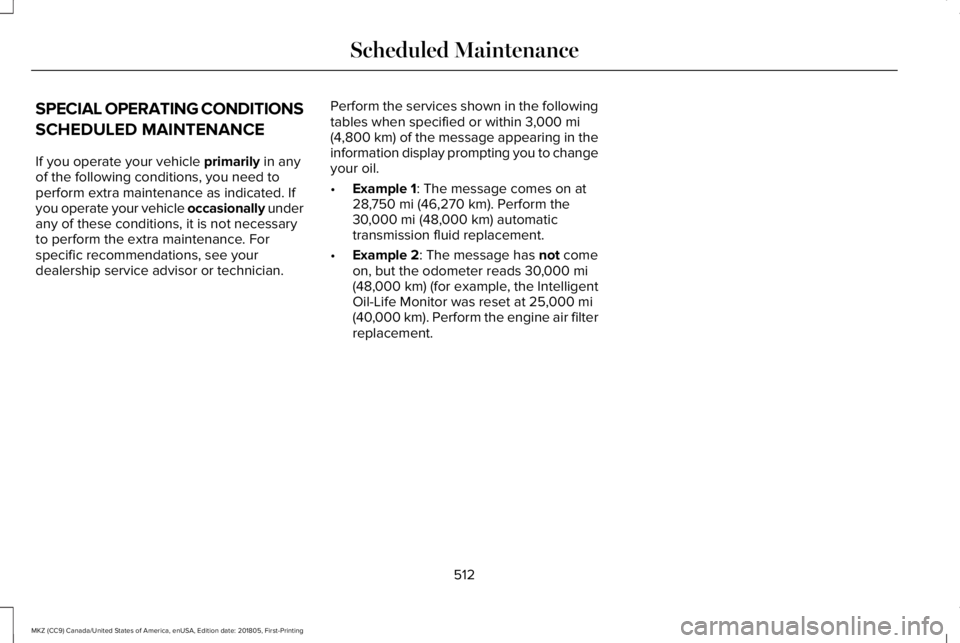
SPECIAL OPERATING CONDITIONS
SCHEDULED MAINTENANCE
If you operate your vehicle primarily in anyof the following conditions, you need toperform extra maintenance as indicated. Ifyou operate your vehicle occasionally underany of these conditions, it is not necessaryto perform the extra maintenance. Forspecific recommendations, see yourdealership service advisor or technician.
Perform the services shown in the followingtables when specified or within 3,000 mi(4,800 km) of the message appearing in theinformation display prompting you to changeyour oil.
•Example 1: The message comes on at28,750 mi (46,270 km). Perform the30,000 mi (48,000 km) automatictransmission fluid replacement.
•Example 2: The message has not comeon, but the odometer reads 30,000 mi(48,000 km) (for example, the IntelligentOil-Life Monitor was reset at 25,000 mi(40,000 km). Perform the engine air filterreplacement.
512
MKZ (CC9) Canada/United States of America, enUSA, Edition date: 201805, First-Printing
Scheduled Maintenance
Page 518 of 595
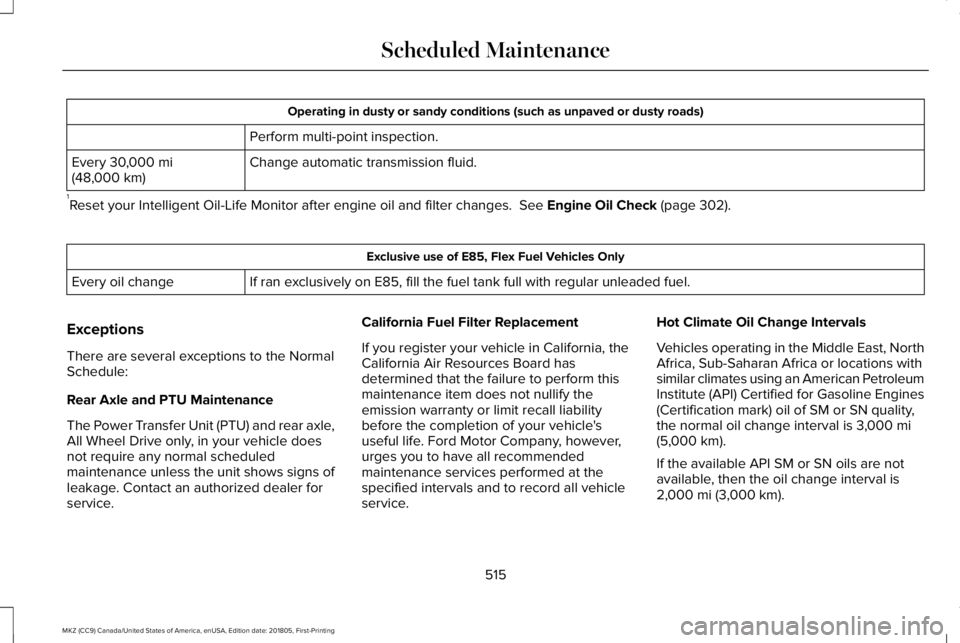
Operating in dusty or sandy conditions (such as unpaved or dusty roads)
Perform multi-point inspection.
Change automatic transmission fluid.Every 30,000 mi(48,000 km)
1Reset your Intelligent Oil-Life Monitor after engine oil and filter changes. See Engine Oil Check (page 302).
Exclusive use of E85, Flex Fuel Vehicles Only
If ran exclusively on E85, fill the fuel tank full with regular unleaded fuel.Every oil change
Exceptions
There are several exceptions to the NormalSchedule:
Rear Axle and PTU Maintenance
The Power Transfer Unit (PTU) and rear axle,All Wheel Drive only, in your vehicle doesnot require any normal scheduledmaintenance unless the unit shows signs ofleakage. Contact an authorized dealer forservice.
California Fuel Filter Replacement
If you register your vehicle in California, theCalifornia Air Resources Board hasdetermined that the failure to perform thismaintenance item does not nullify theemission warranty or limit recall liabilitybefore the completion of your vehicle'suseful life. Ford Motor Company, however,urges you to have all recommendedmaintenance services performed at thespecified intervals and to record all vehicleservice.
Hot Climate Oil Change Intervals
Vehicles operating in the Middle East, NorthAfrica, Sub-Saharan Africa or locations withsimilar climates using an American PetroleumInstitute (API) Certified for Gasoline Engines(Certification mark) oil of SM or SN quality,the normal oil change interval is 3,000 mi(5,000 km).
If the available API SM or SN oils are notavailable, then the oil change interval is2,000 mi (3,000 km).
515
MKZ (CC9) Canada/United States of America, enUSA, Edition date: 201805, First-Printing
Scheduled Maintenance
Page 590 of 595
J
Jump Starting the Vehicle..........................264Connecting the Jumper Cables.....................264Jump Starting......................................................265Preparing Your Vehicle.....................................264Removing the Jumper Cables........................266
K
Keyless Entry....................................................73SECURICODE™ KEYLESS ENTRYKEYPAD...............................................................73
Keyless Starting..............................................161Ignition Modes......................................................161
Keys and Remote Controls...........................57
L
Lane Keeping System.................................229Switching the System On and Off..................230
Lighting Control...............................................87Flashing the Headlamp High Beam.................88Headlamp High Beam.........................................88
Lighting..............................................................87General Information..............................................87
Lincoln Automotive Financial Services......12
Lincoln Protect...............................................501Lincoln Protect (CANADA ONLY)...................502Lincoln Protect Extended Service Plans (U.S.Only)...................................................................501
Load Carrying................................................248Load Limit.......................................................248Special Loading Instructions for Owners ofPick-up Trucks and Utility-typeVehicles............................................................252Vehicle Loading - with and without aTrailer................................................................248
Locking and Unlocking..................................67Activating Intelligent Access.............................68Autolock..................................................................70Battery Saver...........................................................71Illuminated Entry...................................................70Illuminated Exit......................................................70Locking and Unlocking the Doors with theKey Blade...........................................................69Luggage Compartment........................................71Power Door Locks................................................67Remote Control.....................................................67Smart Unlocks for Intelligent AccessKeys.....................................................................69
Lug NutsSee: Changing a Road Wheel.........................356
M
Maintenance..................................................297General Information...........................................297
Media Hub......................................................392Memory Function...........................................147Easy Entry and Exit Feature..............................148Linking a PreSet Position to your RemoteControl or Intelligent Access Key Fob.......148Saving a PreSet Position....................................147
Message CenterSee: Information Displays..................................110
MirrorsSee: Windows and Mirrors.................................95
Mobile Communications Equipment...........14Moonroof.........................................................100Opening and Closing.........................................102Type 1.......................................................................101Type 2.....................................................................101
Motorcraft Parts - 2.0L................................368Motorcraft Parts - 3.0L.................................370MyKey Troubleshooting................................65MyKey™..............................................................62Principle of Operation.........................................62
587
MKZ (CC9) Canada/United States of America, enUSA, Edition date: 201805, First-Printing
Index
Page 591 of 595
N
Navigation......................................................447cityseeker.............................................................456Destination Mode...............................................448Map Mode.............................................................447Navigation Map Updates..................................457Navigation Menu................................................453SiriusXM Traffic and Travel Link......................457SYNC AppLink....................................................456Waypoints.............................................................455
Normal Scheduled Maintenance.............508Intelligent Oil-Life Monitor™.............................508Maintenance Intervals........................................510
O
Oil Change Indicator Reset........................303Oil CheckSee: Engine Oil Check......................................302
Opening and Closing the Hood...............297Closing the Hood...............................................298Opening the Hood.............................................297
Ordering Additional Owner'sLiterature......................................................275Obtaining a French Owner’s Manual............275
Overhead Console.......................................160
P
Parking Aids...................................................201Principle of Operation........................................201
Passive Anti-Theft System............................77SecuriLock...............................................................77
PATSSee: Passive Anti-Theft System.........................77
Perchlorate........................................................12Personal Safety System™..............................46How Does the Personal Safety SystemWork?...................................................................46
Phone..............................................................439During a Phone Call...........................................444Making Calls.........................................................443Pairing Your Cell Phone for the FirstTime...................................................................439Phone Menu........................................................440Receiving Calls....................................................444Smartphone Connectivity.................................446Text Messaging...................................................445
Post-Crash Alert System............................266Power Decklid...................................................71Obstacle Detection...............................................72Opening and Closing the Power Decklid.......72Resetting the Power Decklid..............................73
Power Door LocksSee: Locking and Unlocking..............................67
Power Seats....................................................143Adjusting the Four-Way LumbarSupport..............................................................145Adjusting the Lumbar Support.........................145Adjusting the Multi-Contour Front Seats WithActive Motion ..................................................145
Power Windows..............................................95Accessory Delay...................................................96Bounce-Back..........................................................95One-Touch Down..................................................95One-Touch Up.......................................................95Window Lock.........................................................96
Pre-Collision Assist.......................................241Adjusting the Pre-Collision AssistSettings.............................................................243Blocked Sensors.................................................244Distance Indication and Alert..........................242Using the Pre-Collision Assist System..........242
Protecting the Environment..........................16PunctureSee: Changing a Road Wheel.........................356
R
Rear Parking Aid............................................201Obstacle Distance Indicator............................202
Rear Seat Armrest..........................................151Armrest Pass-Through.......................................152
588
MKZ (CC9) Canada/United States of America, enUSA, Edition date: 201805, First-Printing
Index