steering LINCOLN MKZ 2019 Workshop Manual
[x] Cancel search | Manufacturer: LINCOLN, Model Year: 2019, Model line: MKZ, Model: LINCOLN MKZ 2019Pages: 595, PDF Size: 4.95 MB
Page 259 of 595
Trailer lamps are required on most towedvehicles. Make sure all running lights, brakelights, turn signals and hazard lights areworking.
Before Towing a Trailer
Practice turning, stopping and backing up toget the feel of your vehicle-trailercombination before starting on a trip. Whenturning, make wider turns so the trailerwheels clear curbs and other obstacles.
When Towing a Trailer
•Do not drive faster than 70 mph(113 km/h) during the first 500 mi(800 km).
•Do not make full-throttle starts.
•Check your hitch, electrical connectionsand trailer wheel lug nuts thoroughly afteryou have traveled 50 mi (80 km).
•When stopped in congested or heavytraffic during hot weather, place thetransmission in park (P) to aid engine andtransmission cooling and to help A/Cperformance.
•Turn off the speed control with heavyloads or in hilly terrain. The speed controlmay turn off automatically when you aretowing on long, steep grades.
•Shift to a lower gear when driving downa long or steep hill. Do not apply thebrakes continuously, as they mayoverheat and become less effective.
•If your transmission is equipped with aGrade Assist or Tow/Haul feature, usethis feature when towing. This providesengine braking and helps eliminateexcessive transmission shifting foroptimum fuel economy and transmissioncooling.
•Allow more distance for stopping with atrailer attached. Anticipate stops andbrake gradually.
•Avoid parking on a grade. However, ifyou must park on a grade:
1. Turn the steering wheel to point yourvehicle tires away from traffic flow.
2. Set your vehicle parking brake.
3. Place the transmission in park (P).
4. Place wheel chocks in front and back ofthe trailer wheels. Chocks are notincluded with your vehicle.
Launching or Retrieving a Boat orPersonal Watercraft (PWC)
Note:Disconnect the wiring to the trailerbefore backing the trailer into the water.
Note:Reconnect the wiring to the trailerafter removing the trailer from the water.
When backing down a ramp during boatlaunching or retrieval:
•Do not allow the static water level to riseabove the bottom edge of the rearbumper.
•Do not allow waves to break higher than6 in (15 cm) above the bottom edge ofthe rear bumper.
Exceeding these limits may allow water toenter vehicle components:
•Causing internal damage to thecomponents.
•Affecting driveability, emissions, andreliability.
256
MKZ (CC9) Canada/United States of America, enUSA, Edition date: 201805, First-Printing
Towing
Page 260 of 595
Replace the rear axle lubricant anytime yousubmerge the rear axle in water. Water maycontaminate the rear axle lubricant, which isnot a normal maintenance inspection itemunless there is a possibility of a leak or otheraxle repair is required.
TOWING THE VEHICLE ON FOUR
WHEELS
Emergency Towing
WARNING: If your vehicle has asteering wheel lock make sure the ignitionis in the accessory or on position when beingtowed.
You can flat-tow (all wheels on the ground,regardless of the powertrain/transmissionconfiguration) your disabled vehicle (withoutaccess to wheel dollies, car-hauling trailer,or flatbed transport vehicle) under thefollowing conditions:
•Your vehicle is facing forward so you towit in a forward direction.
•You place the transmission in neutral (N).If you cannot place the transmission inneutral (N), you may need to override thegear shifter. See AutomaticTransmission (page 177).
•Maximum speed is 35 mph (56 km/h).
•Maximum distance is 50 mi (80 km).
Recreational Towing
Note: Put your climate control system inrecirculated air mode to prevent exhaustfumes from entering the vehicle. SeeClimate Control (page 136).
Follow these guidelines if you have a needfor recreational (RV) towing. An example ofrecreational towing would be towing yourvehicle behind a motorhome. Theseguidelines are to make sure you do notdamage the transmission during towing.
Vehicles Equipped with a 2.0L Engine
Front-wheel drive (FWD) vehicles CANNOTbe flat-towed (all wheels on the ground) asvehicle or transmission damage may occur.You must place the front wheels on atwo-wheel tow dolly. If you are using a towdolly, follow the instructions specified by theequipment provider.
All-wheel drive (AWD) vehicles CANNOT beflat-towed (all wheels on the ground), asvehicle or transmission damage may occur.It is recommended to tow your vehicle withall four (4) wheels off the ground such aswhen using a car-hauling trailer. Otherwise,you cannot tow your vehicle.
257
MKZ (CC9) Canada/United States of America, enUSA, Edition date: 201805, First-Printing
Towing
Page 263 of 595
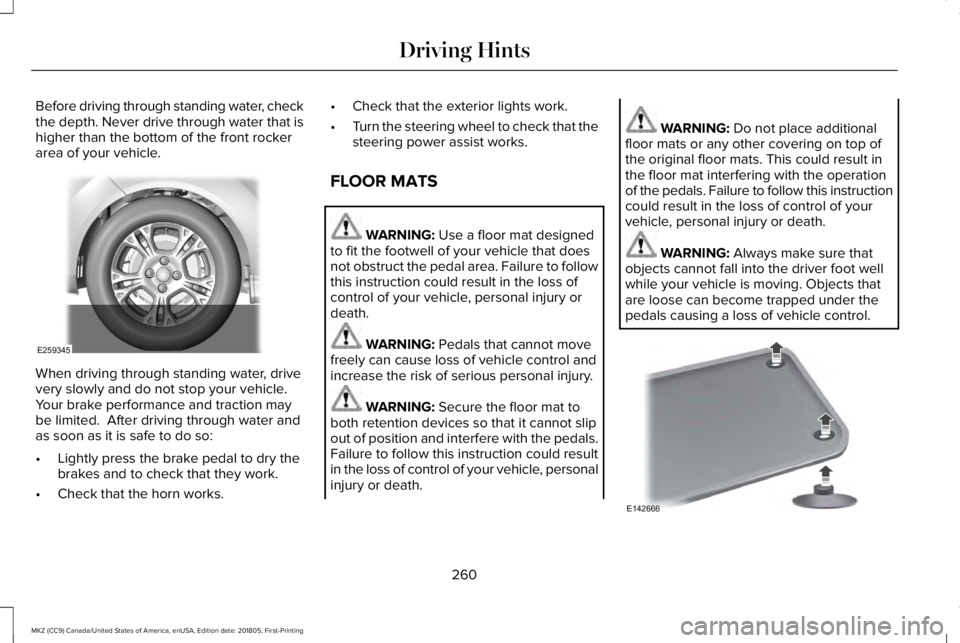
Before driving through standing water, checkthe depth. Never drive through water that ishigher than the bottom of the front rockerarea of your vehicle.
When driving through standing water, drivevery slowly and do not stop your vehicle. Your brake performance and traction maybe limited. After driving through water andas soon as it is safe to do so:
•Lightly press the brake pedal to dry thebrakes and to check that they work.
•Check that the horn works.
•Check that the exterior lights work.
•Turn the steering wheel to check that thesteering power assist works.
FLOOR MATS
WARNING: Use a floor mat designedto fit the footwell of your vehicle that doesnot obstruct the pedal area. Failure to followthis instruction could result in the loss ofcontrol of your vehicle, personal injury ordeath.
WARNING: Pedals that cannot movefreely can cause loss of vehicle control andincrease the risk of serious personal injury.
WARNING: Secure the floor mat toboth retention devices so that it cannot slipout of position and interfere with the pedals.Failure to follow this instruction could resultin the loss of control of your vehicle, personalinjury or death.
WARNING: Do not place additionalfloor mats or any other covering on top ofthe original floor mats. This could result inthe floor mat interfering with the operationof the pedals. Failure to follow this instructioncould result in the loss of control of yourvehicle, personal injury or death.
WARNING: Always make sure thatobjects cannot fall into the driver foot wellwhile your vehicle is moving. Objects thatare loose can become trapped under thepedals causing a loss of vehicle control.
260
MKZ (CC9) Canada/United States of America, enUSA, Edition date: 201805, First-Printing
Driving HintsE259345 E142666
Page 283 of 595
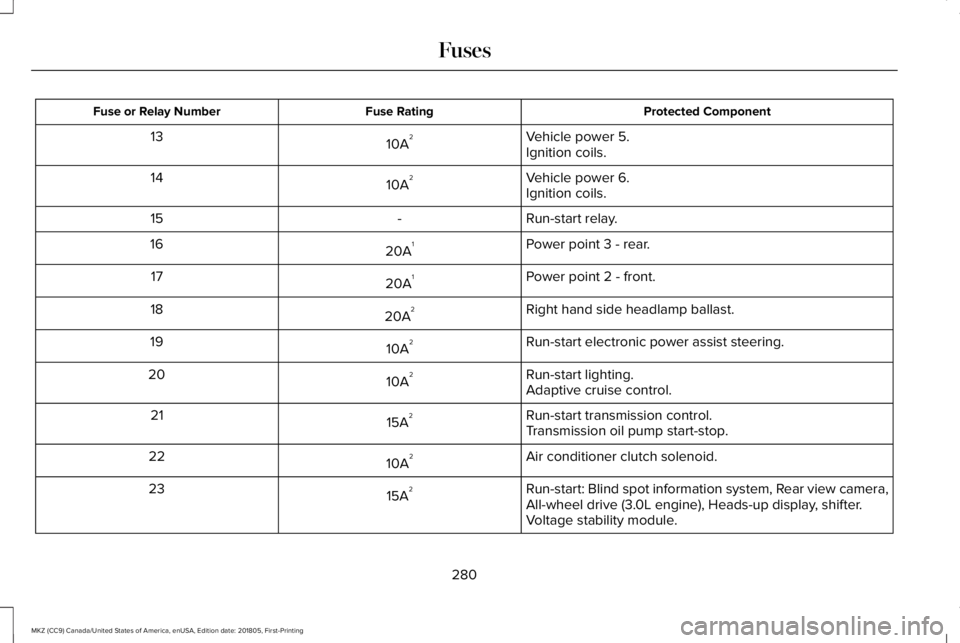
Protected ComponentFuse RatingFuse or Relay Number
Vehicle power 5.10A213Ignition coils.
Vehicle power 6.10A214Ignition coils.
Run-start relay.-15
Power point 3 - rear.20A116
Power point 2 - front.20A117
Right hand side headlamp ballast.20A218
Run-start electronic power assist steering.10A219
Run-start lighting.10A220Adaptive cruise control.
Run-start transmission control.15A221Transmission oil pump start-stop.
Air conditioner clutch solenoid.10A222
Run-start: Blind spot information system, Rear view camera,All-wheel drive (3.0L engine), Heads-up display, shifter.15A223
Voltage stability module.
280
MKZ (CC9) Canada/United States of America, enUSA, Edition date: 201805, First-Printing
Fuses
Page 292 of 595
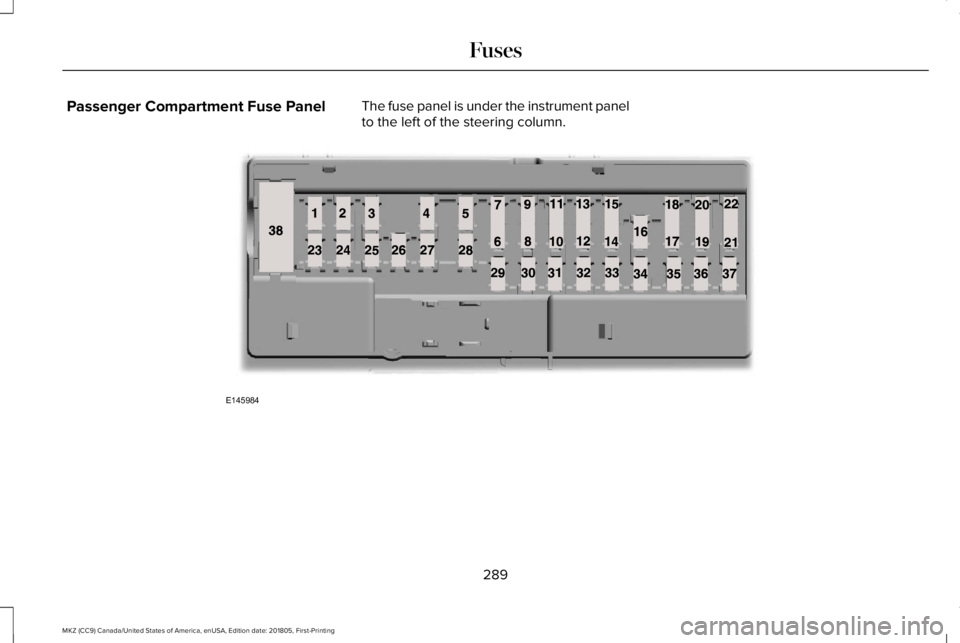
Passenger Compartment Fuse PanelThe fuse panel is under the instrument panelto the left of the steering column.
289
MKZ (CC9) Canada/United States of America, enUSA, Edition date: 201805, First-Printing
FusesE145984
Page 294 of 595
Protected ComponentFuse RatingFuse or Relay Number
Climate control.7.5A212Gear shift.
Steering wheel column.7.5A213Cluster.Datalink logic.
Extended power module.10A214
Datalink-Gateway module.10A215
Trunk release.15A116
Not used (spare).5A217
Push button stop-start.5A218
Extended power module.7.5A219
Adaptive headlamps.7.5A220
Humidity and in-car temperature sensor.5A221
Not used (spare).5A222
291
MKZ (CC9) Canada/United States of America, enUSA, Edition date: 201805, First-Printing
Fuses
Page 296 of 595
Protected ComponentFuse RatingFuse or Relay Number
Radio.20A133Active noise control.CD changer.
Run-start bus (fuse #19, 20, 21, 22, 35, 36, 37, circuit breaker).30A134
Not used (spare).5A135
Continuous control damping suspension module.15A136Auto dimming rear view mirror.Rear heated seats.
Heated steering wheel.20A137
Not used.-38
1 Micro 2 fuse.2 Micro 3 fuse.
293
MKZ (CC9) Canada/United States of America, enUSA, Edition date: 201805, First-Printing
Fuses
Page 306 of 595
Note:Do not remove the dipstick when theengine is running.
Note: If the oil level is between themaximum and minimum marks, the oil levelis acceptable. Do not add oil.
Note:The oil consumption of new enginesreaches its normal level after approximately3,000 mi (5,000 km).
Adding Engine Oil
WARNING: Do not remove the fillercap when the engine is running.
Do not use supplemental engine oil additivesbecause they are unnecessary and couldlead to engine damage that may not becovered by the vehicle Warranty.
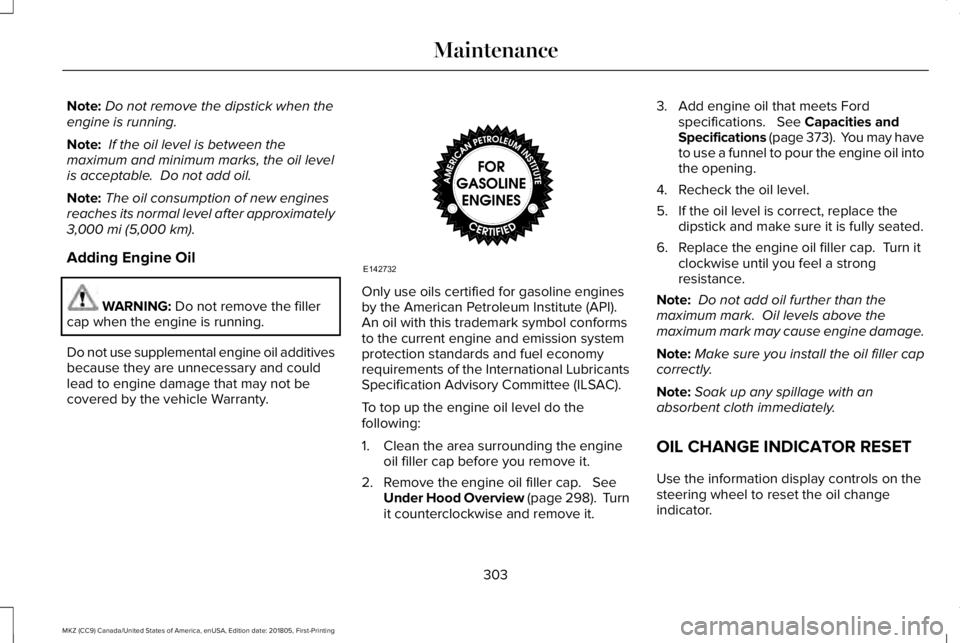
Only use oils certified for gasoline enginesby the American Petroleum Institute (API). An oil with this trademark symbol conformsto the current engine and emission systemprotection standards and fuel economyrequirements of the International LubricantsSpecification Advisory Committee (ILSAC).
To top up the engine oil level do thefollowing:
1. Clean the area surrounding the engineoil filler cap before you remove it.
2. Remove the engine oil filler cap. SeeUnder Hood Overview (page 298). Turnit counterclockwise and remove it.
3. Add engine oil that meets Fordspecifications. See Capacities andSpecifications (page 373). You may haveto use a funnel to pour the engine oil intothe opening.
4. Recheck the oil level.
5. If the oil level is correct, replace thedipstick and make sure it is fully seated.
6. Replace the engine oil filler cap. Turn itclockwise until you feel a strongresistance.
Note: Do not add oil further than themaximum mark. Oil levels above themaximum mark may cause engine damage.
Note:Make sure you install the oil filler capcorrectly.
Note:Soak up any spillage with anabsorbent cloth immediately.
OIL CHANGE INDICATOR RESET
Use the information display controls on thesteering wheel to reset the oil changeindicator.
303
MKZ (CC9) Canada/United States of America, enUSA, Edition date: 201805, First-Printing
MaintenanceE142732
Page 310 of 595
A warning lamp illuminates and amessage may appear in theinformation display.
If the engine reaches a presetover-temperature condition, the engineautomatically switches to alternating cylinderoperation. Each disabled cylinder acts as anair pump and cools the engine.
When this occurs, your vehicle still operates,however:
•Engine power is limited.
•The air conditioning system turns off.
Continued operation increases the enginetemperature, causing the engine tocompletely shut down. Your steering andbraking effort increases in this situation.
When the engine temperature cools, you canre-start the engine. Have your vehiclechecked as soon as possible to minimizeengine damage.
When Fail-Safe Mode Is Activated
WARNING: Fail-safe mode is for useduring emergencies only. Operate yourvehicle in fail-safe mode only as long asnecessary to bring your vehicle to rest in asafe location and seek immediate repairs.When in fail-safe mode, your vehicle will havelimited power, will not be able to maintainhigh-speed operation, and may completelyshut down without warning, potentially losingengine power, power steering assist, andpower brake assist, which may increase thepossibility of a crash resulting in seriousinjury.
WARNING: Do not remove the coolantreservoir cap when the cooling system is hot.Wait 10 minutes for the cooling system tocool down. Cover the coolant reservoir capwith a thick cloth to prevent the possibilityof scalding and slowly remove the cap.Failure to follow this instruction could resultin personal injury.
Your vehicle has limited engine power whenin the fail-safe mode, drive your vehicle withcaution. Your vehicle does not maintainhigh-speed operation and the engine mayoperate poorly.
Remember that the engine is capable ofautomatically shutting down to preventengine damage. In this situation:
1. Pull off the road as soon as safelypossible and switch the engine off.
2. If you are a member of a roadsideassistance program, we recommend thatyou contact your roadside assistanceservice provider.
3.If this is not possible, wait a short periodfor the engine to cool.
4. Check the coolant level. If the coolantlevel is at or below the minimum mark,add prediluted coolant immediately.
5.When the engine temperature cools, youcan re-start the engine. Have your vehiclechecked as soon as possible to minimizeengine damage.
307
MKZ (CC9) Canada/United States of America, enUSA, Edition date: 201805, First-Printing
Maintenance
Page 328 of 595
CLEANING THE INSTRUMENT
PANEL AND INSTRUMENT
CLUSTER LENS
WARNING: Do not use chemicalsolvents or strong detergents when cleaningthe steering wheel or instrument panel toavoid contamination of the airbag system.
Note:Follow the same procedure ascleaning leather seats for cleaning leatherinstrument panels and leather interior trimsurfaces. See Cleaning Leather Seats (page325).
Clean the instrument panel and cluster lenswith a clean, damp and soft cloth, then usea clean, dry and soft cloth to dry these areas.
•Avoid cleaners or polishes that increasethe gloss of the upper portion of theinstrument panel. The dull finish in thisarea helps protect you from undesirablewindshield reflection.
•Do not use any household cleaningproducts or glass cleaners as these maydamage the finish of the instrumentpanel, interior trim and cluster lens.
•Wash or wipe your hands clean if youhave been in contact with certainproducts such as insect repellent andsuntan lotion to avoid possible damageto the interior painted surfaces.
•Do not allow air fresheners and handsanitizers to spill onto interior surfaces.If a spill occurs, wipe off immediately.Your warranty may not cover thesedamages.
If a staining liquid like coffee or juice hasbeen spilled on the instrument panel or oninterior trim surfaces:
1.Wipe up spilled liquid using a clean, softcloth as quickly as possible.
2. Use Motorcraft Premium Leather andVinyl Cleaner or a commercially availableleather cleaning product for automotiveinteriors. Test any cleaner or stainremover on an inconspicuous area.
3. Alternatively, wipe the surface with aclean, soft cloth and a mild soap andwater solution. Dry the area with a clean,soft cloth.
4.If necessary, apply more soap and watersolution or cleaning product to a clean,soft cloth and press it onto the soiledarea. Allow this to set at roomtemperature for 30 minutes.
5. Remove the soaked cloth, then with aclean, damp cloth, use a rubbing motionfor 60 seconds on the soiled area.
6. Dry the area with a clean, soft cloth.
CLEANING LEATHER SEATS
Note:Follow the same procedure ascleaning leather seats for cleaning leatherinstrument panels and leather interior trimsurfaces.
325
MKZ (CC9) Canada/United States of America, enUSA, Edition date: 201805, First-Printing
Vehicle Care