steering LINCOLN MKZ 2019 User Guide
[x] Cancel search | Manufacturer: LINCOLN, Model Year: 2019, Model line: MKZ, Model: LINCOLN MKZ 2019Pages: 595, PDF Size: 4.95 MB
Page 84 of 595
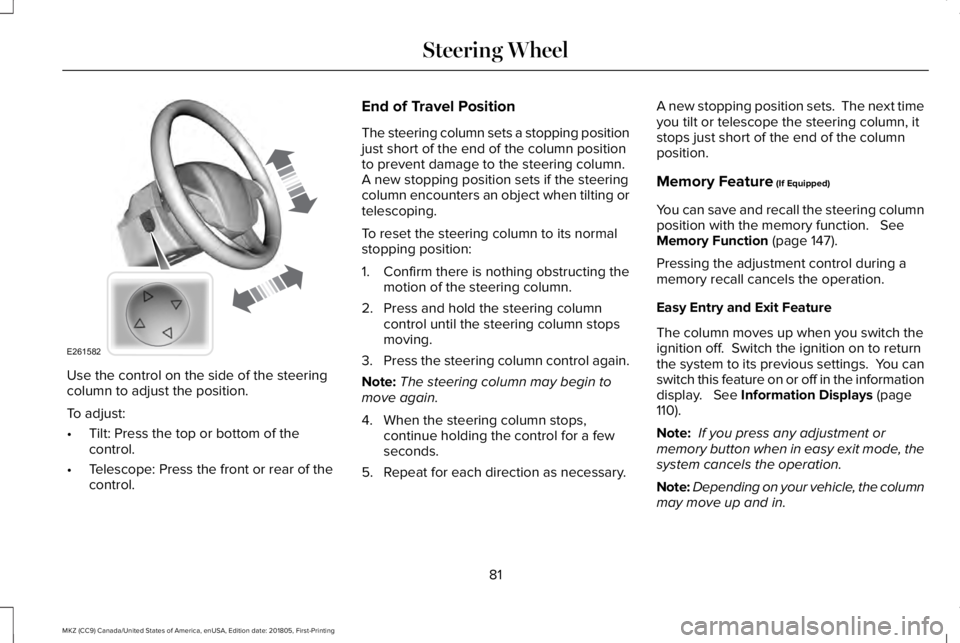
Use the control on the side of the steeringcolumn to adjust the position.
To adjust:
•Tilt: Press the top or bottom of thecontrol.
•Telescope: Press the front or rear of thecontrol.
End of Travel Position
The steering column sets a stopping positionjust short of the end of the column positionto prevent damage to the steering column. A new stopping position sets if the steeringcolumn encounters an object when tilting ortelescoping.
To reset the steering column to its normalstopping position:
1. Confirm there is nothing obstructing themotion of the steering column.
2. Press and hold the steering columncontrol until the steering column stopsmoving.
3.Press the steering column control again.
Note:The steering column may begin tomove again.
4. When the steering column stops,continue holding the control for a fewseconds.
5. Repeat for each direction as necessary.
A new stopping position sets. The next timeyou tilt or telescope the steering column, itstops just short of the end of the columnposition.
Memory Feature (If Equipped)
You can save and recall the steering columnposition with the memory function. SeeMemory Function (page 147).
Pressing the adjustment control during amemory recall cancels the operation.
Easy Entry and Exit Feature
The column moves up when you switch theignition off. Switch the ignition on to returnthe system to its previous settings. You canswitch this feature on or off in the informationdisplay. See Information Displays (page110).
Note: If you press any adjustment ormemory button when in easy exit mode, thesystem cancels the operation.
Note:Depending on your vehicle, the columnmay move up and in.
81
MKZ (CC9) Canada/United States of America, enUSA, Edition date: 201805, First-Printing
Steering WheelE261582
Page 85 of 595
AUDIO CONTROL
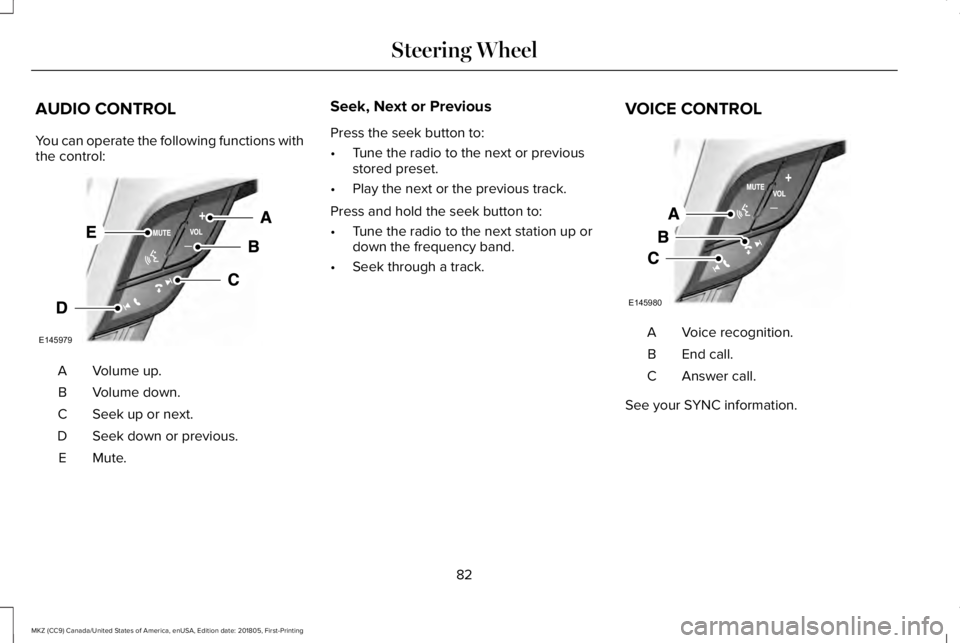
You can operate the following functions withthe control:
Volume up.A
Volume down.B
Seek up or next.C
Seek down or previous.D
Mute.E
Seek, Next or Previous
Press the seek button to:
•Tune the radio to the next or previousstored preset.
•Play the next or the previous track.
Press and hold the seek button to:
•Tune the radio to the next station up ordown the frequency band.
•Seek through a track.
VOICE CONTROL
Voice recognition.A
End call.B
Answer call.C
See your SYNC information.
82
MKZ (CC9) Canada/United States of America, enUSA, Edition date: 201805, First-Printing
Steering WheelE145979 E145980
Page 86 of 595
CRUISE CONTROL
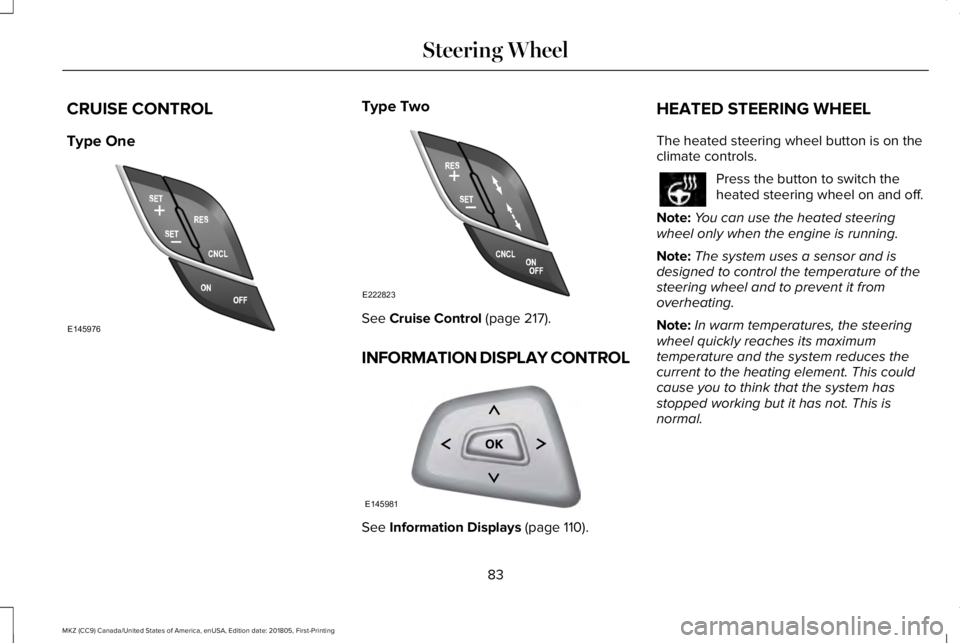
Type One
Type Two
See Cruise Control (page 217).
INFORMATION DISPLAY CONTROL
See Information Displays (page 110).
HEATED STEERING WHEEL
The heated steering wheel button is on theclimate controls.
Press the button to switch theheated steering wheel on and off.
Note:You can use the heated steeringwheel only when the engine is running.
Note:The system uses a sensor and isdesigned to control the temperature of thesteering wheel and to prevent it fromoverheating.
Note:In warm temperatures, the steeringwheel quickly reaches its maximumtemperature and the system reduces thecurrent to the heating element. This couldcause you to think that the system hasstopped working but it has not. This isnormal.
83
MKZ (CC9) Canada/United States of America, enUSA, Edition date: 201805, First-Printing
Steering WheelE145976 E222823 E145981
Page 94 of 595
A camera sensor, centrally mounted behindthe windshield of your vehicle, continuouslymonitors conditions to turn the high beamson and off.
Once the system is active, the high beamsturn on if:
•The ambient light level is low enough.
•There is no traffic in front of your vehicle.
•The vehicle speed is greater thanapproximately 32 mph (51 km/h).
The system turns the high beams off if:
•The ambient light level is high enoughthat high beams are not required.
•The system detects an approachingvehicle's headlamps or tail lamps.
•The vehicle speed falls belowapproximately 27 mph (44 km/h).
•The system detects severe rain, snow orfog.
•The camera is blocked.
Switching the System On and Off
Switch the system on using the informationdisplay. See Information Displays (page110).
Switch the lighting control to the autolampsposition. See Autolamps (page 88).
Overriding the System
Push the lever away from you to switchbetween high beam and low beam.
Automatic High Beam Indicator
The indicator illuminates to confirmwhen the system is ready to assist.
ADAPTIVE HEADLAMPS (If Equipped)
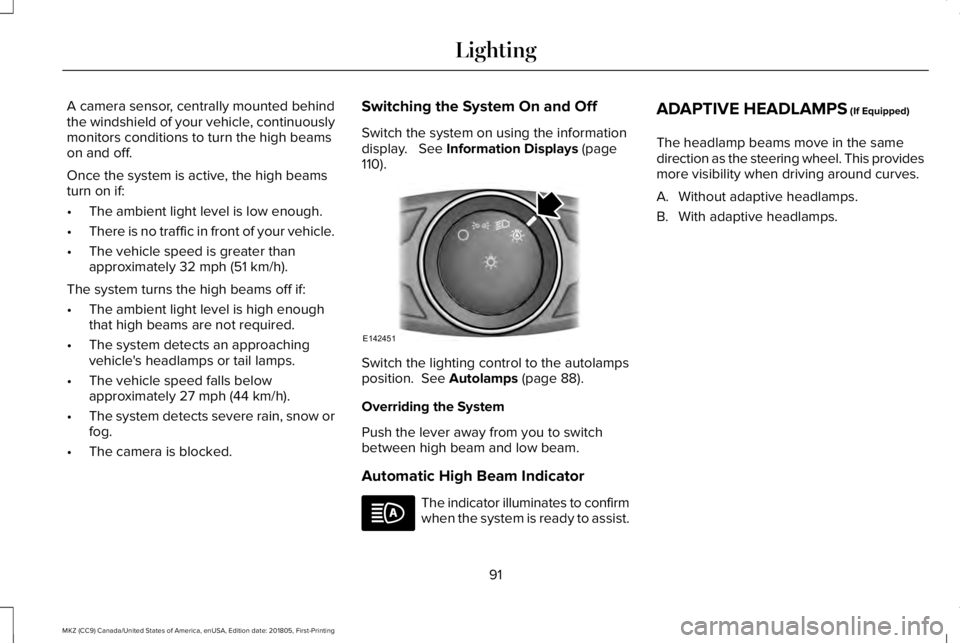
The headlamp beams move in the samedirection as the steering wheel. This providesmore visibility when driving around curves.
A. Without adaptive headlamps.
B. With adaptive headlamps.
91
MKZ (CC9) Canada/United States of America, enUSA, Edition date: 201805, First-Printing
LightingE142451
Page 113 of 595
GENERAL INFORMATION
WARNING: Driving while distractedcan result in loss of vehicle control, crashand injury. We strongly recommend that youuse extreme caution when using any devicethat may take your focus off the road. Yourprimary responsibility is the safe operationof your vehicle. We recommend against theuse of any hand-held device while drivingand encourage the use of voice-operatedsystems when possible. Make sure you areaware of all applicable local laws that mayaffect the use of electronic devices whiledriving.
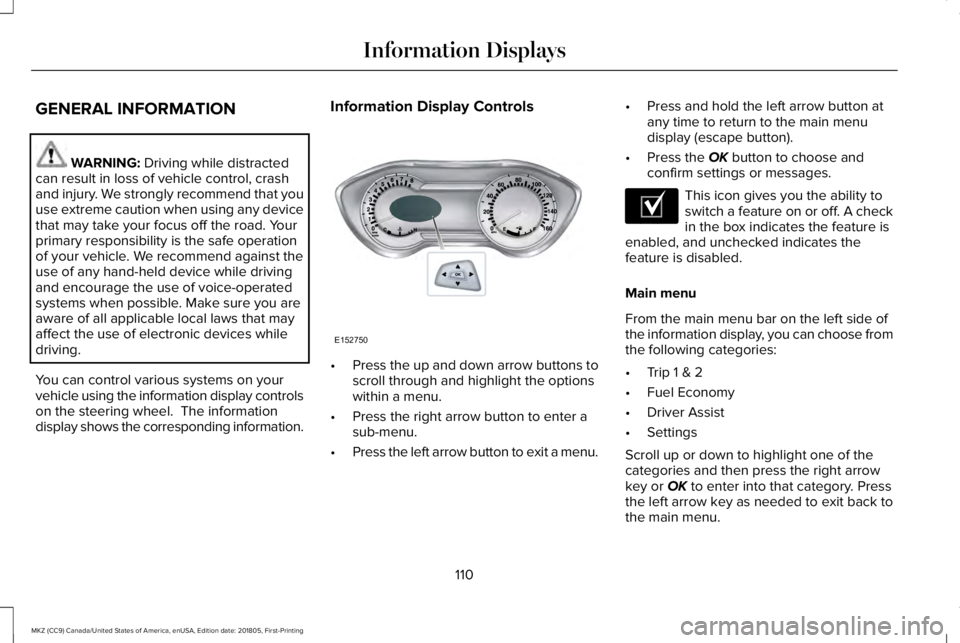
You can control various systems on yourvehicle using the information display controlson the steering wheel. The informationdisplay shows the corresponding information.
Information Display Controls
•Press the up and down arrow buttons toscroll through and highlight the optionswithin a menu.
•Press the right arrow button to enter asub-menu.
•Press the left arrow button to exit a menu.
•Press and hold the left arrow button atany time to return to the main menudisplay (escape button).
•Press the OK button to choose andconfirm settings or messages.
This icon gives you the ability toswitch a feature on or off. A checkin the box indicates the feature isenabled, and unchecked indicates thefeature is disabled.
Main menu
From the main menu bar on the left side ofthe information display, you can choose fromthe following categories:
•Trip 1 & 2
•Fuel Economy
•Driver Assist
•Settings
Scroll up or down to highlight one of thecategories and then press the right arrowkey or OK to enter into that category. Pressthe left arrow key as needed to exit back tothe main menu.
110
MKZ (CC9) Canada/United States of America, enUSA, Edition date: 201805, First-Printing
Information DisplaysE152750 E204495
Page 122 of 595
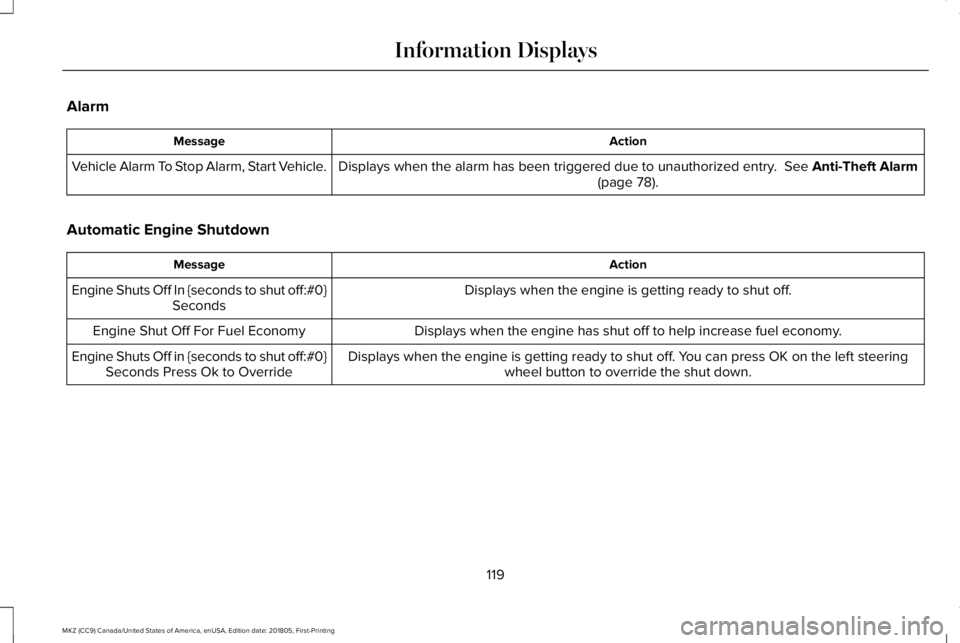
Alarm
ActionMessage
Displays when the alarm has been triggered due to unauthorized entry. See Anti-Theft Alarm(page 78).Vehicle Alarm To Stop Alarm, Start Vehicle.
Automatic Engine Shutdown
ActionMessage
Displays when the engine is getting ready to shut off.Engine Shuts Off In {seconds to shut off:#0}Seconds
Displays when the engine has shut off to help increase fuel economy.Engine Shut Off For Fuel Economy
Displays when the engine is getting ready to shut off. You can press OK on the left steeringwheel button to override the shut down.Engine Shuts Off in {seconds to shut off:#0}Seconds Press Ok to Override
119
MKZ (CC9) Canada/United States of America, enUSA, Edition date: 201805, First-Printing
Information Displays
Page 128 of 595
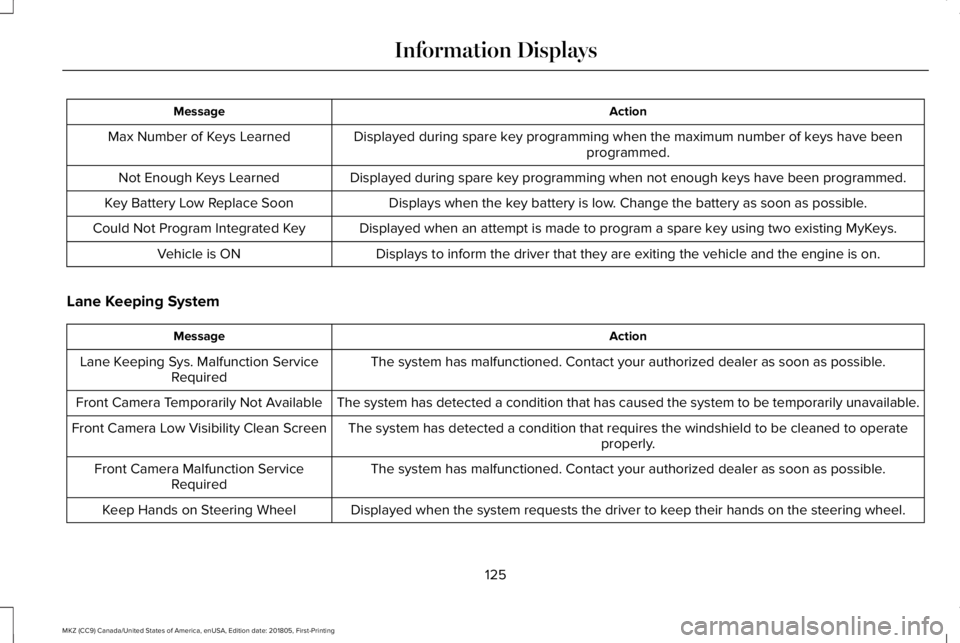
ActionMessage
Displayed during spare key programming when the maximum number of keys have beenprogrammed.Max Number of Keys Learned
Displayed during spare key programming when not enough keys have been programmed.Not Enough Keys Learned
Displays when the key battery is low. Change the battery as soon as possible.Key Battery Low Replace Soon
Displayed when an attempt is made to program a spare key using two existing MyKeys.Could Not Program Integrated Key
Displays to inform the driver that they are exiting the vehicle and the engine is on.Vehicle is ON
Lane Keeping System
ActionMessage
The system has malfunctioned. Contact your authorized dealer as soon as possible.Lane Keeping Sys. Malfunction ServiceRequired
The system has detected a condition that has caused the system to be temporarily unavailable.Front Camera Temporarily Not Available
The system has detected a condition that requires the windshield to be cleaned to operateproperly.Front Camera Low Visibility Clean Screen
The system has malfunctioned. Contact your authorized dealer as soon as possible.Front Camera Malfunction ServiceRequired
Displayed when the system requests the driver to keep their hands on the steering wheel.Keep Hands on Steering Wheel
125
MKZ (CC9) Canada/United States of America, enUSA, Edition date: 201805, First-Printing
Information Displays
Page 132 of 595
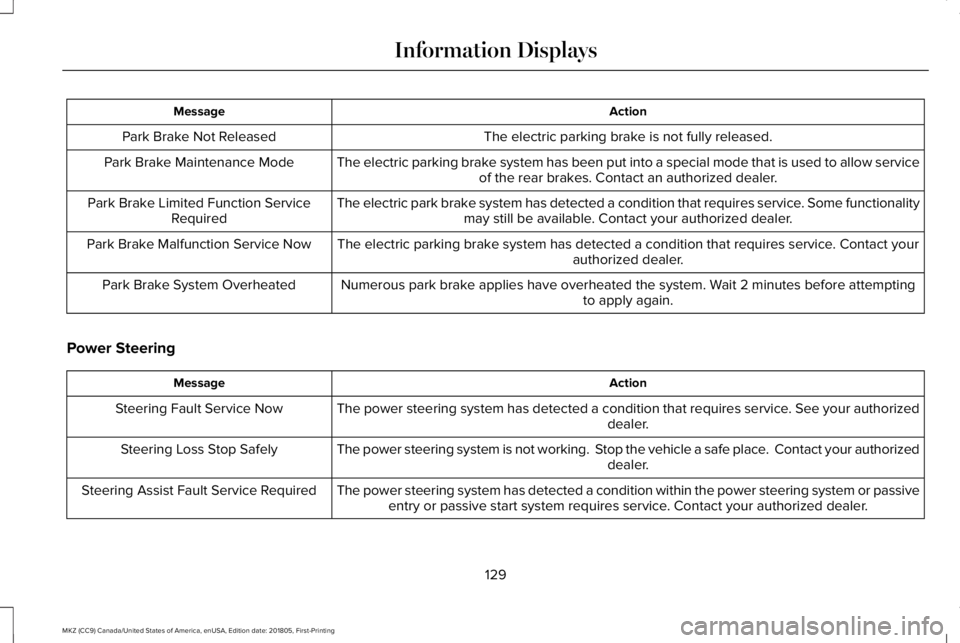
ActionMessage
The electric parking brake is not fully released.Park Brake Not Released
The electric parking brake system has been put into a special mode that is used to allow serviceof the rear brakes. Contact an authorized dealer.Park Brake Maintenance Mode
The electric park brake system has detected a condition that requires service. Some functionalitymay still be available. Contact your authorized dealer.Park Brake Limited Function ServiceRequired
The electric parking brake system has detected a condition that requires service. Contact yourauthorized dealer.Park Brake Malfunction Service Now
Numerous park brake applies have overheated the system. Wait 2 minutes before attemptingto apply again.Park Brake System Overheated
Power Steering
ActionMessage
The power steering system has detected a condition that requires service. See your authorizeddealer.Steering Fault Service Now
The power steering system is not working. Stop the vehicle a safe place. Contact your authorizeddealer.Steering Loss Stop Safely
The power steering system has detected a condition within the power steering system or passiveentry or passive start system requires service. Contact your authorized dealer.Steering Assist Fault Service Required
129
MKZ (CC9) Canada/United States of America, enUSA, Edition date: 201805, First-Printing
Information Displays
Page 140 of 595
Use air conditioning with recirculated air toimprove cooling performance and efficiency.
Note:In certain conditions (for example,maximum defrost) the air conditioningcompressor may continue to operate eventhough you switch off the air conditioning.
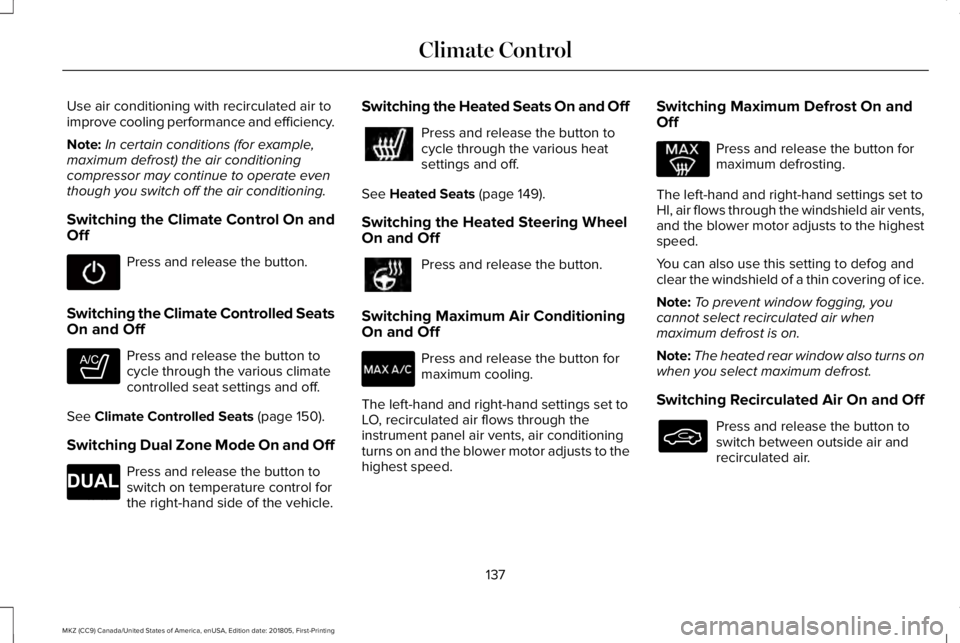
Switching the Climate Control On andOff
Press and release the button.
Switching the Climate Controlled SeatsOn and Off
Press and release the button tocycle through the various climatecontrolled seat settings and off.
See Climate Controlled Seats (page 150).
Switching Dual Zone Mode On and Off
Press and release the button toswitch on temperature control forthe right-hand side of the vehicle.
Switching the Heated Seats On and Off
Press and release the button tocycle through the various heatsettings and off.
See Heated Seats (page 149).
Switching the Heated Steering WheelOn and Off
Press and release the button.
Switching Maximum Air ConditioningOn and Off
Press and release the button formaximum cooling.
The left-hand and right-hand settings set toLO, recirculated air flows through theinstrument panel air vents, air conditioningturns on and the blower motor adjusts to thehighest speed.
Switching Maximum Defrost On andOff
Press and release the button formaximum defrosting.
The left-hand and right-hand settings set toHI, air flows through the windshield air vents,and the blower motor adjusts to the highestspeed.
You can also use this setting to defog andclear the windshield of a thin covering of ice.
Note:To prevent window fogging, youcannot select recirculated air whenmaximum defrost is on.
Note:The heated rear window also turns onwhen you select maximum defrost.
Switching Recirculated Air On and Off
Press and release the button toswitch between outside air andrecirculated air.
137
MKZ (CC9) Canada/United States of America, enUSA, Edition date: 201805, First-Printing
Climate Control E265282 E265280
Page 143 of 595
REMOTE START
The climate control system adjusts theinterior temperature during remote start.
You can switch this feature on or off andadjust the settings using the informationdisplay controls. See Information Displays(page 110).
You cannot adjust the climate control settingduring remote start operation. Switch theignition on to make adjustments.
Based on your remote start settings, thefollowing vehicle-dependent features mayor may not remain on after remote startingyour vehicle:
•Climate controlled seats.
•Heated steering wheel.
•Heated mirrors.
•Heated rear window.
•Windshield wiper de-icer.
Note:For dual zone climate controlled seats,the passenger seat setting defaults to matchthe driver seat during remote start.
Automatic Settings
If Auto is on, the system sets the interiortemperature to 72°F (22°C) and heats orcools the vehicle interior as required toachieve comfort.
Note:In cold weather, the heated rearwindow and heated mirrors turn on.
Last Settings
If Last Settings is on, the system uses thesettings last selected before you turned offthe vehicle.
Heated and Cooled Features
In Auto mode, certain heated features mayswitch on during cold weather, and cooledfeatures during hot weather.
140
MKZ (CC9) Canada/United States of America, enUSA, Edition date: 201805, First-Printing
Climate Control