ABS LINCOLN MKZ 2020 User Guide
[x] Cancel search | Manufacturer: LINCOLN, Model Year: 2020, Model line: MKZ, Model: LINCOLN MKZ 2020Pages: 561, PDF Size: 5.7 MB
Page 239 of 561
 when I can s\
ee the lane markings on the road?
Your vehicle stays too close to the lane markings.
Driving at high speeds in curves.
The last")
Why is the feature not available (line markings are gray) when I can s\
ee the lane markings on the road?
Your vehicle stays too close to the lane markings.
Driving at high speeds in curves.
The last alert warning or aid intervention occurred a short time ago.
Ambiguous lane markings, for example in construction zones.
Rapid transition from light to dark, or from dark to light.
Sudden offset in lane markings.
ABS or AdvanceTrac ™ is active.
There is a camera blockage due to dirt, grime, fog, frost or water on the windshield.
You are driving too close to the vehicle in front of you.
Transitioning between no lane markings to lane markings or vice versa.
There is standing water on the road.
Faint lane markings, for example partial yellow lane markings on concret\
e roads.
Lane width is too narrow or too wide.
The camera has not been calibrated after a windshield replacement.
Driving on tight roads or on uneven roads.
236
MKZ (CC9) Canada/United States of America, enUSA, Edition date: 201905, Second-Printing Driving Aids
Page 252 of 561
Note:
If something hits the front end of your
vehicle or damage occurs, the radar sensing
zone may change. This could cause missed
or false vehicle detections. Contact an
authorized dealer to have the radar checked
for proper coverage and operation.
Note: If your vehicle detects excessive heat
at the camera or a potential misalignment
condition, a message may display in the
information display indicating temporary
sensor unavailability. This message
deactivates automatically when operational
conditions return to normal. For example,
when the ambient temperature around the
sensor decreases or the sensor
automatically recalibrates successfully.
DRIVE CONTROL (IF EQUIPPED)
Lincoln Drive Control
Lincoln Drive Control delivers the Lincoln
driving experience through a suite of
sophisticated electronic vehicle systems.
These systems continuously monitor your
driving inputs and the road conditions to
optimize ride comfort, steering, handling, powertrain response and sound. You can
preset your preferences for these systems
within the information display. Lincoln Drive
Control will respond to your preferences
based on what gear position you select. This
provides a single location to control multiple
systems performance settings.
Lincoln Drive Control consists of the
following systems:
•
Adaptive suspension dynamically adjusts
the shock absorbers stiffness in real time
to match the road surface and driver
inputs. This system continuously monitors
your vehicle ’s motion, suspension
position, load, speed, road conditions
and steering to adjust the suspension
damping for optimal vehicle control.
• Electronically power-assisted steering
adjusts steering effort and feel based on
your vehicle speed and your inputs.
• Active noise control utilizes your vehicle
electronics to enhance the acoustic
experience. •
Electronic stability control and traction
control maintain your vehicle control in
adverse conditions or high performance
driving.
• Electronic throttle control enhances the
powertrain response to your inputs.
Using Lincoln Drive Control
You can configure which of the drive control
modes are active when your vehicle is in
drive (D) or sport (S). The configuration
remains active until modified from the main
menu on the information display.
249
MKZ (CC9) Canada/United States of America, enUSA, Edition date: 201905, Second-Printing Driving Aids
Page 311 of 561
Note:
Do not add oil further than the
maximum mark. Oil levels above the
maximum mark may cause engine damage.
Note: Make sure you install the oil filler cap
correctly.
Note: Soak up any spillage with an
absorbent cloth immediately.
OIL CHANGE INDICATOR RESET
Use the information display controls on the
steering wheel to reset the oil change
indicator. From the main menu scroll to: Action and description
Message
Press the right arrow button,
then from this menu scroll to
the following message.
Settings
Press the right arrow button,
then from this menu scroll to
the following message.
Vehicle
Press the right arrow button,
then from this menu scroll to
the following message.
Oil Life
Press and hold the OK button
until the instrument cluster
displays the following
message.
Hold OK to
Reset
Reset Successful
When the oil change indicator
resets the instrument cluster
displays 100%.
Remaining Life
{00}% Action and description
Message
If the instrument cluster
displays one of the following
messages, repeat the
process.
Not Reset
Reset Cancelled
ENGINE COOLANT CHECK WARNING: Do not remove the
coolant reservoir cap when the engine is
on or the cooling system is hot. Wait 10
minutes for the cooling system to cool
down. Cover the coolant reservoir cap with
a thick cloth to prevent the possibility of
scalding and slowly remove the cap.
Failure to follow this instruction could result
in personal injury.
308
MKZ (CC9) Canada/United States of America, enUSA, Edition date: 201905, Second-Printing Maintenance
Page 320 of 561
8. Reinstall the harness retaining clip into
the front of the air filter assembly.
BRAKE FLUID CHECK WARNING: Do not use any fluid other
than the recommended brake fluid as this
will reduce brake efficiency. Use of
incorrect fluid could result in the loss of
vehicle control, serious personal injury or
death. WARNING: Only use brake fluid from
a sealed container. Contamination with dirt,
water, petroleum products or other
materials may result in brake system
damage or failure. Failure to adhere to this
warning could result in the loss of vehicle
control, serious personal injury or death. WARNING:
Do not allow the fluid to
touch your skin or eyes. If this happens,
rinse the affected areas immediately with
plenty of water and contact your physician. WARNING:
The brake system could
be affected if the brake fluid level is below
the
MIN mark or above the MAX mark on
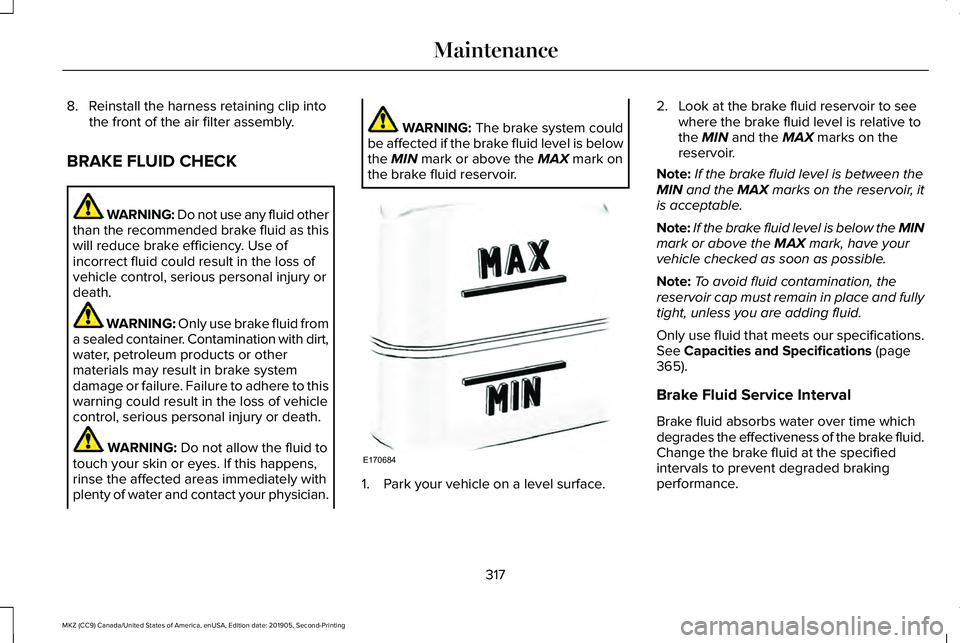
the brake fluid reservoir. 1. Park your vehicle on a level surface.2. Look at the brake fluid reservoir to see
where the brake fluid level is relative to
the
MIN and the MAX marks on the
reservoir.
Note: If the brake fluid level is between the
MIN
and the MAX marks on the reservoir, it
is acceptable.
Note: If the brake fluid level is below the MIN
mark or above the
MAX mark, have your
vehicle checked as soon as possible.
Note: To avoid fluid contamination, the
reservoir cap must remain in place and fully
tight, unless you are adding fluid.
Only use fluid that meets our specifications.
See
Capacities and Specifications (page
365).
Brake Fluid Service Interval
Brake fluid absorbs water over time which
degrades the effectiveness of the brake fluid.
Change the brake fluid at the specified
intervals to prevent degraded braking
performance.
317
MKZ (CC9) Canada/United States of America, enUSA, Edition date: 201905, Second-Printing MaintenanceE170684
Page 476 of 561
Transferable Coverage
If you sell your vehicle before your Lincoln
Protect extended service plan coverage
expires, you can transfer any remaining
coverage to the new owner. Which should
give you and your potential buyer a little
more peace of mind.
Less Cost to Properly Maintain Your Vehicle
Lincoln Protect extended service plan also
offers a Premium Maintenance Plan that
covers all scheduled maintenance, and
selected wear items. The coverage is
prepaid, so you never have to worry about
the cost of your vehicle
’s maintenance.
Covered maintenance includes:
• Windshield wiper blades.
• Spark plugs.
• The clutch disc (if equipped).
• Brake pads and linings.
• Shock absorbers and struts.
• Engine cooling hoses, clamps and
o-rings. •
Engine belts.
• Diesel exhaust fluid replenishment (if
equipped).
Interest Free Finance Options
Just a 10% down payment will provide you
with an affordable, no interest, no fee
payment program allowing you all the
security and benefits Lincoln Protect
extended service plan has to offer while
paying over time. You are pre-approved with
no credit check or hassles. To learn more,
call our Lincoln Protect extended service
plan specialists at 800-367-3377.
Complete the information below and mail to:
Lincoln Protect Extended Service Plan
P.O. Box 321067
Detroit, MI 48232 Lincoln Protect (CANADA ONLY)
You can get more protection for your vehicle
by purchasing a Lincoln Protect extended
service plan. Lincoln Protect extended
service plan is the only service contract
backed by Lincoln Motor Company of
Canada, Limited. Depending on the plan you
purchase, Lincoln Protect extended service
plan provides benefits such as:
•
Rental reimbursement.
• Coverage for certain maintenance and
wear items.
• Protection against repair costs after your
New Vehicle Limited Warranty Coverage
expires.
• Roadside Assistance benefits.
473
MKZ (CC9) Canada/United States of America, enUSA, Edition date: 201905, Second-Printing Lincoln Protect
Page 481 of 561
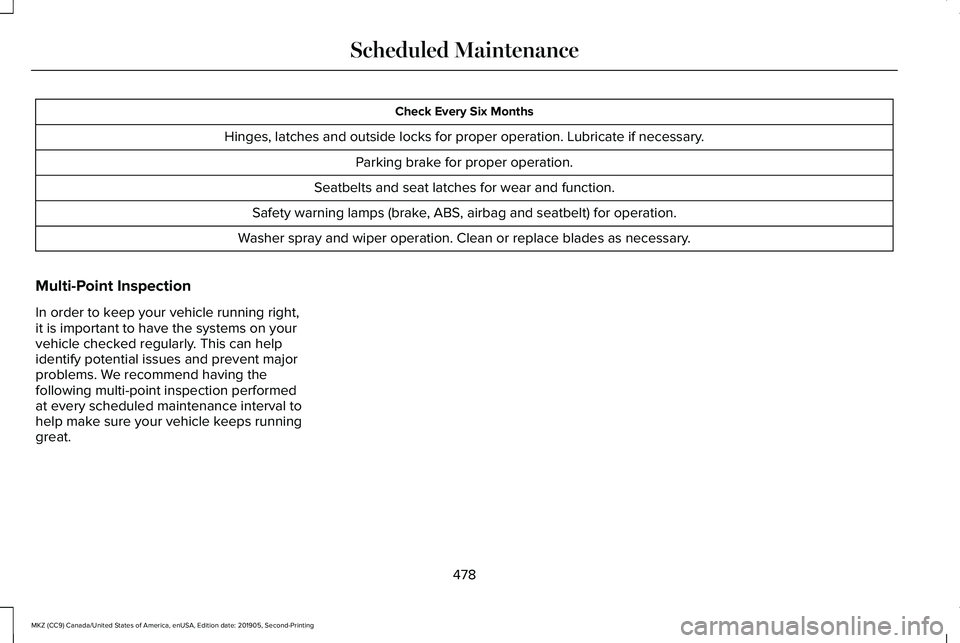
Check Every Six Months
Hinges, latches and outside locks for proper operation. Lubricate if necessary. Parking brake for proper operation.
Seatbelts and seat latches for wear and function.
Safety warning lamps (brake, ABS, airbag and seatbelt) for operation.
Washer spray and wiper operation. Clean or replace blades as necessary.
Multi-Point Inspection
In order to keep your vehicle running right,
it is important to have the systems on your
vehicle checked regularly. This can help
identify potential issues and prevent major
problems. We recommend having the
following multi-point inspection performed
at every scheduled maintenance interval to
help make sure your vehicle keeps running
great.
478
MKZ (CC9) Canada/United States of America, enUSA, Edition date: 201905, Second-Printing Scheduled Maintenance
Page 548 of 561
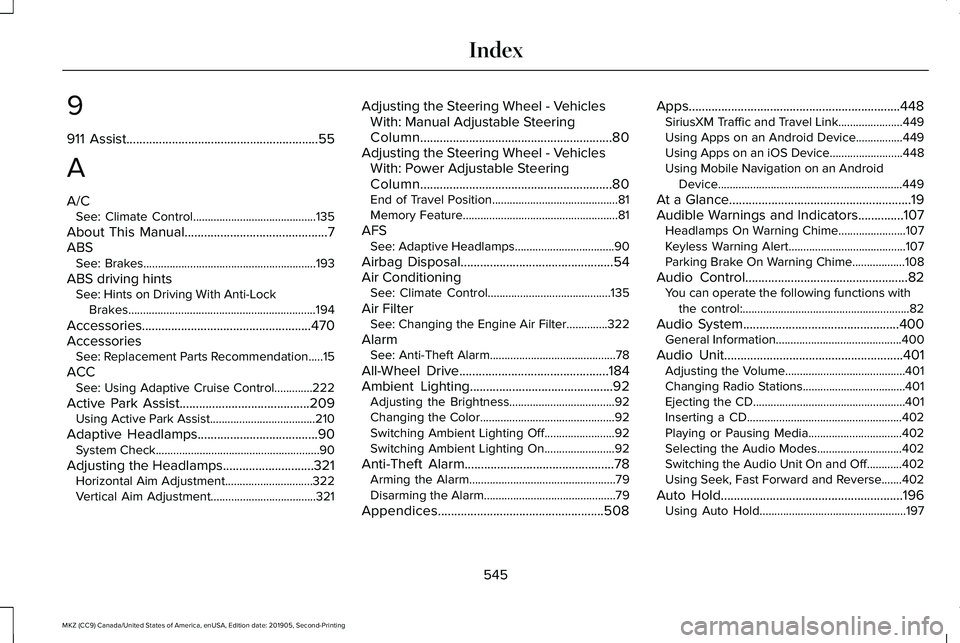
9
911 Assist...........................................................55
A
A/C See: Climate Control..........................................135
About This Manual
............................................7
ABS See: Brakes...........................................................193
ABS driving hints See: Hints on Driving With Anti-Lock
Brakes................................................................194
Accessories....................................................470
Accessories See: Replacement Parts Recommendation.....15
ACC See: Using Adaptive Cruise Control.............222
Active Park Assist........................................209 Using Active Park Assist....................................210
Adaptive Headlamps
.....................................90
System Check........................................................90
Adjusting the Headlamps............................321 Horizontal Aim Adjustment..............................322
Vertical Aim Adjustment....................................321 Adjusting the Steering Wheel - Vehicles
With: Manual Adjustable Steering
Column...........................................................80
Adjusting the Steering Wheel - Vehicles With: Power Adjustable Steering
Column...........................................................80
End of Travel Position...........................................81
Memory Feature.....................................................81
AFS See: Adaptive Headlamps..................................90
Airbag Disposal
...............................................54
Air Conditioning See: Climate Control..........................................135
Air Filter See: Changing the Engine Air Filter..............322
Alarm See: Anti-Theft Alarm...........................................78
All-Wheel Drive
..............................................184
Ambient Lighting............................................92
Adjusting the Brightness....................................92
Changing the Color..............................................92
Switching Ambient Lighting Off........................92
Switching Ambient Lighting On........................92
Anti-Theft Alarm..............................................78 Arming the Alarm..................................................79
Disarming the Alarm.............................................79
Appendices...................................................508 Apps.................................................................448
SiriusXM Traffic and Travel Link......................449
Using Apps on an Android Device................449
Using Apps on an iOS Device.........................
448
Using Mobile Navigation on an Android Device...............................................................449
At a Glance
........................................................19
Audible Warnings and Indicators..............107 Headlamps On Warning Chime.......................
107
Keyless Warning Alert........................................107
Parking Brake On Warning Chime..................108
Audio Control..................................................82 You can operate the following functions with
the control:.........................................................82
Audio System
................................................400
General Information...........................................400
Audio Unit
.......................................................401
Adjusting the Volume.........................................401
Changing Radio Stations...................................401
Ejecting the CD....................................................401
Inserting a CD.....................................................402
Playing or Pausing Media................................402
Selecting the Audio Modes.............................402
Switching the Audio Unit On and Off............402
Using Seek, Fast Forward and Reverse.......402
Auto Hold........................................................196 Using Auto Hold..................................................197
545
MKZ (CC9) Canada/United States of America, enUSA, Edition date: 201905, Second-Printing Index