change wheel LINCOLN MKZ 2020 Owner's Manual
[x] Cancel search | Manufacturer: LINCOLN, Model Year: 2020, Model line: MKZ, Model: LINCOLN MKZ 2020Pages: 561, PDF Size: 5.7 MB
Page 361 of 561
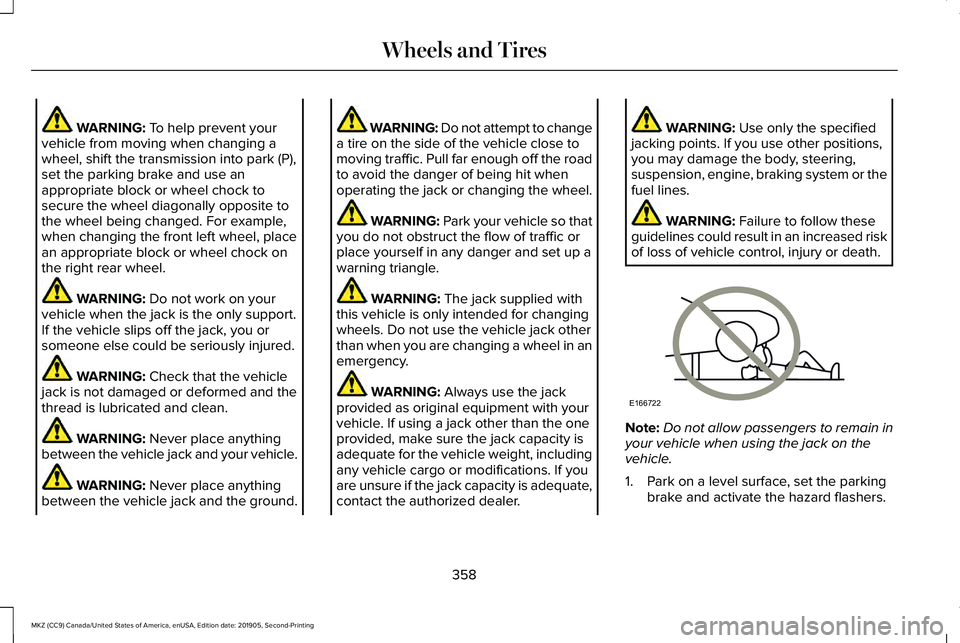
WARNING: To help prevent your
vehicle from moving when changing a
wheel, shift the transmission into park (P),
set the parking brake and use an
appropriate block or wheel chock to
secure the wheel diagonally opposite to
the wheel being changed. For example,
when changing the front left wheel, place
an appropriate block or wheel chock on
the right rear wheel. WARNING:
Do not work on your
vehicle when the jack is the only support.
If the vehicle slips off the jack, you or
someone else could be seriously injured. WARNING:
Check that the vehicle
jack is not damaged or deformed and the
thread is lubricated and clean. WARNING:
Never place anything
between the vehicle jack and your vehicle. WARNING:
Never place anything
between the vehicle jack and the ground. WARNING: Do not attempt to change
a tire on the side of the vehicle close to
moving traffic. Pull far enough off the road
to avoid the danger of being hit when
operating the jack or changing the wheel. WARNING:
Park your vehicle so that
you do not obstruct the flow of traffic or
place yourself in any danger and set up a
warning triangle. WARNING:
The jack supplied with
this vehicle is only intended for changing
wheels. Do not use the vehicle jack other
than when you are changing a wheel in an
emergency. WARNING:
Always use the jack
provided as original equipment with your
vehicle. If using a jack other than the one
provided, make sure the jack capacity is
adequate for the vehicle weight, including
any vehicle cargo or modifications. If you
are unsure if the jack capacity is adequate,
contact the authorized dealer. WARNING:
Use only the specified
jacking points. If you use other positions,
you may damage the body, steering,
suspension, engine, braking system or the
fuel lines. WARNING:
Failure to follow these
guidelines could result in an increased risk
of loss of vehicle control, injury or death. Note:
Do not allow passengers to remain in
your vehicle when using the jack on the
vehicle.
1. Park on a level surface, set the parking brake and activate the hazard flashers.
358
MKZ (CC9) Canada/United States of America, enUSA, Edition date: 201905, Second-Printing Wheels and TiresE166722
Page 387 of 561
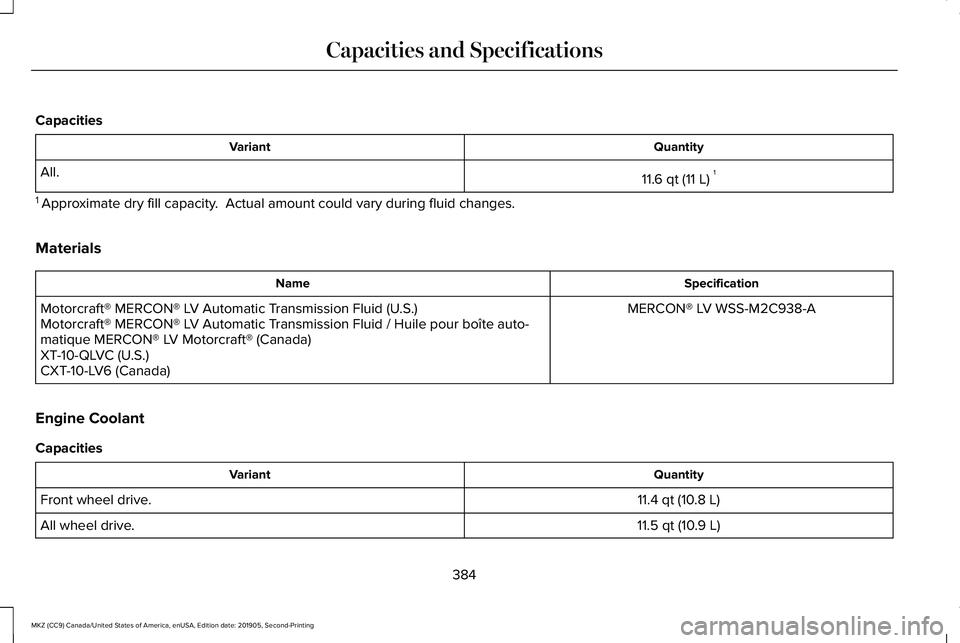
Capacities
Quantity
Variant
11.6 qt (11 L)1
All.
1 Approximate dry fill capacity. Actual amount could vary during fluid changes.
Materials Specification
Name
MERCON® LV WSS-M2C938-A
Motorcraft® MERCON® LV Automatic Transmission Fluid (U.S.)
Motorcraft® MERCON® LV Automatic Transmission Fluid / Huile pour boîte auto-
matique MERCON® LV Motorcraft® (Canada)
XT-10-QLVC (U.S.)
CXT-10-LV6 (Canada)
Engine Coolant
Capacities Quantity
Variant
11.4 qt (10.8 L)
Front wheel drive.
11.5 qt (10.9 L)
All wheel drive.
384
MKZ (CC9) Canada/United States of America, enUSA, Edition date: 201905, Second-Printing Capacities and Specifications
Page 451 of 561
The navigation system map data may contain
inaccurate or incomplete information due to
the passage of time, changing
circumstances, sources used and the nature
of collecting comprehensive geographic
data, any of which may lead to incorrect
results. Inaccurate speed limit information,
turn restrictions and other road attributes
may affect the determined route and
associated guidance
Annual navigation map updates are available
for purchase through your dealership.
Depending on your purchase agreement,
you might be eligible for free Map update.
You can choose to download the Map data
update onto a USB, order a USB, or use Wi-Fi
to deliver automatic updates. To update your
Map data over Wi-Fi, your vehicle must be
connected to a Wi-Fi access point. Map Data
files are large, so it is highly recommended
to perform the update when free Wi-Fi is
available otherwise high data rates may
apply. For USB updates, free map update
eligibility, and other details, contact dealers
at 1-866-462-8837 in the United States and
Canada or 01-800-557-5539 in Mexico or
visit our local website for more information.
APPS
The system allows you interact with select
mobile apps while keeping your eyes on the
road. Voice commands, your steering wheel
buttons, or a quick tap on your touchscreen
give you advanced control of compatible
mobile apps. You can also stream your
favorite music or podcasts, share your time
of arrival with friends, and keep connected
safely.
When you start an app through the system
for the first time, you could be asked to grant
certain permissions. You can review and
change the permissions that you have
granted at any time when your vehicle is not
moving. We recommend that you check your
data plan before using your apps through
the system. Using them could result in
additional charges. We also recommend that
you check the app provider's terms and
conditions and privacy policy before using
their app. Make sure that you have an active
account for apps that you want to use
through the system. Some apps will work
with no setup. Others require you to
configure some personal settings before you
can use them.
Note:
For more information about available
apps, visit catalog.ford.com.
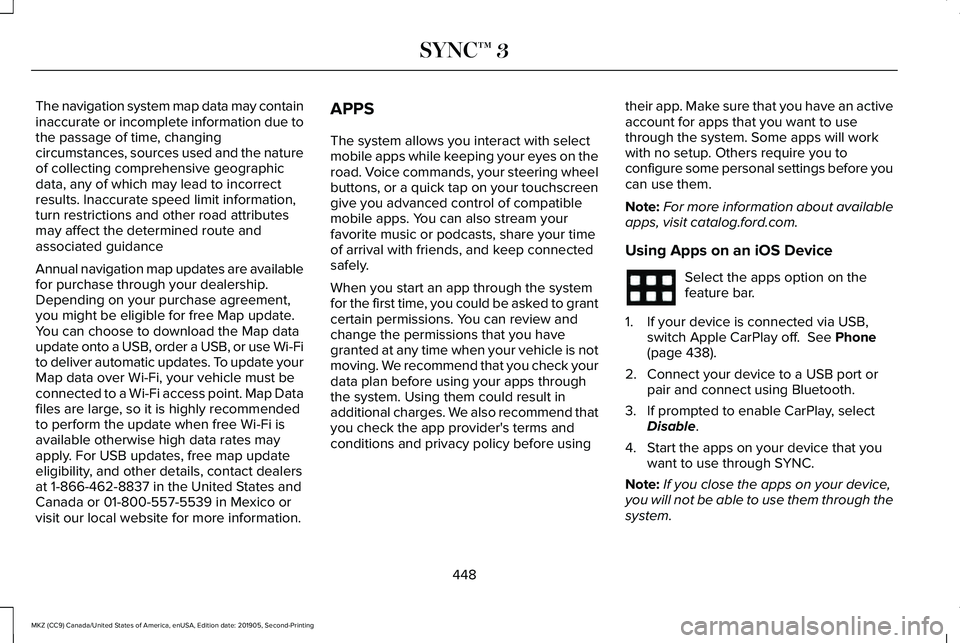
Using Apps on an iOS Device Select the apps option on the
feature bar.
1. If your device is connected via USB, switch Apple CarPlay off. See Phone
(page 438).
2. Connect your device to a USB port or pair and connect using Bluetooth.
3. If prompted to enable CarPlay, select Disable
.
4. Start the apps on your device that you want to use through SYNC.
Note: If you close the apps on your device,
you will not be able to use them through the
system.
448
MKZ (CC9) Canada/United States of America, enUSA, Edition date: 201905, Second-Printing SYNC™ 3
Page 485 of 561
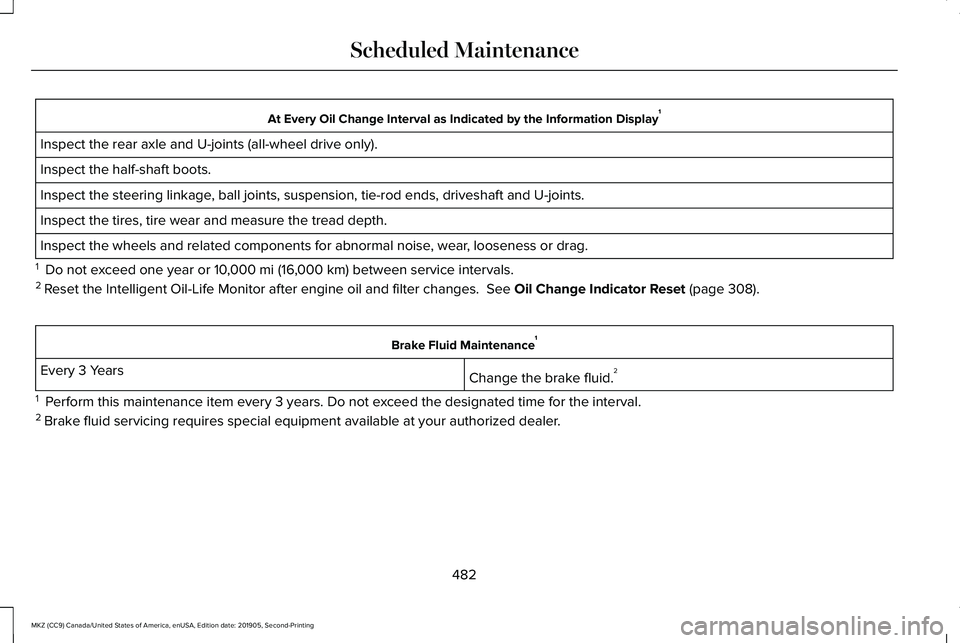
At Every Oil Change Interval as Indicated by the Information Display
1
Inspect the rear axle and U-joints (all-wheel drive only).
Inspect the half-shaft boots.
Inspect the steering linkage, ball joints, suspension, tie-rod ends, driveshaft and U-joints.
Inspect the tires, tire wear and measure the tread depth.
Inspect the wheels and related components for abnormal noise, wear, looseness or drag.
1 Do not exceed one year or 10,000 mi (16,000 km) between service intervals.
2 Reset the Intelligent Oil-Life Monitor after engine oil and filter change\
s.
See Oil Change Indicator Reset (page 308). Brake Fluid Maintenance
1
Change the brake fluid. 2
Every 3 Years
1 Perform this maintenance item every 3 years. Do not exceed the designated time for the interval.
2 Brake fluid servicing requires special equipment available at your authorize\
d dealer.
482
MKZ (CC9) Canada/United States of America, enUSA, Edition date: 201905, Second-Printing Scheduled Maintenance
Page 486 of 561
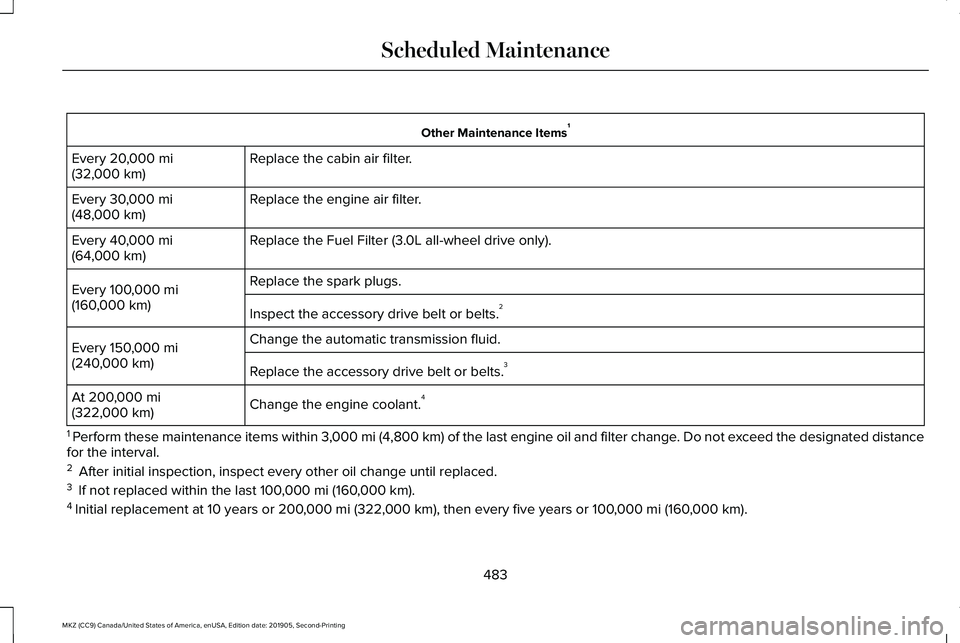
Other Maintenance Items
1
Replace the cabin air filter.
Every 20,000 mi
(32,000 km)
Replace the engine air filter.
Every
30,000 mi
(48,000 km)
Replace the Fuel Filter (3.0L all-wheel drive only).
Every
40,000 mi
(64,000 km)
Replace the spark plugs.
Every
100,000 mi
(160,000 km) Inspect the accessory drive belt or belts. 2
Change the automatic transmission fluid.
Every
150,000 mi
(240,000 km) Replace the accessory drive belt or belts. 3
Change the engine coolant. 4
At
200,000 mi
(322,000 km)
1 Perform these maintenance items within 3,000 mi (4,800 km) of the last engine oil and filter change. Do not exceed the designated distance
for the interval.
2 After initial inspection, inspect every other oil change until replaced\
.
3 If not replaced within the last
100,000 mi (160,000 km).
4 Initial replacement at 10 years or
200,000 mi (322,000 km), then every five years or 100,000 mi (160,000 km).
483
MKZ (CC9) Canada/United States of America, enUSA, Edition date: 201905, Second-Printing Scheduled Maintenance
Page 489 of 561
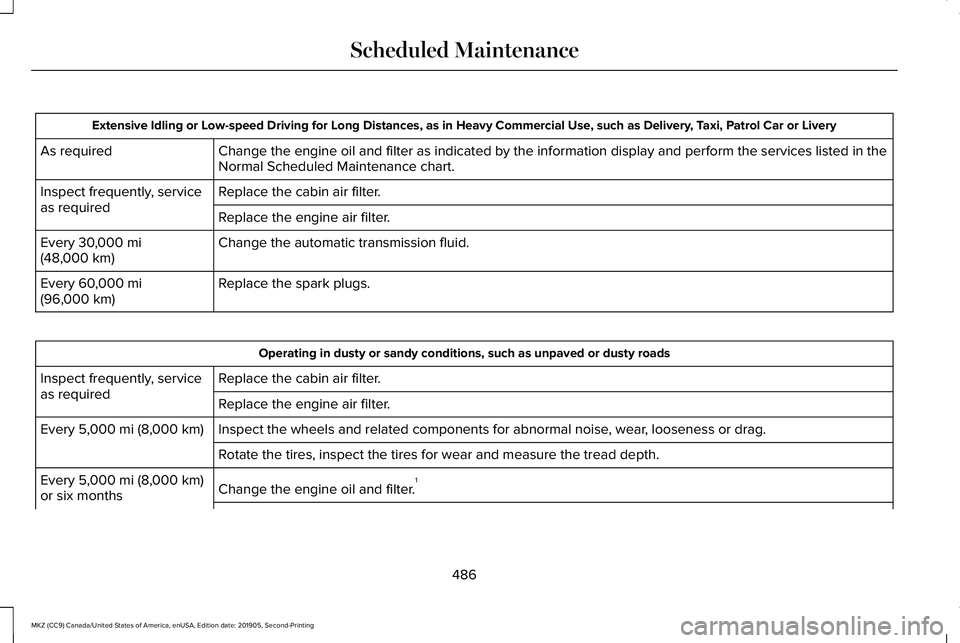
Extensive Idling or Low-speed Driving for Long Distances, as in Heavy Commercial Use, such as Delivery, Taxi, Patrol Car or Livery
Change the engine oil and filter as indicated by the information display\
and perform the services listed in the
Normal Scheduled Maintenance chart.
As required
Replace the cabin air filter.
Inspect frequently, service
as required
Replace the engine air filter.
Change the automatic transmission fluid.
Every 30,000 mi
(48,000 km)
Replace the spark plugs.
Every
60,000 mi
(96,000 km) Operating in dusty or sandy conditions, such as unpaved or dusty roads
Replace the cabin air filter.
Inspect frequently, service
as required
Replace the engine air filter.
Inspect the wheels and related components for abnormal noise, wear, looseness or drag.
Every
5,000 mi (8,000 km)
Rotate the tires, inspect the tires for wear and measure the tread depth.\
Change the engine oil and filter. 1
Every
5,000 mi (8,000 km)
or six months
486
MKZ (CC9) Canada/United States of America, enUSA, Edition date: 201905, Second-Printing Scheduled Maintenance
Page 490 of 561
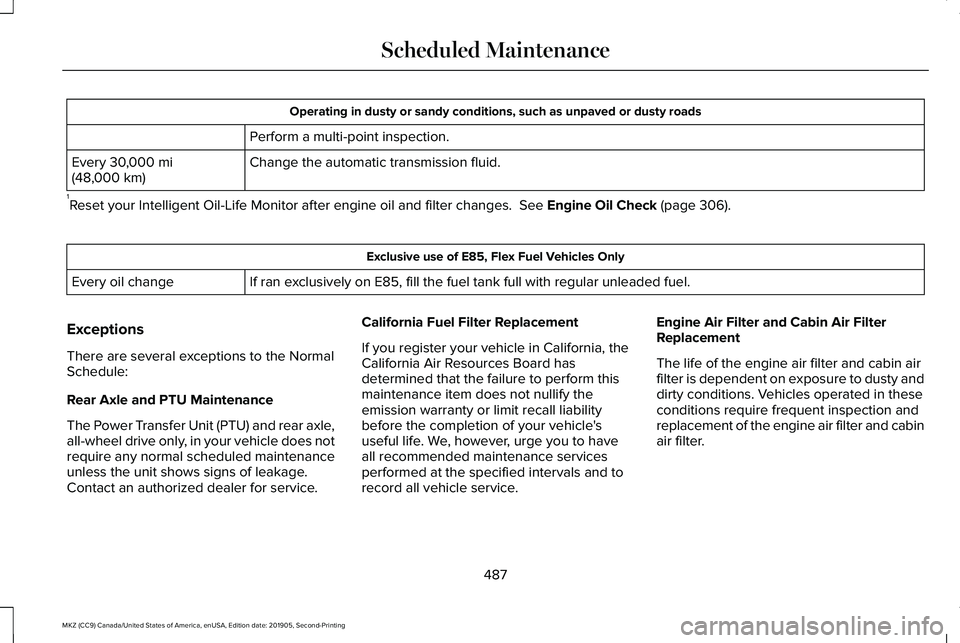
Operating in dusty or sandy conditions, such as unpaved or dusty roads
Perform a multi-point inspection.
Change the automatic transmission fluid.
Every 30,000 mi
(48,000 km)
1 Reset your Intelligent Oil-Life Monitor after engine oil and filter chang\
es.
See Engine Oil Check (page 306). Exclusive use of E85, Flex Fuel Vehicles Only
If ran exclusively on E85, fill the fuel tank full with regular unleaded fuel.
Every oil change
Exceptions
There are several exceptions to the Normal
Schedule:
Rear Axle and PTU Maintenance
The Power Transfer Unit (PTU) and rear axle,
all-wheel drive only, in your vehicle does not
require any normal scheduled maintenance
unless the unit shows signs of leakage.
Contact an authorized dealer for service. California Fuel Filter Replacement
If you register your vehicle in California, the
California Air Resources Board has
determined that the failure to perform this
maintenance item does not nullify the
emission warranty or limit recall liability
before the completion of your vehicle's
useful life. We, however, urge you to have
all recommended maintenance services
performed at the specified intervals and to
record all vehicle service.Engine Air Filter and Cabin Air Filter
Replacement
The life of the engine air filter and cabin air
filter is dependent on exposure to dusty and
dirty conditions. Vehicles operated in these
conditions require frequent inspection and
replacement of the engine air filter and cabin
air filter.
487
MKZ (CC9) Canada/United States of America, enUSA, Edition date: 201905, Second-Printing Scheduled Maintenance
Page 556 of 561
Motorcraft Parts - 2.0L.................................367
Motorcraft Parts - 3.0L................................369
MyKey – Troubleshooting............................65
MyKey™..............................................................62 Principle of Operation.........................................62
N
Navigation......................................................440 Changing the Format of the Map...................444
cityseeker.............................................................446
Michelin Travel Guide........................................447
Navigation Map Accuracy and Updates.......447
Route Guidance..................................................444
Setting a Destination.........................................442
SiriusXM Traffic and Travel Link......................447
Zoom......................................................................444
Normal Scheduled Maintenance
.............480
Intelligent Oil-Life Monitor™.............................480
Maintenance Intervals........................................481
O
Oil Change Indicator Reset.......................308
Oil Check See: Engine Oil Check......................................306
Opening and Closing the Hood
................301
Closing the Hood...............................................302 Opening the Hood..............................................301
Ordering Additional Owner's Literature......................................................278
Obtaining a French Owner’ s Manual.............278
Overhead Console
.......................................159
Overriding Automatic High Beam Control............................................................94
P
Parking Aids
..................................................203
Principle of Operation.......................................203
Passive Anti-Theft System............................77 SecuriLock...............................................................77
PATS See: Passive Anti-Theft System.........................77
Perchlorate........................................................14
Personal Safety System ™
..............................44
How Does the Personal Safety System
Work?...................................................................44
Phone
..............................................................438
Android Auto.......................................................440
Apple CarPlay......................................................440
Pairing Your Cell Phone for the First
Time...................................................................438
Text Messaging...................................................439
Using Your Cell Phone......................................439
Post-Crash Alert System.............................270 Power Decklid
...................................................71
Obstacle Detection...............................................72
Opening and Closing the Power Decklid.......72
Resetting the Power Decklid..............................
73
Power Door Locks See: Locking and Unlocking..............................67
Power Seats
....................................................142
Adjusting the Four-Way Lumbar
Support..............................................................144
Adjusting the Lumbar Support.........................144
Adjusting the Multi-Contour Front Seats With Active Motion ..................................................144
Power Windows
..............................................95
Accessory Delay...................................................96
Bounce-Back..........................................................95
One-Touch Down..................................................95
One-Touch Up.......................................................95
Window Lock.........................................................96
Pre-Collision Assist
......................................245
Adjusting the Pre-Collision Assist
Settings.............................................................247
Blocked Sensors.................................................247
Distance Indication and Alert..........................246
Using the Pre-Collision Assist System..........245
Protecting the Environment
..........................18
Puncture See: Changing a Road Wheel.........................
355
553
MKZ (CC9) Canada/United States of America, enUSA, Edition date: 201905, Second-Printing Index