heating LINCOLN MKZ 2020 Owners Manual
[x] Cancel search | Manufacturer: LINCOLN, Model Year: 2020, Model line: MKZ, Model: LINCOLN MKZ 2020Pages: 561, PDF Size: 5.7 MB
Page 86 of 561
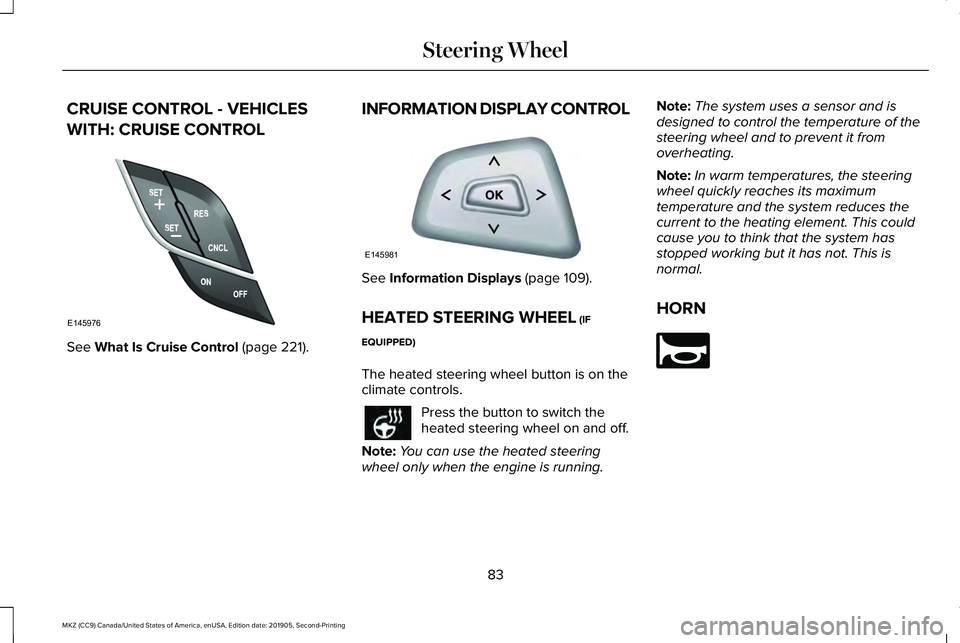
CRUISE CONTROL - VEHICLES
WITH: CRUISE CONTROL
See What Is Cruise Control (page 221).
INFORMATION DISPLAY CONTROL See
Information Displays (page 109).
HEATED STEERING WHEEL
(IF
EQUIPPED)
The heated steering wheel button is on the
climate controls. Press the button to switch the
heated steering wheel on and off.
Note: You can use the heated steering
wheel only when the engine is running. Note:
The system uses a sensor and is
designed to control the temperature of the
steering wheel and to prevent it from
overheating.
Note: In warm temperatures, the steering
wheel quickly reaches its maximum
temperature and the system reduces the
current to the heating element. This could
cause you to think that the system has
stopped working but it has not. This is
normal.
HORN 83
MKZ (CC9) Canada/United States of America, enUSA, Edition date: 201905, Second-Printing Steering WheelE145976 E145981 E270945
Page 122 of 561

AWD
Action
Message
Displayed when the AWD system has been temporarily disabled to protect i\
tself from overheating.
AWD Temporarily Disabled
Displayed when the AWD system has been automatically disabled to protect\
itself. This is causedby operating the vehicle with the compact spare tire installed or if the\
system is overheating.
AWD OFF
The AWD system will resume normal function and clear this message after \
driving a short distancewith the road tire re-installed or after the system is allowed to cool.
AWD Restored
Displayed in conjunction with the Throttle Control/Transmission/AWD light when the AWD system
is not operating properly. If the warning stays on or continues to come on, contact your authoriz\
ed dealer as soon as possible.
AWD Malfunction Service Required
119
MKZ (CC9) Canada/United States of America, enUSA, Edition date: 201905, Second-Printing Information Displays
Page 135 of 561
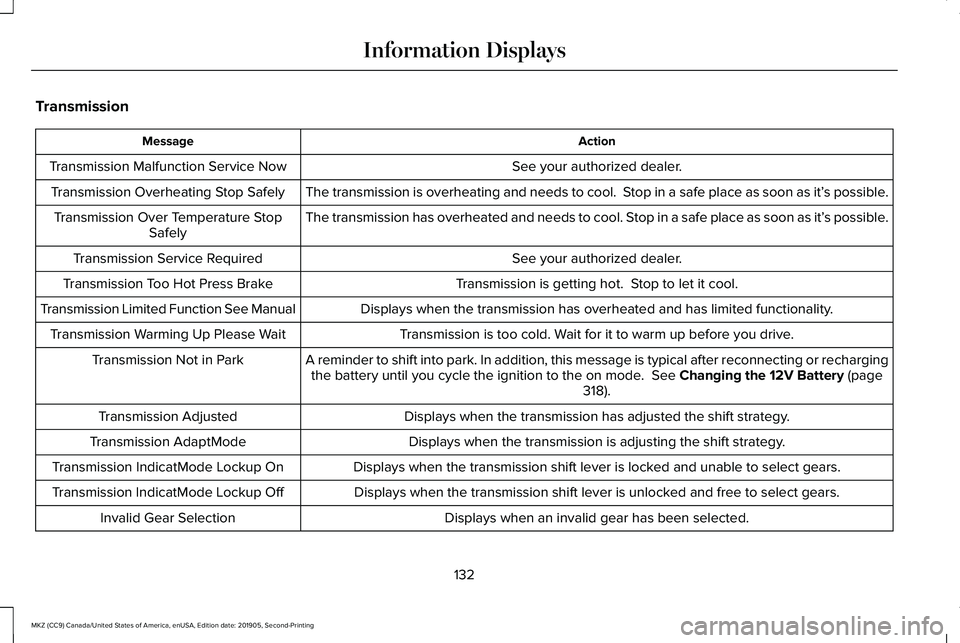
Transmission
Action
Message
See your authorized dealer.
Transmission Malfunction Service Now
The transmission is overheating and needs to cool. Stop in a safe place as soon as it’ s possible.
Transmission Overheating Stop Safely
The transmission has overheated and needs to cool. Stop in a safe place as soon as it’ s possible.
Transmission Over Temperature Stop
Safely
See your authorized dealer.
Transmission Service Required
Transmission is getting hot. Stop to let it cool.
Transmission Too Hot Press Brake
Displays when the transmission has overheated and has limited functional\
ity.
Transmission Limited Function See Manual
Transmission is too cold. Wait for it to warm up before you drive.
Transmission Warming Up Please Wait
A reminder to shift into park. In addition, this message is typical afte\
r reconnecting or rechargingthe battery until you cycle the ignition to the on mode. See Changing the 12V Battery (page
318).
Transmission Not in Park
Displays when the transmission has adjusted the shift strategy.
Transmission Adjusted
Displays when the transmission is adjusting the shift strategy.
Transmission AdaptMode
Displays when the transmission shift lever is locked and unable to select gears.
Transmission IndicatMode Lockup On
Displays when the transmission shift lever is unlocked and free to select gears.
Transmission IndicatMode Lockup Off
Displays when an invalid gear has been selected.
Invalid Gear Selection
132
MKZ (CC9) Canada/United States of America, enUSA, Edition date: 201905, Second-Printing Information Displays
Page 141 of 561
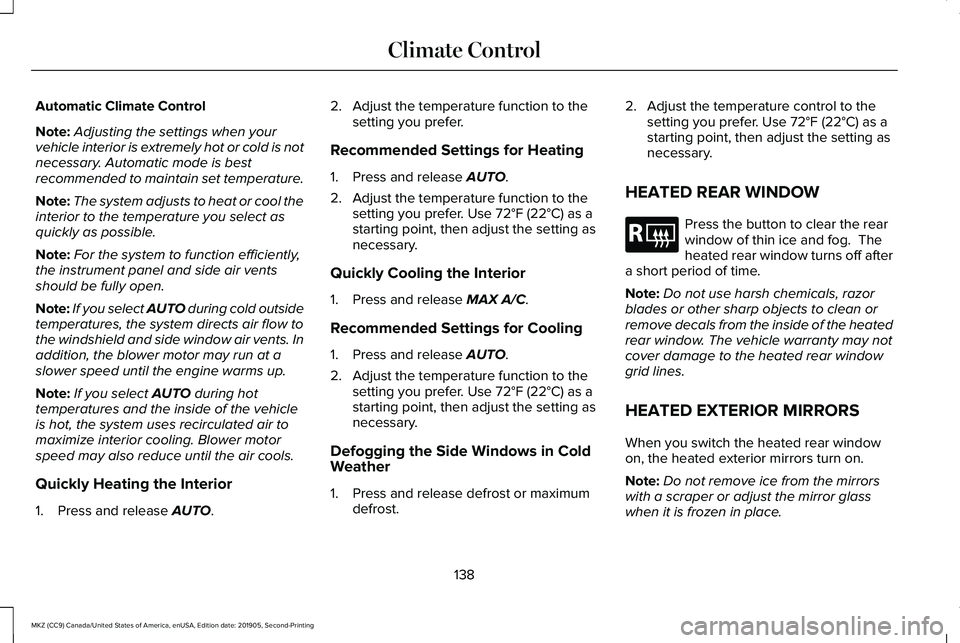
Automatic Climate Control
Note:
Adjusting the settings when your
vehicle interior is extremely hot or cold is not
necessary. Automatic mode is best
recommended to maintain set temperature.
Note: The system adjusts to heat or cool the
interior to the temperature you select as
quickly as possible.
Note: For the system to function efficiently,
the instrument panel and side air vents
should be fully open.
Note: If you select AUTO during cold outside
temperatures, the system directs air flow to
the windshield and side window air vents. In
addition, the blower motor may run at a
slower speed until the engine warms up.
Note: If you select
AUTO during hot
temperatures and the inside of the vehicle
is hot, the system uses recirculated air to
maximize interior cooling. Blower motor
speed may also reduce until the air cools.
Quickly Heating the Interior
1. Press and release
AUTO. 2. Adjust the temperature function to the
setting you prefer.
Recommended Settings for Heating
1. Press and release
AUTO.
2. Adjust the temperature function to the setting you prefer. Use
72°F (22°C) as a
starting point, then adjust the setting as
necessary.
Quickly Cooling the Interior
1. Press and release
MAX A/C.
Recommended Settings for Cooling
1. Press and release
AUTO.
2. Adjust the temperature function to the setting you prefer. Use
72°F (22°C) as a
starting point, then adjust the setting as
necessary.
Defogging the Side Windows in Cold
Weather
1. Press and release defrost or maximum defrost. 2. Adjust the temperature control to the
setting you prefer. Use
72°F (22°C) as a
starting point, then adjust the setting as
necessary.
HEATED REAR WINDOW Press the button to clear the rear
window of thin ice and fog. The
heated rear window turns off after
a short period of time.
Note: Do not use harsh chemicals, razor
blades or other sharp objects to clean or
remove decals from the inside of the heated
rear window. The vehicle warranty may not
cover damage to the heated rear window
grid lines.
HEATED EXTERIOR MIRRORS
When you switch the heated rear window
on, the heated exterior mirrors turn on.
Note: Do not remove ice from the mirrors
with a scraper or adjust the mirror glass
when it is frozen in place.
138
MKZ (CC9) Canada/United States of America, enUSA, Edition date: 201905, Second-Printing Climate ControlE184884
Page 151 of 561
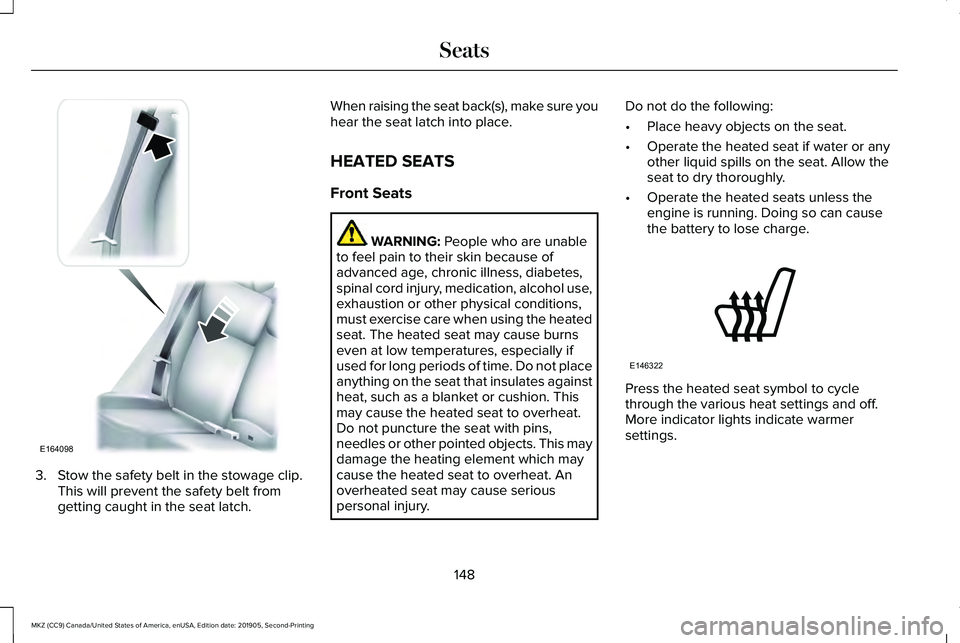
3. Stow the safety belt in the stowage clip.
This will prevent the safety belt from
getting caught in the seat latch. When raising the seat back(s), make sure you
hear the seat latch into place.
HEATED SEATS
Front Seats
WARNING: People who are unable
to feel pain to their skin because of
advanced age, chronic illness, diabetes,
spinal cord injury, medication, alcohol use,
exhaustion or other physical conditions,
must exercise care when using the heated
seat. The heated seat may cause burns
even at low temperatures, especially if
used for long periods of time. Do not place
anything on the seat that insulates against
heat, such as a blanket or cushion. This
may cause the heated seat to overheat.
Do not puncture the seat with pins,
needles or other pointed objects. This may
damage the heating element which may
cause the heated seat to overheat. An
overheated seat may cause serious
personal injury. Do not do the following:
•
Place heavy objects on the seat.
• Operate the heated seat if water or any
other liquid spills on the seat. Allow the
seat to dry thoroughly.
• Operate the heated seats unless the
engine is running. Doing so can cause
the battery to lose charge. Press the heated seat symbol to cycle
through the various heat settings and off.
More indicator lights indicate warmer
settings.
148
MKZ (CC9) Canada/United States of America, enUSA, Edition date: 201905, Second-Printing SeatsE164098 E146322
Page 152 of 561
Rear Seats
WARNING: Persons who are unable
to feel pain to the skin because of
advanced age, chronic illness, diabetes,
spinal cord injury, medication, alcohol use,
exhaustion, or other physical conditions,
must exercise care when using the seat
heater. The seat heater may cause burns
even at low temperatures, especially if
used for long periods of time. Do not place
anything on the seat that insulates against
heat, such as a blanket or cushion,
because this may cause the seat heater to
overheat. Do not puncture the seat with
pins, needles, or other pointed objects
because this may damage the heating
element which may cause the seat heater
to overheat. An overheated seat may
cause serious personal injury. Do not do the following:
•
Place heavy objects on the seat.
• Operate the seat heater if water or any
other liquid is spilled on the seat. Allow
the seat to dry thoroughly.
• Operate the heated seats unless the
engine is running. Doing so can cause
the battery to lose charge.
The rear seat heat controls are located on
the rear of the center console. Press the heated seat symbol to cycle
through the various heat settings and off.
More indicator lights indicate warmer
settings.The heated seat module resets at every
ignition run cycle. While the ignition is on,
press the high or low heated seat switch to
enable heating mode. When activated, they
will turn off automatically when you turn the
engine off.
CLIMATE CONTROLLED SEATS
(IF
EQUIPPED)
Heated Seats WARNING:
People who are unable
to feel pain to their skin because of
advanced age, chronic illness, diabetes,
spinal cord injury, medication, alcohol use,
exhaustion or other physical conditions,
must exercise care when using the heated
seat. The heated seat may cause burns
even at low temperatures, especially if
used for long periods of time. Do not place
anything on the seat that insulates against
heat, such as a blanket or cushion. This
may cause the heated seat to overheat.
149
MKZ (CC9) Canada/United States of America, enUSA, Edition date: 201905, Second-Printing SeatsE146322
Page 153 of 561
Do not puncture the seat with pins,
needles or other pointed objects. This may
damage the heating element which may
cause the heated seat to overheat. An
overheated seat may cause serious
personal injury.
Do not do the following:
• Place heavy objects on the seat.
• Operate the heated seat if water or any
other liquid spills on the seat. Allow the
seat to dry thoroughly.
• Operate the heated seats unless the
engine is running. Doing so can cause
the battery to lose charge. Touch the heated seat symbol to cycle
through the various heat settings and off.
More indicator lights indicate warmer
settings.
Cooled Seats
The cooled seats will only function when the
engine is running.
To operate the cooled seats:
Press the cooled seat symbol to cycle
through the various cooling settings and off.
More indicator lights indicate cooler settings.
If the engine falls below 350 RPM while the
cooled seats are on, the feature will turn itself
off. You will need to reactivate it.Climate controlled seat air filter
replacement
Your vehicle is equipped with lifetime air
filters that are integrated with the seats.
Regular maintenance or replacement is not
needed.
150
MKZ (CC9) Canada/United States of America, enUSA, Edition date: 201905, Second-Printing SeatsE146322 E146309
Page 156 of 561
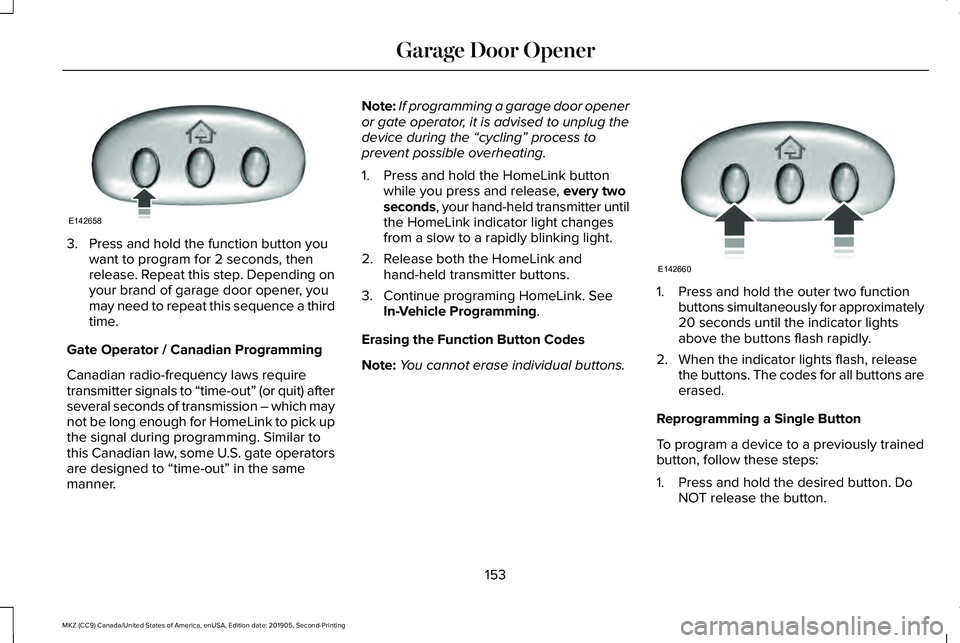
3. Press and hold the function button you
want to program for 2 seconds, then
release. Repeat this step. Depending on
your brand of garage door opener, you
may need to repeat this sequence a third
time.
Gate Operator / Canadian Programming
Canadian radio-frequency laws require
transmitter signals to “time-out” (or quit) after
several seconds of transmission – which may
not be long enough for HomeLink to pick up
the signal during programming. Similar to
this Canadian law, some U.S. gate operators
are designed to “time-out” in the same
manner. Note:
If programming a garage door opener
or gate operator, it is advised to unplug the
device during the “cycling” process to
prevent possible overheating.
1. Press and hold the HomeLink button while you press and release, every two
seconds, your hand-held transmitter until
the HomeLink indicator light changes
from a slow to a rapidly blinking light.
2. Release both the HomeLink and hand-held transmitter buttons.
3. Continue programing HomeLink. See In-Vehicle Programming
.
Erasing the Function Button Codes
Note: You cannot erase individual buttons. 1. Press and hold the outer two function
buttons simultaneously for approximately
20 seconds until the indicator lights
above the buttons flash rapidly.
2. When the indicator lights flash, release the buttons. The codes for all buttons are
erased.
Reprogramming a Single Button
To program a device to a previously trained
button, follow these steps:
1. Press and hold the desired button. Do NOT release the button.
153
MKZ (CC9) Canada/United States of America, enUSA, Edition date: 201905, Second-Printing Garage Door OpenerE142658 E142660
Page 188 of 561
All-Wheel Drive Messages
Action / Description
AWD Messages
Displays when the system automatically disables to protect itself. This
may be caused by operating the vehicle with the compact tire installed,
if the system is overheating or if there is an issue with another vehicl\
e
system preventing AWD operation. The system resumes normal
operation and clears this message after cycling the ignition on and
off and driving a short distance with the road tire re-installed, after
the system is allowed to cool or after the other vehicle system issues
are resolved.
AWD OFF
Displays in conjunction with the powertrain malfunction or reduced
power light when the system is not operating properly. If the message
stays on or continues to come on, contact your authorized dealer as
soon as possible.
AWD Malfunction Service Required
185
MKZ (CC9) Canada/United States of America, enUSA, Edition date: 201905, Second-Printing All-Wheel Drive (If Equipped)
Page 189 of 561
Operating AWD Vehicles With Spare
or Mismatched Tires
WARNING: Only use replacement
tires and wheels that are the same size,
load index, speed rating and type (such as
P-metric versus LT-metric or all-season
versus all-terrain) as those originally
provided by Ford. The recommended tire
and wheel size may be found on either the
Safety Compliance Certification Label
(affixed to either the door hinge pillar,
door-latch post, or the door edge that
meets the door-latch post, next to the
driver’ s seating position), or the Tire Label
which is located on the B-Pillar or edge of
the driver’ s door. If this information is not
found on these labels, then you should
contact your authorized dealer as soon as
possible. Use of any tire or wheel not
recommended by Ford can affect the
safety and performance of your vehicle,
which could result in an increased risk of
loss of vehicle control, vehicle rollover,
personal injury and death. A spare tire of a different size other than the
tire provided should never be used. The
AWD system may disable automatically and
enter front-wheel drive only mode to protect
driveline components if a non-full sized tire
is installed. This condition may display an
AWD OFF
message in the information
display. If there is an AWD OFF message in
the information display from using a non-full
sized spare tire, this indicator should turn off
after reinstalling the repaired or replaced
normal road tire and cycling the ignition off
and on. It is recommended to reinstall the
repaired or replaced road tire as soon as
possible.
Major dissimilar tire sizes between the front
and rear axles (for example, 17 inch low
profile tires on the front axle and 22 inch high
profile tires on the rear axle) could cause the
AWD system to stop functioning and default
to front-wheel drive or damage the AWD
system. However, the AWD system is
capable of tolerating any combination of new
and worn tires of the same original tire size.
For example, using 3 worn tread tires and 1
new tread tire all of the same original tire
size, can be tolerated by the AWD system. Driving In Special Conditions With All-
Wheel Drive (AWD)
AWD vehicles are equipped for driving on
sand, snow, mud and rough roads and have
operating characteristics that are somewhat
different from conventional vehicles, both on
and off the highway.
When driving at slow speeds in deep sand
under high outside temperatures, use a low
gear when possible. Lower gear operation
will maximize the engine and transmission
cooling capability.
Under severe operating conditions, the A/C
may cycle on and off to protect overheating
of the engine.
Basic operating principles in special
conditions
•
Drive slower in strong crosswinds which
can affect the normal steering
characteristics of your vehicle.
• Be extremely careful when driving on
pavement made slippery by loose sand,
water, gravel, snow or ice.
186
MKZ (CC9) Canada/United States of America, enUSA, Edition date: 201905, Second-Printing All-Wheel Drive
(If Equipped)