open LINCOLN MKZ 2020 Owners Manual
[x] Cancel search | Manufacturer: LINCOLN, Model Year: 2020, Model line: MKZ, Model: LINCOLN MKZ 2020Pages: 561, PDF Size: 5.7 MB
Page 5 of 561
MyKey – Troubleshooting
...........................65
Doors and Locks
Locking and Unlocking .................................
67
Power Decklid ..................................................
71
Keyless Entry ...................................................
73
Interior Luggage Compartment Release ........................................................................\
.
75
Security
Passive Anti-Theft System ...........................
77
Anti-Theft Alarm .............................................
78
Steering Wheel
Adjusting the Steering Wheel - Vehicles With: Manual Adjustable Steering
Column .........................................................
80
Adjusting the Steering Wheel - Vehicles With: Power Adjustable Steering Column
........................................................................\
80
Audio Control .................................................
82
Voice Control ..................................................
82
Cruise Control - Vehicles With: Adaptive Cruise Control With Stop and Go ..........
82Cruise Control - Vehicles With: Cruise
Control .........................................................
83
Information Display Control ........................
83
Heated Steering Wheel ...............................
83
Horn ..................................................................
83
Wipers and Washers
Windshield Wipers ........................................
84
Autowipers ......................................................
85
Windshield Washers .....................................
86
Lighting
General Information ......................................
87
Lighting Control ..............................................
87
Autolamps .......................................................
88
Instrument Lighting Dimmer .......................
89
Headlamp Exit Delay ....................................
89
Daytime Running Lamps - Vehicles With: Daytime Running Lamps (DRL) ..............
89
Daytime Running Lamps - Vehicles With: Configurable Daytime Running Lamps
........................................................................\
89
Adaptive Headlamps ....................................
90
Direction Indicators .......................................
90Welcome Lighting
...........................................
91
Interior Lamps ..................................................
91
Ambient Lighting ...........................................
92
Automatic High Beam Control
What Is Automatic High Beam Control ........................................................................\
.
93
Switching Automatic High Beam Control On and Off ...................................................
93
Automatic High Beam Control Indicators ........................................................................\
.
94
Overriding Automatic High Beam Control ........................................................................\
.
94
Windows and Mirrors
Power Windows .............................................
95
Global Opening and Closing ......................
96
Exterior Mirrors ...............................................
96
Interior Mirror ..................................................
98
Sun Visors .......................................................
99
Sun Shades .....................................................
99
Moonroof .........................................................
99
2
MKZ (CC9) Canada/United States of America, enUSA, Edition date: 201905, Second-Printing Table of Contents
Page 6 of 561
Instrument Cluster
Gauges
...........................................................102
Warning Lamps and Indicators .................
104
Audible Warnings and Indicators .............
107
Information Displays
General Information ....................................
109
Information Messages .................................
115
Climate Control
Automatic Climate Control ........................
135
Hints on Controlling the Interior Climate .......................................................................
137
Heated Rear Window ..................................
138
Heated Exterior Mirrors ..............................
138
Cabin Air Filter ..............................................
139
Remote Start ..................................................
139
Seats
Sitting in the Correct Position ...................
140
Head Restraints .............................................
141
Power Seats ...................................................
142
Memory Function .........................................
146Rear Seats
......................................................
147
Heated Seats .................................................
148
Climate Controlled Seats ...........................
149
Garage Door Opener
Universal Garage Door Opener ................
151
Auxiliary Power Points
Auxiliary Power Points ................................
157
Storage Compartments
Center Console ............................................
159
Overhead Console ......................................
159
Rear Seat Armrest ........................................
159
Starting and Stopping the Engine
General Information ......................................
161
Keyless Starting .............................................
161
Starting a Gasoline Engine ........................
162
Engine Block Heater ...................................
165Fuel and Refueling
Safety Precautions
.......................................
167
Fuel Quality ....................................................
168
Fuel Filler Funnel Location ........................
168
Running Out of Fuel ....................................
169
Refueling .........................................................
170
Fuel Consumption ........................................
173
Engine Emission Control
Emission Law .................................................
174
Catalytic Converter ......................................
175
Transmission
Automatic Transmission ..............................
178
All-Wheel Drive
Using All-Wheel Drive .................................
184
Brakes
General Information .....................................
193
Hints on Driving With Anti-Lock Brakes .......................................................................
194
Electric Parking Brake .................................
194
3
MKZ (CC9) Canada/United States of America, enUSA, Edition date: 201905, Second-Printing Table of Contents
Page 8 of 561
Getting Assistance Outside the U.S. and
Canada ......................................................276
Ordering Additional Owner's Literature ......................................................................
278
Reporting Safety Defects (U.S. Only) ......
279
Reporting Safety Defects (Canada Only) ......................................................................
279
Fuses
Fuse Specification Chart ............................
281
Changing a Fuse .........................................
298
Maintenance
General Information ....................................
301
Opening and Closing the Hood ...............
301
Under Hood Overview - 2.0L ...................
303
Under Hood Overview - 3.0L ...................
305
Engine Oil Dipstick - 2.0L .........................
306
Engine Oil Dipstick - 3.0L ..........................
306
Engine Oil Check ........................................
306
Oil Change Indicator Reset ......................
308
Engine Coolant Check ...............................
308
Automatic Transmission Fluid Check ......
313
Brake Fluid Check ........................................
317Washer Fluid Check
....................................
318
Fuel Filter ........................................................
318
Changing the 12V Battery ..........................
318
Checking the Wiper Blades .....................
320
Changing the Wiper Blades .....................
320
Adjusting the Headlamps ..........................
321
Changing a Bulb ..........................................
322
Changing the Engine Air Filter ................
322
Vehicle Care
General Information ....................................
324
Cleaning Products .......................................
324
Cleaning the Exterior .................................
325
Waxing ...........................................................
326
Cleaning the Engine ...................................
327
Cleaning the Windows and Wiper Blades ......................................................................
327
Cleaning the Interior ...................................
328
Cleaning the Instrument Panel and Instrument Cluster Lens ........................
330
Cleaning Leather Seats ..............................
331
Repairing Minor Paint Damage .................
331
Cleaning the Wheels ...................................
331Vehicle Storage
...........................................
332
Body Styling Kits ..........................................
334
Wheels and Tires
Tire Care ........................................................
335
Using Summer Tires ...................................
349
Using Snow Chains .....................................
349
Tire Pressure Monitoring System ...........
350
Changing a Road Wheel ...........................
355
Technical Specifications ............................
363
Capacities and Specifications
Engine Specifications - 2.0L .....................
365
Engine Specifications - 3.0L .....................
366
Motorcraft Parts - 2.0L ................................
367
Motorcraft Parts - 3.0L ...............................
369
Vehicle Identification Number .................
370
Vehicle Certification Label ........................
370
Transmission Code Designation ...............
371
Capacities and Specifications - 2.0L ......
372
Capacities and Specifications - 3.0L ......
382
Bulb Specification Chart ............................
392
5
MKZ (CC9) Canada/United States of America, enUSA, Edition date: 201905, Second-Printing Table of Contents
Page 11 of 561
Anti-lock braking system
Avoid smoking, flames or sparks
Battery
Battery acid
Brake fluid - non petroleum based
Brake system
Brake system
Cabin air filter
Check fuel cap Child safety door lock or unlock
Child seat lower anchor
Child seat tether anchor
Cruise control
Do not open when hot
Engine air filter
Engine coolant
Engine coolant temperature
Engine oil Explosive gas
Fan warning
Fasten seatbelt
Flammable
Front airbag
Front fog lamps
Fuel pump reset
Fuse compartment
Hazard flashers
Heated rear window
8
MKZ (CC9) Canada/United States of America, enUSA, Edition date: 201905, Second-Printing Introduction E270480 E71340 E71880 E231160 E67017
Page 32 of 561
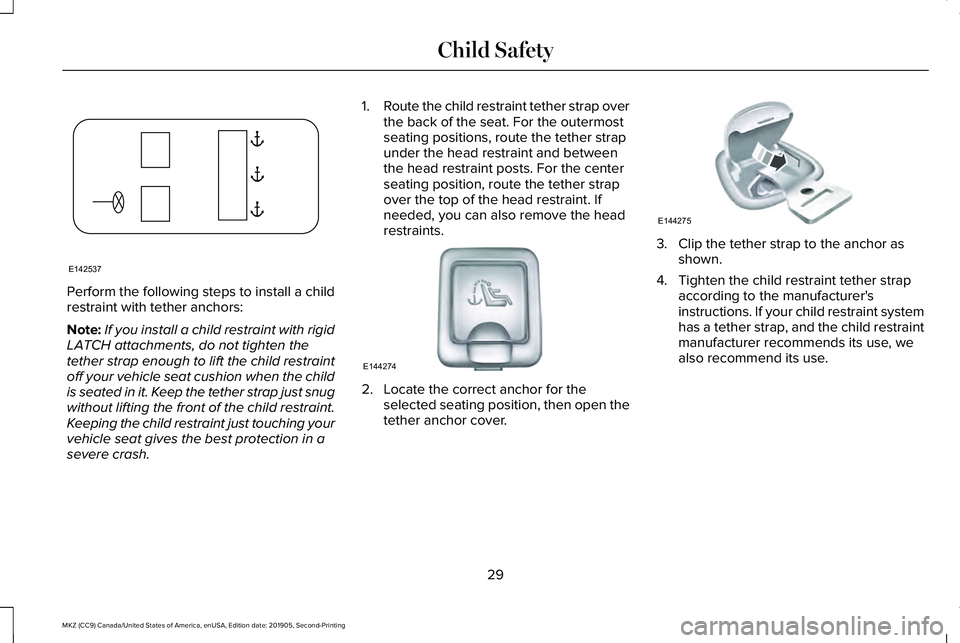
Perform the following steps to install a child
restraint with tether anchors:
Note:
If you install a child restraint with rigid
LATCH attachments, do not tighten the
tether strap enough to lift the child restraint
off your vehicle seat cushion when the child
is seated in it. Keep the tether strap just snug
without lifting the front of the child restraint.
Keeping the child restraint just touching your
vehicle seat gives the best protection in a
severe crash. 1.
Route the child restraint tether strap over
the back of the seat. For the outermost
seating positions, route the tether strap
under the head restraint and between
the head restraint posts. For the center
seating position, route the tether strap
over the top of the head restraint. If
needed, you can also remove the head
restraints. 2. Locate the correct anchor for the
selected seating position, then open the
tether anchor cover. 3. Clip the tether strap to the anchor as
shown.
4. Tighten the child restraint tether strap according to the manufacturer's
instructions. If your child restraint system
has a tether strap, and the child restraint
manufacturer recommends its use, we
also recommend its use.
29
MKZ (CC9) Canada/United States of America, enUSA, Edition date: 201905, Second-Printing Child SafetyE142537 E144274 E144275
Page 38 of 561
Note:
The child restraint must rest tightly
against the vehicle seat upon which it is
installed. It may be necessary to lift or
remove the head restraint. See Seats (page
140).
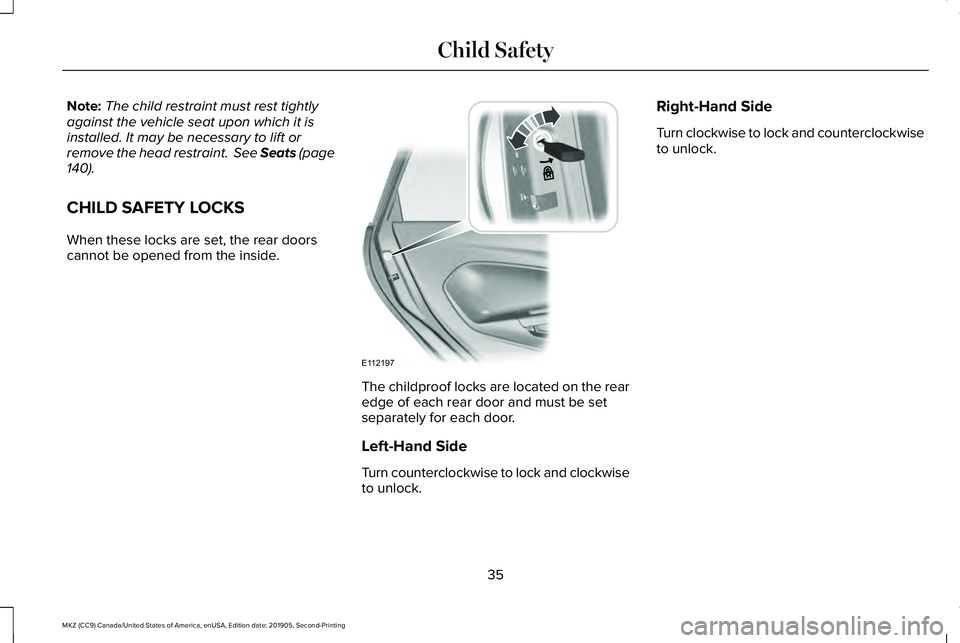
CHILD SAFETY LOCKS
When these locks are set, the rear doors
cannot be opened from the inside. The childproof locks are located on the rear
edge of each rear door and must be set
separately for each door.
Left-Hand Side
Turn counterclockwise to lock and clockwise
to unlock.Right-Hand Side
Turn clockwise to lock and counterclockwise
to unlock.
35
MKZ (CC9) Canada/United States of America, enUSA, Edition date: 201905, Second-Printing Child SafetyE112197
Page 55 of 561
WARNING: All occupants of your
vehicle, including the driver, should always
properly wear their seatbelts, even when
an airbag supplemental restraint system is
provided. Failure to properly wear your
seatbelt could seriously increase the risk
of injury or death. WARNING:
To reduce risk of injury,
do not obstruct or place objects in the
deployment path of the airbag. WARNING:
If a supplementary
restraint system component has deployed,
it will not function again. Have the system
and associated components inspected as
soon as possible. Failure to follow this
instruction could result in personal injury
or death.
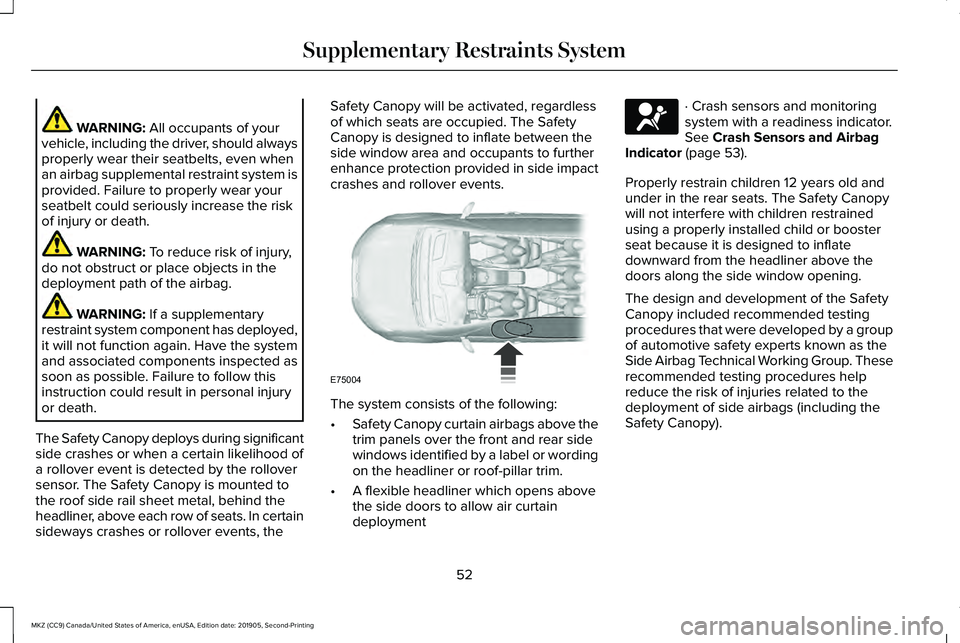
The Safety Canopy deploys during significant
side crashes or when a certain likelihood of
a rollover event is detected by the rollover
sensor. The Safety Canopy is mounted to
the roof side rail sheet metal, behind the
headliner, above each row of seats. In certain
sideways crashes or rollover events, the Safety Canopy will be activated, regardless
of which seats are occupied. The Safety
Canopy is designed to inflate between the
side window area and occupants to further
enhance protection provided in side impact
crashes and rollover events.
The system consists of the following:
•
Safety Canopy curtain airbags above the
trim panels over the front and rear side
windows identified by a label or wording
on the headliner or roof-pillar trim.
• A flexible headliner which opens above
the side doors to allow air curtain
deployment · Crash sensors and monitoring
system with a readiness indicator.
See
Crash Sensors and Airbag
Indicator (page 53).
Properly restrain children 12 years old and
under in the rear seats. The Safety Canopy
will not interfere with children restrained
using a properly installed child or booster
seat because it is designed to inflate
downward from the headliner above the
doors along the side window opening.
The design and development of the Safety
Canopy included recommended testing
procedures that were developed by a group
of automotive safety experts known as the
Side Airbag Technical Working Group. These
recommended testing procedures help
reduce the risk of injuries related to the
deployment of side airbags (including the
Safety Canopy).
52
MKZ (CC9) Canada/United States of America, enUSA, Edition date: 201905, Second-Printing Supplementary Restraints SystemE75004 E67017
Page 60 of 561
GENERAL INFORMATION ON
RADIO FREQUENCIES
This device complies with Part 15 of the FCC
Rules and with Industry Canada
license-exempt RSS standard(s). Operation
is subject to the following two conditions: (1)
This device may not cause harmful
interference, and (2) This device must accept
any interference received, including
interference that may cause undesired
operation.
WARNING: Changes or modifications
not expressively approved by the party
responsible for compliance could void the
user's authority to operate the equipment.
The term "IC:" before the radio certification
number only signifies that Industry Canada
technical specifications were met.
The typical operating range for your
transmitter is approximately 33 ft (10 m).
Vehicles with the remote start feature will
have a greater range. One of the following could cause a decrease
in operating range:
•
Weather conditions.
• Nearby radio towers.
• Structures around the vehicle.
• Other vehicles parked next to your
vehicle.
The radio frequency used by your remote
control can also be used by other radio
transmitters, for example amateur radios,
medical equipment, wireless headphones,
wireless remote controls, cell phones, battery
chargers and alarm systems. If the
frequencies are jammed, you will not be able
to use your remote control. You can lock and
unlock the doors with the key.
Note: Make sure to lock your vehicle before
leaving it unattended.
Note: If you are in range, the remote control
will operate if you press any button
unintentionally.
Note: The remote control contains sensitive
electrical components. Exposure to moisture
or impact may cause permanent damage. Intelligent Access
(If Equipped)
The system uses a radio frequency signal to
communicate with your vehicle and authorize
your vehicle to unlock when one of the
following conditions are met:
• You activate the front exterior door
handle switch.
• You press the luggage compartment
button.
• You press a button on the transmitter.
If excessive radio frequency interference is
present in the area or if the transmitter
battery is low, you may need to mechanically
unlock your door. You can use the
mechanical key blade in your intelligent
access key to open the driver door in this
situation.
See Remote Control (page 57).
REMOTE CONTROL
Intelligent Access Key
Note: You may not be able to shift out of
park (P) unless the intelligent access key is
inside your vehicle.
57
MKZ (CC9) Canada/United States of America, enUSA, Edition date: 201905, Second-Printing Keys and Remote Controls
Page 63 of 561
5. Reinstall the battery cover and the key
blade.
Car Finder Press the button twice within three
seconds. A tone sounds and the
direction indicators flash. We
recommend you use this method to locate
your vehicle, rather than using the panic
alarm.
Sounding the Panic Alarm
Note: The panic alarm only operates when
the ignition is off. Press the button to sound the
panic alarm. Press the button
again or switch the ignition on to
turn it off. Remote Start WARNING: To avoid exhaust fumes,
do not use remote start if your vehicle is
parked indoors or in areas that are not well
ventilated.
Note: Do not use remote start if your fuel
level is low. The remote start button is on the
transmitter.
This feature allows you to start your vehicle
from the outside. The transmitter has an
extended operating range.
You can configure your automatic climate
control to operate when you remote start
your vehicle.
See Climate Control (page
135).
Many states and provinces have restrictions
for the use of remote start. Check your local
and state or provincial laws for specific
requirements regarding remote start
systems. The remote start system does not work if any
of the following occur:
•
The ignition is on.
• The anti-theft alarm triggers.
• You switch the feature off in the
information display.
• The hood is open.
• The transmission is not in park (P).
• The battery voltage is below the
minimum operating voltage.
Remote Control Feedback (If Equipped)
An LED on the remote control provides status
feedback of remote start or stop commands. Status
LED
Remote startsuccessful
Solid green
Remote stopsuccessful
Solid red
Request failed or
status not received
Blinking red
Status incomplete
Blinking green
60
MKZ (CC9) Canada/United States of America, enUSA, Edition date: 201905, Second-Printing Keys and Remote ControlsE138623 E138624 E138625
Page 66 of 561
Note:
Not every feature applies to every
vehicle in every market. When they are
available for your vehicle, then they appear
in your information display, providing choices
to switch them on or off, or to select a more
specific setting.
• Various vehicle speed limits so the
MyKey driver cannot exceed certain
speeds. The information display shows
warnings followed by an audible tone
when the MyKey driver reaches the set
speed. You cannot override the set
speed by fully depressing the accelerator
pedal. WARNING: Do not set MyKey
maximum speed limit to a limit that will
prevent the driver from maintaining a safe
speed considering posted speed limits and
prevailing road conditions. The driver is
always responsible to drive in accordance
with local laws and prevailing conditions.
Failure to do so could result in accident or
injury. •
Various vehicle speed reminders so
MyKey drivers know when their vehicle
speed approaches the limits. Warnings
appear in your information display and a
tone sounds when the MyKey drivers
exceed the set vehicle speed.
• The audio system's maximum volume
limits to 45% so MyKey drivers can
concentrate on the road. A message
appears in the information display when
MyKey drivers attempt to exceed the
limited volume. MyKey also disables the
automatic volume control.
Note: If your
vehicle includes an AM/FM radio or a
very basic audio system, then the radio
may not limit.
• Always on setting. This setting forces
certain features to remain on and active
for MyKey drivers. For example, E911 or
emergency assistance and the do not
disturb features stay on even if a MyKey
driver uses the feature's control to switch
it off. When selected, you will not be able
to turn off Advance Trac or traction
control (if your vehicle has this feature). CREATING A MYKEY
Use the information display to create a
MyKey:
1. Insert the key you want to program into
the ignition. If your vehicle is equipped
with a push-button start, place the remote
control into the backup slot. See Starting
a Gasoline Engine
(page 162).
2. Switch the ignition on.
3. Access the main menu in the information
display and then scroll through the
menus to change the settings of your
MyKey. From the MyKey menu select the
option Create MyKey.
See Information
Displays (page 109).
4. When prompted, hold the OK button until
you see a message informing you to label
this key as a MyKey. The programmed
restrictions apply when you key off, open
and close the driver door and restart your
vehicle with the programmed key or
transmitter.
MyKey is successfully created. Make sure
you label it so you can distinguish it from the
admin keys.
63
MKZ (CC9) Canada/United States of America, enUSA, Edition date: 201905, Second-Printing MyKey™