rear entertainment LINCOLN MKZ 2020 Owners Manual
[x] Cancel search | Manufacturer: LINCOLN, Model Year: 2020, Model line: MKZ, Model: LINCOLN MKZ 2020Pages: 561, PDF Size: 5.7 MB
Page 23 of 561
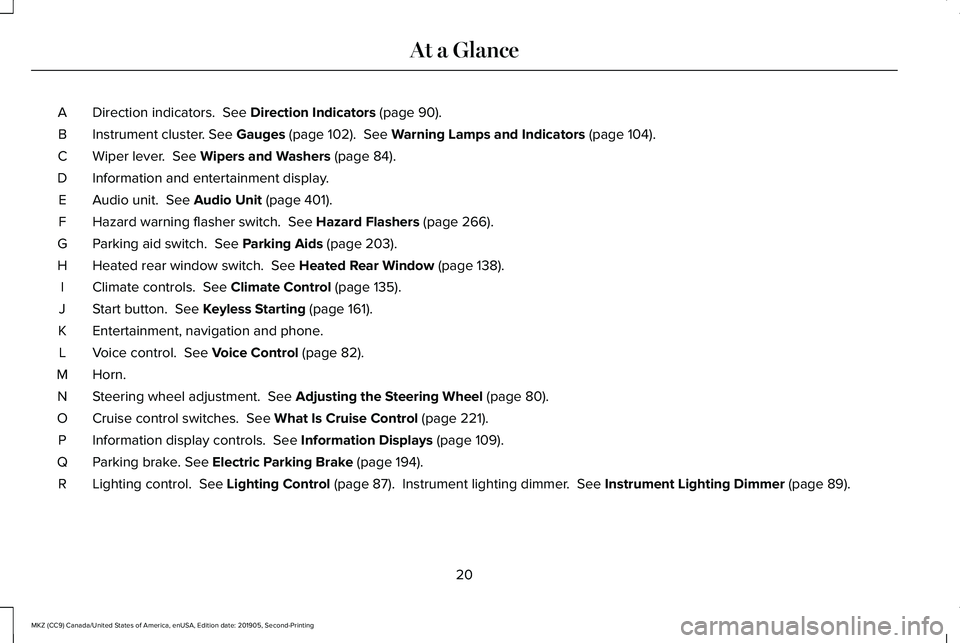
Direction indicators. See Direction Indicators (page 90).
A
Instrument cluster.
See Gauges (page 102). See Warning Lamps and Indicators (page 104).
B
Wiper lever.
See Wipers and Washers (page 84).
C
Information and entertainment display.
D
Audio unit.
See Audio Unit (page 401).
E
Hazard warning flasher switch.
See Hazard Flashers (page 266).
F
Parking aid switch.
See Parking Aids (page 203).
G
Heated rear window switch.
See Heated Rear Window (page 138).
H
Climate controls.
See Climate Control (page 135).
I
Start button.
See Keyless Starting (page 161).
J
Entertainment, navigation and phone.
K
Voice control.
See Voice Control (page 82).
L
Horn.M
Steering wheel adjustment.
See Adjusting the Steering Wheel (page 80).
N
Cruise control switches.
See What Is Cruise Control (page 221).
O
Information display controls.
See Information Displays (page 109).
P
Parking brake.
See Electric Parking Brake (page 194).
Q
Lighting control.
See Lighting Control (page 87). Instrument lighting dimmer. See Instrument Lighting Dimmer (page 89).
R
20
MKZ (CC9) Canada/United States of America, enUSA, Edition date: 201905, Second-Printing At a Glance
Page 409 of 561
SiriusXM Satellite Radio Service
Note:
SiriusXM reserves the unrestricted
right to change, rearrange, add or delete
programming including canceling, moving
or adding particular channels, and its prices,
at any time, with or without notice to you.
Ford Motor Company shall not be
responsible for any such programming
changes. SiriusXM satellite radio is a
subscription-based satellite radio service that
broadcasts a variety of music, sports, news,
weather, traffic and entertainment
programming. Your factory-installed SiriusXM
satellite radio system includes hardware and
a limited subscription term, which begins on
the date of sale or lease of your vehicle. See
an authorized dealer for availability.
For more information on extended
subscription terms (a service fee is required),
the online media player and a complete list
of SiriusXM satellite radio channels, and
other features, please visit www.siriusxm.com
in the United States, www.siriusxm.ca in
Canada, or call SiriusXM at 1-888-539-7474.
Satellite Radio Electronic Serial
Number (ESN)
You need your ESN to activate, modify or
track your satellite radio account.
Locating Your ESN
With satellite radio as the source, use the
touchscreen to select the following:
1.
Select Settings. See Settings (page 451).
2. Select
SiriusXM.
3. Select
SiriusXM information.
406
MKZ (CC9) Canada/United States of America, enUSA, Edition date: 201905, Second-Printing Audio SystemE208625
Page 428 of 561
SiriusXM satellite radio is a
subscription-based satellite radio service that
broadcasts a variety of music, sports, news,
weather, traffic and entertainment
programming. Your factory-installed SiriusXM
satellite radio system includes hardware and
a limited subscription term that begins on
the date of sale or lease of your vehicle. See
an authorized dealer for availability.
For more information on extended
subscription terms (a service fee is required),
the online media player and a list of SiriusXM
satellite radio channels, and other features,
please visit www.siriusxm.com in the United
States, www.siriusxm.ca in Canada, or call
SiriusXM at 1-888-539-7474.
Note:
SiriusXM reserves the unrestricted
right to change, rearrange, add or delete
programming. This includes canceling,
moving or adding particular channels, and
its prices, at any time, with or without notice
to you. We are not responsible for any such
programming changes.
Note: This receiver includes the eCos
real-time operating system. eCos is
published under the eCos License.
The following buttons are available for SiriusXM: Action and Description
Menu Item
Touch this button to see a list of available stations.
Browse
A pop-up appears, allowing you to type in the call numbers of a station.\
Direct Tune
Once you enter the stations call numbers, you can select:
The system tunes to the station you select.
Enter
You exit the pop-up and the current station continues to play.
Cancel
You can press the backspace button to delete the previous number.
425
MKZ (CC9) Canada/United States of America, enUSA, Edition date: 201905, Second-Printing SYNC™ 3
Page 551 of 561
Switching Rear Auto Mode On and Off........438
Switching Recirculated Air On and Off.........437
Switching the Air Conditioning On and
Off......................................................................436
Switching the Climate Controlled Seats On and Off..............................................................436
Switching the Climate Control On and Off......................................................................436
Switching the Heated Exterior Mirrors On and Off.......................................................................437
Switching the Heated Rear Window On and Off.......................................................................437
Switching the Heated Seats On and Off......437
Switching the Heated Steering Wheel On and Off.......................................................................437
Switching the Heated Windshield On and Off.......................................................................437
Switching the Rear Climate Controlled Seats On and Off.......................................................438
Switching the Rear Heated Seats On and Off......................................................................438
Switching the Rear Ventilated Seats On and Off......................................................................438
Switching the Ventilated Seats On and Off......................................................................438
Climate Control..............................................135
Climate Controlled Seats............................149
Cooled Seats........................................................150 Connected Vehicle
......................................395
Connecting the Vehicle to a Mobile
Network............................................................395
Connected Vehicle Limitations.................395
Connected Vehicle Requirements...........395
Connected Vehicle – Troubleshooting.........................................396
Connecting the Vehicle to a Mobile Network.......................................................395
Connecting Lincoln Way to the Modem.......395
Enabling and Disabling the Modem..............395
What Is the Modem............................................395
Connecting the Vehicle to a Wi-Fi Network.......................................................395
Coolant Check See: Engine Coolant Check............................308
Crash Sensors and Airbag Indicator
..........53
Creating a MyKey...........................................63 Programming and Changing Configurable
Settings...............................................................64
Creating a Wi-Fi Hotspot............................398 Connecting a Device to the Wi-Fi
Hotspot.............................................................398
Finding the Wi-Fi Hotspot Name and Password..........................................................398
Cross Traffic Alert.........................................239 Cross Traffic Alert Behavior When Trailer is
Attached...........................................................242 Cross Traffic Alert Indicator.............................243
Cross Traffic Alert Information
Messages.........................................................243
Cross Traffic Alert System Limitations..........242
Cross Traffic Alert System Sensors...............242
Switching the System On and Off..................242
Using Cross Traffic Alert...................................
239
Cruise Control
................................................221
Cruise Control Indicators...........................222
Cruise Control - Vehicles With: Adaptive Cruise Control With Stop and Go
............82
Cruise Control - Vehicles With: Cruise Control............................................................83
Customer Assistance
..................................272
D
Data Recording
................................................10
Comfort, Convenience and Entertainment
Data.......................................................................12
Event Data................................................................11
Service Data............................................................10
Services That Third Parties Provide..................12
Services That We Provide...................................12
Vehicles With a Modem.......................................13
Vehicles With an Emergency Call System.......14
Vehicles With SYNC..............................................13
548
MKZ (CC9) Canada/United States of America, enUSA, Edition date: 201905, Second-Printing Index