warning lights LINCOLN MKZ 2020 Owners Manual
[x] Cancel search | Manufacturer: LINCOLN, Model Year: 2020, Model line: MKZ, Model: LINCOLN MKZ 2020Pages: 561, PDF Size: 5.7 MB
Page 76 of 561
Note:
Before driving your vehicle, check the
instrument cluster for a trunk ajar or door
ajar message or warning indicator. Failure
to do this could result in unintentionally
leaving the decklid open while driving.
The decklid will stop and three chimes will
sound if it detects an obstacle while opening.
Remove the obstacle to operate the decklid.
Resetting the Power Decklid
The decklid may not operate correctly and
you may need to reset it if:
• The vehicle battery charge is low.
• You disconnect the battery.
• You manually close the decklid and leave
it unlatched.
To reset the power decklid:
1. Disconnect the battery for 20 seconds then reconnect the battery.
2. Manually close the decklid making sure it is fully closed.
3. Power open the decklid using the remote
control or instrument panel button. KEYLESS ENTRY
SECURICODE™ KEYLESS ENTRY
KEYPAD
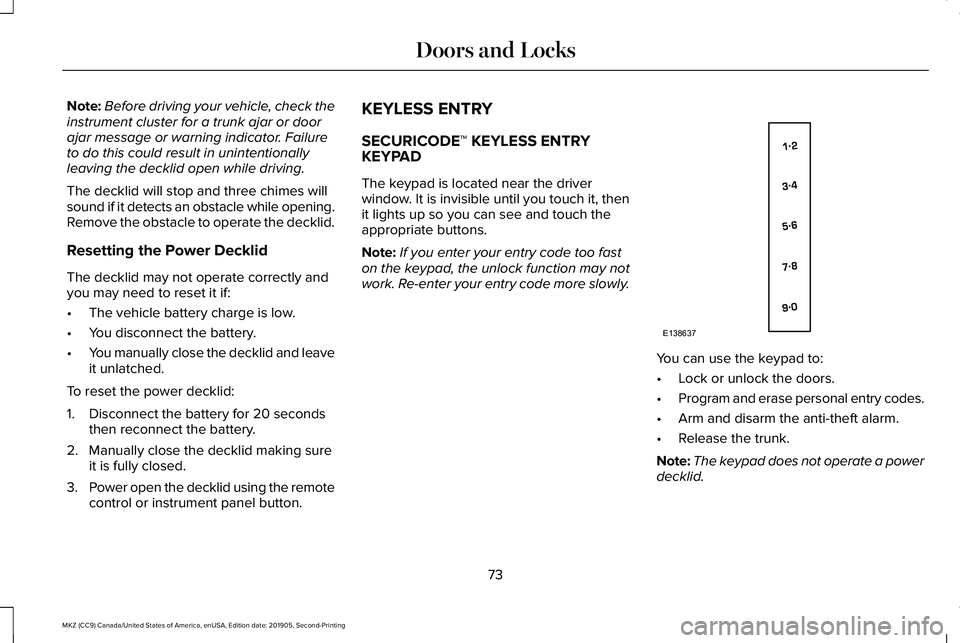
The keypad is located near the driver
window. It is invisible until you touch it, then
it lights up so you can see and touch the
appropriate buttons.
Note:
If you enter your entry code too fast
on the keypad, the unlock function may not
work. Re-enter your entry code more slowly. You can use the keypad to:
•
Lock or unlock the doors.
• Program and erase personal entry codes.
• Arm and disarm the anti-theft alarm.
• Release the trunk.
Note: The keypad does not operate a power
decklid.
73
MKZ (CC9) Canada/United States of America, enUSA, Edition date: 201905, Second-Printing Doors and LocksE138637
Page 101 of 561
Loose Mirror
If you manually fold the power-folding
mirrors, they may not work properly even
after you re-position them. You need to reset
them if:
•
The mirrors vibrate when you drive.
• The mirrors feel loose.
• The mirrors do not stay in the folded or
unfolded position.
• One of the mirrors is not in its normal
driving position.
To reset the power-fold feature, use the
power-folding mirror control to fold and
unfold the mirrors. You may hear a loud noise
as you reset the power-folding mirrors. This
sound is normal. Repeat this process as
needed each time you manually fold the
mirrors.
Heated Exterior Mirrors
See Heated Rear Window (page 138). Memory Mirrors
(If Equipped)
You can save and recall the mirror positions
through the memory function.
See Memory
Function (page 146).
Auto-dimming Feature
The driver exterior mirror automatically dims
when the interior auto-dimming mirror turns
on.
Signal Indicator Mirrors
The outer portion of the appropriate mirror
housing blinks when you activate the
direction indicator.
Lincoln Welcome Mat
Projection lights, on the bottom of the mirror
housings, project an image onto the ground
a short distance from the vehicle.
See
Lighting (page 87).
Blind Spot Information System
See
Blind Spot Information System (page
237). INTERIOR MIRROR WARNING:
Do not adjust the mirror
when your vehicle is moving.
Note: Do not clean the housing or glass of
any mirror with harsh abrasives, fuel or other
petroleum or ammonia-based cleaning
products.
You can adjust the interior mirror to your
preference. Some mirrors also have a second
pivot point. This lets you move the mirror
head up or down and from side to side.
Auto-Dimming Mirror
Note: Do not block the sensors on the front
and back of the mirror. Mirror performance
may be affected. A rear center passenger
or raised rear center head restraint may also
block light from reaching the sensor.
98
MKZ (CC9) Canada/United States of America, enUSA, Edition date: 201905, Second-Printing Windows and Mirrors
Page 102 of 561
The mirror will dim automatically to reduce
glare when bright lights are detected from
behind your vehicle. It will automatically
return to normal reflection when you select
reverse gear to make sure you have a clear
view when backing up.
SUN VISORS
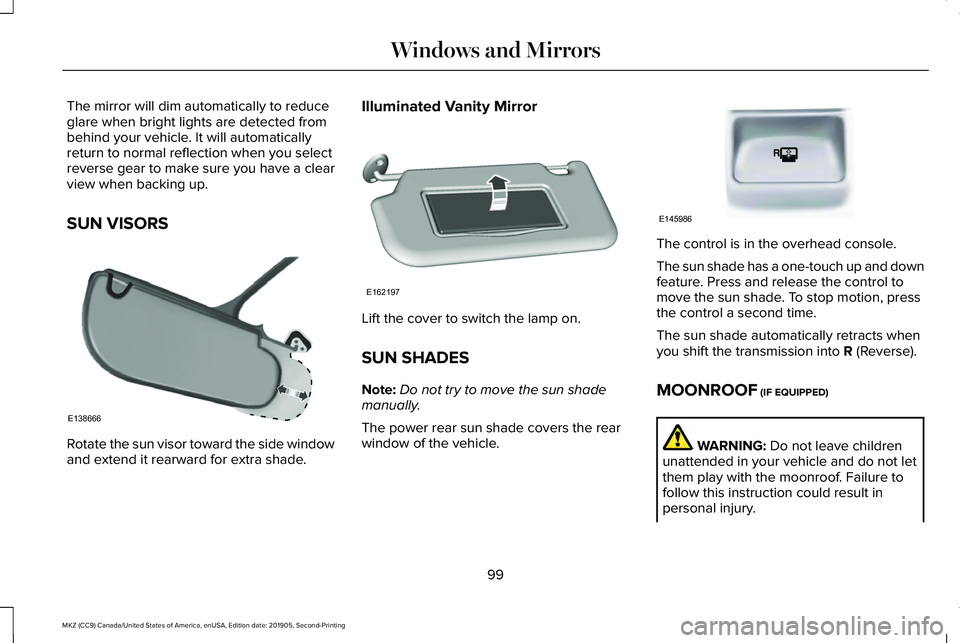
Rotate the sun visor toward the side window
and extend it rearward for extra shade. Illuminated Vanity Mirror
Lift the cover to switch the lamp on.
SUN SHADES
Note:
Do not try to move the sun shade
manually.
The power rear sun shade covers the rear
window of the vehicle. The control is in the overhead console.
The sun shade has a one-touch up and down
feature. Press and release the control to
move the sun shade. To stop motion, press
the control a second time.
The sun shade automatically retracts when
you shift the transmission into R (Reverse).
MOONROOF
(IF EQUIPPED) WARNING:
Do not leave children
unattended in your vehicle and do not let
them play with the moonroof. Failure to
follow this instruction could result in
personal injury.
99
MKZ (CC9) Canada/United States of America, enUSA, Edition date: 201905, Second-Printing Windows and MirrorsE138666 E162197 E145986
Page 109 of 561
If it illuminates when the engine is running,
this indicates a malfunction. Stop your
vehicle as soon as it is safe to do so and
switch the engine off. Check the engine oil
level. If the oil level is sufficient, this
indicates a system malfunction. Have your
vehicle checked as soon as possible.
See Engine Oil Check (page 306).
Fasten Seatbelt Warning Lamp It illuminates and a chime sounds
until you fasten the seatbelts.
Front Airbag If it fails to illuminate when you
start your vehicle, continues to
flash or remains on, it indicates a
malfunction. Have the system checked by
your authorized dealer. Heads Up Display
(If Equipped) A red beam of lights will illuminate
on the windshield in certain
instances when using adaptive
cruise control, and the collision warning
system. It also illuminates momentarily when
you start your vehicle to make sure the
display works.
Headlamp High Beam Indicator It illuminates when you switch the
high beam headlamps on. It flashes
when you use the headlamp
flasher.
Hood Ajar Displays when the ignition is on
and the hood is not completely
closed.
Lane Keeping System Lamp It illuminates when the system
activates.Low Fuel Level Warning Lamp It illuminates when the fuel level is
low or the fuel tank is nearly
empty. Refuel as soon as possible.
Low Tire Pressure Warning Lamp If the lamp remains on with the
engine running or when driving,
check your tire pressure as soon
as possible. It illuminates when your tire
pressure is low.
It also illuminates momentarily when you
switch the ignition on to confirm the lamp is
functional. If it does not illuminate when you
switch the ignition on, or begins to flash at
any time, have the system checked by your
authorized dealer.
Low Washer Fluid Level Warning Lamp It illuminates when the windshield
washer fluid is low.
106
MKZ (CC9) Canada/United States of America, enUSA, Edition date: 201905, Second-Printing Instrument ClusterE71880 E67017 E156133 E159324 E144813 E132353
Page 151 of 561
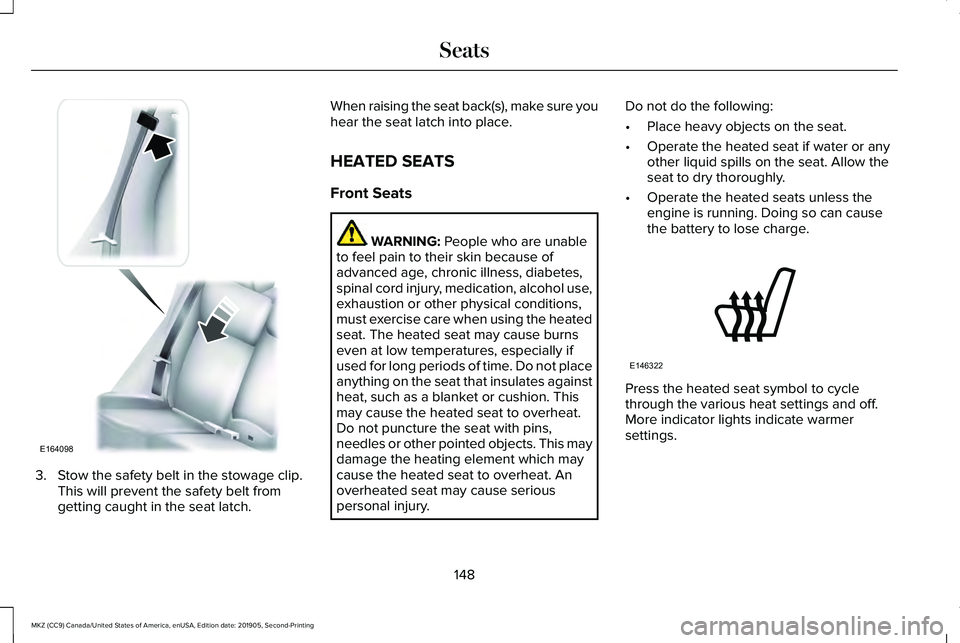
3. Stow the safety belt in the stowage clip.
This will prevent the safety belt from
getting caught in the seat latch. When raising the seat back(s), make sure you
hear the seat latch into place.
HEATED SEATS
Front Seats
WARNING: People who are unable
to feel pain to their skin because of
advanced age, chronic illness, diabetes,
spinal cord injury, medication, alcohol use,
exhaustion or other physical conditions,
must exercise care when using the heated
seat. The heated seat may cause burns
even at low temperatures, especially if
used for long periods of time. Do not place
anything on the seat that insulates against
heat, such as a blanket or cushion. This
may cause the heated seat to overheat.
Do not puncture the seat with pins,
needles or other pointed objects. This may
damage the heating element which may
cause the heated seat to overheat. An
overheated seat may cause serious
personal injury. Do not do the following:
•
Place heavy objects on the seat.
• Operate the heated seat if water or any
other liquid spills on the seat. Allow the
seat to dry thoroughly.
• Operate the heated seats unless the
engine is running. Doing so can cause
the battery to lose charge. Press the heated seat symbol to cycle
through the various heat settings and off.
More indicator lights indicate warmer
settings.
148
MKZ (CC9) Canada/United States of America, enUSA, Edition date: 201905, Second-Printing SeatsE164098 E146322
Page 152 of 561
Rear Seats
WARNING: Persons who are unable
to feel pain to the skin because of
advanced age, chronic illness, diabetes,
spinal cord injury, medication, alcohol use,
exhaustion, or other physical conditions,
must exercise care when using the seat
heater. The seat heater may cause burns
even at low temperatures, especially if
used for long periods of time. Do not place
anything on the seat that insulates against
heat, such as a blanket or cushion,
because this may cause the seat heater to
overheat. Do not puncture the seat with
pins, needles, or other pointed objects
because this may damage the heating
element which may cause the seat heater
to overheat. An overheated seat may
cause serious personal injury. Do not do the following:
•
Place heavy objects on the seat.
• Operate the seat heater if water or any
other liquid is spilled on the seat. Allow
the seat to dry thoroughly.
• Operate the heated seats unless the
engine is running. Doing so can cause
the battery to lose charge.
The rear seat heat controls are located on
the rear of the center console. Press the heated seat symbol to cycle
through the various heat settings and off.
More indicator lights indicate warmer
settings.The heated seat module resets at every
ignition run cycle. While the ignition is on,
press the high or low heated seat switch to
enable heating mode. When activated, they
will turn off automatically when you turn the
engine off.
CLIMATE CONTROLLED SEATS
(IF
EQUIPPED)
Heated Seats WARNING:
People who are unable
to feel pain to their skin because of
advanced age, chronic illness, diabetes,
spinal cord injury, medication, alcohol use,
exhaustion or other physical conditions,
must exercise care when using the heated
seat. The heated seat may cause burns
even at low temperatures, especially if
used for long periods of time. Do not place
anything on the seat that insulates against
heat, such as a blanket or cushion. This
may cause the heated seat to overheat.
149
MKZ (CC9) Canada/United States of America, enUSA, Edition date: 201905, Second-Printing SeatsE146322
Page 158 of 561
Programming HomeLink to the Genie
Intellicode Garage Door Opener Motor
Note:
You may need a ladder to access the
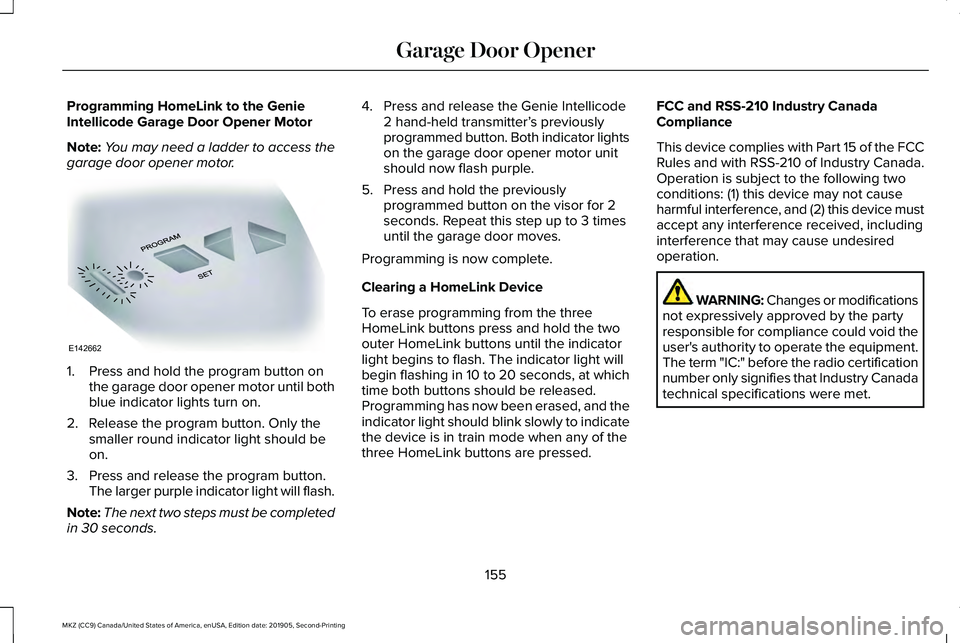
garage door opener motor. 1. Press and hold the program button on
the garage door opener motor until both
blue indicator lights turn on.
2. Release the program button. Only the smaller round indicator light should be
on.
3. Press and release the program button. The larger purple indicator light will flash.
Note: The next two steps must be completed
in 30 seconds. 4. Press and release the Genie Intellicode
2 hand-held transmitter’ s previously
programmed button. Both indicator lights
on the garage door opener motor unit
should now flash purple.
5. Press and hold the previously programmed button on the visor for 2
seconds. Repeat this step up to 3 times
until the garage door moves.
Programming is now complete.
Clearing a HomeLink Device
To erase programming from the three
HomeLink buttons press and hold the two
outer HomeLink buttons until the indicator
light begins to flash. The indicator light will
begin flashing in 10 to 20 seconds, at which
time both buttons should be released.
Programming has now been erased, and the
indicator light should blink slowly to indicate
the device is in train mode when any of the
three HomeLink buttons are pressed. FCC and RSS-210 Industry Canada
Compliance
This device complies with Part 15 of the FCC
Rules and with RSS-210 of Industry Canada.
Operation is subject to the following two
conditions: (1) this device may not cause
harmful interference, and (2) this device must
accept any interference received, including
interference that may cause undesired
operation.
WARNING: Changes or modifications
not expressively approved by the party
responsible for compliance could void the
user's authority to operate the equipment.
The term "IC:" before the radio certification
number only signifies that Industry Canada
technical specifications were met.
155
MKZ (CC9) Canada/United States of America, enUSA, Edition date: 201905, Second-Printing Garage Door OpenerE142662
Page 199 of 561
AUTO HOLD
WARNING: The system does not
replace the parking brake. When you leave
your vehicle, always apply the parking
brake. WARNING: You must remain in your
vehicle when the system turns on. At all
times, you are responsible for controlling
your vehicle, supervising the system and
intervening, if required. Failure to take care
may result in the loss of control of your
vehicle, serious personal injury or death. WARNING:
The system will turn off
if a malfunction is apparent. Failure to take
care may result in the loss of control of
your vehicle, serious personal injury or
death. Auto Hold uses your vehicle's brakes to hold
your vehicle at a stop once your vehicle has
reached a standstill condition. For example,
Auto Hold can assist you while stopping at
traffic lights or while in traffic jams by holding
the brake pressure for you once you bring
your vehicle to a stop.
Switch Auto Hold off during vehicle or trailer
towing.
Note:
In case of a malfunction in the system
while Auto Hold actively holds the vehicle
(for example, low power supply), a message
appears in the information display asking
you to press the brake pedal. If you see this
message, press the brake pedal
immediately.
Note: Auto Hold only activates if the system
recognizes it is applying enough brake
pressure. On a steep hill or incline, you may
need to make sure the brake pedal is
pressed sufficiently to activate the Auto Hold
system. Note:
In some cases, Auto Hold might hand
over to the parking brake. When the parking
brake applies, the red brake lamp appears.
This is normal. When you press the
accelerator pedal, the drive away release
feature releases the parking brake.
Note: Auto Hold works on all road grades.
196
MKZ (CC9) Canada/United States of America, enUSA, Edition date: 201905, Second-Printing Brakes
Page 202 of 561
PRINCIPLE OF OPERATION
The traction control system helps avoid drive
wheel spin and loss of traction.
If your vehicle begins to slide, the system
applies the brakes to individual wheels and,
when needed, reduces engine power at the
same time. If the wheels spin when
accelerating on slippery or loose surfaces,
the system reduces engine power in order
to increase traction.
USING TRACTION CONTROL
WARNING: The stability and traction
control light illuminates steadily if the
system detects a failure. Make sure you
did not manually disable the traction
control system using the information
display controls or the switch. If the stability
control and traction control light is still illuminating steadily, have the system
serviced by an authorized dealer
immediately. Operating your vehicle with
the traction control disabled could lead to
an increased risk of loss of vehicle control,
vehicle rollover, personal injury and death.
The system automatically turns on each time
you switch the ignition on.
If your vehicle is stuck in mud or snow,
switching traction control off may be
beneficial as this allows the wheels to spin.
Note: When you switch traction control off,
stability control remains fully active.
Switching the System Off
When you switch the system off or on, a
message appears in the information display
showing system status.
You can switch the system off by either using
the information display controls or the switch. Using the Information Display Controls
You can switch this feature off or on in the
information display. See General Information
(page
109).
Using a Switch
(If Equipped)
Use the traction control switch on the
instrument panel to switch the system off or
on.
System Indicator Lights and Messages The stability and traction control
light:
• Temporarily illuminates on engine
start-up.
• Flashes when a driving condition
activates either of the systems.
• Illuminates if a problem occurs in either
of the systems. The stability and traction control
off light temporarily illuminates on
engine start-up and stays on when
you switch the traction control system off.
199
MKZ (CC9) Canada/United States of America, enUSA, Edition date: 201905, Second-Printing Traction ControlE138639 E130458
Page 222 of 561
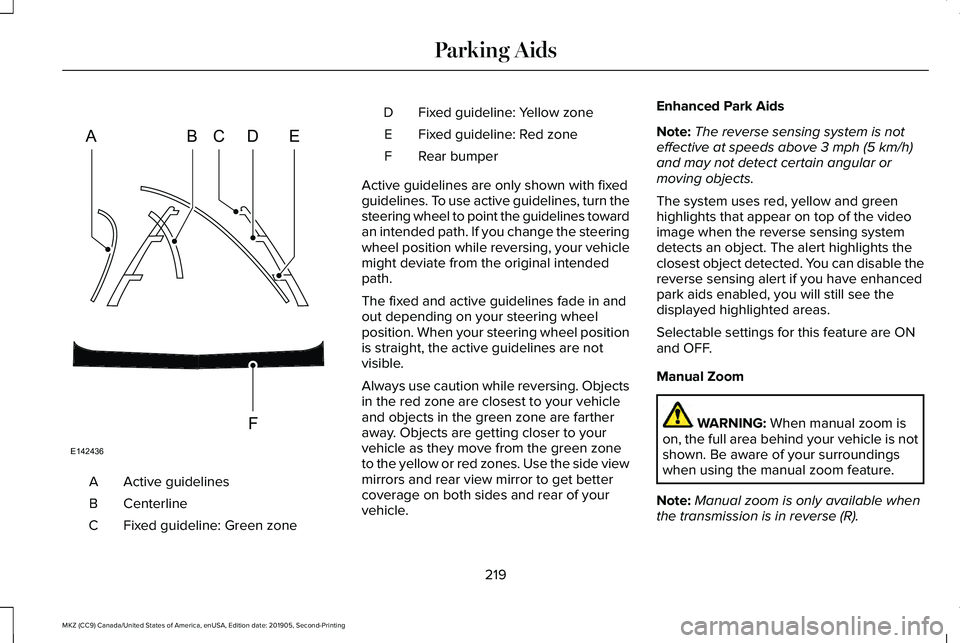
Active guidelines
A
Centerline
B
Fixed guideline: Green zone
C Fixed guideline: Yellow zone
D
Fixed guideline: Red zone
E
Rear bumper
F
Active guidelines are only shown with fixed
guidelines. To use active guidelines, turn the
steering wheel to point the guidelines toward
an intended path. If you change the steering
wheel position while reversing, your vehicle
might deviate from the original intended
path.
The fixed and active guidelines fade in and
out depending on your steering wheel
position. When your steering wheel position
is straight, the active guidelines are not
visible.
Always use caution while reversing. Objects
in the red zone are closest to your vehicle
and objects in the green zone are farther
away. Objects are getting closer to your
vehicle as they move from the green zone
to the yellow or red zones. Use the side view
mirrors and rear view mirror to get better
coverage on both sides and rear of your
vehicle. Enhanced Park Aids
Note:
The reverse sensing system is not
effective at speeds above 3 mph (5 km/h)
and may not detect certain angular or
moving objects.
The system uses red, yellow and green
highlights that appear on top of the video
image when the reverse sensing system
detects an object. The alert highlights the
closest object detected. You can disable the
reverse sensing alert if you have enhanced
park aids enabled, you will still see the
displayed highlighted areas.
Selectable settings for this feature are ON
and OFF.
Manual Zoom WARNING:
When manual zoom is
on, the full area behind your vehicle is not
shown. Be aware of your surroundings
when using the manual zoom feature.
Note: Manual zoom is only available when
the transmission is in reverse (R).
219
MKZ (CC9) Canada/United States of America, enUSA, Edition date: 201905, Second-Printing Parking AidsABCD
F
E
E142436