Brake LINCOLN MKZ HYBRID 2013 User Guide
[x] Cancel search | Manufacturer: LINCOLN, Model Year: 2013, Model line: MKZ HYBRID, Model: LINCOLN MKZ HYBRID 2013Pages: 475, PDF Size: 3.89 MB
Page 100 of 475
WARNING LAMPS AND
INDICATORS
The following warning lamps and
indicators will alert you to a vehicle
condition that may become serious.
Some lamps will illuminate when you
start your vehicle to make sure they
work. If any lamps remain on after
starting your vehicle, refer to the
respective system warning lamp for
further information.
Note:
Some warning indicators appear
in the information display and function
the same as a warning lamp but do not
display when you start your vehicle.
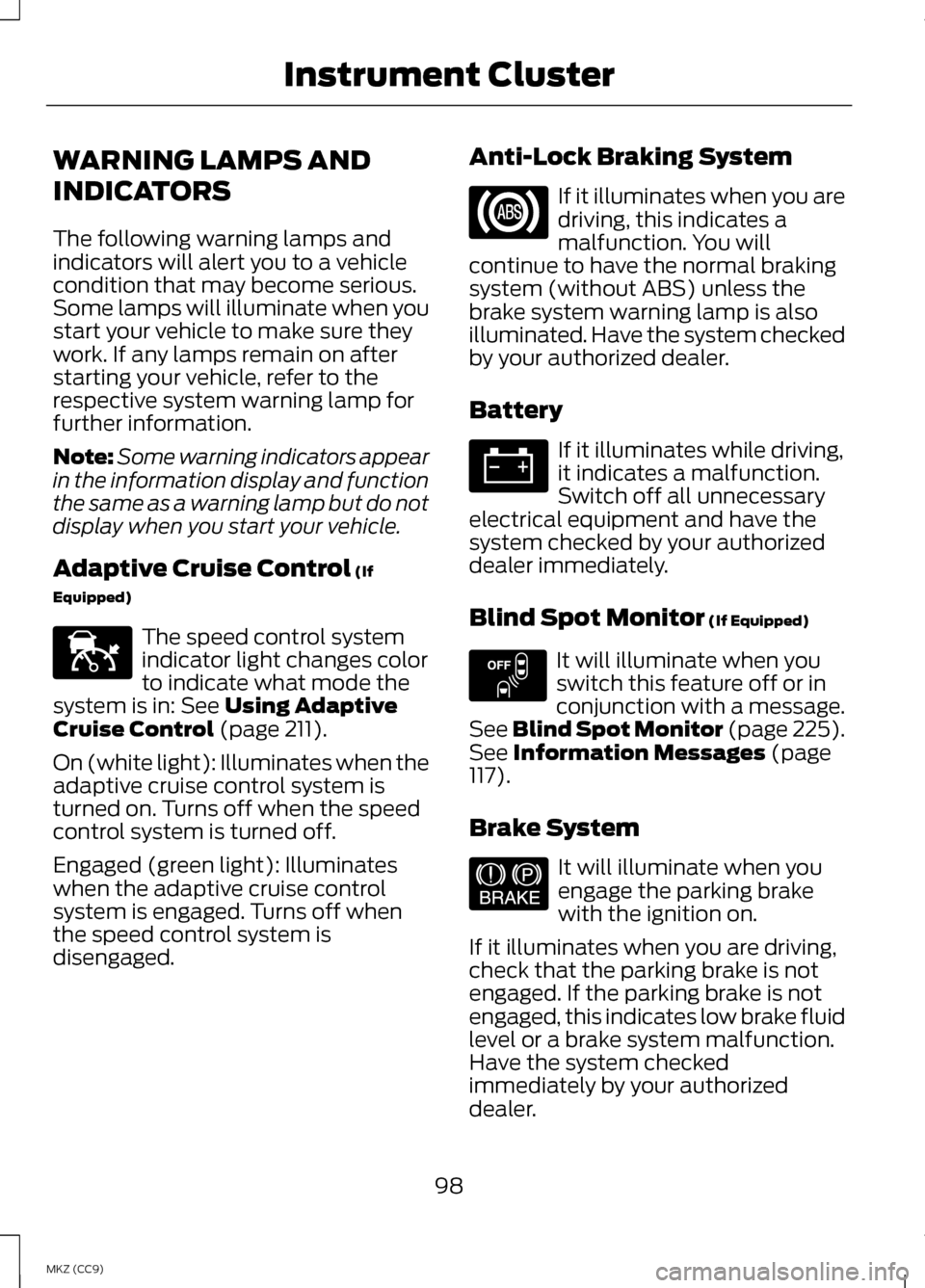
Adaptive Cruise Control (If
Equipped) The speed control system
indicator light changes color
to indicate what mode the
system is in:
See Using Adaptive
Cruise Control (page 211).
On (white light): Illuminates when the
adaptive cruise control system is
turned on. Turns off when the speed
control system is turned off.
Engaged (green light): Illuminates
when the adaptive cruise control
system is engaged. Turns off when
the speed control system is
disengaged. Anti-Lock Braking System If it illuminates when you are
driving, this indicates a
malfunction. You will
continue to have the normal braking
system (without ABS) unless the
brake system warning lamp is also
illuminated. Have the system checked
by your authorized dealer.
Battery If it illuminates while driving,
it indicates a malfunction.
Switch off all unnecessary
electrical equipment and have the
system checked by your authorized
dealer immediately.
Blind Spot Monitor
(If Equipped) It will illuminate when you
switch this feature off or in
conjunction with a message.
See Blind Spot Monitor (page 225).
See
Information Messages (page
117).
Brake System It will illuminate when you
engage the parking brake
with the ignition on.
If it illuminates when you are driving,
check that the parking brake is not
engaged. If the parking brake is not
engaged, this indicates low brake fluid
level or a brake system malfunction.
Have the system checked
immediately by your authorized
dealer.
98
MKZ (CC9) Instrument ClusterE144524 E151262 E144522
Page 101 of 475
WARNING
Driving your vehicle with the
warning lamp on is dangerous. A
significant decrease in braking
performance may occur. It will take
you longer to stop your vehicle. Have
your vehicle checked by your
authorized dealer immediately. Driving
extended distances with the parking
brake engaged can cause brake failure
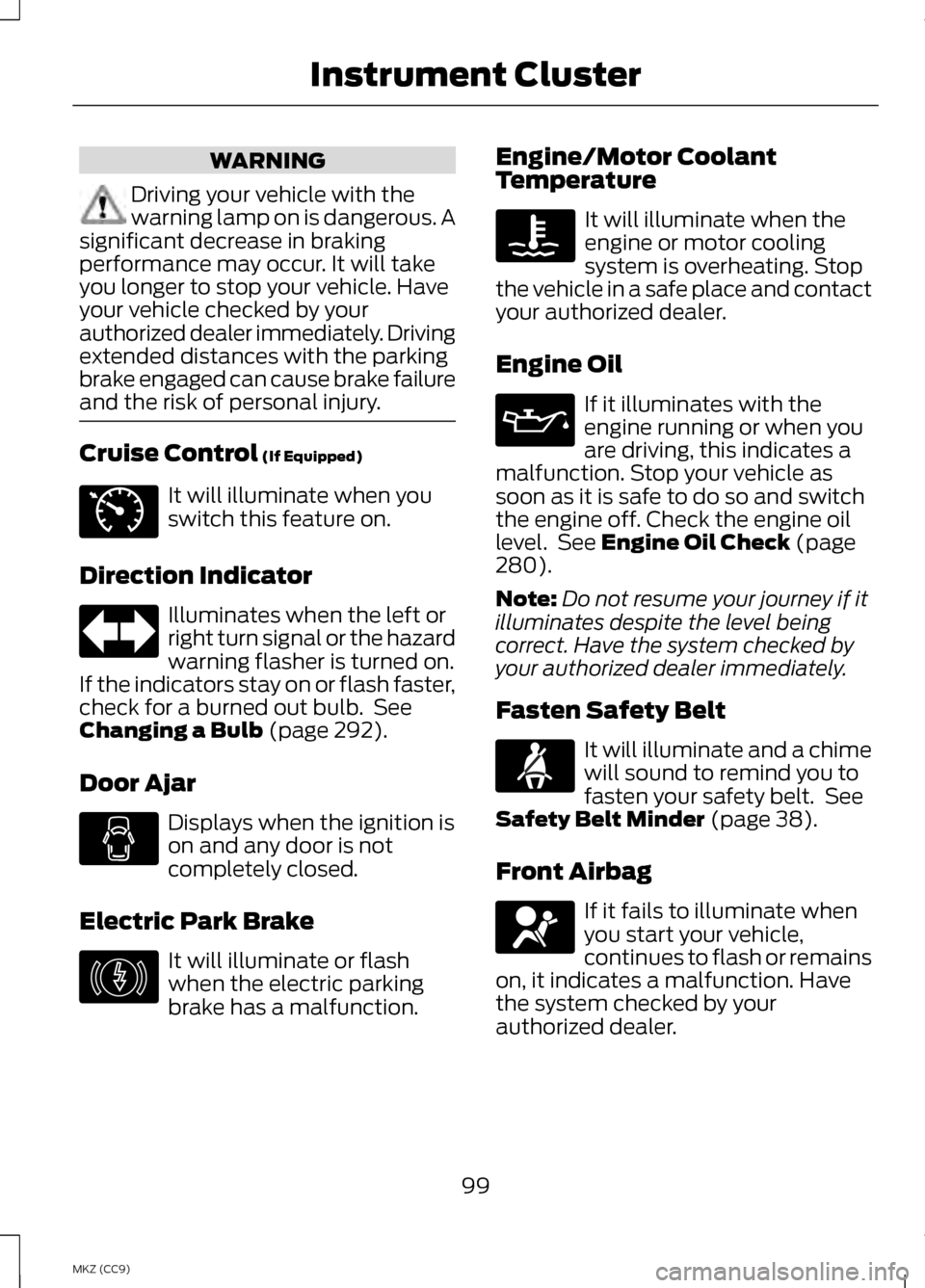
and the risk of personal injury. Cruise Control (If Equipped)
It will illuminate when you
switch this feature on.
Direction Indicator Illuminates when the left or
right turn signal or the hazard
warning flasher is turned on.
If the indicators stay on or flash faster,
check for a burned out bulb. See
Changing a Bulb
(page 292).
Door Ajar Displays when the ignition is
on and any door is not
completely closed.
Electric Park Brake It will illuminate or flash
when the electric parking
brake has a malfunction. Engine/Motor Coolant
Temperature It will illuminate when the
engine or motor cooling
system is overheating. Stop
the vehicle in a safe place and contact
your authorized dealer.
Engine Oil If it illuminates with the
engine running or when you
are driving, this indicates a
malfunction. Stop your vehicle as
soon as it is safe to do so and switch
the engine off. Check the engine oil
level. See
Engine Oil Check (page
280).
Note: Do not resume your journey if it
illuminates despite the level being
correct. Have the system checked by
your authorized dealer immediately.
Fasten Safety Belt It will illuminate and a chime
will sound to remind you to
fasten your safety belt. See
Safety Belt Minder
(page 38).
Front Airbag If it fails to illuminate when
you start your vehicle,
continues to flash or remains
on, it indicates a malfunction. Have
the system checked by your
authorized dealer.
99
MKZ (CC9) Instrument ClusterE71340 E146190
Page 104 of 475
AUDIBLE WARNINGS AND
INDICATORS
Key in Ignition Warning Chime
Sounds when you open the driver's
door and you have left the key in the
ignition with it in the off or accessory
position.
Keyless Warning Alert (If Equipped)
Chirps the horn twice when you exit
the vehicle with the intelligent access
key and the keyless vehicle is in RUN,
indicating the vehicle is still on.
Headlamps On Warning Chime
Sounds when you remove the key
from the ignition and open the driver's
door and you have left the headlamps
or parking lamps on.
Parking Brake On Warning
Chime
Sounds when you have left the
parking brake on and drive your
vehicle. If the warning chime remains
on after you have released the parking
brake, have the system checked by
your authorized dealer immediately.
102
MKZ (CC9) Instrument Cluster
Page 119 of 475
Settings (cont’
d)
Fuel only / Fuel +Electric
Fuel Economy
Fahrenheit (°F) /Celsius (°C)
Temperature
—
On / Off
Brake Coach
Display
—
Lifetime Fuel
Economy, Regen
Miles, Brake Score,
Hold OK to RESET
Liftetime
Summary
• Brake Coach Display: This appears after the vehicle has come to a stop. It
coaches you to brake in a manner which maximizes the amount of energy
returned through the regenerative braking system. The percent displayed is
an indication of the regenerative braking efficiency with 100% representing
the maximum amount of regenerative braking energy recovery.
INFORMATION MESSAGES
Note: Depending on the vehicle
options equipped with your vehicle, not
all of the messages will display or be
available. Certain messages may be
abbreviated or shortened depending
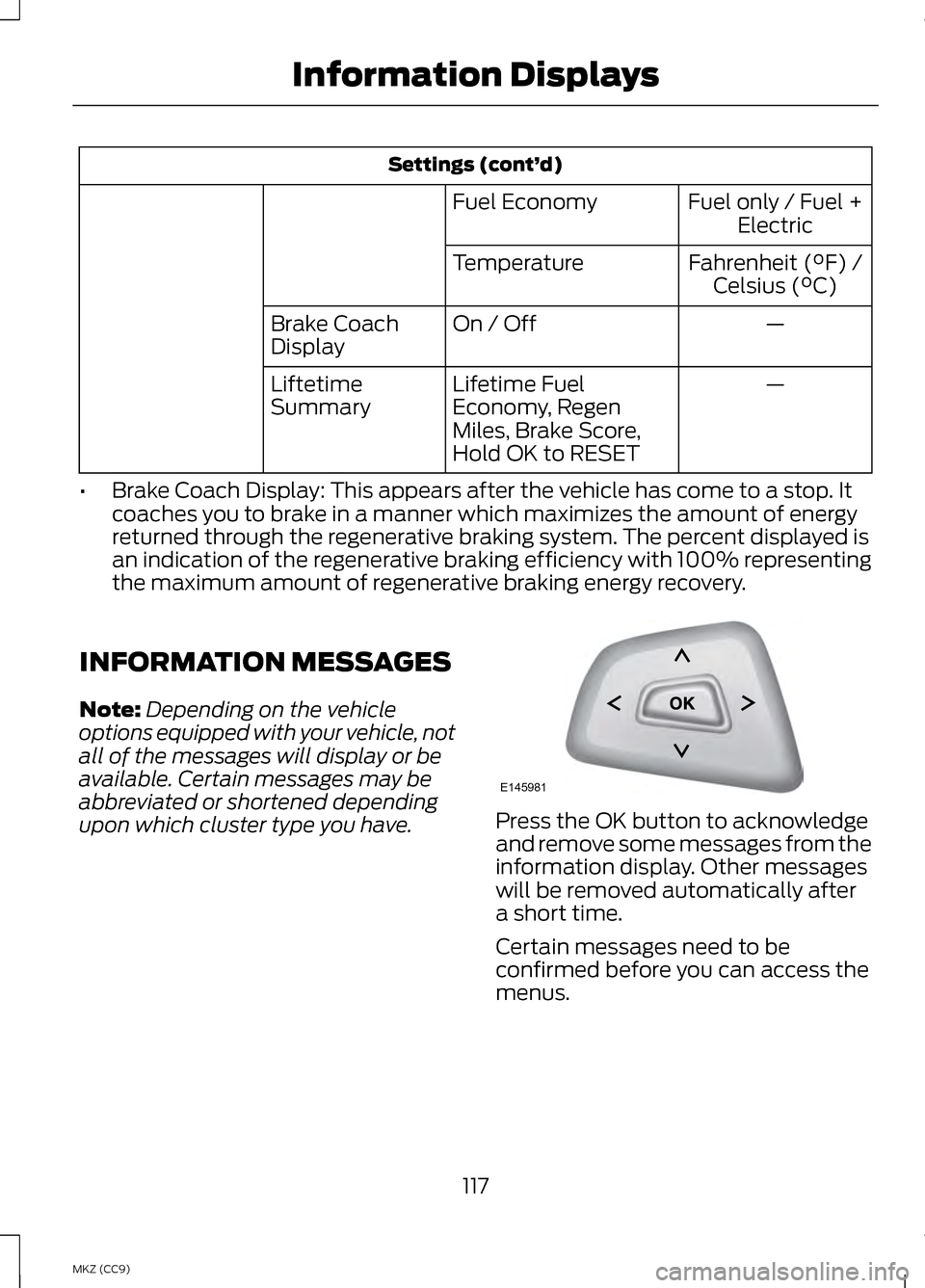
upon which cluster type you have. Press the OK button to acknowledge
and remove some messages from the
information display. Other messages
will be removed automatically after
a short time.
Certain messages need to be
confirmed before you can access the
menus.
117
MKZ (CC9) Information DisplaysE145981
Page 125 of 475
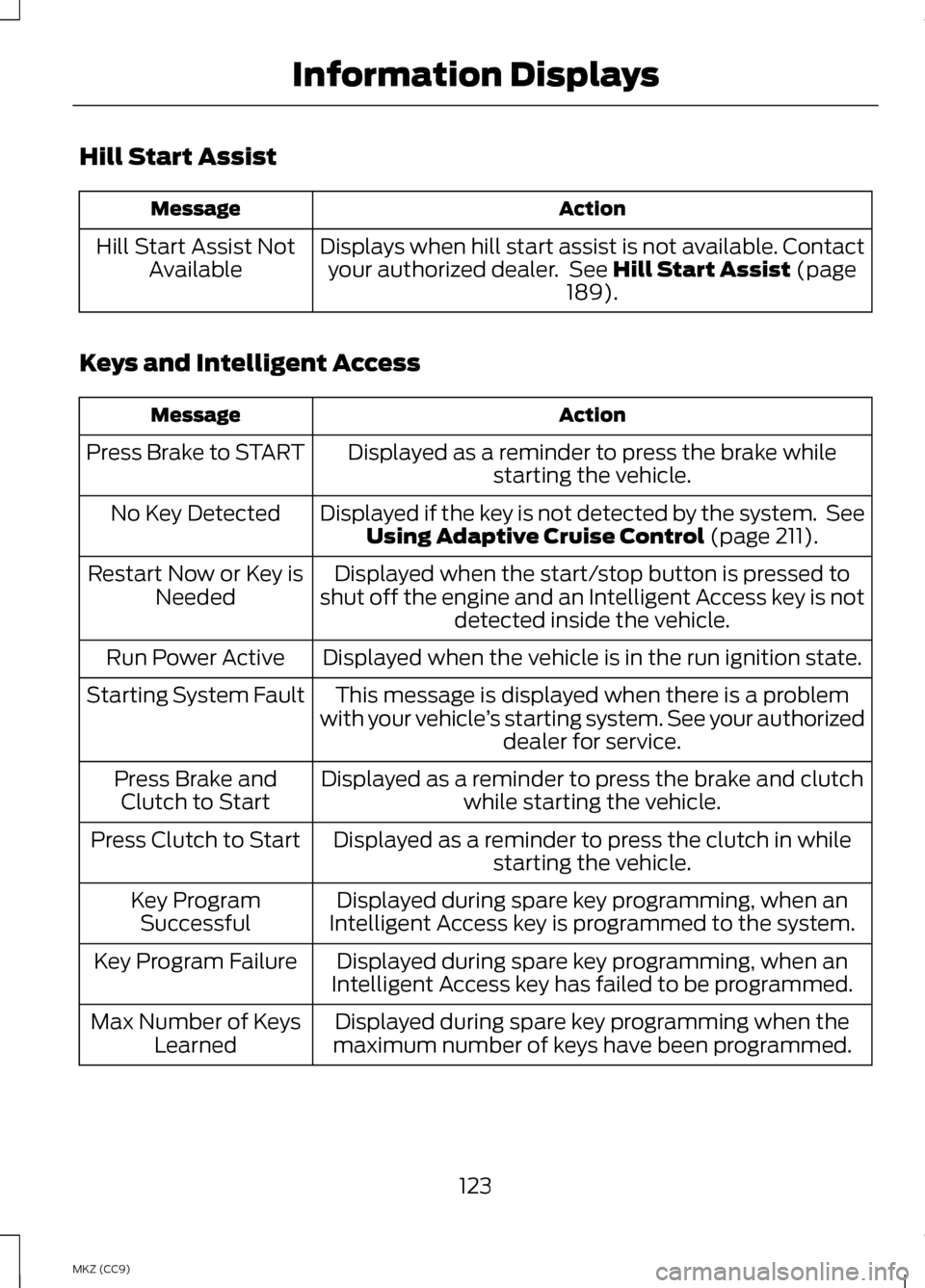
Hill Start Assist
Action
Message
Displays when hill start assist is not available. Contactyour authorized dealer. See Hill Start Assist (page
189).
Hill Start Assist Not
Available
Keys and Intelligent Access Action
Message
Displayed as a reminder to press the brake whilestarting the vehicle.
Press Brake to START
Displayed if the key is not detected by the system. SeeUsing Adaptive Cruise Control
(page 211).
No Key Detected
Displayed when the start/stop button is pressed to
shut off the engine and an Intelligent Access key is not detected inside the vehicle.
Restart Now or Key is
Needed
Displayed when the vehicle is in the run ignition state.
Run Power Active
This message is displayed when there is a problem
with your vehicle ’s starting system. See your authorized
dealer for service.
Starting System Fault
Displayed as a reminder to press the brake and clutchwhile starting the vehicle.
Press Brake and
Clutch to Start
Displayed as a reminder to press the clutch in whilestarting the vehicle.
Press Clutch to Start
Displayed during spare key programming, when an
Intelligent Access key is programmed to the system.
Key Program
Successful
Displayed during spare key programming, when an
Intelligent Access key has failed to be programmed.
Key Program Failure
Displayed during spare key programming when the
maximum number of keys have been programmed.
Max Number of Keys
Learned
123
MKZ (CC9) Information Displays
Page 127 of 475
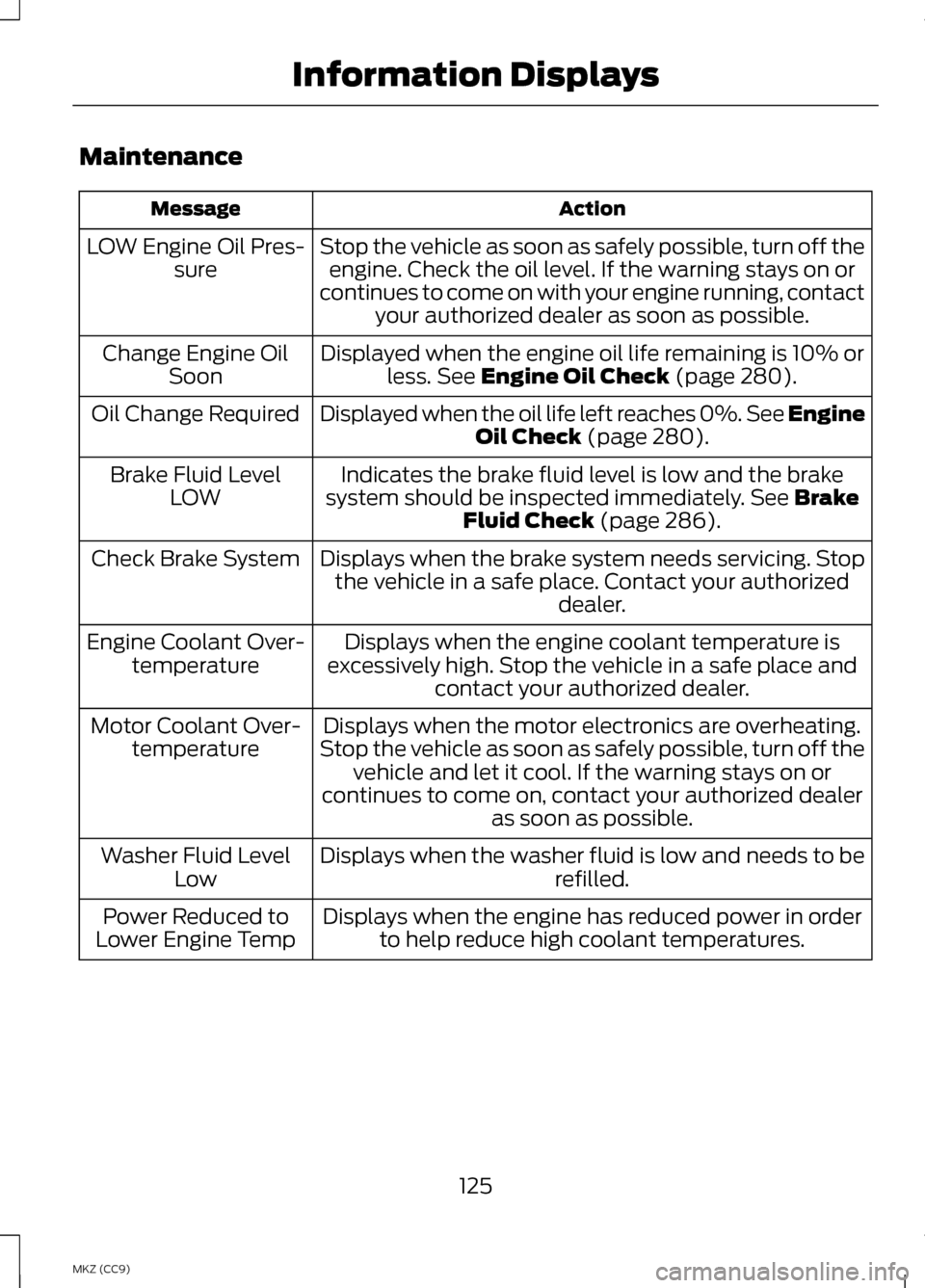
Maintenance
Action
Message
Stop the vehicle as soon as safely possible, turn off theengine. Check the oil level. If the warning stays on or
continues to come on with your engine running, contact your authorized dealer as soon as possible.
LOW Engine Oil Pres-
sure
Displayed when the engine oil life remaining is 10% orless. See Engine Oil Check (page 280).
Change Engine Oil
Soon
Displayed when the oil life left reaches 0%. See Engine Oil Check
(page 280).
Oil Change Required
Indicates the brake fluid level is low and the brake
system should be inspected immediately.
See Brake
Fluid Check (page 286).
Brake Fluid Level
LOW
Displays when the brake system needs servicing. Stopthe vehicle in a safe place. Contact your authorized dealer.
Check Brake System
Displays when the engine coolant temperature is
excessively high. Stop the vehicle in a safe place and contact your authorized dealer.
Engine Coolant Over-
temperature
Displays when the motor electronics are overheating.
Stop the vehicle as soon as safely possible, turn off the vehicle and let it cool. If the warning stays on or
continues to come on, contact your authorized dealer as soon as possible.
Motor Coolant Over-
temperature
Displays when the washer fluid is low and needs to be refilled.
Washer Fluid Level
Low
Displays when the engine has reduced power in orderto help reduce high coolant temperatures.
Power Reduced to
Lower Engine Temp
125
MKZ (CC9) Information Displays
Page 130 of 475
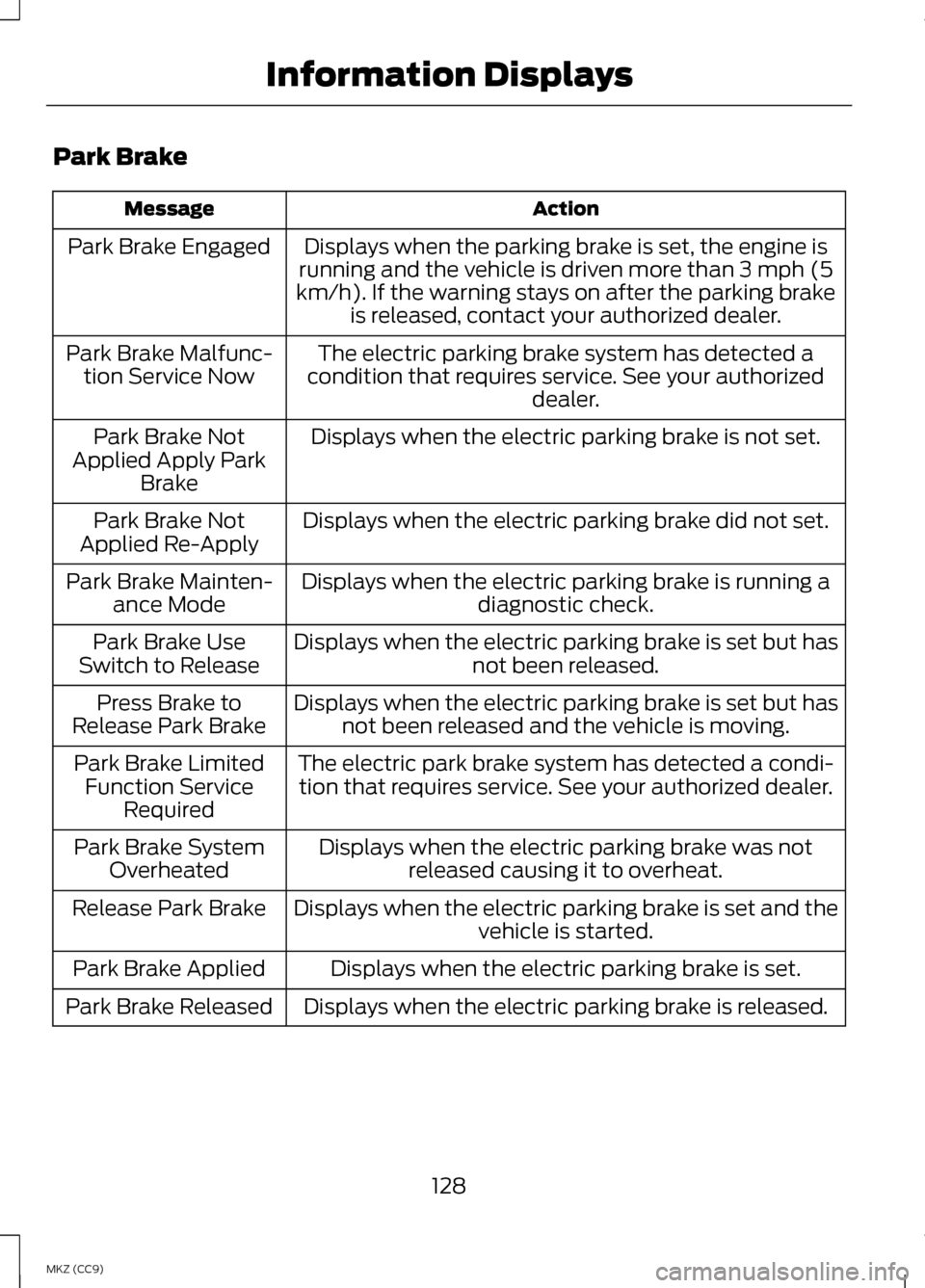
Park Brake
Action
Message
Displays when the parking brake is set, the engine is
running and the vehicle is driven more than 3 mph (5
km/h). If the warning stays on after the parking brake is released, contact your authorized dealer.
Park Brake Engaged
The electric parking brake system has detected a
condition that requires service. See your authorized dealer.
Park Brake Malfunc-
tion Service Now
Displays when the electric parking brake is not set.
Park Brake Not
Applied Apply Park Brake
Displays when the electric parking brake did not set.
Park Brake Not
Applied Re-Apply
Displays when the electric parking brake is running adiagnostic check.
Park Brake Mainten-
ance Mode
Displays when the electric parking brake is set but hasnot been released.
Park Brake Use
Switch to Release
Displays when the electric parking brake is set but hasnot been released and the vehicle is moving.
Press Brake to
Release Park Brake
The electric park brake system has detected a condi-tion that requires service. See your authorized dealer.
Park Brake Limited
Function Service Required
Displays when the electric parking brake was notreleased causing it to overheat.
Park Brake System
Overheated
Displays when the electric parking brake is set and the vehicle is started.
Release Park Brake
Displays when the electric parking brake is set.
Park Brake Applied
Displays when the electric parking brake is released.
Park Brake Released
128
MKZ (CC9) Information Displays
Page 131 of 475
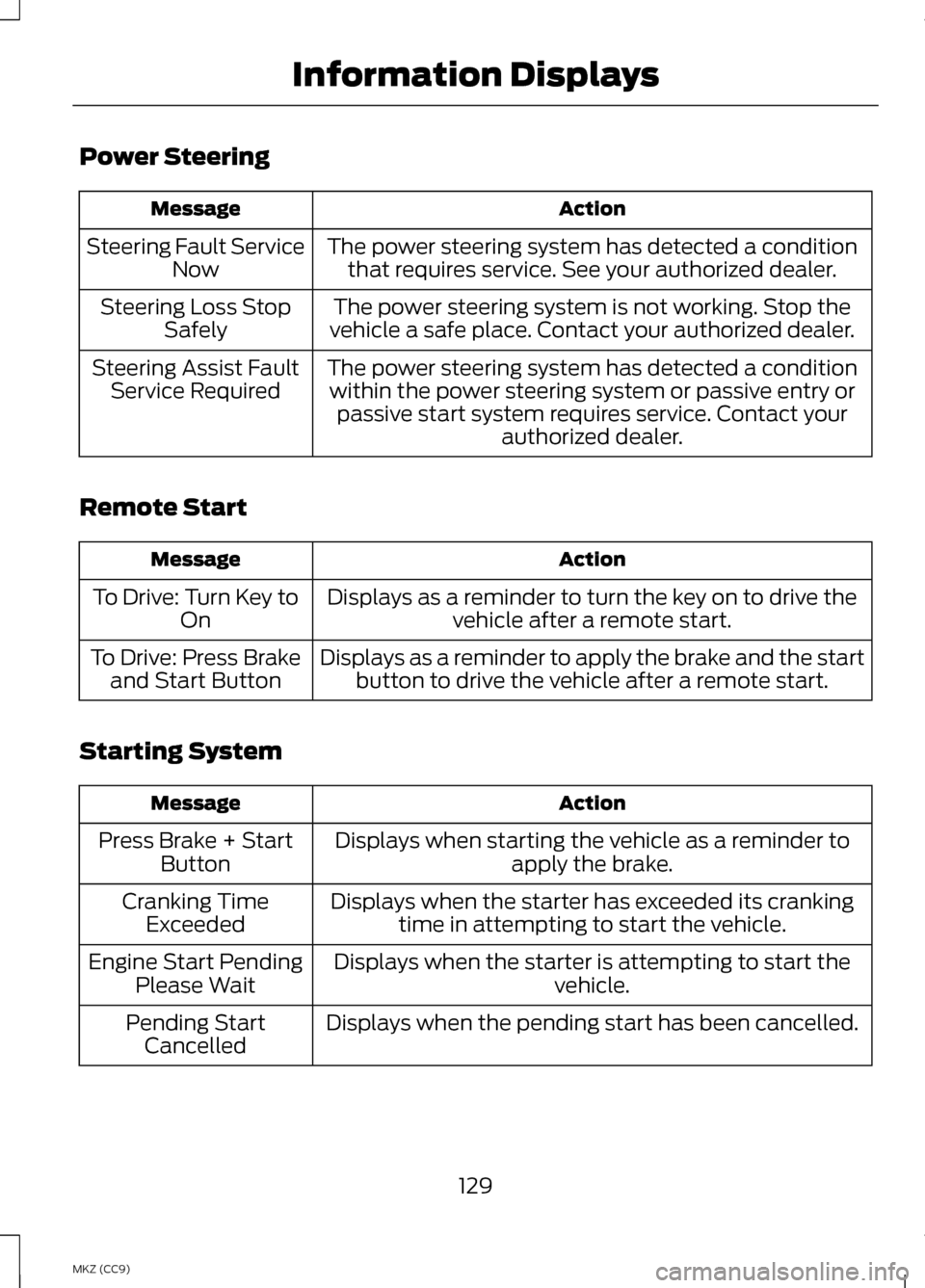
Power Steering
Action
Message
The power steering system has detected a conditionthat requires service. See your authorized dealer.
Steering Fault Service
Now
The power steering system is not working. Stop the
vehicle a safe place. Contact your authorized dealer.
Steering Loss Stop
Safely
The power steering system has detected a conditionwithin the power steering system or passive entry or passive start system requires service. Contact your authorized dealer.
Steering Assist Fault
Service Required
Remote Start Action
Message
Displays as a reminder to turn the key on to drive thevehicle after a remote start.
To Drive: Turn Key to
On
Displays as a reminder to apply the brake and the startbutton to drive the vehicle after a remote start.
To Drive: Press Brake
and Start Button
Starting System Action
Message
Displays when starting the vehicle as a reminder toapply the brake.
Press Brake + Start
Button
Displays when the starter has exceeded its crankingtime in attempting to start the vehicle.
Cranking Time
Exceeded
Displays when the starter is attempting to start the vehicle.
Engine Start Pending
Please Wait
Displays when the pending start has been cancelled.
Pending Start
Cancelled
129
MKZ (CC9) Information Displays
Page 133 of 475
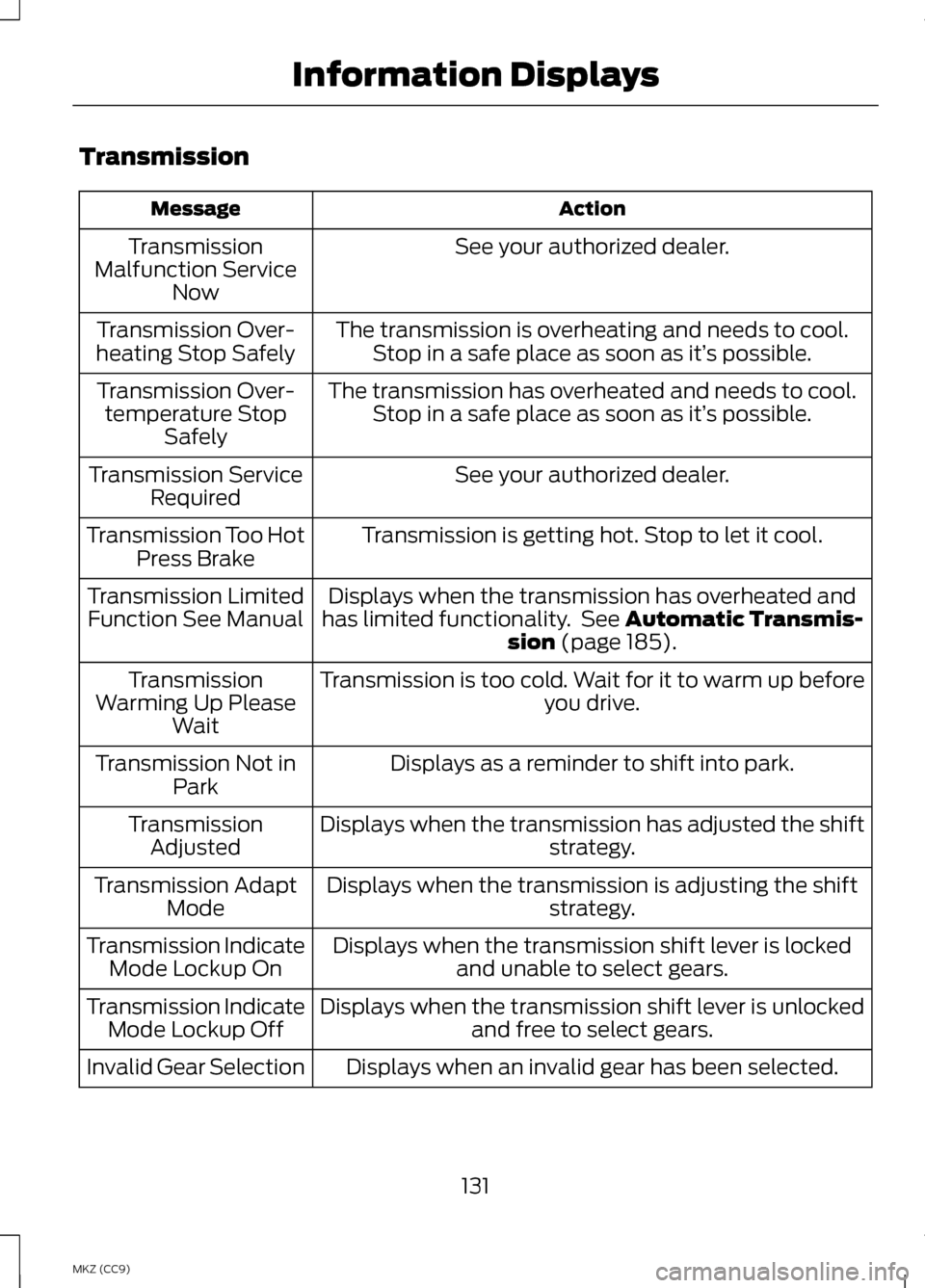
Transmission
Action
Message
See your authorized dealer.
Transmission
Malfunction Service Now
The transmission is overheating and needs to cool.Stop in a safe place as soon as it’ s possible.
Transmission Over-
heating Stop Safely
The transmission has overheated and needs to cool.Stop in a safe place as soon as it’ s possible.
Transmission Over-
temperature Stop Safely
See your authorized dealer.
Transmission Service
Required
Transmission is getting hot. Stop to let it cool.
Transmission Too Hot
Press Brake
Displays when the transmission has overheated and
has limited functionality. See Automatic Transmis-
sion (page 185).
Transmission Limited
Function See Manual
Transmission is too cold. Wait for it to warm up beforeyou drive.
Transmission
Warming Up Please Wait
Displays as a reminder to shift into park.
Transmission Not in
Park
Displays when the transmission has adjusted the shift strategy.
Transmission
Adjusted
Displays when the transmission is adjusting the shift strategy.
Transmission Adapt
Mode
Displays when the transmission shift lever is lockedand unable to select gears.
Transmission Indicate
Mode Lockup On
Displays when the transmission shift lever is unlockedand free to select gears.
Transmission Indicate
Mode Lockup Off
Displays when an invalid gear has been selected.
Invalid Gear Selection
131
MKZ (CC9) Information Displays
Page 134 of 475
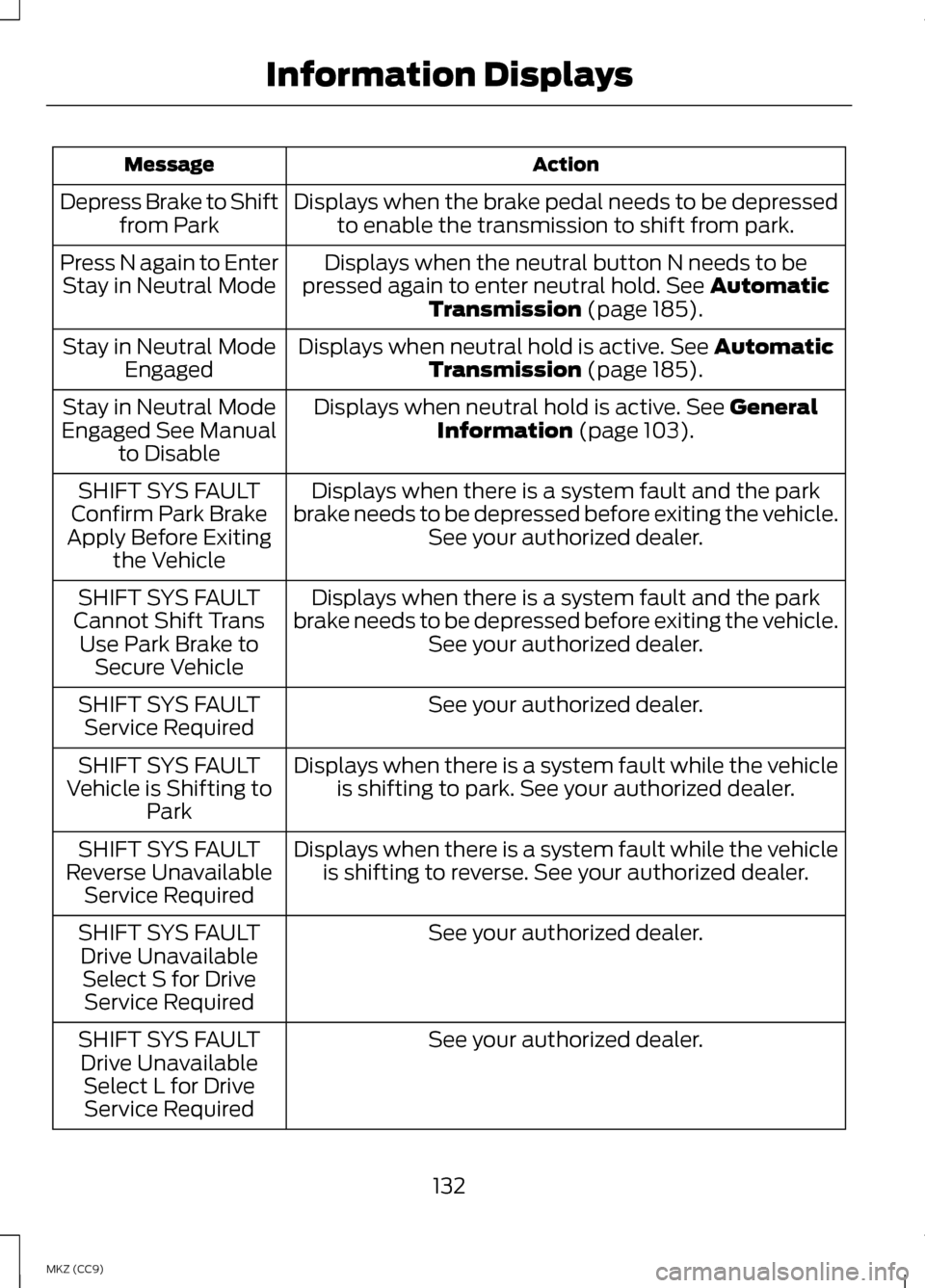
Action
Message
Displays when the brake pedal needs to be depressedto enable the transmission to shift from park.
Depress Brake to Shift
from Park
Displays when the neutral button N needs to be
pressed again to enter neutral hold. See Automatic
Transmission (page 185).
Press N again to Enter
Stay in Neutral Mode
Displays when neutral hold is active.
See Automatic
Transmission (page 185).
Stay in Neutral Mode
Engaged
Displays when neutral hold is active.
See General
Information (page 103).
Stay in Neutral Mode
Engaged See Manual to Disable
Displays when there is a system fault and the park
brake needs to be depressed before exiting the vehicle. See your authorized dealer.
SHIFT SYS FAULT
Confirm Park Brake
Apply Before Exiting the Vehicle
Displays when there is a system fault and the park
brake needs to be depressed before exiting the vehicle. See your authorized dealer.
SHIFT SYS FAULT
Cannot Shift Trans Use Park Brake to Secure Vehicle
See your authorized dealer.
SHIFT SYS FAULT
Service Required
Displays when there is a system fault while the vehicleis shifting to park. See your authorized dealer.
SHIFT SYS FAULT
Vehicle is Shifting to Park
Displays when there is a system fault while the vehicleis shifting to reverse. See your authorized dealer.
SHIFT SYS FAULT
Reverse Unavailable Service Required
See your authorized dealer.
SHIFT SYS FAULT
Drive UnavailableSelect S for Drive Service Required
See your authorized dealer.
SHIFT SYS FAULT
Drive Unavailable Select L for DriveService Required
132
MKZ (CC9) Information Displays