steering LINCOLN MKZ HYBRID 2013 User Guide
[x] Cancel search | Manufacturer: LINCOLN, Model Year: 2013, Model line: MKZ HYBRID, Model: LINCOLN MKZ HYBRID 2013Pages: 475, PDF Size: 3.89 MB
Page 98 of 475
Right Information Display
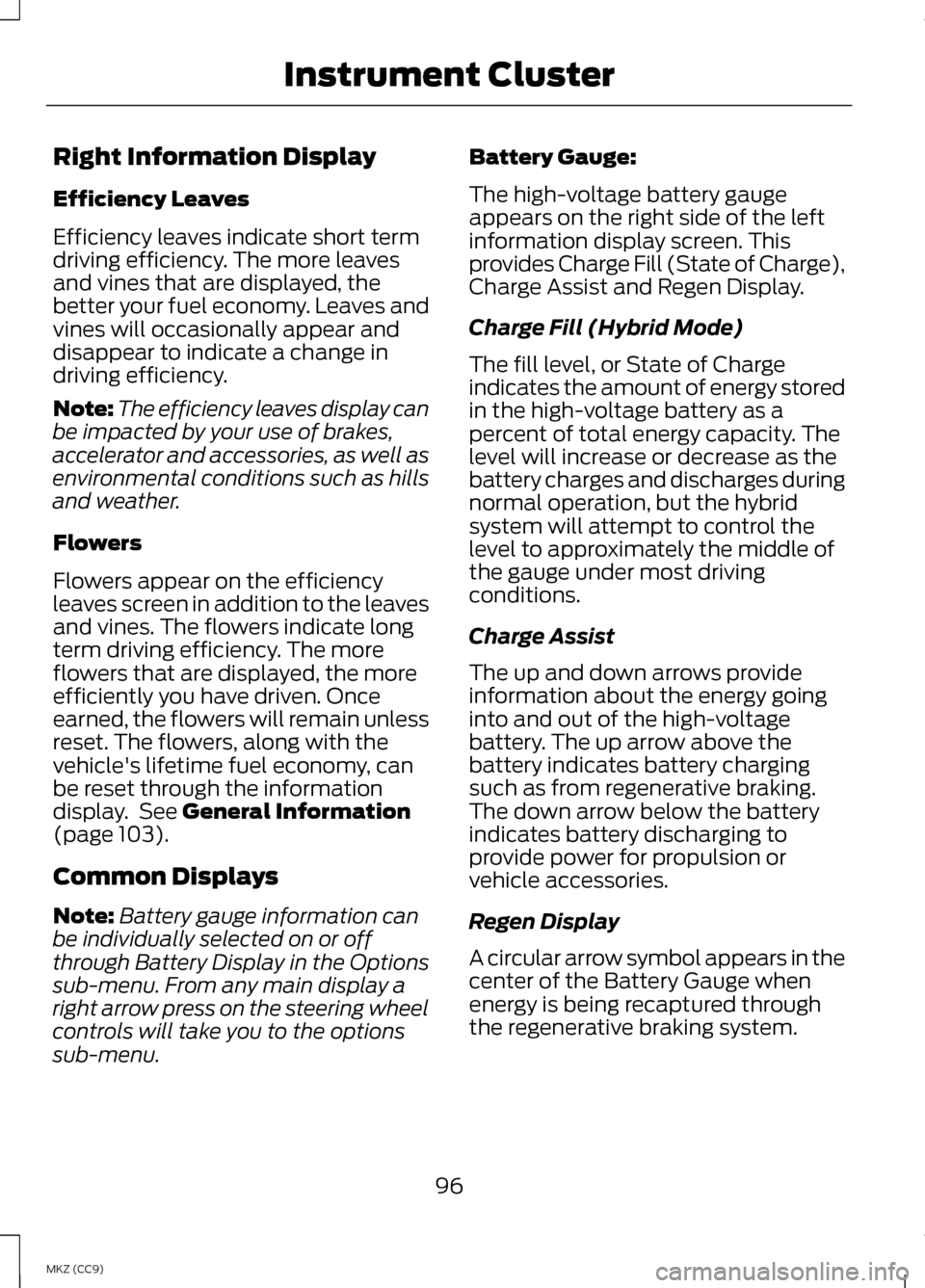
Efficiency Leaves
Efficiency leaves indicate short term
driving efficiency. The more leaves
and vines that are displayed, the
better your fuel economy. Leaves and
vines will occasionally appear and
disappear to indicate a change in
driving efficiency.
Note:
The efficiency leaves display can
be impacted by your use of brakes,
accelerator and accessories, as well as
environmental conditions such as hills
and weather.
Flowers
Flowers appear on the efficiency
leaves screen in addition to the leaves
and vines. The flowers indicate long
term driving efficiency. The more
flowers that are displayed, the more
efficiently you have driven. Once
earned, the flowers will remain unless
reset. The flowers, along with the
vehicle's lifetime fuel economy, can
be reset through the information
display. See General Information
(page 103).
Common Displays
Note: Battery gauge information can
be individually selected on or off
through Battery Display in the Options
sub-menu. From any main display a
right arrow press on the steering wheel
controls will take you to the options
sub-menu. Battery Gauge:
The high-voltage battery gauge
appears on the right side of the left
information display screen. This
provides Charge Fill (State of Charge),
Charge Assist and Regen Display.
Charge Fill (Hybrid Mode)
The fill level, or State of Charge
indicates the amount of energy stored
in the high-voltage battery as a
percent of total energy capacity. The
level will increase or decrease as the
battery charges and discharges during
normal operation, but the hybrid
system will attempt to control the
level to approximately the middle of
the gauge under most driving
conditions.
Charge Assist
The up and down arrows provide
information about the energy going
into and out of the high-voltage
battery. The up arrow above the
battery indicates battery charging
such as from regenerative braking.
The down arrow below the battery
indicates battery discharging to
provide power for propulsion or
vehicle accessories.
Regen Display
A circular arrow symbol appears in the
center of the Battery Gauge when
energy is being recaptured through
the regenerative braking system.
96
MKZ (CC9) Instrument Cluster
Page 99 of 475
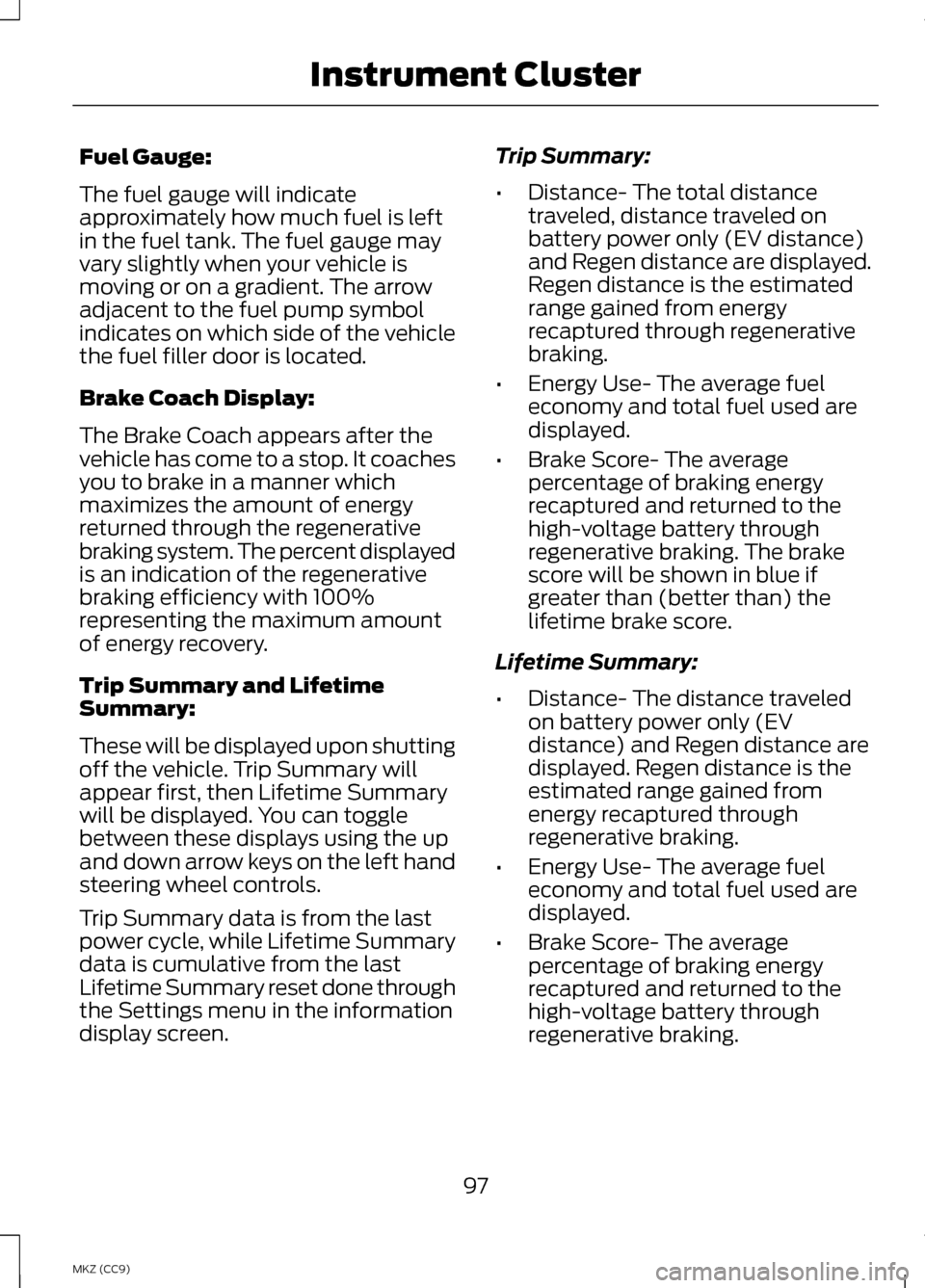
Fuel Gauge:
The fuel gauge will indicate
approximately how much fuel is left
in the fuel tank. The fuel gauge may
vary slightly when your vehicle is
moving or on a gradient. The arrow
adjacent to the fuel pump symbol
indicates on which side of the vehicle
the fuel filler door is located.
Brake Coach Display:
The Brake Coach appears after the
vehicle has come to a stop. It coaches
you to brake in a manner which
maximizes the amount of energy
returned through the regenerative
braking system. The percent displayed
is an indication of the regenerative
braking efficiency with 100%
representing the maximum amount
of energy recovery.
Trip Summary and Lifetime
Summary:
These will be displayed upon shutting
off the vehicle. Trip Summary will
appear first, then Lifetime Summary
will be displayed. You can toggle
between these displays using the up
and down arrow keys on the left hand
steering wheel controls.
Trip Summary data is from the last
power cycle, while Lifetime Summary
data is cumulative from the last
Lifetime Summary reset done through
the Settings menu in the information
display screen.
Trip Summary:
•
Distance- The total distance
traveled, distance traveled on
battery power only (EV distance)
and Regen distance are displayed.
Regen distance is the estimated
range gained from energy
recaptured through regenerative
braking.
• Energy Use- The average fuel
economy and total fuel used are
displayed.
• Brake Score- The average
percentage of braking energy
recaptured and returned to the
high-voltage battery through
regenerative braking. The brake
score will be shown in blue if
greater than (better than) the
lifetime brake score.
Lifetime Summary:
• Distance- The distance traveled
on battery power only (EV
distance) and Regen distance are
displayed. Regen distance is the
estimated range gained from
energy recaptured through
regenerative braking.
• Energy Use- The average fuel
economy and total fuel used are
displayed.
• Brake Score- The average
percentage of braking energy
recaptured and returned to the
high-voltage battery through
regenerative braking.
97
MKZ (CC9) Instrument Cluster
Page 105 of 475
GENERAL INFORMATION
WARNING
Driving while distracted can
result in loss of vehicle control,
accident and injury. We strongly
recommend that you use extreme
caution when using any device or
feature that may take your focus off
the road. Your primary responsibility
is the safe operation of the vehicle.
We recommend against the use of any
handheld device while driving and that
you comply with all applicable laws. Various systems on your vehicle can
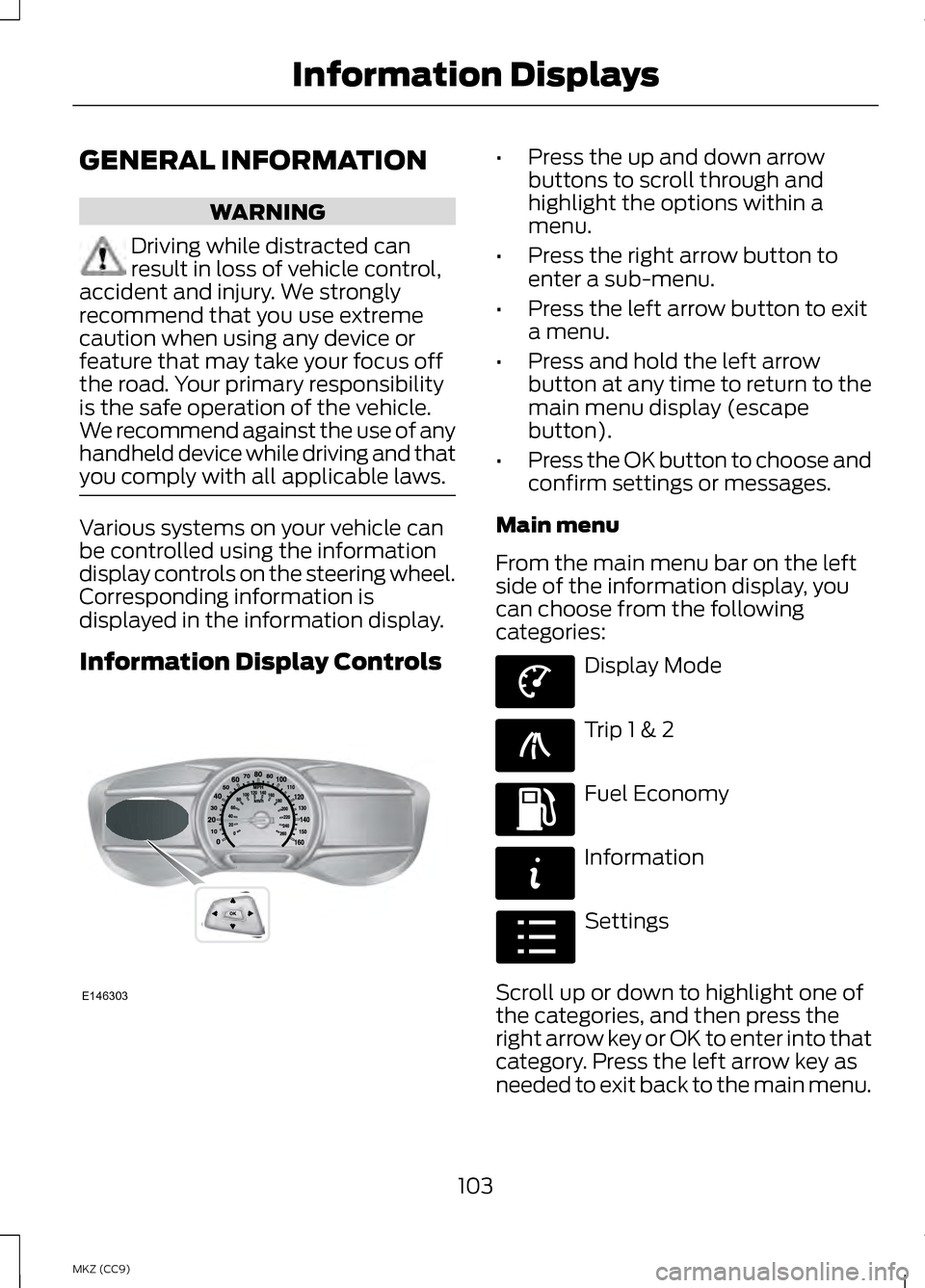
be controlled using the information
display controls on the steering wheel.
Corresponding information is
displayed in the information display.
Information Display Controls •
Press the up and down arrow
buttons to scroll through and
highlight the options within a
menu.
• Press the right arrow button to
enter a sub-menu.
• Press the left arrow button to exit
a menu.
• Press and hold the left arrow
button at any time to return to the
main menu display (escape
button).
• Press the OK button to choose and
confirm settings or messages.
Main menu
From the main menu bar on the left
side of the information display, you
can choose from the following
categories: Display Mode
Trip 1 & 2
Fuel Economy
Information
Settings
Scroll up or down to highlight one of
the categories, and then press the
right arrow key or OK to enter into that
category. Press the left arrow key as
needed to exit back to the main menu.
103
MKZ (CC9) Information DisplaysE146303 E144639 E138660 E144640 E144642 E100023
Page 114 of 475
Fuel Economy
Help —
—
Help
Fuel Economy Displays
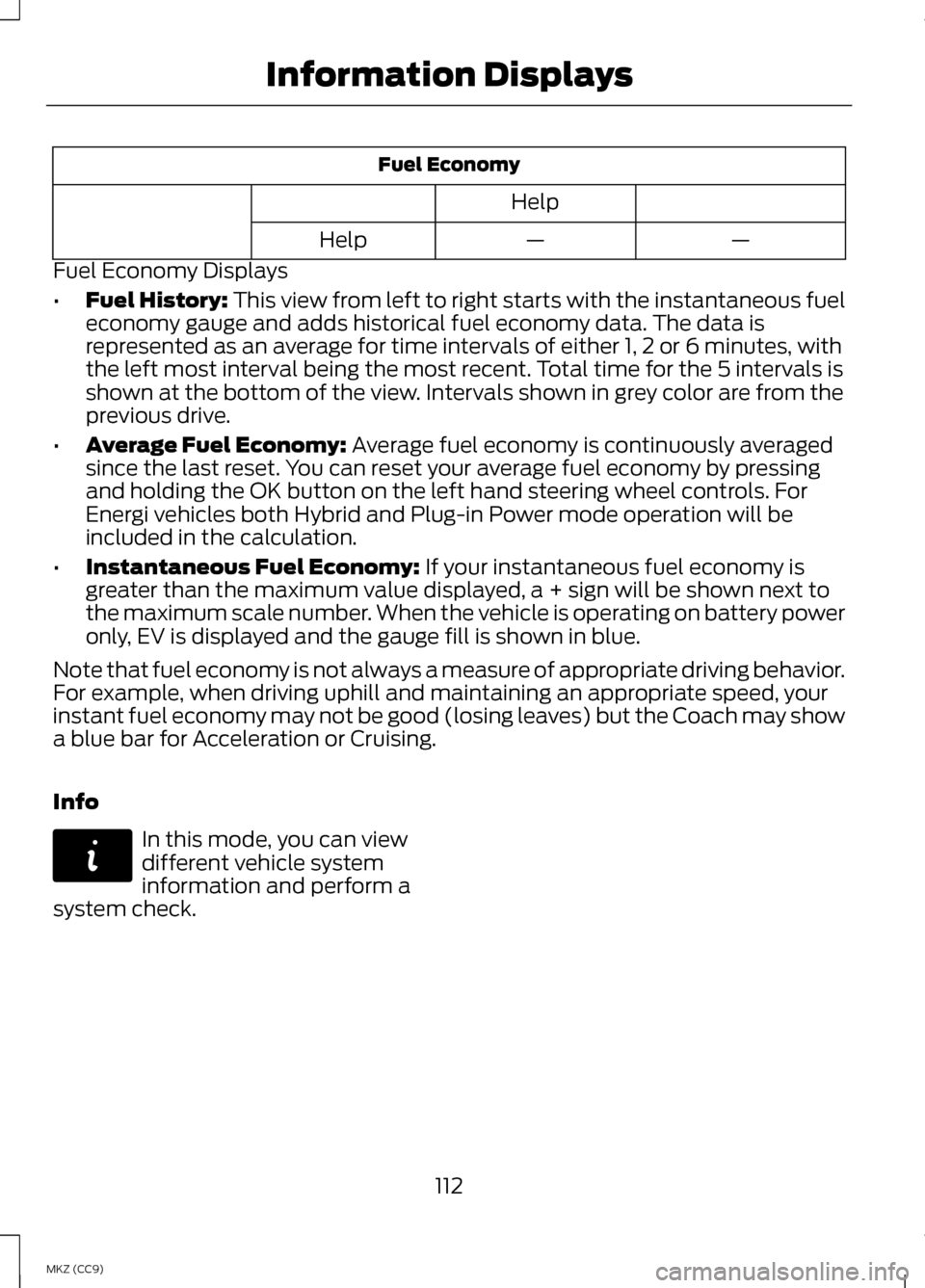
• Fuel History: This view from left to right starts with the instantaneous fuel
economy gauge and adds historical fuel economy data. The data is
represented as an average for time intervals of either 1, 2 or 6 minutes, with
the left most interval being the most recent. Total time for the 5 intervals is
shown at the bottom of the view. Intervals shown in grey color are from the
previous drive.
• Average Fuel Economy:
Average fuel economy is continuously averaged
since the last reset. You can reset your average fuel economy by pressing
and holding the OK button on the left hand steering wheel controls. For
Energi vehicles both Hybrid and Plug-in Power mode operation will be
included in the calculation.
• Instantaneous Fuel Economy:
If your instantaneous fuel economy is
greater than the maximum value displayed, a + sign will be shown next to
the maximum scale number. When the vehicle is operating on battery power
only, EV is displayed and the gauge fill is shown in blue.
Note that fuel economy is not always a measure of appropriate driving behavior.
For example, when driving uphill and maintaining an appropriate speed, your
instant fuel economy may not be good (losing leaves) but the Coach may show
a blue bar for Acceleration or Cruising.
Info In this mode, you can view
different vehicle system
information and perform a
system check.
112
MKZ (CC9) Information DisplaysE144642
Page 117 of 475
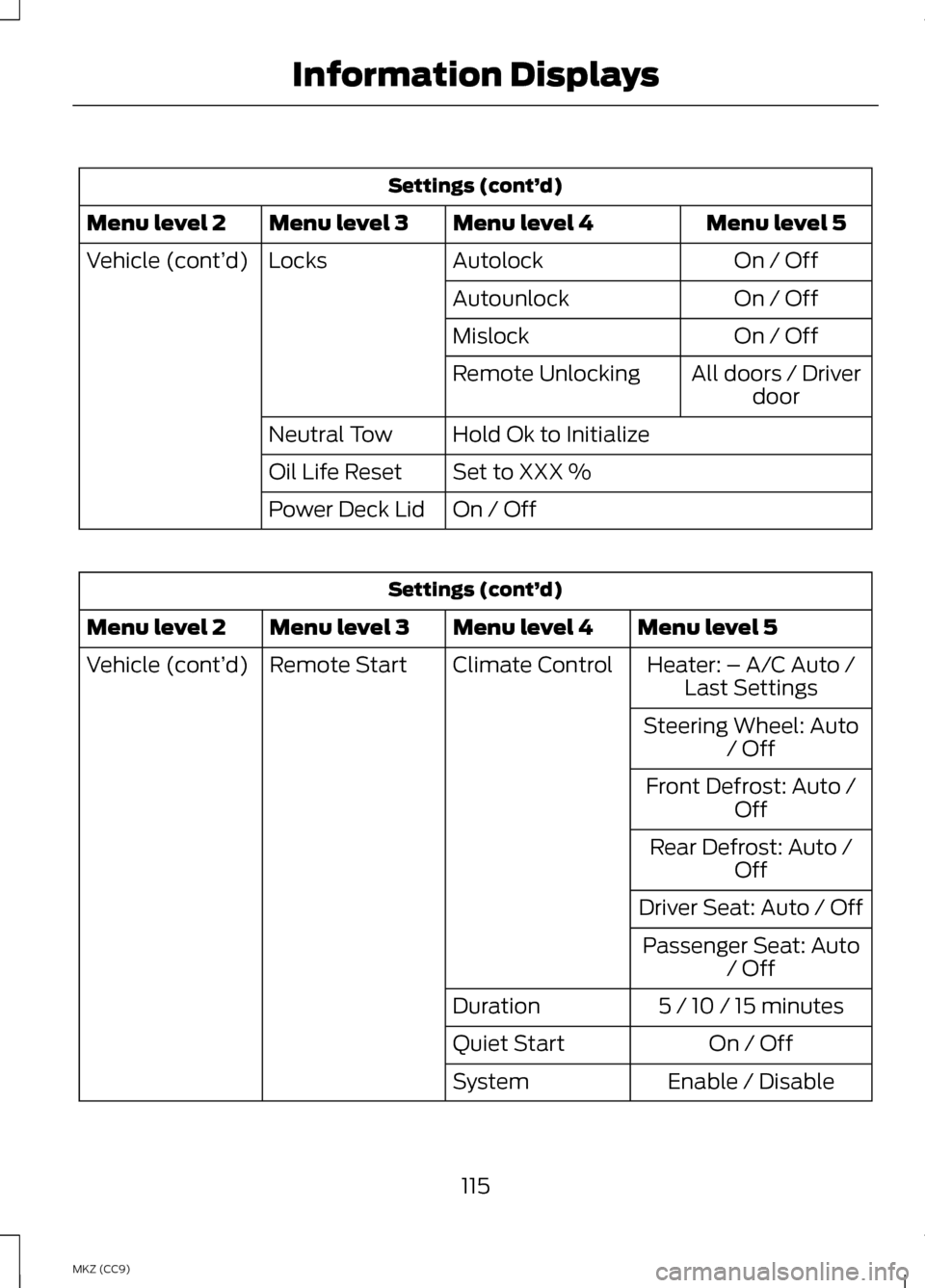
Settings (cont’
d)
Menu level 5
Menu level 4
Menu level 3
Menu level 2
On / Off
Autolock
Locks
Vehicle (cont’ d)
On / Off
Autounlock
On / Off
Mislock
All doors / Driverdoor
Remote Unlocking
Hold Ok to Initialize
Neutral Tow
Set to XXX %
Oil Life Reset
On / Off
Power Deck Lid Settings (cont’
d)
Menu level 5
Menu level 4
Menu level 3
Menu level 2
Heater: – A/C Auto /Last Settings
Climate Control
Remote Start
Vehicle (cont’ d)
Steering Wheel: Auto/ Off
Front Defrost: Auto / Off
Rear Defrost: Auto / Off
Driver Seat: Auto / Off Passenger Seat: Auto / Off
5 / 10 / 15 minutes
Duration
On / Off
Quiet Start
Enable / Disable
System
115
MKZ (CC9) Information Displays
Page 121 of 475

AdvanceTrac
™ Action
Message
Displays when the system detects a malfunction dueto a blocked sensor.
Service AdvanceTrac
Displayed when the traction control has been disabledor enabled by the driver.
AdvanceTrac Off On
Airbag Action
Message
Displays when the system detects a malfunction dueto a blocked sensor.
Occupant Sensor
BLOCKED Remove Objects Near
Passenger Seat
Alarm Action
Message
Displays when the alarm has been triggered due to
unauthorized entry. See Anti-Theft Alarm (page 73).
Vehicle Alarm to Stop
Alarm, Start Vehicle
Automatic Engine Shutdown Action
Message
Displays when the engine is getting ready to shut off.
Engine Shuts Off in
XX Seconds
Displays when the engine has shut off to help increase fuel economy.
Engine Shut Off for
Fuel Economy
Displays when the engine is getting ready to shut off.
You can press OK on the left steering wheel button to override the shut down.
Engine Shuts Off in
XX Seconds Press Ok to Override
119
MKZ (CC9) Information Displays
Page 126 of 475
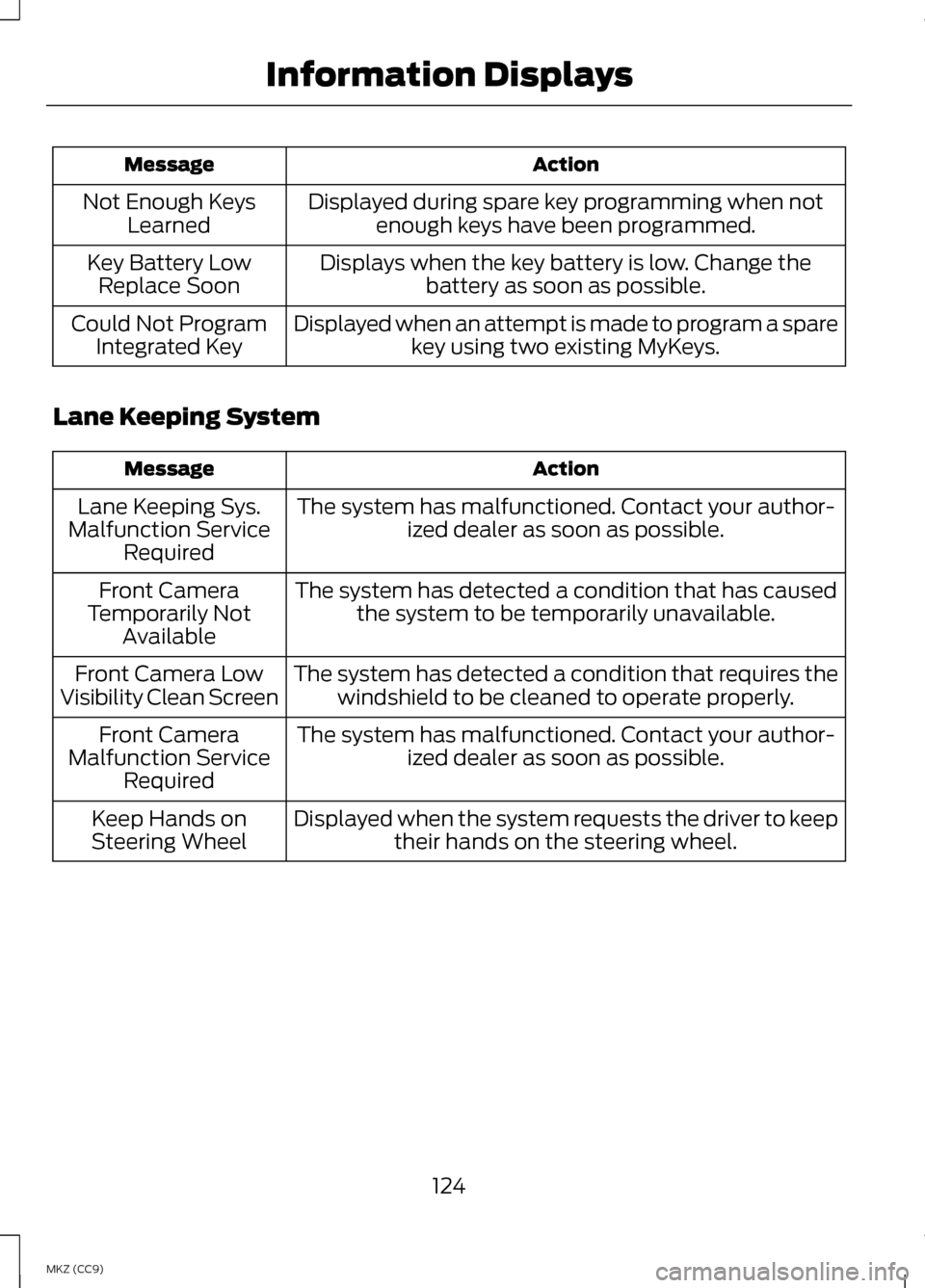
Action
Message
Displayed during spare key programming when notenough keys have been programmed.
Not Enough Keys
Learned
Displays when the key battery is low. Change thebattery as soon as possible.
Key Battery Low
Replace Soon
Displayed when an attempt is made to program a sparekey using two existing MyKeys.
Could Not Program
Integrated Key
Lane Keeping System Action
Message
The system has malfunctioned. Contact your author-ized dealer as soon as possible.
Lane Keeping Sys.
Malfunction Service Required
The system has detected a condition that has causedthe system to be temporarily unavailable.
Front Camera
Temporarily Not Available
The system has detected a condition that requires thewindshield to be cleaned to operate properly.
Front Camera Low
Visibility Clean Screen
The system has malfunctioned. Contact your author-ized dealer as soon as possible.
Front Camera
Malfunction Service Required
Displayed when the system requests the driver to keeptheir hands on the steering wheel.
Keep Hands on
Steering Wheel
124
MKZ (CC9) Information Displays
Page 131 of 475
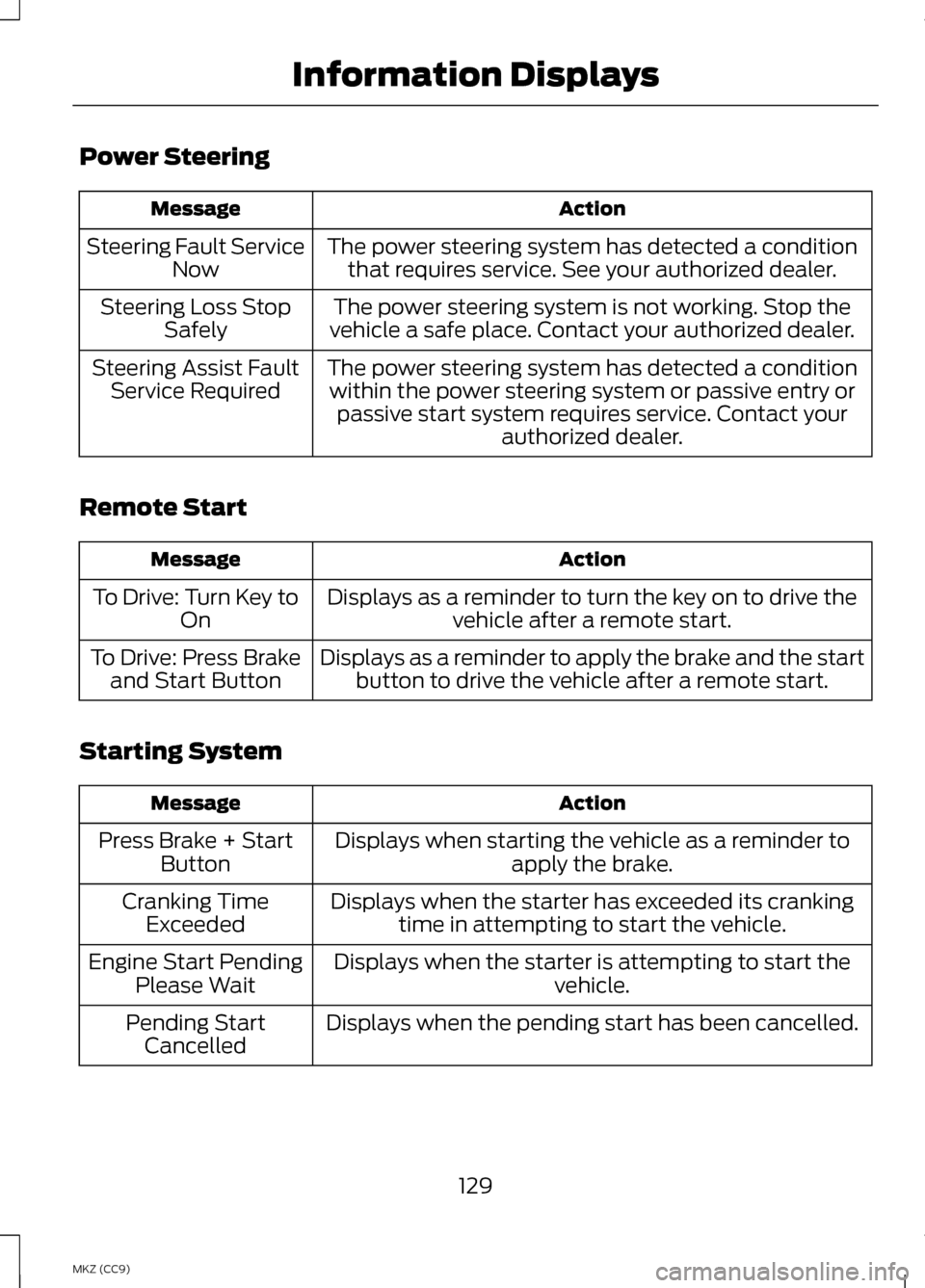
Power Steering
Action
Message
The power steering system has detected a conditionthat requires service. See your authorized dealer.
Steering Fault Service
Now
The power steering system is not working. Stop the
vehicle a safe place. Contact your authorized dealer.
Steering Loss Stop
Safely
The power steering system has detected a conditionwithin the power steering system or passive entry or passive start system requires service. Contact your authorized dealer.
Steering Assist Fault
Service Required
Remote Start Action
Message
Displays as a reminder to turn the key on to drive thevehicle after a remote start.
To Drive: Turn Key to
On
Displays as a reminder to apply the brake and the startbutton to drive the vehicle after a remote start.
To Drive: Press Brake
and Start Button
Starting System Action
Message
Displays when starting the vehicle as a reminder toapply the brake.
Press Brake + Start
Button
Displays when the starter has exceeded its crankingtime in attempting to start the vehicle.
Cranking Time
Exceeded
Displays when the starter is attempting to start the vehicle.
Engine Start Pending
Please Wait
Displays when the pending start has been cancelled.
Pending Start
Cancelled
129
MKZ (CC9) Information Displays
Page 143 of 475
Both heated mirrors remove ice, mist
and fog when you switch on the
heated rear window.
CABIN AIR FILTER
Your vehicle is equipped with a cabin
air filter. It is located behind the glove
box.
The particulate filtration system
reduces the concentration of airborne
particles such as dust, spores and
pollen in the air supplied to the interior
of your vehicle.
Note:
To prevent foreign objects from
entering the system, make sure the
cabin air is in place at all times.
Running the system without a filter in
place could result in degradation or
damage to the system.
The particulate filtration system gives
you and your passengers the following
benefits:
• It improves your driving comfort by
reducing particle concentration.
• It improves the interior
compartment cleanliness.
• It protects the climate control
components from particle
deposits.
Replace the filter at regular intervals.
See Scheduled Maintenance (page
444).
For additional cabin air filter
information, or to replace the filter,
see an authorized dealer. REMOTE START
The climate control system adjusts
the cabin temperature during remote
start.
You cannot adjust the system during
remote start operation. Turn the
ignition on to return the system to its
previous settings. You can now make
adjustments. You need to turn certain
vehicle-dependent features back on,
such as:
•
heated seats
• cooled seats
• heated steering wheel
• heated mirrors
• heated rear window.
You can adjust the settings using the
information display controls.
See
Information Displays (page 103).
Automatic Settings
You can set the climate control to
operate in AUTO mode through the
information display setting: Remote
Start > Climate Control > Heater-A/C
> Auto. The climate control system
automatically sets the interior
temperature to 72°F (22°C).
In hot weather, the system is set to
72°F (22°C). Cooled seats are set to
high (if available, and selected to
AUTO in the information display).
In moderate weather, the system
either heats or cools (based on
previous settings). The rear defroster,
heated mirrors and heated/cooled
seats do not automatically turn on.
141
MKZ (CC9) Climate Control
Page 144 of 475
In cold weather, the system is set to
72°F (22°C). The heated seats and
heated steering wheel are set to high
(if available, and selected to AUTO in
the information display). The rear
defroster and heated mirrors
automatically turn on.
Last Settings
You can set the climate control to
operate using the last climate control
settings through the information
display setting: Remote Start >
Climate Control > Heater
–A/C > Last
Settings. The climate control system
automatically uses the settings last
selected before turning off the vehicle.
Heated and Cooled Devices
The climate control system controls
other heated and cooled devices
inside the vehicle. These devices (if
available and selected to AUTO in the
information displays) may switch on
during remote start. Heated devices
typically switch on during cold
weather, and cooled devices during
hot weather.
142
MKZ (CC9) Climate Control