park LINCOLN MKZ HYBRID 2013 Owners Manual
[x] Cancel search | Manufacturer: LINCOLN, Model Year: 2013, Model line: MKZ HYBRID, Model: LINCOLN MKZ HYBRID 2013Pages: 475, PDF Size: 3.89 MB
Page 5 of 475
Rear Seat Armrest...............................152
Universal Garage Door Opener
Universal Garage Door Opener......153
Auxiliary Power Points
Auxiliary Power Points......................158
Storage Compartments
Center Console....................................160
Overhead Console
..............................160
Starting and Stopping the Engine
General Information............................161
Keyless Starting
....................................161
Starting a Gasoline Engine..............162
Engine Block Heater...........................164
Unique Driving Character- istics
Hybrid Electric Vehicle......................166
Fuel and Refueling
Safety Precautions
..............................172
Fuel Quality
............................................173
Running Out of Fuel............................173
Refueling
.................................................175
Fuel Consumption
..............................178
Emission Control System.................179
High Voltage Battery
General Information...........................182 High Voltage Battery Cut-Off
Switch.................................................183
Transmission
Automatic Transmission
..................185
Hill Start Assist....................................189
Brakes
General Information............................191
Hints on Driving With Anti-Lock Brakes..................................................192
Electric Parking Brake........................192
Traction Control
Principle of Operation
.......................196
Using Traction Control......................196
Stability Control
Principle of Operation........................197
Using Stability Control......................198
Parking Aids
Parking Aid
............................................199
Active Park Assist................................201
Rear View Camera.............................206
Cruise Control
Principle of Operation.......................210
Using Cruise Control..........................210
Using Adaptive Cruise Control........211
Driving Aids
Driver Alert
.............................................219
Lane Keeping System
.......................220
Blind Spot Monitor.............................225
3
MKZ Hybrid (CC9) Table of Contents
Page 10 of 475
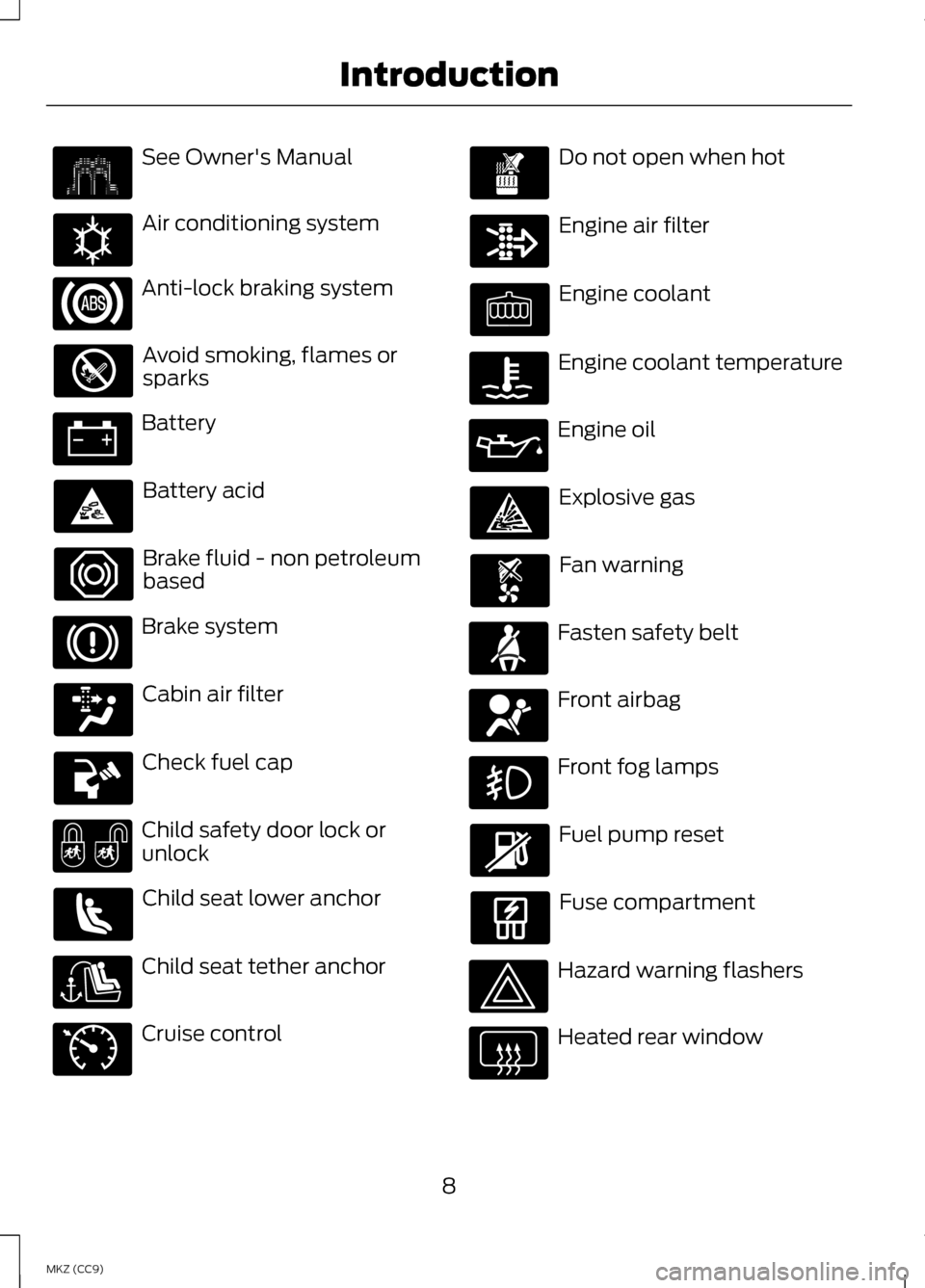
See Owner's Manual
Air conditioning system
Anti-lock braking system
Avoid smoking, flames or
sparks
Battery
Battery acid
Brake fluid - non petroleum
based
Brake system
Cabin air filter
Check fuel cap
Child safety door lock or
unlock
Child seat lower anchor
Child seat tether anchor
Cruise control Do not open when hot
Engine air filter
Engine coolant
Engine coolant temperature
Engine oil
Explosive gas
Fan warning
Fasten safety belt
Front airbag
Front fog lamps
Fuel pump reset
Fuse compartment
Hazard warning flashers
Heated rear window
8
MKZ (CC9) Introduction E162384 E71340
Page 11 of 475
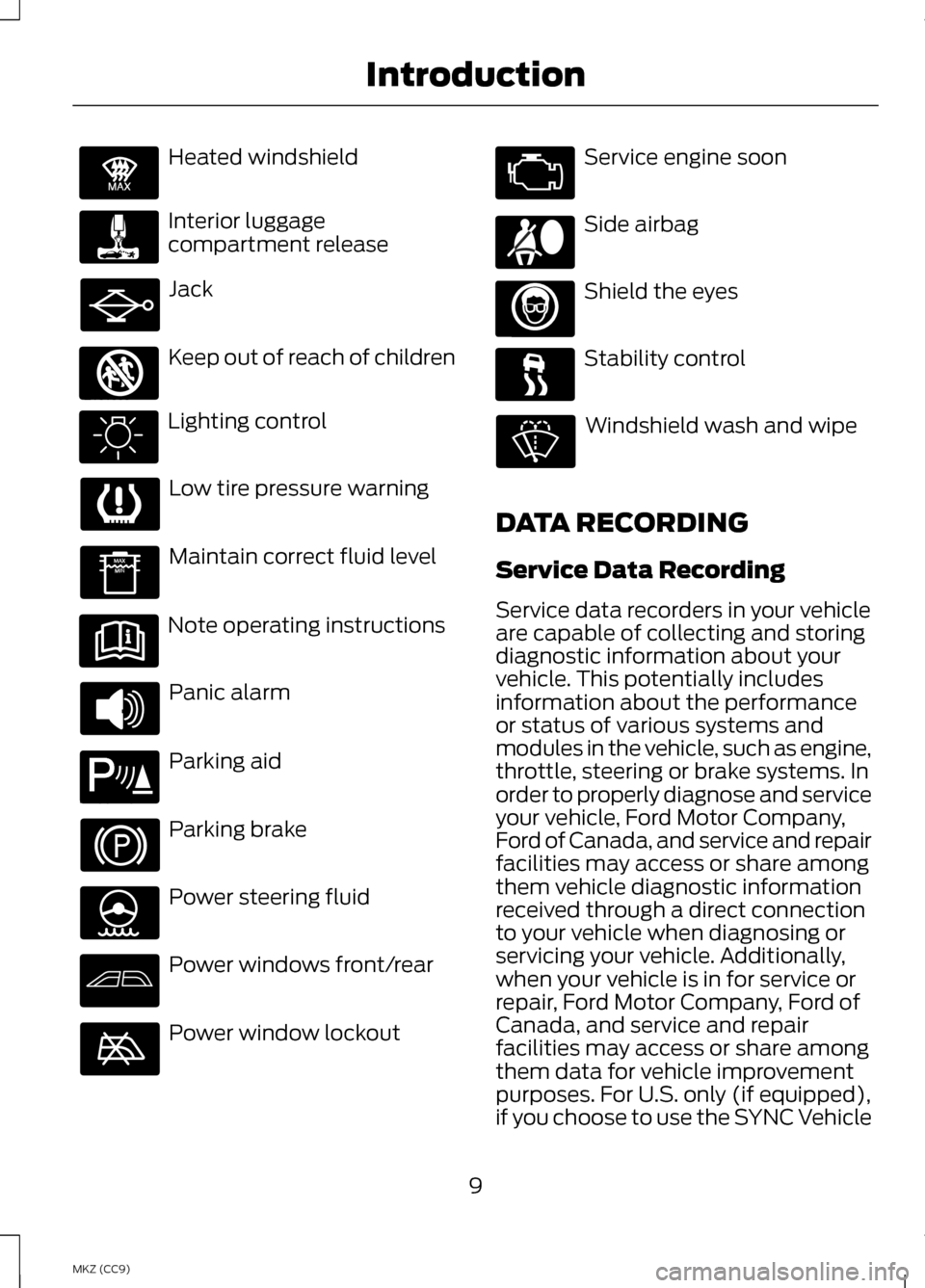
Heated windshield
Interior luggage
compartment release
Jack
Keep out of reach of children
Lighting control
Low tire pressure warning
Maintain correct fluid level
Note operating instructions
Panic alarm
Parking aid
Parking brake
Power steering fluid
Power windows front/rear
Power window lockout Service engine soon
Side airbag
Shield the eyes
Stability control
Windshield wash and wipe
DATA RECORDING
Service Data Recording
Service data recorders in your vehicle
are capable of collecting and storing
diagnostic information about your
vehicle. This potentially includes
information about the performance
or status of various systems and
modules in the vehicle, such as engine,
throttle, steering or brake systems. In
order to properly diagnose and service
your vehicle, Ford Motor Company,
Ford of Canada, and service and repair
facilities may access or share among
them vehicle diagnostic information
received through a direct connection
to your vehicle when diagnosing or
servicing your vehicle. Additionally,
when your vehicle is in for service or
repair, Ford Motor Company, Ford of
Canada, and service and repair
facilities may access or share among
them data for vehicle improvement
purposes. For U.S. only (if equipped),
if you choose to use the SYNC Vehicle
9
MKZ (CC9) IntroductionE91392 E161353 E139213 E167012
Page 41 of 475
Deactivating and Activating the
Belt-Minder Feature
WARNING
While the system allows you to
deactivate it, this system is
designed to improve your chances of
being safely belted and surviving an
accident. We recommend you leave
the system activated for yourself and
others who may use the vehicle. To
reduce the risk of injury, do not
deactivate or activate the system
while driving the vehicle. Note:
The driver and front passenger
warning are deactivated and activated
independently. When deactivating or
activating one seating position, do not
buckle the other position as this will
terminate the process.
Read Steps 1 - 4 thoroughly before
proceeding with the programming
procedure.
Before following the procedure, make
sure that:
• the parking brake is set
• the transmission selector is in
position P or N
• the ignition is off
• the driver and front passenger
safety belts are unbuckled.
1. Turn the ignition on. Do not start the vehicle. 2. Wait until the safety belt warning
light turns off (about one minute).
After Step 2, wait an additional five
seconds before proceeding with
Step 3. Once Step 3 is started, the
procedure must be completed
within 30 seconds.
3. For the seating position being disabled, buckle then unbuckle the
safety belt three times at a
moderate speed, ending in the
unbuckled state. After Step 3, the
safety belt warning light will turn
on.
4. While the safety belt warning light
is on, buckle and then unbuckle the
safety belt. After Step 4, the safety
belt warning light will flash for
confirmation.
• This will disable the feature for
that seating position if it is
currently enabled.
• This will enable the feature for that
seating position if it is currently
disabled.
CHILD RESTRAINT AND
SAFETY BELT
MAINTENANCE
Inspect the vehicle safety belts and
child safety seat systems periodically
to make sure they work properly and
are not damaged. Inspect the vehicle
and child seat safety belts to make
sure there are no nicks, tears or cuts.
Replace if necessary. All vehicle safety
belt assemblies, including retractors,
buckles, front safety belt buckle
assemblies, buckle support
39
MKZ (CC9) Safety Belts
Page 54 of 475
GENERAL INFORMATION
ON RADIO FREQUENCIES
This device complies with Part 15 of
the FCC Rules and with Industry
Canada license-exempt RSS
standard(s). Operation is subject to
the following two conditions: (1) This
device may not cause harmful
interference, and (2) This device must
accept any interference received,
including interference that may cause
undesired operation.
Note:
Changes or modifications not
expressively approved by the party
responsible for compliance could void
the user's authority to operate the
equipment. The term IC before the
radio certification number only signifies
that Industry Canada technical
specifications were met.
The typical operating range for your
transmitter is approximately 33 feet
(10 meters). Vehicles with the remote
start feature will have a greater range.
One of the following could cause a
decrease in operating range:
• weather conditions
• nearby radio towers
• structures around the vehicle
• other vehicles parked next to your
vehicle The radio frequency used by your
remote control can also be used by
other short distance radio
transmissions, for example amateur
radios, medical equipment, wireless
headphones, remote controls and
alarm systems. If the frequencies are
jammed, you will not be able to use
your remote control. You can lock and
unlock the doors with the key.
Note:
Make sure to lock your vehicle
before leaving it unattended.
Note: If you are in range, the remote
control will operate if you press any
button unintentionally.
Intelligent Access
The system uses a radio frequency
signal to communicate with your
vehicle and authorize your vehicle to
unlock when one of the following
conditions are met:
• You touch the inside of the front
exterior door handle.
• You press the luggage
compartment button.
• You press a button on the
transmitter.
If excessive radio frequency
interference is present in the area or
if the transmitter battery is low, you
may need to mechanically unlock your
door. You can use the mechanical key
blade in your intelligent access key to
open the driver door in this situation.
See
Remote Control (page 53).
52
MKZ (CC9) Keys and Remote Controls
Page 56 of 475
1.
Slide the release on the back of the
remote control and pivot the cover
off. 2.
Insert a coin into the slot and twist
to separate the housing. 3. Remove the batteries. 4. Install new batteries with the +
facing each other.
Note: Make sure to replace the label
between the two batteries.
5. Reinstall the housing and cover.
Car Finder Press the button twice within
three seconds. The horn will
sound and the turn signals
will flash. We recommend you use this
method to locate your vehicle, rather
than using the panic alarm.
Sounding a Panic Alarm
Note: The panic alarm will only
operate when the ignition is off. Press the button to activate
the alarm. Press the button
again or switch the ignition
on to deactivate.
Remote Start WARNING
To avoid exhaust fumes, do not
use remote start if your vehicle
is parked indoors or areas that are not
well ventilated. Note:
Do not use remote start if your
vehicle is low on fuel. The remote start button is on
the transmitter.
54
MKZ (CC9) Keys and Remote ControlsE151796 E153890 E153891 E138623 E138624 E138625
Page 58 of 475
The horn will sound if the system fails
to start, unless quiet start is on. Quiet
start will run the blower fan at a
slower speed to reduce noise. It can
be switched on or off in the
information display. See General
Information (page 103).
Note: If the vehicle has been remote
started with an integrated keyhead
transmitter, you must switch the
ignition on before driving your vehicle.
With an intelligent access transmitter,
you must press the
START/STOP
button on the instrument panel once
while applying the brake pedal before
driving your vehicle.
The power windows will not work
during the remote start and the radio
will not turn on automatically.
The parking lamps will remain on and
the vehicle will run for 5, 10, or 15
minutes, depending on the setting.
Extending the Vehicle Run Time
Repeat Steps 1 and 2 with the vehicle
still running to extend the run time for
another remote start duration. If you
programmed the duration to last 10
minutes, the second 10 minutes will
begin after what is left of the first
activation time. For example, if the
vehicle had been running from the first
remote start for five minutes, the
vehicle will continue to run now for a
total of 15 minutes. You can extend
the remote start up to a maximum of
35 minutes.
Wait at least five seconds before
remote starting after a vehicle
shutdown. Turning the Vehicle Off After
Remote Starting Press the button once. The
parking lamps will turn off.
You may have to be closer to
the vehicle than when starting due to
ground reflection and the added noise
of the running vehicle.
You can disable or enable the remote
start system through the information
display. See
General Information
(page 103).
REPLACING A LOST KEY OR
REMOTE CONTROL
Replacement keys or remote controls
can be purchased from an authorized
dealer. Authorized dealers can
program remote controls for your
vehicle. See
Passive Anti-Theft
System (page 72).
To re-program the passive anti-theft
system see an authorized dealer.
56
MKZ (CC9) Keys and Remote ControlsE138625
Page 59 of 475
PRINCIPLE OF OPERATION
MyKey allows you to program keys
with restricted driving modes to
promote good driving habits. All but
one of the keys programmed to the
vehicle can be activated with these
restricted modes.
Any keys that have not been
programmed are referred to as
administrator keys or admin keys.
These can be used to:
•
create a MyKey
• program configurable MyKey
settings
• clear all MyKey features.
When you have programmed a MyKey,
you can access the following
information using the information
display:
• How many admin keys and MyKeys
are programmed to your vehicle.
• The total distance your vehicle has
traveled using a MyKey.
Note: All MyKeys are programmed to
the same settings. You cannot program
them individually.
Note: For vehicles with intelligent
access with push-button start, when
both a MyKey and an admin intelligent
access key fob are present, the admin
fob will be recognized by the vehicle
while switching the ignition on to start
the vehicle.
Non-configurable Settings
The following settings cannot be
changed by an admin key user: •
Belt-Minder. You cannot disable
this feature. The audio system will
mute when the front seat
occupants’ safety belts are not
fastened.
• Early low fuel. The low-fuel
warning activates earlier, giving the
MyKey user more time to refuel.
• Driver assist features, if equipped
on your vehicle, are forced on:
parking aid, blind spot information
system (BLIS) with cross traffic
alert, lane departure warning and
forward collision warning system.
Configurable Settings
With an admin key, you can configure
certain MyKey settings when you first
create a MyKey and before you recycle
the key or restart the vehicle. You can
also change the settings afterward
with an admin key.
• A vehicle speed limit can be set.
Warnings will be shown in the
display followed by an audible
tone when your vehicle reaches the
set speed. You cannot override the
set speed by fully depressing the
accelerator pedal or by setting
cruise control.
• Vehicle speed minders of 45, 55 or
65 mph (75, 90 or 105 km/h).
Once you select a speed, it will be
shown in the display, followed by
an audible tone when the
preselected vehicle speed is
exceeded.
57
MKZ (CC9) MyKey
™
Page 66 of 475
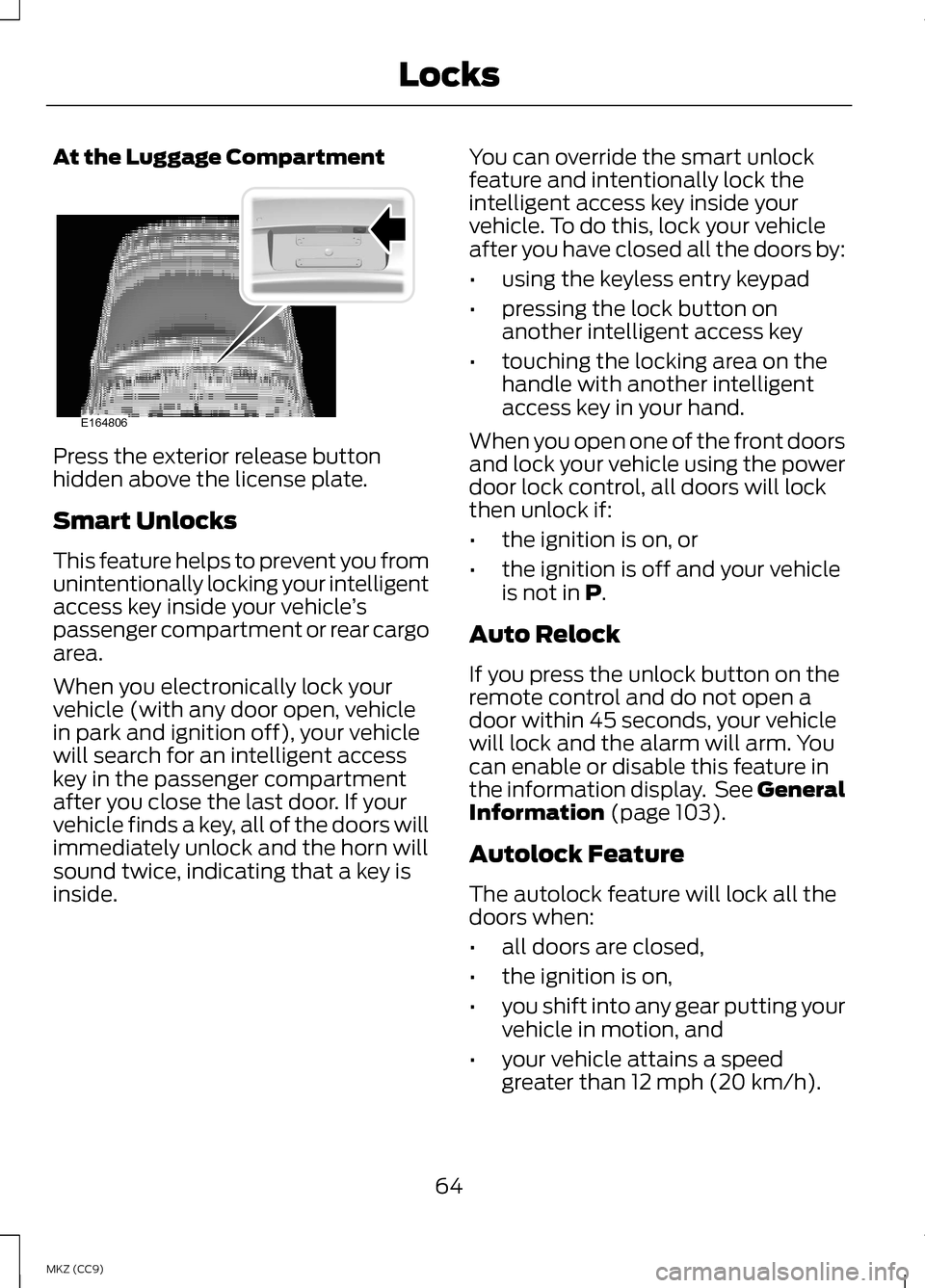
At the Luggage Compartment
Press the exterior release button
hidden above the license plate.
Smart Unlocks
This feature helps to prevent you from
unintentionally locking your intelligent
access key inside your vehicle
’s
passenger compartment or rear cargo
area.
When you electronically lock your
vehicle (with any door open, vehicle
in park and ignition off), your vehicle
will search for an intelligent access
key in the passenger compartment
after you close the last door. If your
vehicle finds a key, all of the doors will
immediately unlock and the horn will
sound twice, indicating that a key is
inside. You can override the smart unlock
feature and intentionally lock the
intelligent access key inside your
vehicle. To do this, lock your vehicle
after you have closed all the doors by:
•
using the keyless entry keypad
• pressing the lock button on
another intelligent access key
• touching the locking area on the
handle with another intelligent
access key in your hand.
When you open one of the front doors
and lock your vehicle using the power
door lock control, all doors will lock
then unlock if:
• the ignition is on, or
• the ignition is off and your vehicle
is not in P.
Auto Relock
If you press the unlock button on the
remote control and do not open a
door within 45 seconds, your vehicle
will lock and the alarm will arm. You
can enable or disable this feature in
the information display. See General
Information
(page 103).
Autolock Feature
The autolock feature will lock all the
doors when:
• all doors are closed,
• the ignition is on,
• you shift into any gear putting your
vehicle in motion, and
• your vehicle attains a speed
greater than 12 mph (20 km/h).
64
MKZ (CC9) LocksE164806
Page 84 of 475
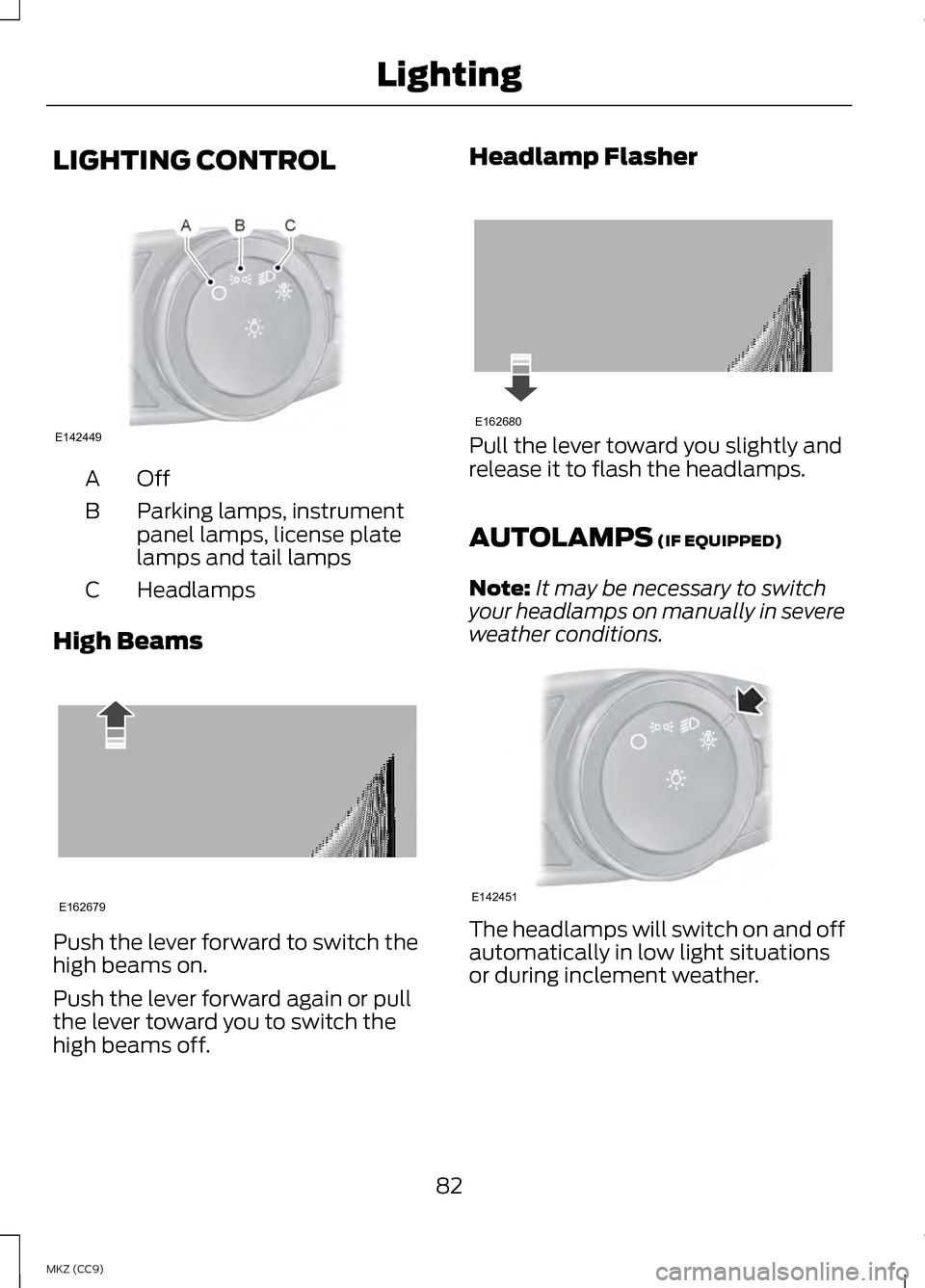
LIGHTING CONTROL
OffA
Parking lamps, instrument
panel lamps, license plate
lamps and tail lamps
B
Headlamps
C
High Beams Push the lever forward to switch the
high beams on.
Push the lever forward again or pull
the lever toward you to switch the
high beams off. Headlamp Flasher
Pull the lever toward you slightly and
release it to flash the headlamps.
AUTOLAMPS (IF EQUIPPED)
Note: It may be necessary to switch
your headlamps on manually in severe
weather conditions. The headlamps will switch on and off
automatically in low light situations
or during inclement weather.
82
MKZ (CC9) LightingE142449 E162679 E162680 E142451