engine LINCOLN MKZ HYBRID 2014 User Guide
[x] Cancel search | Manufacturer: LINCOLN, Model Year: 2014, Model line: MKZ HYBRID, Model: LINCOLN MKZ HYBRID 2014Pages: 445, PDF Size: 3.8 MB
Page 95 of 445
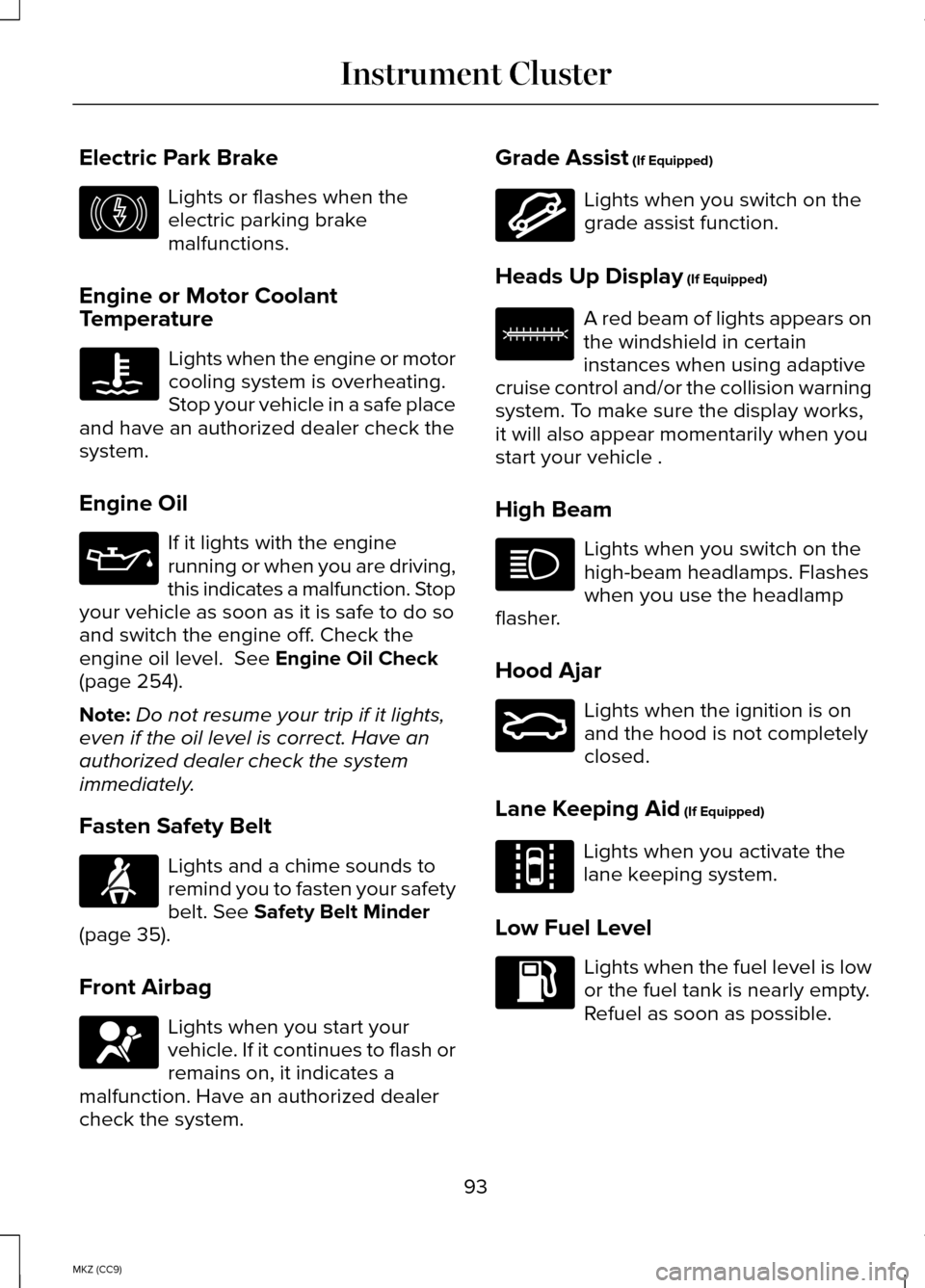
Electric Park Brake
Lights or flashes when the
electric parking brake
malfunctions.
Engine or Motor Coolant
Temperature Lights when the engine or motor
cooling system is overheating.
Stop your vehicle in a safe place
and have an authorized dealer check the
system.
Engine Oil If it lights with the engine
running or when you are driving,
this indicates a malfunction. Stop
your vehicle as soon as it is safe to do so
and switch the engine off. Check the
engine oil level. See Engine Oil Check
(page 254).
Note: Do not resume your trip if it lights,
even if the oil level is correct. Have an
authorized dealer check the system
immediately.
Fasten Safety Belt Lights and a chime sounds to
remind you to fasten your safety
belt.
See Safety Belt Minder
(page 35).
Front Airbag Lights when you start your
vehicle. If it continues to flash or
remains on, it indicates a
malfunction. Have an authorized dealer
check the system. Grade Assist
(If Equipped) Lights when you switch on the
grade assist function.
Heads Up Display
(If Equipped) A red beam of lights appears on
the windshield in certain
instances when using adaptive
cruise control and/or the collision warning
system. To make sure the display works,
it will also appear momentarily when you
start your vehicle .
High Beam Lights when you switch on the
high-beam headlamps. Flashes
when you use the headlamp
flasher.
Hood Ajar Lights when the ignition is on
and the hood is not completely
closed.
Lane Keeping Aid
(If Equipped) Lights when you activate the
lane keeping system.
Low Fuel Level Lights when the fuel level is low
or the fuel tank is nearly empty.
Refuel as soon as possible.
93
MKZ (CC9) Instrument ClusterE146190 E144523 E156133 E159324 E144813
Page 96 of 445
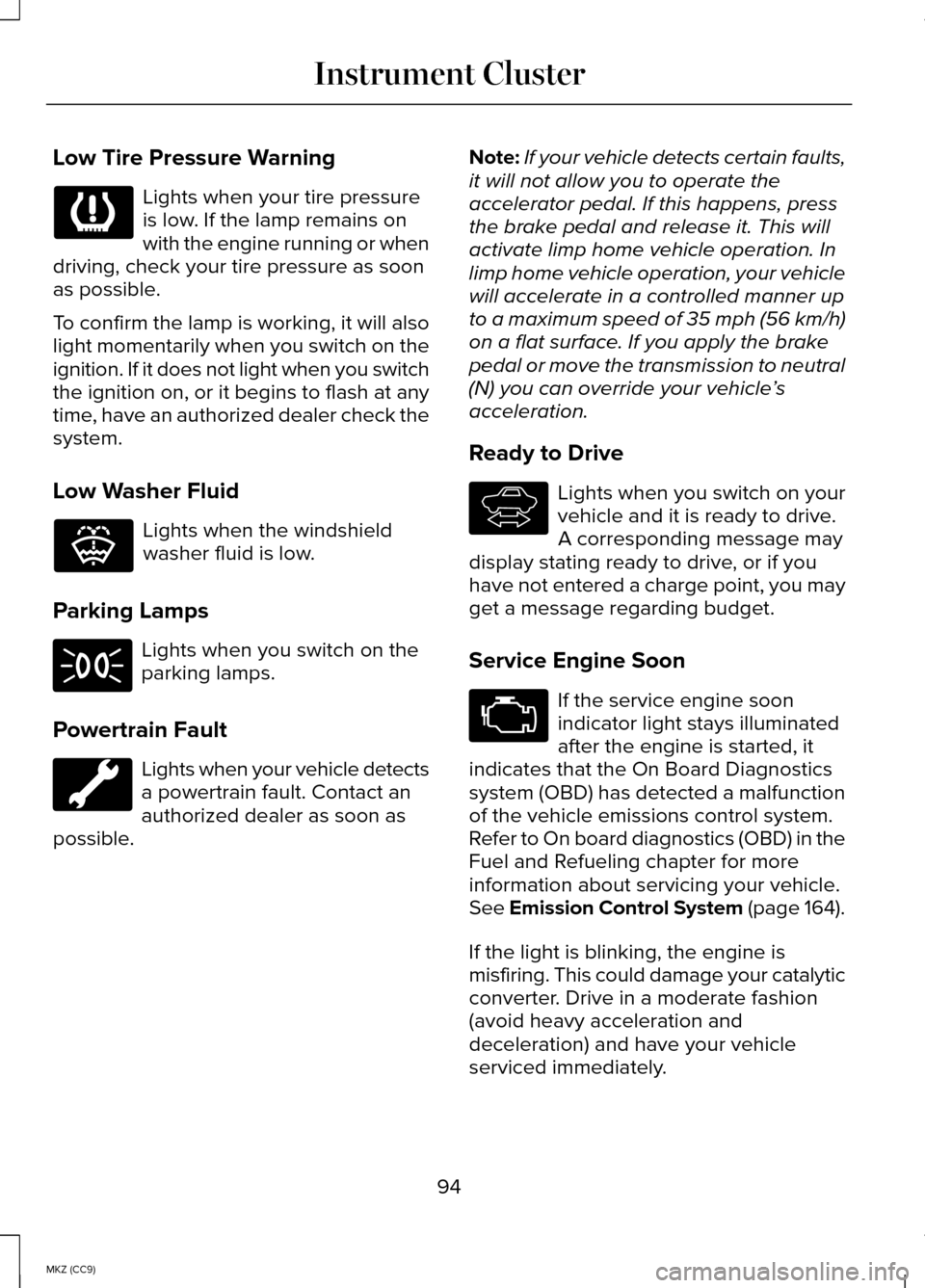
Low Tire Pressure Warning
Lights when your tire pressure
is low. If the lamp remains on
with the engine running or when
driving, check your tire pressure as soon
as possible.
To confirm the lamp is working, it will also
light momentarily when you switch on the
ignition. If it does not light when you switch
the ignition on, or it begins to flash at any
time, have an authorized dealer check the
system.
Low Washer Fluid Lights when the windshield
washer fluid is low.
Parking Lamps Lights when you switch on the
parking lamps.
Powertrain Fault Lights when your vehicle detects
a powertrain fault. Contact an
authorized dealer as soon as
possible. Note:
If your vehicle detects certain faults,
it will not allow you to operate the
accelerator pedal. If this happens, press
the brake pedal and release it. This will
activate limp home vehicle operation. In
limp home vehicle operation, your vehicle
will accelerate in a controlled manner up
to a maximum speed of 35 mph (56 km/h)
on a flat surface. If you apply the brake
pedal or move the transmission to neutral
(N) you can override your vehicle ’s
acceleration.
Ready to Drive Lights when you switch on your
vehicle and it is ready to drive.
A corresponding message may
display stating ready to drive, or if you
have not entered a charge point, you may
get a message regarding budget.
Service Engine Soon If the service engine soon
indicator light stays illuminated
after the engine is started, it
indicates that the On Board Diagnostics
system (OBD) has detected a malfunction
of the vehicle emissions control system.
Refer to On board diagnostics (OBD) in the
Fuel and Refueling chapter for more
information about servicing your vehicle.
See Emission Control System (page 164).
If the light is blinking, the engine is
misfiring. This could damage your catalytic
converter. Drive in a moderate fashion
(avoid heavy acceleration and
deceleration) and have your vehicle
serviced immediately.
94
MKZ (CC9) Instrument Cluster E132353 E144692
Page 97 of 445
Note:
If your engine is misfiring, excessive
exhaust temperatures could damage the
catalytic converter or other vehicle
components.
The service engine soon indicator lights
when the you first switch on your vehicle,
prior to engine start, to check the bulb and
to indicate whether the vehicle is ready
for inspection maintenance testing.
Normally, the service engine soon light
will stay on until the engine cranks, then
turn itself off if no malfunctions are
present. However, if after 15 seconds the
service engine soon light blinks eight
times, it means that the vehicle is not
ready for inspection maintenance testing.
See Emission Control System (page 164).
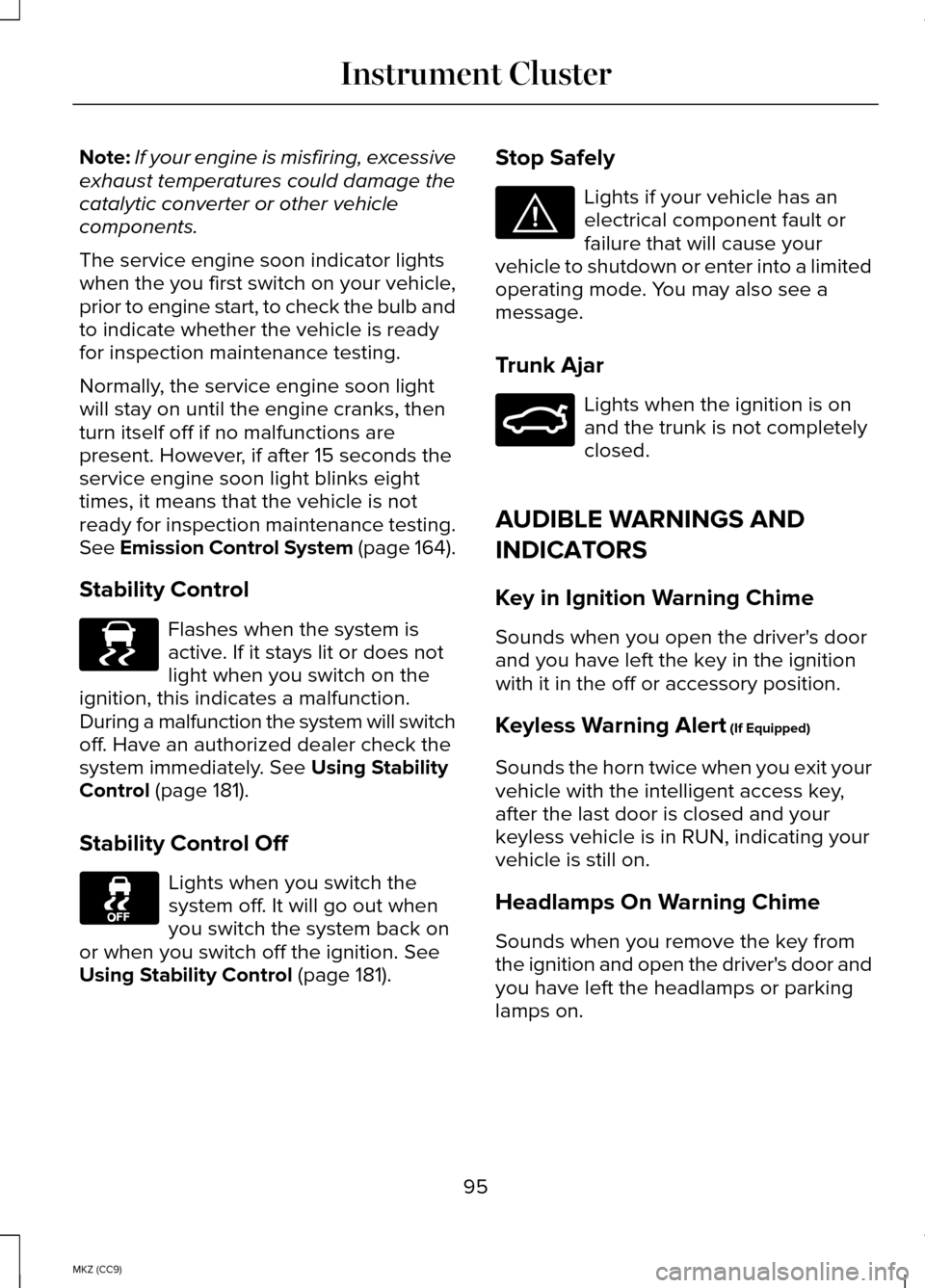
Stability Control Flashes when the system is
active. If it stays lit or does not
light when you switch on the
ignition, this indicates a malfunction.
During a malfunction the system will switch
off. Have an authorized dealer check the
system immediately.
See Using Stability
Control (page 181).
Stability Control Off Lights when you switch the
system off. It will go out when
you switch the system back on
or when you switch off the ignition.
See
Using Stability Control (page 181). Stop Safely Lights if your vehicle has an
electrical component fault or
failure that will cause your
vehicle to shutdown or enter into a limited
operating mode. You may also see a
message.
Trunk Ajar Lights when the ignition is on
and the trunk is not completely
closed.
AUDIBLE WARNINGS AND
INDICATORS
Key in Ignition Warning Chime
Sounds when you open the driver's door
and you have left the key in the ignition
with it in the off or accessory position.
Keyless Warning Alert
(If Equipped)
Sounds the horn twice when you exit your
vehicle with the intelligent access key,
after the last door is closed and your
keyless vehicle is in RUN, indicating your
vehicle is still on.
Headlamps On Warning Chime
Sounds when you remove the key from
the ignition and open the driver's door and
you have left the headlamps or parking
lamps on.
95
MKZ (CC9) Instrument ClusterE138639 E144693 E159323
Page 101 of 445
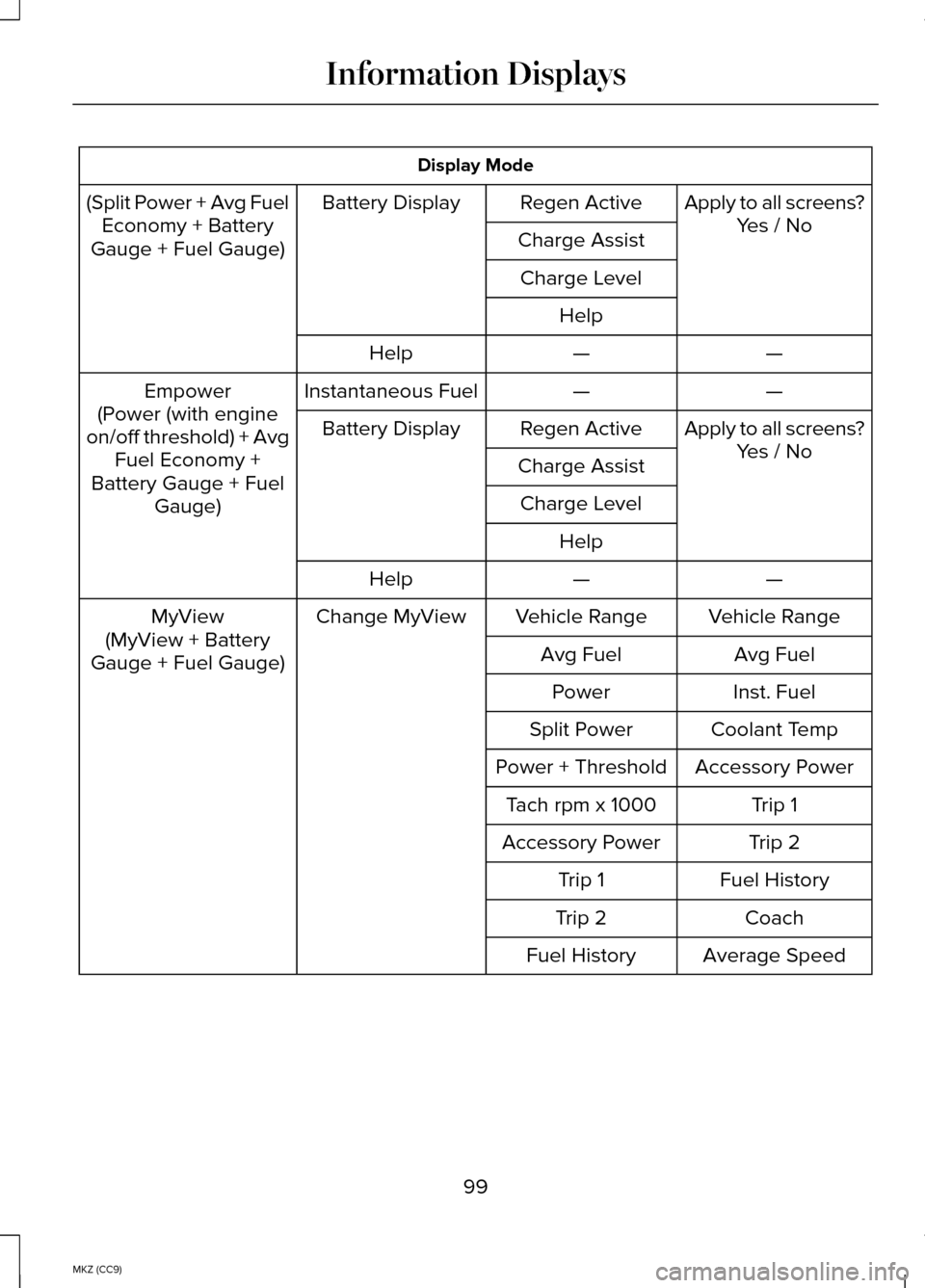
Display Mode
(Split Power + Avg Fuel Economy + Battery
Gauge + Fuel Gauge) Apply to all screens?
Yes / No
Regen Active
Battery Display
Charge AssistCharge Level Help —
—
Help
—
—
Instantaneous Fuel
Empower
(Power (with engine
on/off threshold) + Avg Fuel Economy +
Battery Gauge + Fuel Gauge) Apply to all screens?
Yes / No
Regen Active
Battery Display
Charge AssistCharge Level Help —
—
Help
Vehicle Range
Vehicle Range
Change MyView
MyView
(MyView + Battery
Gauge + Fuel Gauge) Avg Fuel
Avg Fuel
Inst. Fuel
Power
Coolant Temp
Split Power
Accessory Power
Power + Threshold
Trip 1
Tach rpm x 1000
Trip 2
Accessory Power
Fuel History
Trip 1
Coach
Trip 2
Average Speed
Fuel History
99
MKZ (CC9) Information Displays
Page 102 of 445
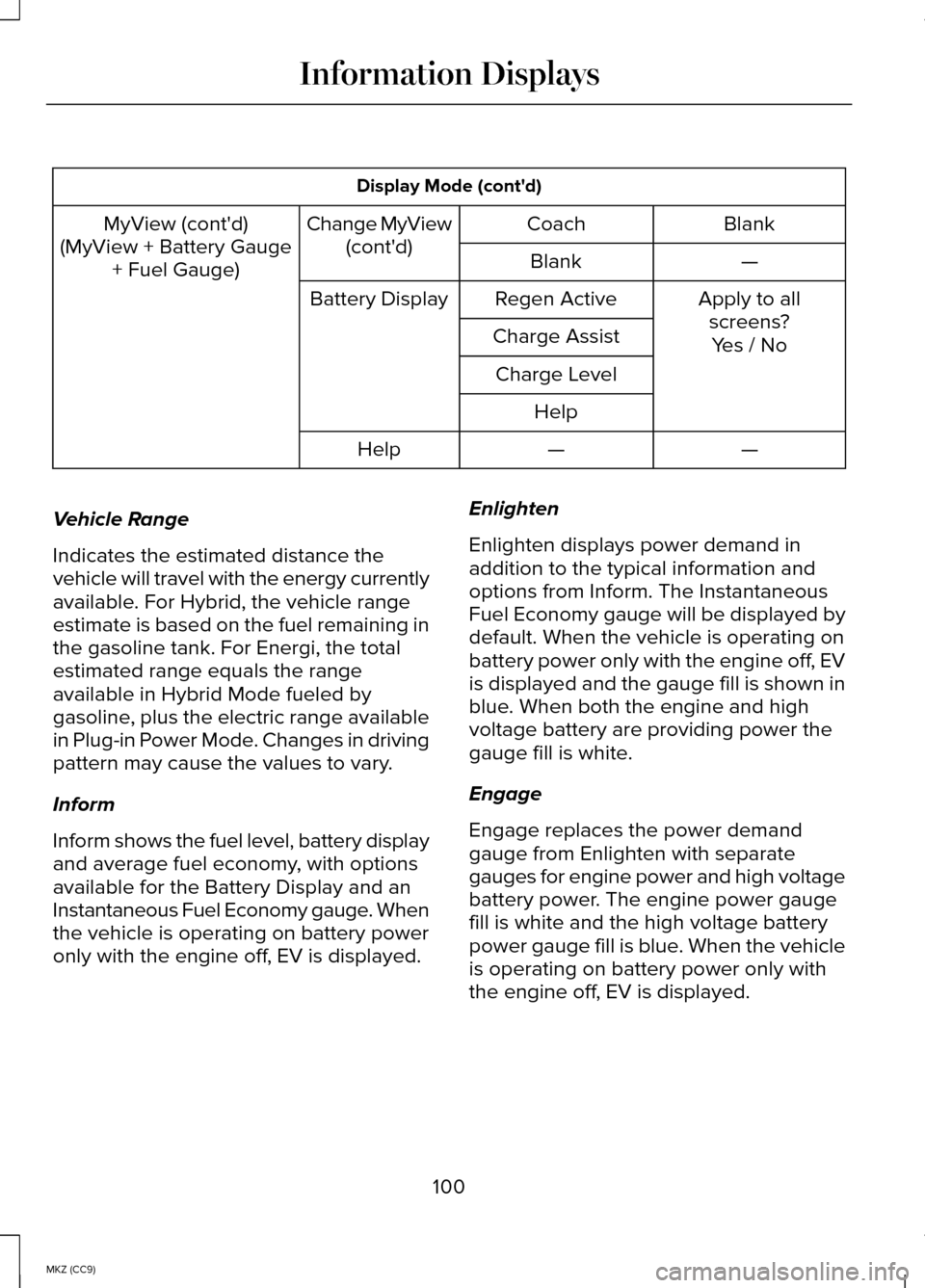
Display Mode (cont'd)
Blank
Coach
Change MyView
(cont'd)
MyView (cont'd)
(MyView + Battery Gauge + Fuel Gauge) —
Blank
Apply to allscreens?
Regen Active
Battery Display
Charge Assist Yes / No
Charge Level
Help —
—
Help
Vehicle Range
Indicates the estimated distance the
vehicle will travel with the energy currently
available. For Hybrid, the vehicle range
estimate is based on the fuel remaining in
the gasoline tank. For Energi, the total
estimated range equals the range
available in Hybrid Mode fueled by
gasoline, plus the electric range available
in Plug-in Power Mode. Changes in driving
pattern may cause the values to vary.
Inform
Inform shows the fuel level, battery display
and average fuel economy, with options
available for the Battery Display and an
Instantaneous Fuel Economy gauge. When
the vehicle is operating on battery power
only with the engine off, EV is displayed. Enlighten
Enlighten displays power demand in
addition to the typical information and
options from Inform. The Instantaneous
Fuel Economy gauge will be displayed by
default. When the vehicle is operating on
battery power only with the engine off, EV
is displayed and the gauge fill is shown in
blue. When both the engine and high
voltage battery are providing power the
gauge fill is white.
Engage
Engage replaces the power demand
gauge from Enlighten with separate
gauges for engine power and high voltage
battery power. The engine power gauge
fill is white and the high voltage battery
power gauge fill is blue. When the vehicle
is operating on battery power only with
the engine off, EV is displayed.
100
MKZ (CC9) Information Displays
Page 103 of 445
Empower
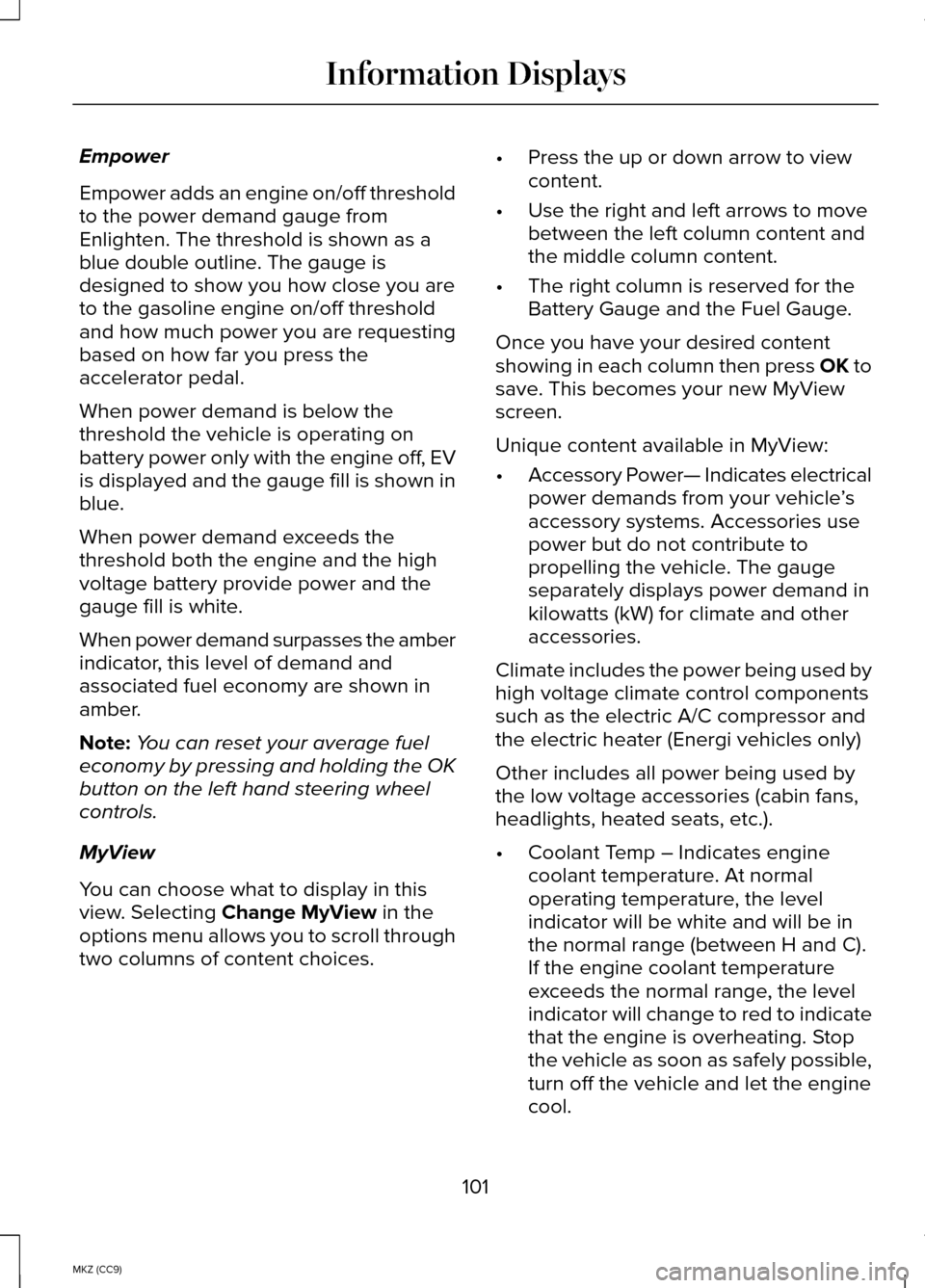
Empower adds an engine on/off threshold
to the power demand gauge from
Enlighten. The threshold is shown as a
blue double outline. The gauge is
designed to show you how close you are
to the gasoline engine on/off threshold
and how much power you are requesting
based on how far you press the
accelerator pedal.
When power demand is below the
threshold the vehicle is operating on
battery power only with the engine off, EV
is displayed and the gauge fill is shown in
blue.
When power demand exceeds the
threshold both the engine and the high
voltage battery provide power and the
gauge fill is white.
When power demand surpasses the amber
indicator, this level of demand and
associated fuel economy are shown in
amber.
Note:
You can reset your average fuel
economy by pressing and holding the OK
button on the left hand steering wheel
controls.
MyView
You can choose what to display in this
view. Selecting Change MyView in the
options menu allows you to scroll through
two columns of content choices. •
Press the up or down arrow to view
content.
• Use the right and left arrows to move
between the left column content and
the middle column content.
• The right column is reserved for the
Battery Gauge and the Fuel Gauge.
Once you have your desired content
showing in each column then press OK to
save. This becomes your new MyView
screen.
Unique content available in MyView:
• Accessory Power— Indicates electrical
power demands from your vehicle ’s
accessory systems. Accessories use
power but do not contribute to
propelling the vehicle. The gauge
separately displays power demand in
kilowatts (kW) for climate and other
accessories.
Climate includes the power being used by
high voltage climate control components
such as the electric A/C compressor and
the electric heater (Energi vehicles only)
Other includes all power being used by
the low voltage accessories (cabin fans,
headlights, heated seats, etc.).
• Coolant Temp – Indicates engine
coolant temperature. At normal
operating temperature, the level
indicator will be white and will be in
the normal range (between H and C).
If the engine coolant temperature
exceeds the normal range, the level
indicator will change to red to indicate
that the engine is overheating. Stop
the vehicle as soon as safely possible,
turn off the vehicle and let the engine
cool.
101
MKZ (CC9) Information Displays
Page 104 of 445
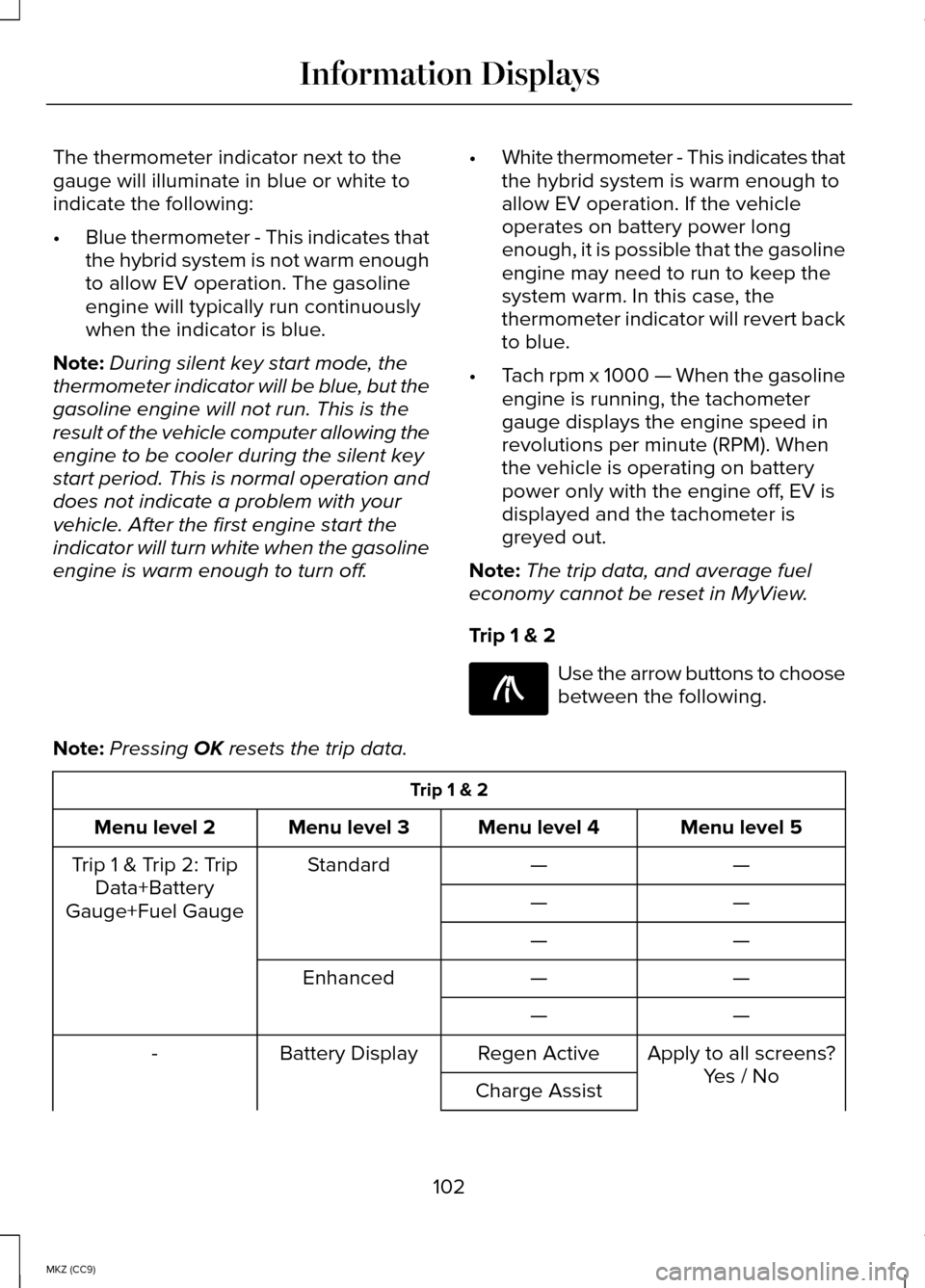
The thermometer indicator next to the
gauge will illuminate in blue or white to
indicate the following:
•
Blue thermometer - This indicates that
the hybrid system is not warm enough
to allow EV operation. The gasoline
engine will typically run continuously
when the indicator is blue.
Note: During silent key start mode, the
thermometer indicator will be blue, but the
gasoline engine will not run. This is the
result of the vehicle computer allowing the
engine to be cooler during the silent key
start period. This is normal operation and
does not indicate a problem with your
vehicle. After the first engine start the
indicator will turn white when the gasoline
engine is warm enough to turn off. •
White thermometer - This indicates that
the hybrid system is warm enough to
allow EV operation. If the vehicle
operates on battery power long
enough, it is possible that the gasoline
engine may need to run to keep the
system warm. In this case, the
thermometer indicator will revert back
to blue.
• Tach rpm x 1000 — When the gasoline
engine is running, the tachometer
gauge displays the engine speed in
revolutions per minute (RPM). When
the vehicle is operating on battery
power only with the engine off, EV is
displayed and the tachometer is
greyed out.
Note: The trip data, and average fuel
economy cannot be reset in MyView.
Trip 1 & 2 Use the arrow buttons to choose
between the following.
Note: Pressing OK resets the trip data. Trip 1 & 2
Menu level 5
Menu level 4
Menu level 3
Menu level 2
—
—
Standard
Trip 1 & Trip 2: Trip
Data+Battery
Gauge+Fuel Gauge —
—
—
—
—
—
Enhanced
—
—
Apply to all screens?
Regen Active
Battery Display
-
Yes / No
Charge Assist
102
MKZ (CC9) Information DisplaysE138660
Page 105 of 445
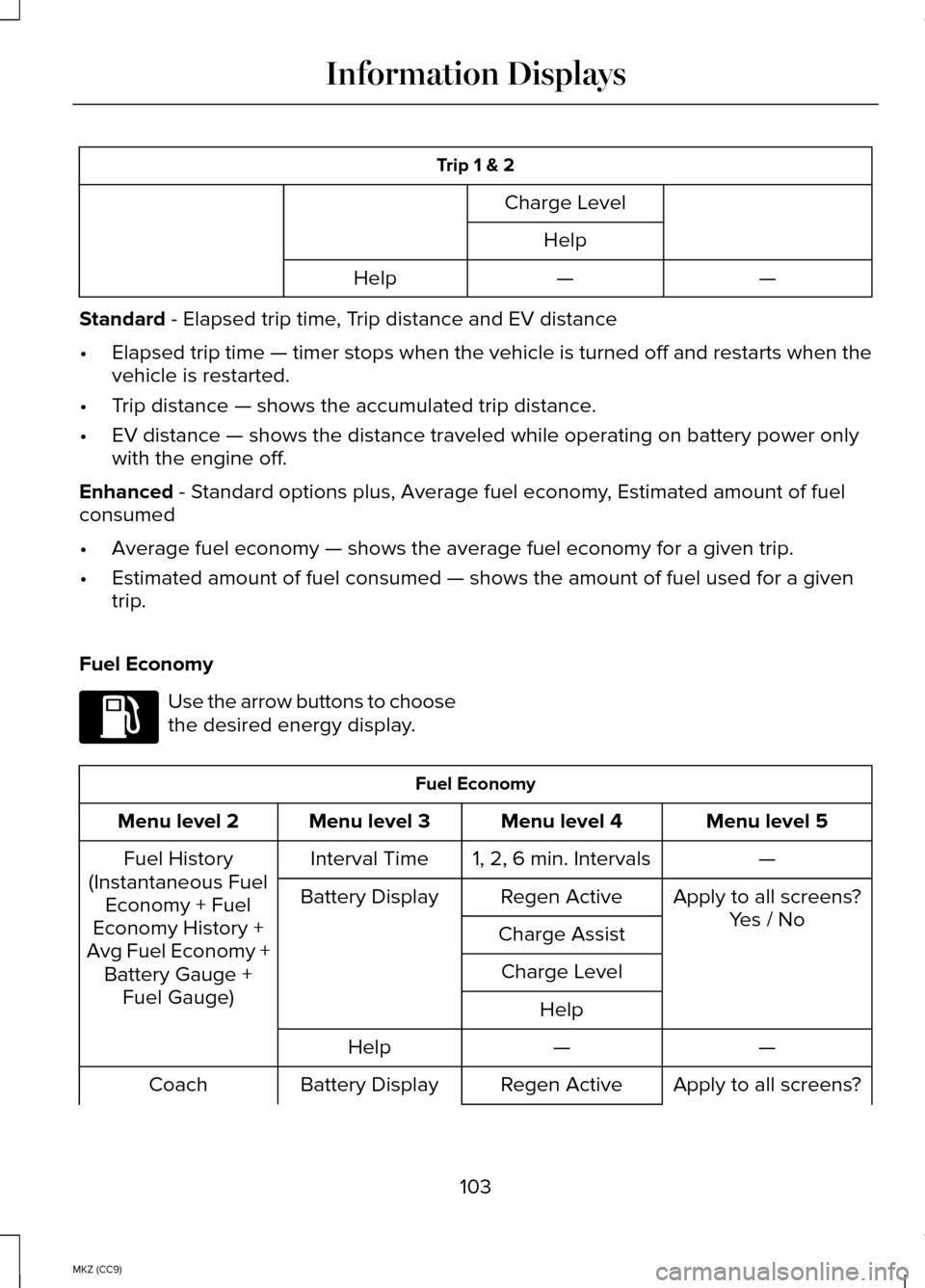
Trip 1 & 2
Charge LevelHelp —
—
Help
Standard - Elapsed trip time, Trip distance and EV distance
• Elapsed trip time — timer stops when the vehicle is turned off and restarts when the
vehicle is restarted.
• Trip distance — shows the accumulated trip distance.
• EV distance — shows the distance traveled while operating on battery power only
with the engine off.
Enhanced
- Standard options plus, Average fuel economy, Estimated amount of fuel
consumed
• Average fuel economy — shows the average fuel economy for a given trip.
• Estimated amount of fuel consumed — shows the amount of fuel used for a given
trip.
Fuel Economy Use the arrow buttons to choose
the desired energy display.
Fuel Economy
Menu level 5
Menu level 4
Menu level 3
Menu level 2
—
1, 2, 6 min. Intervals
Interval Time
Fuel History
(Instantaneous Fuel Economy + Fuel
Economy History +
Avg Fuel Economy + Battery Gauge + Fuel Gauge) Apply to all screens?
Yes / No
Regen Active
Battery Display
Charge AssistCharge Level Help —
—
Help
Apply to all screens?
Regen Active
Battery Display
Coach
103
MKZ (CC9) Information DisplaysE144640
Page 108 of 445
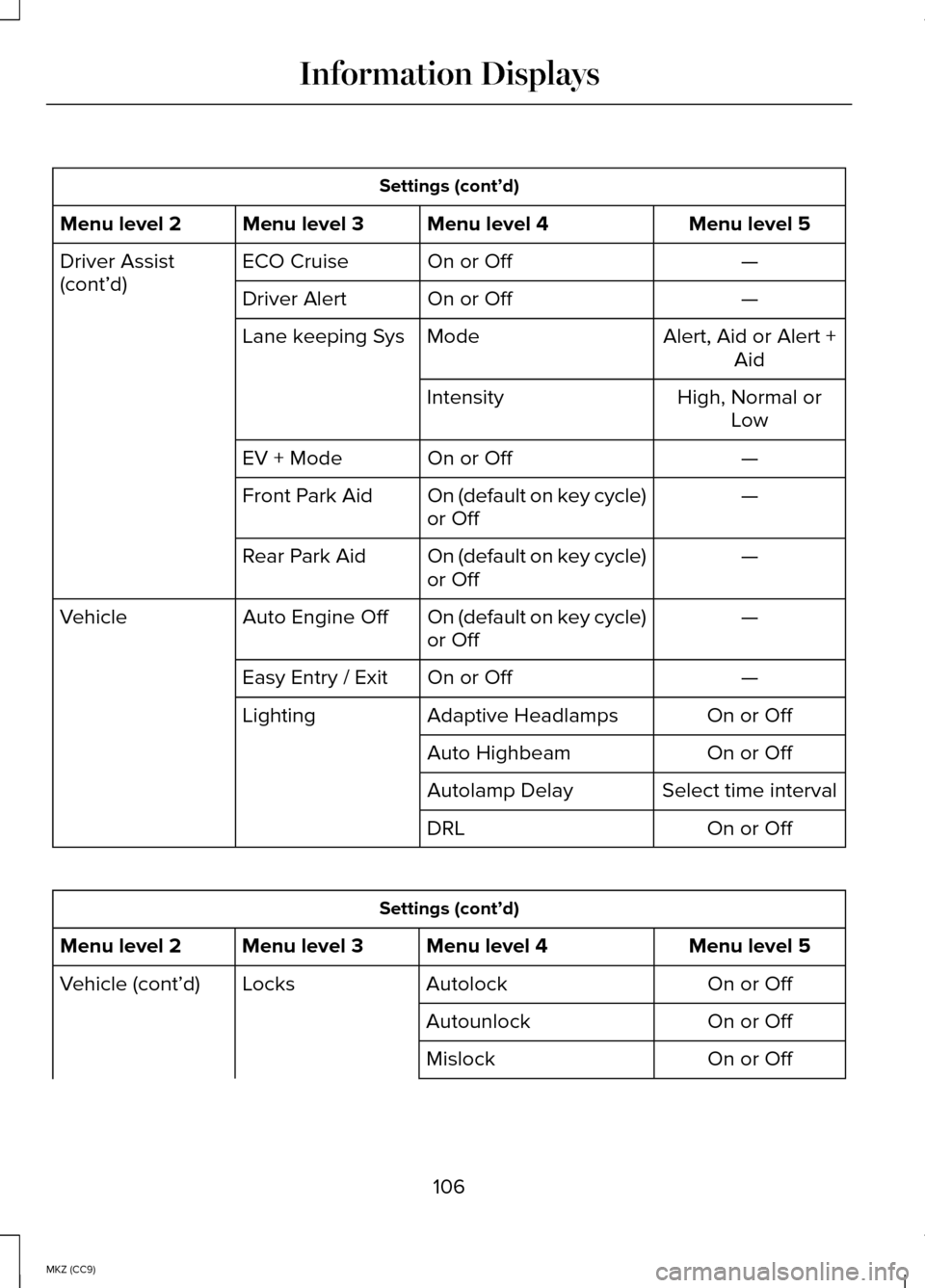
Settings (cont’d)
Menu level 5
Menu level 4
Menu level 3
Menu level 2
—
On or Off
ECO Cruise
Driver Assist
(cont’d)
—
On or Off
Driver Alert
Alert, Aid or Alert +Aid
Mode
Lane keeping Sys
High, Normal orLow
Intensity
—
On or Off
EV + Mode
—
On (default on key cycle)
or Off
Front Park Aid
—
On (default on key cycle)
or Off
Rear Park Aid
—
On (default on key cycle)
or Off
Auto Engine Off
Vehicle
—
On or Off
Easy Entry / Exit
On or Off
Adaptive Headlamps
Lighting
On or Off
Auto Highbeam
Select time interval
Autolamp Delay
On or Off
DRL Settings (cont’d)
Menu level 5
Menu level 4
Menu level 3
Menu level 2
On or Off
Autolock
Locks
Vehicle (cont’d)
On or Off
Autounlock
On or Off
Mislock
106
MKZ (CC9) Information Displays
Page 113 of 445
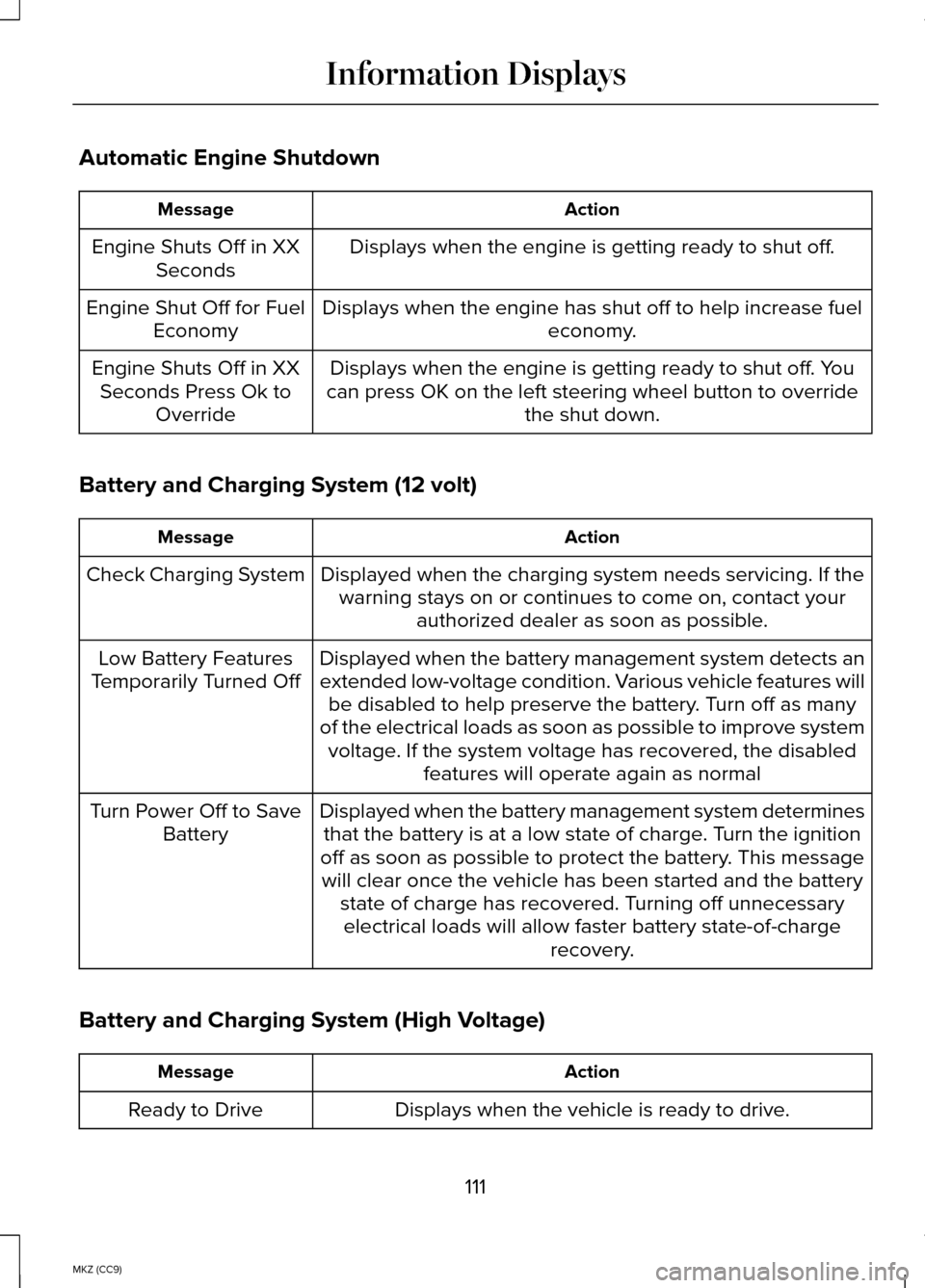
Automatic Engine Shutdown
Action
Message
Displays when the engine is getting ready to shut off.
Engine Shuts Off in XX
Seconds
Displays when the engine has shut off to help increase fuel economy.
Engine Shut Off for Fuel
Economy
Displays when the engine is getting ready to shut off. You
can press OK on the left steering wheel button to override the shut down.
Engine Shuts Off in XX
Seconds Press Ok to Override
Battery and Charging System (12 volt) Action
Message
Displayed when the charging system needs servicing. If thewarning stays on or continues to come on, contact your authorized dealer as soon as possible.
Check Charging System
Displayed when the battery management system detects an
extended low-voltage condition. Various vehicle features willbe disabled to help preserve the battery. Turn off as many
of the electrical loads as soon as possible to improve system voltage. If the system voltage has recovered, the disabled features will operate again as normal
Low Battery Features
Temporarily Turned Off
Displayed when the battery management system determinesthat the battery is at a low state of charge. Turn the ignition
off as soon as possible to protect the battery. This message will clear once the vehicle has been started and the battery state of charge has recovered. Turning off unnecessaryelectrical loads will allow faster battery state-of-charge recovery.
Turn Power Off to Save
Battery
Battery and Charging System (High Voltage) Action
Message
Displays when the vehicle is ready to drive.
Ready to Drive
111
MKZ (CC9) Information Displays