engine LINCOLN MKZ HYBRID 2014 Workshop Manual
[x] Cancel search | Manufacturer: LINCOLN, Model Year: 2014, Model line: MKZ HYBRID, Model: LINCOLN MKZ HYBRID 2014Pages: 445, PDF Size: 3.8 MB
Page 179 of 445
Manual release
WARNING
If the brake system warning light
remains illuminated or flashes after
you have released the parking brake, there
could be a problem with you braking
system. Have the system checked by an
authorized dealer as soon as possible. You can manually release the electric
parking brake by turning the ignition on,
pressing the brake pedal and then
pressing the electric parking brake switch.
When the electric parking brake is
released, the brake system warning lamp
will turn off.
Automatic release - drive away release
Note:
You must close the driver's door and
you must fasten the driver's safety belt
before this feature will operate.
Note: If the electric parking brake warning
lamp stays illuminated, the electric parking
brake will not automatically release. You
must release the electric parking brake
using the electric parking brake switch.
Note: The engine must be running and
you must press the accelerator pedal
before the drive away release feature will
operate.
Note: On hybrid vehicles, the vehicle must
be Ready-to-Drive as indicated by the
green Ready indicator light.
The brake system warning lamp will go off
to confirm that the electric parking brake
has been released. Note:
The electric parking brake drive
away release makes starting on a hill
easier. This feature will release the
parking brake automatically when the
vehicle has sufficient drive force to move
up the hill. To assure drive away release
when starting uphill, press the accelerator
pedal quickly.
Battery With No Charge WARNING
You will not be able to apply or
release the electric parking brake if
the battery is low or has no charge. If the battery is low or has no charge, use
jumper cables and a booster battery.
HILL START ASSIST
WARNINGS
The system does not replace the
parking brake. When you leave your
vehicle, always apply the parking brake
and put the transmission in park (P). You must remain in your vehicle
once you have activated the system.
During all times, you are responsible
for controlling your vehicle,
supervising the system and intervening, if
required. If the engine is revved excessively,
or if a malfunction is detected, the
system will be deactivated. The system makes it easier to pull away
when your vehicle is on a slope without
the need to use the parking brake.
177
MKZ (CC9) Brakes
Page 180 of 445
When the system is active, your vehicle
will remain stationary on the slope for two
to three seconds after you release the
brake pedal. This allows you time to move
your foot from the brake to the accelerator
pedal. The brakes are released
automatically once the engine has
developed sufficient drive to prevent your
vehicle from rolling down the slope. This
is an advantage when pulling away on a
slope, (for example from a car park ramp,
traffic lights or when reversing uphill into
a parking space).
The system will activate automatically on
any slope that will cause significant vehicle
rollback.
Using Hill Start Assist
1. Press the brake pedal to bring your
vehicle to a complete standstill. Keep
the brake pedal pressed.
2. If the sensors detect that your vehicle is on a slope, the system will activate
automatically.
3. When you remove your foot from the brake pedal, your vehicle will remain
on the slope without rolling away for
about two or three seconds. This hold
time will automatically be extended if
you are in the process of driving off.
4. Drive off in the normal manner. The brakes will release automatically.
178
MKZ (CC9) Brakes
Page 181 of 445
PRINCIPLE OF OPERATION
The traction control system helps avoid
drive wheel spin and loss of traction.
If your vehicle begins to slide, the system
applies the brakes to individual wheels
and, when needed, reduces engine power
at the same time. If the wheels spin when
accelerating on slippery or loose surfaces,
the system reduces engine power in order
to increase traction.
USING TRACTION CONTROL
In certain situations for example, stuck in
snow or mud, turning the traction control
off may be beneficial as this allows the
wheels to spin with full engine power.
Depending on the type of system you have
on your vehicle, you can either turn the
system off using the information display
or by pressing the button.
Switching the System Off Using the
Information Display Controls (If Equipped)
Your vehicle comes with this feature
already enabled. If required, you can
switch this feature off using the information
display controls. See Principle of
Operation (page 179).
Switching the System Off Using a
Switch
(If Equipped)
The button is located in the instrument
panel.
Press the button. You will see a message
in conjunction with an illuminated icon in
the display. Press the button again to
return the system to normal mode. When you switch the traction control
system off, stability control remains fully
active.
System Indicator Lights and
Messages
WARNING
If a failure has been detected within
the AdvanceTrac system, the
stability control light will illuminate steadily.
Verify that the AdvanceTrac system was
not manually disabled through the
information display. If the stability control
light still illuminates steadily, have the
system serviced by an authorized dealer
immediately. Operating your vehicle with
AdvanceTrac disabled could lead to an
increased risk of loss of vehicle control,
vehicle rollover, personal injury and death. The stability control light
temporarily illuminates on
engine start-up and flashes
when a driving condition activates the
stability system. The stability control off light
temporarily illuminates on
engine start-up and stays on
when you turn the traction control system
off.
When you turn the traction control system
off or on, a message appears in the
information display showing system status.
179
MKZ (CC9) Traction ControlE138639
Page 198 of 445
The system may apply the brakes to slow
the vehicle to the new set speed. The set
speed will display continuously in the
information display while the system is
active.
Resuming the Set Speed
Note:
Only use resume if you are aware
of the set speed and intend to return to it.
Press and release RES. The vehicle will
return to the previously set speed. The set
speed will display continuously in the
information display while the system is
active.
Low Speed Automatic Cancellation
The system is not functional at vehicle
speeds below 12 mph (20 km/h). An
audible alarm will sound and the automatic
braking releases if the vehicle drops below
this speed.
Hilly Condition Usage
Note: An audible alarm will sound and the
system will shut down if it is applying
brakes for an extended period of time.
This allows the brakes to cool down. The
system will function normally again when
the brakes have cooled down.
You should select a lower gear position
when the system is active in situations
such as prolonged downhill driving on
steep grades, for example in mountainous
areas. The system needs additional engine
braking in these situations to reduce the
load on the vehicle ’s regular brake system
to prevent them from overheating. Switching the System Off
Note:
The set speed memory erases when
you switch off the system.
Press and release
OFF or turn off the
ignition.
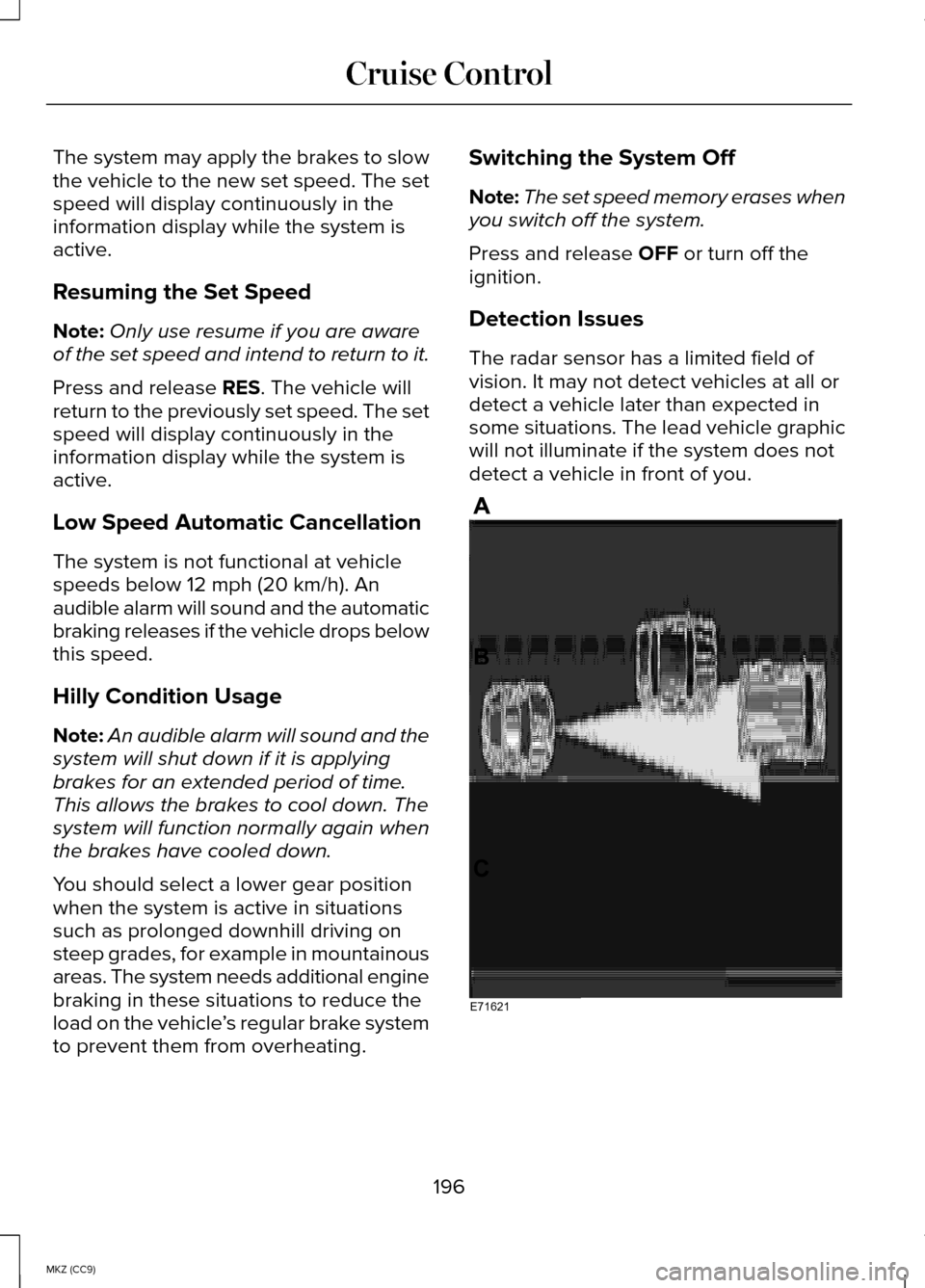
Detection Issues
The radar sensor has a limited field of
vision. It may not detect vehicles at all or
detect a vehicle later than expected in
some situations. The lead vehicle graphic
will not illuminate if the system does not
detect a vehicle in front of you. 196
MKZ (CC9) Cruise ControlE71621
Page 211 of 445
Note:
The CTA system always switches
on whenever the ignition is switched on.
However, the BLIS system will remember
the last selected on or off setting.
One or both systems cannot be switched
off when MyKey is used. See General
Information (page 313).
One or both systems can also be switched
off permanently at your authorized dealer.
Once switched off, switching it back on
must also be done at your authorized
dealer.
STEERING
Electric Power Steering WARNINGS
The electric power steering system
has diagnostic checks that
continuously monitor the system to ensure
proper operation. When a system error is
detected a steering message will appear
in the information display. The electric power steering system
has diagnostic checks that
continuously monitor the system to ensure
proper operation of the electronic system.
When an electronic error is detected, a
message will be displayed in the
information display. If this happens, stop
the vehicle in a safe place, and turn off the
engine. After at least 10 seconds, reset the
system by restarting the engine, and watch
the information display for a steering
message. If a steering message returns,
or returns while driving, take the vehicle
to your dealer to have it checked. WARNINGS
Obtain immediate service if a system
error is detected. You may not notice
any difference in the feel of your steering,
but a serious condition may exist. Failure
to do so may result in loss of steering
control. Your vehicle is equipped with an electric
power-assisted steering system. There is
no fluid reservoir to check or fill.
If your vehicle loses electrical power while
you are driving (or if the ignition is turned
off ), you can steer the vehicle manually,
but it takes more effort. Extreme
continuous steering may increase the
effort it takes for you to steer. This occurs
to prevent internal overheating and
permanent damage to your steering
system. If this should occur, you will
neither lose the ability to steer the vehicle
manually nor will it cause permanent
damage. Typical steering and driving
maneuvers will allow the system to cool
and steering assist will return to normal.
Steering Tips
If the steering wanders or pulls, check for:
•
an improperly inflated tire
• uneven tire wear
• loose or worn suspension components
• loose or worn steering components
• improper vehicle alignment
A high crown in the road or high
crosswinds may also make the steering
seem to wander or pull.
209
MKZ (CC9) Driving Aids
Page 215 of 445
•
Electronic stability control and traction
control maintain your vehicle control
in adverse conditions or high
performance driving.
• Electronic throttle control enhances
the powertrain response to your inputs.
These systems have a range of modes
which you can choose from in order to
customize your ideal driving experience:
• Comfort – Provides a more relaxed
driving experience, maximizing
comfort. Your steering effort decreases
and the suspension movement is more
fluid. Comfort mode is ideal when you
desire enhanced traveling comfort.
• Normal – Delivers a balanced
combination of comfortable, controlled
ride and confident handling. This mode
provides an engaging drive experience
and a direct connection to the road
without sacrificing any of the
composure demanded from a luxury
vehicle.
• Sport – Provides a sportier driving
experience. The suspension stiffens,
with an emphasis on handling and
control. The engine responds more
directly to your inputs and takes on a
more powerful tone. Sport mode is
ideal for use during more spirited
driving.
Using Lincoln Drive Control
You can configure which of the Drive
Control modes are active when your
vehicle is in Drive (D) or in Sport (S). The
configuration remains active until modified
from the main menu on the information
display. To change your vehicle
’s Drive Control
settings from the main menu on the
information display:
1. Choose Settings.
2. Choose Vehicle.
3. Choose Drive Control.
4. Select the shift position you would like
to configure, either D or S.
5. Choose from Comfort, Normal, or Sport
modes as your preferred setting in
D.
6. Choose from Normal or Sport modes as your preferred setting in S.
Note: Lincoln Drive Control has diagnostic
checks that continuously monitor the
system to ensure proper operation.
Certain types of system errors will gray
out the mode selections within the
information display, preventing you from
changing states when the gear position
is changed. Other types of errors will
produce a temporary message that states
Drive Control Malfunction. If either
condition persists for multiple key cycles,
have your vehicle checked by an
authorized dealer.
213
MKZ (CC9) Driving Aids
Page 220 of 445
WARNING
Exceeding the Safety
Compliance Certification Label
vehicle weight rating limits could result
in substandard vehicle handling or
performance, engine, transmission
and/or structural damage, serious
damage to the vehicle, loss of control
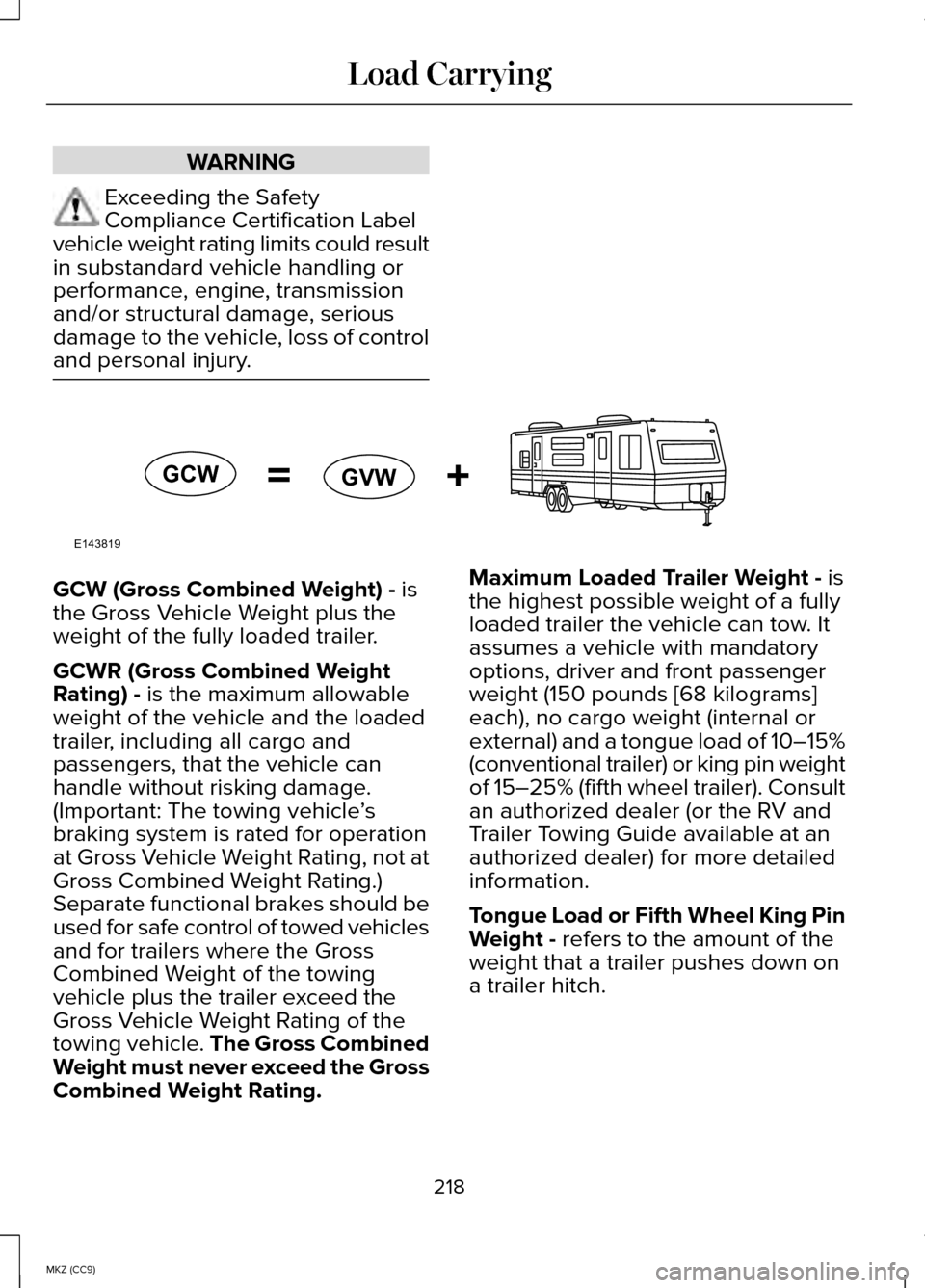
and personal injury. GCW (Gross Combined Weight) - is
the Gross Vehicle Weight plus the
weight of the fully loaded trailer.
GCWR (Gross Combined Weight
Rating) -
is the maximum allowable
weight of the vehicle and the loaded
trailer, including all cargo and
passengers, that the vehicle can
handle without risking damage.
(Important: The towing vehicle ’s
braking system is rated for operation
at Gross Vehicle Weight Rating, not at
Gross Combined Weight Rating.)
Separate functional brakes should be
used for safe control of towed vehicles
and for trailers where the Gross
Combined Weight of the towing
vehicle plus the trailer exceed the
Gross Vehicle Weight Rating of the
towing vehicle. The Gross Combined
Weight must never exceed the Gross
Combined Weight Rating. Maximum Loaded Trailer Weight -
is
the highest possible weight of a fully
loaded trailer the vehicle can tow. It
assumes a vehicle with mandatory
options, driver and front passenger
weight (150 pounds [68 kilograms]
each), no cargo weight (internal or
external) and a tongue load of 10–15%
(conventional trailer) or king pin weight
of 15–25% (fifth wheel trailer). Consult
an authorized dealer (or the RV and
Trailer Towing Guide available at an
authorized dealer) for more detailed
information.
Tongue Load or Fifth Wheel King Pin
Weight -
refers to the amount of the
weight that a trailer pushes down on
a trailer hitch.
218
MKZ (CC9) Load CarryingE143819GCW
GVW
Page 224 of 445
TOWING THE VEHICLE ON FOUR
WHEELS
Emergency Towing
In the event your vehicle becomes
disabled (without access to wheel dollies,
car-hauling trailer, or flatbed transport
vehicle), it can be flat-towed (all wheels on
the ground, regardless of the
powertrain/transmission configuration)
under the following conditions:
•
The vehicle is facing forward so that it
is towed in a forward direction.
• The transmission gear shift lever is
placed in position N. If the transmission
gear shift lever cannot be moved to
position N, it may need to be
overridden. See Automatic
Transmission (page 170).
• Maximum speed is 35 mph (56 km/h).
• Maximum distance is 50 miles (80
kilometers).
Recreational Towing
Note: Put your climate control system in
recirculated air mode to prevent exhaust
fumes from entering the vehicle.
See
Climate Control (page 124).
Follow these guidelines if you have a need
for recreational (RV) towing. An example
of recreational towing would be towing
your vehicle behind a motorhome. These
guidelines are designed to ensure that
your transmission is not damaged. Your vehicle can be towed with all four
wheels on the ground using the Neutral
Tow feature, or with all four wheels off the
ground using a vehicle transport trailer. If
you are using a vehicle transport trailer,
follow the instruction specified by the
equipment provider.
Neutral Tow
If you tow your vehicle with all four wheels
on the ground:
•
Tow only in the forward direction.
• Release the parking brake.
• Place the vehicle in Neutral Tow mode
by doing the following:
•Put the ignition in accessory mode
(ignition on, engine off ).
See
Keyless Starting (page 147).
• Select
Neutral Tow in the
information display.
• When prompted by the information
display, press the brake pedal and
select Neutral on the transmission.
Make sure the parking brake is off.
If done successfully,
Neutral Tow
Engaged appears in the display.
• Shut the ignition off.
See Keyless
Starting (page 147). If the process
is completed successfully, the N
on the transmission slowly blinks
and "Neutral tow engaged"
appears in the information display.
• Do not exceed 70 mph (113 km/h).
• Start the engine and allow it to run for
one minute at the beginning of each
day. With the engine running and your
foot on the brake, shift into position D
and then into position R before shifting
back into position
N.
222
MKZ (CC9) Towing
Page 225 of 445
BREAKING-IN
You need to break in new tires for
approximately 300 miles (480 kilometers).
During this time, your vehicle may exhibit
some unusual driving characteristics. The
engine also needs to break in. Avoid hard
accelerations and driving too fast for the
first 1000 miles (1600 kilometers). If
possible, avoid carrying heavy loads up
steep grades during the break-in period.
ECONOMICAL DRIVING
Fuel economy is affected by several things
such as how you drive, the conditions you
drive under and how you maintain your
vehicle.
There are some things to keep in mind
that may improve your fuel economy:
•
Accelerate and slow down in a smooth,
moderate fashion.
• Drive at steady speeds.
• Anticipate stops; slowing down may
eliminate the need to stop.
• Combine errands and minimize
stop-and-go driving.
•When running errands, go to the
furthest destination first and then
work your way back home.
• Close the windows for high-speed
driving.
• Drive at reasonable speeds. (Traveling
at 65 mph/105 kph uses about 15% less
fuel than traveling at 75 mph/121 kph).
• Keep the tires properly inflated and
use only the recommended size. •
Use the recommended engine oil.
• Perform all regularly scheduled
maintenance.
There are also some things you may want
to avoid doing because they reduce your
fuel economy:
• Avoid sudden or hard accelerations.
• Avoid revving the engine before
turning off the car.
• Avoid long idle periods.
• Do not warm up your vehicle on cold
mornings.
• Reduce the use of air conditioning and
heat.
• Avoid using speed control in hilly
terrain.
• Do not rest your foot on the brake
pedal while driving.
• Avoid carrying unnecessary weight
(approximately 1 mpg [0.4
kilometers/liter] is lost for every 400
lbs [180 kilograms] of weight carried).
• Avoid adding particular accessories to
your vehicle (e.g. bug deflectors,
rollbars/light bars, running boards, ski
racks).
• Avoid driving with the wheels out of
alignment.
DRIVING THROUGH WATER
Note: Driving through deep water above
the recommended levels can cause
vehicle damage.
223
MKZ (CC9) Driving Hints
Page 226 of 445
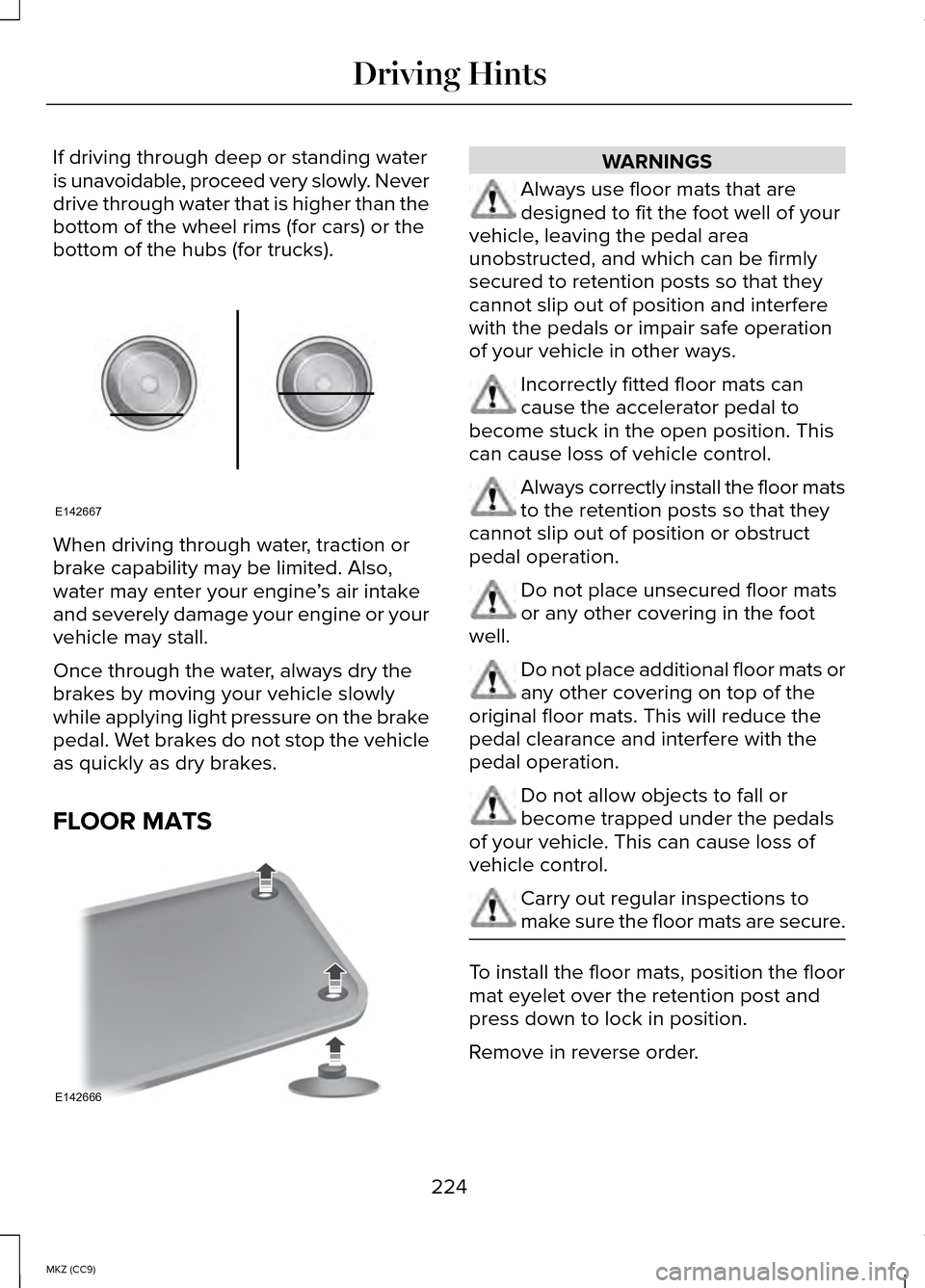
If driving through deep or standing water
is unavoidable, proceed very slowly. Never
drive through water that is higher than the
bottom of the wheel rims (for cars) or the
bottom of the hubs (for trucks).
When driving through water, traction or
brake capability may be limited. Also,
water may enter your engine
’s air intake
and severely damage your engine or your
vehicle may stall.
Once through the water, always dry the
brakes by moving your vehicle slowly
while applying light pressure on the brake
pedal. Wet brakes do not stop the vehicle
as quickly as dry brakes.
FLOOR MATS WARNINGS
Always use floor mats that are
designed to fit the foot well of your
vehicle, leaving the pedal area
unobstructed, and which can be firmly
secured to retention posts so that they
cannot slip out of position and interfere
with the pedals or impair safe operation
of your vehicle in other ways. Incorrectly fitted floor mats can
cause the accelerator pedal to
become stuck in the open position. This
can cause loss of vehicle control. Always correctly install the floor mats
to the retention posts so that they
cannot slip out of position or obstruct
pedal operation. Do not place unsecured floor mats
or any other covering in the foot
well. Do not place additional floor mats or
any other covering on top of the
original floor mats. This will reduce the
pedal clearance and interfere with the
pedal operation. Do not allow objects to fall or
become trapped under the pedals
of your vehicle. This can cause loss of
vehicle control. Carry out regular inspections to
make sure the floor mats are secure.
To install the floor mats, position the floor
mat eyelet over the retention post and
press down to lock in position.
Remove in reverse order.
224
MKZ (CC9) Driving HintsE142667 E142666