warning light LINCOLN MKZ HYBRID 2014 User Guide
[x] Cancel search | Manufacturer: LINCOLN, Model Year: 2014, Model line: MKZ HYBRID, Model: LINCOLN MKZ HYBRID 2014Pages: 445, PDF Size: 3.8 MB
Page 45 of 445
Passenger airbag
Passenger airbag status
indicator
Occupant
Disabled
OFF: Lit
Empty
ON: Unlit Disabled
OFF: Lit
Child
ON: Unlit Enabled
OFF: Unlit
Adult
ON: Lit
Note: When the passenger airbag status
indicator OFF light is illuminated, the
passenger (seat mounted) side airbag may
be disabled to avoid the risk of airbag
deployment injuries.
After all occupants have adjusted their
seats and put on safety belts, it is very
important that they continue to sit properly.
A properly seated occupant sits upright,
leaning against the seat back, and
centered on the seat cushion, with their
feet comfortably extended on the floor.
Sitting improperly can increase the chance
of injury in a crash event. For example, if
an occupant slouches, lies down, turns
sideways, sits forward, leans forward or
sideways, or puts one or both feet up, the
chance of injury during a crash is greatly
increased.
The conditions listed above may cause
the weight of a properly seated occupant
to be incorrectly interpreted by the front
passenger sensing system. The person in
the front passenger seat may appear
heavier or lighter due to the conditions
described in the list above. To know if the front passenger
sensing system is operating
properly, See Crash Sensors
and Airbag Indicator (page 46).
Do not attempt to repair or service the
system. Take your vehicle immediately to
an authorized dealer.
If it is necessary to modify an advanced
front airbag system to accommodate a
person with disabilities, contact the Ford
Customer Relationship Center.
See
Getting the Services You Need (page 232).
SIDE AIRBAGS WARNINGS
Do not place objects or mount
equipment on or near the airbag
cover, on the side of the seatbacks (of the
front seats), or in front seat areas that may
come into contact with a deploying airbag.
Failure to follow these instructions may
increase the risk of personal injury in the
event of a crash.
43
MKZ (CC9) Supplementary Restraints System
Page 48 of 445
•
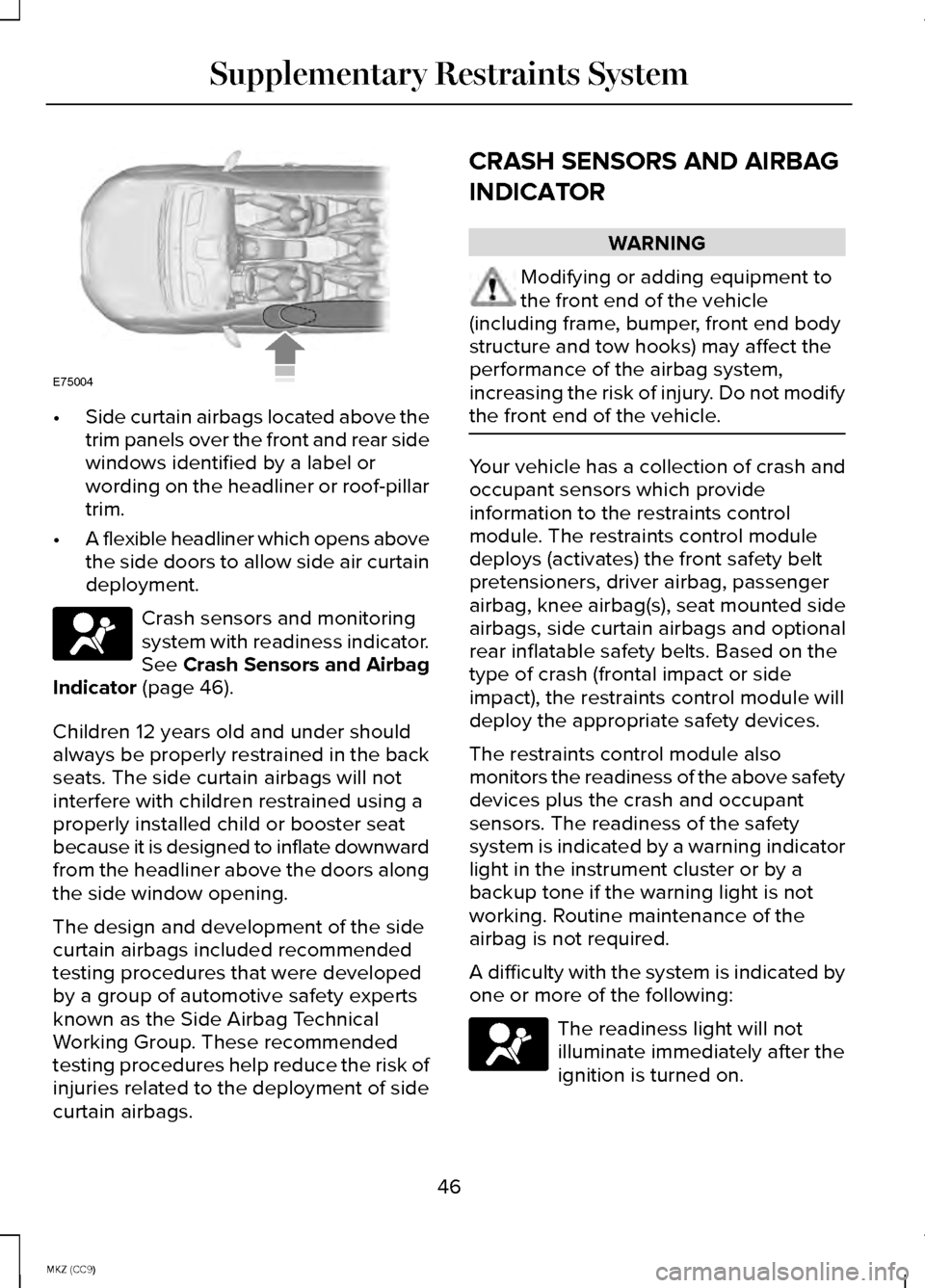
Side curtain airbags located above the
trim panels over the front and rear side
windows identified by a label or
wording on the headliner or roof-pillar
trim.
• A flexible headliner which opens above
the side doors to allow side air curtain
deployment. Crash sensors and monitoring
system with readiness indicator.
See Crash Sensors and Airbag
Indicator (page 46).
Children 12 years old and under should
always be properly restrained in the back
seats. The side curtain airbags will not
interfere with children restrained using a
properly installed child or booster seat
because it is designed to inflate downward
from the headliner above the doors along
the side window opening.
The design and development of the side
curtain airbags included recommended
testing procedures that were developed
by a group of automotive safety experts
known as the Side Airbag Technical
Working Group. These recommended
testing procedures help reduce the risk of
injuries related to the deployment of side
curtain airbags. CRASH SENSORS AND AIRBAG
INDICATOR WARNING
Modifying or adding equipment to
the front end of the vehicle
(including frame, bumper, front end body
structure and tow hooks) may affect the
performance of the airbag system,
increasing the risk of injury. Do not modify
the front end of the vehicle. Your vehicle has a collection of crash and
occupant sensors which provide
information to the restraints control
module. The restraints control module
deploys (activates) the front safety belt
pretensioners, driver airbag, passenger
airbag, knee airbag(s), seat mounted side
airbags, side curtain airbags and optional
rear inflatable safety belts. Based on the
type of crash (frontal impact or side
impact), the restraints control module will
deploy the appropriate safety devices.
The restraints control module also
monitors the readiness of the above safety
devices plus the crash and occupant
sensors. The readiness of the safety
system is indicated by a warning indicator
light in the instrument cluster or by a
backup tone if the warning light is not
working. Routine maintenance of the
airbag is not required.
A difficulty with the system is indicated by
one or more of the following:
The readiness light will not
illuminate immediately after the
ignition is turned on.
46
MKZ (CC9) Supplementary Restraints SystemE75004
Page 52 of 445
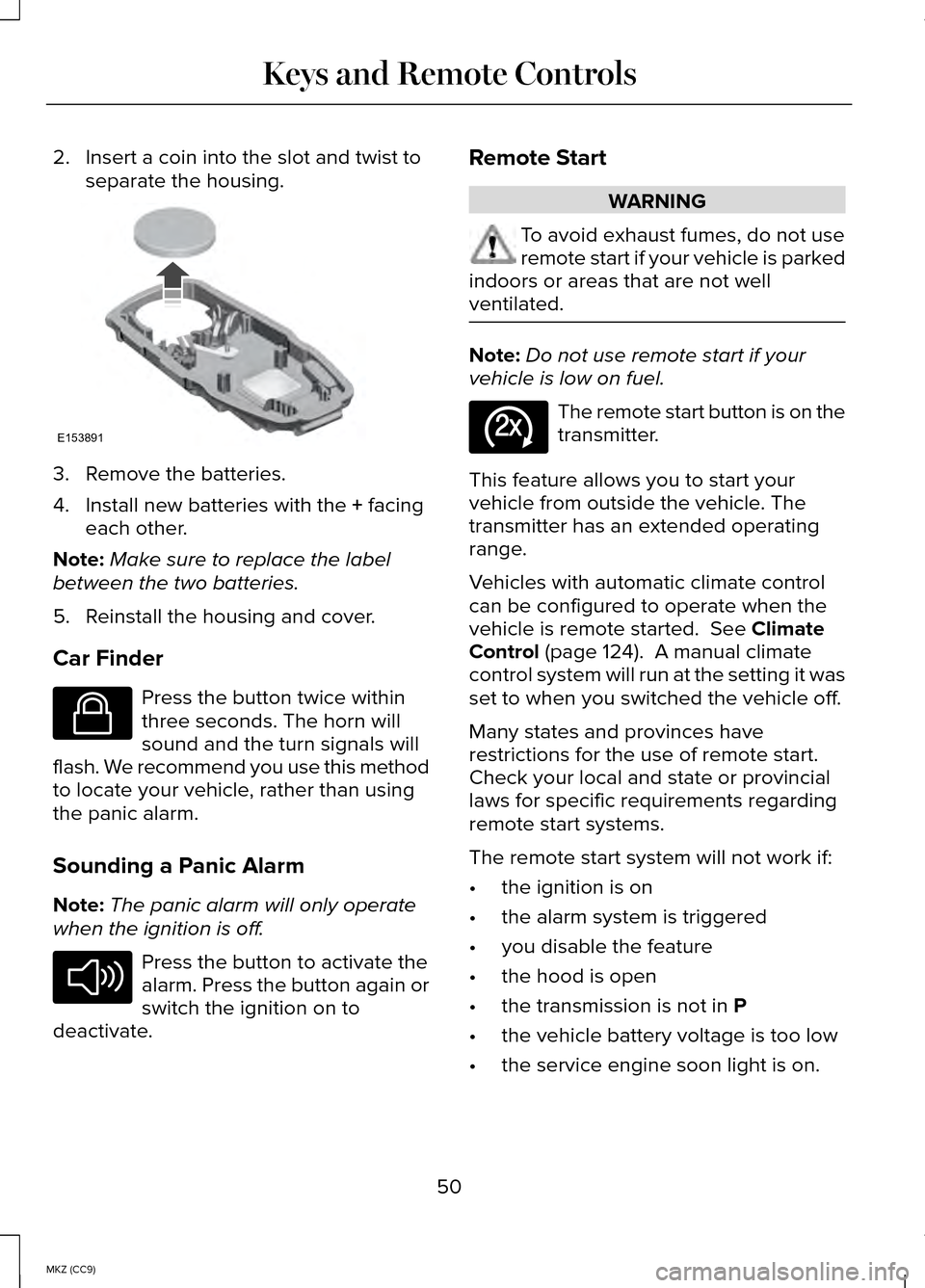
2. Insert a coin into the slot and twist to
separate the housing. 3. Remove the batteries.
4. Install new batteries with the + facing
each other.
Note: Make sure to replace the label
between the two batteries.
5. Reinstall the housing and cover.
Car Finder Press the button twice within
three seconds. The horn will
sound and the turn signals will
flash. We recommend you use this method
to locate your vehicle, rather than using
the panic alarm.
Sounding a Panic Alarm
Note: The panic alarm will only operate
when the ignition is off. Press the button to activate the
alarm. Press the button again or
switch the ignition on to
deactivate. Remote Start WARNING
To avoid exhaust fumes, do not use
remote start if your vehicle is parked
indoors or areas that are not well
ventilated. Note:
Do not use remote start if your
vehicle is low on fuel. The remote start button is on the
transmitter.
This feature allows you to start your
vehicle from outside the vehicle. The
transmitter has an extended operating
range.
Vehicles with automatic climate control
can be configured to operate when the
vehicle is remote started.
See Climate
Control (page 124). A manual climate
control system will run at the setting it was
set to when you switched the vehicle off.
Many states and provinces have
restrictions for the use of remote start.
Check your local and state or provincial
laws for specific requirements regarding
remote start systems.
The remote start system will not work if:
• the ignition is on
• the alarm system is triggered
• you disable the feature
• the hood is open
• the transmission is not in
P
• the vehicle battery voltage is too low
• the service engine soon light is on.
50
MKZ (CC9) Keys and Remote ControlsE153891 E138623 E138624 E138625
Page 65 of 445
With the Decklid Close Button
Press the button inside the
decklid on the left side.
Obstacle Detection
The decklid will reverse to full open if it
detects an obstacle while closing. Three
chimes will sound as the decklid begins
to reopen. Remove the obstacle to close
the decklid.
Note: Before driving off, check the
instrument cluster for a trunk ajar or door
ajar message or warning indicator. Failure
to do this could result in unintentionally
leaving the decklid open while driving.
The decklid will stop and three chimes will
sound if it detects an obstacle while
opening. Remove the obstacle to operate
the decklid.
Resetting the Power Decklid
The decklid may not operate properly and
you may need to reset it if:
• the battery is dead or has low voltage
• you disconnect the battery
• you manually close the decklid and
leave it unlatched.
To reset the power decklid:
1. Disconnect the battery for 20 seconds
then reconnect the battery.
2. Manually close and fully latch the decklid.
3. Power open the decklid using the remote control or instrument panel
button. KEYLESS ENTRY
SECURICODE™ KEYLESS ENTRY
KEYPAD
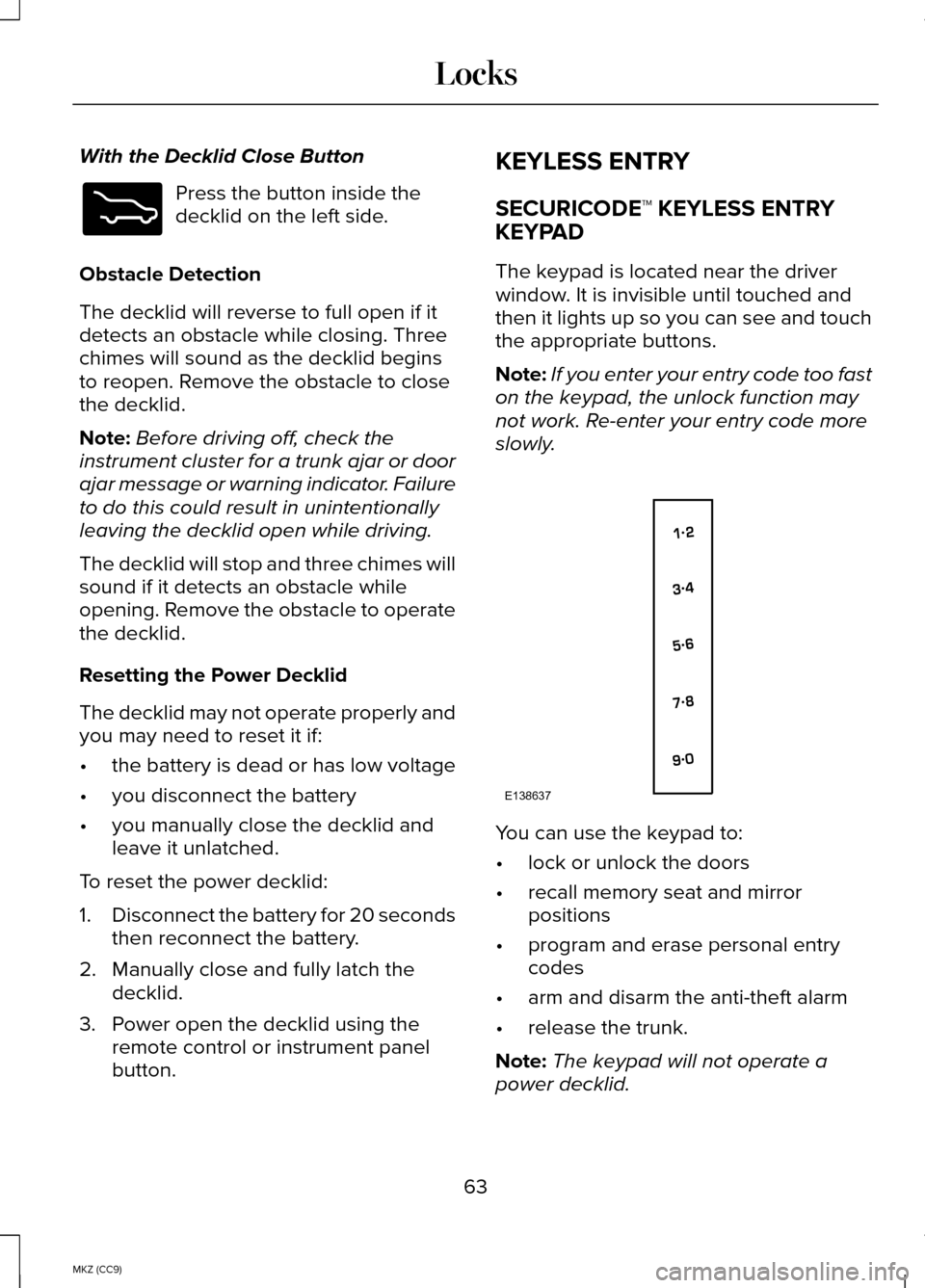
The keypad is located near the driver
window. It is invisible until touched and
then it lights up so you can see and touch
the appropriate buttons.
Note:
If you enter your entry code too fast
on the keypad, the unlock function may
not work. Re-enter your entry code more
slowly. You can use the keypad to:
•
lock or unlock the doors
• recall memory seat and mirror
positions
• program and erase personal entry
codes
• arm and disarm the anti-theft alarm
• release the trunk.
Note: The keypad will not operate a
power decklid.
63
MKZ (CC9) LocksE173217 E138637
Page 68 of 445
WARNINGS
Do not leave children, unreliable
adults, or animals unattended in the
vehicle. On hot days, the temperature in
the trunk or vehicle interior can rise very
quickly. Exposure of people or animals to
these high temperatures for even a short
time can cause death or serious
heat-related injuries, including brain
damage. Small children are particularly at
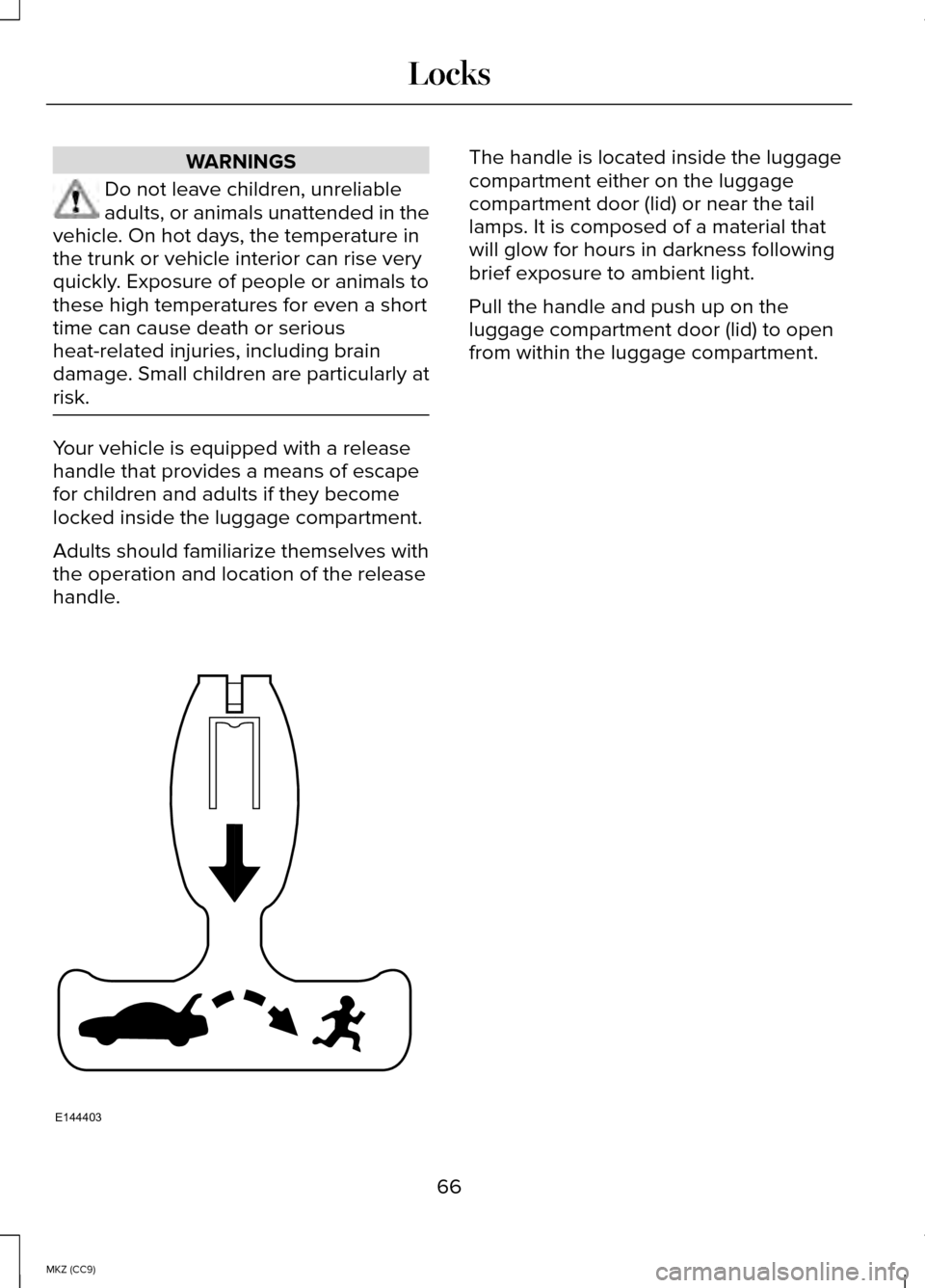
risk. Your vehicle is equipped with a release
handle that provides a means of escape
for children and adults if they become
locked inside the luggage compartment.
Adults should familiarize themselves with
the operation and location of the release
handle. The handle is located inside the luggage
compartment either on the luggage
compartment door (lid) or near the tail
lamps. It is composed of a material that
will glow for hours in darkness following
brief exposure to ambient light.
Pull the handle and push up on the
luggage compartment door (lid) to open
from within the luggage compartment.
66
MKZ (CC9) LocksE144403
Page 81 of 445
DAYTIME RUNNING LAMPS (IF
EQUIPPED) WARNING
Always remember to switch your
headlamps on in low light situations
or during inclement weather. The system
does not activate the tail lamps and may
not provide adequate lighting during these
conditions. Failure to activate your
headlamps under these conditions may
result in a collision. The system switches the signature lamps
on in day light conditions.
To switch the system on, switch the
ignition on, and switch the lighting control
to the off, autolamp, or parking lamp
position.
AUTOMATIC HIGH BEAM
CONTROL
(IF EQUIPPED)
The system will automatically turn on your
high beams if it is dark enough and no
other traffic is present. When it detects the
headlights of an approaching vehicle, the
tail lamps of the preceding vehicle or
street lighting, the system will turn off the
high beams before they distract other
drivers. The low beams remain on.
Note: If it appears that automatic control
of the high beams is not functioning
properly, check the windshield in front of
the camera for a blockage. A clear view
of the road is required for proper system
operation. Have any windshield damage
in the area of the camera ’s field-of-view
repaired. Note:
If the system detects a blockage
such as bird droppings, bug splatter, snow
or ice, and you do not observe changes,
the system will go into low beam mode
until you clear the blockage. A message
may also appear in the instrument cluster
display noting the front camera is blocked.
Note: Typical road dust, dirt and water
spots will not affect the performance of
the automatic high beam system .
However, in cold or inclement weather
conditions, you will notice a decrease in
the availability of the high beam system,
especially at start up. If you want to
change the beam state independently of
the system, you may switch the high
beams on or off using the multifunction
switch. Automatic control will resume
when conditions are correct.
Note: Modification of the vehicle ride
height such as using much larger tires,
may degrade feature performance.
A camera sensor, centrally mounted
behind the windshield of your vehicle,
continuously monitors conditions to decide
when to switch the high beams off and on.
Once the system is active, the high beams
will switch on if:
• the ambient light level is low enough
• there is no traffic in front of the vehicle
• the vehicle speed is greater than
25 mph (40 km/h)
The high beams will switch off if:
• the system detects the headlamps of
an approaching vehicle or the tail
lamps of a preceding vehicle.
• vehicle speed falls below
16 mph
(25 km/h)
79
MKZ (CC9) Lighting
Page 85 of 445
POWER WINDOWS
WARNINGS
Do not leave children unattended in
your vehicle and do not let them play
with the power windows. They may
seriously injure themselves. When closing the power windows,
you should verify they are free of
obstructions and make sure that children
and pets are not in the proximity of the
window openings. Note:
Window operation may stop or
delay during low battery conditions and
engine re-cranking. It will resume after the
engine starts. Note:
You may hear a pulsing noise when
just one of the windows are open. Lower
the opposite window slightly to reduce this
noise.
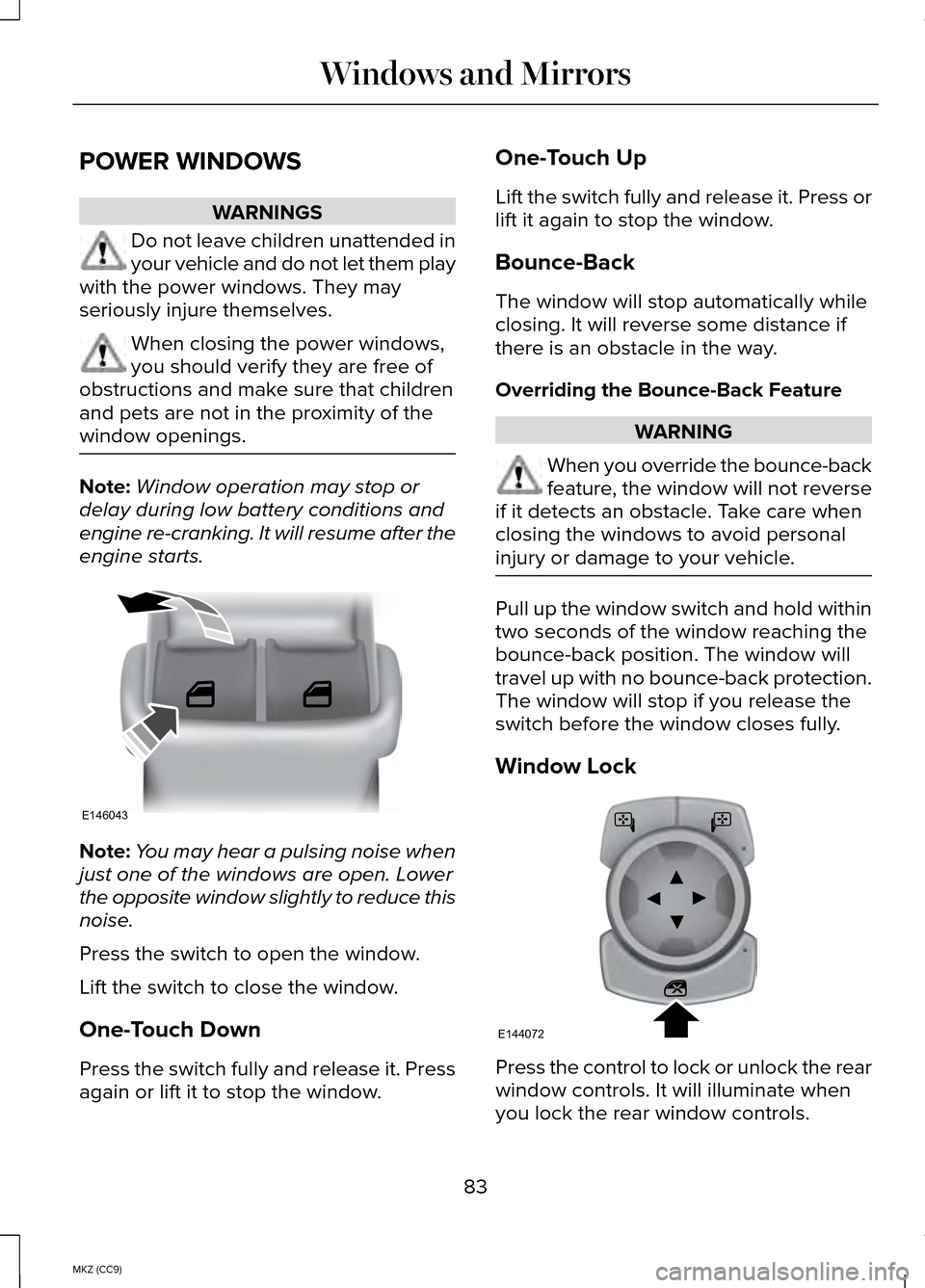
Press the switch to open the window.
Lift the switch to close the window.
One-Touch Down
Press the switch fully and release it. Press
again or lift it to stop the window. One-Touch Up
Lift the switch fully and release it. Press or
lift it again to stop the window.
Bounce-Back
The window will stop automatically while
closing. It will reverse some distance if
there is an obstacle in the way.
Overriding the Bounce-Back Feature
WARNING
When you override the bounce-back
feature, the window will not reverse
if it detects an obstacle. Take care when
closing the windows to avoid personal
injury or damage to your vehicle. Pull up the window switch and hold within
two seconds of the window reaching the
bounce-back position. The window will
travel up with no bounce-back protection.
The window will stop if you release the
switch before the window closes fully.
Window Lock
Press the control to lock or unlock the rear
window controls. It will illuminate when
you lock the rear window controls.
83
MKZ (CC9) Windows and MirrorsE146043 E144072
Page 88 of 445
Blind Spot Monitor (If Equipped)
See Blind Spot Information System (page
205
).
INTERIOR MIRROR WARNING
Do not adjust the mirror when your
vehicle is moving.
Note:
Do not clean the housing or glass
of any mirror with harsh abrasives, fuel or
other petroleum or ammonia-based
cleaning products.
You can adjust the interior mirror to your
preference. Some mirrors also have a
second pivot point. This lets you move the
mirror head up or down and from side to
side.
Auto-Dimming Mirror
Note: Do not block the sensors on the
front and back of the mirror. Mirror
performance may be affected. A rear
center passenger or raised rear center
head restraint may also block light from
reaching the sensor.
The mirror will dim automatically to reduce
glare when bright lights are detected from
behind your vehicle. It will automatically
return to normal reflection when you select
reverse gear to make sure you have a
clear view when backing up. SUN VISORS
Rotate the sun visor toward the side
window and extend it rearward for extra
shade.
Illuminated Vanity Mirror
Lift the cover to switch the lamp on.
SUN SHADES
(IF EQUIPPED)
Note: Do not try to move the sun shade
manually.
The power rear sun shade covers the rear
window of the vehicle.
86
MKZ (CC9) Windows and MirrorsE138666 E162197
Page 93 of 445
Charge Assist
The up and down arrows provide
information about the energy going into
and out of the high-voltage battery. The
up arrow above the battery indicates
battery charging such as from regenerative
braking. The down arrow below the battery
indicates battery discharging to provide
power for propulsion or vehicle
accessories.
Regen Display
When stepping on the brake pedal, a
circular arrow symbol appears in the
center of the Battery Gauge when energy
is being recaptured through the
regenerative braking system.
Fuel Gauge:
The fuel gauge will indicate approximately
how much fuel is left in the fuel tank. The
fuel gauge may vary slightly when your
vehicle is moving or on a gradient. The
arrow adjacent to the fuel pump symbol
indicates on which side of the vehicle the
fuel filler door is located.
Brake Coach Display:
The Brake Coach appears after the vehicle
has come to a stop. It coaches you to
brake in a manner which maximizes the
amount of energy returned through the
regenerative braking system. The percent
displayed is an indication of the
regenerative braking efficiency with 100%
representing the maximum amount of
energy recovery.
Trip Summary:
Trip Summary is displayed upon shutting
off your vehicle. The data is calculated
over the last on and off cycle.
•
Distance - The total distance traveled,
distance traveled on battery power
only (EV distance) and Regen distance
are displayed. Regen distance is the
estimated range gained from energy
recaptured through regenerative
braking.
• Fuel Use - The average fuel economy
and total fuel used are displayed.
• Brake Score - The average percentage
of braking energy recaptured and
returned to the high voltage battery
through regenerative braking.
WARNING LAMPS AND
INDICATORS
The following warning lamps and
indicators will alert you to a vehicle
condition that may become serious. Some
lamps light when you start your vehicle to
make sure they work. If any lamps remain
on after starting your vehicle, refer to the
respective system warning lamp for further
information.
Note: Some warning indicators appear in
the information display and function the
same as a warning lamp but do not light
when you start your vehicle.
91
MKZ (CC9) Instrument Cluster
Page 94 of 445
Adaptive Cruise Control (If Equipped)
The speed control system
indicator light changes color to
indicate what mode the system
is in:
See Using Adaptive Cruise Control
(page 192).
On (white light): Lights when you turn the
adaptive cruise control system on. Turns
off when you turn the speed control
system off.
Engaged (green light): Lights when the
adaptive cruise control system engages.
Turns off when the speed control system
disengages.
Anti-Lock Braking System If it lights when you are driving,
this indicates a malfunction. You
will continue to have the normal
braking system (without Anti-lock braking
system) unless the brake system warning
lamp also lights. Have an authorized dealer
check the system.
Battery If it lights while driving, it
indicates a malfunction. Switch
off all unnecessary electrical
equipment and have an authorized dealer
check the system immediately.
Blind Spot Monitor
(If Equipped) Lights when you switch this
feature off or with a blind spot
message.
See Using Adaptive
Cruise Control (page 192). See
Information Messages (page 109). Brake System Lights when you engage the
parking brake with the ignition
on.
If it lights when you are driving, check that
the parking brake is not on. If the parking
brake is not on, this Brake System lamp
indicates low brake fluid level or a brake
system malfunction. Have an authorized
dealer check the system immediately. WARNING
Driving your vehicle with the warning
lamp on is dangerous. A significant
decrease in braking performance may
occur. It will take you longer to stop your
vehicle. Have an authorized dealer check
the system immediately. Driving extended
distances with the parking brake engaged
can cause brake failure and the risk of
personal injury. Cruise Control
(If Equipped)
Lights when you switch on
cruise control.
Direction Indicator Lights when the left or right turn
signal or the hazard warning
flasher is switched on. If the
indicators stay on or flash faster, check for
a burned-out bulb. See Changing a Bulb
(page
264).
Door Ajar Lights when the ignition is on
and any door is not completely
closed.
92
MKZ (CC9) Instrument ClusterE144524 E151262 E144522 E71340