lock LINCOLN MKZ HYBRID 2014 Manual PDF
[x] Cancel search | Manufacturer: LINCOLN, Model Year: 2014, Model line: MKZ HYBRID, Model: LINCOLN MKZ HYBRID 2014Pages: 445, PDF Size: 3.8 MB
Page 213 of 445
The warning system sensitivity can be
adjusted to one of three possible settings
by using the information display control.
See General Information (page 97).
Note: If the system cannot be turned off
in a vehicle equipped with MyKey®,
Note: If collision warnings are perceived
as being too frequent or disturbing then
the warning sensitivity can be reduced,
though the manufacturer recommends
using the highest sensitivity setting where
possible. Setting lower sensitivity would
lead to fewer and later system warnings.
See
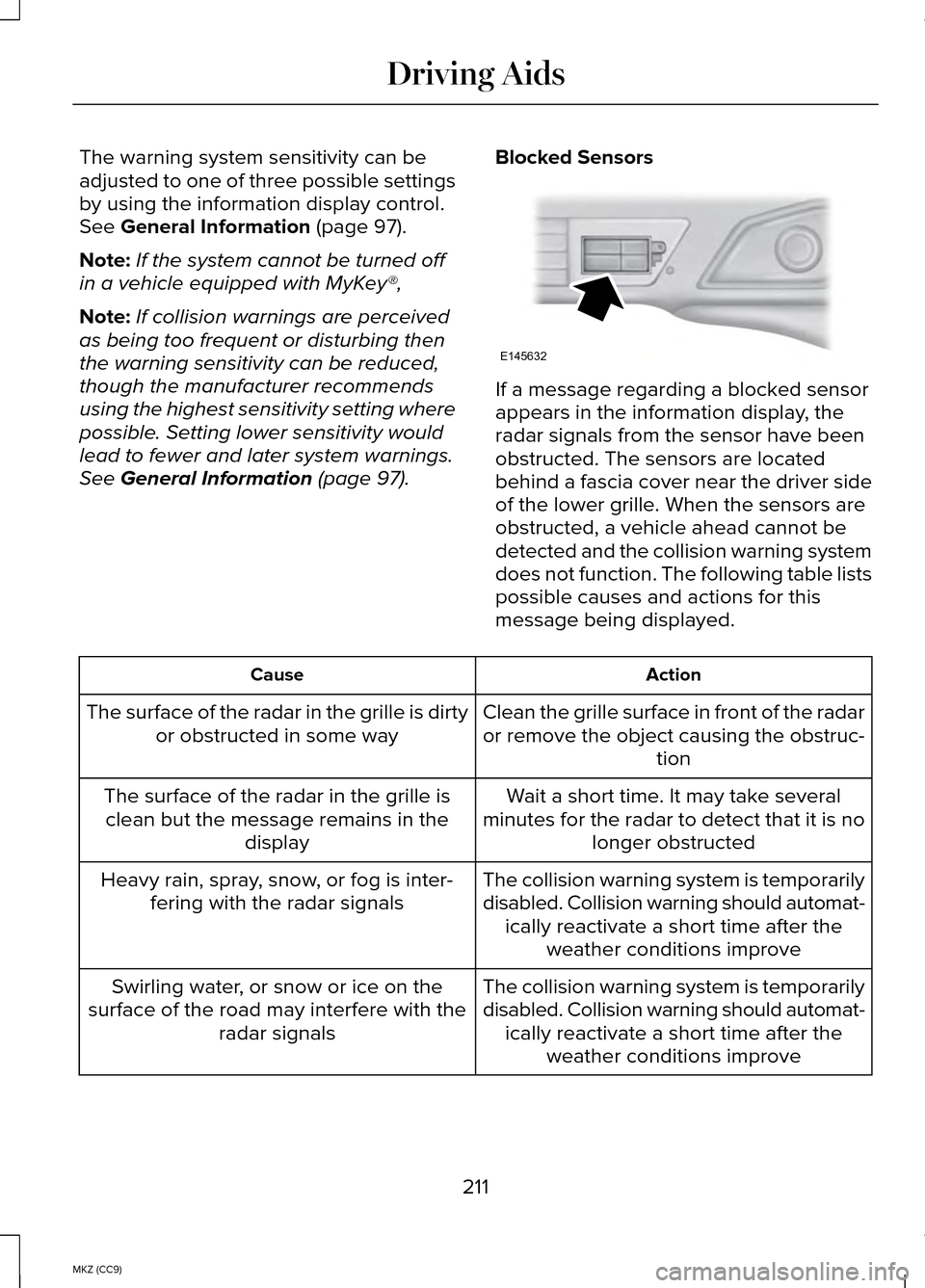
General Information (page 97). Blocked Sensors If a message regarding a blocked sensor
appears in the information display, the
radar signals from the sensor have been
obstructed. The sensors are located
behind a fascia cover near the driver side
of the lower grille. When the sensors are
obstructed, a vehicle ahead cannot be
detected and the collision warning system
does not function. The following table lists
possible causes and actions for this
message being displayed.
Action
Cause
Clean the grille surface in front of the radar
or remove the object causing the obstruc-tion
The surface of the radar in the grille is dirty
or obstructed in some way
Wait a short time. It may take several
minutes for the radar to detect that it is no longer obstructed
The surface of the radar in the grille is
clean but the message remains in the display
The collision warning system is temporarily
disabled. Collision warning should automat-ically reactivate a short time after the weather conditions improve
Heavy rain, spray, snow, or fog is inter-
fering with the radar signals
The collision warning system is temporarily
disabled. Collision warning should automat-ically reactivate a short time after the weather conditions improve
Swirling water, or snow or ice on the
surface of the road may interfere with the radar signals
211
MKZ (CC9) Driving AidsE145632
Page 214 of 445
System Limitations
WARNING
The collision warning system
’s brake
support can only help reduce the
speed at which a collision occurs if the
driver applies the vehicle ’s brakes. The
brake pedal must be pressed just like any
typical braking situation. Due to the nature of radar technology,
there may be certain instances where
vehicles do not provide a collision warning.
These include:
•
Stationary vehicles or vehicles moving
below 6 mph (10 km/h).
• Pedestrians or objects in the roadway.
• Oncoming vehicles in the same lane.
• Severe weather conditions (see
blocked sensor section).
• Debris build-up on the grille near the
headlamps (see blocked sensor
section).
• Small distance to vehicle ahead.
• Steering wheel and pedal movements
are large (very active driving style).
•
If the front end of the vehicle is hit or
damaged, the radar sensing zone may be
altered causing missed or false collision
warnings. See your authorized dealer to
have your collision warning radar checked
for proper coverage and operation. DRIVE CONTROL
LINCOLN DRIVE CONTROL
Lincoln Drive Control delivers the Lincoln
driving experience through a suite of
sophisticated electronic vehicle systems.
These systems continuously monitor your
driving inputs and the road conditions to
optimize ride comfort, steering, handling,
powertrain response and sound. You can
preset your preferences for these systems
within the information display. Lincoln
Drive Control will respond to your
preferences based on what gear position
you select. This provides a single location
to control multiple systems performance
settings.
Lincoln Drive Control consists of the
following systems:
•
Continuously controlled damping
dynamically adjusts the shock
absorbers stiffness in real time to
match the road surface and driver
inputs. This system continuously
monitors your vehicle ’s motion (roll,
pitch, bounce), suspension position,
load, speed, road conditions, and
steering to adjust the suspension
damping for optimal vehicle control.
• Electronically power-assisted steering
adjusts steering effort and feel based
on your vehicle speed and your inputs.
• Active noise control utilizes your
vehicle electronics to enhance the
acoustic experience.
212
MKZ (CC9) Driving Aids
Page 226 of 445
If driving through deep or standing water
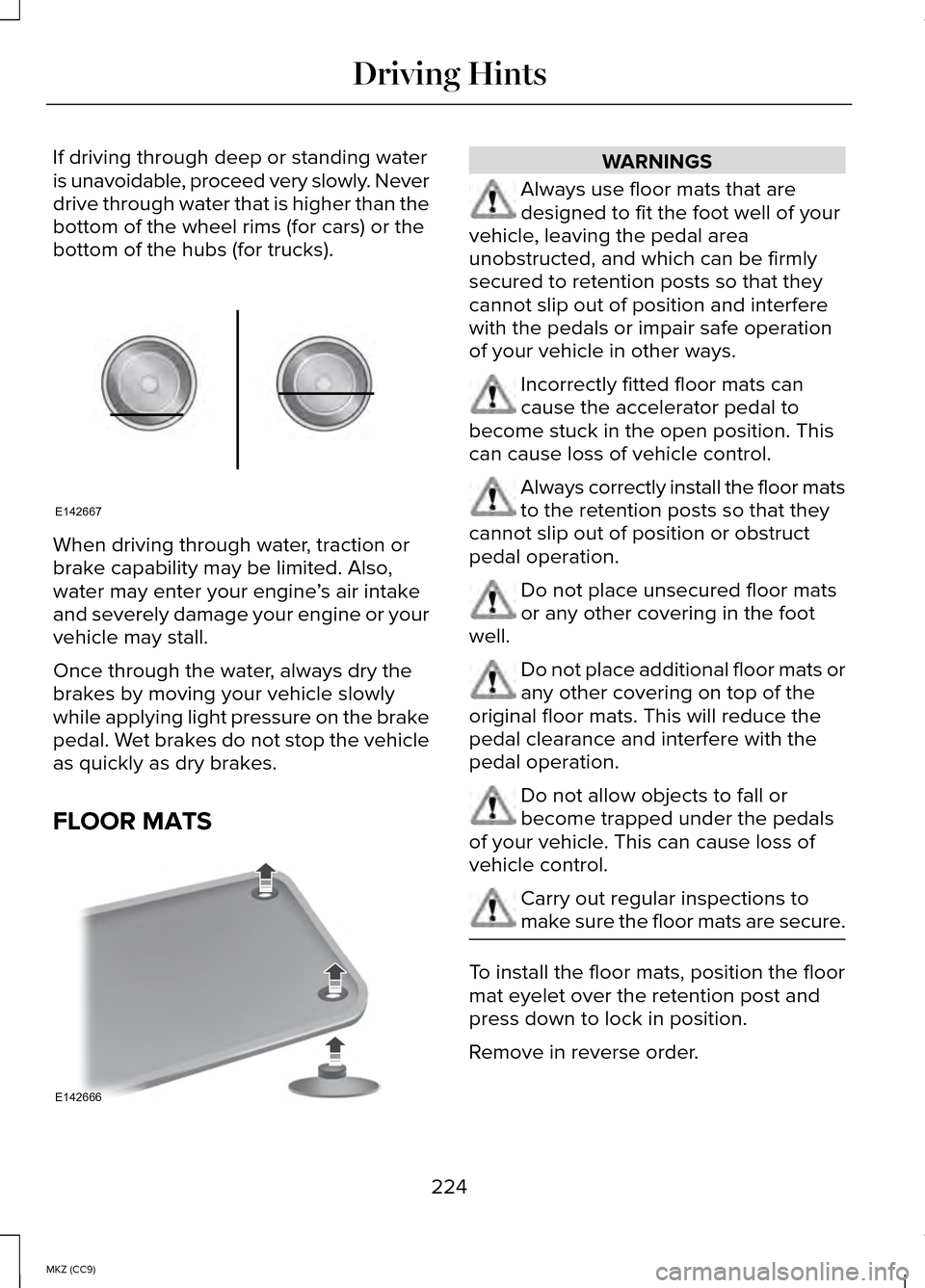
is unavoidable, proceed very slowly. Never
drive through water that is higher than the
bottom of the wheel rims (for cars) or the
bottom of the hubs (for trucks).
When driving through water, traction or
brake capability may be limited. Also,
water may enter your engine
’s air intake
and severely damage your engine or your
vehicle may stall.
Once through the water, always dry the
brakes by moving your vehicle slowly
while applying light pressure on the brake
pedal. Wet brakes do not stop the vehicle
as quickly as dry brakes.
FLOOR MATS WARNINGS
Always use floor mats that are
designed to fit the foot well of your
vehicle, leaving the pedal area
unobstructed, and which can be firmly
secured to retention posts so that they
cannot slip out of position and interfere
with the pedals or impair safe operation
of your vehicle in other ways. Incorrectly fitted floor mats can
cause the accelerator pedal to
become stuck in the open position. This
can cause loss of vehicle control. Always correctly install the floor mats
to the retention posts so that they
cannot slip out of position or obstruct
pedal operation. Do not place unsecured floor mats
or any other covering in the foot
well. Do not place additional floor mats or
any other covering on top of the
original floor mats. This will reduce the
pedal clearance and interfere with the
pedal operation. Do not allow objects to fall or
become trapped under the pedals
of your vehicle. This can cause loss of
vehicle control. Carry out regular inspections to
make sure the floor mats are secure.
To install the floor mats, position the floor
mat eyelet over the retention post and
press down to lock in position.
Remove in reverse order.
224
MKZ (CC9) Driving HintsE142667 E142666
Page 227 of 445
ROADSIDE ASSISTANCE
Vehicles Sold In the United States:
Getting Roadside Assistance
To fully assist, if you have a vehicle
concern, Ford Motor Company offers a
complimentary Roadside Assistance
program. This program is separate from
the New Vehicle Limited Warranty.
The service is available:
•
24 hours a day, seven days a week.
• Throughout the life of the vehicle for
original owners.
• For six years or 70,000.0 mi
(112,654.08 km) (whichever comes first)
within the extended powertrain
warranty coverage period for
subsequent owners.
Roadside assistance will cover:
• A flat tire change with a good spare
(except vehicles supplied with a tire
mobility kit).
• Battery jump start.
• Lock-out assistance (key replacement
cost is the customer's responsibility).
• Fuel delivery — independent service
contractors, if not prohibited by state,
local or municipal law shall deliver up
to
2.00 gal (7.57 L) of gasoline or
5.00 gal (18.93 L) of diesel fuel to a
disabled vehicle. Roadside Assistance
limits fuel delivery service to two
no-charge occurrences within a
12-month period. •
Winch out — available within
100.0 ft
(30.48 m) of a paved or county
maintained road, no recoveries.
• Towing — Lincoln eligible vehicles to
the client's selling or preferred dealer
within
100.0 mi (161 km) of the
disablement location or to the nearest
Lincoln dealer. If a client requests a
tow to a selling or preferred dealer that
is more than 100.0 mi (161 km) from the
disablement location, the client shall
be responsible for any mileage costs
in excess of
100.0 mi (161 km).
Roadside Assistance will include up to
$200 coverage for a towed trailer if the
disabled eligible vehicle requires service
at the nearest authorized dealer. If the
towing vehicle is operational but the trailer
is not, then the trailer does not qualify for
any roadside services.
Vehicles Sold In the United States :
Using Roadside Assistance
United States Lincoln vehicle clients who
need Roadside Assistance, call
1-800-521-4140.
If you need to arrange roadside assistance
for yourself, Ford Motor Company will
reimburse a reasonable amount for towing
to the nearest Lincoln dealership within
100.0 mi (161 km). To obtain reimbursement
information, United States Lincoln vehicle
clients, call 1-800-521-4140. Ford Motor
Company will ask clients to submit their
original receipts.
Vehicles Sold In Canada : Getting
Roadside Assistance
Canadian clients who need roadside
assistance, call 1-800-665-2006.
225
MKZ (CC9) Roadside Emergencies
Page 233 of 445
Post-Incident
•
Do not store a severely damaged
vehicle with a lithium-ion battery inside
a structure or within 50 feet (15 meters)
of any structure or vehicle.
• Make sure that passenger and cargo
compartments remain ventilated (i.e.,
open window, door, or trunk).
• For vehicles in the United States, notify
Ford Motor Company 1-800-392-3673
(then follow the prompts on the voice
response menu), an authorized Ford
dealer or service center as soon as
possible as there may be other steps
to secure and discharge the
high-voltage battery.
• For vehicles in Canada, notify Ford
Motor Company 1-800-565-3673 (then
follow the prompts on the voice
response menu), an authorized Ford
dealer or service center as soon as
possible as there may be other steps
to secure and discharge the
high-voltage battery.
• Call 911 if you observe leaking fluids,
sparks, smoke or flames, or hear
gurgling or bubbling from the
high-voltage battery.
POST-CRASH ALERT SYSTEM
The system flashes the turn signal lamps
and sounds the horn (intermittently) in the
event of a serious impact that deploys an
airbag (front, side, side curtain or Safety
Canopy) or the safety belt pretensioners. The horn and lamps will turn off when:
•
The hazard control button is pressed
• The panic button (if equipped) is
pressed on the remote entry
transmitter
• Your vehicle runs out of power
Spinout Detection
If a spinout is detected, the vehicle comes
to a stop and the hazard warning flashers
come on. The message Spinout Detected
Hazards Activated will also appear on the
instrument cluster. The message may not
appear if your vehicle runs out of power.
Once the hazard warning flashers have
been activated, you can turn them off by:
• Pressing the hazard warning flasher
button
• Pressing the remote control unlock
button
• Pressing the remote control panic
button
• Cycling the ignition on and off twice
231
MKZ (CC9) Roadside Emergencies
Page 243 of 445
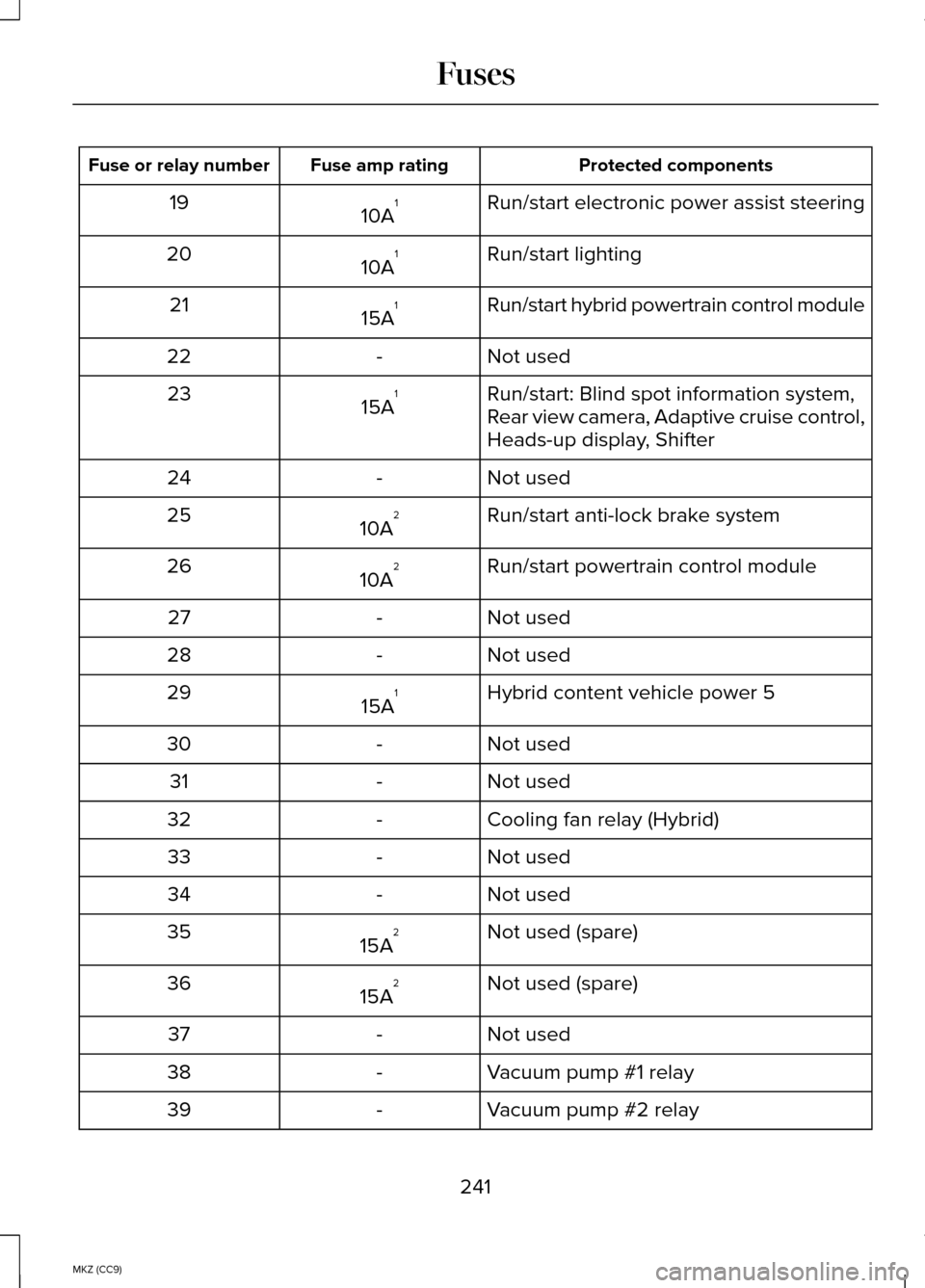
Protected components
Fuse amp rating
Fuse or relay number
Run/start electronic power assist steering
10A 1
19
Run/start lighting
10A 1
20
Run/start hybrid powertrain control module
15A 1
21
Not used
-
22
Run/start: Blind spot information system,
Rear view camera, Adaptive cruise control,
Heads-up display, Shifter
15A
1
23
Not used
-
24
Run/start anti-lock brake system
10A 2
25
Run/start powertrain control module
10A 2
26
Not used
-
27
Not used
-
28
Hybrid content vehicle power 5
15A 1
29
Not used
-
30
Not used
-
31
Cooling fan relay (Hybrid)
-
32
Not used
-
33
Not used
-
34
Not used (spare)
15A 2
35
Not used (spare)
15A 2
36
Not used
-
37
Vacuum pump #1 relay
-
38
Vacuum pump #2 relay
-
39
241
MKZ (CC9) Fuses
Page 247 of 445
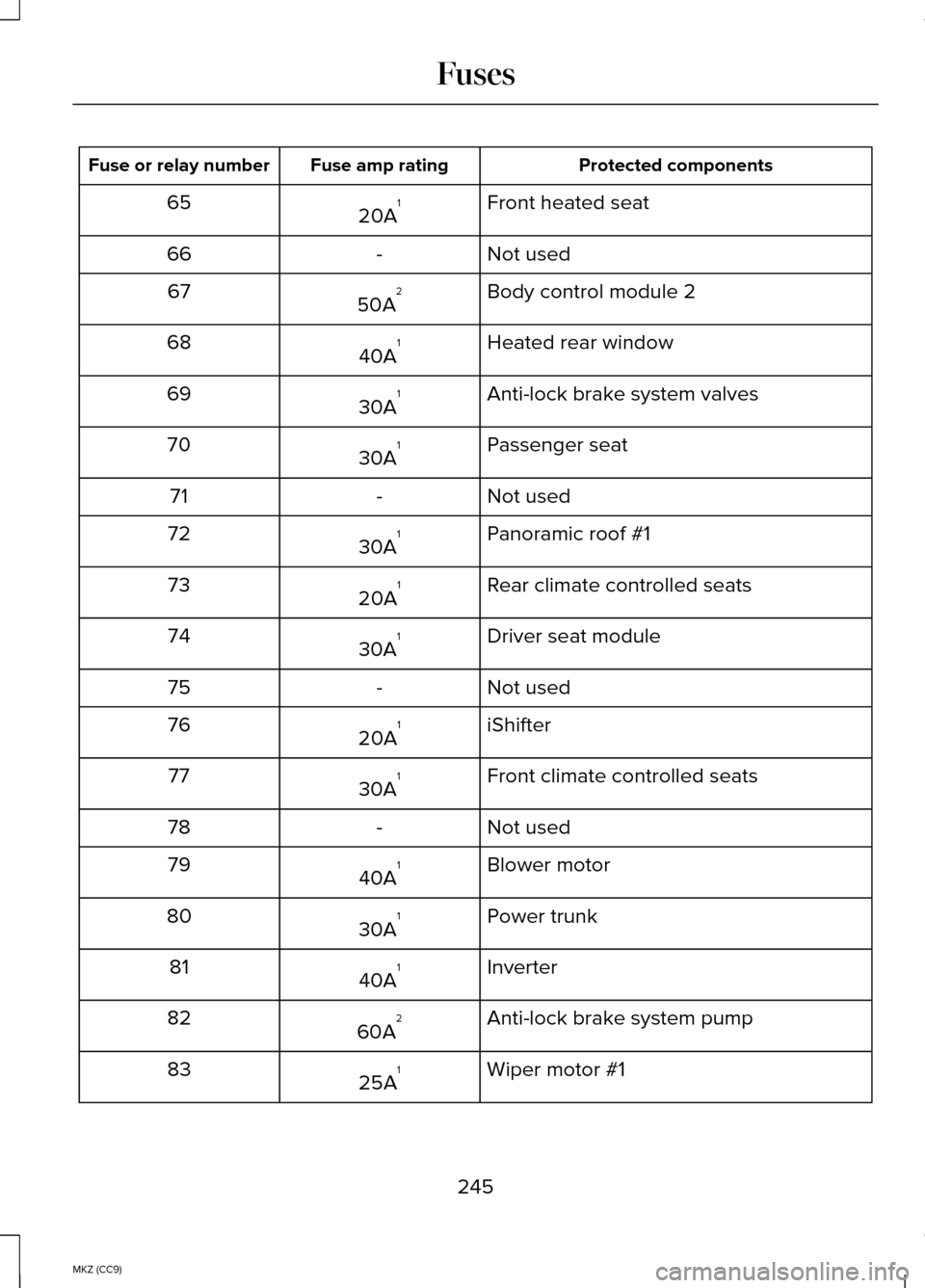
Protected components
Fuse amp rating
Fuse or relay number
Front heated seat
20A 1
65
Not used
-
66
Body control module 2
50A 2
67
Heated rear window
40A 1
68
Anti-lock brake system valves
30A 1
69
Passenger seat
30A 1
70
Not used
-
71
Panoramic roof #1
30A 1
72
Rear climate controlled seats
20A 1
73
Driver seat module
30A 1
74
Not used
-
75
iShifter
20A 1
76
Front climate controlled seats
30A 1
77
Not used
-
78
Blower motor
40A 1
79
Power trunk
30A 1
80
Inverter
40A 1
81
Anti-lock brake system pump
60A 2
82
Wiper motor #1
25A 1
83
245
MKZ (CC9) Fuses
Page 249 of 445
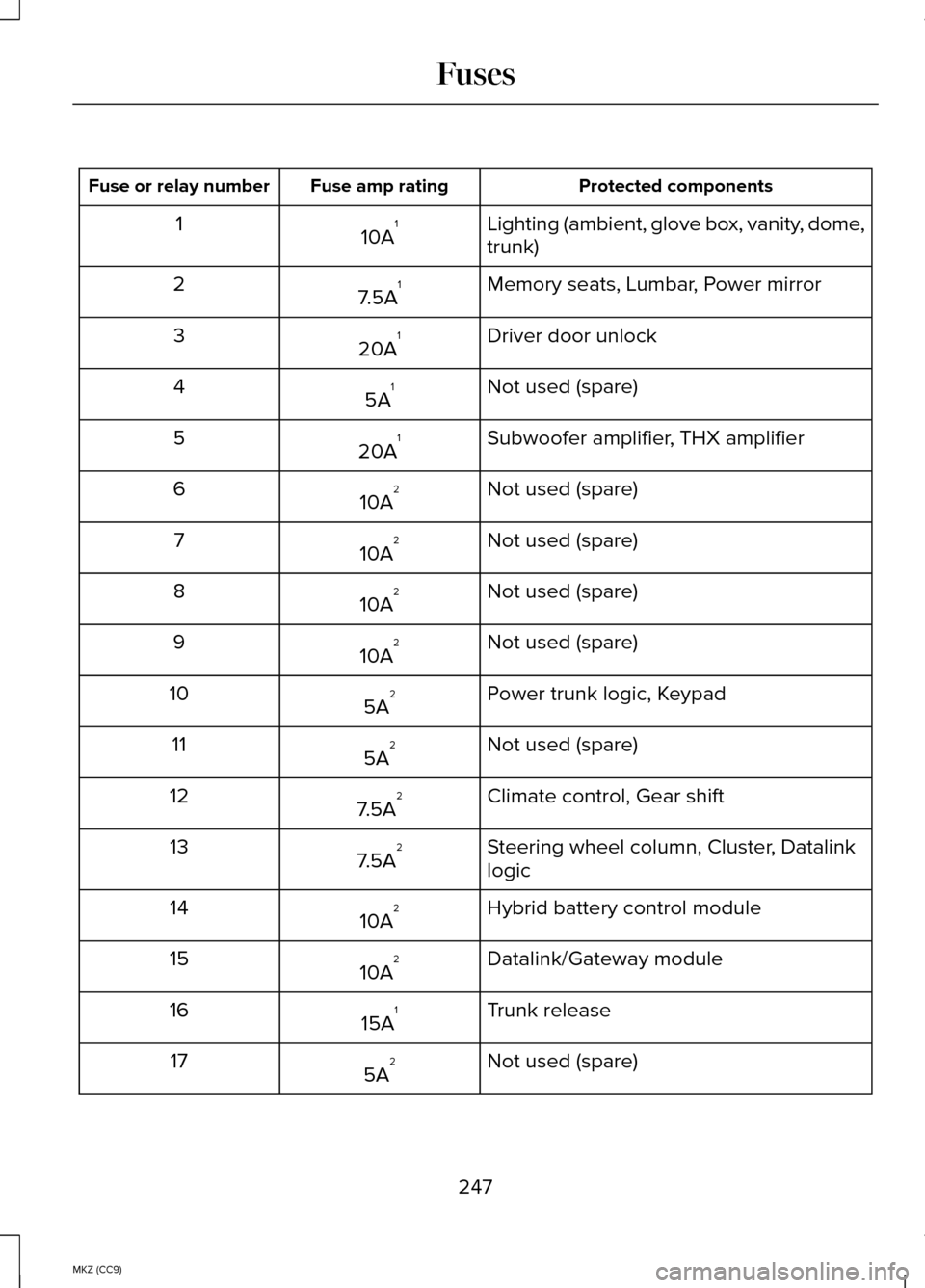
Protected components
Fuse amp rating
Fuse or relay number
Lighting (ambient, glove box, vanity, dome,
trunk)
10A 1
1
Memory seats, Lumbar, Power mirror
7.5A 1
2
Driver door unlock
20A 1
3
Not used (spare)
5A 1
4
Subwoofer amplifier, THX amplifier
20A 1
5
Not used (spare)
10A 2
6
Not used (spare)
10A 2
7
Not used (spare)
10A 2
8
Not used (spare)
10A 2
9
Power trunk logic, Keypad
5A 2
10
Not used (spare)
5A 2
11
Climate control, Gear shift
7.5A 2
12
Steering wheel column, Cluster, Datalink
logic
7.5A 2
13
Hybrid battery control module
10A 2
14
Datalink/Gateway module
10A 2
15
Trunk release
15A 1
16
Not used (spare)
5A 2
17
247
MKZ (CC9) Fuses
Page 250 of 445
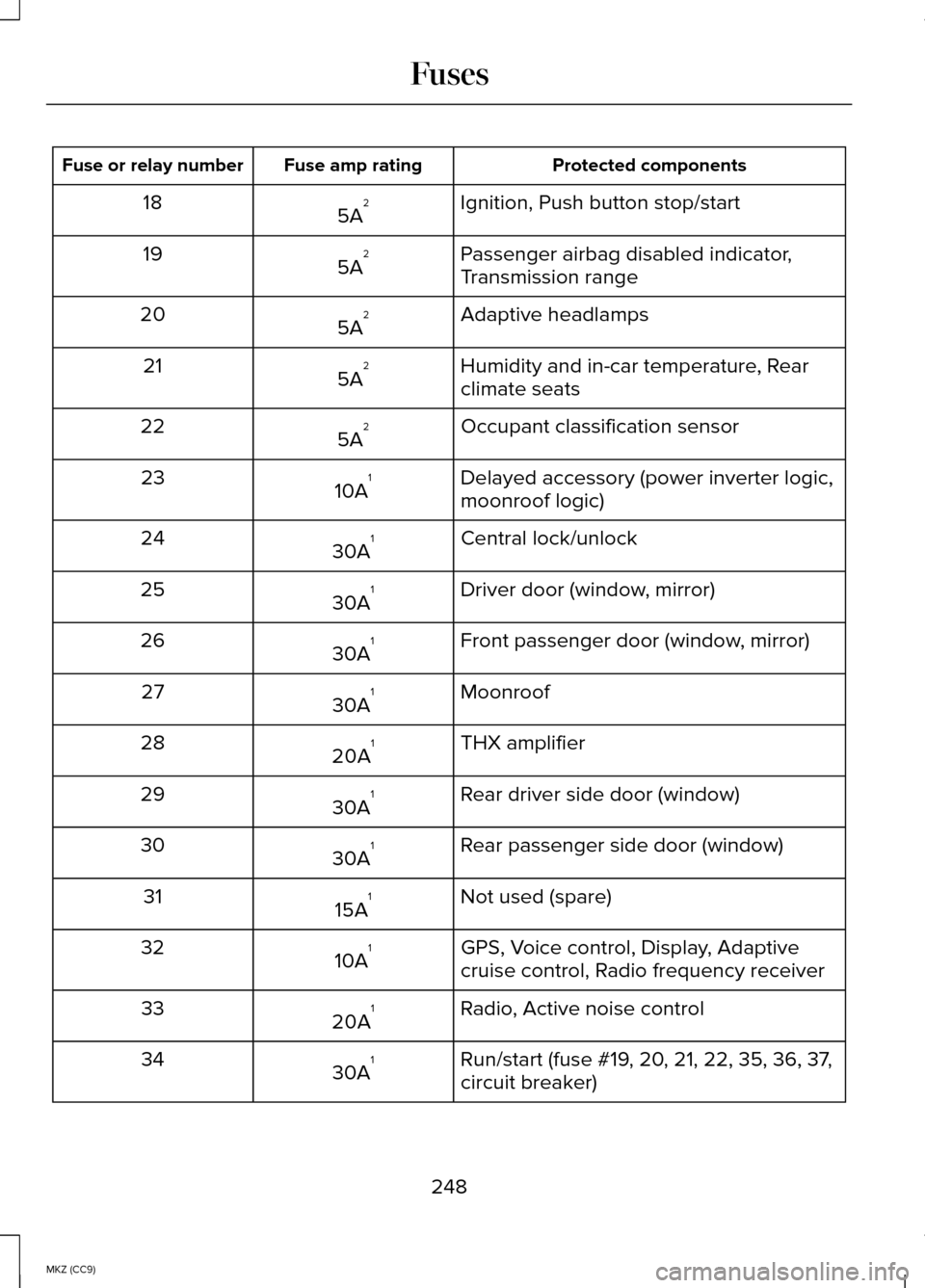
Protected components
Fuse amp rating
Fuse or relay number
Ignition, Push button stop/start
5A 2
18
Passenger airbag disabled indicator,
Transmission range
5A 2
19
Adaptive headlamps
5A 2
20
Humidity and in-car temperature, Rear
climate seats
5A 2
21
Occupant classification sensor
5A 2
22
Delayed accessory (power inverter logic,
moonroof logic)
10A 1
23
Central lock/unlock
30A 1
24
Driver door (window, mirror)
30A 1
25
Front passenger door (window, mirror)
30A 1
26
Moonroof
30A 1
27
THX amplifier
20A 1
28
Rear driver side door (window)
30A 1
29
Rear passenger side door (window)
30A 1
30
Not used (spare)
15A 1
31
GPS, Voice control, Display, Adaptive
cruise control, Radio frequency receiver
10A 1
32
Radio, Active noise control
20A 1
33
Run/start (fuse #19, 20, 21, 22, 35, 36, 37,
circuit breaker)
30A 1
34
248
MKZ (CC9) Fuses
Page 253 of 445
GENERAL INFORMATION
Have your vehicle serviced regularly to
help maintain its roadworthiness and
resale value. There is a large network of
Ford authorized dealers that are there to
help you with their professional servicing
expertise. We believe that their specially
trained technicians are best qualified to
service your vehicle properly and expertly.
They are supported by a wide range of
highly specialized tools developed
specifically for servicing your vehicle.
To help you service your vehicle, we
provide scheduled maintenance
information which makes tracking routine
service easy. See Scheduled
Maintenance (page 412).
If your vehicle requires professional
service, your authorized dealer can
provide the necessary parts and service.
Check your warranty information to find
out which parts and services are covered.
Use only recommended fuels, lubricants,
fluids and service parts conforming to
specifications. Motorcraft® parts are
designed and built to provide the best
performance in your vehicle.
Precautions
• Do not work on a hot engine.
• Make sure that nothing gets caught in
moving parts. •
Do not work on a vehicle with the
engine running in an enclosed space,
unless you are sure you have enough
ventilation.
• Keep all open flames and other
burning material (such as cigarettes)
away from the battery and all fuel
related parts.
Working with the Engine Off
1. Set the parking brake and shift to
P
(Park).
2. Turn off the engine and remove the key (if equipped).
3. Block the wheels.
Working with the Engine On WARNING
To reduce the risk of vehicle damage
and/or personal burn injuries, do not
start your engine with the air cleaner
removed and do not remove it while the
engine is running. 1. Set the parking brake and shift to
P
(Park).
2. Block the wheels
251
MKZ (CC9) Maintenance