battery LINCOLN MKZ HYBRID 2015 User Guide
[x] Cancel search | Manufacturer: LINCOLN, Model Year: 2015, Model line: MKZ HYBRID, Model: LINCOLN MKZ HYBRID 2015Pages: 504, PDF Size: 4.45 MB
Page 104 of 504
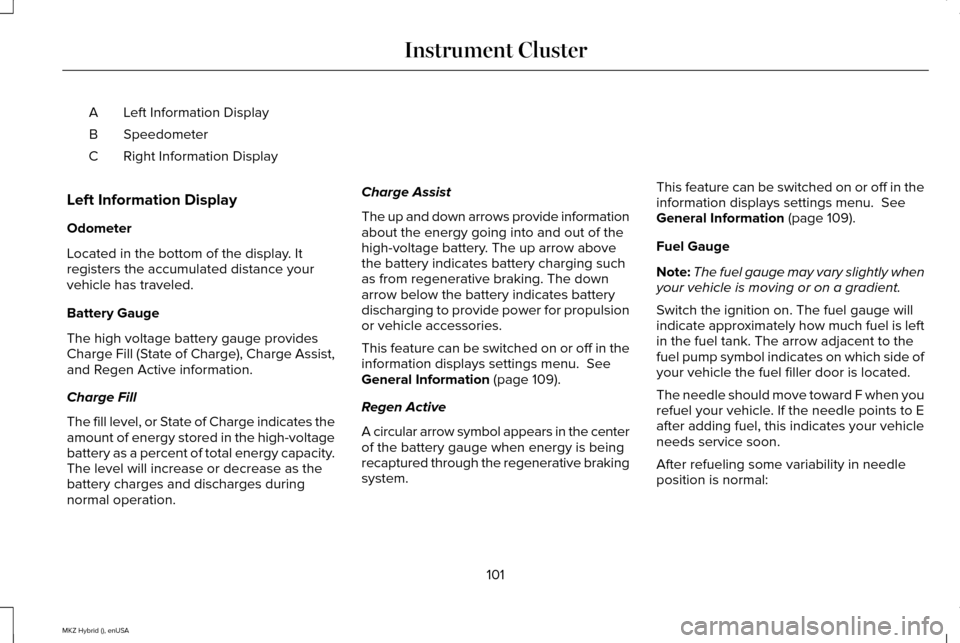
Left Information Display
A
Speedometer
B
Right Information Display
C
Left Information Display
Odometer
Located in the bottom of the display. It
registers the accumulated distance your
vehicle has traveled.
Battery Gauge
The high voltage battery gauge provides
Charge Fill (State of Charge), Charge Assist,
and Regen Active information.
Charge Fill
The fill level, or State of Charge indicates the
amount of energy stored in the high-voltage
battery as a percent of total energy capacity.
The level will increase or decrease as the
battery charges and discharges during
normal operation. Charge Assist
The up and down arrows provide information
about the energy going into and out of the
high-voltage battery. The up arrow above
the battery indicates battery charging such
as from regenerative braking. The down
arrow below the battery indicates battery
discharging to provide power for propulsion
or vehicle accessories.
This feature can be switched on or off in the
information displays settings menu. See
General Information (page 109).
Regen Active
A circular arrow symbol appears in the center
of the battery gauge when energy is being
recaptured through the regenerative braking
system. This feature can be switched on or off in the
information displays settings menu.
See
General Information (page 109).
Fuel Gauge
Note: The fuel gauge may vary slightly when
your vehicle is moving or on a gradient.
Switch the ignition on. The fuel gauge will
indicate approximately how much fuel is left
in the fuel tank. The arrow adjacent to the
fuel pump symbol indicates on which side of
your vehicle the fuel filler door is located.
The needle should move toward F when you
refuel your vehicle. If the needle points to E
after adding fuel, this indicates your vehicle
needs service soon.
After refueling some variability in needle
position is normal:
101
MKZ Hybrid (), enUSA Instrument Cluster
Page 106 of 504
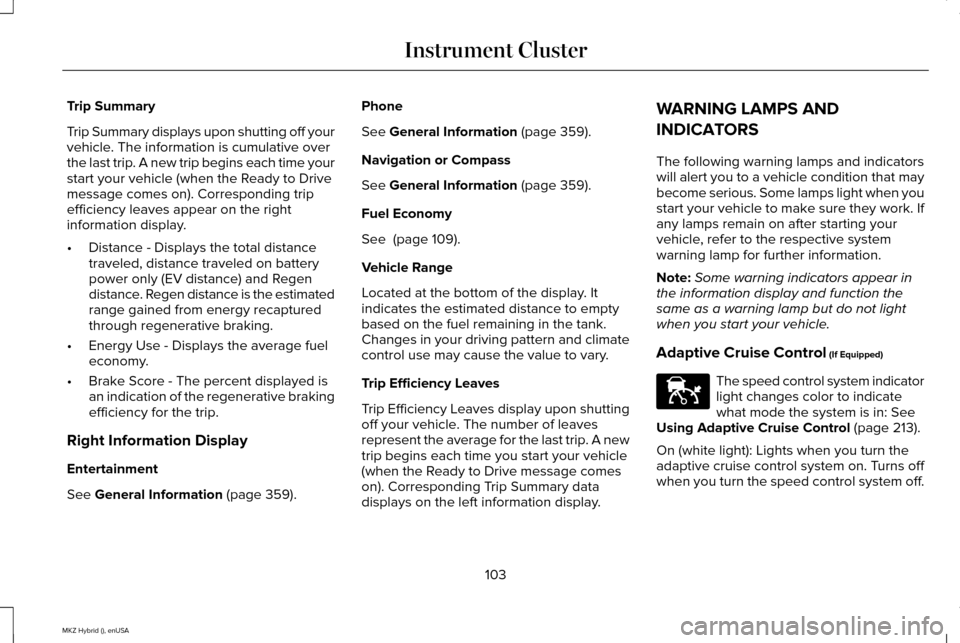
Trip Summary
Trip Summary displays upon shutting off your
vehicle. The information is cumulative over
the last trip. A new trip begins each time your
start your vehicle (when the Ready to Drive
message comes on). Corresponding trip
efficiency leaves appear on the right
information display.
•
Distance - Displays the total distance
traveled, distance traveled on battery
power only (EV distance) and Regen
distance. Regen distance is the estimated
range gained from energy recaptured
through regenerative braking.
• Energy Use - Displays the average fuel
economy.
• Brake Score - The percent displayed is
an indication of the regenerative braking
efficiency for the trip.
Right Information Display
Entertainment
See General Information (page 359). Phone
See
General Information (page 359).
Navigation or Compass
See
General Information (page 359).
Fuel Economy
See
(page 109).
Vehicle Range
Located at the bottom of the display. It
indicates the estimated distance to empty
based on the fuel remaining in the tank.
Changes in your driving pattern and climate
control use may cause the value to vary.
Trip Efficiency Leaves
Trip Efficiency Leaves display upon shutting
off your vehicle. The number of leaves
represent the average for the last trip. A new
trip begins each time you start your vehicle
(when the Ready to Drive message comes
on). Corresponding Trip Summary data
displays on the left information display. WARNING LAMPS AND
INDICATORS
The following warning lamps and indicators
will alert you to a vehicle condition that may
become serious. Some lamps light when you
start your vehicle to make sure they work. If
any lamps remain on after starting your
vehicle, refer to the respective system
warning lamp for further information.
Note:
Some warning indicators appear in
the information display and function the
same as a warning lamp but do not light
when you start your vehicle.
Adaptive Cruise Control
(If Equipped) The speed control system indicator
light changes color to indicate
what mode the system is in:
See
Using Adaptive Cruise Control (page 213).
On (white light): Lights when you turn the
adaptive cruise control system on. Turns off
when you turn the speed control system off.
103
MKZ Hybrid (), enUSA Instrument ClusterE144524
Page 107 of 504
Engaged (green light): Lights when the
adaptive cruise control system engages.
Turns off when the speed control system
disengages.
Anti-Lock Braking System
If it lights when you are driving, this
indicates a malfunction. You will
continue to have the normal
braking system (without Anti-lock braking
system) unless the brake system warning
lamp also lights. Have an authorized dealer
check the system.
Battery If it lights while driving, it indicates
a malfunction. Switch off all
unnecessary electrical equipment
and have an authorized dealer check the
system immediately. Blind Spot Monitor (If Equipped) Lights when you switch this feature
off or with a blind spot message.
See
Blind Spot Information
System (page 227). See Information
Messages (page 120).
Brake System Lights when you engage the
parking brake with the ignition on.
If it lights when you are driving,
check that the parking brake is not on. If the
parking brake is not on, this Brake System
lamp indicates low brake fluid level or a
brake system malfunction. Have an
authorized dealer check the system
immediately. WARNING
Driving your vehicle with the warning
lamp on is dangerous. A significant
decrease in braking performance may occur.
It will take you longer to stop your vehicle.
Have an authorized dealer check the system
immediately. Driving extended distances with
the parking brake engaged can cause brake
failure and the risk of personal injury. Cruise Control
(If Equipped)
Lights when you switch on cruise
control.
Direction Indicator Lights when the left or right turn
signal or the hazard warning
flasher is switched on. If the
indicators stay on or flash faster, check for a
burned-out bulb.
See Changing a Bulb
(page 299).
104
MKZ Hybrid (), enUSA Instrument Cluster E151262 E144522 E71340
Page 113 of 504
Note:
The cluster will remember the menu
level 2 state when the individual key state
is changed from the RUN position to the OFF
position. Display/Trip
Menu level 5
Menu level 4
Menu level 3
Menu level 2
—
—
Help
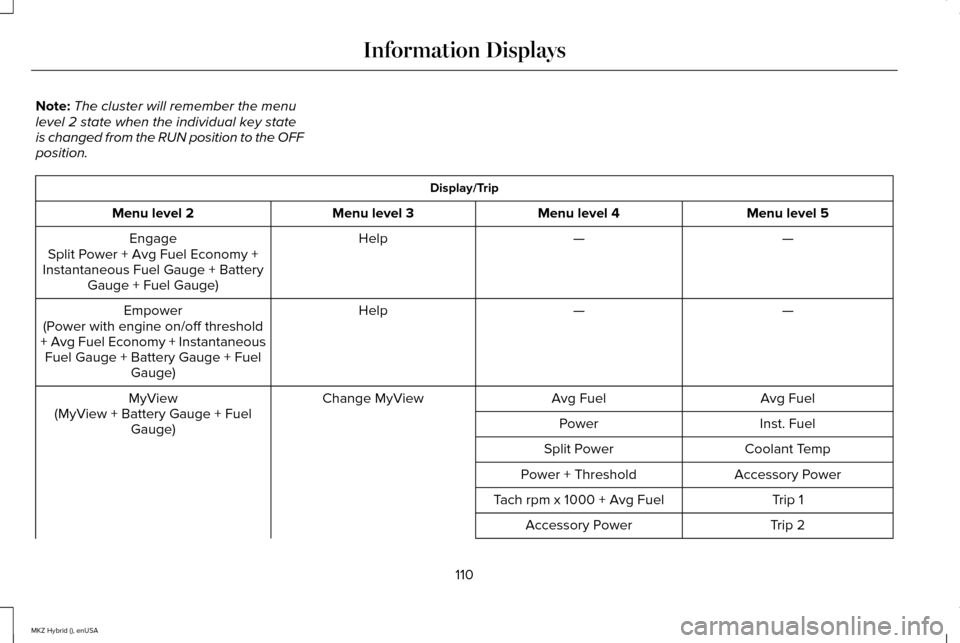
Engage
Split Power + Avg Fuel Economy +
Instantaneous Fuel Gauge + Battery Gauge + Fuel Gauge)
—
—
Help
Empower
(Power with engine on/off threshold
+ Avg Fuel Economy + Instantaneous Fuel Gauge + Battery Gauge + Fuel Gauge)
Avg Fuel
Avg Fuel
Change MyView
MyView
(MyView + Battery Gauge + Fuel Gauge) Inst. Fuel
Power
Coolant Temp
Split Power
Accessory Power
Power + Threshold
Trip 1
Tach rpm x 1000 + Avg Fuel
Trip 2
Accessory Power
110
MKZ Hybrid (), enUSA Information Displays
Page 114 of 504
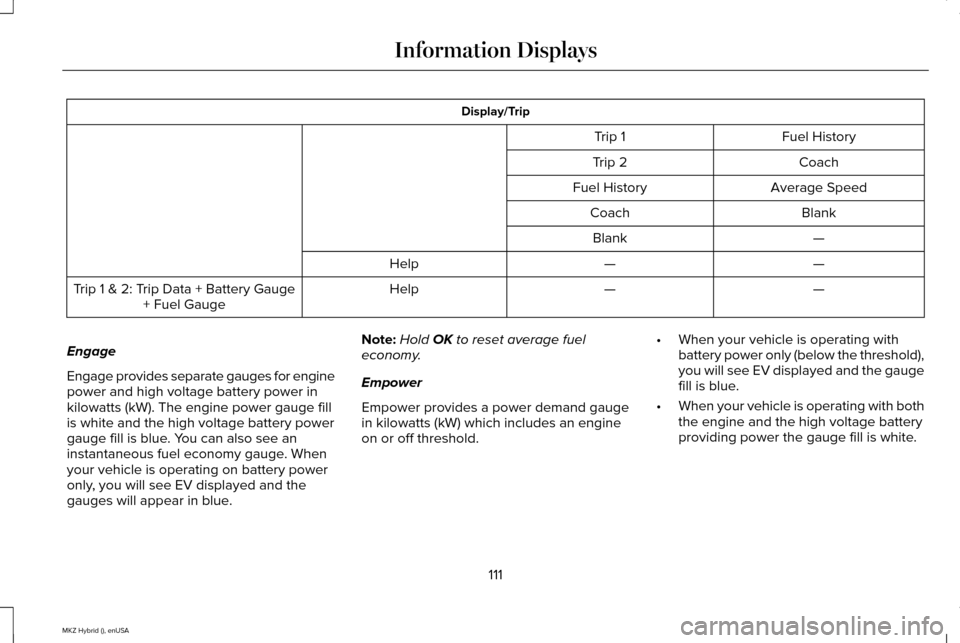
Display/Trip
Fuel History
Trip 1
Coach
Trip 2
Average Speed
Fuel History
Blank
Coach
—
Blank
—
—
Help
—
—
Help
Trip 1 & 2: Trip Data + Battery Gauge
+ Fuel Gauge
Engage
Engage provides separate gauges for engine
power and high voltage battery power in
kilowatts (kW). The engine power gauge fill
is white and the high voltage battery power
gauge fill is blue. You can also see an
instantaneous fuel economy gauge. When
your vehicle is operating on battery power
only, you will see EV displayed and the
gauges will appear in blue. Note:
Hold OK to reset average fuel
economy.
Empower
Empower provides a power demand gauge
in kilowatts (kW) which includes an engine
on or off threshold. •
When your vehicle is operating with
battery power only (below the threshold),
you will see EV displayed and the gauge
fill is blue.
• When your vehicle is operating with both
the engine and the high voltage battery
providing power the gauge fill is white.
111
MKZ Hybrid (), enUSA Information Displays
Page 115 of 504
•
When power demand surpasses the
amber indicator, this level of demand and
associated fuel economy displays in
amber.
• When the engine is on, reducing power
demand to less than the threshold will
allow the engine to turn off.
You can also see an instantaneous fuel
economy gauge.
Note: Hold OK to reset average fuel
economy.
MyView
You can choose what to display in this view.
Selecting
Change MyView in the options
menu allows you to scroll through two
columns of content choices.
• Press the up or down arrow to view
content.
• Press OK to save your selected content
• You must select content in both columns
before you can save your new MyView. Unique content available in MyView:
•
Accessory Power— Indicates electrical
power demands from your vehicle ’s
accessory systems. Accessories use
power but do not contribute to propelling
your vehicle. The gauge separately
displays power demand in kilowatts (kW)
for climate and other accessories.
• Climate includes the power being
used by high voltage climate control
components such as the electric A/C
compressor.
• Other includes all power being used
by the low voltage accessories (cabin
fans, headlights and heated seats).
• Coolant Temp – Indicates engine coolant
temperature. At normal operating
temperature, the level indicator will be
white and will be in the normal range
(between H and C). If the engine coolant
temperature exceeds the normal range,
the level indicator will change to red to
indicate that the engine is overheating.
Stop your vehicle as soon as safely
possible, turn your vehicle off and let the
engine cool. •
Tach rpm x 1000 — When the gasoline
engine is running, the tachometer gauge
displays the engine speed in revolutions
per minute (RPM). When your vehicle is
operating on battery power only with the
engine off, EV displays and the
tachometer is greyed out.
Note: The trip data, and average fuel
economy cannot be reset in MyView.
Trip 1 & 2
Provides trip odometer, trip average fuel
economy and trip timer.
Distance traveled on battery power only with
the engine off is shown in blue next to total
trip distance.
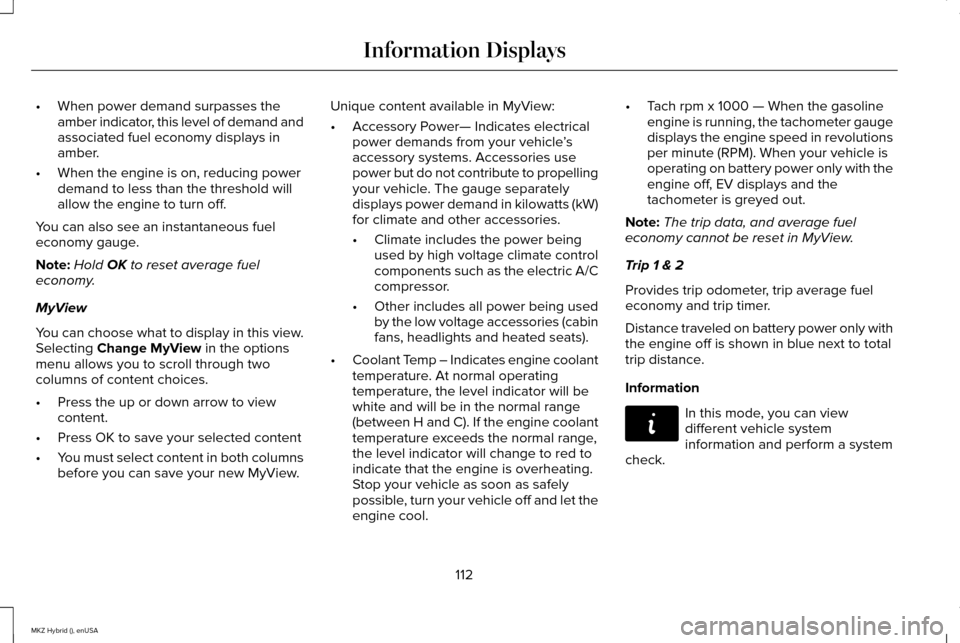
Information In this mode, you can view
different vehicle system
information and perform a system
check.
112
MKZ Hybrid (), enUSA Information DisplaysE144642
Page 123 of 504
Note:
Fuel economy is not always a measure
of appropriate driving behavior. For example,
when driving uphill and maintaining an
appropriate speed, your instant fuel
economy may not be good (losing leaves)
but the Coach may show a blue bar for
Acceleration and Cruising.
Common Displays
Both Average fuel economy and an
instantaneous fuel economy gauge are
included in Engage, Empower and MyView
(if selected) on the left information display.
They are also included in Fuel History on the
right information display.
Average Fuel Economy
Average Fuel Economy is continuously
averaged since the last reset. You can reset
your average fuel economy by pressing and
holding the OK button on the corresponding
steering wheel controls. Note:
Average fuel economy cannot be reset
in MyView.
Instantaneous Fuel Economy
If your instantaneous fuel economy is greater
than the maximum value displayed, a + sign
will be shown next to the maximum scale
number. When your vehicle is operating on
battery power only, EV will display and the
gauge fill will show in blue.
INFORMATION MESSAGES
Note: Depending on the vehicle options
equipped with your vehicle, not all of the
messages will display or be available.
Certain messages may be abbreviated or
shortened depending upon which cluster
type you have. Press the OK button to acknowledge and
remove some messages from the information
display. Other messages will be removed
automatically after a short time.
Certain messages need to be confirmed
before you can access the menus.
120
MKZ Hybrid (), enUSA Information DisplaysE145981
Page 127 of 504

Action
Message
Displayed when the charging system needs servicing. If the warning stays\
on or continues tocome on, contact your authorized dealer as soon as pos")
Battery and Charging System (12 volt)
Action
Message
Displayed when the charging system needs servicing. If the warning stays\
on or continues tocome on, contact your authorized dealer as soon as possible.
Check Charging System
Displayed when the battery management system detects an extended low-vol\
tage condition.Various vehicle features will be disabled to help preserve the battery. Turn off as many of the electrical loads as soon as possible to improve system voltage. If the system voltage has recovered, the disabled features will operate again as normal
Low Battery Features Temporarily Turned
Off
Displayed when the battery management system determines that the battery\
is at a low state ofcharge. Turn the ignition off as soon as possible to protect the battery. This message will clear once the vehicle has been started and the battery state of charge has re\
covered. Turning off unnecessary electrical loads will allow faster battery state-of-charge r\
ecovery.
Turn Power Off to Save Battery
Battery and Charging System (High Voltage) Action
Message
Displays when the vehicle is ready to drive.
Ready to Drive
124
MKZ Hybrid (), enUSA Information Displays
Page 131 of 504
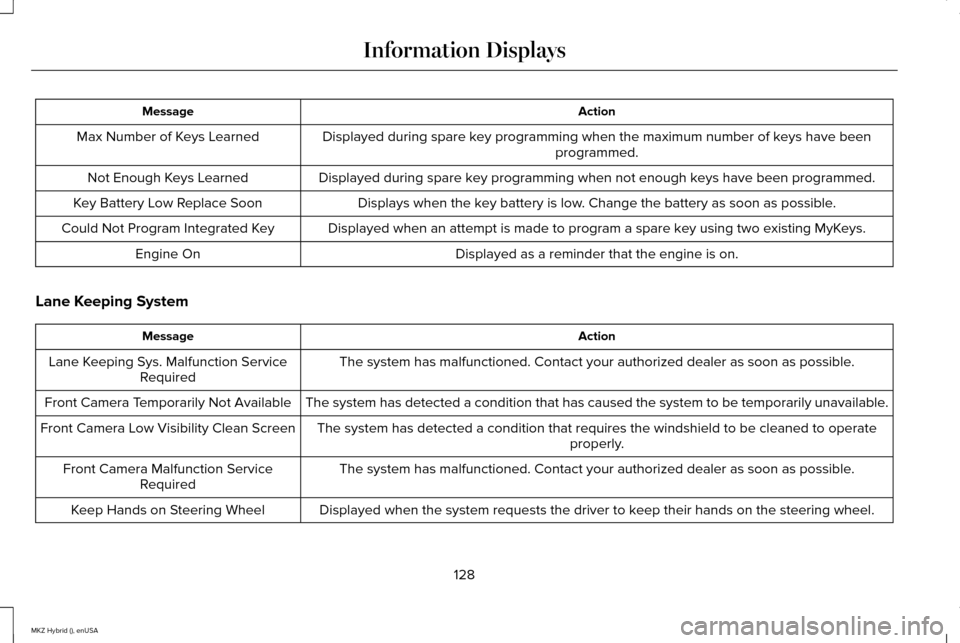
Action
Message
Displayed during spare key programming when the maximum number of keys have been programmed.
Max Number of Keys Learned
Displayed during spare key programming when not enough keys have been programmed.
Not Enough Keys Learned
Displays when the key battery is low. Change the battery as soon as possible.
Key Battery Low Replace Soon
Displayed when an attempt is made to program a spare key using two existing MyKeys.
Could Not Program Integrated Key
Displayed as a reminder that the engine is on.
Engine On
Lane Keeping System Action
Message
The system has malfunctioned. Contact your authorized dealer as soon as \
possible.
Lane Keeping Sys. Malfunction Service
Required
The system has detected a condition that has caused the system to be tem\
porarily unavailable.
Front Camera Temporarily Not Available
The system has detected a condition that requires the windshield to be c\
leaned to operateproperly.
Front Camera Low Visibility Clean Screen
The system has malfunctioned. Contact your authorized dealer as soon as \
possible.
Front Camera Malfunction Service
Required
Displayed when the system requests the driver to keep their hands on the steering wheel.
Keep Hands on Steering Wheel
128
MKZ Hybrid (), enUSA Information Displays
Page 139 of 504
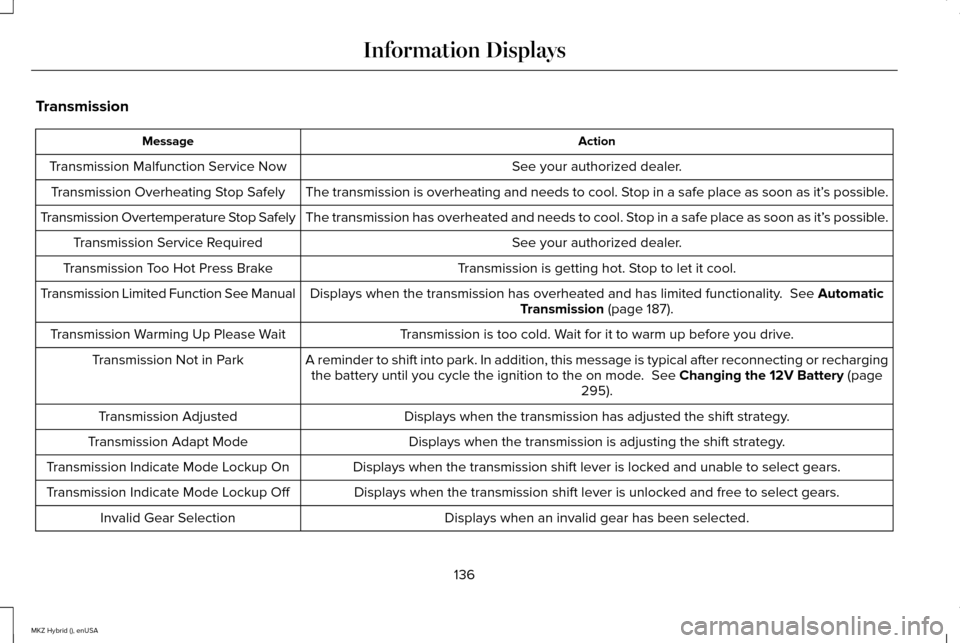
Transmission
Action
Message
See your authorized dealer.
Transmission Malfunction Service Now
The transmission is overheating and needs to cool. Stop in a safe place as soon as it’ s possible.
Transmission Overheating Stop Safely
The transmission has overheated and needs to cool. Stop in a safe place as soon as it’ s possible.
Transmission Overtemperature Stop Safely
See your authorized dealer.
Transmission Service Required
Transmission is getting hot. Stop to let it cool.
Transmission Too Hot Press Brake
Displays when the transmission has overheated and has limited functional\
ity. See Automatic
Transmission (page 187).
Transmission Limited Function See Manual
Transmission is too cold. Wait for it to warm up before you drive.
Transmission Warming Up Please Wait
A reminder to shift into park. In addition, this message is typical afte\
r reconnecting or rechargingthe battery until you cycle the ignition to the on mode.
See Changing the 12V Battery (page
295).
Transmission Not in Park
Displays when the transmission has adjusted the shift strategy.
Transmission Adjusted
Displays when the transmission is adjusting the shift strategy.
Transmission Adapt Mode
Displays when the transmission shift lever is locked and unable to select gears.
Transmission Indicate Mode Lockup On
Displays when the transmission shift lever is unlocked and free to select gears.
Transmission Indicate Mode Lockup Off
Displays when an invalid gear has been selected.
Invalid Gear Selection
136
MKZ Hybrid (), enUSA Information Displays