display LINCOLN MKZ HYBRID 2016 Owners Manual
[x] Cancel search | Manufacturer: LINCOLN, Model Year: 2016, Model line: MKZ HYBRID, Model: LINCOLN MKZ HYBRID 2016Pages: 543, PDF Size: 5.04 MB
Page 424 of 543
To pair a subsequent cell phone, select:
Action and Description
Menu Item
Phone
Settings
Bluetooth Devices
Add Device Follow the on-screen instructions.
Find SYNC
Make sure that Bluetooth is set to On and that your cell phone is in the correct mode. See your
cell phone ’s manual if necessary.
Select
SYNC and a six-digit PIN appears on your device.
If you are prompted to enter a PIN on your device, it does not support Secure Simple Pairing. To
pair, enter the PIN displayed on the touchscreen. Skip the next step.
When prompted on your cell phone ’s display, confirm that the PIN provided by SYNC matches
the PIN displayed on your cell phone.
The display indicates when the pairing is successful.
SYNC may prompt you with more cell phone options. For more information on\
your cell phone's
capability, see your cell phone's manual and visit the website.
Making Calls 421
MKZ Hybrid (CC9) Hybrid Electric Vehicle (HEV), Canada/United States of America, enUSA, First Printing MyLincoln Touch™E142599
Page 425 of 543
Press the voice button and say a command
similar to the following:
Voice command
Call
Dial
You can say the name of a person from your
phone book to call or a say a number to dial.
For example "Call Jenny" or "Dial 867-5309". To end the call or exit phone
mode, press and hold the phone
button.
Receiving Calls
During an incoming call, an audible tone
sounds. Call information appears in the
display if it is available. To accept the call, select:
Message
Accept
Note: You can also accept the call by
pressing the phone button on the steering
wheel. To reject the call, select:
Message
Reject
Note: You can also reject the call by
pressing the phone button on the steering
wheel.
Ignore the call by doing nothing. SYNC logs
it as a missed call.
Phone Menu Options
Press the top left corner on the touchscreen
to select from the following options: Action and Description
Menu Item
Touch this button to access the on-screen numerical pad to enter a number\
and place a call. During
an active call, you can also choose any of these options:
Phone
Mute Call
Hold Call
422
MKZ Hybrid (CC9) Hybrid Electric Vehicle (HEV), Canada/United States of America, enUSA, First Printing MyLincoln Touch™E142632 E142632
Page 426 of 543

Action and Description
Menu Item
Privacy
Join Calls
End
Select to call stored contacts.
Quick Dial
Touch this button to access and call any contacts in your previously down\
loaded phonebook. The
system places the entries in alphabetical categories summarized at the t\
op of the screen
Phonebook
To turn on contact picture settings, if your device supports this feature\
, select:
Phone
Settings
Manage Phonebook
Display Photos from Phonebook
Certain smartphones may support transferring street addresses when liste\
d with phonebook contact
information. If your cell phone supports this feature, you can select and use these addresses as
destinations and save them as favorites.
Note: This is a cell phone-dependent feature. If your cell phone does not support downloading call
history using Bluetooth, SYNC keeps track of calls made with the SYNC system.
Call History
After you connect your Bluetooth-enabled cell phone to SYNC, you can access any previously
dialed, received or missed calls. You can also choose to save these to:
423
MKZ Hybrid (CC9) Hybrid Electric Vehicle (HEV), Canada/United States of America, enUSA, First Printing MyLincoln Touch™
Page 427 of 543
Action and Description
Menu Item
Quick Dial
Favorites
Send text messages using the touchscreen. See Text Messaging later in this section.
Messaging
Touch this button to access various phone settings, for example turning B\
luetooth on and off,
managing your phonebook and more. See
Phone Settings later in this section
Settings
Text Messaging
Note: Downloading and sending text
messages using Bluetooth are cell
phone-dependent features.
Note: Certain features in text messaging are
speed-dependent and not available when
your vehicle is traveling at speeds over
3 mph (5 km/h)
.
Note: SYNC does not download read text
messages from your cell phone.
You can send and receive text messages
using Bluetooth, read them aloud and
translate text messaging acronyms, for
example LOL. Touch the top left corner of the display,
then select: Message
Phone
Messaging
Then any of the following:
Listen (speaker icon)
Dial Message
Send Text
View
Delete
Composing a Text Message
Note: This is a speed-dependent feature. It
is unavailable when your vehicle is traveling
at speeds over
3 mph (5 km/h).
Note: Downloading and sending text
messages using Bluetooth are cell
phone-dependent features.
424
MKZ Hybrid (CC9) Hybrid Electric Vehicle (HEV), Canada/United States of America, enUSA, First Printing MyLincoln Touch™
Page 429 of 543
When a new message arrives, an audible
tone sounds and the screen displays a
pop-up with the caller name and ID, if
supported by your cell phone. You can
select:
Action and Description
Message Action and Description
Message
To view the text message.
View
For SYNC to read the
message to you.
Listen
To call the contact.
Dial
To exit the screen.
Ignore
Phone Settings
To enter the phone settings menu select: Action and Description
Message
Phone
Settings
Then any of the following: Connect, disconnect, add or delete a device, as well as save it as a favorite.
Bluetooth Devices
To turn Bluetooth off or on.
Bluetooth
If you want all calls to go directly to your voicemail and not ring in t\
he vehicle. When this feature
is on, text message notifications do not ring inside the cabin either.
Do Not Disturb
Turn the 911 Assist feature on and off. See Information (page 434).
911 Assist
426
MKZ Hybrid (CC9) Hybrid Electric Vehicle (HEV), Canada/United States of America, enUSA, First Printing MyLincoln Touch™
Page 431 of 543
Press the voice button and when prompted
say any of the following or a similar
command:
Voice command
Call Voicemail Voice command
Listen to Message
Reply to Message
Pair Phone
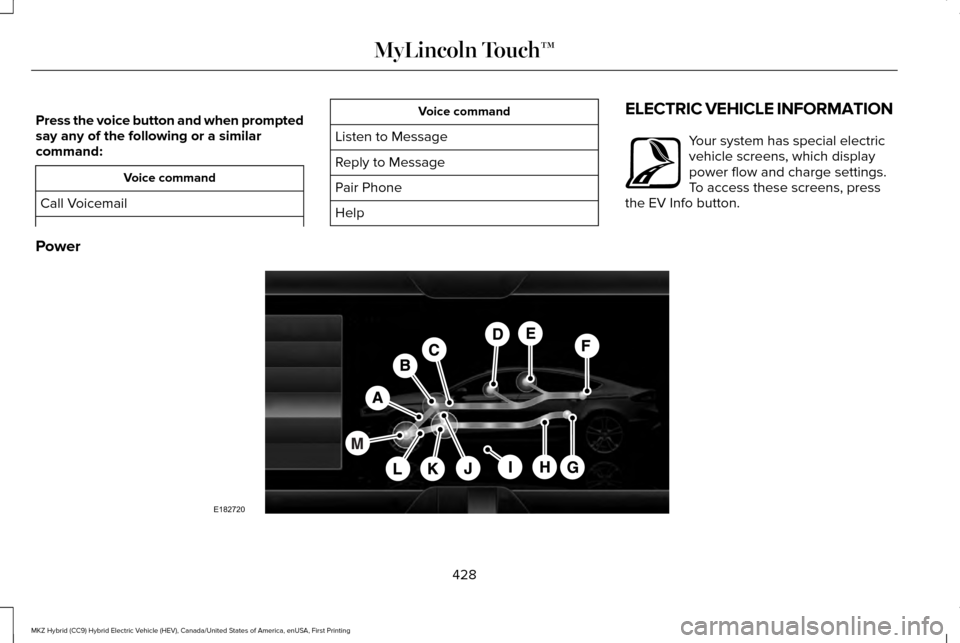
Help ELECTRIC VEHICLE INFORMATION Your system has special electric
vehicle screens, which display
power flow and charge settings.
To access these screens, press
the EV Info button.
Power 428
MKZ Hybrid (CC9) Hybrid Electric Vehicle (HEV), Canada/United States of America, enUSA, First Printing MyLincoln Touch™E161716 E182720
Page 433 of 543
Description
Item
Callout
Represents your high-voltage battery. A circle illuminates
around the node when the high-voltage battery is receiving
power from regenerative braking or engine charging. The higher the power going into the high-voltage battery, the larger the circle around this node.
High Voltage Battery Power
F
Represents the fuel tank in the vehicle.
Fuel
G
Shows flow from the fuel tank to the engine when the
engine is on and using fuel (there are some cases where
the engine is on, but not using any fuel). When the engine
is on, but not using fuel, the engine node is active, but the fuel flow path is off. An example of this is when your foot
is off the accelerator pedal and the vehicle is traveling at a high speed.
Fuel-to-Engine Flow
H
Provides you with the reason(s) the gasoline engine is on.When the gasoline engine is off, this display does not
appear. Engine On due to reasons displayed by the system are in a chart following this list.
Engine on due to:
I
Shows the direction of power flow between the engine andthe electric motor. The direction indicates if the engine isproviding power to the high-voltage electrical system, or
if the high-voltage electrical system is providing power to control or start the engine.
Motor-to-Engine Flow
J
430
MKZ Hybrid (CC9) Hybrid Electric Vehicle (HEV), Canada/United States of America, enUSA, First Printing MyLincoln Touch™
Page 434 of 543
Description
Item
Callout
Represents the gasoline engine. It illuminates only when
the gasoline engine is on. The higher the engine power is, the larger the circle around this node.
Engine Power
K
Shows the direction of the power flow between the engineand the wheels.
Engine-to-Wheels Flow
L
Represents the power going to the wheels. The higher the
wheel power is, the larger the circle around this node. Whenthe engine is off, drive power is shown in blue. When the engine is on, drive power is shown in grey.
Drive Power
M
1 The battery-to-motor flow includes battery
power the vehicle is using for acceleration.
It does not include energy the vehicle is
using for accessories (such as air
conditioning, headlights and radio). This
screen displays accessories and climate
usage separately. 2
Accessories indicates electrical power
demands from your vehicle ’s accessory
systems. Accessories use power but do not
contribute to making the vehicle move. The
power flow displays power usage from the
climate control system and other accessories
separately. 3
The climate control system may determine
A/C is necessary even when you turn it off.
In this case, you may see some climate
power when the A/C is off.
431
MKZ Hybrid (CC9) Hybrid Electric Vehicle (HEV), Canada/United States of America, enUSA, First Printing MyLincoln Touch™
Page 446 of 543
Sirius Travel Link Voice Commands
Press the voice button on the steering
wheel controls. When prompted, say any
of the following or a similar command:
Voice command
Show Traffic
Show Weather
Help
Alerts If your vehicle is equipped with
Navigation, touch the I
(Information) button to access
these features. If your vehicle is not
equipped with Navigation, touch the corner
of the touchscreen with the green tab. Press Alerts, then choose from any of the
following services: Action and Description
Menu Item
The complete message
View
The message
Delete
Messages
Delete All
This screen displays any system messages
(such as an SD card fault).
Note: The system alerts you to any
messages by turning the information icon
yellow. After you read or delete the
messages, the icon returns to white.
Calendar If your vehicle is equipped with
Navigation, touch the I
(Information) button to access
these features. If your vehicle is not
equipped with Navigation, touch the corner
of the touchscreen with the green tab. Press Calendar. You can view the current
calendar by day, week or month.
911 Assist
(If Equipped) WARNINGS
Unless the 911 Assist setting is set on
before a crash, the system will not dial
for help, which could delay response time,
potentially increasing the risk of serious
injury or death after a crash. Do not wait for 911 Assist to make an
emergency call if you can do it yourself.
Dial emergency services immediately to
avoid delayed response time, which could
increase the risk of serious injury or death
after a crash. If you do not hear 911 Assist
within five seconds of the crash, the system
or phone may be damaged or non-functional. Always place your phone in a secure
location in your vehicle so it does not
become a projectile or damaged in a crash.
Failure to do so may cause serious injury to
someone or damage the phone, which could
prevent 911 Assist from working properly. 443
MKZ Hybrid (CC9) Hybrid Electric Vehicle (HEV), Canada/United States of America, enUSA, First Printing MyLincoln Touch™E142599 E142608 E142608
Page 447 of 543
Note:
The SYNC 911 Assist feature must be
set on prior to the incident.
Note: Before setting this feature on, make
sure that you read the 911 Assist Privacy
Notice later in this section for important
information.
Note: If any user turns 911 Assist on or off,
that setting applies for all paired phones. If
911 Assist is turned off, either a voice
message plays or a display message (or
icon) comes on (or both) when your vehicle
is started after a previously paired phone
connects.
Note: Every phone operates differently.
While SYNC 911 Assist works with most
cellular phones, some may have trouble
using this feature.
If a crash deploys an airbag, excluding knee
airbags and rear inflatable safety belts where
fitted or activates the fuel pump shut-off, your
SYNC-equipped vehicle may be able to
contact emergency services by dialing 911
through a paired and connected
Bluetooth-enabled phone. For more
information about the 911 Assist feature visit: Website
visit www.SYNCMyRide.com www.SYNCMyRide.cawww.syncmaroute.ca
See Supplementary Restraints System
(page 44). Important information regarding
airbag deployment is in this chapter.
See
Roadside Emergencies (page 254).
Important information regarding the fuel
pump shut-off is in this chapter.
Setting 911 Assist On If your vehicle is equipped with Navigation,
touch the I (Information) button to access
these features. If your vehicle is not
equipped with Navigation, touch the corner
of the touchscreen with the green tab. Then
select:
Menu Item
Apps
911 Assist
On You can also access 911 Assist by pressing
the Setting icon and then selecting:
Menu Item
Settings
Phone
911 Assist
444
MKZ Hybrid (CC9) Hybrid Electric Vehicle (HEV), Canada/United States of America, enUSA, First Printing MyLincoln Touch™E142608 E142607