instrument panel LINCOLN MKZ HYBRID 2016 Owner's Manual
[x] Cancel search | Manufacturer: LINCOLN, Model Year: 2016, Model line: MKZ HYBRID, Model: LINCOLN MKZ HYBRID 2016Pages: 543, PDF Size: 5.04 MB
Page 314 of 543
CLEANING LEATHER SEATS (If
Equipped)
Note: Follow the same procedure as
cleaning leather seats for cleaning leather
instrument panels and leather interior trim
surfaces.
For routine cleaning, wipe the surface with
a soft, damp cloth and a mild soap and water
solution. Dry the area with a clean, soft cloth.
For cleaning and removing stains such as
dye transfer, use Motorcraft Premium Leather
and Vinyl Cleaner or a commercially available
leather cleaning product for automotive
interiors.
Note: Test any cleaner or stain remover on
an inconspicuous area.
You should:
• Remove dust and loose dirt with a
vacuum cleaner.
• Clean and treat spills and stains as soon
as possible. Do not use the following products as these
may damage the leather:
•
Oil and petroleum or silicone-based
leather conditioners.
• Household cleaners.
• Alcohol solutions.
• Solvents or cleaners intended specifically
for rubber, vinyl and plastics.
REPAIRING MINOR PAINT
DAMAGE
Authorized dealers have touch-up paint to
match your vehicle ’s color. Your vehicle color
code is printed on a sticker on the front,
left-hand side door jamb. Take your color
code to your authorized dealer to make sure
you get the correct color.
Before repairing minor paint damage, use a
cleaner such as Motorcraft Bug and Tar
Remover to remove particles such as bird
droppings, tree sap, insect deposits, tar
spots, road salt and industrial fallout.
Always read the instructions before using
cleaning products. CLEANING THE ALLOY WHEELS
Note:
Do not apply a cleaning chemical to
warm or hot wheel rims and covers.
Note: Some automatic car washes may
cause damage to the finish on your wheel
rims and covers.
Note: Industrial-strength or heavy-duty
cleaners in combination with brush agitation
to remove brake dust and dirt, could wear
away the clear coat finish over a period time.
Note: Do not use hydrofluoric acid-based or
high caustic-based wheel cleaners, steel
wool, fuels or strong household detergents.
Note: If you intend parking your vehicle for
an extended period after cleaning the
wheels with a wheel cleaner, drive your
vehicle for a few minutes before doing so.
This will reduce the risk of increased
corrosion of the brake discs.
Alloy wheels and wheel covers are coated
with a clear coat paint finish. To maintain
their condition we recommend that you:
311
MKZ Hybrid (CC9) Hybrid Electric Vehicle (HEV), Canada/United States of America, enUSA, First Printing Vehicle Care
Page 319 of 543
What to do when a Tire Is Punctured
A tire puncture within the tire tread area can
be repaired in two stages with the kit.
•
In the first stage, the tire will be reinflated
with a sealing compound and air. After
the tire has been reinflated, you will need
to drive the vehicle a short distance 4 mi
(6 km) to distribute the sealant in the tire.
• In the second stage, you will need to
check the tire pressure and adjust, if
necessary, to the vehicle tire inflation
pressure.
First Stage: Reinflating the Tire with
Sealing Compound and Air WARNINGS
Do not stand directly over the kit while
inflating the tire. If you notice any
unusual bulges or deformations in the tire
sidewall during inflation, stop and call
roadside assistance. If the tire does not inflate to the
recommended tire pressure within 15
minutes, stop and call roadside assistance. Preparation: Park the vehicle in a safe, level
and secure area, away from moving traffic.
Turn the hazard lights on. Apply the parking
brake and turn the engine off. Inspect the
flat tire for visible damage.
Sealant compound contains latex. To avoid
any allergic reactions, use the non-latex
gloves located in the accessory box on the
underside of the kit housing.
Do not remove any foreign object that has
pierced the tire. If a puncture is located in
the tire sidewall, stop and call roadside
assistance.
1.
Remove the valve cap from the tire valve.
2. Unwrap the clear tube from the compressor housing.
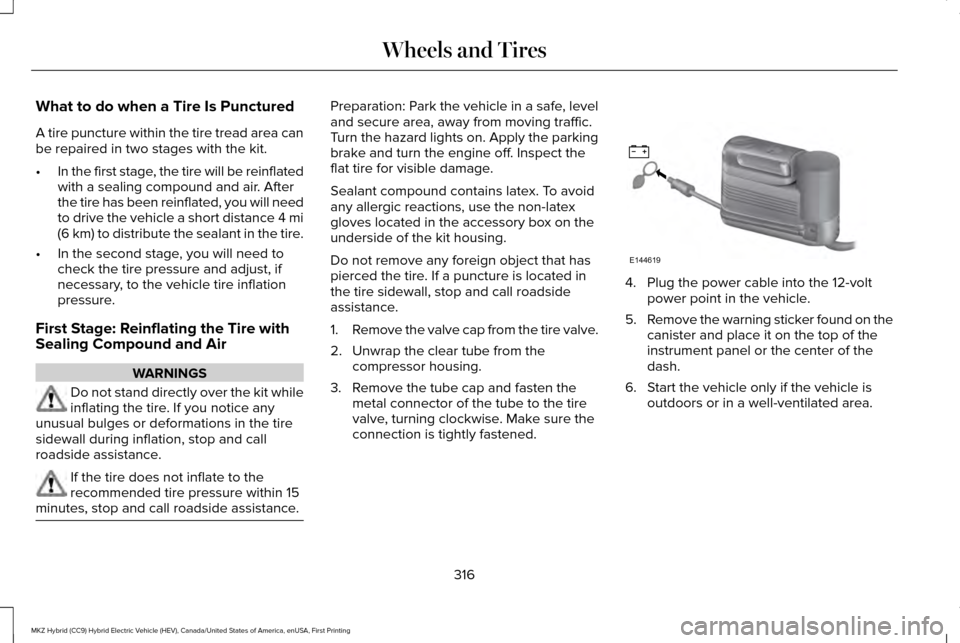
3. Remove the tube cap and fasten the metal connector of the tube to the tire
valve, turning clockwise. Make sure the
connection is tightly fastened. 4. Plug the power cable into the 12-volt
power point in the vehicle.
5. Remove the warning sticker found on the
canister and place it on the top of the
instrument panel or the center of the
dash.
6. Start the vehicle only if the vehicle is outdoors or in a well-ventilated area.
316
MKZ Hybrid (CC9) Hybrid Electric Vehicle (HEV), Canada/United States of America, enUSA, First Printing Wheels and TiresE144619
Page 326 of 543
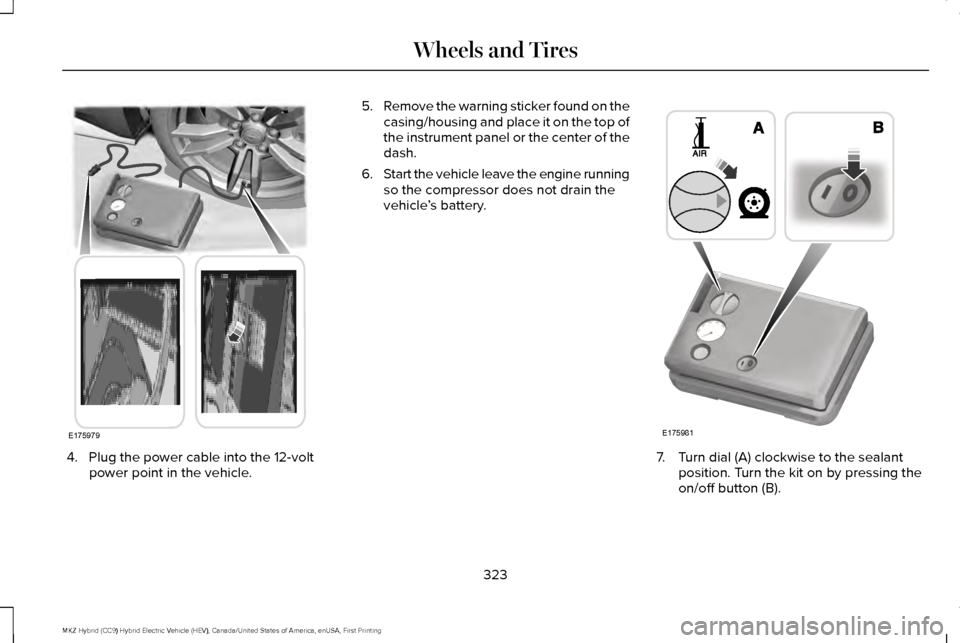
4. Plug the power cable into the 12-volt
power point in the vehicle. 5.
Remove the warning sticker found on the
casing/housing and place it on the top of
the instrument panel or the center of the
dash.
6. Start the vehicle leave the engine running
so the compressor does not drain the
vehicle ’s battery. 7. Turn dial (A) clockwise to the sealant
position. Turn the kit on by pressing the
on/off button (B).
323
MKZ Hybrid (CC9) Hybrid Electric Vehicle (HEV), Canada/United States of America, enUSA, First Printing Wheels and TiresE175979 E175981
Page 354 of 543
VEHICLE IDENTIFICATION
NUMBER
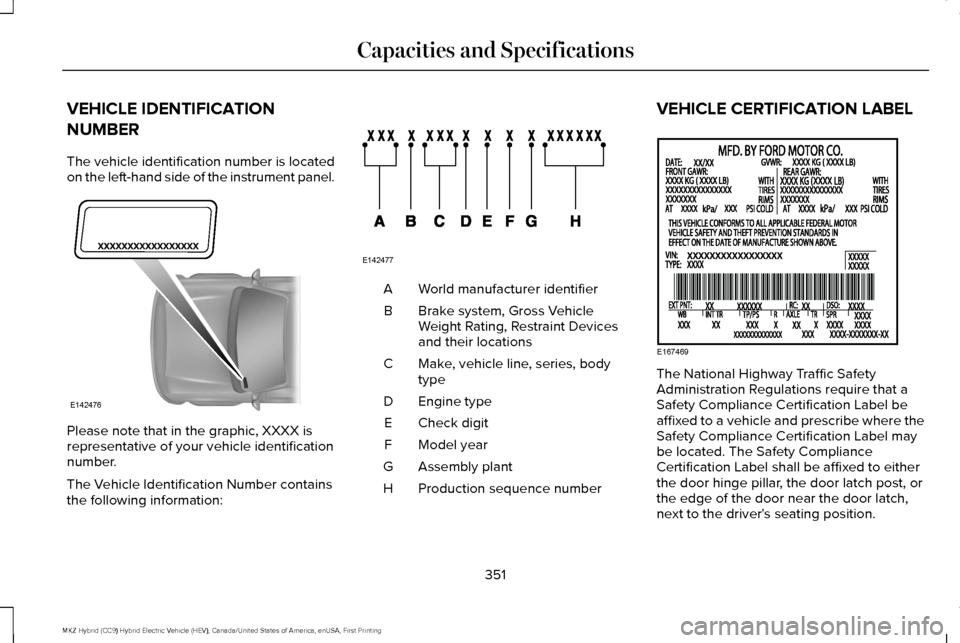
The vehicle identification number is located
on the left-hand side of the instrument panel.
Please note that in the graphic, XXXX is
representative of your vehicle identification
number.
The Vehicle Identification Number contains
the following information: World manufacturer identifier
A
Brake system, Gross Vehicle
Weight Rating, Restraint Devices
and their locations
B
Make, vehicle line, series, body
type
C
Engine type
D
Check digit
E
Model year
F
Assembly plant
G
Production sequence number
H VEHICLE CERTIFICATION LABEL
The National Highway Traffic Safety
Administration Regulations require that a
Safety Compliance Certification Label be
affixed to a vehicle and prescribe where the
Safety Compliance Certification Label may
be located. The Safety Compliance
Certification Label shall be affixed to either
the door hinge pillar, the door latch post, or
the edge of the door near the door latch,
next to the driver's seating position.
351
MKZ Hybrid (CC9) Hybrid Electric Vehicle (HEV), Canada/United States of America, enUSA, First Printing Capacities and SpecificationsE142476 E142477 E167469
Page 416 of 543
If you are not listening to a CD, press the
voice button and, after the tone, say:
Voice command
CD Player
When listening to a CD you can say many
commands. Following are a few examples
of what you can say. Voice command
Play
Pause
Next Track
Previous Track
Help
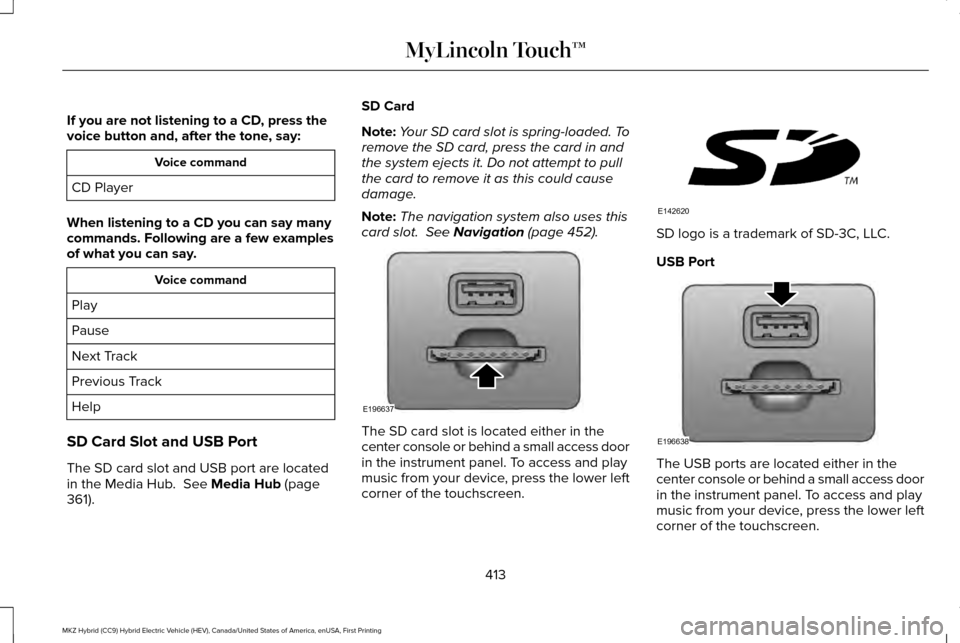
SD Card Slot and USB Port
The SD card slot and USB port are located
in the Media Hub. See Media Hub (page
361). SD Card
Note:
Your SD card slot is spring-loaded. To
remove the SD card, press the card in and
the system ejects it. Do not attempt to pull
the card to remove it as this could cause
damage.
Note: The navigation system also uses this
card slot.
See Navigation (page 452). The SD card slot is located either in the
center console or behind a small access door
in the instrument panel. To access and play
music from your device, press the lower left
corner of the touchscreen. SD logo is a trademark of SD-3C, LLC.
USB Port
The USB ports are located either in the
center console or behind a small access door
in the instrument panel. To access and play
music from your device, press the lower left
corner of the touchscreen.
413
MKZ Hybrid (CC9) Hybrid Electric Vehicle (HEV), Canada/United States of America, enUSA, First Printing MyLincoln Touch™E196637 E142620 E196638
Page 453 of 543

Note: The passenger side temperature and the Dual indicator automatically turn on when the passenger is adjusting their t\
emperature
control.
Note:
See the following Smart Zone Feature section for more information on th\
e DUAL button.
Fan speed:
Touch + or - to increase or decrease the volume of air circulated in your vehicle.
C
Note:
When the system is controlling the fan speed automatically, all the fan speed indicators turn off.
Recirculated air:
Touch the button to switch between outside air and recirculated air. When you select recirculated air, the air
currently in the passenger compartment recirculates. This may reduce the\
time needed to cool the interior (when used with A/C)
and may reduce unwanted odors from entering your vehicle.
D
Note:
Recirculated air may turn off automatically (or be prevented from turnin\
g on) in all airflow modes except Max A/C to reduce
risk of fogging. Recirculated air may also turn on and off automatically in Panel or Panel and Floor airflow modes during hot weather
in order to improve cooling efficiency.
Max A/C:
Touch the button to maximize cooling. Recirculated air flows through the instrument panel vents, air conditioni\
ng
automatically turns on, and the fan automatically adjusts to the highest\
speed.
E
A/C:
Touch the button to switch air conditioning compressor on or off. Use air conditioning with recirculated air to improve cooling
performance and efficiency.
F
Note:
In certain conditions (such as when using Max Defrost), the air condi\
tioning compressor may continue to operate even after
you switch off the air conditioning with the A/C button.
Auto:
Touch the button to switch on automatic operation. Select the desired tem\
perature using the temperature control. The system
adjusts fan speed, air distribution, air conditioning operation, and sel\
ects outside air or recirculated air to heat or cool the vehicle
in order to maintain the desired temperature. You can also use the
Auto button to switch off dual zone operation by touching and
holding the button for more than two seconds.
G
Heated rear window:
Turns the heated rear window on and off. See Heated Windows and Mirrors (page 144).
H
450
MKZ Hybrid (CC9) Hybrid Electric Vehicle (HEV), Canada/United States of America, enUSA, First Printing MyLincoln Touch™
Page 533 of 543
Bonnet Lock
See: Opening and Closing the Hood............287
Booster Seats...................................................27
Types of Booster Seats.......................................27
Brake Fluid Check.......................................296
Brakes..............................................................195 General Information............................................195
Breaking-In......................................................251
Bulb Specification Chart
..............................301
C
Cabin Air Filter...............................................144
California Proposition 65................................11
Capacities and Specifications...................353 Specifications......................................................354
Car Wash See: Cleaning the Exterior...............................305
Center Console
.............................................165
Changing a Bulb............................................301
Lamp Assembly Condensation........................301
Replacing Bulbs...................................................301
Changing a Fuse..........................................286 Fuses.....................................................................286
Changing the 12V Battery..........................297
Changing the Engine Air Filter.................304
Changing the Wiper Blades......................299
Checking MyKey System Status.................64 Checking the Wiper Blades.......................299
Child Restraint and Safety Belt
Maintenance...................................................41
Child Safety
.......................................................16
General Information..............................................16
Child Safety Locks...........................................31 Left-Hand Side.......................................................32
Right-Hand Side....................................................32
Child Seat Positioning...................................29
Cleaning Leather Seats................................311
Cleaning Products
.......................................305
Cleaning the Alloy Wheels...........................311
Cleaning the Engine....................................307
Cleaning the Exterior..................................305 Exterior Chrome Parts.......................................306
Exterior Plastic Parts..........................................306
Stripes or Graphics............................................306
Underbody...........................................................306
Cleaning the Instrument Panel and Instrument Cluster Lens............................310
Cleaning the Interior....................................308 Cleaning Black Label Interior (If
Equipped).........................................................308
Cleaning the Windows and Wiper Blades...........................................................307
Clearing All MyKeys
.......................................62 Climate............................................................448
Climate Control Voice Commands................
452
Smart Zone Feature............................................451
Climate Control
...............................................141
Climate Controlled Seats............................155
Cooled Seats........................................................156
Collision, Damage or Fire Event...............259 Guidance for Ford Motor Company Electric
and Hybrid-Electric Vehicles Equipped With
High Voltage Batteries.................................259
Coolant Check See: Engine Coolant Check.............................291
Crash Sensors and Airbag Indicator
..........52
Creating a MyKey............................................61 Programming/Changing Configurable
Settings................................................................61
Cruise Control.................................................82 Principle of Operation........................................214
Type 1.......................................................................82
Type 2......................................................................82
Cruise control See: Using Cruise Control.................................214
Customer Assistance..................................262
530
MKZ Hybrid (CC9) Hybrid Electric Vehicle (HEV), Canada/United States of America, enUSA, First Printing Index