tow LINCOLN MKZ HYBRID 2016 Repair Manual
[x] Cancel search | Manufacturer: LINCOLN, Model Year: 2016, Model line: MKZ HYBRID, Model: LINCOLN MKZ HYBRID 2016Pages: 543, PDF Size: 5.04 MB
Page 432 of 543
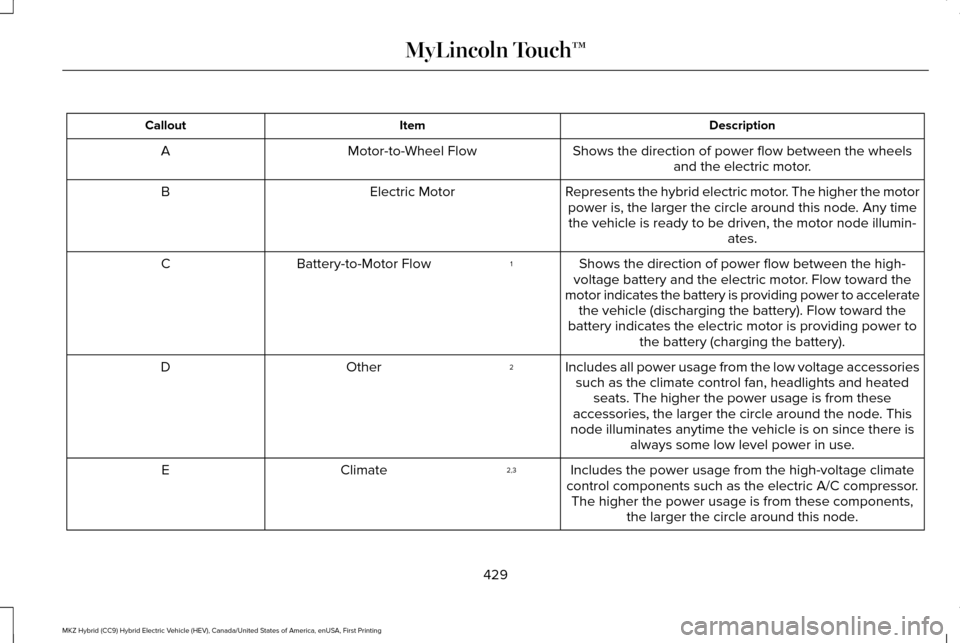
Description
Item
Callout
Shows the direction of power flow between the wheelsand the electric motor.
Motor-to-Wheel Flow
A
Represents the hybrid electric motor. The higher the motorpower is, the larger the circle around this node. Any timethe vehicle is ready to be driven, the motor node illumin- ates.
Electric Motor
B
Shows the direction of power flow between the high-
voltage battery and the electric motor. Flow toward the
motor indicates the battery is providing power to accelerate the vehicle (discharging the battery). Flow toward the
battery indicates the electric motor is providing power to the battery (charging the battery).
1
Battery-to-Motor Flow
C
Includes all power usage from the low voltage accessoriessuch as the climate control fan, headlights and heated seats. The higher the power usage is from these
accessories, the larger the circle around the node. This
node illuminates anytime the vehicle is on since there is always some low level power in use.
2
Other
D
Includes the power usage from the high-voltage climate
control components such as the electric A/C compressor. The higher the power usage is from these components, the larger the circle around this node.
2,3
Climate
E
429
MKZ Hybrid (CC9) Hybrid Electric Vehicle (HEV), Canada/United States of America, enUSA, First Printing MyLincoln Touch™
Page 441 of 543
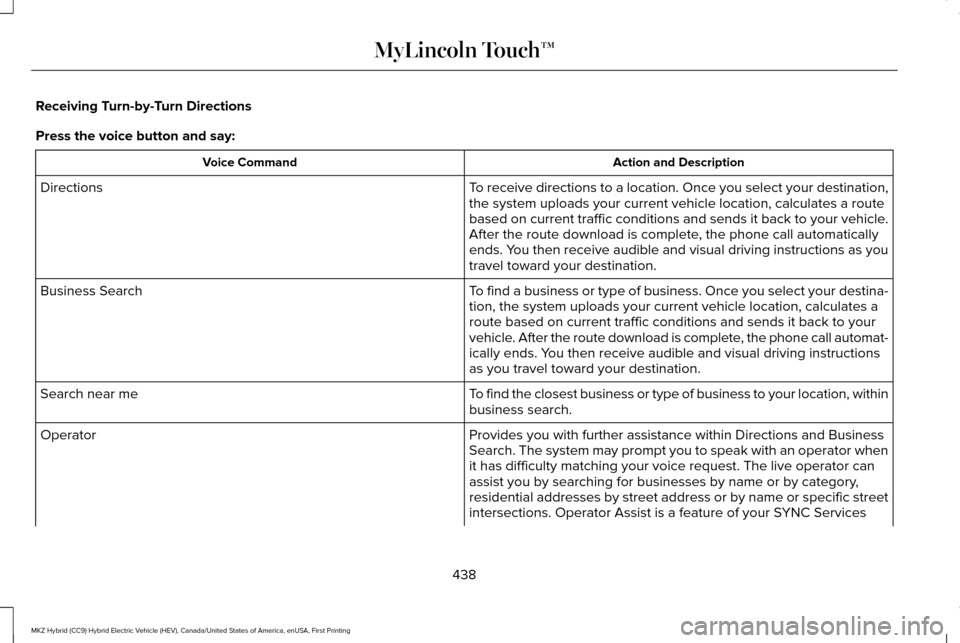
Receiving Turn-by-Turn Directions
Press the voice button and say:
Action and Description
Voice Command
To receive directions to a location. Once you select your destination,
the system uploads your current vehicle location, calculates a route
based on current traffic conditions and sends it back to your vehicle.
After the route download is complete, the phone call automatically
ends. You then receive audible and visual driving instructions as you
travel toward your destination.
Directions
To find a business or type of business. Once you select your destina-
tion, the system uploads your current vehicle location, calculates a
route based on current traffic conditions and sends it back to your
vehicle. After the route download is complete, the phone call automat-
ically ends. You then receive audible and visual driving instructions
as you travel toward your destination.
Business Search
To find the closest business or type of business to your location, within\
business search.
Search near me
Provides you with further assistance within Directions and Business
Search. The system may prompt you to speak with an operator when
it has difficulty matching your voice request. The live operator can
assist you by searching for businesses by name or by category,
residential addresses by street address or by name or specific street
intersections. Operator Assist is a feature of your SYNC Services
Operator
438
MKZ Hybrid (CC9) Hybrid Electric Vehicle (HEV), Canada/United States of America, enUSA, First Printing MyLincoln Touch™
Page 464 of 543
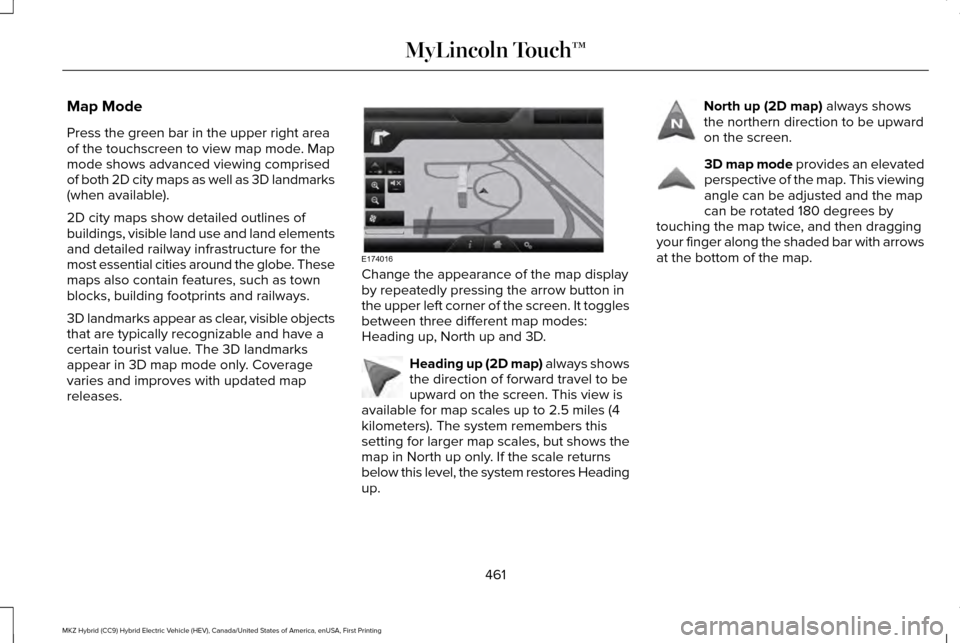
Map Mode
Press the green bar in the upper right area
of the touchscreen to view map mode. Map
mode shows advanced viewing comprised
of both 2D city maps as well as 3D landmarks
(when available).
2D city maps show detailed outlines of
buildings, visible land use and land elements
and detailed railway infrastructure for the
most essential cities around the globe. These
maps also contain features, such as town
blocks, building footprints and railways.
3D landmarks appear as clear, visible objects
that are typically recognizable and have a
certain tourist value. The 3D landmarks
appear in 3D map mode only. Coverage
varies and improves with updated map
releases.
Change the appearance of the map display
by repeatedly pressing the arrow button in
the upper left corner of the screen. It toggles
between three different map modes:
Heading up, North up and 3D.
Heading up (2D map) always shows
the direction of forward travel to be
upward on the screen. This view is
available for map scales up to 2.5 miles (4
kilometers). The system remembers this
setting for larger map scales, but shows the
map in North up only. If the scale returns
below this level, the system restores Heading
up. North up (2D map) always shows
the northern direction to be upward
on the screen. 3D map mode
provides an elevated
perspective of the map. This viewing
angle can be adjusted and the map
can be rotated 180 degrees by
touching the map twice, and then dragging
your finger along the shaded bar with arrows
at the bottom of the map.
461
MKZ Hybrid (CC9) Hybrid Electric Vehicle (HEV), Canada/United States of America, enUSA, First Printing MyLincoln Touch™E174016 E142642 E142643 E142644
Page 468 of 543
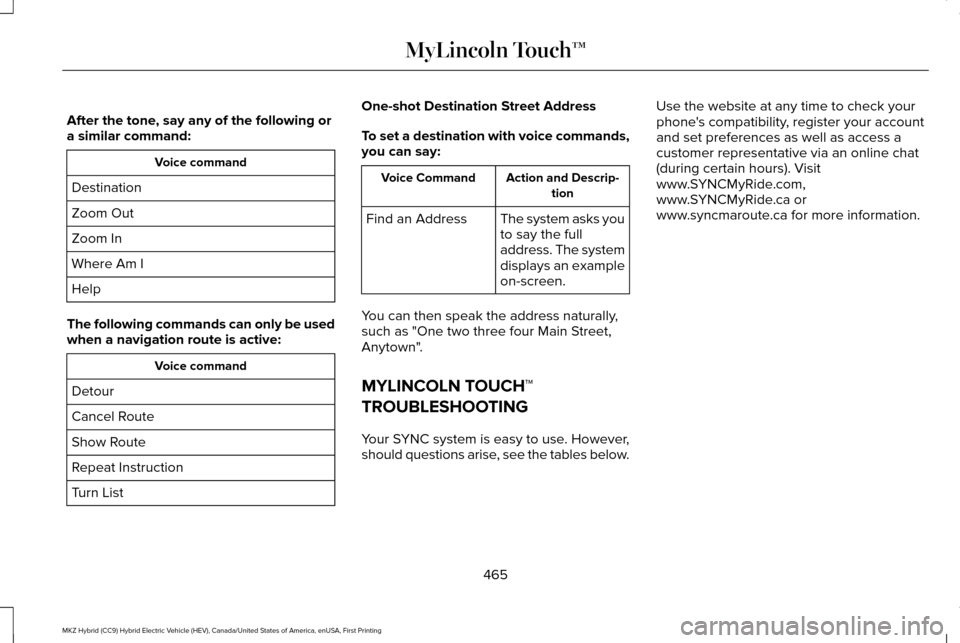
After the tone, say any of the following or
a similar command:
Voice command
Destination
Zoom Out
Zoom In
Where Am I
Help
The following commands can only be used
when a navigation route is active: Voice command
Detour
Cancel Route
Show Route
Repeat Instruction
Turn List One-shot Destination Street Address
To set a destination with voice commands,
you can say: Action and Descrip-
tion
Voice Command
The system asks you
to say the full
address. The system
displays an example
on-screen.
Find an Address
You can then speak the address naturally,
such as "One two three four Main Street,
Anytown".
MYLINCOLN TOUCH™
TROUBLESHOOTING
Your SYNC system is easy to use. However,
should questions arise, see the tables below. Use the website at any time to check your
phone's compatibility, register your account
and set preferences as well as access a
customer representative via an online chat
(during certain hours). Visit
www.SYNCMyRide.com,
www.SYNCMyRide.ca or
www.syncmaroute.ca for more information.
465
MKZ Hybrid (CC9) Hybrid Electric Vehicle (HEV), Canada/United States of America, enUSA, First Printing MyLincoln Touch™
Page 479 of 543
PROTECT YOURSELF FROM THE RISING
COST OF VEHICLE REPAIRS WITH A
LINCOLN EXTENDED SERVICE PLAN.
SERVICE PLANS (U.S. Only)
Lincoln owners have discovered the powerful
protection of Lincoln Extended Service Plan.
It is the only extended service plan backed
by Lincoln Motor Company, and provides
peace of mind protection beyond the New
Vehicle Limited Warranty coverage.
Lincoln ESP Can Quickly Pay for Itself
One service bill – the cost of parts and labor
– can easily exceed the price of your Lincoln
Extended Service Plan. With Lincoln ESP,
you minimize your risk for unexpected repair
bills and rising repair costs.
Up to 1000+ Covered Vehicle Components
There are four Extended Service Plans with
different levels of coverage. Ask your
authorized dealer for details.
1.
PremiumCARE - Our most comprehensive
coverage. With over 1000 covered
components, this plan is so complete that
we generally only discuss what’ s not
covered.
2. ExtraCARE - Covers 113 components, and
includes many high-tech items.
3. BaseCARE - Covers 84 components.
4. PowertrainCARE - Covers 29 critical components.
Lincoln Extended Service Plan is honored by
all authorized Lincoln and Ford dealers in
the United States, Canada and Mexico. It is
the only extended service plan authorized
and backed by Lincoln Motor Company.
That means you get:
• Reliable, quality service at any Lincoln or
Ford dealership.
• Repairs performed by factory trained
technicians, using genuine parts. Rental Car Reimbursement
1st day Rental Benefit
You take advantage of replacement
transportation if your vehicle is at your
authorized dealer for same day covered
repairs.
Extended Rental Benefits
If your vehicle is kept overnight for covered
repairs, you are eligible for rental car
coverage, including bumper to bumper
warranty repairs, and Field Service Actions.
Roadside Assistance
Exclusive 24/7 roadside assistance, including:
•
Towing, flat-tire change and battery jump
starts.
• Out of fuel and lock-out assistance.
• Travel expense reimbursement for
lodging, meals and rental car.
• Destination assistance for taxi, shuttle,
rental car coverage and emergency
transportation.
476
MKZ Hybrid (CC9) Hybrid Electric Vehicle (HEV), Canada/United States of America, enUSA, First Printing Extended Service Plan (ESP)
Page 481 of 543
There are several Lincoln Extended Service
Plans available in various time, distance and
deductible combinations. Each plan is
tailored to fit your own driving needs,
including reimbursement for towing and
rental. When you purchase Lincoln Extended
Service Plan, you receive added
peace-of-mind protection throughout
Canada, the United States and Mexico,
provided by a network of participating
authorized Lincoln Motor Company dealers.
Note:
Repairs performed outside of Canada,
the United States and Mexico are not eligible
for Lincoln Extended Service Plan coverage.
This information is subject to change. For
more information, visit your local Lincoln of
Canada dealer or www.Lincoln.ca to find the
Lincoln Extended Service Plan that is right
for you.
478
MKZ Hybrid (CC9) Hybrid Electric Vehicle (HEV), Canada/United States of America, enUSA, First Printing Extended Service Plan (ESP)
Page 489 of 543
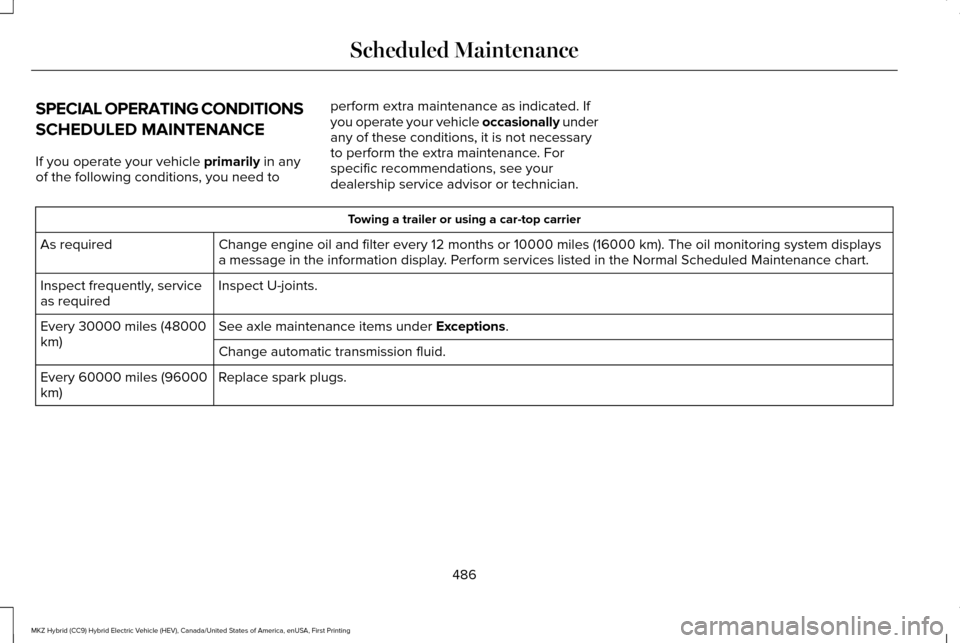
SPECIAL OPERATING CONDITIONS
SCHEDULED MAINTENANCE
If you operate your vehicle primarily in any
of the following conditions, you need to perform extra maintenance as indicated. If
you operate your vehicle occasionally under
any of these conditions, it is not necessary
to perform the extra maintenance. For
specific recommendations, see your
dealership service advisor or technician. Towing a trailer or using a car-top carrier
Change engine oil and filter every 12 months or 10000 miles (16000 km)\
. The oil monitoring system displays
a message in the information display. Perform services listed in the Normal Scheduled Maintenance chart.
As required
Inspect U-joints.
Inspect frequently, service
as required
See axle maintenance items under
Exceptions.
Every 30000 miles (48000
km)
Change automatic transmission fluid.
Replace spark plugs.
Every 60000 miles (96000
km)
486
MKZ Hybrid (CC9) Hybrid Electric Vehicle (HEV), Canada/United States of America, enUSA, First Printing Scheduled Maintenance
Page 532 of 543
A
A/C
See: Climate Control............................................141
About This Manual............................................7
Protecting the Environment..................................7
ABS See: Brakes...........................................................195
ABS driving hints See: Hints on Driving With Anti-Lock
Brakes................................................................196
Accessories....................................................474 Exterior style........................................................474
Interior style.........................................................474
Lifestyle.................................................................474
Peace of mind......................................................474
Accessories See: Replacement Parts Recommendation.....12
ACC See: Using Adaptive Cruise Control..............215
Active Park Assist........................................206 Automatic Steering into Parking Space........207
Deactivating the Park Assist Feature............208
Troubleshooting the System...........................209
Using Active Park Assist..................................206
Adaptive Headlamps......................................91 Adjusting the Headlamps..........................300
Horizontal Aim Adjustment...............................301
Vertical Aim Adjustment...................................300
Adjusting the Steering Wheel.....................80 Power Tilt and Telescope Steering
Column................................................................80
AFS See: Adaptive Headlamps...................................91
Airbag Disposal
...............................................53
Air Conditioning See: Climate Control............................................141
Alarm See: Anti-Theft Alarm...........................................78
Ambient Lighting
.............................................94
Anti-Theft Alarm..............................................78 Arming the Alarm..................................................79
Disarming the Alarm.............................................79
Appendices...................................................500
Audible Warnings and Indicators
..............109
Headlamps On Warning Chime.......................109
Key in Ignition Warning Chime........................109
Keyless Warning Alert........................................109
Parking Brake On Warning Chime..................
109
Audio Control
....................................................81
Seek, Next or Previous.........................................81
Audio System................................................358 General Information...........................................358 Audio Unit - Vehicles With: Premium AM/
FM/CD..........................................................359
Autolamps.........................................................87 Windshield Wiper Activated Headlamps........88
Automatic Climate Control...........................141
Automatic High Beam Control
....................90
Activating the System...........................................91
Manually Overriding the System.......................91
Automatic Transmission
..............................190
Brake-Shift Interlock Override.........................193
If Your Vehicle Gets Stuck In Mud or Snow..................................................................194
Push Button Shift Transmission.......................
190
Automatic Transmission Fluid Check...........................................................296
Autowipers.......................................................85
Auxiliary Power Points.................................163 110 Volt AC Power Point and Twisting Auxiliary
Cover..................................................................163
12 Volt DC Power Point......................................163
Locations...............................................................163
B
Blind Spot Information System.................229 Blind Spot Information System (BLIS®) with
Cross Traffic Alert..........................................229
529
MKZ Hybrid (CC9) Hybrid Electric Vehicle (HEV), Canada/United States of America, enUSA, First Printing Index
Page 541 of 543
Tire Pressure Monitoring System.............342
Changing Tires with a Tire Pressure
Monitoring System.........................................343
Understanding Your Tire Pressure Monitoring System .............................................................344
Tire Repair Kit See: Temporary Mobility Kit..............................314
Tires See: Wheels and Tires.......................................314
Towing a Trailer.............................................249
Towing the Vehicle on Four Wheels
.......250
Emergency Towing............................................250
Recreational Towing..........................................250
Towing.............................................................249
Traction Control
............................................200
Principle of Operation.......................................200
Transmission Code Designation..............352
Transmission...................................................190
Transmission See: Transmission...............................................190
Transporting the Vehicle............................249
Type Approvals.............................................525 RF Certification Logos for Tire Pressure
Monitoring Sensor(s).....................................525
U
Under Hood Overview................................288 Unique Driving Characteristics...................171
Universal Garage Door Opener................158
HomeLink Wireless Control System...............
158
Using Adaptive Cruise Control..................215 Blocked Sensor...................................................221
Changing the Set Speed...................................219
Detection Issues.................................................220
Disengaging the System...................................218
Following a Vehicle.............................................217
Hilly Condition Usage........................................219
Low Speed Automatic Cancellation...............219
Overriding the System.......................................219
Resuming the Set Speed..................................
219
Setting a Speed...................................................216
Setting the Gap Distance..................................217
Switching Adaptive Cruise Control Off..........219
Switching Adaptive Cruise Control On..........216
Switching to Normal Cruise Control..............222
System Not Available.........................................221
Using Cruise Control
....................................214
Switching Cruise Control Off............................215
Switching Cruise Control On............................214
Using MyKey With Remote Start Systems..........................................................65
Using Snow Chains
......................................342
Using Stability Control................................203
AdvanceTrac® .....................................................203
Using Summer Tires
.....................................341 Using Traction Control................................200
Switching the System Off Using a
Switch...............................................................200
Switching the System Off Using the Information Display Controls......................200
System Indicator Lights and Messages.......200
Utilizing the Mediation/Arbitration Program (Canada Only).............................................265
V
Vehicle Care
..................................................305
General Information...........................................305
Vehicle Certification Label..........................351
Vehicle Identification Number...................351
Vehicle Storage
.............................................312
Battery....................................................................313
Body........................................................................\
312
Brakes.....................................................................313
Cooling system....................................................313
Engine....................................................................312
Fuel system...........................................................312
General..................................................................312
Miscellaneous.......................................................313
Removing Vehicle From Storage.....................
313
Tires........................................................................\
313
Ventilation See: Climate Control............................................141
538
MKZ Hybrid (CC9) Hybrid Electric Vehicle (HEV), Canada/United States of America, enUSA, First Printing Index
Page 543 of 543
W
Warning Lamps and Indicators..................105
Adaptive Cruise Control....................................105
Anti-Lock Braking System.................................105
Battery....................................................................105
Blind Spot Monitor..............................................106
Brake System.......................................................106
Cruise Control......................................................106
Direction Indicator..............................................106
Door Ajar...............................................................106
EcoSelect..............................................................106
Electric Park Brake..............................................106
Engine Oil..............................................................107
Engine or Motor Coolant Temperature..........106
Fasten Safety Belt...............................................107
Front Airbag..........................................................107
Grade Assist..........................................................107
Heads Up Display................................................107
High Beam.............................................................107
Hood Ajar..............................................................107
Lane Keeping Aid................................................107
Low Fuel Level.....................................................107
Low Tire Pressure Warning...............................107
Low Washer Fluid................................................108
Parking Lamps.....................................................108
Powertrain Fault..................................................108
Ready to Drive.....................................................108 Service Engine Soon.....................................108
Stability Control...................................................108
Stability Control Off............................................109
Stop Safely............................................................109
Trunk Ajar..............................................................109
Washer Fluid Check.....................................297
Washers See: Cleaning the Exterior...............................305
See: Wipers and Washers...................................84
Waxing............................................................306
Welcome Lighting...........................................93
Wheels and Tires...........................................314 Technical Specifications....................................347
Windows and Mirrors.....................................95
Windshield Washers
......................................86
Windshield Wipers..........................................84
Intermittent Wipe..................................................84
Speed Dependent Wipers..................................84
Wipers and Washers......................................84
Wrecker Towing See: Transporting the Vehicle.........................249
540
MKZ Hybrid (CC9) Hybrid Electric Vehicle (HEV), Canada/United States of America, enUSA, First Printing Index