lights LINCOLN MKZ HYBRID 2017 User Guide
[x] Cancel search | Manufacturer: LINCOLN, Model Year: 2017, Model line: MKZ HYBRID, Model: LINCOLN MKZ HYBRID 2017Pages: 546, PDF Size: 5.12 MB
Page 108 of 546
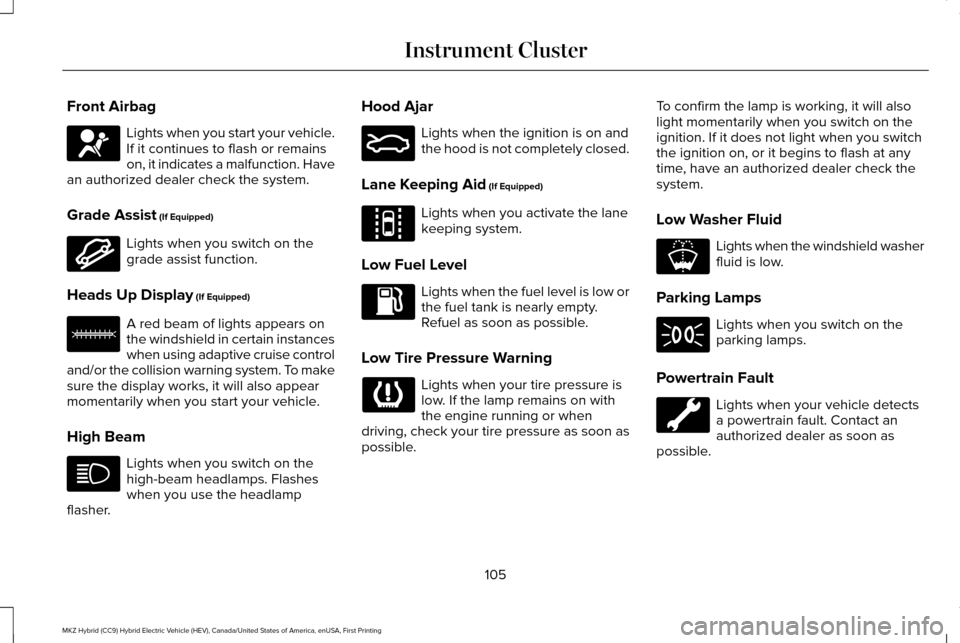
Front Airbag
Lights when you start your vehicle.
If it continues to flash or remains
on, it indicates a malfunction. Have
an authorized dealer check the system.
Grade Assist (If Equipped) Lights when you switch on the
grade assist function.
Heads Up Display
(If Equipped) A red beam of lights appears on
the windshield in certain instances
when using adaptive cruise control
and/or the collision warning system. To make
sure the display works, it will also appear
momentarily when you start your vehicle.
High Beam Lights when you switch on the
high-beam headlamps. Flashes
when you use the headlamp
flasher. Hood Ajar Lights when the ignition is on and
the hood is not completely closed.
Lane Keeping Aid
(If Equipped) Lights when you activate the lane
keeping system.
Low Fuel Level Lights when the fuel level is low or
the fuel tank is nearly empty.
Refuel as soon as possible.
Low Tire Pressure Warning Lights when your tire pressure is
low. If the lamp remains on with
the engine running or when
driving, check your tire pressure as soon as
possible. To confirm the lamp is working, it will also
light momentarily when you switch on the
ignition. If it does not light when you switch
the ignition on, or it begins to flash at any
time, have an authorized dealer check the
system.
Low Washer Fluid Lights when the windshield washer
fluid is low.
Parking Lamps Lights when you switch on the
parking lamps.
Powertrain Fault Lights when your vehicle detects
a powertrain fault. Contact an
authorized dealer as soon as
possible.
105
MKZ Hybrid (CC9) Hybrid Electric Vehicle (HEV), Canada/United States of America, enUSA, First Printing Instrument Cluster E144523 E156133 E159324 E144813 E178202
Page 109 of 546
Note:
If your vehicle detects certain faults,
it will not allow you to operate the
accelerator pedal. If this happens, press the
brake pedal and release it. This will activate
limp home vehicle operation. In limp home
vehicle operation, your vehicle will
accelerate in a controlled manner up to a
maximum speed of 35 mph (56 km/h) on a
flat surface. If you apply the brake pedal or
move the transmission to neutral (N) you can
override your vehicle ’s acceleration.
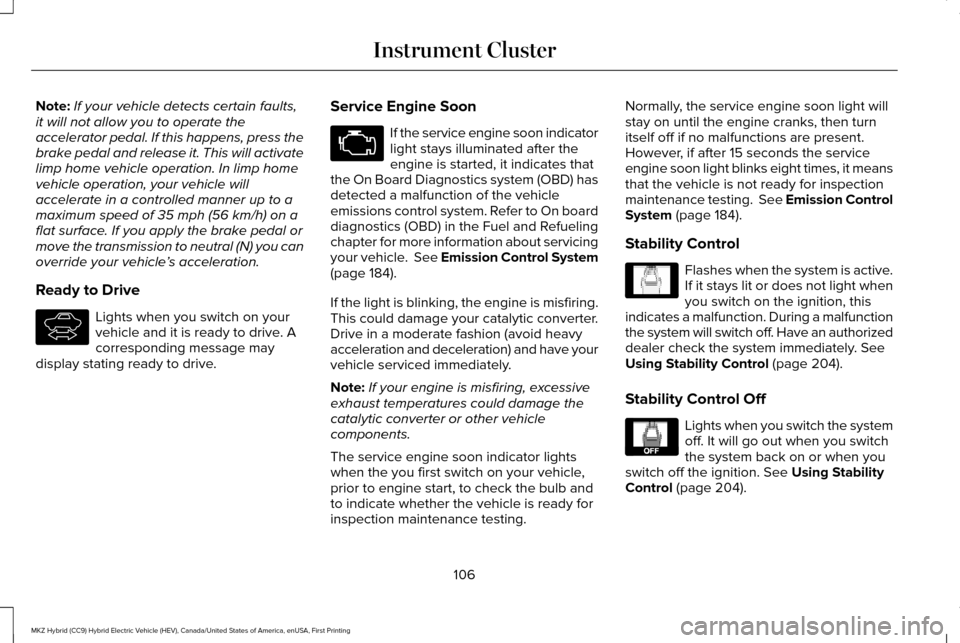
Ready to Drive Lights when you switch on your
vehicle and it is ready to drive. A
corresponding message may
display stating ready to drive. Service Engine Soon If the service engine soon indicator
light stays illuminated after the
engine is started, it indicates that
the On Board Diagnostics system (OBD) has
detected a malfunction of the vehicle
emissions control system. Refer to On board
diagnostics (OBD) in the Fuel and Refueling
chapter for more information about servicing
your vehicle. See Emission Control System
(page 184).
If the light is blinking, the engine is misfiring.
This could damage your catalytic converter.
Drive in a moderate fashion (avoid heavy
acceleration and deceleration) and have your
vehicle serviced immediately.
Note: If your engine is misfiring, excessive
exhaust temperatures could damage the
catalytic converter or other vehicle
components.
The service engine soon indicator lights
when the you first switch on your vehicle,
prior to engine start, to check the bulb and
to indicate whether the vehicle is ready for
inspection maintenance testing. Normally, the service engine soon light will
stay on until the engine cranks, then turn
itself off if no malfunctions are present.
However, if after 15 seconds the service
engine soon light blinks eight times, it means
that the vehicle is not ready for inspection
maintenance testing. See Emission Control
System
(page 184).
Stability Control Flashes when the system is active.
If it stays lit or does not light when
you switch on the ignition, this
indicates a malfunction. During a malfunction
the system will switch off. Have an authorized
dealer check the system immediately.
See
Using Stability Control (page 204).
Stability Control Off Lights when you switch the system
off. It will go out when you switch
the system back on or when you
switch off the ignition.
See Using Stability
Control (page 204).
106
MKZ Hybrid (CC9) Hybrid Electric Vehicle (HEV), Canada/United States of America, enUSA, First Printing Instrument ClusterE144692 E138639 E130458
Page 110 of 546
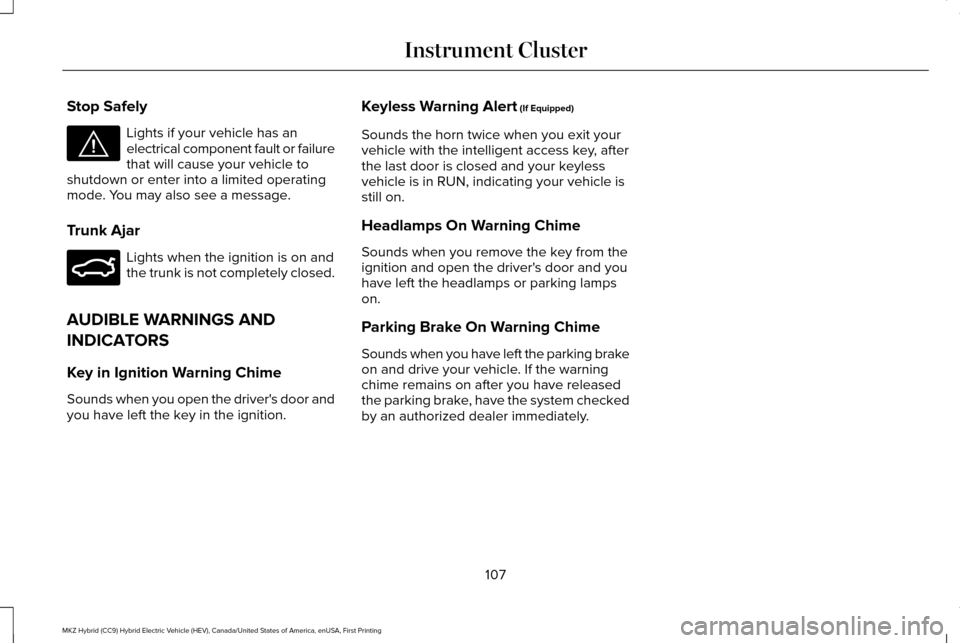
Stop Safely
Lights if your vehicle has an
electrical component fault or failure
that will cause your vehicle to
shutdown or enter into a limited operating
mode. You may also see a message.
Trunk Ajar Lights when the ignition is on and
the trunk is not completely closed.
AUDIBLE WARNINGS AND
INDICATORS
Key in Ignition Warning Chime
Sounds when you open the driver's door and
you have left the key in the ignition. Keyless Warning Alert (If Equipped)
Sounds the horn twice when you exit your
vehicle with the intelligent access key, after
the last door is closed and your keyless
vehicle is in RUN, indicating your vehicle is
still on.
Headlamps On Warning Chime
Sounds when you remove the key from the
ignition and open the driver's door and you
have left the headlamps or parking lamps
on.
Parking Brake On Warning Chime
Sounds when you have left the parking brake
on and drive your vehicle. If the warning
chime remains on after you have released
the parking brake, have the system checked
by an authorized dealer immediately.
107
MKZ Hybrid (CC9) Hybrid Electric Vehicle (HEV), Canada/United States of America, enUSA, First Printing Instrument ClusterE144693 E159323
Page 114 of 546
Engage
Engage provides separate gauges for engine
power and high voltage battery power in
kilowatts (kW). The engine power gauge fill
is white and the high voltage battery power
gauge fill is blue. You can also see an
instantaneous fuel economy gauge. When
your vehicle is operating on battery power
only, you will see EV displayed and the
gauges will appear in blue.
Note:
Hold OK to reset average fuel
economy.
Empower
Empower provides a power demand gauge
in kilowatts (kW) which includes an engine
on or off threshold.
• When your vehicle is operating with
battery power only (below the threshold),
you will see EV displayed and the gauge
fill is blue.
• When your vehicle is operating with both
the engine and the high voltage battery
providing power the gauge fill is white. •
When power demand surpasses the
amber indicator, this level of demand and
associated fuel economy displays in
amber.
• When the engine is on, reducing power
demand to less than the threshold will
allow the engine to turn off.
You can also see an instantaneous fuel
economy gauge.
Note: Hold OK to reset average fuel
economy.
MyView
You can choose what to display in this view.
Selecting
Change MyView in the options
menu allows you to scroll through two
columns of content choices.
• Press the up or down arrow to view
content.
• Press OK to save your selected content
• You must select content in both columns
before you can save your new MyView. Unique content available in MyView:
•
Accessory Power— Indicates electrical
power demands from your vehicle ’s
accessory systems. Accessories use
power but do not contribute to propelling
your vehicle. The gauge separately
displays power demand in kilowatts (kW)
for climate and other accessories.
Climate includes the power being used
by high voltage climate control
components such as the electric A/C
compressor. Other includes all power
being used by the low voltage
accessories (cabin fans, headlights and
heated seats).
• Coolant Temp – Indicates engine coolant
temperature. At normal operating
temperature, the level indicator will be
white and will be in the normal range
(between H and C). If the engine coolant
temperature exceeds the normal range,
the level indicator will change to red to
indicate that the engine is overheating.
Stop your vehicle as soon as safely
possible, turn your vehicle off and let the
engine cool.
111
MKZ Hybrid (CC9) Hybrid Electric Vehicle (HEV), Canada/United States of America, enUSA, First Printing Information Displays
Page 117 of 546
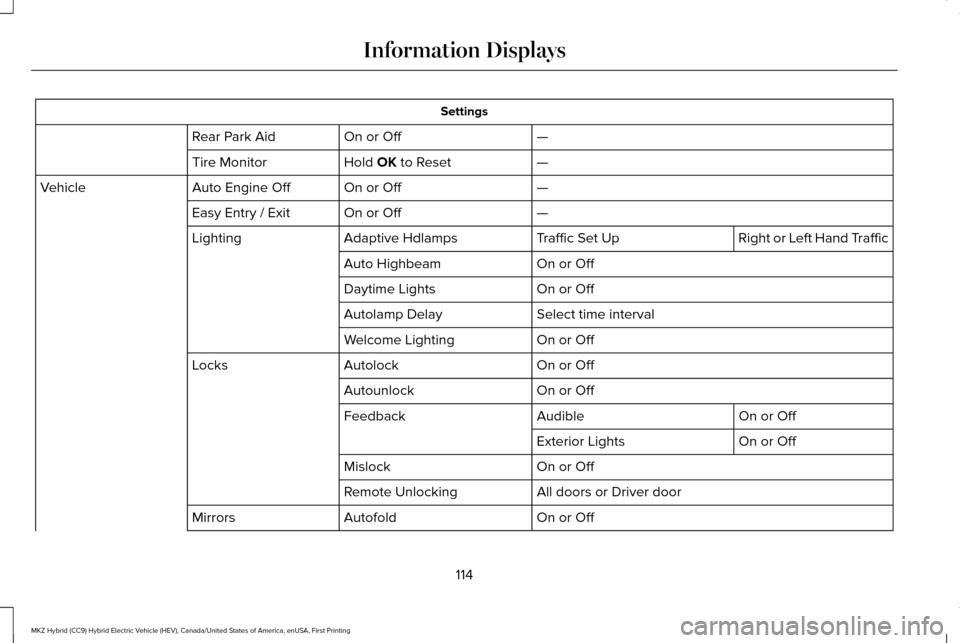
Settings
—
On or Off
Rear Park Aid
—
Hold OK to Reset
Tire Monitor
—
On or Off
Auto Engine Off
Vehicle
—
On or Off
Easy Entry / Exit
Right or Left Hand Traffic
Traffic Set Up
Adaptive Hdlamps
Lighting
On or Off
Auto Highbeam
On or Off
Daytime Lights
Select time interval
Autolamp Delay
On or Off
Welcome Lighting
On or Off
Autolock
Locks
On or Off
Autounlock
On or Off
Audible
Feedback
On or Off
Exterior Lights
On or Off
Mislock
All doors or Driver door
Remote Unlocking
On or Off
Autofold
Mirrors
114
MKZ Hybrid (CC9) Hybrid Electric Vehicle (HEV), Canada/United States of America, enUSA, First Printing Information Displays
Page 154 of 546
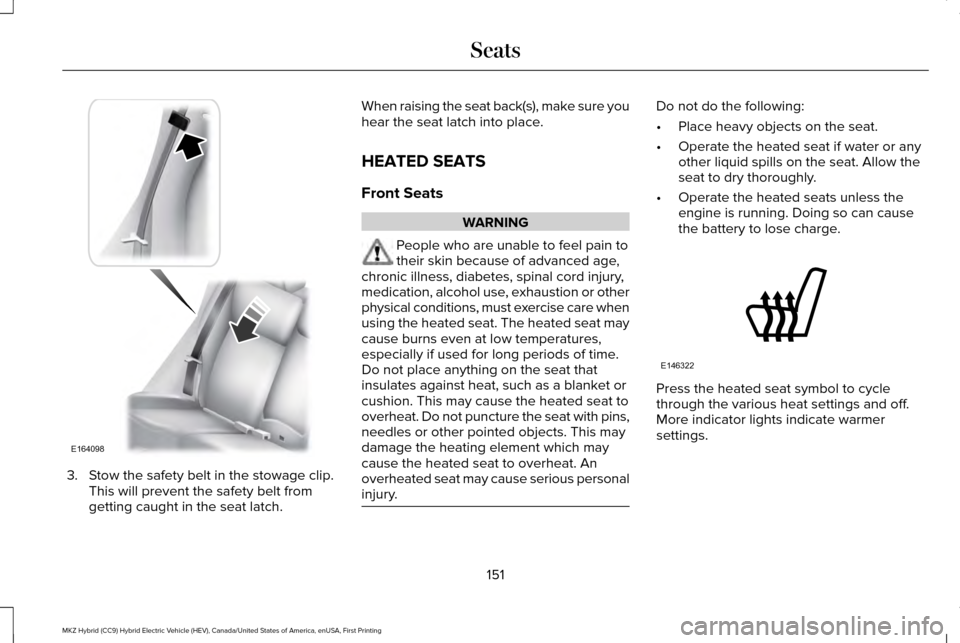
3. Stow the safety belt in the stowage clip.
This will prevent the safety belt from
getting caught in the seat latch. When raising the seat back(s), make sure you
hear the seat latch into place.
HEATED SEATS
Front Seats
WARNING
People who are unable to feel pain to
their skin because of advanced age,
chronic illness, diabetes, spinal cord injury,
medication, alcohol use, exhaustion or other
physical conditions, must exercise care when
using the heated seat. The heated seat may
cause burns even at low temperatures,
especially if used for long periods of time.
Do not place anything on the seat that
insulates against heat, such as a blanket or
cushion. This may cause the heated seat to
overheat. Do not puncture the seat with pins,
needles or other pointed objects. This may
damage the heating element which may
cause the heated seat to overheat. An
overheated seat may cause serious personal
injury. Do not do the following:
•
Place heavy objects on the seat.
• Operate the heated seat if water or any
other liquid spills on the seat. Allow the
seat to dry thoroughly.
• Operate the heated seats unless the
engine is running. Doing so can cause
the battery to lose charge. Press the heated seat symbol to cycle
through the various heat settings and off.
More indicator lights indicate warmer
settings.
151
MKZ Hybrid (CC9) Hybrid Electric Vehicle (HEV), Canada/United States of America, enUSA, First Printing SeatsE164098 E146322
Page 155 of 546
Rear Seats
WARNING
Persons who are unable to feel pain to
the skin because of advanced age,
chronic illness, diabetes, spinal cord injury,
medication, alcohol use, exhaustion, or other
physical conditions, must exercise care when
using the seat heater. The seat heater may
cause burns even at low temperatures,
especially if used for long periods of time.
Do not place anything on the seat that
insulates against heat, such as a blanket or
cushion, because this may cause the seat
heater to overheat. Do not puncture the seat
with pins, needles, or other pointed objects
because this may damage the heating
element which may cause the seat heater to
overheat. An overheated seat may cause
serious personal injury. Do not do the following:
•
Place heavy objects on the seat.
• Operate the seat heater if water or any
other liquid is spilled on the seat. Allow
the seat to dry thoroughly.
• Operate the heated seats unless the
engine is running. Doing so can cause
the battery to lose charge.
The rear seat heat controls are located on
the rear of the center console. Press the heated seat symbol to cycle
through the various heat settings and off.
More indicator lights indicate warmer
settings.The heated seat module resets at every
ignition run cycle. While the ignition is on,
press the high or low heated seat switch to
enable heating mode. When activated, they
will turn off automatically when you turn the
engine off.
CLIMATE CONTROLLED SEATS (If
Equipped)
Heated Seats
152
MKZ Hybrid (CC9) Hybrid Electric Vehicle (HEV), Canada/United States of America, enUSA, First Printing SeatsE146322
Page 156 of 546
WARNING
People who are unable to feel pain to
their skin because of advanced age,
chronic illness, diabetes, spinal cord injury,
medication, alcohol use, exhaustion or other
physical conditions, must exercise care when
using the heated seat. The heated seat may
cause burns even at low temperatures,
especially if used for long periods of time.
Do not place anything on the seat that
insulates against heat, such as a blanket or
cushion. This may cause the heated seat to
overheat. Do not puncture the seat with pins,
needles or other pointed objects. This may
damage the heating element which may
cause the heated seat to overheat. An
overheated seat may cause serious personal
injury. Do not do the following:
•
Place heavy objects on the seat.
• Operate the heated seat if water or any
other liquid spills on the seat. Allow the
seat to dry thoroughly.
• Operate the heated seats unless the
engine is running. Doing so can cause
the battery to lose charge. Touch the heated seat symbol to cycle
through the various heat settings and off.
More indicator lights indicate warmer
settings.
Cooled Seats
The cooled seats will only function when the
engine is running. To operate the cooled seats:
Press the cooled seat symbol to cycle
through the various cooling settings and off.
More indicator lights indicate cooler settings.
If the engine falls below 350 RPM while the
cooled seats are on, the feature will turn itself
off. You will need to reactivate it.
Climate controlled seat air filter
replacement
Your vehicle is equipped with lifetime air
filters that are integrated with the seats.
Regular maintenance or replacement is not
needed.
153
MKZ Hybrid (CC9) Hybrid Electric Vehicle (HEV), Canada/United States of America, enUSA, First Printing SeatsE146322 E146309
Page 160 of 546
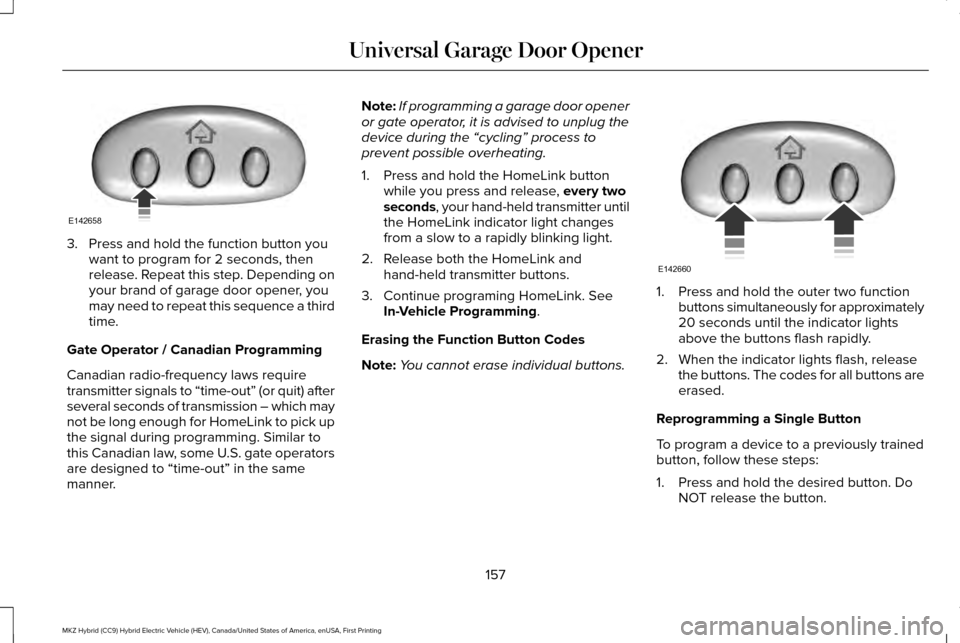
3. Press and hold the function button you
want to program for 2 seconds, then
release. Repeat this step. Depending on
your brand of garage door opener, you
may need to repeat this sequence a third
time.
Gate Operator / Canadian Programming
Canadian radio-frequency laws require
transmitter signals to “time-out” (or quit) after
several seconds of transmission – which may
not be long enough for HomeLink to pick up
the signal during programming. Similar to
this Canadian law, some U.S. gate operators
are designed to “time-out” in the same
manner. Note:
If programming a garage door opener
or gate operator, it is advised to unplug the
device during the “cycling” process to
prevent possible overheating.
1. Press and hold the HomeLink button while you press and release, every two
seconds, your hand-held transmitter until
the HomeLink indicator light changes
from a slow to a rapidly blinking light.
2. Release both the HomeLink and hand-held transmitter buttons.
3. Continue programing HomeLink. See In-Vehicle Programming
.
Erasing the Function Button Codes
Note: You cannot erase individual buttons. 1. Press and hold the outer two function
buttons simultaneously for approximately
20 seconds until the indicator lights
above the buttons flash rapidly.
2. When the indicator lights flash, release the buttons. The codes for all buttons are
erased.
Reprogramming a Single Button
To program a device to a previously trained
button, follow these steps:
1. Press and hold the desired button. Do NOT release the button.
157
MKZ Hybrid (CC9) Hybrid Electric Vehicle (HEV), Canada/United States of America, enUSA, First Printing Universal Garage Door OpenerE142658 E142660
Page 162 of 546
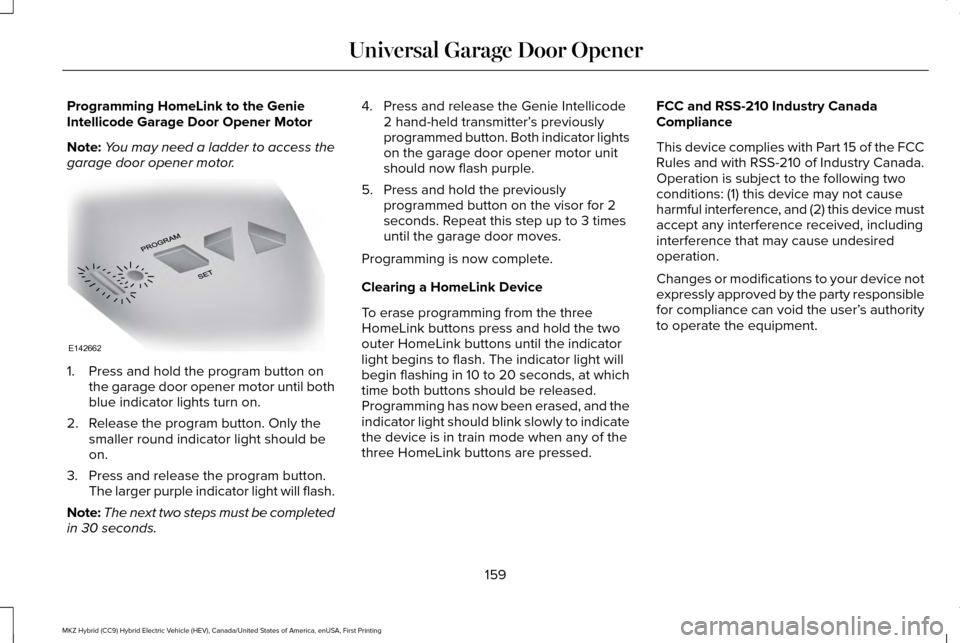
Programming HomeLink to the Genie
Intellicode Garage Door Opener Motor
Note:
You may need a ladder to access the
garage door opener motor. 1. Press and hold the program button on
the garage door opener motor until both
blue indicator lights turn on.
2. Release the program button. Only the smaller round indicator light should be
on.
3. Press and release the program button. The larger purple indicator light will flash.
Note: The next two steps must be completed
in 30 seconds. 4. Press and release the Genie Intellicode
2 hand-held transmitter’ s previously
programmed button. Both indicator lights
on the garage door opener motor unit
should now flash purple.
5. Press and hold the previously programmed button on the visor for 2
seconds. Repeat this step up to 3 times
until the garage door moves.
Programming is now complete.
Clearing a HomeLink Device
To erase programming from the three
HomeLink buttons press and hold the two
outer HomeLink buttons until the indicator
light begins to flash. The indicator light will
begin flashing in 10 to 20 seconds, at which
time both buttons should be released.
Programming has now been erased, and the
indicator light should blink slowly to indicate
the device is in train mode when any of the
three HomeLink buttons are pressed. FCC and RSS-210 Industry Canada
Compliance
This device complies with Part 15 of the FCC
Rules and with RSS-210 of Industry Canada.
Operation is subject to the following two
conditions: (1) this device may not cause
harmful interference, and (2) this device must
accept any interference received, including
interference that may cause undesired
operation.
Changes or modifications to your device not
expressly approved by the party responsible
for compliance can void the user’
s authority
to operate the equipment.
159
MKZ Hybrid (CC9) Hybrid Electric Vehicle (HEV), Canada/United States of America, enUSA, First Printing Universal Garage Door OpenerE142662