remote control LINCOLN MKZ HYBRID 2017 Owner's Manual
[x] Cancel search | Manufacturer: LINCOLN, Model Year: 2017, Model line: MKZ HYBRID, Model: LINCOLN MKZ HYBRID 2017Pages: 546, PDF Size: 5.12 MB
Page 118 of 546
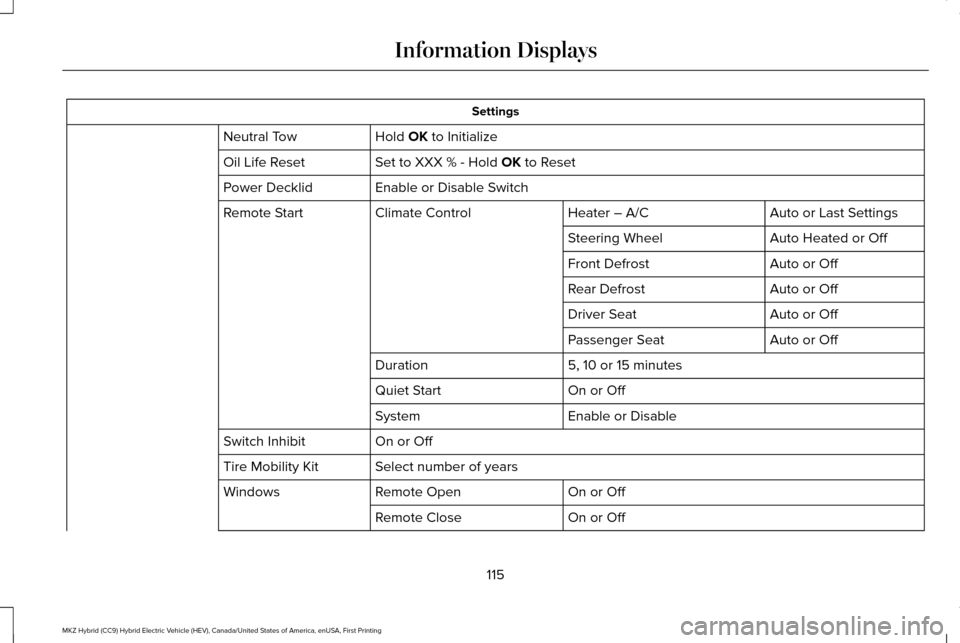
Settings
Hold OK to Initialize
Neutral Tow
Set to XXX % - Hold
OK to Reset
Oil Life Reset
Enable or Disable Switch
Power Decklid
Auto or Last Settings
Heater – A/C
Climate Control
Remote Start
Auto Heated or Off
Steering Wheel
Auto or Off
Front Defrost
Auto or Off
Rear Defrost
Auto or Off
Driver Seat
Auto or Off
Passenger Seat
5, 10 or 15 minutes
Duration
On or Off
Quiet Start
Enable or Disable
System
On or Off
Switch Inhibit
Select number of years
Tire Mobility Kit
On or Off
Remote Open
Windows
On or Off
Remote Close
115
MKZ Hybrid (CC9) Hybrid Electric Vehicle (HEV), Canada/United States of America, enUSA, First Printing Information Displays
Page 144 of 546
Note:
If you select AUTO during hot outside
temperatures, or when the inside of the
vehicle is hot, the system automatically uses
recirculated air to maximize interior cooling.
When the interior reaches the selected
temperature, the system automatically
switches to using outside air.
Heating the Interior Quickly
1. Select the AUTO function.
2. Adjust the temperature function to the desired setting.
Recommended Settings for Heating
1. Select the
AUTO function.
2. Adjust the temperature function to the desired setting. Use 72°F (22°C) as a
starting point, then adjust the setting as
necessary.
Cooling the Interior Quickly
1. Select the
MAX A/C function.
Recommended Settings for Cooling
1. Select the
AUTO function. 2. Adjust the temperature function to the
desired setting. Use 72°F (22°C) as a
starting point, then adjust the setting as
necessary.
Side Window Defogging in Cold
Weather
1. Press the defrost button.
2. Adjust the temperature control to the desired setting. Use 72°F (22°C) as a
starting point, then adjust the setting as
necessary.
HEATED WINDOWS AND MIRRORS
Note: Make sure the engine is running
before operating the heated windows.
Note: Depending on your remote start
settings, the heated windows, mirrors and
wipers may remain on after remote starting
the vehicle. Heated Rear Window Press the button to clear the
heated rear window of thin ice and
fog. The heated rear window will
automatically turn off after a short period of
time. Press the button again to switch it off.
Note: An indicator on the button illuminates
when active.
Note: Do not use razor blades or other
sharp objects to clean or remove decals from
the inside of the heated rear window. The
vehicle warranty does not cover damage
caused to the heated rear window grid lines.
Heated Exterior Mirrors
(If Equipped)
When you switch the heated rear window
on, the heated exterior mirrors will
automatically turn on.
Note: Do not remove ice from the mirrors
with a scraper or adjust the mirror glass
when it is frozen in place.
Note: Do not clean the mirror housing or
glass with harsh abrasives, fuel or other
petroleum-based cleaning products.
141
MKZ Hybrid (CC9) Hybrid Electric Vehicle (HEV), Canada/United States of America, enUSA, First Printing Climate ControlE184884
Page 145 of 546
Heated Wiper Park (If Equipped)
When you switch the heated rear window
on, the heated wiper park automatically turns
on.
CABIN AIR FILTER
Your vehicle is equipped with a cabin air
filter, which gives you and your passengers
the following benefits:
• It improves your driving comfort by
reducing particle concentration.
• It improves the interior compartment
cleanliness.
• It protects the climate control
components from particle deposits.
You can locate the cabin air filter behind the
glove box.
Note: Make sure you have a cabin air filter
installed at all times. This prevents foreign
objects from entering the system. Running
the system without a filter in place could
result in degradation or damage to the
system. Replace the filter at regular intervals. See
Scheduled Maintenance (page 479).
For additional cabin air filter information, or
to replace the filter, see an authorized dealer.
REMOTE START
The remote start feature allows you to
pre-condition the interior of your vehicle. The
climate control system works to achieve
comfort according to your pre-selected
settings.
Note: You cannot adjust the system during
remote start operation. You cannot switch
on the displays or indicators during remote
start.
Switch the ignition on to return the system
to its previous settings. The following
features remain on if they automatically
turned on during remote start, or remain off
if they did not turn on during remote start.
• Heated seats.
• Cooled seats.
• Heated steering wheel. •
Heated mirrors.
• Heated rear window.
Note: Passenger heated and cooled seats
only remain on during remote start if they
were on when you switched the vehicle off.
You can adjust the default remote start
settings using the information display
controls.
See Information Displays (page
108).
Automatic Settings
In hot weather, the system is set to 72°F
(22°C). The cooled seats are set to high (if
available, and selected to AUTO in the
information display).
In moderate weather, the system either heats
or cools (based on pre-selected settings).
The rear defroster, heated mirrors and
heated seats do not automatically switch on.
In cold weather, the system is set to 72°F
(22°C). The heated and cooled seats and
heated steering wheel are set to high (if
available, and selected to AUTO in the
information display). The rear defroster and
heated mirrors automatically switch on.
142
MKZ Hybrid (CC9) Hybrid Electric Vehicle (HEV), Canada/United States of America, enUSA, First Printing Climate Control
Page 153 of 546
Linking a PreSet Position to your
Remote Control or Intelligent Access
Key Fob
Your vehicle can save the preset memory
positions for up to two remote controls or
intelligent access (IA) keys.
After you have saved your desired memory
preset positions:
1.
Press and hold the desired preset button
for about three seconds until you hear a
single tone.
2. Within three seconds, press the lock button on the remote control you are
linking.
To unlink a remote control, follow the same
procedure – except in step 2, press the
unlock button on the remote control.
Note: If more than one linked remote control
or intelligent access key is in range, the
memory function moves to the settings of
the first key to initiate a memory recall. Easy Entry and Exit Feature
If you enable the easy entry and exit feature,
it automatically moves the driver seat
position rearward up to two inches (five
centimeters) when you switch the ignition
off.
The driver seat will return to the previous
position when you switch the ignition on.
You can enable or disable this feature in the
information display. See Information
Displays (page 108).
REAR SEATS
Note: Your vehicle may have split seatbacks
that you must fold individually.
Note: Make sure the center safety belt is
unbuckled before folding the seatback.
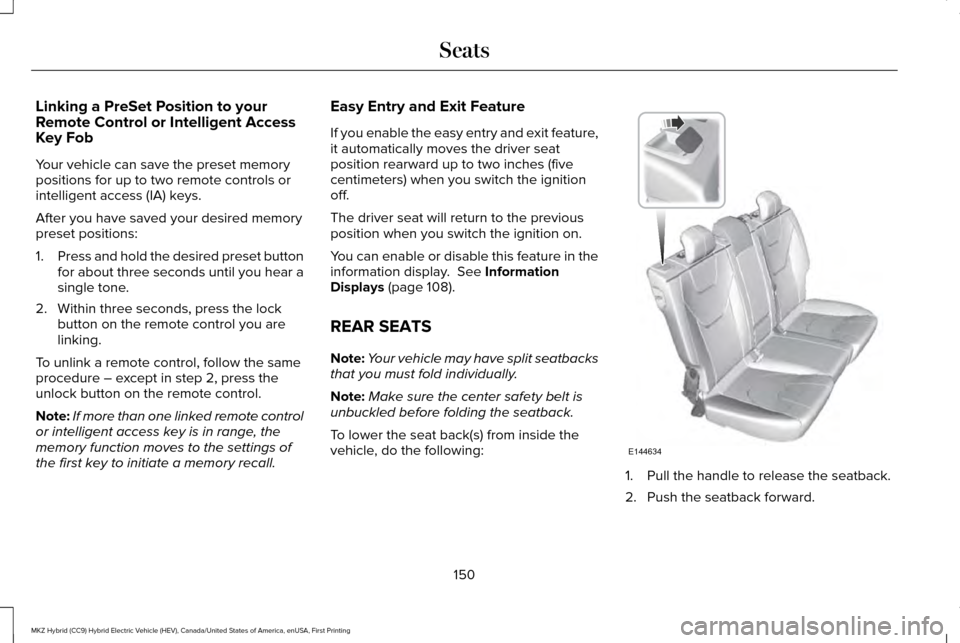
To lower the seat back(s) from inside the
vehicle, do the following: 1. Pull the handle to release the seatback.
2. Push the seatback forward.
150
MKZ Hybrid (CC9) Hybrid Electric Vehicle (HEV), Canada/United States of America, enUSA, First Printing SeatsE144634
Page 158 of 546
HomeLink Wireless Control System
WARNINGS
Make sure that the garage door and
security device are free from
obstruction when you are programming. Do
not program the system with the vehicle in
the garage. Do not use the system with any garage
door opener that does not have the
safety stop and reverse feature as required
by U.S. Federal Safety Standards (this
includes any garage door opener
manufactured before April 1, 1982). A garage
door opener which cannot detect an object,
signaling the door to stop and reverse, does
not meet current federal safety standards.
Using a garage door opener without these
features increases the risk of serious injury
or death. Note:
Make sure you keep the original
remote control transmitter for use in other
vehicles as well as for future system
programming. Note:
We recommend that upon the sale or
lease termination of your vehicle, you erase
the programmed function buttons for security
reasons. See Erasing the Function Button
Codes.
Note: You can program a maximum of three
devices. To change or replace any of the
three devices after it has been initially
programmed, you must first erase the current
settings. See
Erasing the Function Button
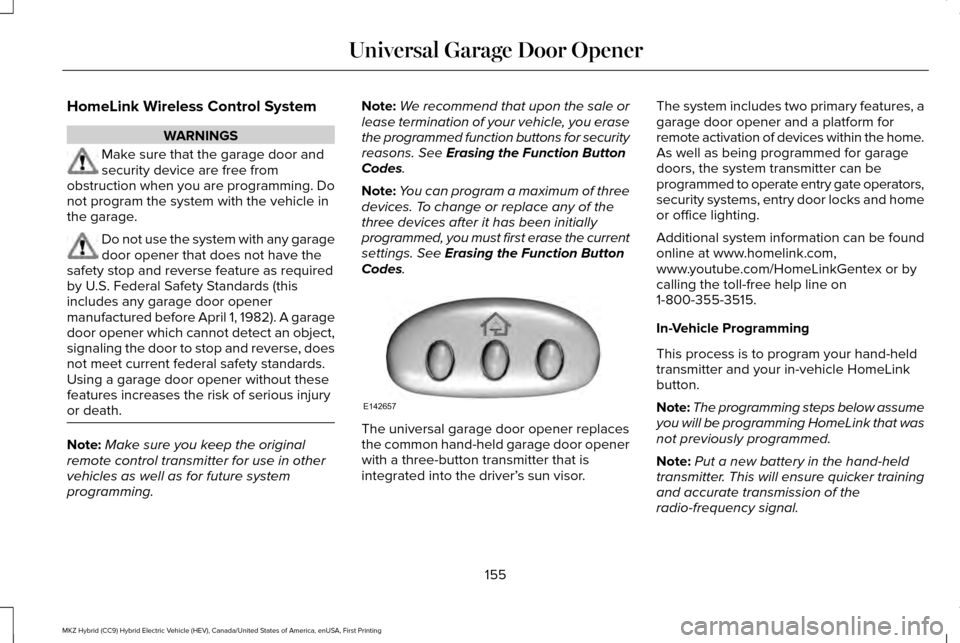
Codes. The universal garage door opener replaces
the common hand-held garage door opener
with a three-button transmitter that is
integrated into the driver’
s sun visor.The system includes two primary features, a
garage door opener and a platform for
remote activation of devices within the home.
As well as being programmed for garage
doors, the system transmitter can be
programmed to operate entry gate operators,
security systems, entry door locks and home
or office lighting.
Additional system information can be found
online at www.homelink.com,
www.youtube.com/HomeLinkGentex or by
calling the toll-free help line on
1-800-355-3515.
In-Vehicle Programming
This process is to program your hand-held
transmitter and your in-vehicle HomeLink
button.
Note:
The programming steps below assume
you will be programming HomeLink that was
not previously programmed.
Note: Put a new battery in the hand-held
transmitter. This will ensure quicker training
and accurate transmission of the
radio-frequency signal.
155
MKZ Hybrid (CC9) Hybrid Electric Vehicle (HEV), Canada/United States of America, enUSA, First Printing Universal Garage Door OpenerE142657
Page 232 of 546
System Not Available
Conditions that can cause the system to
deactivate or prevent the system from
activating when requested include:
•
A blocked sensor.
• High brake temperature.
• A failure in the system or a related
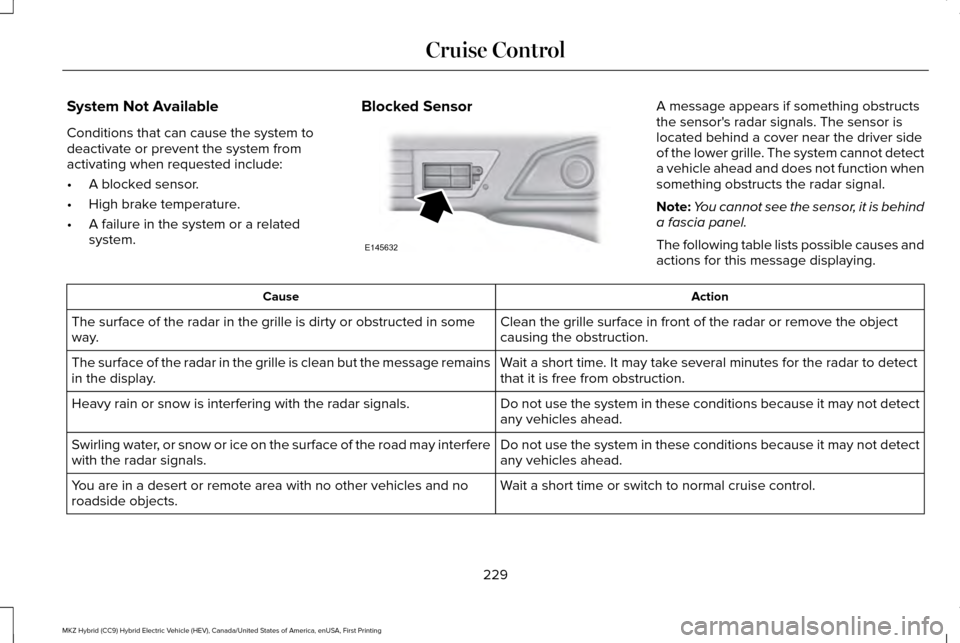
system. Blocked Sensor A message appears if something obstructs
the sensor's radar signals. The sensor is
located behind a cover near the driver side
of the lower grille. The system cannot detect
a vehicle ahead and does not function when
something obstructs the radar signal.
Note:
You cannot see the sensor, it is behind
a fascia panel.
The following table lists possible causes and
actions for this message displaying. Action
Cause
Clean the grille surface in front of the radar or remove the object
causing the obstruction.
The surface of the radar in the grille is dirty or obstructed in some
way.
Wait a short time. It may take several minutes for the radar to detect
that it is free from obstruction.
The surface of the radar in the grille is clean but the message remains
in the display.
Do not use the system in these conditions because it may not detect
any vehicles ahead.
Heavy rain or snow is interfering with the radar signals.
Do not use the system in these conditions because it may not detect
any vehicles ahead.
Swirling water, or snow or ice on the surface of the road may interfere
with the radar signals.
Wait a short time or switch to normal cruise control.
You are in a desert or remote area with no other vehicles and no
roadside objects.
229
MKZ Hybrid (CC9) Hybrid Electric Vehicle (HEV), Canada/United States of America, enUSA, First Printing Cruise ControlE145632
Page 268 of 546
•
Avoid contact with leaking fluids and
gases, and remain out of the way of
oncoming traffic until emergency
responders arrive.
• When emergency responders arrive, tell
them that the vehicle involved is an
electric vehicle or hybrid vehicle.
Fires
As with any vehicle, call 911 immediately if
you see sparks, smoke or flames coming
from the vehicle.
• Exit the vehicle immediately.
• Advise 911 that an electric or
hybrid-electric vehicle is involved.
• As with any vehicle fire, do not inhale
smoke, vapors or gas from the vehicle,
as they may be hazardous.
• Remain a safe distance from the vehicle
and try to stay clear of the smoke.
• Stay out of the roadway and stay out of
the way of any oncoming traffic while
awaiting the arrival of emergency
responders. Post-Incident
•
Do not store a severely damaged vehicle
with a lithium-ion battery inside a
structure or within 50 feet (15 meters) of
any structure or vehicle.
• Make sure that passenger and cargo
compartments remain ventilated (i.e.
open window, door or trunk).
• For vehicles in the United States, notify
Ford Motor Company 1-800-392-3673
(then follow the prompts on the voice
response menu), an authorized Ford
dealer or service center as soon as
possible as there may be other steps to
secure and discharge the high-voltage
battery.
• For vehicles in Canada, notify Ford Motor
Company 1-800-565-3673 (then follow
the prompts on the voice response
menu), an authorized Ford dealer or
service center as soon as possible as
there may be other steps to secure and
discharge the high-voltage battery.
• Call 911 if you observe leaking fluids,
sparks, smoke or flames, or hear gurgling
or bubbling from the high-voltage battery. POST-CRASH ALERT SYSTEM
The system flashes the direction indicators
and sounds the horn (intermittently) in the
event of a serious impact that deploys an
airbag (front, side, side curtain or Safety
Canopy) or the safety belt pretensioners.
The horn and indicators will turn off when:
•
You press the hazard control button.
• You press the panic button on the remote
entry transmitter (if equipped).
• Your vehicle runs out of power.
Spinout Detection
If a spinout is detected, the vehicle comes
to a stop and the hazard warning flashers
come on. A message that states the spinout
hazards are activated will appear on the
instrument cluster. The message may not
appear if your vehicle runs out of power.
265
MKZ Hybrid (CC9) Hybrid Electric Vehicle (HEV), Canada/United States of America, enUSA, First Printing Roadside Emergencies
Page 269 of 546
Once the hazard warning flashers have been
activated, you can turn them off by:
•
Pressing the hazard warning flasher
button.
• Pressing the remote control unlock
button.
• Pressing the remote control panic button.
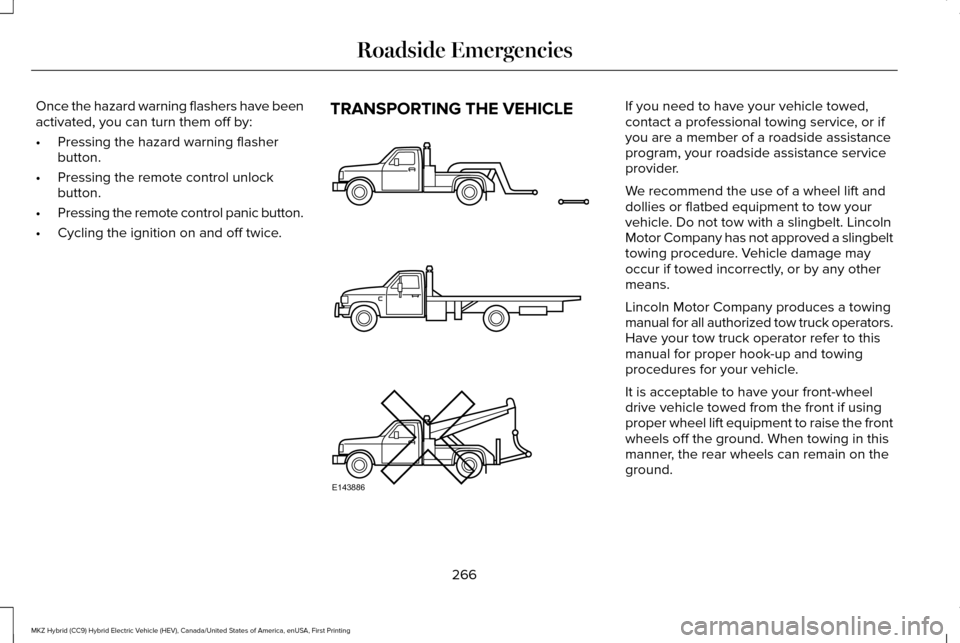
• Cycling the ignition on and off twice. TRANSPORTING THE VEHICLE If you need to have your vehicle towed,
contact a professional towing service, or if
you are a member of a roadside assistance
program, your roadside assistance service
provider.
We recommend the use of a wheel lift and
dollies or flatbed equipment to tow your
vehicle. Do not tow with a slingbelt. Lincoln
Motor Company has not approved a slingbelt
towing procedure. Vehicle damage may
occur if towed incorrectly, or by any other
means.
Lincoln Motor Company produces a towing
manual for all authorized tow truck operators.
Have your tow truck operator refer to this
manual for proper hook-up and towing
procedures for your vehicle.
It is acceptable to have your front-wheel
drive vehicle towed from the front if using
proper wheel lift equipment to raise the front
wheels off the ground. When towing in this
manner, the rear wheels can remain on the
ground.
266
MKZ Hybrid (CC9) Hybrid Electric Vehicle (HEV), Canada/United States of America, enUSA, First Printing Roadside EmergenciesE143886
Page 540 of 546
Heated Seats...................................................151
Front Seats.............................................................151
Rear Seats.............................................................152
Heated Steering Wheel................................80
Heated Windows and Mirrors.....................141
Heated Exterior Mirrors......................................141
Heated Rear Window..........................................141
Heated Wiper Park..............................................142
Heating See: Climate Control..........................................138
High Voltage Battery Cut-Off Switch........188
High Voltage Battery....................................187 General Information............................................187
Hints on Controlling the Interior Climate..........................................................140
Cooling the Interior Quickly...............................141
General Hints.......................................................140
Heating the Interior Quickly..............................141
Recommended Settings for Cooling ..............141
Recommended Settings for Heating...............141
Side Window Defogging in Cold Weather..............................................................141
Hints on Driving With Anti-Lock Brakes
...........................................................196
Home Screen................................................384
Hood Lock See: Opening and Closing the Hood............296 Hybrid Vehicle Frequently Asked
Questions......................................................172
Hybrid Vehicle Operation...........................168 Battery:...................................................................169
Braking:..................................................................170
Driving:...................................................................168
Driving to Optimize Fuel Economy.................170
Engine:...................................................................169
EV+ Mode..............................................................170
Starting:..................................................................168
Stopping:...............................................................169
Transmission Operation:....................................169
I
In California (U.S. Only)...............................269
Information Display Control
.........................79
Information Displays.....................................108 General Information............................................108
Information Messages
..................................119
Active Park............................................................120
Adaptive Cruise Control....................................120
Adaptive Headlamps...........................................121
AdvanceTrac ™........................................................121
Airbag.....................................................................122
Alarm......................................................................122
Automatic Engine Shutdown............................122
Battery and Charging System (12 volt)...........123 Battery and Charging System (High
Voltage).............................................................123
Blind Spot Information and Cross Traffic Alert System...............................................................124
Doors and Locks..................................................124
Driver Alert............................................................125
Fuel........................................................................\
.125
Hill Start Assist.....................................................126
Keys and Intelligent Access.............................126
Lane Keeping System.........................................127
Maintenance.........................................................128
MyKey.....................................................................129
Park Aid..................................................................130
Park Brake..............................................................131
Power Steering....................................................132
Pre-Collision Assist.............................................132
Remote Start.........................................................133
Seats.......................................................................133
Starting System ...................................................133
Tire Pressure Monitoring System....................134
Traction Control...................................................134
Transmission.........................................................135
Installing Child Restraints
..............................18
Child Seats...............................................................18
Using Lap and Shoulder Belts............................18
Using Lower Anchors and Tethers for
CHildren (LATCH).............................................24
Using Tether Straps..............................................26
537
MKZ Hybrid (CC9) Hybrid Electric Vehicle (HEV), Canada/United States of America, enUSA, First Printing Index
Page 541 of 546
Instrument Cluster........................................100
Instrument Lighting Dimmer........................85
Interior Lamps..................................................90
Front Interior Lamp...............................................90
Rear Interior Lamp.................................................91
Interior Luggage Compartment Release...........................................................72
Interior Mirror...................................................96 Auto-Dimming Mirror...........................................96
Introduction
.........................................................7
J
Jump Starting the Vehicle...........................261 Connecting the Jumper Cables......................
261
Jump Starting......................................................263
Preparing Your Vehicle......................................261
Removing the Jumper Cables.........................263
K
Keyless Entry
....................................................70
SECURICODE™ KEYLESS ENTRY
KEYPAD...............................................................70
Keyless Starting
.............................................163
Ignition Modes.....................................................163
Keys and Remote Controls...........................53 L
Lane Keeping System
.................................232
Switching the System On and Off..................233
Lighting Control...............................................84 Headlamp Flasher................................................84
Headlamp High Beam.........................................
84
Lighting..............................................................84
Lincoln Automotive Financial Services......12
Lincoln Protect...............................................477 EXTENDED SERVICE PLANS (CANADA
ONLY)................................................................478
Lincoln Protect (U.S. Only)................................
477
Load Carrying
................................................249
Load Limit.......................................................249 Special Loading Instructions for Owners of
Pick-up Trucks and Utility-type
Vehicles............................................................253
Vehicle Loading - with and without a Trailer................................................................249
Locking and Unlocking.................................64 Activating Intelligent Access.............................65
Autolock..................................................................67
Battery Saver.........................................................68
Illuminated Entry....................................................67
Illuminated Exit......................................................67
Locking and Unlocking the Doors with the
Key Blade...........................................................66 Luggage Compartment.......................................68
Power Decklid.......................................................68
Power Door Locks................................................64
Remote Control.....................................................64
Smart Unlocks for Intelligent Access
Keys.....................................................................66
Locks..................................................................64
M
Maintenance..................................................296 General Information...........................................296
Media Hub......................................................366
Memory Function..........................................149 Easy Entry and Exit Feature.............................150
Linking a PreSet Position to your Remote Control or Intelligent Access Key Fob......
150
Saving a PreSet Position...................................149
Message Center See: Information Displays.................................
108
Mirrors See: Heated Windows and Mirrors..................
141
See: Windows and Mirrors.................................92
Mobile Communications Equipment
...........14
Moonroof...........................................................97 Bounce-Back..........................................................98
Opening and Closing the Moonroof................98
Motorcraft Parts
............................................355
538
MKZ Hybrid (CC9) Hybrid Electric Vehicle (HEV), Canada/United States of America, enUSA, First Printing Index