radio LINCOLN MKZ HYBRID 2017 Owner's Guide
[x] Cancel search | Manufacturer: LINCOLN, Model Year: 2017, Model line: MKZ HYBRID, Model: LINCOLN MKZ HYBRID 2017Pages: 546, PDF Size: 5.12 MB
Page 412 of 546
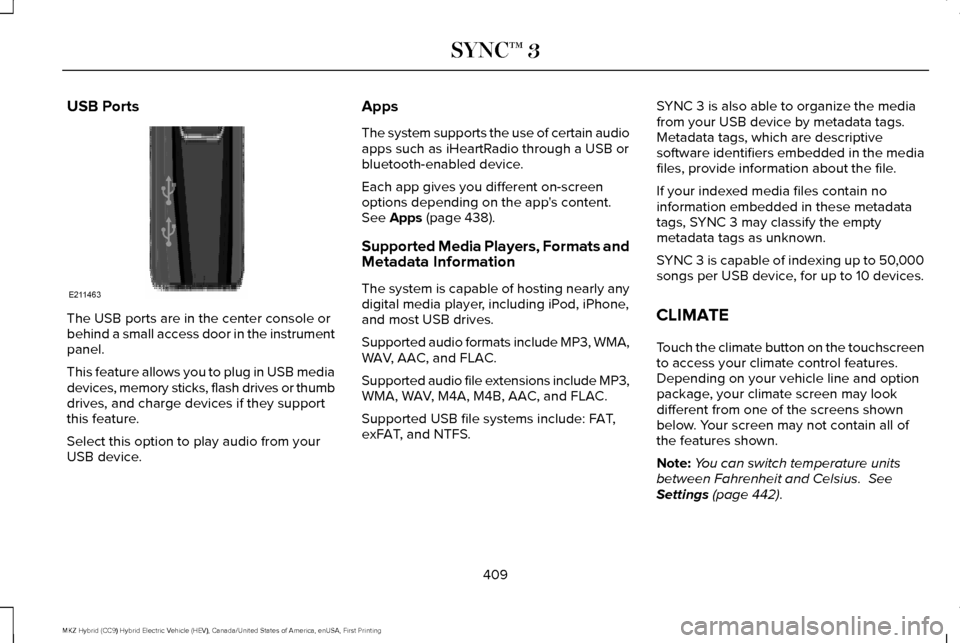
USB Ports
The USB ports are in the center console or
behind a small access door in the instrument
panel.
This feature allows you to plug in USB media
devices, memory sticks, flash drives or thumb
drives, and charge devices if they support
this feature.
Select this option to play audio from your
USB device. Apps
The system supports the use of certain audio
apps such as iHeartRadio through a USB or
bluetooth-enabled device.
Each app gives you different on-screen
options depending on the app's content.
See Apps (page 438).
Supported Media Players, Formats and
Metadata Information
The system is capable of hosting nearly any
digital media player, including iPod, iPhone,
and most USB drives.
Supported audio formats include MP3, WMA,
WAV, AAC, and FLAC.
Supported audio file extensions include MP3,
WMA, WAV, M4A, M4B, AAC, and FLAC.
Supported USB file systems include: FAT,
exFAT, and NTFS. SYNC 3 is also able to organize the media
from your USB device by metadata tags.
Metadata tags, which are descriptive
software identifiers embedded in the media
files, provide information about the file.
If your indexed media files contain no
information embedded in these metadata
tags, SYNC 3 may classify the empty
metadata tags as unknown.
SYNC 3 is capable of indexing up to 50,000
songs per USB device, for up to 10 devices.
CLIMATE
Touch the climate button on the touchscreen
to access your climate control features.
Depending on your vehicle line and option
package, your climate screen may look
different from one of the screens shown
below. Your screen may not contain all of
the features shown.
Note:
You can switch temperature units
between Fahrenheit and Celsius.
See
Settings (page 442).
409
MKZ Hybrid (CC9) Hybrid Electric Vehicle (HEV), Canada/United States of America, enUSA, First Printing SYNC™ 3E211463
Page 439 of 546

Description
Item
Callout
Shows the direction of power flow between the engine and the electric mo\
tor. The
direction indicates if the engine is providing power to the high-voltage\
electrical
system, or if the high-voltage electrical system is providing power to c\
ontrol or start
the engine.
Motor-to-Engine Flow
K
Represents the gasoline engine. It illuminates only when the gasoline engine is on.
The higher the engine power is, the larger the circle around this node.
Engine
L
Shows the direction of the power flow between the engine and the wheels.\
Engine-to-Wheels Flow
M
Represents the power going to the wheels. The higher the wheel power is, \
the larger
the circle around this node. When the engine is off, drive power displays in blue.
When the engine is on, drive power displays in grey.
Drive
N
1 The battery-to-motor flow includes battery
power the vehicle is using for acceleration.
It does not include energy the vehicle is
using for accessories (such as air
conditioning, headlights and radio). This
screen displays accessories and climate
usage separately. 2
Accessories indicates electrical power
demands from your vehicle ’s accessory
systems. Accessories use power but do not
contribute to making the vehicle move. The
power flow displays power usage from the
climate control system and other accessories
separately. 3
The climate control system may determine
A/C is necessary even when you turn it off.
In this case, you may see some climate
power when the A/C is off.
436
MKZ Hybrid (CC9) Hybrid Electric Vehicle (HEV), Canada/United States of America, enUSA, First Printing SYNC™ 3
Page 451 of 546
Action and Description
Menu Item
Text Messaging
You can then select: No sound plays when a message comes to your phone.
No Alert (Silence)
You can select one of the three available notification sounds.
When enabled, a voice prompt alerts you when you receive a new message.
Voice Readout
You can enable and disable the following options as well: Action and Description
Menu Item
When enabled, vehicle audio (such as radio or apps) is muted for the d\
uration of the phone call even when
the phone call is in privacy.
Mute Audio in Privacy
When enabled, an alert displays that your phone is roaming when you atte\
mpt to place a call.
Roaming Warning
When enabled, a message displays when the battery on your phone is runni\
ng low.
Low Battery Notification
911 Assist
Note: This service is only available in the
United States and Canada. Select this button to modify the on or off
setting for this feature. If the mobile phone
’s
contacts have been downloaded, you can
adjust the following option:
448
MKZ Hybrid (CC9) Hybrid Electric Vehicle (HEV), Canada/United States of America, enUSA, First Printing SYNC™ 3
Page 452 of 546
Action and Description
Menu Item
You can select up to two numbers from your mobile device's phonebook as emergency contacts for quick
access at the end of the 911 Assist call process.
Set Emergency Contacts
Radio
This button is available if a Radio source such
as AM or FM is the active media source.
Pressing the button allows you to access the
following features: Action and Description
Menu Item
Activation of this feature allows you to listen to HD radio broadcasts.
FM HD Radio
AM HD Radio
(Dependent on current
radio source, If Available)
This feature is available when FM Radio is your active media source. Activate this feature to have the system
display radio text.
Radio Text
Refresh
Autoset Presets (AST)
Selecting this option stores the six strongest stations in your current \
location to the last preset bank of the
currently tuned source.
449
MKZ Hybrid (CC9) Hybrid Electric Vehicle (HEV), Canada/United States of America, enUSA, First Printing SYNC™ 3
Page 460 of 546
Onboard Modem Serial Number (ESN)
Selecting this button on the settings menu
shows you the ESN number for your system.
You need this number for certain
registrations such as Satellite Radio.
Display
To make adjustments using the touchscreen, select: Action and Description
Menu Item
Make the screen display brighter or dimmer.
Brightness
You can select:
Mode
The screen automatically switches between day and night modes based on t\
he outside
light level.
Auto
The screen displays with a light background to enhance daytime viewing.
Day
The screen displays with a darker background to make nighttime viewing easier.
Night
The screen goes black and does not display anything. To switch the screen back on,
simply tap the screen.
Off
Enable this option to automatically dim the display brightness based on \
ambient lighting conditions.
Auto Dim
Voice Control
You can adjust the voice control settings by
selecting the following options.
457
MKZ Hybrid (CC9) Hybrid Electric Vehicle (HEV), Canada/United States of America, enUSA, First Printing SYNC™ 3
Page 476 of 546
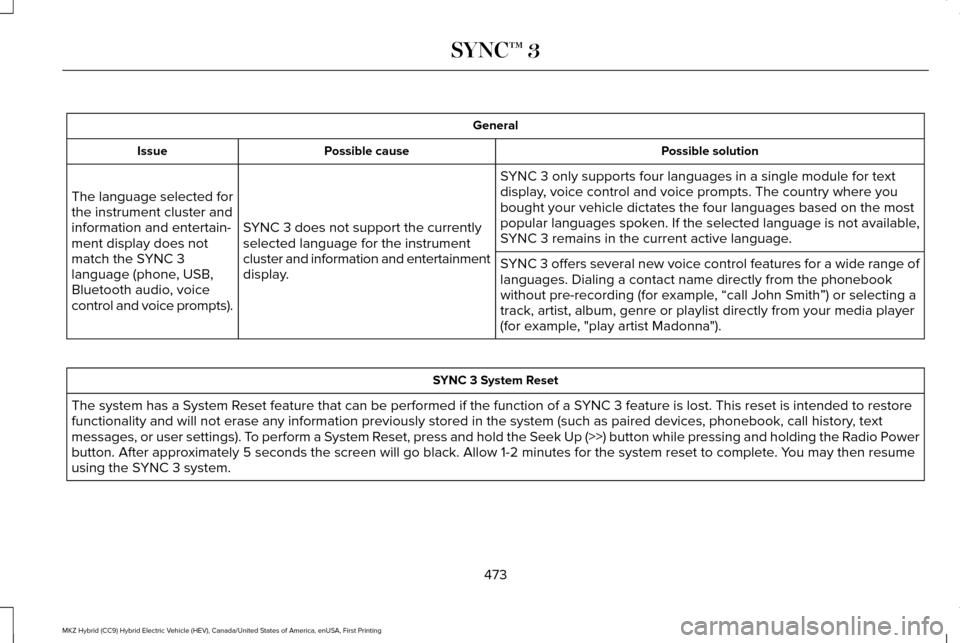
General
Possible solution
Possible cause
Issue
SYNC 3 only supports four languages in a single module for text
display, voice control and voice prompts. The country where you
bought your vehicle dictates the four languages based on the most
popular languages spoken. If the selected language is not available,
SYNC 3 remains in the current active language.
SYNC 3 does not support the currently
selected language for the instrument
cluster and information and entertainment
display.
The language selected for
the instrument cluster and
information and entertain-
ment display does not
match the SYNC 3
language (phone, USB,
Bluetooth audio, voice
control and voice prompts).
SYNC 3 offers several new voice control features for a wide range of
languages. Dialing a contact name directly from the phonebook
without pre-recording (for example, “call John Smith
”) or selecting a
track, artist, album, genre or playlist directly from your media player
(for example, "play artist Madonna"). SYNC 3 System Reset
The system has a System Reset feature that can be performed if the function of a SYNC 3 feature is lost. This reset is intended to restore
functionality and will not erase any information previously stored in th\
e system (such as paired devices, phonebook, call history , text
messages, or user settings). To perform a System Reset, press and hold the Seek Up (>>) button while pressing and holdin\
g the Radio Power
button. After approximately 5 seconds the screen will go black. Allow 1-2 minutes for the s\
ystem reset to complete. You may then resume
using the SYNC 3 system.
473
MKZ Hybrid (CC9) Hybrid Electric Vehicle (HEV), Canada/United States of America, enUSA, First Printing SYNC™ 3
Page 479 of 546
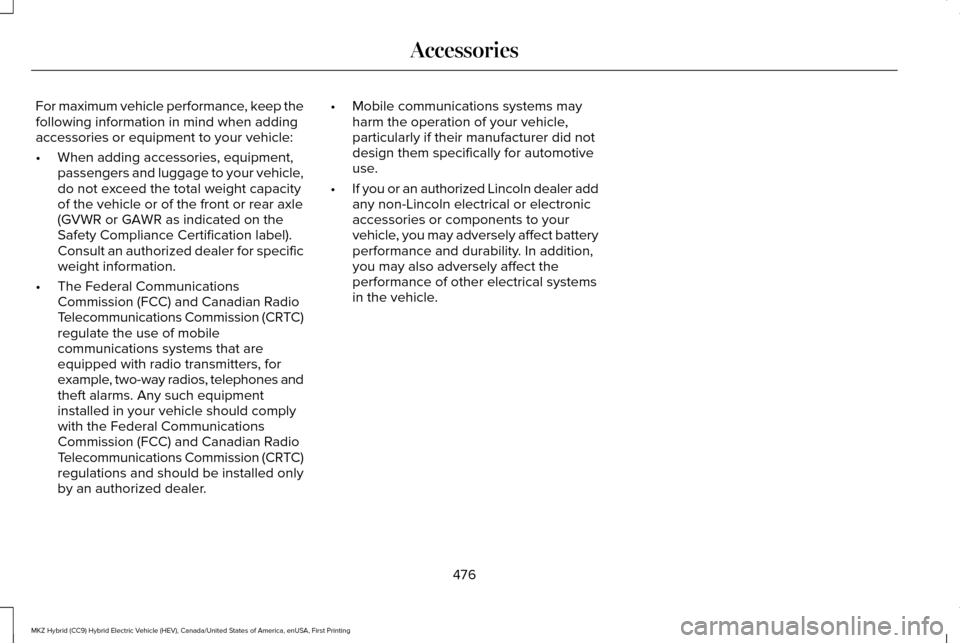
For maximum vehicle performance, keep the
following information in mind when adding
accessories or equipment to your vehicle:
•
When adding accessories, equipment,
passengers and luggage to your vehicle,
do not exceed the total weight capacity
of the vehicle or of the front or rear axle
(GVWR or GAWR as indicated on the
Safety Compliance Certification label).
Consult an authorized dealer for specific
weight information.
• The Federal Communications
Commission (FCC) and Canadian Radio
Telecommunications Commission (CRTC)
regulate the use of mobile
communications systems that are
equipped with radio transmitters, for
example, two-way radios, telephones and
theft alarms. Any such equipment
installed in your vehicle should comply
with the Federal Communications
Commission (FCC) and Canadian Radio
Telecommunications Commission (CRTC)
regulations and should be installed only
by an authorized dealer. •
Mobile communications systems may
harm the operation of your vehicle,
particularly if their manufacturer did not
design them specifically for automotive
use.
• If you or an authorized Lincoln dealer add
any non-Lincoln electrical or electronic
accessories or components to your
vehicle, you may adversely affect battery
performance and durability. In addition,
you may also adversely affect the
performance of other electrical systems
in the vehicle.
476
MKZ Hybrid (CC9) Hybrid Electric Vehicle (HEV), Canada/United States of America, enUSA, First Printing Accessories
Page 531 of 546
ERROR-FREE OR THAT THE FUNCTIONING
OF THE GRACENOTE SOFTWARE OR
GRACENOTE SERVERS WILL BE
UNINTERRUPTED. GRACENOTE IS NOT
OBLIGATED TO PROVIDE YOU WITH ANY
ENHANCED OR ADDITIONAL DATA TYPES
THAT GRACENOTE MAY CHOOSE TO
PROVIDE IN THE FUTURE AND IS FREE TO
DISCONTINUE ITS ONLINE SERVICES AT
ANY TIME. GRACENOTE DISCLAIM ALL
WARRANTIES EXPRESS OR IMPLIED,
INCLUDING, BUT NOT LIMITED TO, IMPLIED
WARRANTIES OF MERCHANTABILITY,
FITNESS FOR A PARTICULAR PURPOSE,
TITLE, AND NON-INFRINGEMENT. NEITHER
GRACENOTE WARRANTS THE RESULTS
THAT WILL BE OBTAINED BY YOUR USE
OF THE GRACENOTE SOFTWARE OR ANY
GRACENOTE SERVER. IN NO CASE WILL
GRACENOTE BE LIABLE FOR ANY
CONSEQUENTIAL OR INCIDENTAL
DAMAGES OR FOR ANY LOST PROFITS OR
LOST REVENUES FOR ANY REASON
WHATSOEVER. © Gracenote 2007.
FCC ID: ACJ-SYNCG3-L
IC: 216B-SYNCG3-L
This device complies with Part 15 of the FCC
Rules and with RSS-210 of Industry Canada.
Operation is subject to the following two
conditions:
(1) This device may not cause harmful
interference, and
(2)
this device must accept any interference
received, including interference that may
cause undesired operation. WARNING
Changes or modifications not
expressively approved by the party
responsible for compliance could void the
user's authority to operate the equipment.
The term "IC" before the radio certification
number only signifies that Industry Canada
technical specifications were met. The antenna used for this transmitter must
not be co-located or operating in conjunction
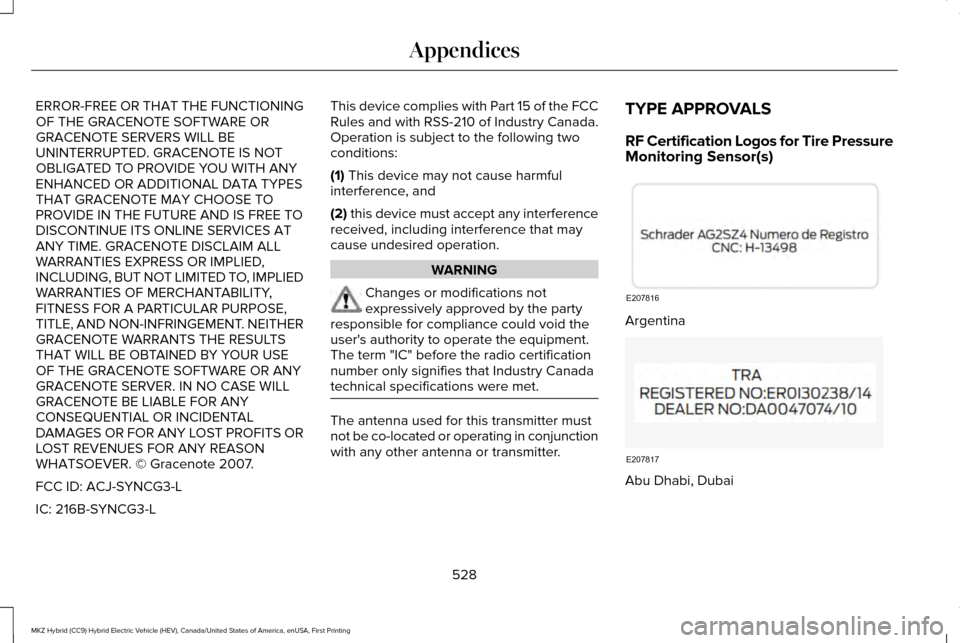
with any other antenna or transmitter.TYPE APPROVALS
RF Certification Logos for Tire Pressure
Monitoring Sensor(s)
Argentina
Abu Dhabi, Dubai
528
MKZ Hybrid (CC9) Hybrid Electric Vehicle (HEV), Canada/United States of America, enUSA, First Printing AppendicesE207816 E207817
Page 538 of 546
System Errors......................................................243
System Lights, Messages and Audible
Alerts.................................................................242
System Limitations.............................................242
Using the System...............................................239
Cruise Control..................................................79
Principle of Operation........................................221
Type 1.......................................................................79
Type 2......................................................................79
Cruise control See: Using Cruise Control................................221
Customer Assistance
..................................268
D
Data Recording
..................................................9
Event Data Recording...........................................10
Service Data Recording.........................................9
Daytime Running Lamps...............................86 Type 1 - Conventional
(Non-Configurable)..........................................86
Type 2 - Configurable..........................................86
Direction Indicators........................................89 Lane Change..........................................................89
Drive Control
..................................................247
LINCOLN DRIVE CONTROL.............................247
Driver Alert......................................................231 Using Driver Alert................................................231 Driver and Passenger Airbags....................44
Children and Airbags...........................................45
Proper Driver and Front Passenger Seating
Adjustment.........................................................45
Driver and Passenger Knee Airbags.........49
Driving Aids
.....................................................231
Driving Hints..................................................256
Driving Through Water
...............................256
DRL See: Daytime Running Lamps...........................86
E
Economical Driving
......................................256
EcoSelect..........................................................171
Electric Parking Brake..................................196 Applying the electric parking brake...............
196
Applying the electric parking brake when the vehicle is moving............................................197
Battery With No Charge....................................198
Releasing the electric parking brake.............198
Electric Vehicle Information
........................431
Power.....................................................................433
Emission Control System
............................184
On-Board Diagnostics (OBD-II)........................185
Readiness for Inspection/Maintenance (I/M)
Testing...............................................................185 End User License Agreement..................509
VEHICLE SOFTWARE END USER LICENSE
AGREEMENT (EULA) ....................................509
Engine Block Heater....................................166 Using the Engine Block Heater.......................167
Engine Coolant Check................................300 Adding Coolant....................................................301
Coolant Change..................................................303
Engine Coolant Temperature
Management...................................................304
Fail-Safe Cooling................................................303
Recycled Coolant...............................................302
Severe Climates.................................................303
Engine Immobilizer See: Passive Anti-Theft System.........................74
Engine Oil Check.........................................299 Adding Engine Oil..............................................299
Engine Oil Dipstick......................................299
Engine Specifications
..................................354
Entertainment................................................396 AM/FM Radio.......................................................398
Apps.......................................................................409
Bluetooth Stereo or USB..................................407
CD (If equipped).................................................406
HD Radio ™ Information (If Available)..............402
SIRIUS® Satellite Radio (If Activated).............398
Sources.................................................................397
535
MKZ Hybrid (CC9) Hybrid Electric Vehicle (HEV), Canada/United States of America, enUSA, First Printing Index
Page 539 of 546
Supported Media Players, Formats and
Metadata Information...................................409
USB Ports.............................................................409
Environment......................................................15
EPB See: Electric Parking Brake..............................196
Event Data Recording See: Data Recording..............................................9
Export Unique Options...................................14
Exterior Mirrors
................................................93
Auto-Dimming Feature........................................95
Auto-Folding Mirrors............................................94
Blind Spot Monitor................................................96
Fold-Away Exterior Mirrors.................................94
Heated Exterior Mirrors.......................................
95
Integrated Blind Spot Mirrors............................95
Lincoln Welcome Mat..........................................95
Memory Mirrors.....................................................95
Power Exterior Mirrors.........................................93
Signal Indicator Mirrors.......................................95
F
Fastening the Seatbelts
................................34
Rear Inflatable Seatbelt.......................................36
Seatbelt Locking Modes.....................................35
Using Seatbelts During Pregnancy..................34 Flat Tire Inflation
See: Tire Sealant and Inflator Kit....................
324
Floor Mats
.......................................................257
Front Parking Aid.........................................206
Obstacle Distance Indicator............................207
Front Passenger Sensing System
..............46
Fuel and Refueling........................................175
Fuel Consumption.........................................183 Calculating Fuel Economy................................183
Filling the Tank.....................................................183
Fuel Filter.......................................................306
Fuel Quality
.....................................................176
Choosing the Right Fuel....................................176
Fuel Freshness Mode.........................................177
Fuel Shutoff...................................................260
Fuses...............................................................276
Fuse Specification Chart............................276 Passenger Compartment Fuse Panel...........287
Power Distribution Box.....................................276
G
Garage Door Opener See: Universal Garage Door Opener.............155
Gauges............................................................100 Left Information Display......................................101
Right Information Display..................................102 General Information on Radio
Frequencies...................................................53
Intelligent Access..................................................53
General Maintenance Information...........479 Multi-point Inspection........................................482
Owner Checks and Services............................
481
Protecting Your Investment..............................479
Why Maintain Your Vehicle?.............................479
Why Maintain Your Vehicle at Your Dealership?......................................................479
Getting Assistance Outside the U.S. and Canada.........................................................272
Getting the Services You Need
................268
Away From Home..............................................268
Global Opening and Closing.......................93 Closing the Windows...........................................93
Opening the Windows.........................................93
H
Hazard Warning Flashers...........................260
Headlamp Adjusting See: Adjusting the Headlamps.......................309
Headlamp Exit Delay.....................................86
Head Restraints
.............................................143
Adjusting the Head Restraint...........................144
Tilting Head Restraints ......................................145
536
MKZ Hybrid (CC9) Hybrid Electric Vehicle (HEV), Canada/United States of America, enUSA, First Printing Index