navigation system LINCOLN MKZ HYBRID 2018 User Guide
[x] Cancel search | Manufacturer: LINCOLN, Model Year: 2018, Model line: MKZ HYBRID, Model: LINCOLN MKZ HYBRID 2018Pages: 572, PDF Size: 4.49 MB
Page 393 of 572
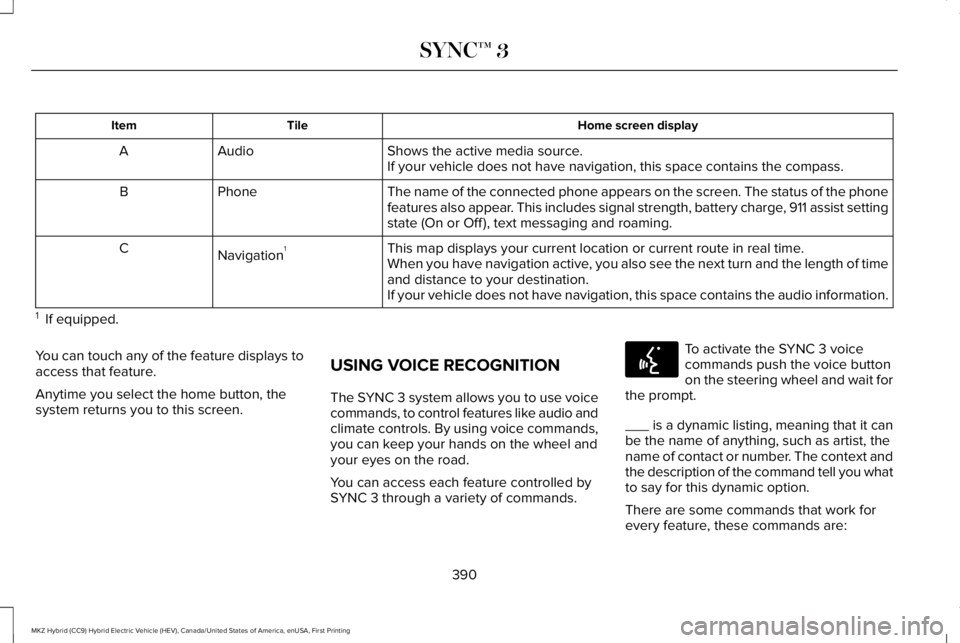
Home screen displayTileItem
Shows the active media source.AudioAIf your vehicle does not have navigation, this space contains the compass.
The name of the connected phone appears on the screen. The status of the phonefeatures also appear. This includes signal strength, battery charge, 911 assist settingstate (On or Off ), text messaging and roaming.
PhoneB
This map displays your current location or current route in real time.Navigation1CWhen you have navigation active, you also see the next turn and the length of timeand distance to your destination.If your vehicle does not have navigation, this space contains the audio information.
1 If equipped.
You can touch any of the feature displays toaccess that feature.
Anytime you select the home button, thesystem returns you to this screen.
USING VOICE RECOGNITION
The SYNC 3 system allows you to use voicecommands, to control features like audio andclimate controls. By using voice commands,you can keep your hands on the wheel andyour eyes on the road.
You can access each feature controlled bySYNC 3 through a variety of commands.
To activate the SYNC 3 voicecommands push the voice buttonon the steering wheel and wait forthe prompt.
___ is a dynamic listing, meaning that it canbe the name of anything, such as artist, thename of contact or number. The context andthe description of the command tell you whatto say for this dynamic option.
There are some commands that work forevery feature, these commands are:
390
MKZ Hybrid (CC9) Hybrid Electric Vehicle (HEV), Canada/United States of America, enUSA, First Printing
SYNC™ 3E142599
Page 394 of 572
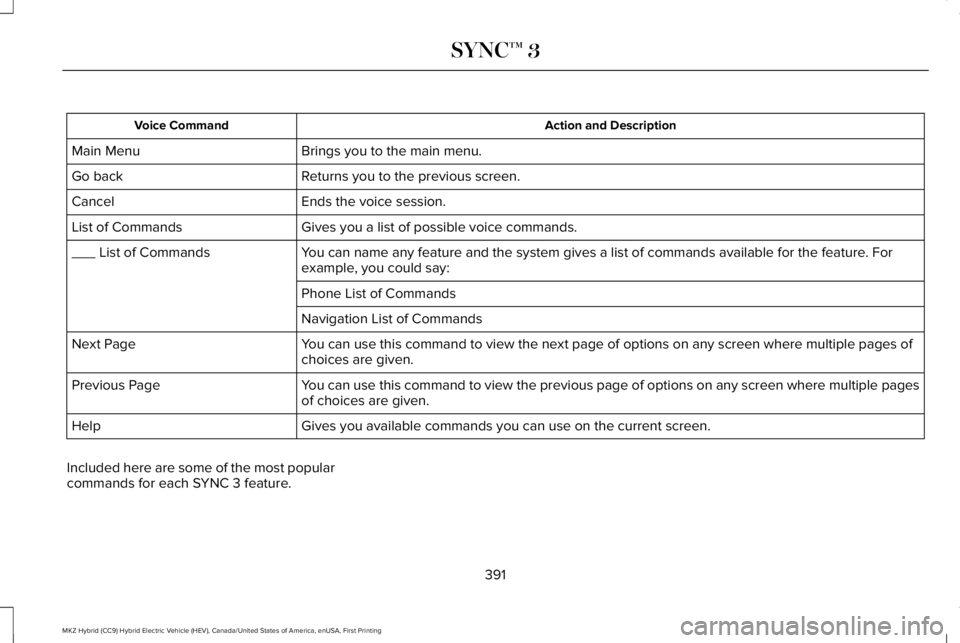
Action and DescriptionVoice Command
Brings you to the main menu.Main Menu
Returns you to the previous screen.Go back
Ends the voice session.Cancel
Gives you a list of possible voice commands.List of Commands
You can name any feature and the system gives a list of commands available for the feature. Forexample, you could say:___ List of Commands
Phone List of Commands
Navigation List of Commands
You can use this command to view the next page of options on any screen where multiple pages ofchoices are given.Next Page
You can use this command to view the previous page of options on any screen where multiple pagesof choices are given.Previous Page
Gives you available commands you can use on the current screen.Help
Included here are some of the most popularcommands for each SYNC 3 feature.
391
MKZ Hybrid (CC9) Hybrid Electric Vehicle (HEV), Canada/United States of America, enUSA, First Printing
SYNC™ 3
Page 429 of 572
Note:You may need to slide your Settingsscreen to the left to select Apple CarPlayPreferences or Android Auto Preferences.
To return to SYNC 3, select the speedometericon in the Android Auto menu bar at thebottom of the touchscreen, and then touchthe option to return to SYNC.
Note:Contact Google for Android Autosupport.
NAVIGATION
Your navigation system is comprised of twomain features, destination mode and mapmode.
Map Mode
Map mode shows advanced viewingcomprised of 2D city maps, 3D landmarksand 3D city models (when available). 2D citymaps show detailed outlines of buildings,visible land use, landscape features, anddetailed railroad infrastructure for the mostessential cities around the globe.
3D landmarks appear as clear, visible objectsthat are typically recognizable and have acertain tourism value.
3D city models are complete 3D models ofentire city areas including navigable roads,parks, rivers and rendered buildings. 3Dlandmarks and city models appear in 3D mapmode only. Coverage of these varies andimproves with updated map releases.
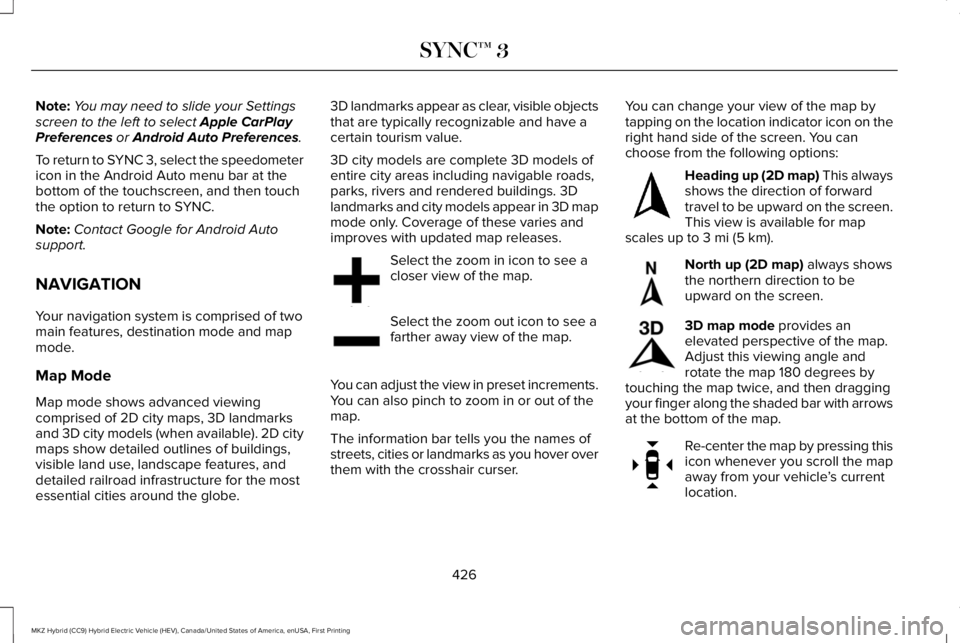
Select the zoom in icon to see acloser view of the map.
Select the zoom out icon to see afarther away view of the map.
You can adjust the view in preset increments.You can also pinch to zoom in or out of themap.
The information bar tells you the names ofstreets, cities or landmarks as you hover overthem with the crosshair curser.
You can change your view of the map bytapping on the location indicator icon on theright hand side of the screen. You canchoose from the following options:
Heading up (2D map) This alwaysshows the direction of forwardtravel to be upward on the screen.This view is available for mapscales up to 3 mi (5 km).
North up (2D map) always showsthe northern direction to beupward on the screen.
3D map mode provides anelevated perspective of the map.Adjust this viewing angle androtate the map 180 degrees bytouching the map twice, and then draggingyour finger along the shaded bar with arrowsat the bottom of the map.
Re-center the map by pressing thisicon whenever you scroll the mapaway from your vehicle’s currentlocation.
426
MKZ Hybrid (CC9) Hybrid Electric Vehicle (HEV), Canada/United States of America, enUSA, First Printing
SYNC™ 3E207752 E207753 E207750 E207749 E207748 E207751
Page 434 of 572
DescriptionMenu Item
Along Route
Near Destination
In a City
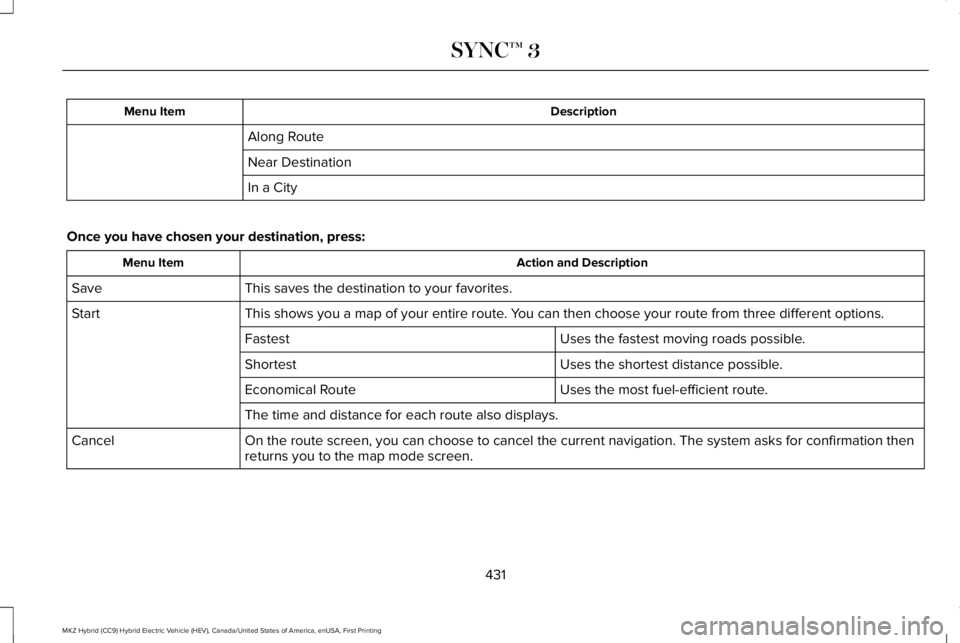
Once you have chosen your destination, press:
Action and DescriptionMenu Item
This saves the destination to your favorites.Save
This shows you a map of your entire route. You can then choose your route from three different options.Start
Uses the fastest moving roads possible.Fastest
Uses the shortest distance possible.Shortest
Uses the most fuel-efficient route.Economical Route
The time and distance for each route also displays.
On the route screen, you can choose to cancel the current navigation. The system asks for confirmation thenreturns you to the map mode screen.Cancel
431
MKZ Hybrid (CC9) Hybrid Electric Vehicle (HEV), Canada/United States of America, enUSA, First Printing
SYNC™ 3
Page 435 of 572
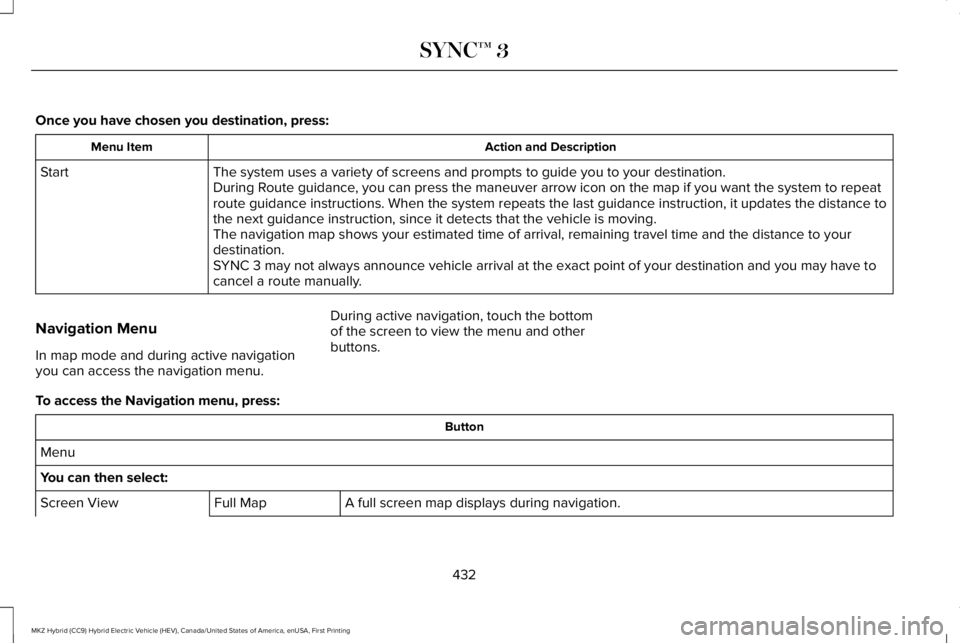
Once you have chosen you destination, press:
Action and DescriptionMenu Item
The system uses a variety of screens and prompts to guide you to your destination.StartDuring Route guidance, you can press the maneuver arrow icon on the map if you want the system to repeatroute guidance instructions. When the system repeats the last guidance instruction, it updates the distance tothe next guidance instruction, since it detects that the vehicle is moving.The navigation map shows your estimated time of arrival, remaining travel time and the distance to yourdestination.SYNC 3 may not always announce vehicle arrival at the exact point of your destination and you may have tocancel a route manually.
Navigation Menu
In map mode and during active navigationyou can access the navigation menu.
During active navigation, touch the bottomof the screen to view the menu and otherbuttons.
To access the Navigation menu, press:
Button
Menu
You can then select:
A full screen map displays during navigation.Full MapScreen View
432
MKZ Hybrid (CC9) Hybrid Electric Vehicle (HEV), Canada/United States of America, enUSA, First Printing
SYNC™ 3
Page 436 of 572
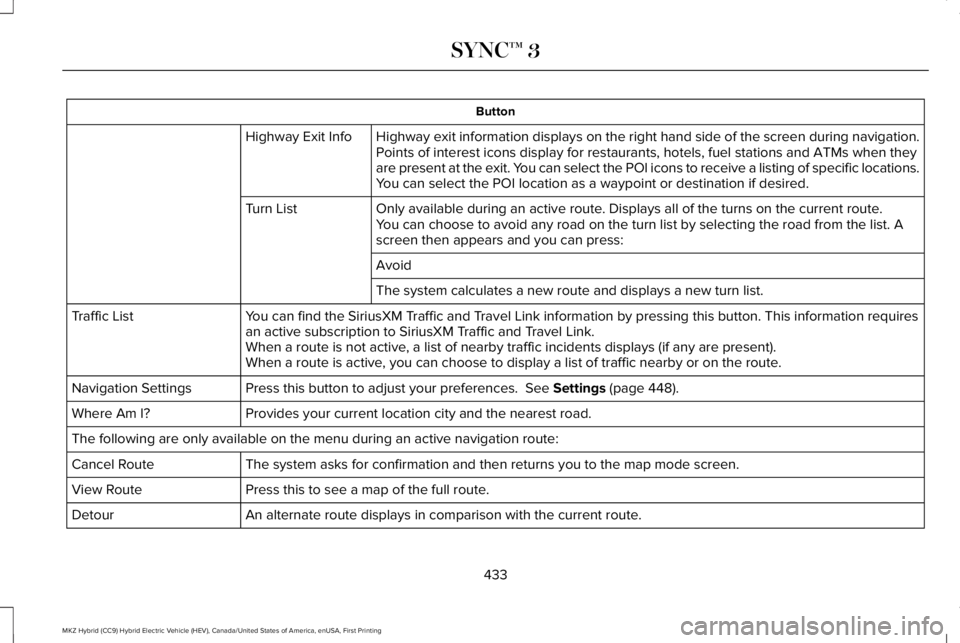
Button
Highway exit information displays on the right hand side of the screen during navigation.Highway Exit InfoPoints of interest icons display for restaurants, hotels, fuel stations and ATMs when theyare present at the exit. You can select the POI icons to receive a listing of specific locations.You can select the POI location as a waypoint or destination if desired.
Only available during an active route. Displays all of the turns on the current route.Turn ListYou can choose to avoid any road on the turn list by selecting the road from the list. Ascreen then appears and you can press:
Avoid
The system calculates a new route and displays a new turn list.
You can find the SiriusXM Traffic and Travel Link information by pressing this button. This information requiresan active subscription to SiriusXM Traffic and Travel Link.Traffic List
When a route is not active, a list of nearby traffic incidents displays (if any are present).When a route is active, you can choose to display a list of traffic nearby or on the route.
Press this button to adjust your preferences. See Settings (page 448).Navigation Settings
Provides your current location city and the nearest road.Where Am I?
The following are only available on the menu during an active navigation route:
The system asks for confirmation and then returns you to the map mode screen.Cancel Route
Press this to see a map of the full route.View Route
An alternate route displays in comparison with the current route.Detour
433
MKZ Hybrid (CC9) Hybrid Electric Vehicle (HEV), Canada/United States of America, enUSA, First Printing
SYNC™ 3
Page 437 of 572
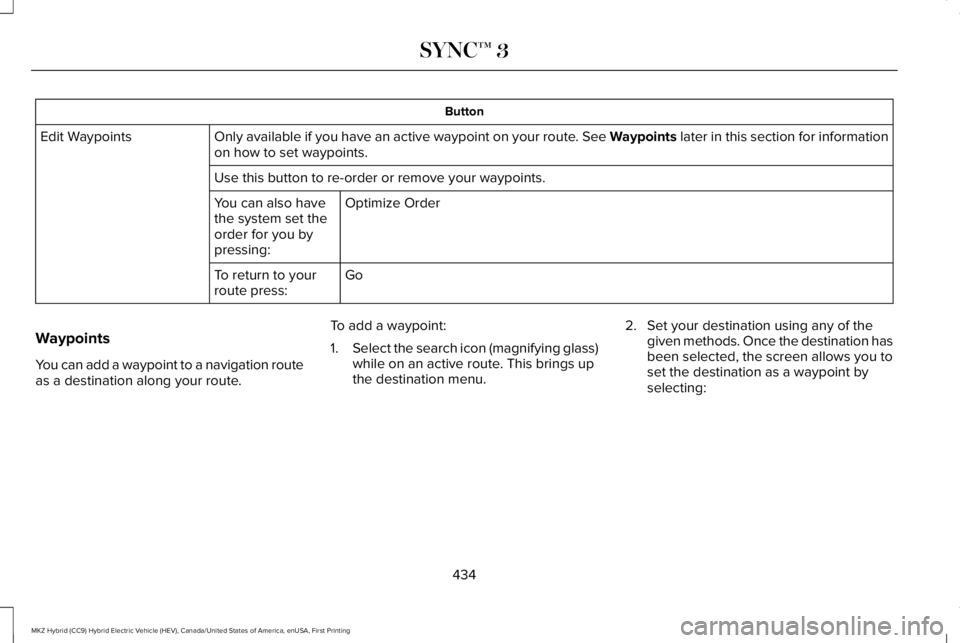
Button
Only available if you have an active waypoint on your route. See Waypoints later in this section for informationon how to set waypoints.Edit Waypoints
Use this button to re-order or remove your waypoints.
Optimize OrderYou can also havethe system set theorder for you bypressing:
GoTo return to yourroute press:
Waypoints
You can add a waypoint to a navigation routeas a destination along your route.
To add a waypoint:
1.Select the search icon (magnifying glass)while on an active route. This brings upthe destination menu.
2. Set your destination using any of thegiven methods. Once the destination hasbeen selected, the screen allows you toset the destination as a waypoint byselecting:
434
MKZ Hybrid (CC9) Hybrid Electric Vehicle (HEV), Canada/United States of America, enUSA, First Printing
SYNC™ 3
Page 438 of 572
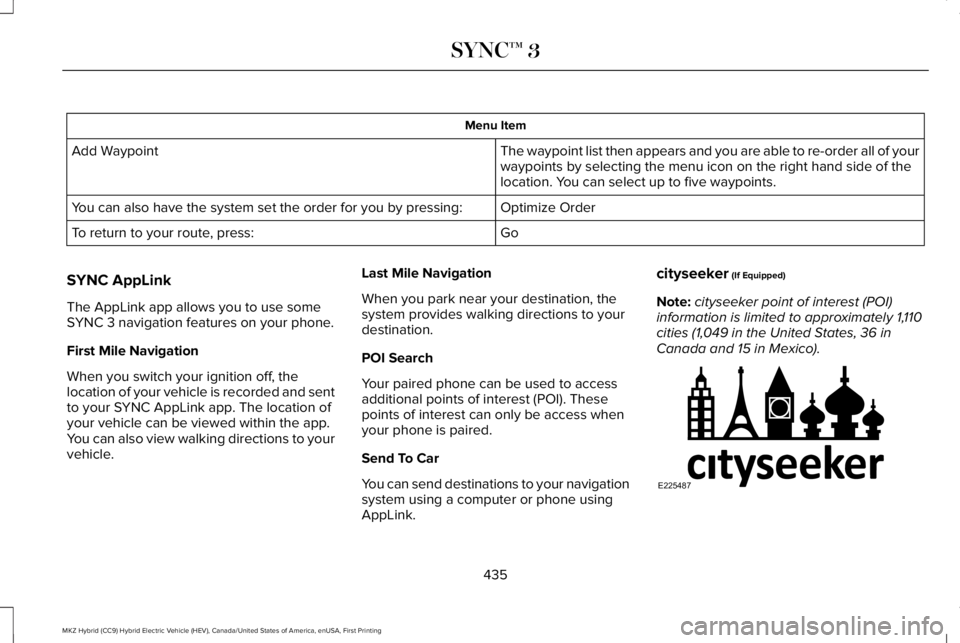
Menu Item
The waypoint list then appears and you are able to re-order all of yourwaypoints by selecting the menu icon on the right hand side of thelocation. You can select up to five waypoints.
Add Waypoint
Optimize OrderYou can also have the system set the order for you by pressing:
GoTo return to your route, press:
SYNC AppLink
The AppLink app allows you to use someSYNC 3 navigation features on your phone.
First Mile Navigation
When you switch your ignition off, thelocation of your vehicle is recorded and sentto your SYNC AppLink app. The location ofyour vehicle can be viewed within the app.You can also view walking directions to yourvehicle.
Last Mile Navigation
When you park near your destination, thesystem provides walking directions to yourdestination.
POI Search
Your paired phone can be used to accessadditional points of interest (POI). Thesepoints of interest can only be access whenyour phone is paired.
Send To Car
You can send destinations to your navigationsystem using a computer or phone usingAppLink.
cityseeker (If Equipped)
Note:cityseeker point of interest (POI)information is limited to approximately 1,110cities (1,049 in the United States, 36 inCanada and 15 in Mexico).
435
MKZ Hybrid (CC9) Hybrid Electric Vehicle (HEV), Canada/United States of America, enUSA, First Printing
SYNC™ 3E225487
Page 439 of 572
cityseeker, when available, is a service thatprovides more information about certainpoints of interest such as restaurants, hotelsand attractions.
When you have selected a point of interest,the location and information appear, such asaddress, phone number and a star rating.
Press More Information to see a photo, areview, a list of services and facilities, theaverage room or meal price and the webaddress. This screen displays the point ofinterest icons.
For restaurants, cityseeker can provideinformation such as star rating, average cost,review, handicap access, hours of operation,and website address.
For hotels, cityseeker can provideinformation such as star rating, pricecategory, review, check-in and checkouttimes, hotel service icons and websiteaddress. Hotel service icons include:
•Restaurant
•Business center
•Handicap facilities
•Laundry
•Refrigerator
•24 hour room service
•Fitness center
•Internet access
•Pool
•Wi-Fi
Attractions include nearby landmarks,amusement parks, historic buildings andmore. cityseeker can provide informationsuch as star rating, reviews, hour of operationand admission price.
SiriusXM Traffic and Travel Link
SiriusXM Traffic and Travel Link is availableon vehicles equipped with navigation andonly in select markets. You must activate andsubscribe to receive SiriusXM Traffic andTravel Link information. It helps you locatethe best gas prices, find movie listings, getcurrent traffic alerts, view the weather map,get accurate ski conditions and see currentsports scores. See Apps (page 444).
The system calculates a reasonable efficientroute based on available speed limits, traffic,and road conditions. You may know a localshort cut that is more efficient at a given timethan the route provided by SYNC 3, but youshould expect a slight difference in minutesor miles with the SYNC 3 route.
Navigation Map Updates
Annual navigation map updates are availablefor purchase through your dealership, bycalling 1-866-462-8837 in the United Statesand Canada or 01-800-557-5539 in Mexico.You can also visit:
Website
www.navigation.com/sync
You need to specify the make and model ofyour vehicle to determine if there is anupdate available.
436
MKZ Hybrid (CC9) Hybrid Electric Vehicle (HEV), Canada/United States of America, enUSA, First Printing
SYNC™ 3
Page 449 of 572
When you launch an app using SYNC 3, thesystem may ask you to grant certainpermissions, for example Vehicle information,Driving characteristics, GPS and Speed,and/or Push notifications. You can enable allgroups or none of them during the initial apppermissions prompts. The settings menuoffers individual group permission control.
Note:You are only prompted to grantpermissions the first time you use an appwith SYNC 3.
Note:If you disable group permissions, appswill still be enabled to work with SYNC 3unless you deactivate All Apps in the settingsmenu.
SiriusXM Traffic and Travel Link (If
Equipped)
WARNING
Driving while distracted can result inloss of vehicle control, crash and injury.We strongly recommend that you useextreme caution when using any device thatmay take your focus off the road. Yourprimary responsibility is the safe operationof your vehicle. We recommend against theuse of any hand-held device while drivingand encourage the use of voice-operatedsystems when possible. Make sure you areaware of all applicable local laws that mayaffect the use of electronic devices whiledriving.
Note:SiriusXM Traffic and Travel Link maynot be available in all markets.
Note:In order to use SiriusXM Traffic andTravel Link, your vehicle must havenavigation.
Note:A paid subscription is required toaccess and use these features. Go towww.siriusxm.com/travellink for moreinformation.
Note:Visit www.siriusxm.com/traffic and clickon Coverage map and details for a completelisting of all traffic areas covered by SiriusXMTraffic and Travel Link.
Note:Neither Sirius nor Ford is responsiblefor any errors or inaccuracies in the SiriusXMTraffic and Travel Link services or its use invehicles.
When you subscribe to SiriusXM Traffic andTravel Link, it can help you locate the bestgas prices, find movie listings, get currenttraffic alerts, view the current weather map,get accurate ski conditions and see scoresto current sports games.
446
MKZ Hybrid (CC9) Hybrid Electric Vehicle (HEV), Canada/United States of America, enUSA, First Printing
SYNC™ 3