start stop button LINCOLN MKZ HYBRID 2018 User Guide
[x] Cancel search | Manufacturer: LINCOLN, Model Year: 2018, Model line: MKZ HYBRID, Model: LINCOLN MKZ HYBRID 2018Pages: 572, PDF Size: 4.49 MB
Page 174 of 572
•Interacting with your vehicle, for examplepressing the brake or accelerator pedal.
•You can temporarily switch off theshutdown feature any time the ignition ison (for the current ignition cycle only).Use the information display to do so. SeeInformation Displays (page 112).
•During the countdown before shutdown,you are prompted to press OK or RESET(depending on your type of informationdisplay) to temporarily switch the featureoff (for the current ignition cycle only).
Switching Off Your Vehicle When It IsStationary
1. Put the transmission in position P.
2. Press the button once.
3. Apply the parking brake.
Note:This switches off the ignition, allelectrical circuits, warning lamps andindicators.
Note:If your vehicle is left running for 30minutes without any interaction, itautomatically shuts down.
Switching Off Your Vehicle When It IsMoving
WARNING
Switching off the engine when thevehicle is still moving will result in aloss of brake and steering assistance. Thesteering will not lock, but higher effort willbe required. When the ignition is switchedoff, some electrical circuits, including airbags, warning lamps and indicators may alsobe off. If the ignition was turned offaccidentally, you can shift into neutral (N) andre-start the engine.
1. Put the transmission in position N anduse the brakes to bring your vehicle to asafe stop.
2. When your vehicle has stopped, put thetransmission in position P.
3. Press and hold the button for onesecond, or press it three times within twoseconds.
4. Apply the parking brake.
Guarding Against Exhaust Fumes
WARNING
Exhaust leaks may result in entry ofharmful and potentially lethal fumesinto the passenger compartment. If you smellexhaust fumes inside your vehicle, have yourvehicle inspected immediately. Do not driveif you smell exhaust fumes.
Important Ventilating Information
If you stop your vehicle and then leave theengine idling for long periods of time, werecommend that you do one of the following:
•Open the windows at least 1 in (3 cm).
•Set your climate control to outside air.
ENGINE BLOCK HEATER (If Equipped)
WARNINGS
Failure to follow engine block heaterinstructions could result in propertydamage or serious personal injury.
171
MKZ Hybrid (CC9) Hybrid Electric Vehicle (HEV), Canada/United States of America, enUSA, First Printing
Starting and Stopping the Engine
Page 195 of 572
3. Pull the outer cover off to expose theservice disconnect lever.
4. Slide the handle on the servicedisconnect outboard to the right.
5. Pull the handle toward you and removethe circuit from the vehicle to disable thehigh voltage battery.
6. Reverse this procedure to reinstall thehigh-voltage service disconnect and theouter lever to the service disconnect.
Reactivating the High Voltage Battery
Note:If you have manually disconnectedyour high voltage shut off circuit, you needto reconnect the circuit before you canreactivate it. The vehicle will detect if theelectrical system is safe and reactivateautomatically.
HIGH VOLTAGE BATTERY CUT-
OFF SWITCH
The high-voltage shut off operation shuts offpower from the high-voltage battery after acollision, or if your vehicle receives asubstantial physical jolt.
1. Press the START/STOP button to turnignition off.
2. Press the brake pedal and press theSTART/STOP button.
192
MKZ Hybrid (CC9) Hybrid Electric Vehicle (HEV), Canada/United States of America, enUSA, First Printing
High Voltage BatteryE159506 E171513 E147234 E146133
Page 196 of 572
3. If your vehicle is not powered after thissequence, repeat steps 1 and 2 up to twomore times.
Note:During this process, your vehicle willdetect if the electrical system is safe andreactivate. Once your vehicle determinesthe electrical system safe, you can start yourvehicle as you would normally by eitherturning the ignition key or by pressing thebrake in combination with the START/STOPbutton.
Note:In the event your vehicle does notreactivate after the third key cycle, contactan authorized dealer.
193
MKZ Hybrid (CC9) Hybrid Electric Vehicle (HEV), Canada/United States of America, enUSA, First Printing
High Voltage Battery
Page 198 of 572
3. The gear shift button you selectilluminates and the instrument clustershows the selected gear.
4. Release the brake pedal and yourtransmission remains in the selectedgear.
Note:If the driver attempts to leave thevehicle when it is in gear, the vehicleautomatically shifts into park (P). Seatbeltand door monitors determine the driver'sintent and makes the shift for you. Duringthis time a Transmission not in Parkmessage appears in the display screen,prompting the driver to make the shift. Toput the vehicle in gear with the door openperform steps 1-4. See the Automatic Returnto Park section in this chapter for moreinformation on this feature.
Note:To put your vehicle in gear with thedoor open, perform steps 1-4. See theAutomatic Return to Park section in thischapter for more information on this feature.
Park (P)
This position locks the transmission andprevents the front wheels from turning.Always come to a complete stop beforeputting your vehicle into and out of park (P).An audible chime sounds when park (P) ismanually selected.
When you turn the ignition off, your vehicleautomatically shifts into park (P). If you turnthe ignition off when your vehicle is moving,it first shifts into neutral (N) until a slowenough speed is reached. Your vehicle thenshifts into park (P) automatically.
Automatic Return to Park
Note:This feature does not operate whenyour vehicle is in Stay in Neutral mode orneutral tow.
Your vehicle has a safety feature thatautomatically shifts your vehicle into park (P)when any of the following circumstances aremet:
•Turn the ignition off.
•Open the driver's door with your seat beltunlatched.
•Unlatching your seatbelt when thedriver's door is open.
If you turn the ignition off when your vehicleis moving, your vehicle first shifts into neutral(N) until it slows down enough to shift intopark (P) automatically.
Note:If you have waited an extended periodof time, (2-15 minutes) before starting yourvehicle, unlatching your safety belt doescause this feature to activate, even with thedriver's door closed.
Note:This feature may not work properly ifthe door ajar switch is malfunctioning. If yourdoor ajar indicator does not illuminate whenyou open the driver’s door or the indicatorilluminates with the driver’s door closed, seeyour authorized dealer.
195
MKZ Hybrid (CC9) Hybrid Electric Vehicle (HEV), Canada/United States of America, enUSA, First Printing
Transmission
Page 199 of 572
Reverse (R)
With the transmission in reverse (R), yourvehicle moves backward. Always come to acomplete stop before shifting into and outof reverse (R).
Neutral (N)
Press the neutral (N) button to put yourvehicle in neutral. In neutral, your vehicle canstart and is free to roll. Hold the brake pedaldown when in this position.
Stay in Neutral mode
Stay in Neutral mode allows your vehicle tostay in neutral when you exit your vehicle.Your vehicle must be stationary to enter thismode.
To enter Stay in Neutral mode:
1.Press the neutral (N) button on the shifterassembly.
2. The message Select N Again to EnterStay in Neutral mode appears in theinformation display screen.
3. Press the neutral (N) button again toenter Stay in Neutral mode.
The message Stay in Neutral modeengaged appears in the instrument clusterwhen your vehicle has entered Stay inNeutral mode.
Note:During this mode the neutral (N) buttonflashes continuously and the instrumentcluster displays neutral as the selected gear.
Exiting Stay in Neutral mode
To disable Stay in Neutral mode put yourvehicle in another gear. See the Putting theVehicle in Gear section for instructions onhow to do this.
Entering a Carwash
Note:Always put your vehicle in Stay inNeutral mode when entering an automaticcar wash. Failure to do this could result invehicle damage that may not be covered bywarranty.
Drive (D)
The normal driving position for the best fueleconomy.
Drive (D) with Grade Assist
Activate grade assist through theinformation display settings menu.See General Information (page112).
Grade assist:
•Provides additional grade braking with acombination of engine motoring andhigh-voltage battery charging to helpmaintain vehicle speed when descendinga grade.
•As your vehicle determines the amountof engine motoring and high-voltagebattery charging, you may notice theengine speed increasing and decreasingto help maintain your vehicle speed whendescending a grade.
The grade assist lamp illuminatesgrey when the grade assist featureis switched on through theinstrument display settings menu. The lampchanges from grey to green when gradeassist is actively providing additional gradebraking.
196
MKZ Hybrid (CC9) Hybrid Electric Vehicle (HEV), Canada/United States of America, enUSA, First Printing
TransmissionE144523 E144523
Page 207 of 572
Note:Auto Hold turns off every time youpower down your vehicle.
When Auto Hold is off, your vehicle behavesthe same as a vehicle without Auto Hold.
There is an Auto Hold indicator lamp in theinstrument cluster that has two modes, activeand unavailable:
The Auto Hold (ACTIVE) indicatorlight illuminates in the informationdisplay when the system holdsyour vehicle stationary. When in active mode,press the brake pedal and the Auto Holdbutton to switch Auto Hold off.
The Auto Hold (UNAVAILABLE)indicator light illuminates in theinformation display when thesystem is on but unavailable to hold yourvehicle (for example, during Active ParkAssist, Stay in Neutral Mode, or when youdo not fasten your seatbelt or close thedoor).
Note:Make sure you switch off Auto Holdor use the Stay in Neutral mode before youenter a car wash. See AutomaticTransmission (page 194).
Using Auto Hold
1. Bring your vehicle to a stop by pressingthe brake pedal. After coming to a stop,the green Auto Hold (ACTIVE) indicatorlamp illuminates in the informationdisplay.
2.Release the brake pedal. The Auto Hold(ACTIVE) indicator light remainsilluminated in the information display andAuto Hold will hold your vehicle at a stop.
3. When you press the accelerator pedal,Auto Hold releases the brakes and youwill be able to drive off. Once you driveoff, the green Auto Hold (ACTIVE)indicator no longer illuminates in theinformation display.
Note:The Stop/Start system (if equipped)may stop the engine when you press thebrake pedal. If this occurs, it will restart onceyou press the accelerator pedal. Auto Holdstill holds your vehicle at a standstill with theengine off.
204
MKZ Hybrid (CC9) Hybrid Electric Vehicle (HEV), Canada/United States of America, enUSA, First Printing
BrakesE197933 E197934
Page 298 of 572
Protected ComponentsFuse RatingFuse or Relay Number
Datalink/Gateway module.10A215
Decklid release.15A116
Not used (spare).5A217
Push button start/stop.5A218
Extended power module.7.5A219
Adaptive headlamps.7.5A220
Humidity and in-car temperature.5A221
Pedestrian sounder (spare).5A222
Delayed accessory (power inverter, moonroof, all smartwindow, driver window switch pack).10A123
Rear sunshade.Panoramic roof.
Central lock/unlock.20A124
Driver door (window, mirror).30A125
295
MKZ Hybrid (CC9) Hybrid Electric Vehicle (HEV), Canada/United States of America, enUSA, First Printing
Fuses
Page 430 of 572
Mute: Press to mute the audionavigation guidance. Press thebutton again to un-mute theguidance.
Points of Interest (POI) groupingicon: You can choose up to threePOI icons to display on the map. Ifthe chosen POIs are located closetogether or are at the same location a box isused to display a single category icon
instead of repeating the same icon, in orderto reduce clutter. When you select the boxon the map, a pop-up appears indicating howmany POIs are in this location. Select the popup to see a list of the available POIs. You canscroll through and select POIs from this list.
If your vehicle is low on charge or fuel,station icons automatically display on themap.
If you have subscribed to SiriusXM Trafficand Travel Link (where available), traffic flowwill be indicated on the map by green (clear),yellow (slowing), and red (stopped) roadhighlights. Traffic flow is indicated where theinformation is available and varies across theUS.
You can choose to display traffic icons onthe map representing twelve different typesof incidents. See Settings (page 448).
You can set a destination by hovering abovea location and selecting:
Button
Start
Destination Mode
To set a destination, press:
DescriptionMenu Item
Destination
Enter a navigation destination in any of the following formats:
Street AddressSearch
427
MKZ Hybrid (CC9) Hybrid Electric Vehicle (HEV), Canada/United States of America, enUSA, First Printing
SYNC™ 3E251780 E251779 E207754
Page 480 of 572
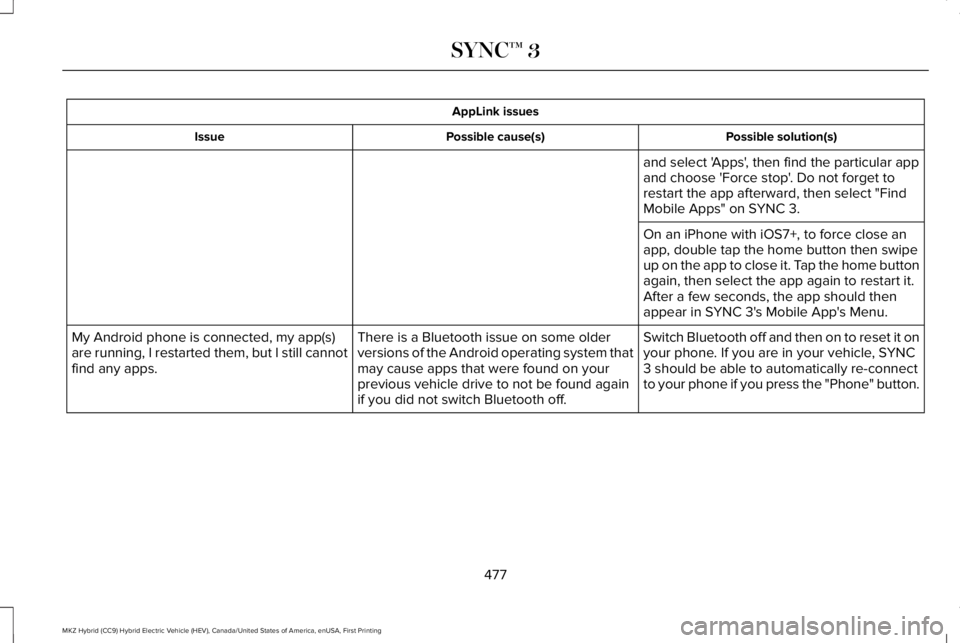
AppLink issues
Possible solution(s)Possible cause(s)Issue
and select 'Apps', then find the particular appand choose 'Force stop'. Do not forget torestart the app afterward, then select "FindMobile Apps" on SYNC 3.
On an iPhone with iOS7+, to force close anapp, double tap the home button then swipeup on the app to close it. Tap the home buttonagain, then select the app again to restart it.After a few seconds, the app should thenappear in SYNC 3's Mobile App's Menu.
Switch Bluetooth off and then on to reset it onyour phone. If you are in your vehicle, SYNC3 should be able to automatically re-connectto your phone if you press the "Phone" button.
There is a Bluetooth issue on some olderversions of the Android operating system thatmay cause apps that were found on yourprevious vehicle drive to not be found againif you did not switch Bluetooth off.
My Android phone is connected, my app(s)are running, I restarted them, but I still cannotfind any apps.
477
MKZ Hybrid (CC9) Hybrid Electric Vehicle (HEV), Canada/United States of America, enUSA, First Printing
SYNC™ 3