key LINCOLN MKZ HYBRID 2018 Owner's Guide
[x] Cancel search | Manufacturer: LINCOLN, Model Year: 2018, Model line: MKZ HYBRID, Model: LINCOLN MKZ HYBRID 2018Pages: 572, PDF Size: 4.49 MB
Page 114 of 572
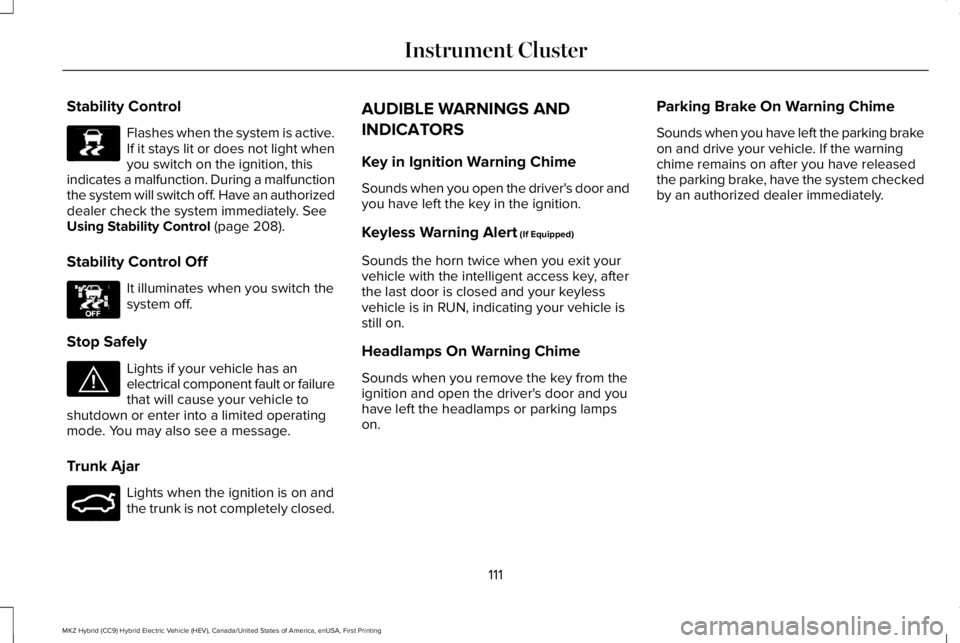
Stability Control
Flashes when the system is active.If it stays lit or does not light whenyou switch on the ignition, thisindicates a malfunction. During a malfunctionthe system will switch off. Have an authorizeddealer check the system immediately. SeeUsing Stability Control (page 208).
Stability Control Off
It illuminates when you switch thesystem off.
Stop Safely
Lights if your vehicle has anelectrical component fault or failurethat will cause your vehicle toshutdown or enter into a limited operatingmode. You may also see a message.
Trunk Ajar
Lights when the ignition is on andthe trunk is not completely closed.
AUDIBLE WARNINGS AND
INDICATORS
Key in Ignition Warning Chime
Sounds when you open the driver's door andyou have left the key in the ignition.
Keyless Warning Alert (If Equipped)
Sounds the horn twice when you exit yourvehicle with the intelligent access key, afterthe last door is closed and your keylessvehicle is in RUN, indicating your vehicle isstill on.
Headlamps On Warning Chime
Sounds when you remove the key from theignition and open the driver's door and youhave left the headlamps or parking lampson.
Parking Brake On Warning Chime
Sounds when you have left the parking brakeon and drive your vehicle. If the warningchime remains on after you have releasedthe parking brake, have the system checkedby an authorized dealer immediately.
111
MKZ Hybrid (CC9) Hybrid Electric Vehicle (HEV), Canada/United States of America, enUSA, First Printing
Instrument ClusterE138639 E130458 E144693 E159323
Page 115 of 572
GENERAL INFORMATION
WARNING
Driving while distracted can result inloss of vehicle control, crash and injury.We strongly recommend that you useextreme caution when using any device thatmay take your focus off the road. Yourprimary responsibility is the safe operationof your vehicle. We recommend against theuse of any hand-held device while drivingand encourage the use of voice-operatedsystems when possible. Make sure you areaware of all applicable local laws that mayaffect the use of electronic devices whiledriving.
You can control various systems on yourvehicle using the information display controlson the steering wheel. The informationdisplay shows the corresponding information.
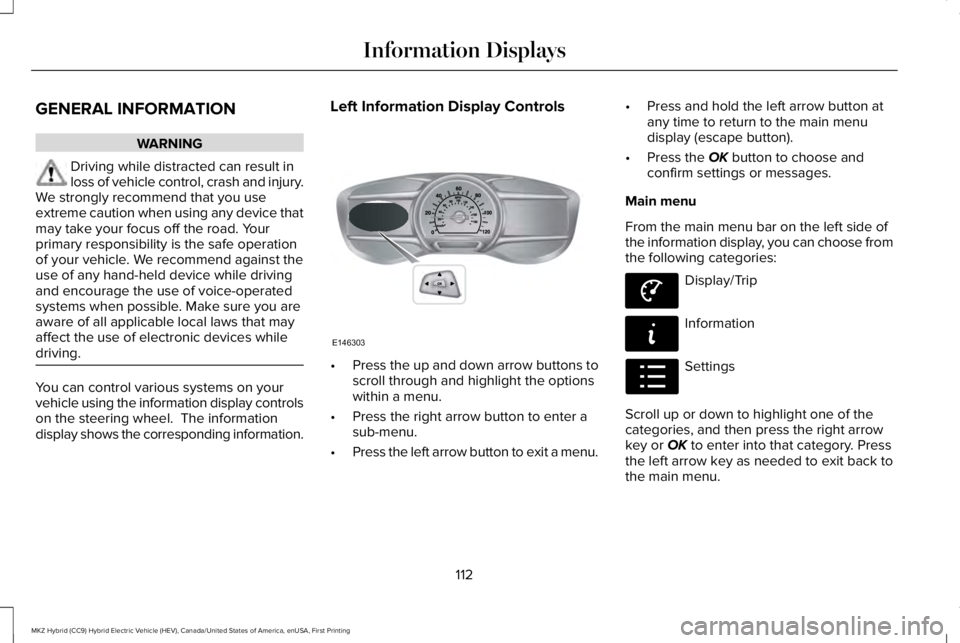
Left Information Display Controls
•Press the up and down arrow buttons toscroll through and highlight the optionswithin a menu.
•Press the right arrow button to enter asub-menu.
•Press the left arrow button to exit a menu.
•Press and hold the left arrow button atany time to return to the main menudisplay (escape button).
•Press the OK button to choose andconfirm settings or messages.
Main menu
From the main menu bar on the left side ofthe information display, you can choose fromthe following categories:
Display/Trip
Information
Settings
Scroll up or down to highlight one of thecategories, and then press the right arrowkey or OK to enter into that category. Pressthe left arrow key as needed to exit back tothe main menu.
112
MKZ Hybrid (CC9) Hybrid Electric Vehicle (HEV), Canada/United States of America, enUSA, First Printing
Information DisplaysE146303 E144639 E144642 E100023
Page 116 of 572
Display/Trip
Use the up or down arrow buttonsto choose between the following
display options.Note:The cluster will remember the menulevel 2 state when the individual key stateis changed from the RUN position to the OFFposition.
Display/Trip
Menu level 5Menu level 4Menu level 3Menu level 2
———Speedometer
——HelpEngageSplit Power + Avg Fuel Economy +Instantaneous Fuel Gauge + FuelGauge)
——HelpEmpower(Power with engine on/off threshold+ Avg Fuel Economy + InstantaneousFuel Gauge + Fuel Gauge)
Average FuelAverage FuelChange MyViewMyView(MyView + Fuel Gauge)Instantaneous FuelSplit Power
Coolant Temp.Power + Threshold
Accessory PowerTach rpm x1000
Trip 1Accessory Power
113
MKZ Hybrid (CC9) Hybrid Electric Vehicle (HEV), Canada/United States of America, enUSA, First Printing
Information DisplaysE144639
Page 119 of 572
•Tach rpm x 1000 — When the gasolineengine is running, the tachometer gaugedisplays the engine speed in revolutionsper minute (RPM). When your vehicle isoperating on battery power only with theengine off, EV displays and thetachometer is greyed out.
Note:The trip data, and average fueleconomy cannot be reset in MyView.
Trip 1 & 2
Provides trip odometer, trip average fueleconomy and trip timer.
Distance traveled on battery power only withthe engine off is shown in blue next to totaltrip distance.
Information
In this mode, you can viewdifferent vehicle systeminformation and perform a systemcheck.
Information
Displays a number of different system tutorials. Use the up or down arrows to scrollthrough the tutorials. Then press OK to view.TutorialWarnings
Displays the associated driver alert graphic.Driver Alert
MyKeys (Number of MyKeys programmed)MyKey
MyKey Miles (km) (Distance traveled using a programmed MyKey)
Admin Keys (Number of admin keys)
All active warnings will display first if applicable. The system check menu may appeardifferent based upon equipment options and current vehicle status. Use the up or downarrow buttons to scroll through the list.
System Check
116
MKZ Hybrid (CC9) Hybrid Electric Vehicle (HEV), Canada/United States of America, enUSA, First Printing
Information DisplaysE144642
Page 120 of 572
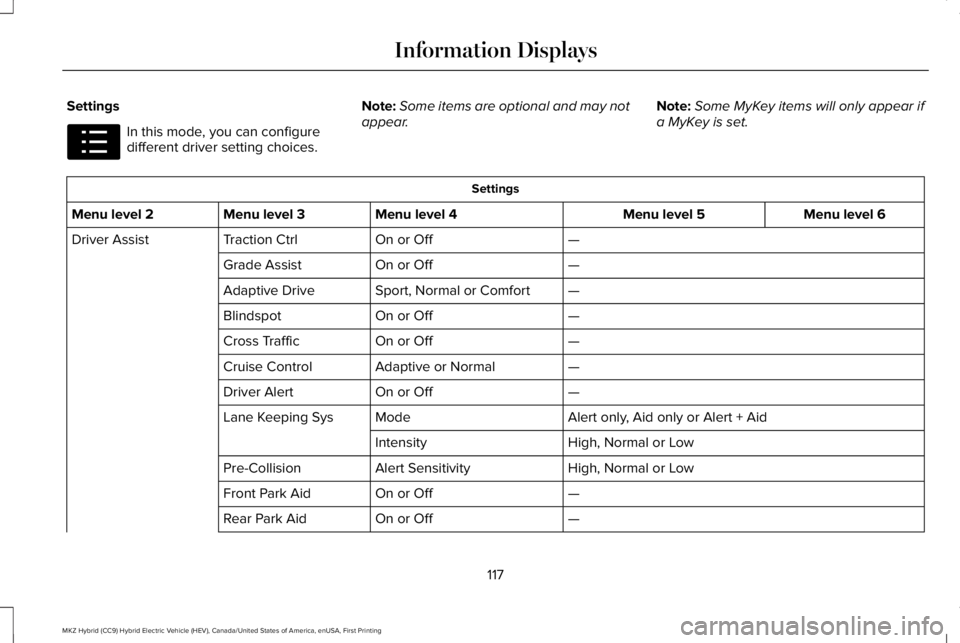
Settings
In this mode, you can configuredifferent driver setting choices.
Note:Some items are optional and may notappear.Note:Some MyKey items will only appear ifa MyKey is set.
Settings
Menu level 6Menu level 5Menu level 4Menu level 3Menu level 2
—On or OffTraction CtrlDriver Assist
—On or OffGrade Assist
—Sport, Normal or ComfortAdaptive Drive
—On or OffBlindspot
—On or OffCross Traffic
—Adaptive or NormalCruise Control
—On or OffDriver Alert
Alert only, Aid only or Alert + AidModeLane Keeping Sys
High, Normal or LowIntensity
High, Normal or LowAlert SensitivityPre-Collision
—On or OffFront Park Aid
—On or OffRear Park Aid
117
MKZ Hybrid (CC9) Hybrid Electric Vehicle (HEV), Canada/United States of America, enUSA, First Printing
Information DisplaysE100023
Page 123 of 572
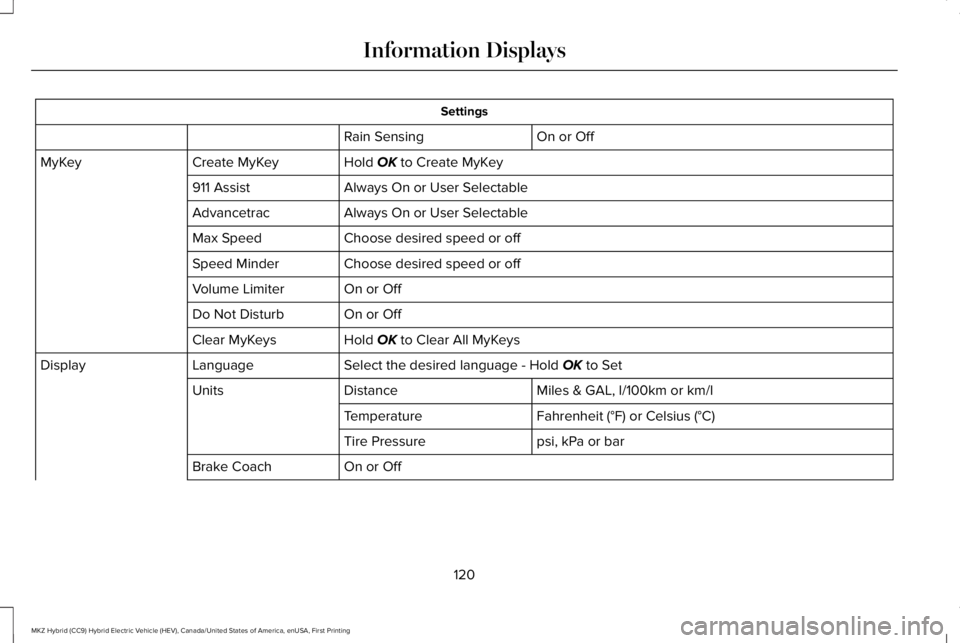
Settings
On or OffRain Sensing
Hold OK to Create MyKeyCreate MyKeyMyKey
Always On or User Selectable911 Assist
Always On or User SelectableAdvancetrac
Choose desired speed or offMax Speed
Choose desired speed or offSpeed Minder
On or OffVolume Limiter
On or OffDo Not Disturb
Hold OK to Clear All MyKeysClear MyKeys
Select the desired language - Hold OK to SetLanguageDisplay
Miles & GAL, l/100km or km/lDistanceUnits
Fahrenheit (°F) or Celsius (°C)Temperature
psi, kPa or barTire Pressure
On or OffBrake Coach
120
MKZ Hybrid (CC9) Hybrid Electric Vehicle (HEV), Canada/United States of America, enUSA, First Printing
Information Displays
Page 124 of 572
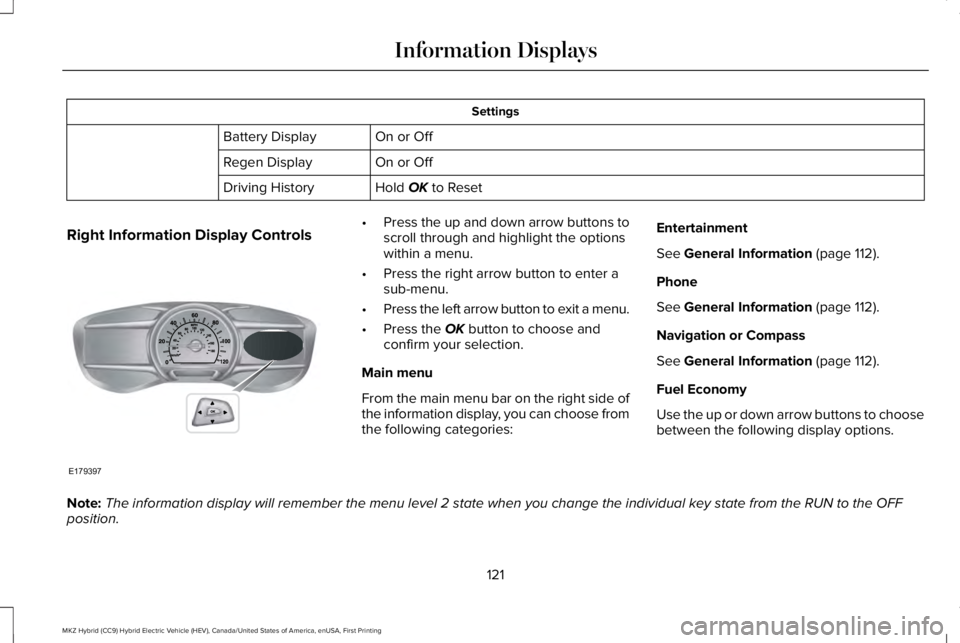
Settings
On or OffBattery Display
On or OffRegen Display
Hold OK to ResetDriving History
Right Information Display Controls•Press the up and down arrow buttons toscroll through and highlight the optionswithin a menu.
•Press the right arrow button to enter asub-menu.
•Press the left arrow button to exit a menu.
•Press the OK button to choose andconfirm your selection.
Main menu
From the main menu bar on the right side ofthe information display, you can choose fromthe following categories:
Entertainment
See General Information (page 112).
Phone
See General Information (page 112).
Navigation or Compass
See General Information (page 112).
Fuel Economy
Use the up or down arrow buttons to choosebetween the following display options.
Note:The information display will remember the menu level 2 state when you change the individual key state from the RUN to the OFFposition.
121
MKZ Hybrid (CC9) Hybrid Electric Vehicle (HEV), Canada/United States of America, enUSA, First Printing
Information DisplaysE179397
Page 132 of 572
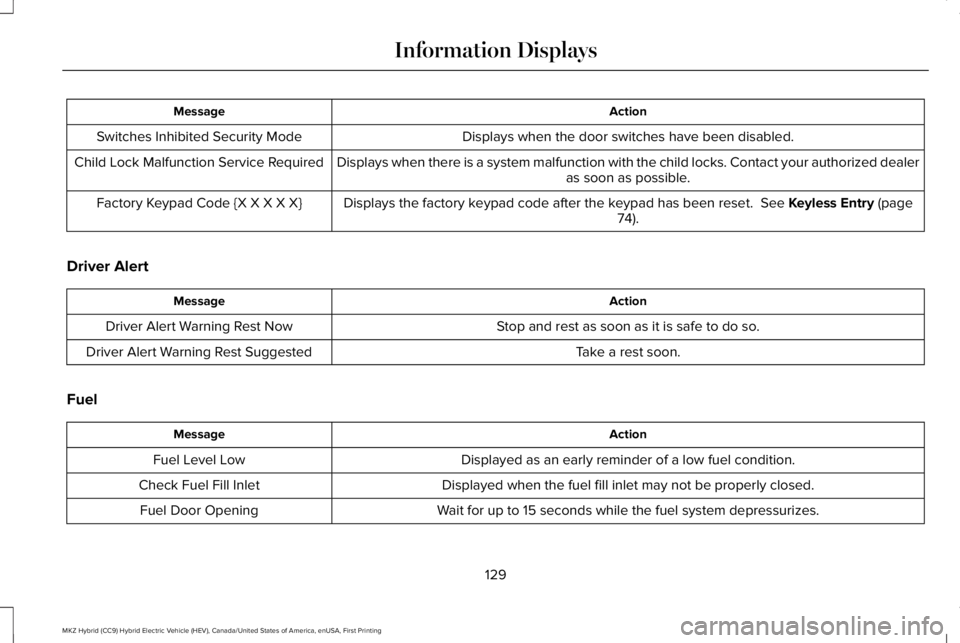
ActionMessage
Displays when the door switches have been disabled.Switches Inhibited Security Mode
Displays when there is a system malfunction with the child locks. Contact your authorized dealeras soon as possible.Child Lock Malfunction Service Required
Displays the factory keypad code after the keypad has been reset. See Keyless Entry (page74).Factory Keypad Code {X X X X X}
Driver Alert
ActionMessage
Stop and rest as soon as it is safe to do so.Driver Alert Warning Rest Now
Take a rest soon.Driver Alert Warning Rest Suggested
Fuel
ActionMessage
Displayed as an early reminder of a low fuel condition.Fuel Level Low
Displayed when the fuel fill inlet may not be properly closed.Check Fuel Fill Inlet
Wait for up to 15 seconds while the fuel system depressurizes.Fuel Door Opening
129
MKZ Hybrid (CC9) Hybrid Electric Vehicle (HEV), Canada/United States of America, enUSA, First Printing
Information Displays
Page 133 of 572
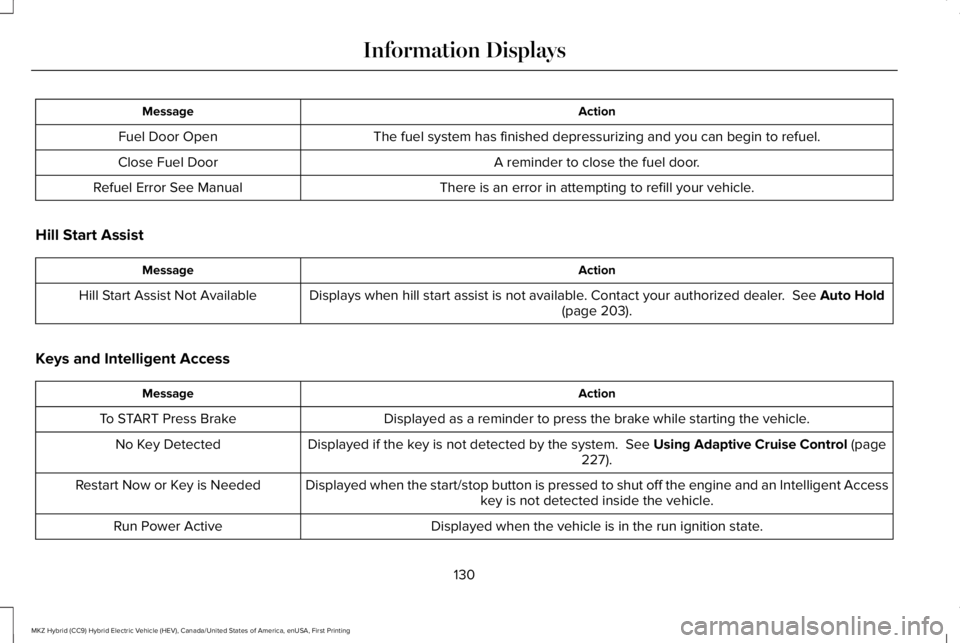
ActionMessage
The fuel system has finished depressurizing and you can begin to refuel.Fuel Door Open
A reminder to close the fuel door.Close Fuel Door
There is an error in attempting to refill your vehicle.Refuel Error See Manual
Hill Start Assist
ActionMessage
Displays when hill start assist is not available. Contact your authorized dealer. See Auto Hold(page 203).Hill Start Assist Not Available
Keys and Intelligent Access
ActionMessage
Displayed as a reminder to press the brake while starting the vehicle.To START Press Brake
Displayed if the key is not detected by the system. See Using Adaptive Cruise Control (page227).No Key Detected
Displayed when the start/stop button is pressed to shut off the engine and an Intelligent Accesskey is not detected inside the vehicle.Restart Now or Key is Needed
Displayed when the vehicle is in the run ignition state.Run Power Active
130
MKZ Hybrid (CC9) Hybrid Electric Vehicle (HEV), Canada/United States of America, enUSA, First Printing
Information Displays
Page 134 of 572
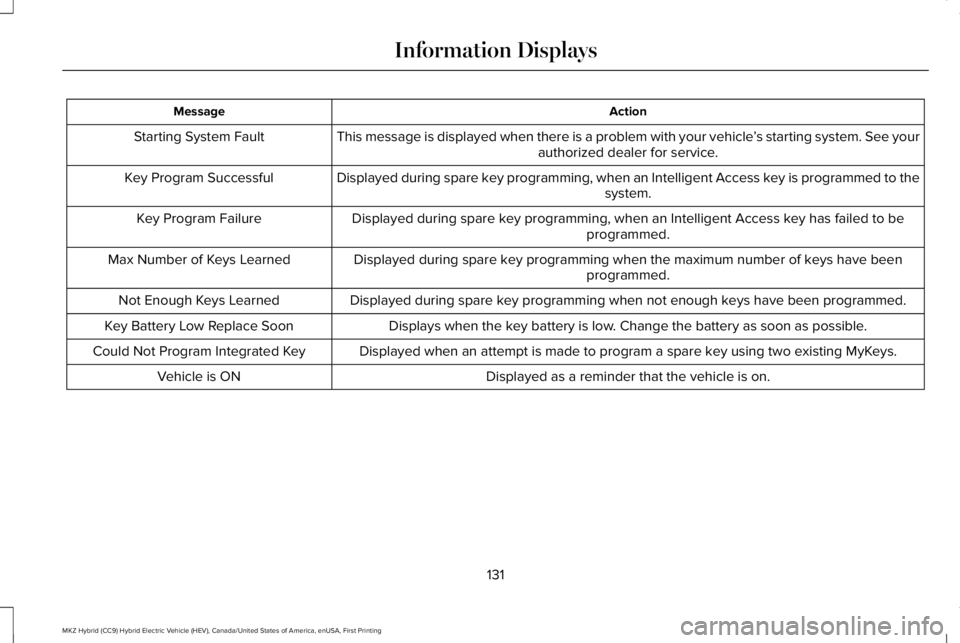
ActionMessage
This message is displayed when there is a problem with your vehicle’s starting system. See yourauthorized dealer for service.Starting System Fault
Displayed during spare key programming, when an Intelligent Access key is programmed to thesystem.Key Program Successful
Displayed during spare key programming, when an Intelligent Access key has failed to beprogrammed.Key Program Failure
Displayed during spare key programming when the maximum number of keys have beenprogrammed.Max Number of Keys Learned
Displayed during spare key programming when not enough keys have been programmed.Not Enough Keys Learned
Displays when the key battery is low. Change the battery as soon as possible.Key Battery Low Replace Soon
Displayed when an attempt is made to program a spare key using two existing MyKeys.Could Not Program Integrated Key
Displayed as a reminder that the vehicle is on.Vehicle is ON
131
MKZ Hybrid (CC9) Hybrid Electric Vehicle (HEV), Canada/United States of America, enUSA, First Printing
Information Displays