reset LINCOLN MKZ HYBRID 2018 Workshop Manual
[x] Cancel search | Manufacturer: LINCOLN, Model Year: 2018, Model line: MKZ HYBRID, Model: LINCOLN MKZ HYBRID 2018Pages: 572, PDF Size: 4.49 MB
Page 471 of 572
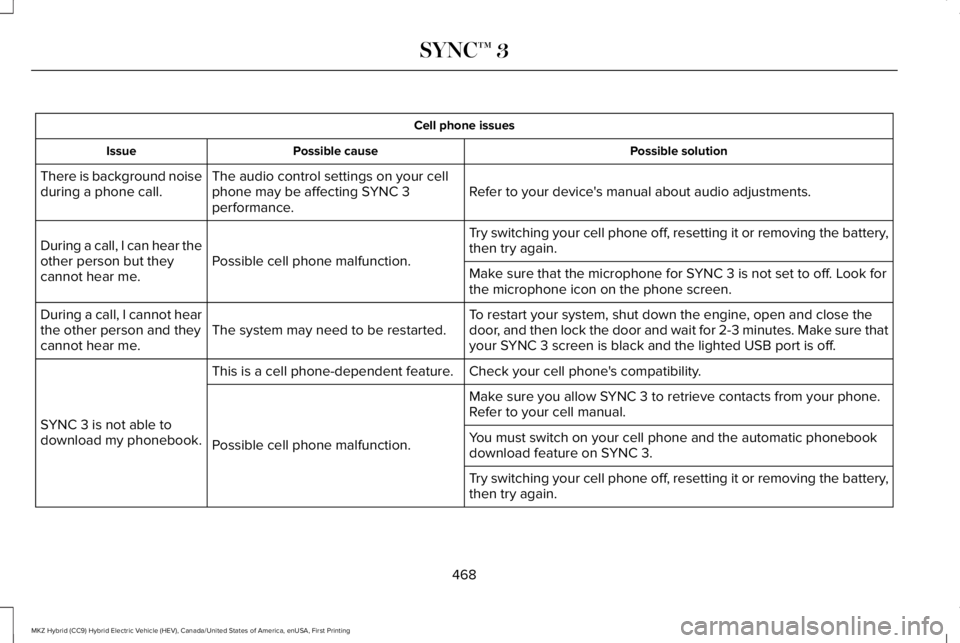
Cell phone issues
Possible solutionPossible causeIssue
Refer to your device's manual about audio adjustments.The audio control settings on your cellphone may be affecting SYNC 3performance.
There is background noiseduring a phone call.
Try switching your cell phone off, resetting it or removing the battery,then try again.Possible cell phone malfunction.During a call, I can hear theother person but theycannot hear me.Make sure that the microphone for SYNC 3 is not set to off. Look forthe microphone icon on the phone screen.
To restart your system, shut down the engine, open and close thedoor, and then lock the door and wait for 2-3 minutes. Make sure thatyour SYNC 3 screen is black and the lighted USB port is off.The system may need to be restarted.During a call, I cannot hearthe other person and theycannot hear me.
Check your cell phone's compatibility.This is a cell phone-dependent feature.
SYNC 3 is not able todownload my phonebook.
Make sure you allow SYNC 3 to retrieve contacts from your phone.Refer to your cell manual.
Possible cell phone malfunction.You must switch on your cell phone and the automatic phonebookdownload feature on SYNC 3.
Try switching your cell phone off, resetting it or removing the battery,then try again.
468
MKZ Hybrid (CC9) Hybrid Electric Vehicle (HEV), Canada/United States of America, enUSA, First Printing
SYNC™ 3
Page 472 of 572
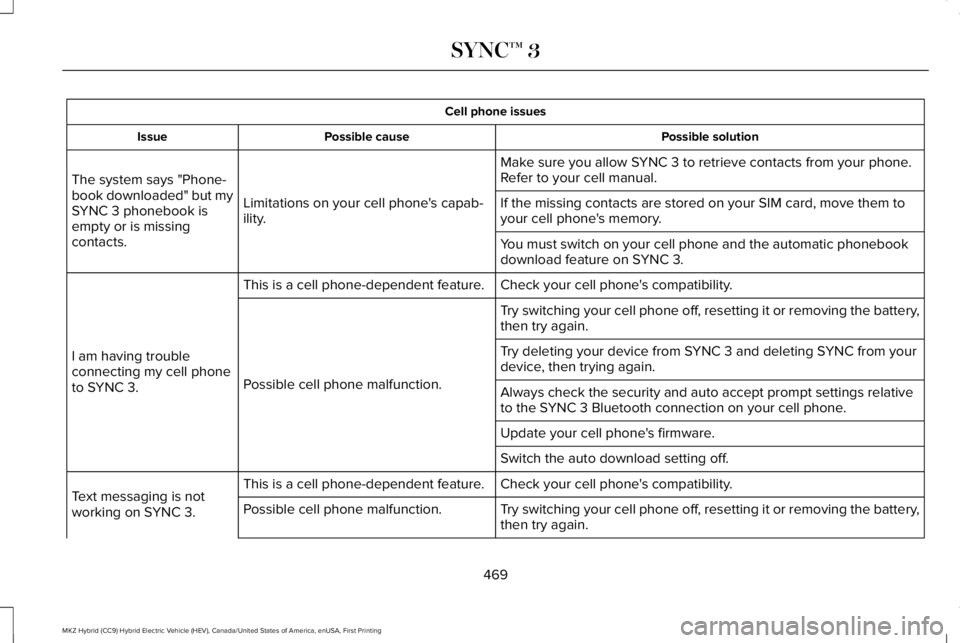
Cell phone issues
Possible solutionPossible causeIssue
Make sure you allow SYNC 3 to retrieve contacts from your phone.Refer to your cell manual.
Limitations on your cell phone's capab-ility.
The system says "Phone-book downloaded" but mySYNC 3 phonebook isempty or is missingcontacts.
If the missing contacts are stored on your SIM card, move them toyour cell phone's memory.
You must switch on your cell phone and the automatic phonebookdownload feature on SYNC 3.
Check your cell phone's compatibility.This is a cell phone-dependent feature.
I am having troubleconnecting my cell phoneto SYNC 3.
Try switching your cell phone off, resetting it or removing the battery,then try again.
Possible cell phone malfunction.
Try deleting your device from SYNC 3 and deleting SYNC from yourdevice, then trying again.
Always check the security and auto accept prompt settings relativeto the SYNC 3 Bluetooth connection on your cell phone.
Update your cell phone's firmware.
Switch the auto download setting off.
Check your cell phone's compatibility.This is a cell phone-dependent feature.Text messaging is notworking on SYNC 3.Try switching your cell phone off, resetting it or removing the battery,then try again.Possible cell phone malfunction.
469
MKZ Hybrid (CC9) Hybrid Electric Vehicle (HEV), Canada/United States of America, enUSA, First Printing
SYNC™ 3
Page 474 of 572
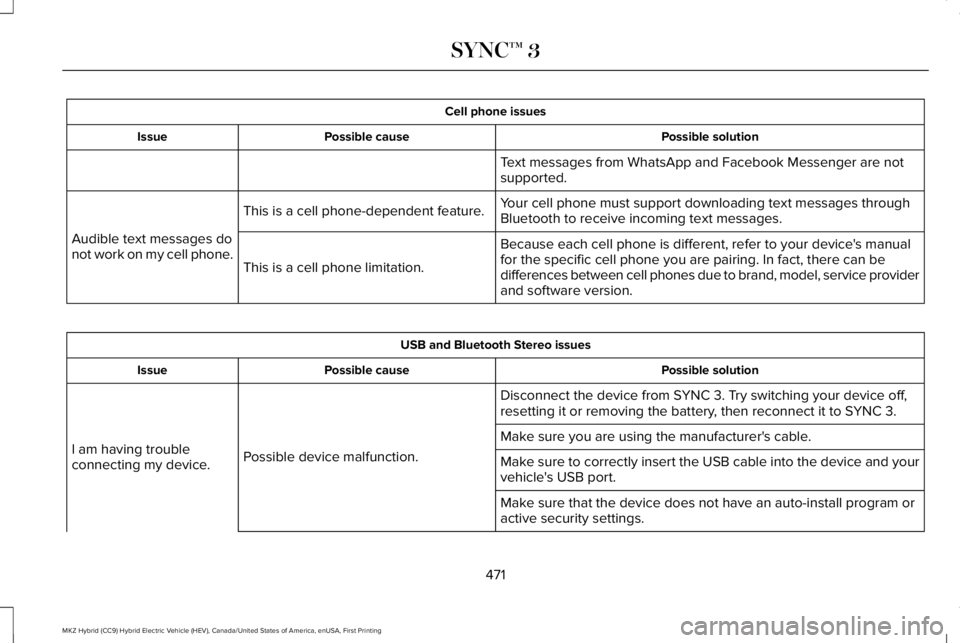
Cell phone issues
Possible solutionPossible causeIssue
Text messages from WhatsApp and Facebook Messenger are notsupported.
Your cell phone must support downloading text messages throughBluetooth to receive incoming text messages.This is a cell phone-dependent feature.
Audible text messages donot work on my cell phone.Because each cell phone is different, refer to your device's manualfor the specific cell phone you are pairing. In fact, there can bedifferences between cell phones due to brand, model, service providerand software version.
This is a cell phone limitation.
USB and Bluetooth Stereo issues
Possible solutionPossible causeIssue
Disconnect the device from SYNC 3. Try switching your device off,resetting it or removing the battery, then reconnect it to SYNC 3.
Possible device malfunction.I am having troubleconnecting my device.
Make sure you are using the manufacturer's cable.
Make sure to correctly insert the USB cable into the device and yourvehicle's USB port.
Make sure that the device does not have an auto-install program oractive security settings.
471
MKZ Hybrid (CC9) Hybrid Electric Vehicle (HEV), Canada/United States of America, enUSA, First Printing
SYNC™ 3
Page 476 of 572
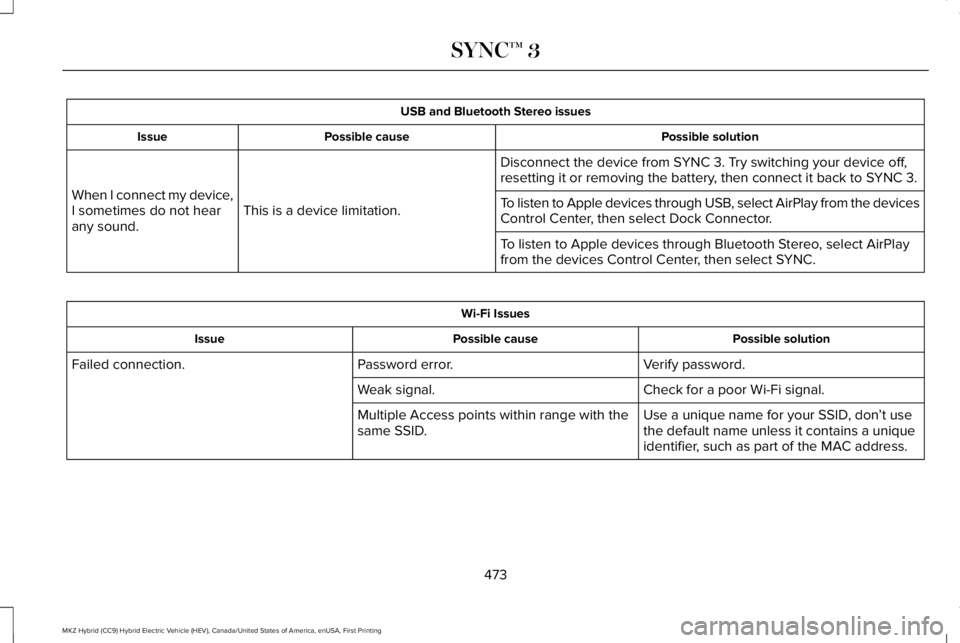
USB and Bluetooth Stereo issues
Possible solutionPossible causeIssue
Disconnect the device from SYNC 3. Try switching your device off,resetting it or removing the battery, then connect it back to SYNC 3.
This is a device limitation.When I connect my device,I sometimes do not hearany sound.
To listen to Apple devices through USB, select AirPlay from the devicesControl Center, then select Dock Connector.
To listen to Apple devices through Bluetooth Stereo, select AirPlayfrom the devices Control Center, then select SYNC.
Wi-Fi Issues
Possible solutionPossible causeIssue
Verify password.Password error.Failed connection.
Check for a poor Wi-Fi signal.Weak signal.
Use a unique name for your SSID, don’t usethe default name unless it contains a uniqueidentifier, such as part of the MAC address.
Multiple Access points within range with thesame SSID.
473
MKZ Hybrid (CC9) Hybrid Electric Vehicle (HEV), Canada/United States of America, enUSA, First Printing
SYNC™ 3
Page 480 of 572
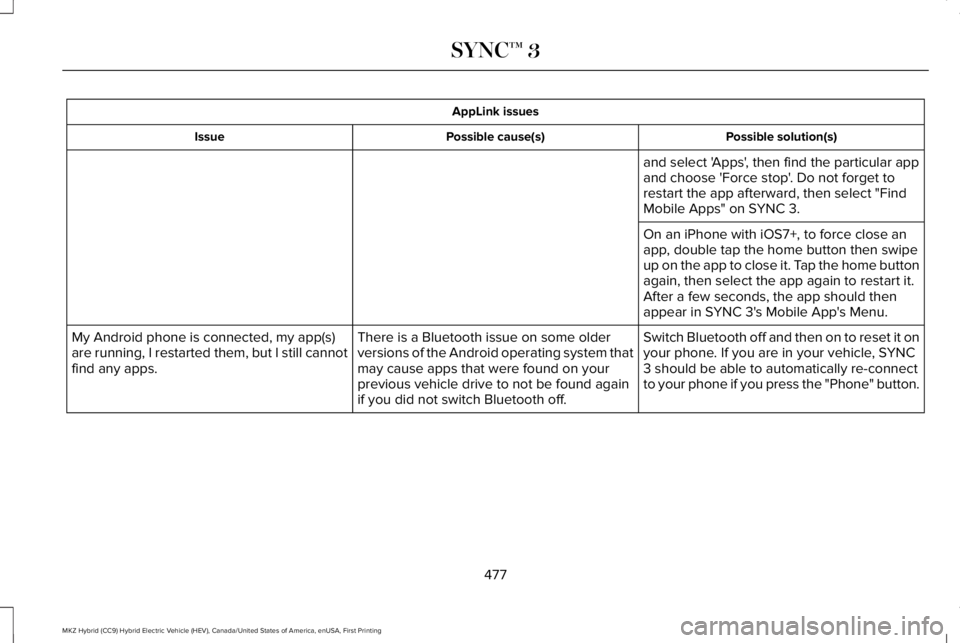
AppLink issues
Possible solution(s)Possible cause(s)Issue
and select 'Apps', then find the particular appand choose 'Force stop'. Do not forget torestart the app afterward, then select "FindMobile Apps" on SYNC 3.
On an iPhone with iOS7+, to force close anapp, double tap the home button then swipeup on the app to close it. Tap the home buttonagain, then select the app again to restart it.After a few seconds, the app should thenappear in SYNC 3's Mobile App's Menu.
Switch Bluetooth off and then on to reset it onyour phone. If you are in your vehicle, SYNC3 should be able to automatically re-connectto your phone if you press the "Phone" button.
There is a Bluetooth issue on some olderversions of the Android operating system thatmay cause apps that were found on yourprevious vehicle drive to not be found againif you did not switch Bluetooth off.
My Android phone is connected, my app(s)are running, I restarted them, but I still cannotfind any apps.
477
MKZ Hybrid (CC9) Hybrid Electric Vehicle (HEV), Canada/United States of America, enUSA, First Printing
SYNC™ 3
Page 481 of 572
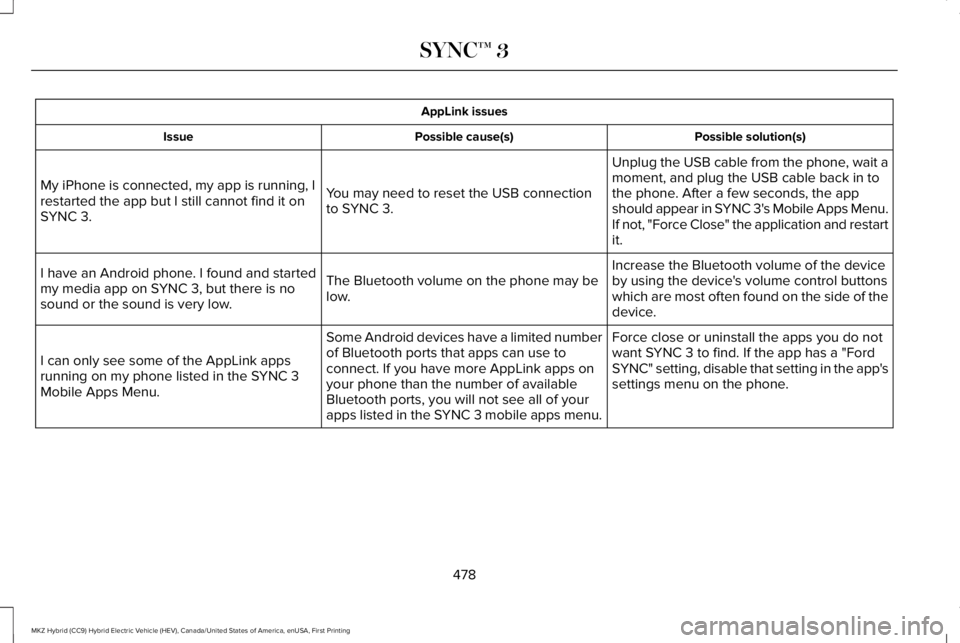
AppLink issues
Possible solution(s)Possible cause(s)Issue
Unplug the USB cable from the phone, wait amoment, and plug the USB cable back in tothe phone. After a few seconds, the appshould appear in SYNC 3's Mobile Apps Menu.If not, "Force Close" the application and restartit.
You may need to reset the USB connectionto SYNC 3.
My iPhone is connected, my app is running, Irestarted the app but I still cannot find it onSYNC 3.
Increase the Bluetooth volume of the deviceby using the device's volume control buttonswhich are most often found on the side of thedevice.
The Bluetooth volume on the phone may below.
I have an Android phone. I found and startedmy media app on SYNC 3, but there is nosound or the sound is very low.
Force close or uninstall the apps you do notwant SYNC 3 to find. If the app has a "FordSYNC" setting, disable that setting in the app'ssettings menu on the phone.
Some Android devices have a limited numberof Bluetooth ports that apps can use toconnect. If you have more AppLink apps onyour phone than the number of availableBluetooth ports, you will not see all of yourapps listed in the SYNC 3 mobile apps menu.
I can only see some of the AppLink appsrunning on my phone listed in the SYNC 3Mobile Apps Menu.
478
MKZ Hybrid (CC9) Hybrid Electric Vehicle (HEV), Canada/United States of America, enUSA, First Printing
SYNC™ 3
Page 485 of 572
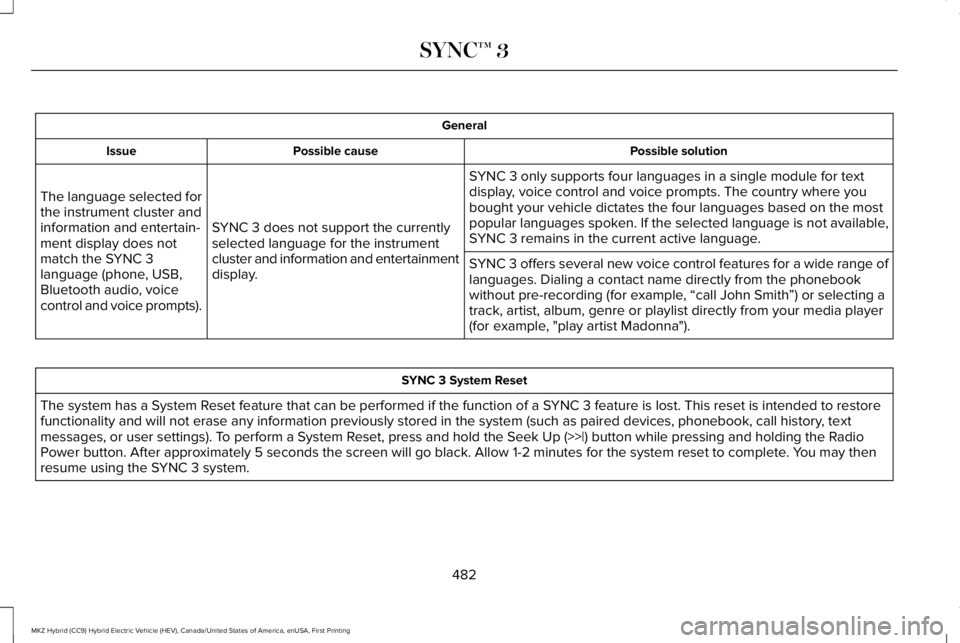
General
Possible solutionPossible causeIssue
SYNC 3 only supports four languages in a single module for textdisplay, voice control and voice prompts. The country where youbought your vehicle dictates the four languages based on the mostpopular languages spoken. If the selected language is not available,SYNC 3 remains in the current active language.SYNC 3 does not support the currentlyselected language for the instrumentcluster and information and entertainmentdisplay.
The language selected forthe instrument cluster andinformation and entertain-ment display does notmatch the SYNC 3language (phone, USB,Bluetooth audio, voicecontrol and voice prompts).
SYNC 3 offers several new voice control features for a wide range oflanguages. Dialing a contact name directly from the phonebookwithout pre-recording (for example, “call John Smith”) or selecting atrack, artist, album, genre or playlist directly from your media player(for example, "play artist Madonna").
SYNC 3 System Reset
The system has a System Reset feature that can be performed if the function of a SYNC 3 feature is lost. This reset is intended to restorefunctionality and will not erase any information previously stored in the system (such as paired devices, phonebook, call history, textmessages, or user settings). To perform a System Reset, press and hold the Seek Up (>>|) button while pressing and holding the RadioPower button. After approximately 5 seconds the screen will go black. Allow 1-2 minutes for the system reset to complete. You may thenresume using the SYNC 3 system.
482
MKZ Hybrid (CC9) Hybrid Electric Vehicle (HEV), Canada/United States of America, enUSA, First Printing
SYNC™ 3
Page 493 of 572
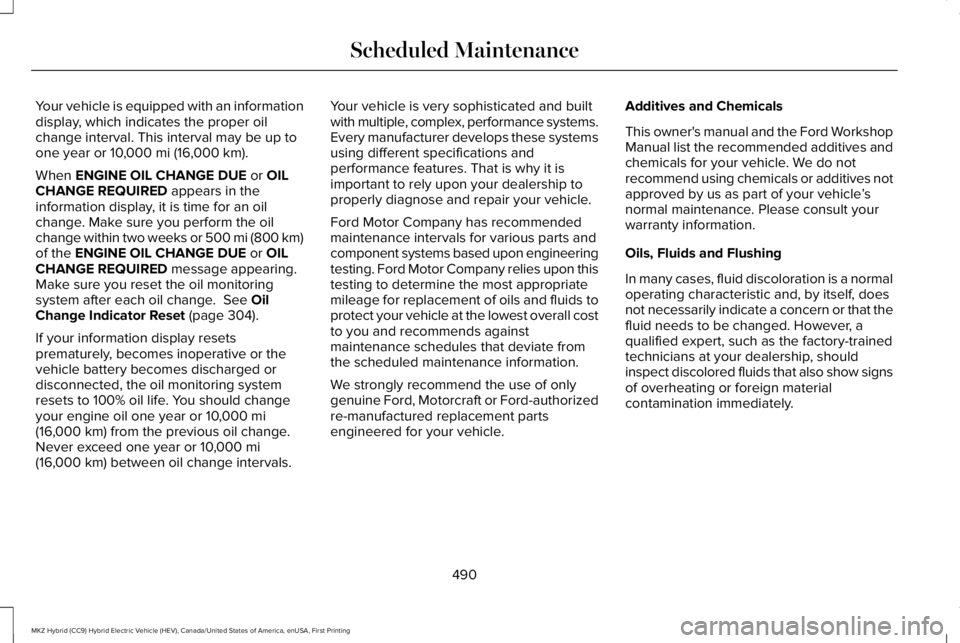
Your vehicle is equipped with an informationdisplay, which indicates the proper oilchange interval. This interval may be up toone year or 10,000 mi (16,000 km).
When ENGINE OIL CHANGE DUE or OILCHANGE REQUIRED appears in theinformation display, it is time for an oilchange. Make sure you perform the oilchange within two weeks or 500 mi (800 km)of the ENGINE OIL CHANGE DUE or OILCHANGE REQUIRED message appearing.Make sure you reset the oil monitoringsystem after each oil change. See OilChange Indicator Reset (page 304).
If your information display resetsprematurely, becomes inoperative or thevehicle battery becomes discharged ordisconnected, the oil monitoring systemresets to 100% oil life. You should changeyour engine oil one year or 10,000 mi(16,000 km) from the previous oil change.Never exceed one year or 10,000 mi(16,000 km) between oil change intervals.
Your vehicle is very sophisticated and builtwith multiple, complex, performance systems.Every manufacturer develops these systemsusing different specifications andperformance features. That is why it isimportant to rely upon your dealership toproperly diagnose and repair your vehicle.
Ford Motor Company has recommendedmaintenance intervals for various parts andcomponent systems based upon engineeringtesting. Ford Motor Company relies upon thistesting to determine the most appropriatemileage for replacement of oils and fluids toprotect your vehicle at the lowest overall costto you and recommends againstmaintenance schedules that deviate fromthe scheduled maintenance information.
We strongly recommend the use of onlygenuine Ford, Motorcraft or Ford-authorizedre-manufactured replacement partsengineered for your vehicle.
Additives and Chemicals
This owner's manual and the Ford WorkshopManual list the recommended additives andchemicals for your vehicle. We do notrecommend using chemicals or additives notapproved by us as part of your vehicle’snormal maintenance. Please consult yourwarranty information.
Oils, Fluids and Flushing
In many cases, fluid discoloration is a normaloperating characteristic and, by itself, doesnot necessarily indicate a concern or that thefluid needs to be changed. However, aqualified expert, such as the factory-trainedtechnicians at your dealership, shouldinspect discolored fluids that also show signsof overheating or foreign materialcontamination immediately.
490
MKZ Hybrid (CC9) Hybrid Electric Vehicle (HEV), Canada/United States of America, enUSA, First Printing
Scheduled Maintenance
Page 497 of 572
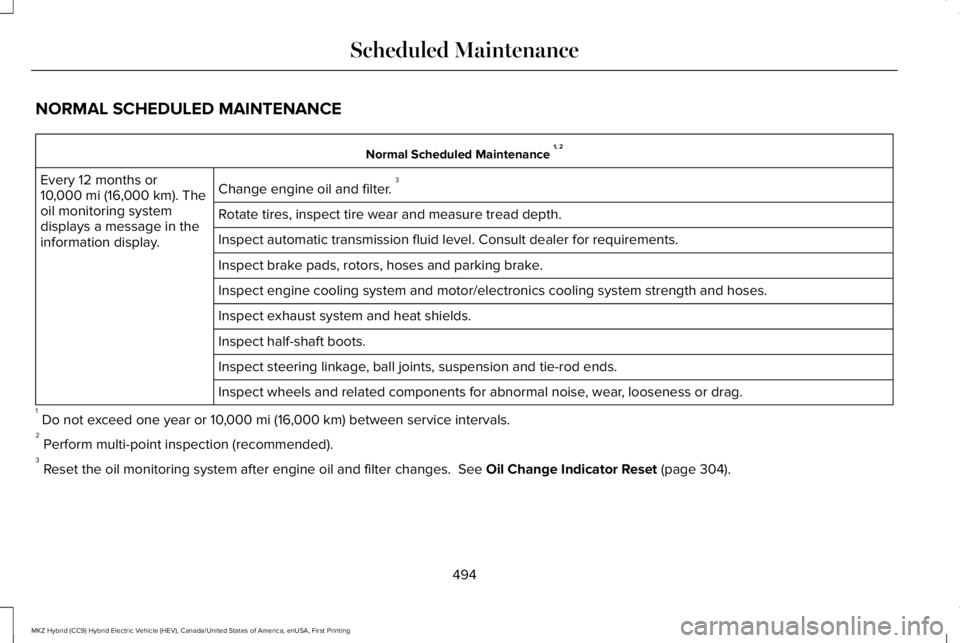
NORMAL SCHEDULED MAINTENANCE
Normal Scheduled Maintenance 1, 2
Change engine oil and filter. 3Every 12 months or10,000 mi (16,000 km). Theoil monitoring systemdisplays a message in theinformation display.
Rotate tires, inspect tire wear and measure tread depth.
Inspect automatic transmission fluid level. Consult dealer for requirements.
Inspect brake pads, rotors, hoses and parking brake.
Inspect engine cooling system and motor/electronics cooling system strength and hoses.
Inspect exhaust system and heat shields.
Inspect half-shaft boots.
Inspect steering linkage, ball joints, suspension and tie-rod ends.
Inspect wheels and related components for abnormal noise, wear, looseness or drag.
1 Do not exceed one year or 10,000 mi (16,000 km) between service intervals.2 Perform multi-point inspection (recommended).3 Reset the oil monitoring system after engine oil and filter changes. See Oil Change Indicator Reset (page 304).
494
MKZ Hybrid (CC9) Hybrid Electric Vehicle (HEV), Canada/United States of America, enUSA, First Printing
Scheduled Maintenance
Page 568 of 572
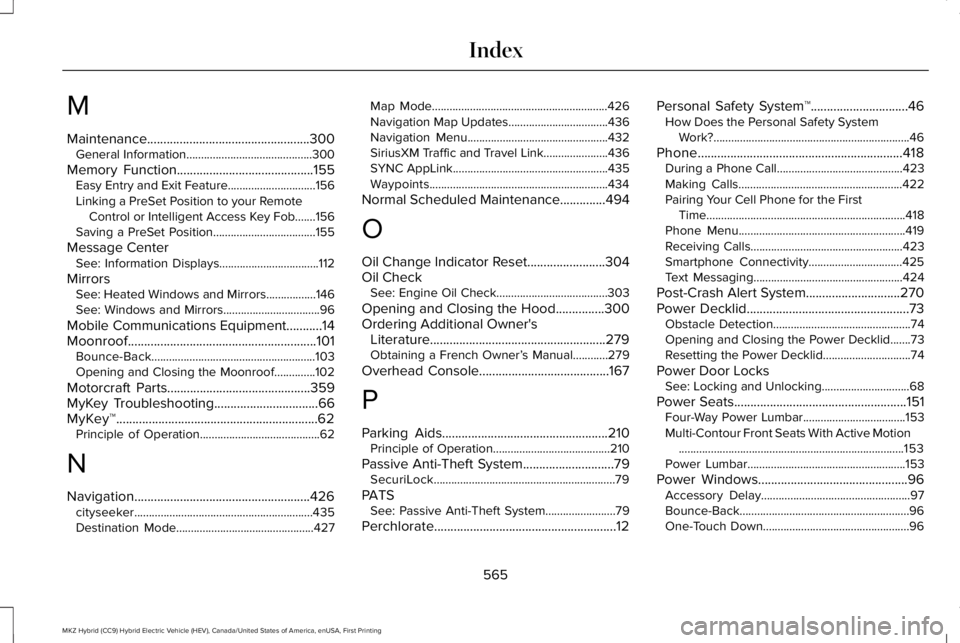
M
Maintenance..................................................300General Information...........................................300
Memory Function..........................................155Easy Entry and Exit Feature..............................156Linking a PreSet Position to your RemoteControl or Intelligent Access Key Fob.......156Saving a PreSet Position...................................155
Message CenterSee: Information Displays..................................112
MirrorsSee: Heated Windows and Mirrors.................146See: Windows and Mirrors.................................96
Mobile Communications Equipment...........14Moonroof..........................................................101Bounce-Back........................................................103Opening and Closing the Moonroof..............102
Motorcraft Parts............................................359MyKey Troubleshooting................................66MyKey™..............................................................62Principle of Operation.........................................62
N
Navigation......................................................426cityseeker.............................................................435Destination Mode...............................................427
Map Mode............................................................426Navigation Map Updates..................................436Navigation Menu................................................432SiriusXM Traffic and Travel Link......................436SYNC AppLink.....................................................435Waypoints.............................................................434
Normal Scheduled Maintenance..............494
O
Oil Change Indicator Reset........................304Oil CheckSee: Engine Oil Check......................................303
Opening and Closing the Hood...............300Ordering Additional Owner'sLiterature......................................................279Obtaining a French Owner’s Manual............279
Overhead Console........................................167
P
Parking Aids...................................................210Principle of Operation........................................210
Passive Anti-Theft System............................79SecuriLock..............................................................79
PATSSee: Passive Anti-Theft System........................79
Perchlorate........................................................12
Personal Safety System™..............................46How Does the Personal Safety SystemWork?...................................................................46
Phone...............................................................418During a Phone Call...........................................423Making Calls........................................................422Pairing Your Cell Phone for the FirstTime....................................................................418Phone Menu.........................................................419Receiving Calls....................................................423Smartphone Connectivity................................425Text Messaging...................................................424
Post-Crash Alert System.............................270Power Decklid..................................................73Obstacle Detection...............................................74Opening and Closing the Power Decklid.......73Resetting the Power Decklid..............................74
Power Door LocksSee: Locking and Unlocking..............................68
Power Seats.....................................................151Four-Way Power Lumbar...................................153Multi-Contour Front Seats With Active Motion.............................................................................153Power Lumbar......................................................153
Power Windows..............................................96Accessory Delay...................................................97Bounce-Back..........................................................96One-Touch Down..................................................96
565
MKZ Hybrid (CC9) Hybrid Electric Vehicle (HEV), Canada/United States of America, enUSA, First Printing
Index