ESP LINCOLN MKZ HYBRID 2018 Repair Manual
[x] Cancel search | Manufacturer: LINCOLN, Model Year: 2018, Model line: MKZ HYBRID, Model: LINCOLN MKZ HYBRID 2018Pages: 572, PDF Size: 4.49 MB
Page 413 of 572
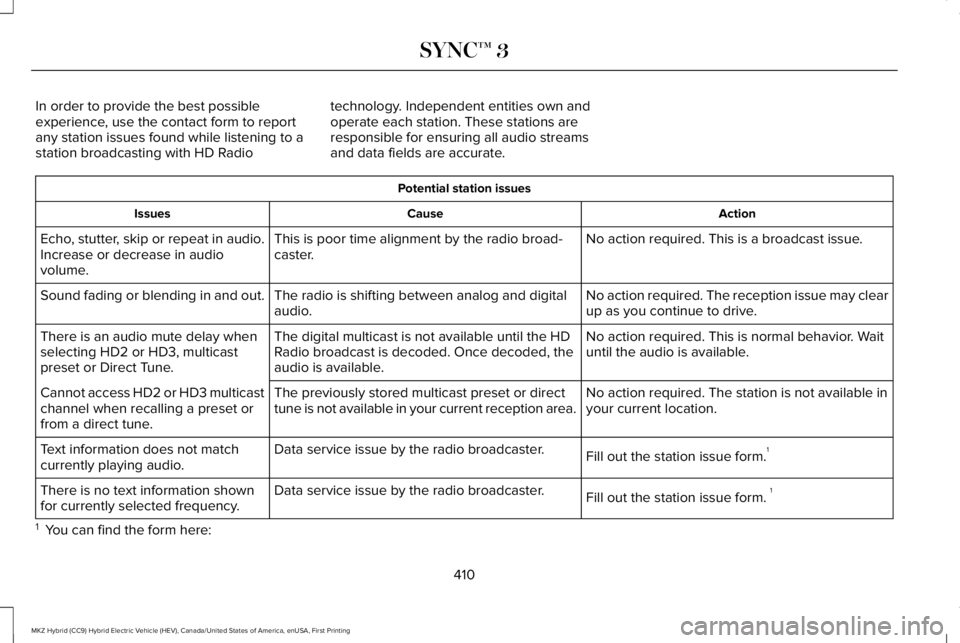
In order to provide the best possibleexperience, use the contact form to reportany station issues found while listening to astation broadcasting with HD Radio
technology. Independent entities own andoperate each station. These stations areresponsible for ensuring all audio streamsand data fields are accurate.
Potential station issues
ActionCauseIssues
No action required. This is a broadcast issue.This is poor time alignment by the radio broad-caster.Echo, stutter, skip or repeat in audio.Increase or decrease in audiovolume.
No action required. The reception issue may clearup as you continue to drive.The radio is shifting between analog and digitalaudio.Sound fading or blending in and out.
No action required. This is normal behavior. Waituntil the audio is available.The digital multicast is not available until the HDRadio broadcast is decoded. Once decoded, theaudio is available.
There is an audio mute delay whenselecting HD2 or HD3, multicastpreset or Direct Tune.
No action required. The station is not available inyour current location.The previously stored multicast preset or directtune is not available in your current reception area.Cannot access HD2 or HD3 multicastchannel when recalling a preset orfrom a direct tune.
Fill out the station issue form.1Data service issue by the radio broadcaster.Text information does not matchcurrently playing audio.
Fill out the station issue form. 1Data service issue by the radio broadcaster.There is no text information shownfor currently selected frequency.
1 You can find the form here:
410
MKZ Hybrid (CC9) Hybrid Electric Vehicle (HEV), Canada/United States of America, enUSA, First Printing
SYNC™ 3
Page 414 of 572
Website
http://hdradio.com/stations/feedback
HD Radio Technology manufactured underlicense from DTS Inc. and foreign patents.HD Radio and the HD and HD Radio logosare proprietary trademarks of DTS Inc. FordMotor Company and DTS Inc. are notresponsible for the content sent using HDRadio technology. Content may be changed,added or deleted at any time at the stationowner's discretion.
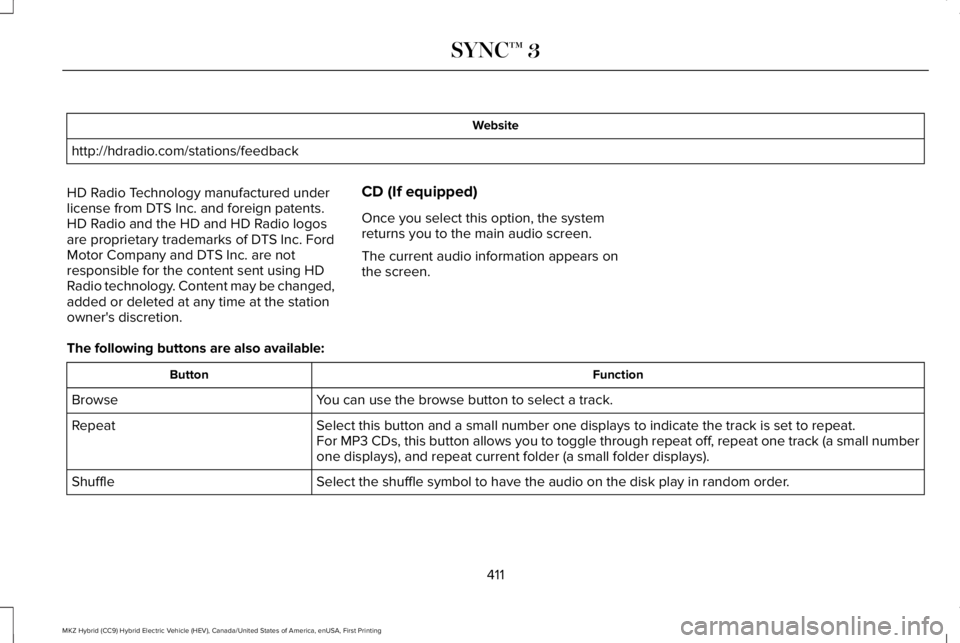
CD (If equipped)
Once you select this option, the systemreturns you to the main audio screen.
The current audio information appears onthe screen.
The following buttons are also available:
FunctionButton
You can use the browse button to select a track.Browse
Select this button and a small number one displays to indicate the track is set to repeat.RepeatFor MP3 CDs, this button allows you to toggle through repeat off, repeat one track (a small numberone displays), and repeat current folder (a small folder displays).
Select the shuffle symbol to have the audio on the disk play in random order.Shuffle
411
MKZ Hybrid (CC9) Hybrid Electric Vehicle (HEV), Canada/United States of America, enUSA, First Printing
SYNC™ 3
Page 421 of 572
PHONE
WARNING
Driving while distracted can result inloss of vehicle control, crash and injury.We strongly recommend that you useextreme caution when using any device thatmay take your focus off the road. Yourprimary responsibility is the safe operationof your vehicle. We recommend against theuse of any hand-held device while drivingand encourage the use of voice-operatedsystems when possible. Make sure you areaware of all applicable local laws that mayaffect the use of electronic devices whiledriving.
Hands-free calling is one of the main featuresof the system. Once you pair your cell phone,you can access many options using thetouchscreen or voice commands. While thesystem supports a variety of features, manyare dependent on your cell phone’sfunctionality.
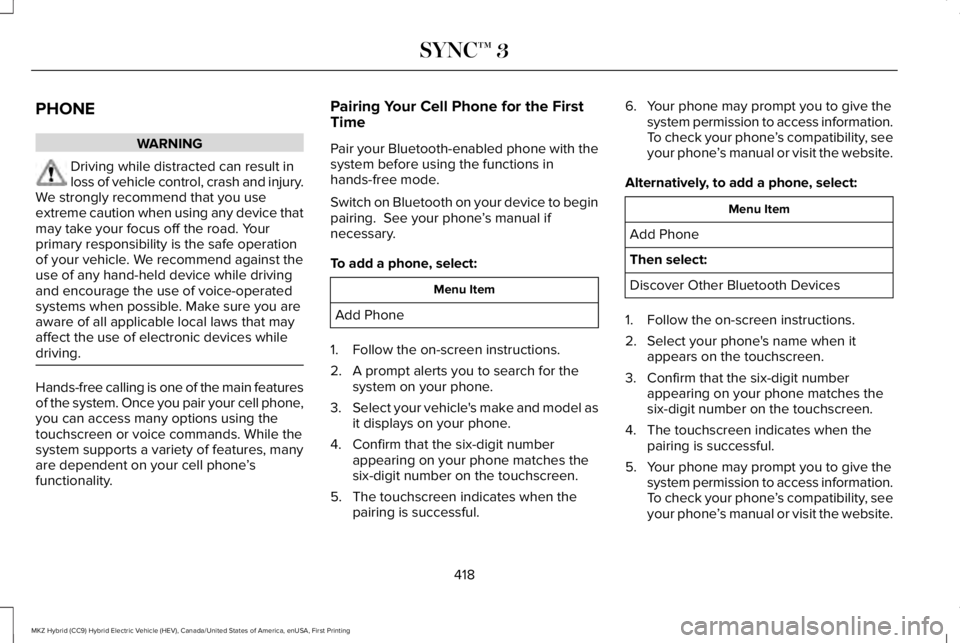
Pairing Your Cell Phone for the FirstTime
Pair your Bluetooth-enabled phone with thesystem before using the functions inhands-free mode.
Switch on Bluetooth on your device to beginpairing. See your phone’s manual ifnecessary.
To add a phone, select:
Menu Item
Add Phone
1. Follow the on-screen instructions.
2. A prompt alerts you to search for thesystem on your phone.
3.Select your vehicle's make and model asit displays on your phone.
4. Confirm that the six-digit numberappearing on your phone matches thesix-digit number on the touchscreen.
5. The touchscreen indicates when thepairing is successful.
6. Your phone may prompt you to give thesystem permission to access information.To check your phone’s compatibility, seeyour phone’s manual or visit the website.
Alternatively, to add a phone, select:
Menu Item
Add Phone
Then select:
Discover Other Bluetooth Devices
1. Follow the on-screen instructions.
2. Select your phone's name when itappears on the touchscreen.
3. Confirm that the six-digit numberappearing on your phone matches thesix-digit number on the touchscreen.
4. The touchscreen indicates when thepairing is successful.
5. Your phone may prompt you to give thesystem permission to access information.To check your phone’s compatibility, seeyour phone’s manual or visit the website.
418
MKZ Hybrid (CC9) Hybrid Electric Vehicle (HEV), Canada/United States of America, enUSA, First Printing
SYNC™ 3
Page 427 of 572
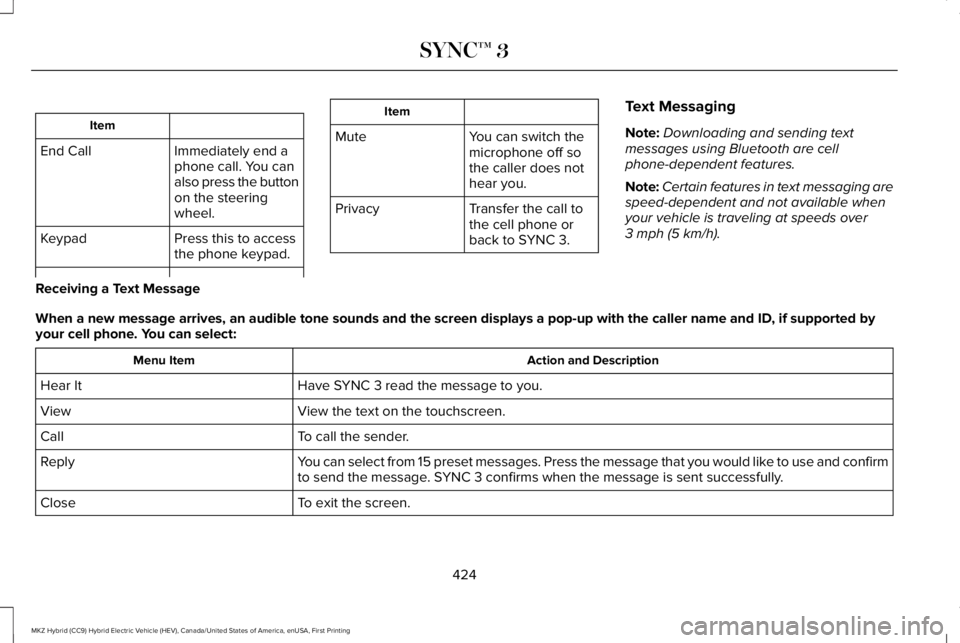
Item
Immediately end aphone call. You canalso press the buttonon the steeringwheel.
End Call
Press this to accessthe phone keypad.Keypad
Item
MuteYou can switch themicrophone off sothe caller does nothear you.
Transfer the call tothe cell phone orback to SYNC 3.
Privacy
Text Messaging
Note:Downloading and sending textmessages using Bluetooth are cellphone-dependent features.
Note:Certain features in text messaging arespeed-dependent and not available whenyour vehicle is traveling at speeds over3 mph (5 km/h).
Receiving a Text Message
When a new message arrives, an audible tone sounds and the screen displays a pop-up with the caller name and ID, if supported byyour cell phone. You can select:
Action and DescriptionMenu Item
Have SYNC 3 read the message to you.Hear It
View the text on the touchscreen.View
To call the sender.Call
You can select from 15 preset messages. Press the message that you would like to use and confirmto send the message. SYNC 3 confirms when the message is sent successfully.Reply
To exit the screen.Close
424
MKZ Hybrid (CC9) Hybrid Electric Vehicle (HEV), Canada/United States of America, enUSA, First Printing
SYNC™ 3
Page 440 of 572
HERE is the digital map provider for thenavigation application. If you find map dataerrors, you may report them directly to HEREby going to www.here.com/mapcreator.HERE evaluates all reported map errors and
responds with the result of their investigationby e-mail.
Map coverage includes the USA (includingPuerto Rico and the US Virgin Islands),Canada and Mexico.
ELECTRIC VEHICLE INFORMATION
The power flow information for your Hybridvehicle is available through the Apps sectionof the touch screen.
437
MKZ Hybrid (CC9) Hybrid Electric Vehicle (HEV), Canada/United States of America, enUSA, First Printing
SYNC™ 3
Page 446 of 572
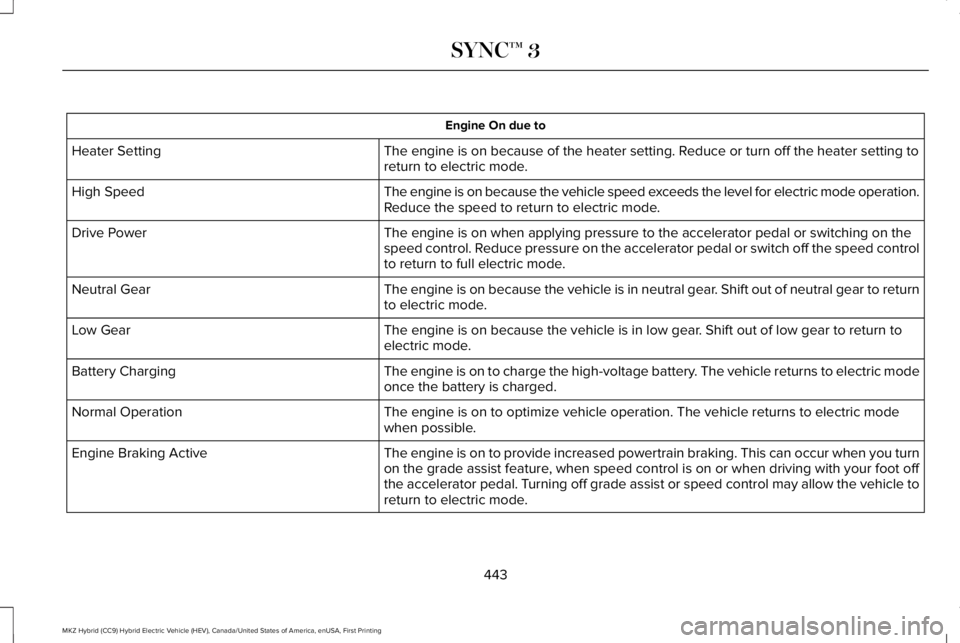
Engine On due to
The engine is on because of the heater setting. Reduce or turn off the heater setting toreturn to electric mode.Heater Setting
The engine is on because the vehicle speed exceeds the level for electric mode operation.Reduce the speed to return to electric mode.High Speed
The engine is on when applying pressure to the accelerator pedal or switching on thespeed control. Reduce pressure on the accelerator pedal or switch off the speed controlto return to full electric mode.
Drive Power
The engine is on because the vehicle is in neutral gear. Shift out of neutral gear to returnto electric mode.Neutral Gear
The engine is on because the vehicle is in low gear. Shift out of low gear to return toelectric mode.Low Gear
The engine is on to charge the high-voltage battery. The vehicle returns to electric modeonce the battery is charged.Battery Charging
The engine is on to optimize vehicle operation. The vehicle returns to electric modewhen possible.Normal Operation
The engine is on to provide increased powertrain braking. This can occur when you turnon the grade assist feature, when speed control is on or when driving with your foot offthe accelerator pedal. Turning off grade assist or speed control may allow the vehicle toreturn to electric mode.
Engine Braking Active
443
MKZ Hybrid (CC9) Hybrid Electric Vehicle (HEV), Canada/United States of America, enUSA, First Printing
SYNC™ 3
Page 447 of 572
Privacy Notice for GPS Mapping withMyLincoln Mobile
MyLincoln Mobile allows for GPS mappingwhen a vehicle is registered to a MyLincolnMobile account. To remove the vehicle fromthe account, thereby removing GPS mappingability, a Master Reset can be performed inthe vehicle. See Settings (page 448).
Before transferring ownership of a vehicle,owners may choose to execute a MasterReset or Factory Reset (completed via theMyLincoln Mobile website). Either methodremoves the vehicle from all MyLincolnMobile accounts.
It is recommended that new owners conducta Master Reset upon taking possession ofthe vehicle to remove it from any existingMyLincoln Mobile accounts. The new ownercan activate a MyLincoln Mobile account bycompleting registration process on thewebsite.
Website
owner.lincoln.comwww.syncmyride.ca
Website
www.syncmaroute.ca
APPS
The system enables voice, steering wheel,and touch screen control of SYNC 3 AppLinkenabled smartphone apps. Once an app isrunning through AppLink, you can controlmain features of the app through voicecommands and steering wheel controls.
Note:Available AppLink enabled apps willvary by market.
Note:You must pair and connect yoursmartphone via Bluetooth to SYNC 3 toaccess AppLink.
Note:iPhone users need to connect thephone to the USB port.
Note:For information on available apps,supported smartphone devices andtroubleshooting tips please visit:
Websites
owner.lincoln.comwww.syncmyride.cawww.syncmaroute.ca
Note:Make sure you have an active accountfor the app that you have downloaded. Someapps will work automatically with no setup.Other apps will want you to configure yourpersonal settings and personalize yourexperience by creating stations or favorites.We recommend you do this at home oroutside of your vehicle.
Note:We encourage you to review thesmartphone app’s terms of service andprivacy policies because Ford is notresponsible for your app or its use of data.
444
MKZ Hybrid (CC9) Hybrid Electric Vehicle (HEV), Canada/United States of America, enUSA, First Printing
SYNC™ 3
Page 448 of 572
Note:AppLink is a native SYNC systemfeature. Accessing mobile apps throughAppLink is only possible when Android Autoor Apple CarPlay are disabled. Some appsmay only be accessible in the car throughAppLink and others only through AndroidAuto or Apple CarPlay. Please refer to theSmartphone Connectivity information todisable Android Auto or Apple CarPlay.
Note:In order to use an app with SYNC 3,the app needs to be running in thebackground of your phone. If you shut downthe app on your phone, it shuts down theapp on SYNC 3 as well.
Note:If a SYNC 3 AppLink compatible appis not shown in the Apps Domain, make surethe required app is running on the mobiledevice.
Action and Descrip-tionMenu Item
SYNC 3 will searchand connect tocompatible app(s)running on yourmobile device.
Connect MobileApps
Enabling SYNC 3 Mobile Apps
In order to enable mobile apps, SYNC 3requires user consent to send and receiveapp authorization information and updatesusing the data plan associated with theconnected device.
The connected device sends data to Ford inthe United States. The information isencrypted and includes your VIN, SYNC 3module number, odometer, usage statisticsand debugging information. We retain thisdata for only as long as necessary to providethis service, troubleshoot, and improveproducts and services and to offer youproducts and services that may interest youwhere allowed by law.
Note:You must enable mobile apps for eachconnected device the first time you select amobile app using the system.
Note:Ford reserves the right to limitfunctionality or deactivate mobile apps atany time.
Note:Standard data rates apply. Ford is notresponsible for any additional charges youmay receive from your service provider,when your vehicle sends or receives datathrough the connected device. This includesany additional charges incurred due todriving in areas when roaming out of a homenetwork.
You can enable and disable apps throughsettings. See Settings (page 448).
App Permissions
The system organizes the app permissionsinto groups. You can grant these grouppermissions individually. You can change apermission group status any time when notdriving, by using the settings menu. While inthe settings menu, you can also see the dataincluded in each group.
445
MKZ Hybrid (CC9) Hybrid Electric Vehicle (HEV), Canada/United States of America, enUSA, First Printing
SYNC™ 3
Page 449 of 572
When you launch an app using SYNC 3, thesystem may ask you to grant certainpermissions, for example Vehicle information,Driving characteristics, GPS and Speed,and/or Push notifications. You can enable allgroups or none of them during the initial apppermissions prompts. The settings menuoffers individual group permission control.
Note:You are only prompted to grantpermissions the first time you use an appwith SYNC 3.
Note:If you disable group permissions, appswill still be enabled to work with SYNC 3unless you deactivate All Apps in the settingsmenu.
SiriusXM Traffic and Travel Link (If
Equipped)
WARNING
Driving while distracted can result inloss of vehicle control, crash and injury.We strongly recommend that you useextreme caution when using any device thatmay take your focus off the road. Yourprimary responsibility is the safe operationof your vehicle. We recommend against theuse of any hand-held device while drivingand encourage the use of voice-operatedsystems when possible. Make sure you areaware of all applicable local laws that mayaffect the use of electronic devices whiledriving.
Note:SiriusXM Traffic and Travel Link maynot be available in all markets.
Note:In order to use SiriusXM Traffic andTravel Link, your vehicle must havenavigation.
Note:A paid subscription is required toaccess and use these features. Go towww.siriusxm.com/travellink for moreinformation.
Note:Visit www.siriusxm.com/traffic and clickon Coverage map and details for a completelisting of all traffic areas covered by SiriusXMTraffic and Travel Link.
Note:Neither Sirius nor Ford is responsiblefor any errors or inaccuracies in the SiriusXMTraffic and Travel Link services or its use invehicles.
When you subscribe to SiriusXM Traffic andTravel Link, it can help you locate the bestgas prices, find movie listings, get currenttraffic alerts, view the current weather map,get accurate ski conditions and see scoresto current sports games.
446
MKZ Hybrid (CC9) Hybrid Electric Vehicle (HEV), Canada/United States of America, enUSA, First Printing
SYNC™ 3
Page 463 of 572
Navigation Source Selection
The screen lists available alternativenavigation sources using Applink.
Mobile Apps
You can enable the control of compatiblemobile apps running on your Bluetooth orUSB device on SYNC 3. In order to enablemobile apps, SYNC 3 requires user consentto send and receive app authorizationinformation and updates using the data planassociated with the connected device.
The connected devices send data to Ford inthe United States. The encrypted informationincludes your VIN, SYNC 3 module number,anonymous usage statistics and debugginginformation. Updates may take placeautomatically.
Note: Not all Mobile Apps are compatiblewith the system.
Note:Standard data rates will apply. Fordis not responsible for any additional chargesyou may receive from your service provider,when your vehicle sends or receives datathrough the connected device. This includesany additional charges incurred due todriving in areas when roaming out of a homenetwork.
Action and DescriptionMenu Item
Enable or disable the use of mobile apps onSYNC 3.OnMobile Apps
OffDisabling mobile apps in the settings menudisables automatic updates and the use ofmobile apps on SYNC 3.
You can view the status of mobile app permissions in the settings menu.
Once Mobile Apps is enabled, you have the following options:
This provides information on the current state of available app updates.Update Mobile Apps
There are three possible statuses:
460
MKZ Hybrid (CC9) Hybrid Electric Vehicle (HEV), Canada/United States of America, enUSA, First Printing
SYNC™ 3