phone LINCOLN MKZ HYBRID 2018 Manual PDF
[x] Cancel search | Manufacturer: LINCOLN, Model Year: 2018, Model line: MKZ HYBRID, Model: LINCOLN MKZ HYBRID 2018Pages: 572, PDF Size: 4.49 MB
Page 485 of 572
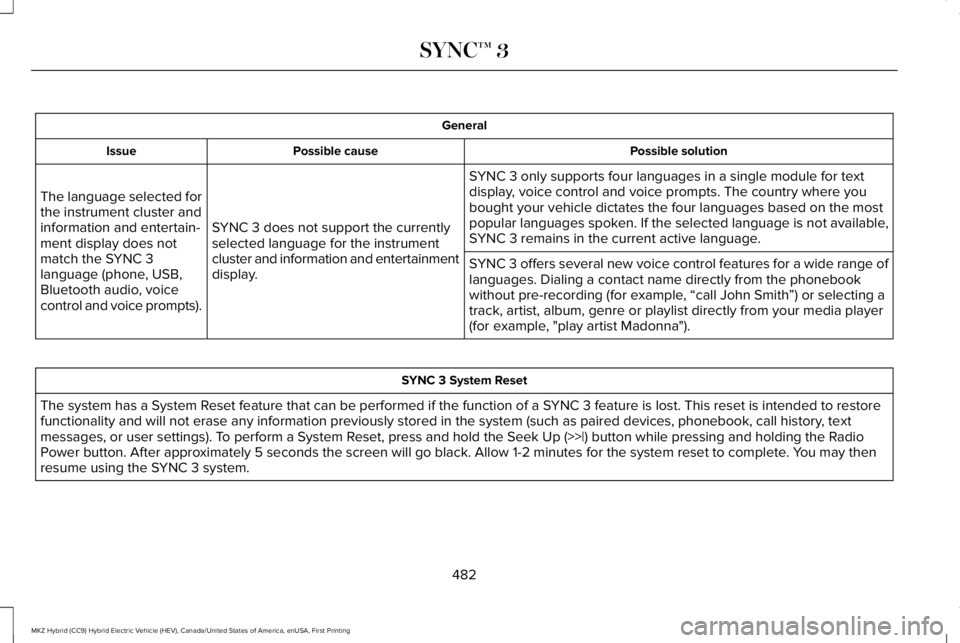
General
Possible solutionPossible causeIssue
SYNC 3 only supports four languages in a single module for textdisplay, voice control and voice prompts. The country where youbought your vehicle dictates the four languages based on the mostpopular languages spoken. If the selected language is not available,SYNC 3 remains in the current active language.SYNC 3 does not support the currentlyselected language for the instrumentcluster and information and entertainmentdisplay.
The language selected forthe instrument cluster andinformation and entertain-ment display does notmatch the SYNC 3language (phone, USB,Bluetooth audio, voicecontrol and voice prompts).
SYNC 3 offers several new voice control features for a wide range oflanguages. Dialing a contact name directly from the phonebookwithout pre-recording (for example, “call John Smith”) or selecting atrack, artist, album, genre or playlist directly from your media player(for example, "play artist Madonna").
SYNC 3 System Reset
The system has a System Reset feature that can be performed if the function of a SYNC 3 feature is lost. This reset is intended to restorefunctionality and will not erase any information previously stored in the system (such as paired devices, phonebook, call history, textmessages, or user settings). To perform a System Reset, press and hold the Seek Up (>>|) button while pressing and holding the RadioPower button. After approximately 5 seconds the screen will go black. Allow 1-2 minutes for the system reset to complete. You may thenresume using the SYNC 3 system.
482
MKZ Hybrid (CC9) Hybrid Electric Vehicle (HEV), Canada/United States of America, enUSA, First Printing
SYNC™ 3
Page 488 of 572
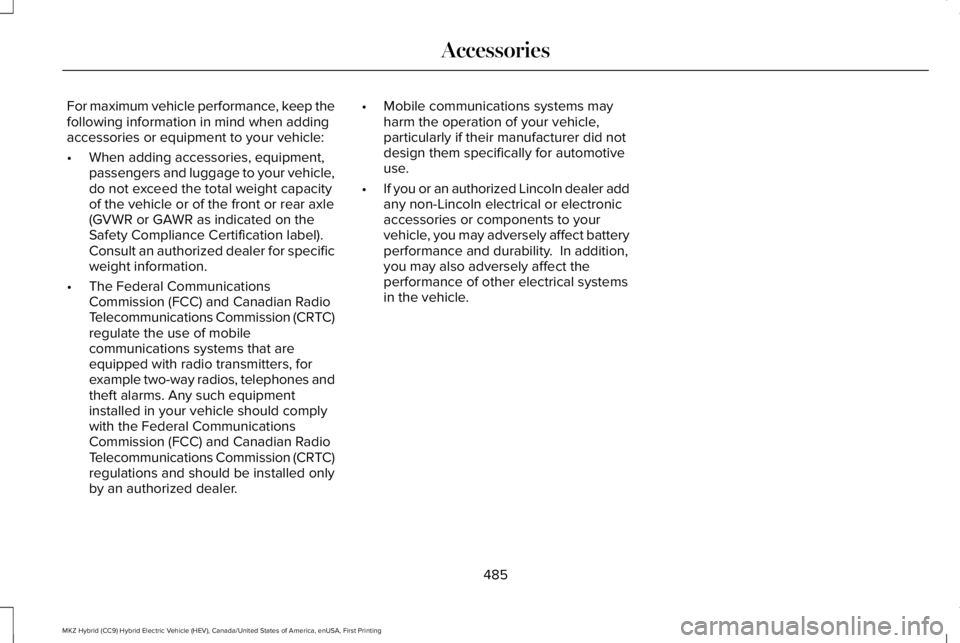
For maximum vehicle performance, keep thefollowing information in mind when addingaccessories or equipment to your vehicle:
•When adding accessories, equipment,passengers and luggage to your vehicle,do not exceed the total weight capacityof the vehicle or of the front or rear axle(GVWR or GAWR as indicated on theSafety Compliance Certification label). Consult an authorized dealer for specificweight information.
•The Federal CommunicationsCommission (FCC) and Canadian RadioTelecommunications Commission (CRTC)regulate the use of mobilecommunications systems that areequipped with radio transmitters, forexample two-way radios, telephones andtheft alarms. Any such equipmentinstalled in your vehicle should complywith the Federal CommunicationsCommission (FCC) and Canadian RadioTelecommunications Commission (CRTC)regulations and should be installed onlyby an authorized dealer.
•Mobile communications systems mayharm the operation of your vehicle,particularly if their manufacturer did notdesign them specifically for automotiveuse.
•If you or an authorized Lincoln dealer addany non-Lincoln electrical or electronicaccessories or components to yourvehicle, you may adversely affect batteryperformance and durability. In addition,you may also adversely affect theperformance of other electrical systemsin the vehicle.
485
MKZ Hybrid (CC9) Hybrid Electric Vehicle (HEV), Canada/United States of America, enUSA, First Printing
Accessories
Page 522 of 572
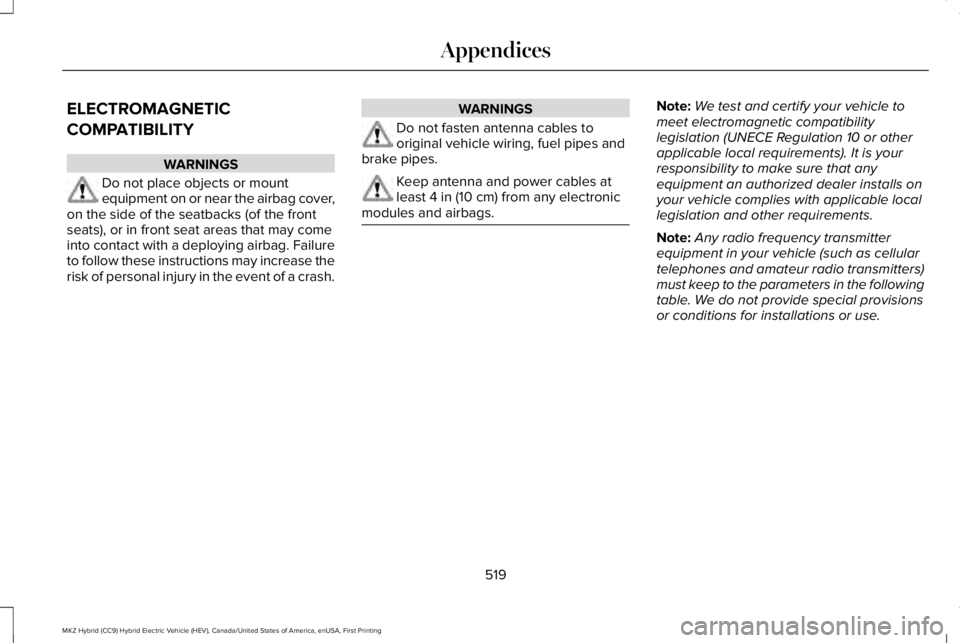
ELECTROMAGNETIC
COMPATIBILITY
WARNINGS
Do not place objects or mountequipment on or near the airbag cover,on the side of the seatbacks (of the frontseats), or in front seat areas that may comeinto contact with a deploying airbag. Failureto follow these instructions may increase therisk of personal injury in the event of a crash.
WARNINGS
Do not fasten antenna cables tooriginal vehicle wiring, fuel pipes andbrake pipes.
Keep antenna and power cables atleast 4 in (10 cm) from any electronicmodules and airbags.
Note:We test and certify your vehicle tomeet electromagnetic compatibilitylegislation (UNECE Regulation 10 or otherapplicable local requirements). It is yourresponsibility to make sure that anyequipment an authorized dealer installs onyour vehicle complies with applicable locallegislation and other requirements.
Note:Any radio frequency transmitterequipment in your vehicle (such as cellulartelephones and amateur radio transmitters)must keep to the parameters in the followingtable. We do not provide special provisionsor conditions for installations or use.
519
MKZ Hybrid (CC9) Hybrid Electric Vehicle (HEV), Canada/United States of America, enUSA, First Printing
Appendices
Page 543 of 572
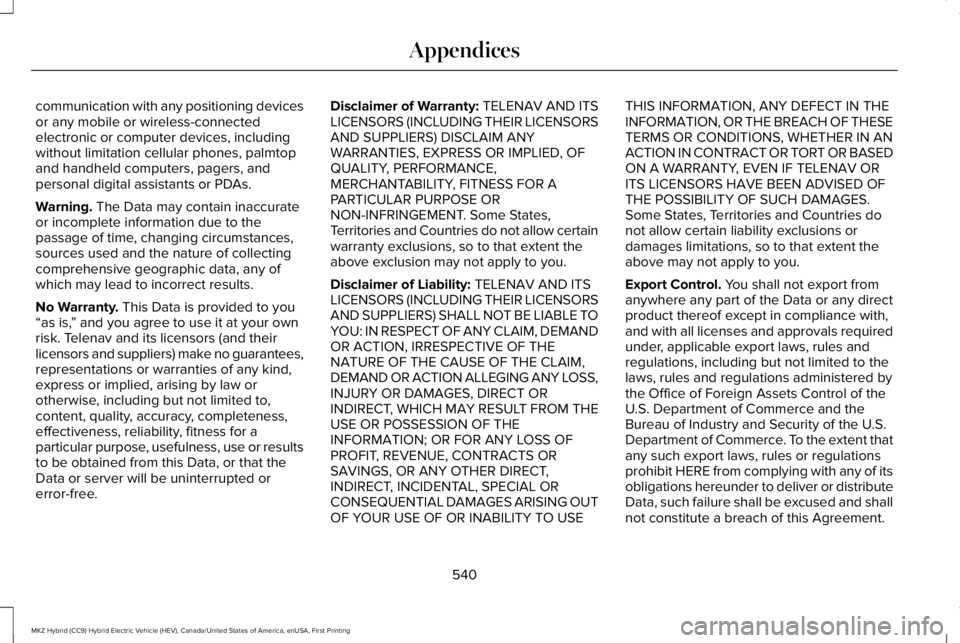
communication with any positioning devicesor any mobile or wireless-connectedelectronic or computer devices, includingwithout limitation cellular phones, palmtopand handheld computers, pagers, andpersonal digital assistants or PDAs.
Warning. The Data may contain inaccurateor incomplete information due to thepassage of time, changing circumstances,sources used and the nature of collectingcomprehensive geographic data, any ofwhich may lead to incorrect results.
No Warranty. This Data is provided to you“as is,” and you agree to use it at your ownrisk. Telenav and its licensors (and theirlicensors and suppliers) make no guarantees,representations or warranties of any kind,express or implied, arising by law orotherwise, including but not limited to,content, quality, accuracy, completeness,effectiveness, reliability, fitness for aparticular purpose, usefulness, use or resultsto be obtained from this Data, or that theData or server will be uninterrupted orerror-free.
Disclaimer of Warranty: TELENAV AND ITSLICENSORS (INCLUDING THEIR LICENSORSAND SUPPLIERS) DISCLAIM ANYWARRANTIES, EXPRESS OR IMPLIED, OFQUALITY, PERFORMANCE,MERCHANTABILITY, FITNESS FOR APARTICULAR PURPOSE ORNON-INFRINGEMENT. Some States,Territories and Countries do not allow certainwarranty exclusions, so to that extent theabove exclusion may not apply to you.
Disclaimer of Liability: TELENAV AND ITSLICENSORS (INCLUDING THEIR LICENSORSAND SUPPLIERS) SHALL NOT BE LIABLE TOYOU: IN RESPECT OF ANY CLAIM, DEMANDOR ACTION, IRRESPECTIVE OF THENATURE OF THE CAUSE OF THE CLAIM,DEMAND OR ACTION ALLEGING ANY LOSS,INJURY OR DAMAGES, DIRECT ORINDIRECT, WHICH MAY RESULT FROM THEUSE OR POSSESSION OF THEINFORMATION; OR FOR ANY LOSS OFPROFIT, REVENUE, CONTRACTS ORSAVINGS, OR ANY OTHER DIRECT,INDIRECT, INCIDENTAL, SPECIAL ORCONSEQUENTIAL DAMAGES ARISING OUTOF YOUR USE OF OR INABILITY TO USE
THIS INFORMATION, ANY DEFECT IN THEINFORMATION, OR THE BREACH OF THESETERMS OR CONDITIONS, WHETHER IN ANACTION IN CONTRACT OR TORT OR BASEDON A WARRANTY, EVEN IF TELENAV ORITS LICENSORS HAVE BEEN ADVISED OFTHE POSSIBILITY OF SUCH DAMAGES.Some States, Territories and Countries donot allow certain liability exclusions ordamages limitations, so to that extent theabove may not apply to you.
Export Control. You shall not export fromanywhere any part of the Data or any directproduct thereof except in compliance with,and with all licenses and approvals requiredunder, applicable export laws, rules andregulations, including but not limited to thelaws, rules and regulations administered bythe Office of Foreign Assets Control of theU.S. Department of Commerce and theBureau of Industry and Security of the U.S.Department of Commerce. To the extent thatany such export laws, rules or regulationsprohibit HERE from complying with any of itsobligations hereunder to deliver or distributeData, such failure shall be excused and shallnot constitute a breach of this Agreement.
540
MKZ Hybrid (CC9) Hybrid Electric Vehicle (HEV), Canada/United States of America, enUSA, First Printing
Appendices
Page 552 of 572
it, and (ii) save it, provided that you do notremove any copyright notices that appearand do not modify the Data in any way. Youagree not to otherwise reproduce, copy,modify, decompile, disassemble or reverseengineer any portion of this Data, and maynot transfer or distribute it in any form, forany purpose, except to the extent permittedby mandatory laws.
Restrictions
Except where you have been specificallylicensed to do so by NAV2 , and withoutlimiting the preceding paragraph, you maynot (a) use this Data with any products,systems, or applications installed orotherwise connected to or in communicationwith vehicles, capable of vehicle navigation,positioning, dispatch, real time routeguidance, fleet management or similarapplications; or (b) with or in communicationwith any positioning devices or any mobileor wireless-connected electronic or computer
devices, including without limitation cellularphones, palmtop and handheld computers,pagers, and personal digital assistants orPDAs. You agree to cease using this Data ifyou fail to comply with these terms andconditions.
Limited Warranty
NAV2 warrants that (a) the Data will performsubstantially in accordance with theaccompanying written materials for a periodof ninety (90) days from the date of receipt,and (b) any support services provided byNAV2 shall be substantially as described inapplicable written materials provided to youby NAV2, and NAV2’s support engineers willmake commercially reasonable efforts tosolve any problem issues.
rigCustomer Remedies
NAV2 and its suppliers’ entire liability andyour exclusive remedy shall be, at NAV2’ssole discretion, either (a) return of the pricepaid, if any, or (b) repair or replacement ofthe Data that do not meet NAV2’s LimitedWarranty and that are returned to NAV2 witha copy of your receipt. This Limited Warranty
is void if failure of the Data has resulted fromaccident, abuse, or misapplication. Anyreplacement Data will be warranted for theremainder of the original warranty period orthirty (30) days, whichever is longer. Neitherthese remedies nor any product supportservices offered by NAV2 are availablewithout proof of purchase from an authorizedinternational source.
No Other Warranty:
EXCEPT FOR THE LMITED WARRANTY SETFORTH ABOVE AND TO THE EXTENTPERMITTED BY APPLICABLE LAW, NAV2AND ITS LICENSORS (INCLUDING THEIRLICENSORS AND SUPPLIERS) DISCLAIMANY WARRANTIES, EXPRESS OR IMPLIED,OF QUALITY, PERFORMANCE,MERCHANTABILITY, FITNESS FOR APARTICULAR PURPOSE, OWNERSHIP ORNON-INFRINGEMENT. Certain warrantyexclusions may not be permitted underapplicable law, so to that extent the aboveexclusion may not apply to you.
549
MKZ Hybrid (CC9) Hybrid Electric Vehicle (HEV), Canada/United States of America, enUSA, First Printing
Appendices
Page 568 of 572
M
Maintenance..................................................300General Information...........................................300
Memory Function..........................................155Easy Entry and Exit Feature..............................156Linking a PreSet Position to your RemoteControl or Intelligent Access Key Fob.......156Saving a PreSet Position...................................155
Message CenterSee: Information Displays..................................112
MirrorsSee: Heated Windows and Mirrors.................146See: Windows and Mirrors.................................96
Mobile Communications Equipment...........14Moonroof..........................................................101Bounce-Back........................................................103Opening and Closing the Moonroof..............102
Motorcraft Parts............................................359MyKey Troubleshooting................................66MyKey™..............................................................62Principle of Operation.........................................62
N
Navigation......................................................426cityseeker.............................................................435Destination Mode...............................................427
Map Mode............................................................426Navigation Map Updates..................................436Navigation Menu................................................432SiriusXM Traffic and Travel Link......................436SYNC AppLink.....................................................435Waypoints.............................................................434
Normal Scheduled Maintenance..............494
O
Oil Change Indicator Reset........................304Oil CheckSee: Engine Oil Check......................................303
Opening and Closing the Hood...............300Ordering Additional Owner'sLiterature......................................................279Obtaining a French Owner’s Manual............279
Overhead Console........................................167
P
Parking Aids...................................................210Principle of Operation........................................210
Passive Anti-Theft System............................79SecuriLock..............................................................79
PATSSee: Passive Anti-Theft System........................79
Perchlorate........................................................12
Personal Safety System™..............................46How Does the Personal Safety SystemWork?...................................................................46
Phone...............................................................418During a Phone Call...........................................423Making Calls........................................................422Pairing Your Cell Phone for the FirstTime....................................................................418Phone Menu.........................................................419Receiving Calls....................................................423Smartphone Connectivity................................425Text Messaging...................................................424
Post-Crash Alert System.............................270Power Decklid..................................................73Obstacle Detection...............................................74Opening and Closing the Power Decklid.......73Resetting the Power Decklid..............................74
Power Door LocksSee: Locking and Unlocking..............................68
Power Seats.....................................................151Four-Way Power Lumbar...................................153Multi-Contour Front Seats With Active Motion.............................................................................153Power Lumbar......................................................153
Power Windows..............................................96Accessory Delay...................................................97Bounce-Back..........................................................96One-Touch Down..................................................96
565
MKZ Hybrid (CC9) Hybrid Electric Vehicle (HEV), Canada/United States of America, enUSA, First Printing
Index
Page 569 of 572
One-Touch Up.......................................................96Window Lock..........................................................97
Pre-Collision Assist......................................249Using the Pre-Collision Assist System..........249
Protecting the Environment..........................16
R
Rear Parking Aid............................................210Obstacle Distance Indicator..............................211
Rear Seat Armrest.........................................160Armrest pass-through........................................160
Rear Seats.......................................................156Rear View Camera.......................................223Using the Rear View Camera System...........223
Rear View CameraSee: Rear View Camera....................................223
Refueling.........................................................182Fuel Filler Door Manual Override Lever........185System Warnings.................................................184
Remote Control...............................................58Car Finder...............................................................60Intelligent Access Key.........................................58Remote Start..........................................................60Replacing the Battery..........................................58Sounding the Panic Alarm..................................60
Remote Start...................................................147Automatic Settings..............................................147
Repairing Minor Paint Damage.................324Replacement Parts Recommendation........13Collision Repairs.....................................................13Scheduled Maintenance and MechanicalRepairs.................................................................13Warranty on Replacement Parts.........................13
Replacing a Lost Key or RemoteControl.............................................................61Reporting Safety Defects (CanadaOnly)..............................................................280Reporting Safety Defects (U.S. Only).......279Roadside Assistance...................................264Vehicles Sold in Canada: Getting RoadsideAssistance.......................................................265Vehicles Sold in Canada: Roadside AssistanceProgram Coverage........................................265Vehicles Sold in Canada: Using RoadsideAssistance.......................................................265Vehicles Sold in the United States: GettingRoadside Assistance.....................................264Vehicles Sold in the United States: UsingRoadside Assistance.....................................264
Roadside Emergencies...............................264Running-InSee: Breaking-In.................................................262
Running Out of Fuel......................................181Refilling With a Portable Fuel Container........181
S
Safety Canopy™...............................................53Safety Precautions........................................179Scheduled Maintenance Record..............499Scheduled Maintenance............................489Seatbelt Extension.........................................45Seatbelt Height Adjustment..........................41Seatbelt Reminder..........................................42Belt-Minder™...........................................................42
Seatbelts...........................................................36Principle of Operation..........................................36
Seatbelt Warning Lamp and IndicatorChime...............................................................41Conditions of operation......................................42
Seats.................................................................149Security..............................................................79Settings...........................................................448911 Assist...............................................................455Ambient Lighting................................................464Bluetooth..............................................................450Clock......................................................................450Display...................................................................466General..................................................................461Media Player........................................................449Mobile Apps........................................................460Navigation............................................................457Phone.....................................................................451
566
MKZ Hybrid (CC9) Hybrid Electric Vehicle (HEV), Canada/United States of America, enUSA, First Printing
Index
Page 571 of 572
What to do when a Tire Is Punctured...........330
TiresSee: Wheels and Tires......................................328
Towing a Trailer............................................260Towing Points.................................................271Installing the Recovery Hook...........................271Recovery Hook Location...................................271
Towing the Vehicle on Four Wheels.......260Emergency Towing............................................260Recreational Towing..........................................260
Towing.............................................................260Traction Control............................................205Principle of Operation.......................................205
Transmission Code Designation...............361Transmission...................................................194Transporting the Vehicle.............................271Type Approvals.............................................555RF Certification Logos for Tire PressureMonitoring Sensor(s).....................................555
U
Under Hood Overview.................................301Unique Driving Characteristics..................173Universal Garage Door Opener.................161HomeLink Wireless Control System................161
USB Port...........................................................371
Using Adaptive Cruise Control.................227Automatic Cancellation......................................231Blocked Sensor...................................................232Canceling the Set Speed..................................231Changing the Set Speed..................................230Detection Issues..................................................231Following a Vehicle...........................................229Following a Vehicle to a CompleteStop...................................................................229Hilly Condition Usage........................................231Overriding the Set Speed................................230Park Brake Application......................................231Resuming the Set Speed...................................231Setting the Adaptive Cruise Speed...............228Setting the Adaptive Cruise Speed When YourVehicle is Stationary......................................228Setting the Gap Distance.................................229Switching Adaptive Cruise Control Off..........231Switching Adaptive Cruise Control On.........228Switching to ECO Cruise..................................234Switching to Normal Cruise Control..............234System Not Available........................................232
Using Cruise Control...................................226Switching Cruise Control Off...........................227Switching Cruise Control On...........................226Switching to ECO Cruise..................................227
Using MyKey With Remote StartSystems..........................................................66
Using Snow Chains......................................349Using Stability Control................................208Using Summer Tires....................................349Using Traction Control................................205Switching the System Off.................................205System Indicator Lights and Messages.......205Using a Switch....................................................205Using the Information Display Controls.......205
Using Voice Recognition............................390Audio Voice Commands...................................392Climate Voice Commands................................393Mobile App Voice Commands........................398Navigation Voice Commands.........................396Phone Voice Commands..................................393SiriusXM Traffic and Travel Link VoiceCommands......................................................398Voice Settings Commands..............................399
Utilizing the Mediation/Arbitration Program(Canada Only).............................................276
V
Vehicle Care...................................................318General Information............................................318
Vehicle Certification Label.........................360Vehicle Identification Number..................360Vehicle Storage............................................325Battery...................................................................326
568
MKZ Hybrid (CC9) Hybrid Electric Vehicle (HEV), Canada/United States of America, enUSA, First Printing
Index