reset LINCOLN MKZ HYBRID 2018 Owners Manual
[x] Cancel search | Manufacturer: LINCOLN, Model Year: 2018, Model line: MKZ HYBRID, Model: LINCOLN MKZ HYBRID 2018Pages: 572, PDF Size: 4.49 MB
Page 7 of 572
Driving Aids
Driver Alert.....................................................235
Lane Keeping System..................................237
Blind Spot Information System.................242
Cross Traffic Alert.........................................244
Steering..........................................................248
Pre-Collision Assist......................................249
Drive Control.................................................253
Load Carrying
Load Limit.......................................................255
Towing
Towing a Trailer............................................260
Towing the Vehicle on Four Wheels.......260
Driving Hints
Breaking-In....................................................262
Economical Driving......................................262
Driving Through Water...............................262
Floor Mats......................................................263
Roadside Emergencies
Roadside Assistance...................................264
Hazard Flashers...........................................265
Fuel Shutoff...................................................265
Jump Starting the Vehicle..........................266
Collision, Damage or Fire Event...............269
Post-Crash Alert System.............................270
Transporting the Vehicle.............................271
Towing Points.................................................271
Customer Assistance
Getting the Services You Need................273
In California (U.S. Only)...............................274
The Better Business Bureau (BBB) AutoLine Program (U.S. Only)........................275
Utilizing the Mediation/Arbitration Program(Canada Only)...........................................276
Getting Assistance Outside the U.S. andCanada........................................................277
Ordering Additional Owner'sLiterature....................................................279
Reporting Safety Defects (U.S. Only).......279
Reporting Safety Defects (CanadaOnly)............................................................280
Fuses
Fuse Specification Chart.............................281
Changing a Fuse..........................................297
Maintenance
General Information....................................300
Opening and Closing the Hood...............300
Under Hood Overview.................................301
Engine Oil Dipstick.......................................303
Engine Oil Check..........................................303
Oil Change Indicator Reset........................304
Engine Coolant Check................................304
Automatic Transmission Fluid Check......309
Brake Fluid Check.......................................309
Washer Fluid Check.....................................310
Fuel Filter.........................................................310
Changing the 12V Battery...........................310
Checking the Wiper Blades........................312
Changing the Wiper Blades.......................312
Adjusting the Headlamps............................313
Changing a Bulb............................................314
Bulb Specification Chart..............................315
Changing the Engine Air Filter...................317
4
MKZ Hybrid (CC9) Hybrid Electric Vehicle (HEV), Canada/United States of America, enUSA, First Printing
Table of Contents
Page 11 of 572
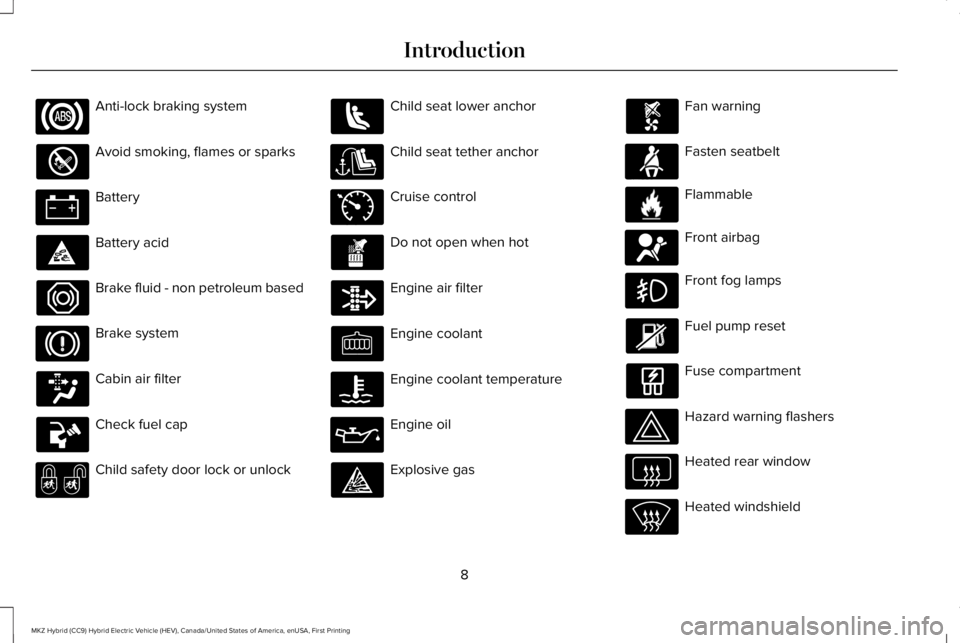
Anti-lock braking system
Avoid smoking, flames or sparks
Battery
Battery acid
Brake fluid - non petroleum based
Brake system
Cabin air filter
Check fuel cap
Child safety door lock or unlock
Child seat lower anchor
Child seat tether anchor
Cruise control
Do not open when hot
Engine air filter
Engine coolant
Engine coolant temperature
Engine oil
Explosive gas
Fan warning
Fasten seatbelt
Flammable
Front airbag
Front fog lamps
Fuel pump reset
Fuse compartment
Hazard warning flashers
Heated rear window
Heated windshield
8
MKZ Hybrid (CC9) Hybrid Electric Vehicle (HEV), Canada/United States of America, enUSA, First Printing
Introduction E71340 E71880 E231160 E67017
Page 65 of 572
PRINCIPLE OF OPERATION
MyKey allows you to program keys withrestricted driving modes to promote gooddriving habits. You can program therestrictions to all keys but one. Any keys thatyou did not program are administrator keysor admin keys.
You can use admin keys to:
•Create a MyKey with certain vehiclerestrictions.
•Program certain MyKey settings.
•Clear all MyKey restrictions.
After you program a MyKey, you can viewthe following information through theinformation display:
•The total number of admin keys andMyKeys for your vehicle.
•The total distance a MyKey drivertraveled with your vehicle.
Note:Every MyKey receives the samerestrictions and settings. You cannotprogram them individually.
Note:For vehicles equipped with apush-button start switch: When both a MyKeyand an admin key are present when youstart your vehicle, the system recognizes theadmin key only.
Standard Settings
Not every vehicle includes the features listedbelow. If your vehicle has this equipment,then you cannot change the followingsettings when using a MyKey:
•Seatbelt reminder or Belt-Minder™. MyKeymutes the audio system until drivers, andin some instances, passengers, fastentheir seatbelts. Note: If your vehicleincludes an AM/FM radio or a very basicaudio system, then the radio may notmute.
•Earlier low-fuel warning. The low-fuelwarning activates earlier for MyKeydrivers, giving them more time to refuel.
•Certain driver alerts, stability systems orparking aids turn on automatically whenyou use the MyKey system. For example,Blind Spot Information System (BLIS),cross traffic alert, lane departure warningor forward collision warning. Note: MyKeydrivers may be able to turn the lanedeparture warning feature off, but thisfeature turns back on automatically withevery new key cycle.
•Restricted touchscreen operation in somemarkets. For example, MyKey mayprevent manual navigation destinationinput while the vehicle is in any gearother than park (P) or when the vehiclereaches a certain rate of speed.
•Satellite radio adult content restrictions,if this feature is available in your market.
Optional Settings
You can configure certain vehicle featuresettings when you first create a MyKey. Youcan also change the settings afterward withan admin key.
62
MKZ Hybrid (CC9) Hybrid Electric Vehicle (HEV), Canada/United States of America, enUSA, First Printing
MyKey™
Page 70 of 572
Potential causesCondition
· The key or transmitter used to start the vehicle is the only admin key.There always has to be at least one admin key.· SecuriLock passive anti-theft system is disabled or in unlimited mode.
· The key or transmitter used to start the vehicle does not have adminprivileges.I cannot program the configurable settings.
· There are no MyKeys programmed to the vehicle. See Creating aMyKey (page 63).
· An admin transmitter is present when you started your vehicle.For vehicles with keyless start: No MyKey restrictions are availablewhen starting the vehicle.· There are no MyKeys programmed to the vehicle. See Creating aMyKey (page 63).
· The key or transmitter used to start the vehicle does not have adminprivileges.I cannot clear the MyKeys.
· No MyKeys are created. See Creating a MyKey (page 63).
· Purchase a new key or transmitter from your authorized dealer.I lost the only admin key.
· Program a spare key or transmitter. You may need to see yourauthorized dealer. See Passive Anti-Theft System (page 79).I lost a key.
· The MyKey user is not using the MyKey.MyKey distances do not accumulate.· An admin key holder cleared the MyKeys and created new MyKeys.· The key system has been reset.
67
MKZ Hybrid (CC9) Hybrid Electric Vehicle (HEV), Canada/United States of America, enUSA, First Printing
MyKey™
Page 77 of 572
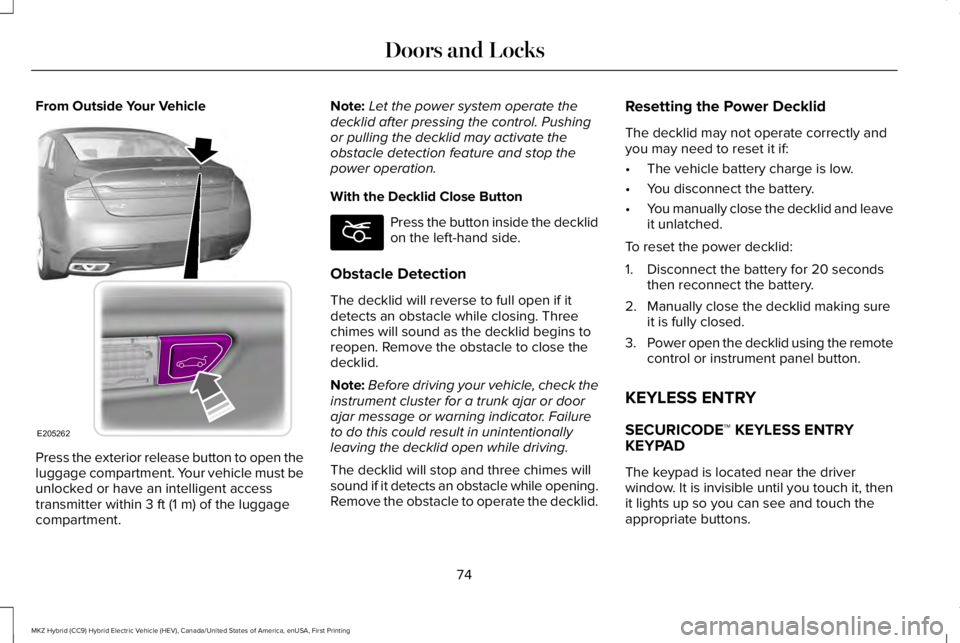
From Outside Your Vehicle
Press the exterior release button to open theluggage compartment. Your vehicle must beunlocked or have an intelligent accesstransmitter within 3 ft (1 m) of the luggagecompartment.
Note:Let the power system operate thedecklid after pressing the control. Pushingor pulling the decklid may activate theobstacle detection feature and stop thepower operation.
With the Decklid Close Button
Press the button inside the decklidon the left-hand side.
Obstacle Detection
The decklid will reverse to full open if itdetects an obstacle while closing. Threechimes will sound as the decklid begins toreopen. Remove the obstacle to close thedecklid.
Note:Before driving your vehicle, check theinstrument cluster for a trunk ajar or doorajar message or warning indicator. Failureto do this could result in unintentionallyleaving the decklid open while driving.
The decklid will stop and three chimes willsound if it detects an obstacle while opening.Remove the obstacle to operate the decklid.
Resetting the Power Decklid
The decklid may not operate correctly andyou may need to reset it if:
•The vehicle battery charge is low.
•You disconnect the battery.
•You manually close the decklid and leaveit unlatched.
To reset the power decklid:
1. Disconnect the battery for 20 secondsthen reconnect the battery.
2. Manually close the decklid making sureit is fully closed.
3.Power open the decklid using the remotecontrol or instrument panel button.
KEYLESS ENTRY
SECURICODE™ KEYLESS ENTRYKEYPAD
The keypad is located near the driverwindow. It is invisible until you touch it, thenit lights up so you can see and touch theappropriate buttons.
74
MKZ Hybrid (CC9) Hybrid Electric Vehicle (HEV), Canada/United States of America, enUSA, First Printing
Doors and LocksE205262 E194407
Page 85 of 572
ADJUSTING THE STEERING WHEEL
WARNING
Do not adjust the steering wheel whenyour vehicle is moving.
Note: Make sure that you are sitting in thecorrect position. See Sitting in the CorrectPosition (page 149).
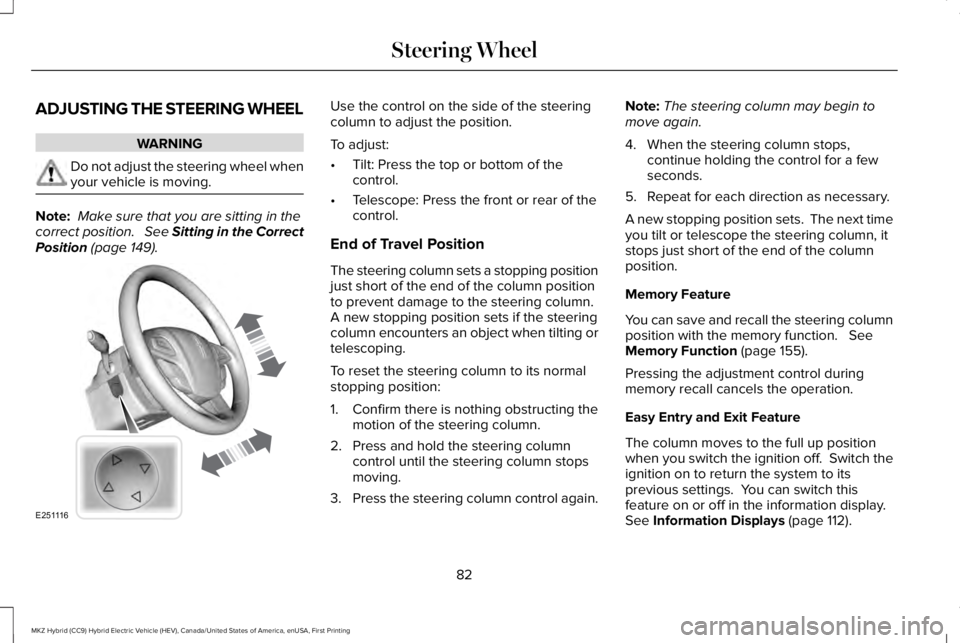
Use the control on the side of the steeringcolumn to adjust the position.
To adjust:
•Tilt: Press the top or bottom of thecontrol.
•Telescope: Press the front or rear of thecontrol.
End of Travel Position
The steering column sets a stopping positionjust short of the end of the column positionto prevent damage to the steering column. A new stopping position sets if the steeringcolumn encounters an object when tilting ortelescoping.
To reset the steering column to its normalstopping position:
1. Confirm there is nothing obstructing themotion of the steering column.
2. Press and hold the steering columncontrol until the steering column stopsmoving.
3.Press the steering column control again.
Note:The steering column may begin tomove again.
4. When the steering column stops,continue holding the control for a fewseconds.
5. Repeat for each direction as necessary.
A new stopping position sets. The next timeyou tilt or telescope the steering column, itstops just short of the end of the columnposition.
Memory Feature
You can save and recall the steering columnposition with the memory function. SeeMemory Function (page 155).
Pressing the adjustment control duringmemory recall cancels the operation.
Easy Entry and Exit Feature
The column moves to the full up positionwhen you switch the ignition off. Switch theignition on to return the system to itsprevious settings. You can switch thisfeature on or off in the information display. See Information Displays (page 112).
82
MKZ Hybrid (CC9) Hybrid Electric Vehicle (HEV), Canada/United States of America, enUSA, First Printing
Steering WheelE251116
Page 86 of 572
AUDIO CONTROL
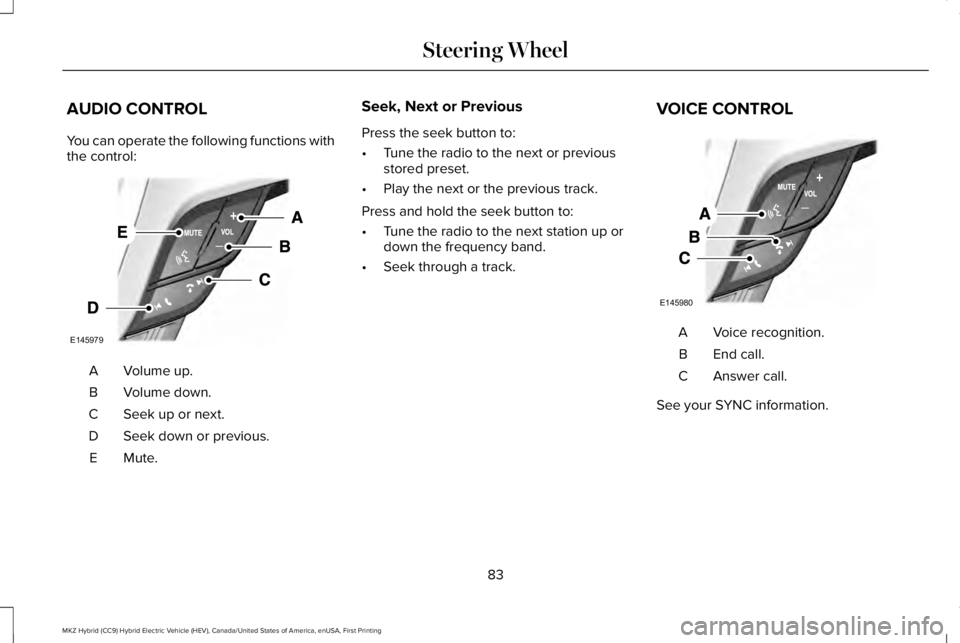
You can operate the following functions withthe control:
Volume up.A
Volume down.B
Seek up or next.C
Seek down or previous.D
Mute.E
Seek, Next or Previous
Press the seek button to:
•Tune the radio to the next or previousstored preset.
•Play the next or the previous track.
Press and hold the seek button to:
•Tune the radio to the next station up ordown the frequency band.
•Seek through a track.
VOICE CONTROL
Voice recognition.A
End call.B
Answer call.C
See your SYNC information.
83
MKZ Hybrid (CC9) Hybrid Electric Vehicle (HEV), Canada/United States of America, enUSA, First Printing
Steering WheelE145979 E145980
Page 99 of 572
POWER WINDOWS
WARNINGS
Do not leave children unattended inyour vehicle and do not let them playwith the power windows. Failure to followthis instruction could result in personal injury.
When closing the power windows,verify they are free of obstruction andmake sure that children and pets are not inthe proximity of the window openings.
Note: You may hear a pulsing noise whenjust one of the windows is open. Lower theopposite window slightly to reduce thisnoise.
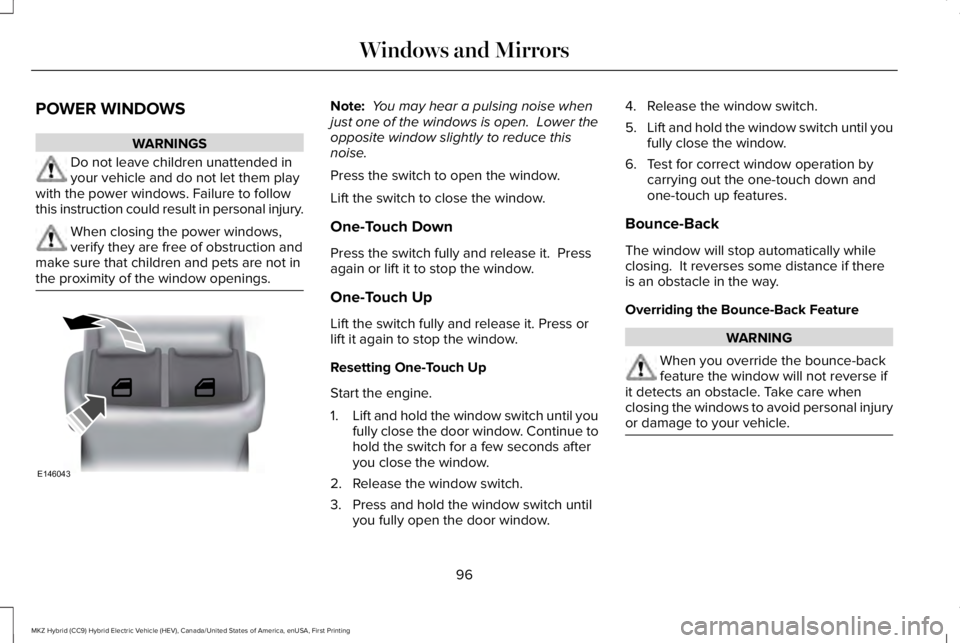
Press the switch to open the window.
Lift the switch to close the window.
One-Touch Down
Press the switch fully and release it. Pressagain or lift it to stop the window.
One-Touch Up
Lift the switch fully and release it. Press orlift it again to stop the window.
Resetting One-Touch Up
Start the engine.
1.Lift and hold the window switch until youfully close the door window. Continue tohold the switch for a few seconds afteryou close the window.
2. Release the window switch.
3. Press and hold the window switch untilyou fully open the door window.
4. Release the window switch.
5.Lift and hold the window switch until youfully close the window.
6. Test for correct window operation bycarrying out the one-touch down andone-touch up features.
Bounce-Back
The window will stop automatically whileclosing. It reverses some distance if thereis an obstacle in the way.
Overriding the Bounce-Back Feature
WARNING
When you override the bounce-backfeature the window will not reverse ifit detects an obstacle. Take care whenclosing the windows to avoid personal injuryor damage to your vehicle.
96
MKZ Hybrid (CC9) Hybrid Electric Vehicle (HEV), Canada/United States of America, enUSA, First Printing
Windows and MirrorsE146043
Page 102 of 572
Loose Mirror
If your power-folding mirrors are manuallyfolded, they may not work properly evenafter you re-position them. You need to resetthem if:
•The mirrors vibrate when you drive.
•The mirrors feel loose.
•The mirrors do not stay in the folded orunfolded position.
•One of the mirrors is not in its normaldriving position.
To reset the power-fold feature, use thepower-folding mirror control to fold andunfold the mirrors. You may hear a loud noiseas you reset the power-folding mirrors. Thissound is normal. Repeat this process asneeded each time the mirrors are manuallyfolded.
Heated Exterior Mirrors
See Heated Windows and Mirrors (page146).
Memory Mirrors
You can save and recall the mirror positionsthrough the memory function. See MemoryFunction (page 155).
Auto-Dimming Feature (If Equipped)
The driver exterior mirror automatically dimswhen the interior auto-dimming mirror turnson.
Signal Indicator Mirrors
The outer portion of the appropriate mirrorhousing blinks when you switch on thedirection indicator.
Lincoln Welcome Mat
Projection lights, on the bottom of the mirrorhousings, project an image onto the grounda short distance from the vehicle. SeeLighting (page 88).
Integrated Blind Spot Mirrors (If Equipped)
WARNING
Objects in the blind spot mirror arecloser than they appear.
Blind spot mirrors have an integrated convexmirror built into the upper outboard cornerof the exterior mirrors. Their design canincrease your visibility along the side of yourvehicle.
Check the main mirror first before a lanechange, then check the blind spot mirror. Ifno vehicles are present in the blind spotmirror and the traffic in the adjacent lane isat a safe distance, signal that you intend tochange lanes. Glance over your shoulder toverify traffic is clear and carefully changelanes.
99
MKZ Hybrid (CC9) Hybrid Electric Vehicle (HEV), Canada/United States of America, enUSA, First Printing
Windows and Mirrors
Page 118 of 572
Engage
Engage provides separate gauges for enginepower and high voltage battery power inkilowatts (kW). The engine power gauge fillis white and the high voltage battery powergauge fill is blue. You can also see aninstantaneous fuel economy gauge. Whenyour vehicle is operating on battery poweronly, you will see EV displayed and thegauges will appear in blue.
Note:Hold OK to reset average fueleconomy.
Empower
Empower provides a power demand gaugein kilowatts (kW) which includes an engineon or off threshold.
•When your vehicle is operating withbattery power only (below the threshold),you will see EV displayed and the gaugefill is blue.
•When your vehicle is operating with boththe engine and the high voltage batteryproviding power the gauge fill is white.
•When power demand surpasses theamber indicator, this level of demand andassociated fuel economy displays inamber.
•When the engine is on, reducing powerdemand to less than the threshold willallow the engine to turn off.
You can also see an instantaneous fueleconomy gauge.
Note:Hold OK to reset average fueleconomy.
MyView
You can choose what to display in this view.Selecting Change MyView in the optionsmenu allows you to scroll through twocolumns of content choices.
•Press the up or down arrow to viewcontent.
•Press OK to save your selected content
•You must select content in both columnsbefore you can save your new MyView.
Unique content available in MyView:
•Accessory Power— Indicates electricalpower demands from your vehicle’saccessory systems. Accessories usepower but do not contribute to propellingyour vehicle. The gauge separatelydisplays power demand in kilowatts (kW)for climate and other accessories.Climate includes the power being usedby high voltage climate controlcomponents such as the electric A/Ccompressor. Other includes all powerbeing used by the low voltageaccessories (cabin fans, headlights andheated seats).
•Coolant Temp – Indicates engine coolanttemperature. At normal operatingtemperature, the level indicator will bewhite and will be in the normal range(between H and C). If the engine coolanttemperature exceeds the normal range,the level indicator will change to red toindicate that the engine is overheating.Stop your vehicle as soon as safelypossible, turn your vehicle off and let theengine cool.
115
MKZ Hybrid (CC9) Hybrid Electric Vehicle (HEV), Canada/United States of America, enUSA, First Printing
Information Displays