climate control LINCOLN MKZ HYBRID 2018 Owners Manual
[x] Cancel search | Manufacturer: LINCOLN, Model Year: 2018, Model line: MKZ HYBRID, Model: LINCOLN MKZ HYBRID 2018Pages: 572, PDF Size: 4.49 MB
Page 5 of 572
Keyless Entry....................................................74
Interior Luggage CompartmentRelease..........................................................77
Security
Passive Anti-Theft System............................79
Anti-Theft Alarm..............................................80
Steering Wheel
Adjusting the Steering Wheel.....................82
Audio Control...................................................83
Voice Control...................................................83
Cruise Control..................................................84
Information Display Control.........................84
Wipers and Washers
Windshield Wipers.........................................85
Autowipers.......................................................85
Windshield Washers......................................86
Lighting
General Information.......................................88
Lighting Control...............................................88
Autolamps.........................................................89
Instrument Lighting Dimmer........................90
Headlamp Exit Delay.....................................90
Daytime Running Lamps...............................90
Automatic High Beam Control.....................91
Adaptive Headlamps.....................................92
Direction Indicators........................................93
Welcome Lighting...........................................93
Interior Lamps..................................................94
Ambient Lighting............................................95
Windows and Mirrors
Power Windows..............................................96
Global Opening and Closing.......................97
Exterior Mirrors................................................97
Interior Mirror.................................................100
Sun Visors........................................................101
Sun Shades......................................................101
Moonroof..........................................................101
Instrument Cluster
Gauges.............................................................104
Warning Lamps and Indicators..................107
Audible Warnings and Indicators................111
Information Displays
General Information.......................................112
Information Messages..................................123
Climate Control
Automatic Climate Control..........................143
Hints on Controlling the InteriorClimate.........................................................145
Heated Windows and Mirrors....................146
Cabin Air Filter................................................147
Remote Start...................................................147
Seats
Sitting in the Correct Position....................149
Head Restraints.............................................149
Power Seats.....................................................151
Memory Function..........................................155
Rear Seats.......................................................156
Heated Seats..................................................157
Climate Controlled Seats............................158
Rear Seat Armrest.........................................160
2
MKZ Hybrid (CC9) Hybrid Electric Vehicle (HEV), Canada/United States of America, enUSA, First Printing
Table of Contents
Page 21 of 572
Direction indicators. See Direction Indicators (page 93).A
Instrument cluster. See Gauges (page 104). See Warning Lamps and Indicators (page 107).B
Wiper lever. See Wipers and Washers (page 85).C
Information and entertainment display.D
Audio unit. See Audio Unit (page 369).E
Hazard warning flasher switch. See Hazard Flashers (page 265).F
Parking aid switch. See Parking Aids (page 210).G
Heated rear window switch. See Heated Windows and Mirrors (page 146).H
Climate controls. See Climate Control (page 143).I
Start button. See Keyless Entry (page 74).J
Entertainment, navigation and phone.K
Voice control. See Voice Control (page 83).L
Horn.M
Steering wheel adjustment. See Adjusting the Steering Wheel (page 82).N
Cruise control switches. See Using Cruise Control (page 226).O
Information display controls. See Information Displays (page 112).P
Parking brake. See Electric Parking Brake (page 200).Q
Lighting control. See Lighting Control (page 88). Instrument lighting dimmer. See Instrument Lighting Dimmer (page 90).R
18
MKZ Hybrid (CC9) Hybrid Electric Vehicle (HEV), Canada/United States of America, enUSA, First Printing
At a Glance
Page 63 of 572
5. Reinstall the battery cover and the keyblade.
Car Finder
Press the button twice within threeseconds. A tone sounds and thedirection indicators will flash. Werecommend you use this method to locateyour vehicle, rather than using the panicalarm.
Sounding the Panic Alarm
Note:The panic alarm only operates whenthe ignition is off.
Press the button to sound thepanic alarm. Press the buttonagain or switch the ignition on toturn it off.
Remote Start
WARNING
To avoid exhaust fumes, do not useremote start if your vehicle is parkedindoors or in areas that are not wellventilated.
Note:Do not use remote start if your fuellevel is low.
The remote start button is on thetransmitter.
This feature allows you to start your vehiclefrom the outside. The transmitter has anextended operating range.
You can configure your automatic climatecontrol to operate when you remote startyour vehicle. See Climate Control (page143).
Many states and provinces have restrictionsfor the use of remote start. Check your localand state or provincial laws for specificrequirements regarding remote startsystems.
The remote start system does not work if anyof the following occur:
•The ignition is on.
•The anti-theft alarm triggers.
•You switch the feature off in theinformation display.
•The hood is open.
•The transmission is not in park (P).
•The battery voltage is below theminimum operating voltage.
Remote Control Feedback (If Equipped)
An LED on the remote control provides statusfeedback of remote start or stop commands.
StatusLED
Remote startsuccessfulSolid green
Remote stopsuccessfulSolid red
Request failed orstatus not receivedBlinking red
Status incompleteBlinking green
60
MKZ Hybrid (CC9) Hybrid Electric Vehicle (HEV), Canada/United States of America, enUSA, First Printing
Keys and Remote ControlsE138623 E138624 E138625
Page 110 of 572
Vehicle Range
Located at the bottom of the display. Itindicates the estimated distance to emptybased on the fuel remaining in the tank.Changes in your driving pattern and climatecontrol use may cause the value to vary.
Trip Efficiency Leaves
Trip Efficiency Leaves display upon shuttingoff your vehicle. The number of leavesrepresent the average for the last trip. A newtrip begins each time you start your vehicle(when the Ready to Drive message comeson). Corresponding Trip Summary datadisplays on the left information display.
WARNING LAMPS AND
INDICATORS
The following warning lamps and indicatorsalert you to a vehicle condition that maybecome serious. Some lamps illuminatewhen you start your vehicle to make surethey work. If any lamps remain on afterstarting your vehicle, refer to the respectivesystem warning lamp for further information.
Note:Some warning indicators appear inthe information display and operate thesame as a warning lamp but do notilluminate when you start your vehicle.
Adaptive Cruise Control Indicator (If
Equipped)
The speed control system indicatorlight changes color to indicatewhat mode the system is in: SeeUsing Adaptive Cruise Control (page 227).
On (white light): Lights when you turn theadaptive cruise control system on. Turns offwhen you turn the speed control system off.
Engaged (green light): Lights when theadaptive cruise control system engages.Turns off when the speed control systemdisengages.
Anti-Lock Brake System Warning Lamp
If it lights when you are driving, thisindicates a malfunction. You willcontinue to have the normalbraking system (without Anti-lock brakingsystem) unless the brake system warninglamp also lights. Have an authorized dealercheck the system.
Auto Hold Active
It illuminates when the systemholds your vehicle stationary.
Auto Hold Unavailable
It illuminates when the system ison, but unavailable to hold yourvehicle stationary.
Automatic Headlamp High BeamIndicator (If Equipped)
It illuminates when the systemautomatically turns the headlamphigh beam on.
107
MKZ Hybrid (CC9) Hybrid Electric Vehicle (HEV), Canada/United States of America, enUSA, First Printing
Instrument ClusterE144524 E197933 E197934
Page 118 of 572
Engage
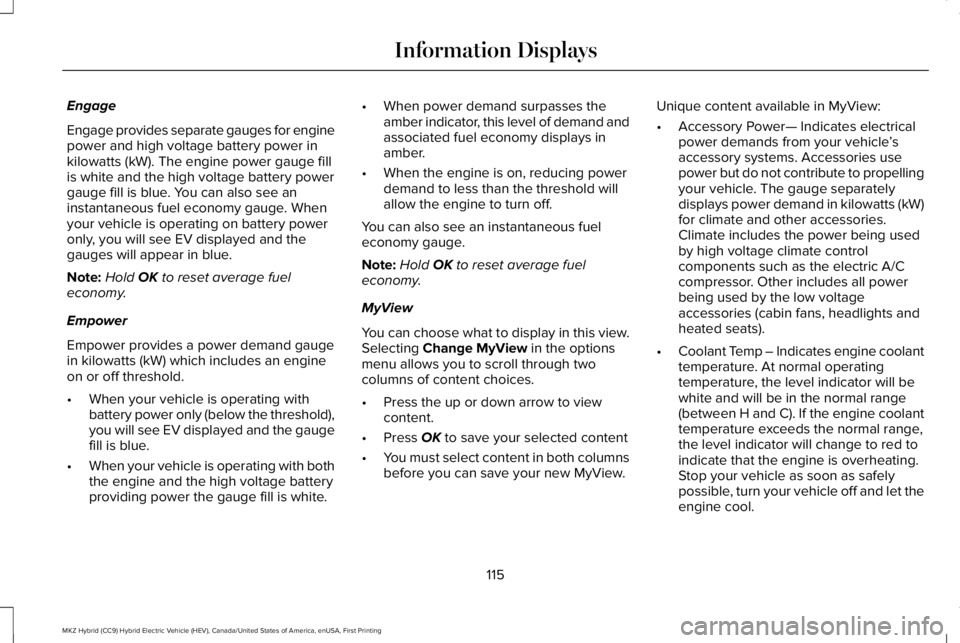
Engage provides separate gauges for enginepower and high voltage battery power inkilowatts (kW). The engine power gauge fillis white and the high voltage battery powergauge fill is blue. You can also see aninstantaneous fuel economy gauge. Whenyour vehicle is operating on battery poweronly, you will see EV displayed and thegauges will appear in blue.
Note:Hold OK to reset average fueleconomy.
Empower
Empower provides a power demand gaugein kilowatts (kW) which includes an engineon or off threshold.
•When your vehicle is operating withbattery power only (below the threshold),you will see EV displayed and the gaugefill is blue.
•When your vehicle is operating with boththe engine and the high voltage batteryproviding power the gauge fill is white.
•When power demand surpasses theamber indicator, this level of demand andassociated fuel economy displays inamber.
•When the engine is on, reducing powerdemand to less than the threshold willallow the engine to turn off.
You can also see an instantaneous fueleconomy gauge.
Note:Hold OK to reset average fueleconomy.
MyView
You can choose what to display in this view.Selecting Change MyView in the optionsmenu allows you to scroll through twocolumns of content choices.
•Press the up or down arrow to viewcontent.
•Press OK to save your selected content
•You must select content in both columnsbefore you can save your new MyView.
Unique content available in MyView:
•Accessory Power— Indicates electricalpower demands from your vehicle’saccessory systems. Accessories usepower but do not contribute to propellingyour vehicle. The gauge separatelydisplays power demand in kilowatts (kW)for climate and other accessories.Climate includes the power being usedby high voltage climate controlcomponents such as the electric A/Ccompressor. Other includes all powerbeing used by the low voltageaccessories (cabin fans, headlights andheated seats).
•Coolant Temp – Indicates engine coolanttemperature. At normal operatingtemperature, the level indicator will bewhite and will be in the normal range(between H and C). If the engine coolanttemperature exceeds the normal range,the level indicator will change to red toindicate that the engine is overheating.Stop your vehicle as soon as safelypossible, turn your vehicle off and let theengine cool.
115
MKZ Hybrid (CC9) Hybrid Electric Vehicle (HEV), Canada/United States of America, enUSA, First Printing
Information Displays
Page 122 of 572
Settings
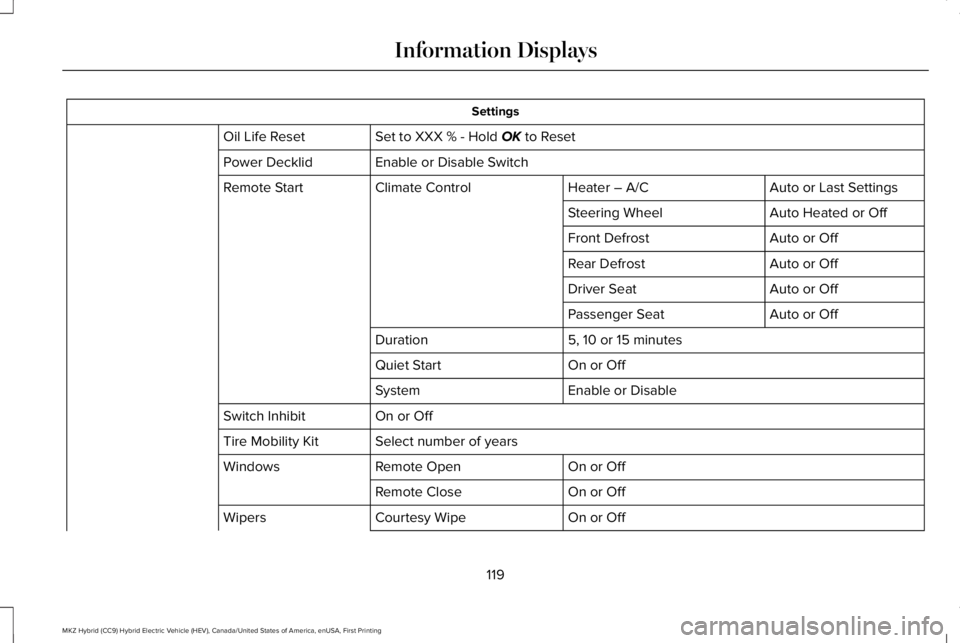
Set to XXX % - Hold OK to ResetOil Life Reset
Enable or Disable SwitchPower Decklid
Auto or Last SettingsHeater – A/CClimate ControlRemote Start
Auto Heated or OffSteering Wheel
Auto or OffFront Defrost
Auto or OffRear Defrost
Auto or OffDriver Seat
Auto or OffPassenger Seat
5, 10 or 15 minutesDuration
On or OffQuiet Start
Enable or DisableSystem
On or OffSwitch Inhibit
Select number of yearsTire Mobility Kit
On or OffRemote OpenWindows
On or OffRemote Close
On or OffCourtesy WipeWipers
119
MKZ Hybrid (CC9) Hybrid Electric Vehicle (HEV), Canada/United States of America, enUSA, First Printing
Information Displays
Page 146 of 572
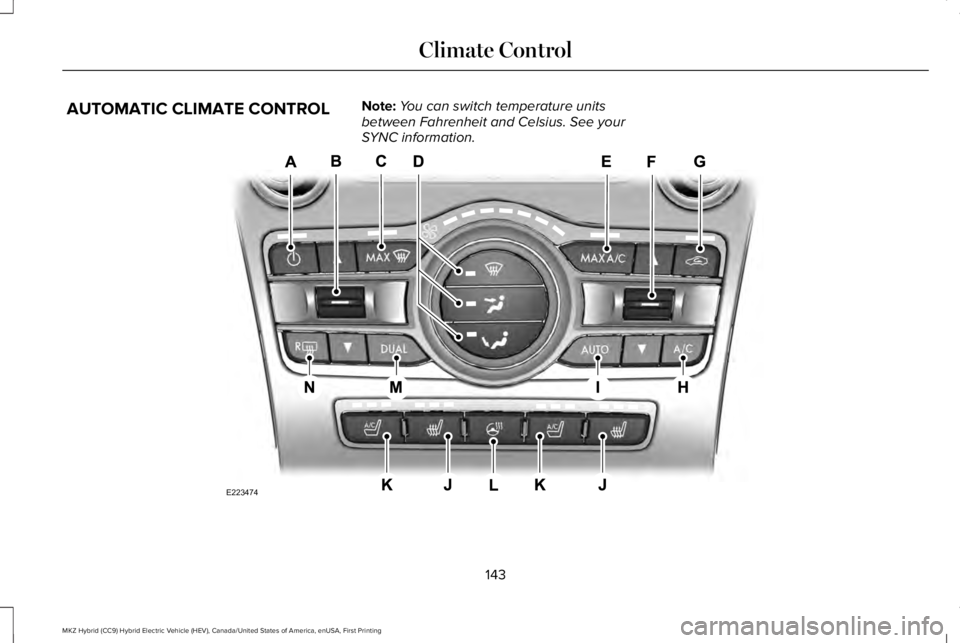
AUTOMATIC CLIMATE CONTROLNote:You can switch temperature unitsbetween Fahrenheit and Celsius. See yourSYNC information.
143
MKZ Hybrid (CC9) Hybrid Electric Vehicle (HEV), Canada/United States of America, enUSA, First Printing
Climate ControlE223474
Page 147 of 572
Power: Press to switch the system on and off. When the system is off, it prevents outside air from entering the vehicle.A
Driver temperature control: Adjusts the temperature setting on the driver side. This control also adjusts the passenger sidetemperature when you switch off dual zone mode.B
MAX Defrost: Press to switch on defrost. The driver and passenger settings set to HI, air flows through the windshield vents, andthe fan adjusts to the highest speed. You can also use this setting to defog and clear the windshield of a thin covering of ice. Theheated rear window also turns on when you select maximum defrost.
C
Note: To prevent window fogging, you cannot select recirculated air when maximum defrost is on.
Air distribution control: Press to switch air flow from the windshield, instrument panel or footwell vents on or off. You can distributeair through any combination of these vents.D
MAX A/C: Press for maximum cooling. The driver and passenger settings set to LO, recirculated air flows through the instrumentpanel vents, air conditioning turns on and the fan adjusts to the highest speed.E
Passenger temperature control: Adjusts the temperature setting on the passenger side.F
Recirculated air: Press to switch between outside air and recirculated air. The air currently in the passenger compartment recirculates.This may reduce the time needed to cool the interior (when used with A/C) and reduce unwanted odors from entering your vehicle.G
Note: Recirculated air may turn off (or prevent you from switching on) in all air flow modes except MAX A/C to reduce the risk offogging. Recirculation may also turn on and off in Panel or Panel/Floor air flow modes during hot weather in order to improve coolingefficiency.
A/C: Press to switch the air conditioning on or off. Use A/C with recirculated air to improve cooling performance and efficiency.H
Note: In certain conditions (for example, maximum defrost), the air conditioning compressor may continue to operate even thoughyou switch off the air conditioning.
AUTO: Press to switch on automatic operation. Adjust to select the desired temperature. Fan speed, air distribution, air conditioningoperation, and outside or recirculated air adjust to heat or cool the vehicle to maintain the desired temperature. You can also switchoff dual zone mode by pressing and holding for more than two seconds.
I
144
MKZ Hybrid (CC9) Hybrid Electric Vehicle (HEV), Canada/United States of America, enUSA, First Printing
Climate Control
Page 148 of 572
Heated seats: Press to switch the heated seats on and off. See Heated Seats (page 157).J
Climate controlled seats: Press to switch the climate controlled seats on and off. See Climate Controlled Seats (page 158).K
Heated steering wheel: Press to switch the heated steering wheel on and off.L
DUAL: Press to switch on temperature control for the passenger side of the vehicle. When dual zone is off, passenger temperaturesettings remain the same as the driver settings.M
Heated rear window: Press to switch the heated rear window on and off. See Heated Windows and Mirrors (page 146).N
Automatic Fan Settings
The AUTO button illuminates for thefollowing fan settings:
•When three indicators are on, the fanadjusts to the highest speed to reach theselected temperature as quickly aspossible.
•When two indicators are on, the fanadjusts to a medium speed to reach theselected temperature with a reducedamount of cabin noise.
•When one indicator is on, the fan adjuststo the lowest speed to reach the selectedtemperature with the least amount ofcabin noise.
Note:The system starts at the previous fansetting when you switch on AUTO.
HINTS ON CONTROLLING THE
INTERIOR CLIMATE
General Hints
Note:Prolonged use of recirculated air maycause the windows to fog up.
Note:You may feel a small amount of airfrom the footwell air vents regardless of theair distribution setting.
Note:To reduce humidity build-up insideyour vehicle, do not drive with the systemswitched off or with recirculated air alwaysswitched on.
Note:Do not place objects under the frontseats as this may interfere with the airflowto the rear seats.
Note:Remove any snow, ice or leaves fromthe air intake area at the base of thewindshield.
Note:To improve the time to reach acomfortable temperature in hot weather,drive with the windows open until you feelcold air through the air vents.
Automatic Climate Control
Note:Adjusting the settings when yourvehicle interior is extremely hot or cold is notnecessary.
145
MKZ Hybrid (CC9) Hybrid Electric Vehicle (HEV), Canada/United States of America, enUSA, First Printing
Climate Control
Page 149 of 572
Note:The system adjusts to heat or cool theinterior to the temperature you select asquickly as possible.
Note:For the system to function efficiently,the instrument panel and side air ventsshould be fully open.
Note:If you select AUTO during cold outsidetemperatures, the system directs air flow tothe windshield and side window vents. Inaddition, the fan may run at a slower speeduntil the engine warms up.
Note:If you select AUTO during hottemperatures and the inside of the vehicleis hot, the system uses recirculated air tomaximize interior cooling. Fan speed mayalso reduce until the air cools.
Quickly Heating the Interior
1. Press AUTO.
2. Adjust the temperature function to thedesired setting.
Recommended Settings for Heating
1. Press AUTO.
2. Adjust the temperature function to thedesired setting. Use 72°F (22°C) as astarting point, then adjust the setting asnecessary.
Quickly Cooling the Interior
1. Press MAX A/C.
Recommended Settings for Cooling
1. Press AUTO.
2. Adjust the temperature function to thedesired setting. Use 72°F (22°C) as astarting point, then adjust the setting asnecessary.
Defogging the Side Windows in ColdWeather
1. Press defrost.
2. Adjust the temperature control to thedesired setting. Use 72°F (22°C) as astarting point, then adjust the setting asnecessary.
HEATED WINDOWS AND MIRRORS
Note:Make sure the engine is runningbefore operating the heated windows.
Note:Depending on your remote startsettings, the heated windows, mirrors andwipers may remain on after remote startingthe vehicle.
Heated Rear Window
Press the button to clear theheated rear window of thin ice andfog. The heated rear window turnsoff after a short period of time. Press thebutton again to switch it off.
Note: Do not use razor blades or othersharp objects to clean or remove decals fromthe inside of the heated rear window. Thevehicle warranty does not cover damagecaused to the heated rear window grid lines.
Heated Exterior Mirrors (If Equipped)
When you switch the heated rear windowon, the heated exterior mirrors turn on.
146
MKZ Hybrid (CC9) Hybrid Electric Vehicle (HEV), Canada/United States of America, enUSA, First Printing
Climate ControlE184884