warning LINCOLN MKZ HYBRID 2019 Owners Manual
[x] Cancel search | Manufacturer: LINCOLN, Model Year: 2019, Model line: MKZ HYBRID, Model: LINCOLN MKZ HYBRID 2019Pages: 575, PDF Size: 4.77 MB
Page 351 of 575
Note:Changes or modifications notexpressively approved by the partyresponsible for compliance could void theuser's authority to operate the equipment.The term "IC:" before the radio certificationnumber only signifies that Industry Canadatechnical specifications were met.
Changing Tires With a Tire PressureMonitoring System
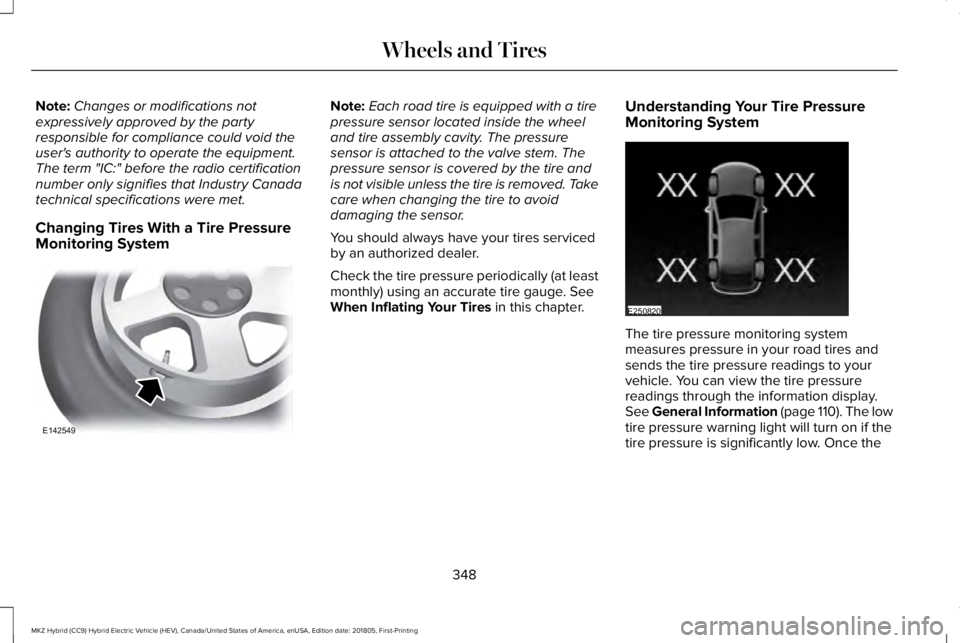
Note:Each road tire is equipped with a tirepressure sensor located inside the wheeland tire assembly cavity. The pressuresensor is attached to the valve stem. Thepressure sensor is covered by the tire andis not visible unless the tire is removed. Takecare when changing the tire to avoiddamaging the sensor.
You should always have your tires servicedby an authorized dealer.
Check the tire pressure periodically (at leastmonthly) using an accurate tire gauge. SeeWhen Inflating Your Tires in this chapter.
Understanding Your Tire PressureMonitoring System
The tire pressure monitoring systemmeasures pressure in your road tires andsends the tire pressure readings to yourvehicle. You can view the tire pressurereadings through the information display.See General Information (page 110). The lowtire pressure warning light will turn on if thetire pressure is significantly low. Once the
348
MKZ Hybrid (CC9) Hybrid Electric Vehicle (HEV), Canada/United States of America, enUSA, Edition date: 201805, First-Printing
Wheels and TiresE142549 E250820
Page 353 of 575
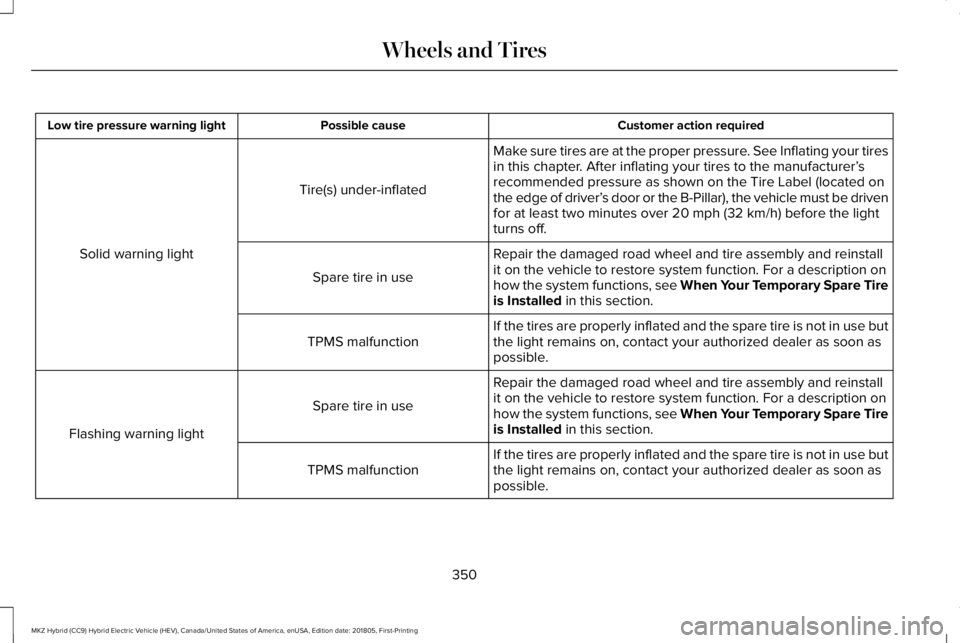
Customer action requiredPossible causeLow tire pressure warning light
Make sure tires are at the proper pressure. See Inflating your tiresin this chapter. After inflating your tires to the manufacturer’srecommended pressure as shown on the Tire Label (located onthe edge of driver’s door or the B-Pillar), the vehicle must be drivenfor at least two minutes over 20 mph (32 km/h) before the lightturns off.
Tire(s) under-inflated
Solid warning lightRepair the damaged road wheel and tire assembly and reinstallit on the vehicle to restore system function. For a description onhow the system functions, see When Your Temporary Spare Tireis Installed in this section.
Spare tire in use
If the tires are properly inflated and the spare tire is not in use butthe light remains on, contact your authorized dealer as soon aspossible.TPMS malfunction
Repair the damaged road wheel and tire assembly and reinstallit on the vehicle to restore system function. For a description onhow the system functions, see When Your Temporary Spare Tireis Installed in this section.
Spare tire in use
Flashing warning light
If the tires are properly inflated and the spare tire is not in use butthe light remains on, contact your authorized dealer as soon aspossible.TPMS malfunction
350
MKZ Hybrid (CC9) Hybrid Electric Vehicle (HEV), Canada/United States of America, enUSA, Edition date: 201805, First-Printing
Wheels and Tires
Page 354 of 575
When Inflating Your Tires
WARNING: Do not use the tirepressure displayed in the information displayas a tire pressure gauge. Failure to followthis instruction could result in personal injuryor death.
When putting air into your tires (such as at agas station or in your garage), the tirepressure monitoring system may not respondimmediately to the air added to your tires.
It may take up to two minutes of driving over20 mph (32 km/h) for the light to turn off afteryou have filled your tires to therecommended inflation pressure.
How Temperature Affects Your TirePressure
The tire pressure monitoring system monitorstire pressure in each pneumatic tire. Whiledriving in a normal manner, a typicalpassenger tire inflation pressure mayincrease about 2–4 psi (14–28 kPa) from acold start situation. If the vehicle is stationaryovernight with the outside temperaturesignificantly lower than the daytimetemperature, the tire pressure may decreaseabout 3 psi (21 kPa) for a drop of 30°F (17°C)in ambient temperature. This lower pressurevalue may be detected by the tire pressuremonitoring system as being significantlylower than the recommended inflation
pressure and activate the system warninglight for low tire pressure. If the low tirepressure warning light is on, visually checkeach tire to verify that no tire is flat. If one ormore tires are flat, repair as necessary.Check the air pressure in the road tires. Ifany tire is under-inflated, carefully drive thevehicle to the nearest location where air canbe added to the tires. Inflate all the tires tothe recommended inflation pressure.
TECHNICAL SPECIFICATIONS
Wheel Lug Nut Torque Specifications
WARNING: When you install a wheel, always remove any corrosion, dirt or foreign materials present on the mounting surfaces of thewheel or the surface of the wheel hub, brake drum or brake disc that contacts the wheel. Make sure to secure any fasteners that attach therotor to the hub so they do not interfere with the mounting surfaces of the wheel. Installing wheels without correct metal-to-metal contact atthe wheel mounting surfaces can cause the wheel nuts to loosen and the wheel to come off while your vehicle is in motion, resulting in lossof vehicle control, personal injury or death.
351
MKZ Hybrid (CC9) Hybrid Electric Vehicle (HEV), Canada/United States of America, enUSA, Edition date: 201805, First-Printing
Wheels and Tires
Page 360 of 575
CAPACITIES AND SPECIFICATIONS
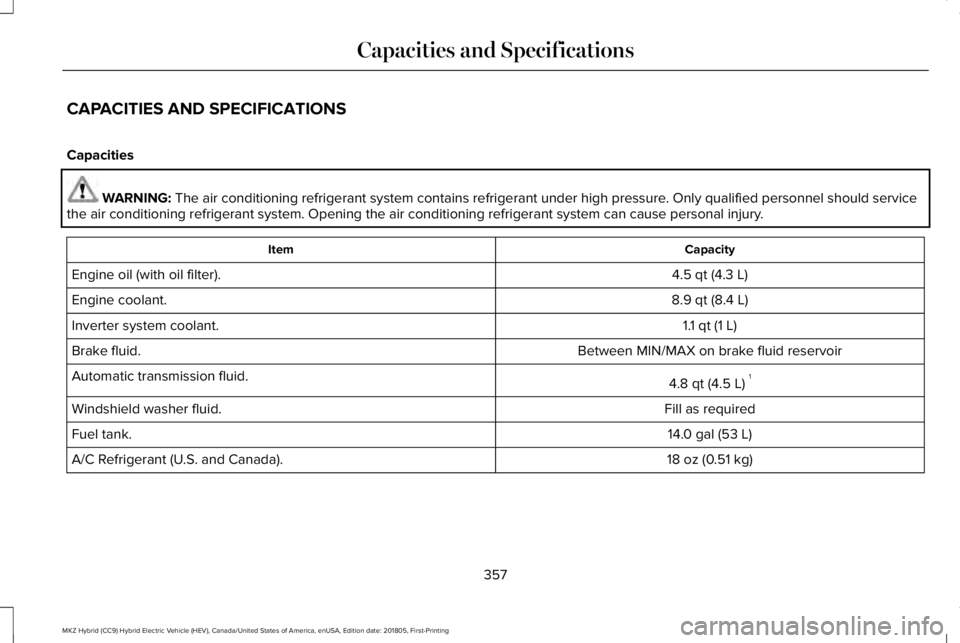
Capacities
WARNING: The air conditioning refrigerant system contains refrigerant under high pressure. Only qualified personnel should servicethe air conditioning refrigerant system. Opening the air conditioning refrigerant system can cause personal injury.
CapacityItem
4.5 qt (4.3 L)Engine oil (with oil filter).
8.9 qt (8.4 L)Engine coolant.
1.1 qt (1 L)Inverter system coolant.
Between MIN/MAX on brake fluid reservoirBrake fluid.
4.8 qt (4.5 L)1Automatic transmission fluid.
Fill as requiredWindshield washer fluid.
14.0 gal (53 L)Fuel tank.
18 oz (0.51 kg)A/C Refrigerant (U.S. and Canada).
357
MKZ Hybrid (CC9) Hybrid Electric Vehicle (HEV), Canada/United States of America, enUSA, Edition date: 201805, First-Printing
Capacities and Specifications
Page 369 of 575
GENERAL INFORMATION
WARNING: Driving while distractedcan result in loss of vehicle control, crashand injury. We strongly recommend that youuse extreme caution when using any devicethat may take your focus off the road. Yourprimary responsibility is the safe operationof your vehicle. We recommend against the
use of any hand-held device while drivingand encourage the use of voice-operatedsystems when possible. Make sure you areaware of all applicable local laws that mayaffect the use of electronic devices whiledriving.
Radio Frequencies and ReceptionFactors
AM and FM frequencies are established bythe Federal Communications Commission(FCC) and the Canadian Radio andTelecommunications Commission (CRTC).Those frequencies are:
•AM: 530-1710 kHz
•FM: 87.9-107.9 MHz
Note:Listening to loud audio for longperiods of time could damage your hearing.
Radio Reception Factors
The further you travel from an AM or FM station, the weaker the signal and the weaker the reception.Distance and strength
Hills, mountains, tall buildings, bridges, tunnels, freeway overpasses, parking garages, dense tree foliage andthunderstorms can interfere with the reception.Terrain
When you pass a ground-based broadcast repeating tower, a stronger signal may overtake a weaker one andresult in the audio system muting.Station overload
366
MKZ Hybrid (CC9) Hybrid Electric Vehicle (HEV), Canada/United States of America, enUSA, Edition date: 201805, First-Printing
Audio System
Page 371 of 575
In track mode, the system displays and playsthe structure as if it were only one level deep(all MP3 and WMA files play, regardless ofbeing in a specific folder). In folder mode,the system only plays the MP3 and WMA filesin the current folder.
AUDIO UNIT
WARNING: Driving while distractedcan result in loss of vehicle control, crashand injury. We strongly recommend that youuse extreme caution when using any devicethat may take your focus off the road. Yourprimary responsibility is the safe operationof your vehicle. We recommend against theuse of any hand-held device while drivingand encourage the use of voice-operatedsystems when possible. Make sure you areaware of all applicable local laws that mayaffect the use of electronic devices whiledriving.
Note: The touchscreen system controls mostof the audio features.
Adjusting the Volume
Turn to adjust the volume.
Changing Radio Stations
In radio mode, turn to search through theradio frequency band.
In satellite radio mode, turn to find theprevious or next available satellite radiostation.
Ejecting the CD (If Equipped)
Press and release the button toeject a CD.
368
MKZ Hybrid (CC9) Hybrid Electric Vehicle (HEV), Canada/United States of America, enUSA, Edition date: 201805, First-Printing
Audio SystemE265373 E265696 E265032
Page 372 of 575
Inserting a CD (If Equipped)
Insert a CD into the CD slot.
Selecting the Audio Modes
Press and release the button toaccess different audio modes, forexample AM, FM and CD.
Switching the Audio Unit On and Off
Press and release the button.
Using Seek, Fast Forward and Reverse
In radio mode, select a frequency band andpress and release either button. The systemstops at the first station it finds in thatdirection.
In CD mode, press and release to select thenext or previous track. Press and hold tomove quickly forward or backward throughthe current track.
In satellite radio mode, press and release toselect the next or previous satellite radiostation. If you select a specific category (suchas jazz, rock or news), press to find the nextor previous station in the category you select.
USB PORT
WARNING: Driving while distractedcan result in loss of vehicle control, crashand injury. We strongly recommend that youuse extreme caution when using any devicethat may take your focus off the road. Yourprimary responsibility is the safe operationof your vehicle. We recommend against theuse of any hand-held device while drivingand encourage the use of voice-operatedsystems when possible. Make sure you areaware of all applicable local laws that mayaffect the use of electronic devices whiledriving.
The USB port allows you to plug in mediaplaying devices, memory sticks and chargedevices, if supported.
MEDIA HUB
WARNING: Driving while distractedcan result in loss of vehicle control, crashand injury. We strongly recommend that youuse extreme caution when using any devicethat may take your focus off the road. Yourprimary responsibility is the safe operationof your vehicle. We recommend against the
369
MKZ Hybrid (CC9) Hybrid Electric Vehicle (HEV), Canada/United States of America, enUSA, Edition date: 201805, First-Printing
Audio SystemE265276 E201595
Page 374 of 575
GENERAL INFORMATION
WARNING: Driving while distractedcan result in loss of vehicle control, crashand injury. We strongly recommend that youuse extreme caution when using any devicethat may take your focus off the road. Yourprimary responsibility is the safe operationof your vehicle. We recommend against theuse of any hand-held device while drivingand encourage the use of voice-operatedsystems when possible. Make sure you areaware of all applicable local laws that mayaffect the use of electronic devices whiledriving.
Getting to Know Your System
The SYNC 3 system allows you to interactwith a variety of features using thetouchscreen and voice commands. Byintegrating with your Bluetooth enabledphone, the touchscreen provides easyinteraction with audio, multimedia, climatecontrol, navigation, and your phone's SYNC3 compatible apps.
Using the Touchscreen
To operate the touchscreen, you can simplytouch the item or option that you want toselect. The button changes color when youselect it.
The SYNC 3 layout allows you to quicklyselect the feature you wish to use.
371
MKZ Hybrid (CC9) Hybrid Electric Vehicle (HEV), Canada/United States of America, enUSA, Edition date: 201805, First-Printing
SYNC™ 3
Page 383 of 575
•DISP: Switch the display on or off. Youcan also touch the screen to switch thedisplay back on.
•Temperature, fan and climate controlbuttons: Control the temperature, fanspeed or settings of the climate controlsystem. See Climate Control (page 141).
911 Assist
WARNING: Unless the 911 Assistsetting is set on before a crash, the systemwill not dial for help which could delayresponse time, potentially increasing the riskof serious injury or death after a crash.
WARNING: Do not wait for 911 Assistto make an emergency call if you can do ityourself. Dial emergency servicesimmediately to avoid delayed response timewhich could increase the risk of serious injuryor death after a crash. If you do not hear 911Assist within five seconds of the crash, thesystem or phone may be damaged ornon-functional.
WARNING: Always place your phonein a secure location in your vehicle so it doesnot become a projectile or get damaged ina crash. Failure to do so may cause seriousinjury to someone or damage the phonewhich could prevent 911 Assist from workingproperly.
Note:The SYNC 911 Assist feature must beset on before the incident.
Note:The SYNC 911 Assist feature onlyoperates in the U.S., Canada or in a territoryin which 911 is the emergency number.
Note:Before setting this feature on, makesure that you read the 911 Assist PrivacyNotice later in this section for importantinformation.
Note:If any user sets 911 Assist to on or off,that setting applies for all paired phones. If911 Assist is switched off and the phone isconnected to SYNC, an icon displays on thestatus bar.
Note:Every phone operates differently.While SYNC 911 Assist works with mostcellular phones, some may have troubleusing this feature.
If a crash deploys an airbag (excluding kneeairbags and rear inflatable safety belts [ifequipped]) or activates the fuel pumpshut-off, your SYNC-equipped vehicle maybe able to contact emergency services bydialing 911 through a paired and connectedBluetooth enabled phone. You can learnmore about the 911 Assist feature, by visiting:
Website
www.owner.lincoln.comwww.syncmyride.cawww.syncmaroute.ca
For important information about airbagdeployment and the fuel pump shut-offplease see the Supplementary Restrains andRoadside Emergencies sections of yourowner manual.
To switch 911 Assist on and off please viewthe settings information. See Settings (page444).
380
MKZ Hybrid (CC9) Hybrid Electric Vehicle (HEV), Canada/United States of America, enUSA, Edition date: 201805, First-Printing
SYNC™ 3
Page 385 of 575
of electronically or verbally disclosing to 911operators your vehicle location or otherdetails about your vehicle or crash to assist911 operators to provide the most appropriateemergency services. If you do not want todisclose this information, do not switch thefeature on.
Safety Information
WARNING: Driving while distractedcan result in loss of vehicle control, crashand injury. We strongly recommend that youuse extreme caution when using any devicethat may take your focus off the road. Yourprimary responsibility is the safe operationof your vehicle. We recommend against theuse of any hand-held device while drivingand encourage the use of voice-operatedsystems when possible. Make sure you areaware of all applicable local laws that mayaffect the use of electronic devices whiledriving.
•Do not attempt to service or repair thesystem. Have an authorized dealercheck your vehicle.
•Do not operate playing devices if thepower cords or cables are broken, splitor damaged. Place cords and cables outof the way, so they do not interfere withthe operation of pedals, seats,compartments or safe driving abilities.
•Do not leave playing devices in yourvehicle during extreme conditions as itcould cause them damage. See yourdevice's user guide for furtherinformation.
•For your safety, some SYNC 3 functionsare speed-dependent. Their use is limitedto when your vehicle is traveling atspeeds under 3 mph (5 km/h). Make surethat you review your device's manualbefore using it with SYNC 3.
Speed-restricted Features
Some features of this system may be toodifficult to use while your vehicle is movingso they are restricted from use unless yourvehicle is stationary.
•Screens crowded with information, suchas Points of Interest reviews and ratings,SiriusXM Travel Link sports information,or ski condition search areas.
•Any action that requires you to use akeyboard is restricted, such as enteringa navigation destination or editinginformation.
•All lists are limited so the user can viewfewer entries (such as phone contacts orrecent phone call entries).
See the following table for more specificexamples.
382
MKZ Hybrid (CC9) Hybrid Electric Vehicle (HEV), Canada/United States of America, enUSA, Edition date: 201805, First-Printing
SYNC™ 3